
Yes! You can use AI to fill out Statement of Net Worth, Supreme Court of the State of New York
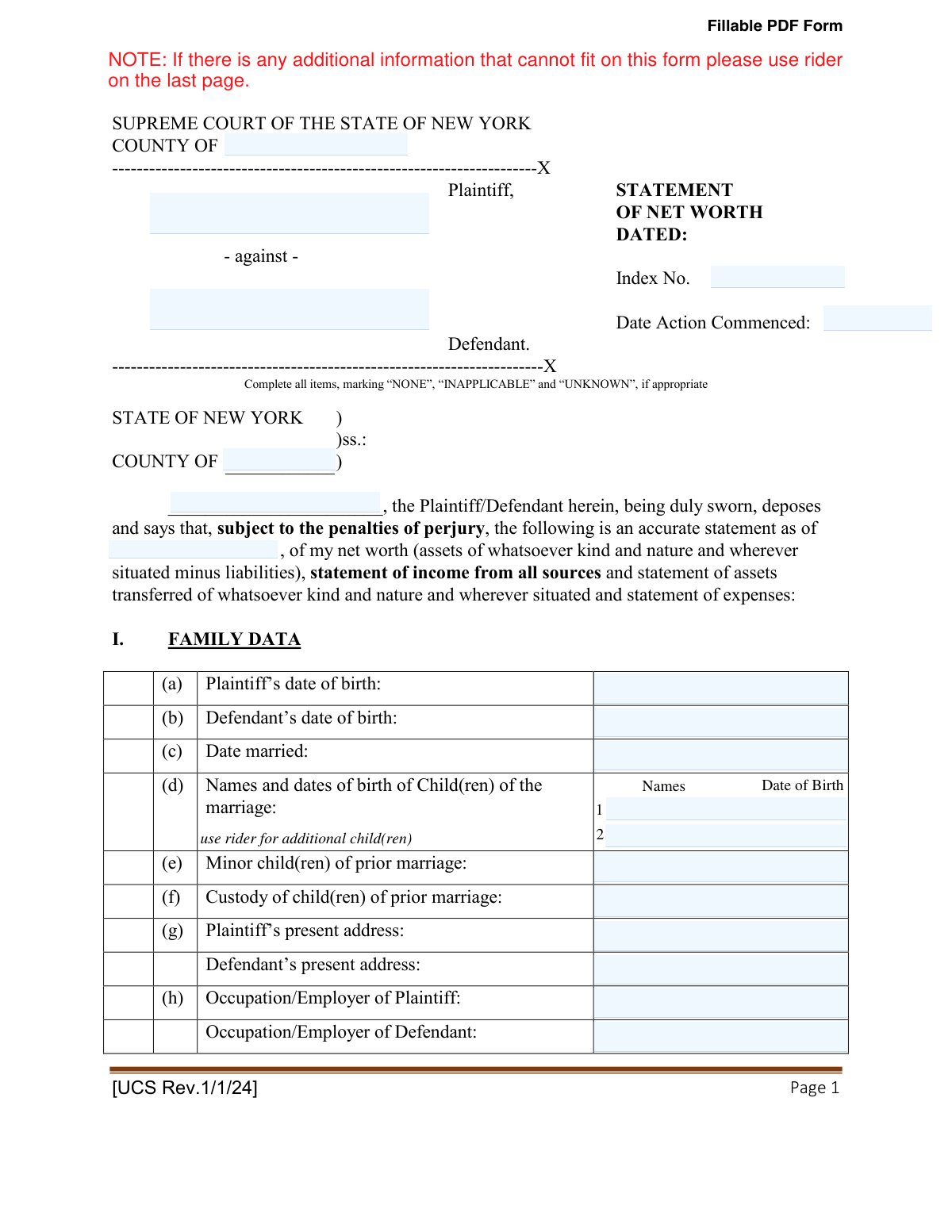
Don't type 496 fields by hand. Tell our AI about yourself, or upload a document you already have, and it fills every field in seconds. You check it, then download, print or sign.
The AI does the filling. You just check it.
No typing into boxes, nothing to install.
What this form asks for
The AI fills all of it, from your answers or your documents.
The AI checks your answers before you download
14 checks built for this form, so a wrong date or a missing answer is caught before anyone else sees it.
Checks that the 'Date Married' is after both the Plaintiff's and Defendant's 'Date of Birth' and before the 'Date Action Commenced'. This ensures chronological consistency in the family data, which is fundamental for establishing the marital timeline for legal purposes. A failure would prompt the user to correct the dates as they are logically impossible.
Ensures that the 'Date of Birth' for any child listed under 'Child(ren) of the marriage' is after the 'Date Married'. This check verifies that children listed as being of the marriage were born within the marital period, which is crucial for matters of custody and support. An error would flag the entry for review, as it may indicate a typo or a child from a prior relationship who should be listed elsewhere.
Verifies that all mandatory case caption fields, including 'County', 'Plaintiff Name', 'Defendant Name', 'Index No.', and 'Date Action Commenced', are filled. These details are essential for identifying the case and ensuring the document is correctly filed with the court. An incomplete caption would cause the form to be rejected by the court clerk.
Automatically calculates and validates the sum of individual expense items against the user-entered total for each category (e.g., 'TOTAL: HOUSING', 'TOTAL: UTILITIES'). It also cross-checks that the 'TOTAL: MONTHLY EXPENSES' on page 7 is the correct sum of all category totals. This prevents mathematical errors that could misrepresent the affiant's financial situation and ensures the statement is arithmetically sound for court review.
Confirms that the 'TOTAL ASSETS' value on page 16 is the correct sum of all individual asset category totals and that the 'TOTAL LIABILITIES' on page 21 is the sum of all liability category totals. Accurate grand totals are essential for calculating the final net worth. An incorrect total would invalidate the entire financial picture presented to the court.
Ensures all date fields throughout the form (e.g., 'Date of acquisition', 'Date of incurring debt') are entered in a valid format (e.g., MM/DD/YYYY) and are not future dates. This maintains data integrity and prevents impossible entries, such as acquiring an asset tomorrow. Failure to comply would require the user to correct the date to a valid, past or present entry.
And 8 more checks
- Check for Required Attachments Confirmation
- Validate Asset Value Consistency
- Logical Check for Mortgage and Real Estate
- Validate Business Interest Percentage
- Validate Asset Transfer Date
- Ensure 'Other' Fields are Explained
- Validate Affiant Identity
- Check for Paired Child Information
Let AI fill out your UCS Statement of Net Worth
No typing. Every field filled in seconds, checked, ready to sign.
How to Fill Out UCS Statement of Net Worth Online for Free in 2026
What the AI walks you through.
- Navigate to Instafill.ai and upload or select the New York Statement of Net Worth form.
- Use the AI assistant to accurately input your personal and family data, including names, dates of birth, and marriage information.
- Systematically list all your monthly expenses across categories like housing, utilities, food, and transportation, allowing the AI to guide you through each section.
- Detail all sources of gross income and attach required financial documents like W-2s and tax returns, which the AI can help process and extract data from.
- Disclose all assets, including bank accounts, real estate, retirement funds, vehicles, and other valuable property, ensuring all fields are completed.
- List all liabilities, such as mortgages, credit card debt, student loans, and other outstanding debts, providing accurate balances and creditor information.
- Carefully review the entire completed statement for accuracy, sign it before a notary public as required, and then file it with the court.
Common Mistakes in Completing UCS Statement of Net Worth
The ones the AI is built to catch.
Leaving Fields Blank Instead of Using 'NONE' or 'INAPPLICABLE'
Miscalculating Monthly Expense Averages
Confusing 'Value as of Date of Commencement' vs. 'Current Value'
Forgetting to Attach Mandatory Financial Documents
Failing to Properly Notarize the Statement
Reporting Net Income Instead of Gross Income
Improperly Disclosing Jointly Held Assets
Omitting Contingent, Intangible, or 'Other' Assets
Neglecting to Specify the 'Source of Funds' for Assets
Not Utilizing the Rider for Overflow Information
Frequently Asked Questions About UCS Statement of Net Worth
Is it really free for 7 days?
Can I fill other forms too?
How do I cancel?
How does the AI fill out UCS Statement of Net Worth?
What happens to my information?
How complex is UCS Statement of Net Worth to fill out?
What is the purpose of the Statement of Net Worth form?
Who is required to fill out this form?
What documents must I attach when I submit this form?
What does 'date of commencement' mean on the form?
How should I calculate my monthly expenses if they are not the same every month?
What should I do if I run out of space in a section?
Does this form need to be notarized?
What do I write if a question or field does not apply to me?
How do I list an asset, like a bank account, that I own jointly with my spouse?
What is the 'Assets Transferred' section for?
Can AI tools help me fill out this detailed form?
How can I fill out this Statement of Net Worth form online?
The PDF version of the form I have isn't fillable. What can I do?
What is the difference between 'Total Assets' and my 'Net Worth'?
Get your UCS Statement of Net Worth filled out by AI
$0 today. Cancel before Nov 10 and you pay nothing.
Other forms like this one
court forms: Form Summons, Supreme Court of New York, Form SC-100, Plaintiff's Claim and ORDER to Go to Small Claims Court, Form AO 240, Application to Proceed in District Court Without Prepaying Fees or Costs, Form AO 239, Application to Proceed in District Court Without Prepaying Fees or Costs, Affidavit for Service by Publication/Posting (Circuit Court of Cook County, Illinois) (CCG 0013 A/B), Petition for Leave to Proceed In Forma Pauperis (Court of Common Pleas of Lehigh County, Pennsylvania, Civil Division), In Forma Pauperis Affidavit/Petition (AOPC 622A) – Pennsylvania Magisterial District Court, Judicial Council of California Form SC-105, Request for Court Order and Answer (Small Claims), SC-120, Defendant’s Claim and ORDER to Go to Small Claims Court (Small Claims), SC-105, Request for Court Order and Answer (Small Claims), Judicial Council of California Form SC-120, Defendant’s Claim and ORDER to Go to Small Claims Court (Small Claims), In Forma Pauperis Affidavit Petition (AOPC 622A) — Pennsylvania Magisterial District Court, Florida Supreme Court Approved Family Law Form 12.901(b)(3), Petition for Dissolution of Marriage with No Dependent or Minor Child(ren) or Property (02/18), Illinois Supreme Court Approved Form E-O 3500.3, Eviction Order, Form P3 (Rule 25-3(2)) — Affidavit of Applicant for Grant of Probate or Grant of Administration with Will Annexed (Short Form) (Supreme Court of British Columbia), Form SC-100, Plaintiff’s Claim and ORDER to Go to Small Claims Court, Designation of Record on Appeal (Civil) (Maricopa County Justice Courts, Arizona) (Form APP 8150-702), FW-003, Order on Court Fee Waiver (Superior Court), Judicial Council of California Form SER-001, Request for Sheriff to Serve Court Papers, FW-003, Order on Court Fee Waiver (Superior Court)
New York court forms: Form Summons, Supreme Court of New York, Petition for Letters of Administration (New York Surrogate's Court)
New York forms: Form Summons, Supreme Court of New York, Affirmation of Service (New York) (January 2024), New York State Department of State (Division of Licensing Services) Property Condition Disclosure Statement (DOS-1614-f), New York State Department of Labor (NYSDOL) Division of Labor Standards Complaint Form (LS 223), New York State Department of Labor, Division of Labor Standards Complaint Form (LS 223), New York State Employment Application: Part 1 – Pre-Interview (Form #S1000), New York State Employment Application Form, New York Rental Application Form, New York State Deferred Compensation Plan Outgoing Rollover, New York State Deferred Compensation Plan Benefit Distribution Request, New York State Deferred Compensation Plan Direct Rollover to a Roth IRA, Petition for Letters of Administration (New York Surrogate's Court), New York State Comptroller Form RS 5127, Designation of Beneficiary with Contingent Beneficiaries, New York Life Investments Funds Individual Retirement Account Application and NYLIFE Securities LLC Investor Profile, New York State Medicaid Enrollment Form (EMEDNY-436701), New York State Medicaid Enrollment Form, New York State Department of Health Certificate of Qualification Questionnaire - Virology, New York State Certificate of Amendment of Articles of Organization, Form ST-120, New York State and Local Sales and Use Tax Resale Certificate, New York Vehicle Registration/Title Application
PA state forms: Form 1095-A, Health Insurance Marketplace Statement, Form W-2, Wage and Tax Statement, Form 593, Real Estate Withholding, Form 8938, Statement of Specified Foreign Financial Assets, Form CMS-2567, Statement of Deficiencies, Form 1098, Mortgage Interest Statement, Form 1098-T, Tuition Statement, Form 1099-S, Proceeds From Real Estate Transactions, Form 1098-E, Student Loan Interest Statement, Form DS-3053, Statement of Consent, Form DS-86, Statement of Non-Receipt of a U.S. Passport, Form DS-86, Statement of Non-Receipt of a U.S. Passport, Form 108, Statement of Intention, Form 107, Statement of Financial Affairs, Form 121, Statement About Your SSNs, Form 122A-1, Chapter 7 Statement of Current Monthly Income, Center for Infertility & Reproductive Surgery – New Patient Questionnaire and Patient/Guarantor Statement (Brigham and Women’s Hospital, Department of Obstetrics and Gynecology), Adult Travel Document Application for Stateless and Protected Persons in Canada (16 years of age or over) (PPTC 190), Form W-8IMY (Rev. October 2021), Certificate of Foreign Intermediary, Foreign Flow-Through Entity, or Certain U.S. Branches for United States Tax Withholding and Reporting, Form W-2, Wage and Tax Statement (2025)
UK court forms: Form Summons, Supreme Court of New York, Form SC-100, Plaintiff's Claim and ORDER to Go to Small Claims Court, Form AO 240, Application to Proceed in District Court Without Prepaying Fees or Costs, Form AO 239, Application to Proceed in District Court Without Prepaying Fees or Costs, Affidavit for Service by Publication/Posting (Circuit Court of Cook County, Illinois) (CCG 0013 A/B), Petition for Leave to Proceed In Forma Pauperis (Court of Common Pleas of Lehigh County, Pennsylvania, Civil Division), In Forma Pauperis Affidavit/Petition (AOPC 622A) – Pennsylvania Magisterial District Court, Judicial Council of California Form SC-105, Request for Court Order and Answer (Small Claims), SC-120, Defendant’s Claim and ORDER to Go to Small Claims Court (Small Claims), SC-105, Request for Court Order and Answer (Small Claims), Judicial Council of California Form SC-120, Defendant’s Claim and ORDER to Go to Small Claims Court (Small Claims), In Forma Pauperis Affidavit Petition (AOPC 622A) — Pennsylvania Magisterial District Court, Florida Supreme Court Approved Family Law Form 12.901(b)(3), Petition for Dissolution of Marriage with No Dependent or Minor Child(ren) or Property (02/18), Illinois Supreme Court Approved Form E-O 3500.3, Eviction Order, Form P3 (Rule 25-3(2)) — Affidavit of Applicant for Grant of Probate or Grant of Administration with Will Annexed (Short Form) (Supreme Court of British Columbia), Form SC-100, Plaintiff’s Claim and ORDER to Go to Small Claims Court, Designation of Record on Appeal (Civil) (Maricopa County Justice Courts, Arizona) (Form APP 8150-702), FW-003, Order on Court Fee Waiver (Superior Court), Judicial Council of California Form SER-001, Request for Sheriff to Serve Court Papers, FW-003, Order on Court Fee Waiver (Superior Court)
New York State forms: New York State Department of State (Division of Licensing Services) Property Condition Disclosure Statement (DOS-1614-f), New York State Department of Labor (NYSDOL) Division of Labor Standards Complaint Form (LS 223), New York State Department of Labor, Division of Labor Standards Complaint Form (LS 223), New York State Employment Application: Part 1 – Pre-Interview (Form #S1000), New York State Employment Application Form, New York State Deferred Compensation Plan Outgoing Rollover, New York State Deferred Compensation Plan Benefit Distribution Request, New York State Deferred Compensation Plan Direct Rollover to a Roth IRA, New York State Comptroller Form RS 5127, Designation of Beneficiary with Contingent Beneficiaries, New York State Medicaid Enrollment Form (EMEDNY-436701), New York State Medicaid Enrollment Form, New York State Department of Health Certificate of Qualification Questionnaire - Virology, New York State Certificate of Amendment of Articles of Organization, Form ST-120, New York State and Local Sales and Use Tax Resale Certificate, Form DOS-2156, New York State Housing Discrimination Disclosure Form, The University of the State of New York, The State Education Department, Office of the Professions, Division of Professional Licensing Services, Nurse Form 3F, Verification of Foreign Professional Licensure/Certification, New York State Department of Health Medicare Savings Program Application
NJ state forms: Form 1095-A, Health Insurance Marketplace Statement, Form W-2, Wage and Tax Statement, Form 593, Real Estate Withholding, Form 8938, Statement of Specified Foreign Financial Assets, Form CMS-2567, Statement of Deficiencies, Form 1098, Mortgage Interest Statement, Form 1098-T, Tuition Statement, Form 1099-S, Proceeds From Real Estate Transactions, Form 1098-E, Student Loan Interest Statement, Form DS-3053, Statement of Consent, Form DS-86, Statement of Non-Receipt of a U.S. Passport, Form DS-86, Statement of Non-Receipt of a U.S. Passport, Form 108, Statement of Intention, Form 107, Statement of Financial Affairs, Form 121, Statement About Your SSNs, Form 122A-1, Chapter 7 Statement of Current Monthly Income, Center for Infertility & Reproductive Surgery – New Patient Questionnaire and Patient/Guarantor Statement (Brigham and Women’s Hospital, Department of Obstetrics and Gynecology), Adult Travel Document Application for Stateless and Protected Persons in Canada (16 years of age or over) (PPTC 190), Form W-8IMY (Rev. October 2021), Certificate of Foreign Intermediary, Foreign Flow-Through Entity, or Certain U.S. Branches for United States Tax Withholding and Reporting, Form W-2, Wage and Tax Statement (2025)
state ID forms: Application for Renewal or Duplicate of Alabama Driver License or ID card, Form 1095-A, Health Insurance Marketplace Statement, Form W-2, Wage and Tax Statement, Form 593, Real Estate Withholding, Form 8938, Statement of Specified Foreign Financial Assets, Form CMS-2567, Statement of Deficiencies, Form 1098, Mortgage Interest Statement, Form 1098-T, Tuition Statement, Form 1099-S, Proceeds From Real Estate Transactions, Form 1098-E, Student Loan Interest Statement, Form DS-3053, Statement of Consent, Form DS-86, Statement of Non-Receipt of a U.S. Passport, Form 108, Statement of Intention, Form 107, Statement of Financial Affairs, Form 121, Statement About Your SSNs, Form 122A-1, Chapter 7 Statement of Current Monthly Income, Center for Infertility & Reproductive Surgery – New Patient Questionnaire and Patient/Guarantor Statement (Brigham and Women’s Hospital, Department of Obstetrics and Gynecology), Adult Travel Document Application for Stateless and Protected Persons in Canada (16 years of age or over) (PPTC 190), Form W-8IMY (Rev. October 2021), Certificate of Foreign Intermediary, Foreign Flow-Through Entity, or Certain U.S. Branches for United States Tax Withholding and Reporting, Form W-2, Wage and Tax Statement (2025)
Let AI fill out your UCS Statement of Net Worth
Your trial starts once a card is added. You pay nothing before Nov 10.
Our AI already knows this form, all 496 fields of it. Skip the typing: tell it about yourself, or upload what you have, and it fills the whole form in seconds.
- AI fills every field on all 24 pages, tables and checkboxes included
- No typing into boxes: answer a few questions, or upload a document you already have, an old copy of this form, a photo of a document
- The AI checks the answers; you review and change anything before you download
- Download the finished PDF, print it, or sign it online
- Encrypted, and never used to train AI
Cancel before Nov 10 and you pay nothing.
A card is needed to start the trial. Cancel in two clicks from your account.
Terms · Privacy