
Yes! You can use AI to fill out Vermögensaufstellung / Selbstauskunft (Statement of Assets / Self-Disclosure)
Don't type 255 fields by hand. Tell our AI about yourself, or upload a document you already have, and it fills every field in seconds. You check it, then download, print or sign.
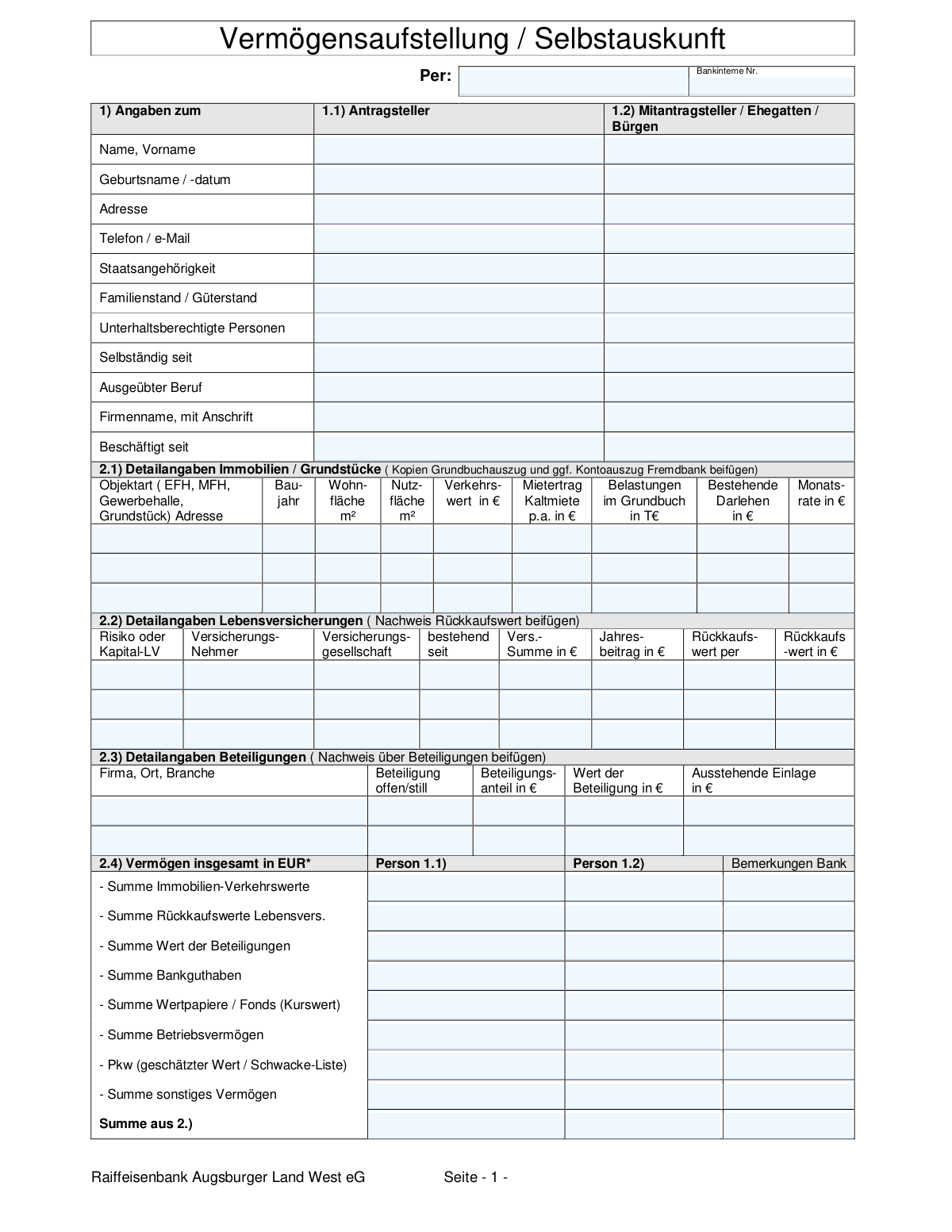
The AI does the filling. You just check it.
No typing into boxes, nothing to install.
What this form asks for
The AI fills all of it, from your answers or your documents.
The AI checks your answers before you download
14 checks built for this form, so a wrong date or a missing answer is caught before anyone else sees it.
Checks that the date of birth for the applicant (1.1) and co-applicant (1.2) is in a valid format (e.g., DD.MM.YYYY) and represents a plausible past date. This ensures the applicant is of legal age and prevents data entry errors. An invalid or future date would halt processing and require manual correction, as age is a critical factor for credit assessment.
This validation cross-references the 'Employed since' and 'Self-employed since' fields with the income section (4). If a date is provided in 'Employed since', there should be a corresponding entry for 'Income from non-self-employed work'. This check verifies the logical consistency of the applicant's declared financial situation, and a mismatch would trigger a review for clarification.
This check ensures that the value entered in 'Total Assets (Sum of Section 2)' for each person correctly equals the sum of all individual asset categories listed in section 2.4 (real estate, life insurance, participations, etc.). This is crucial for maintaining the mathematical integrity of the financial statement. A discrepancy would indicate a calculation error and prevent an accurate assessment of the applicant's net worth.
This validation confirms that the 'Total Liabilities (Sum of Section 3)' field for each person is the correct sum of all individual liability types (mortgages, bank loans, leasing, etc.) listed in section 3. Accurate liability calculation is fundamental to determining creditworthiness and debt-to-income ratios. If the sum is incorrect, the form would be flagged for correction to avoid a flawed financial analysis.
This check validates that the 'Sum of Section 4' is the correct total of all annual income sources, and that the 'Monthly Value' is correctly calculated by dividing the annual total by 12. This ensures the income figures used for affordability checks are accurate. An error here could lead to a wrongful approval or denial of credit, so a failed validation would require immediate recalculation.
This rule checks section 6. If the 'Yes' box is checked for either person, indicating past legal or financial proceedings, the corresponding details field ('Ja, und zwar') must not be empty. This is a critical risk assessment point, as past financial difficulties significantly impact credit decisions. Failure to provide details when required would make the submission incomplete and trigger a request for more information.
And 8 more checks
- Cross-Validates Real Estate Loans with Liabilities and Expenses
- Matches Real Estate Rental Income with Annual Income Statement
- Ensures Core Personal Information is Complete
- Ensures All Monetary Fields Contain Valid Numeric Values
- Validates Chronological Order of Dates
- Verifies Consistency of Life Insurance Surrender Values
- Validates Format of Phone Number and Email Address
- Verifies Consistency of Participation Values
Let AI fill out your Vermögensaufstellung / Selbstauskunft
No typing. Every field filled in seconds, checked, ready to sign.
How to Fill Out Vermögensaufstellung / Selbstauskunft Online for Free in 2026
What the AI walks you through.
- Navigate to Instafill.ai and upload or select the Vermögensaufstellung / Selbstauskunft form.
- Provide personal information for the applicant and any co-applicant, including name, address, marital status, and employment details in Section 1.
- Use the AI assistant to detail all assets in Section 2, including real estate, life insurance policies, bank accounts, securities, and business assets.
- List all financial liabilities in Section 3, such as mortgages, personal loans, leasing agreements, and tax obligations.
- Document all sources of gross annual income for each person in Section 4, covering employment, business, investments, and other earnings.
- Itemize monthly and annual expenses in Section 5, including living costs, rent, loan repayments, and insurance premiums.
- Review all the AI-populated information for accuracy, answer the final questions, and then sign and date the form to certify its correctness before submission.
Common Mistakes in Completing Vermögensaufstellung / Selbstauskunft
The ones the AI is built to catch.
Ignoring Unit Specification (TEUR vs. €)
Confusing Gross (Brutto) and Net (Netto) Income
Mixing Up Annual and Monthly Figures
Incorrectly Valuing Assets
Underreporting Liabilities and Debts
Failing to Provide Required Supporting Documents
Inconsistent Data Between Sections
Omitting Matrimonial Property Regime (Güterstand)
Confusing Real Estate Encumbrances and Loan Amounts
Submitting a Non-Fillable PDF Manually
Frequently Asked Questions About Vermögensaufstellung / Selbstauskunft
Is it really free for 7 days?
Can I fill other forms too?
How do I cancel?
How does the AI fill out Vermögensaufstellung / Selbstauskunft?
What happens to my information?
How complex is Vermögensaufstellung / Selbstauskunft to fill out?
What is the purpose of this 'Vermögensaufstellung / Selbstauskunft' form?
Who should be listed as the applicant (1.1) versus the co-applicant (1.2)?
What supporting documents do I need to attach to this form?
In the real estate section (2.1), what does 'Verkehrswert' mean?
How should I report my income in Section 4, gross or net?
For my expenses in Section 5, should I enter monthly or annual amounts?
What does 'Güterstand' mean in the personal details section?
I have accounts and loans with a different bank. Do I need to list them?
What happens if I have to answer 'Yes' in Section 6 regarding past financial difficulties?
How do I submit the completed form?
Can an AI tool help me fill out this form?
How can I fill out this form online using Instafill.ai?
The PDF I have is not fillable. What can I do?
What is the difference between 'Hypotheken/Grundschulden' and 'sonstige Bankkredite' in the liabilities section?
Get your Vermögensaufstellung / Selbstauskunft filled out by AI
$0 today. Cancel before Nov 2 and you pay nothing.
Other forms like this one
disclosure forms: Arizona Form 285, General Disclosure/Representation Authorization Form, Arizona Form 285-I, Individual Income Tax Disclosure/Representation Authorization Form, State of Florida Department of Highway Safety and Motor Vehicles (FLHSMV) Form HSMV 82993, Separate Odometer Disclosure Statement and Acknowledgment, C.A.R. Form FLD, Lead-Based Paint and Lead-Based Paint Hazards Disclosure, Acknowledgment and Addendum (Revised 11/10), DS 1891, Applicant/Vendor Disclosure Statement (State of California Department of Developmental Services), New York State Department of State (Division of Licensing Services) Property Condition Disclosure Statement (DOS-1614-f), Moving your Vanguard funds to a Vanguard Brokerage Account Disclosure statement, Moving your Vanguard funds to a Vanguard Brokerage Account Disclosure statement, Selbstauskunft/ Vermögensaufstellung (Financial Self-Disclosure/Statement of Assets), Selbstauskunft - vertraulich - (Financial Self-Disclosure), ADP Compensation and Fee Disclosure Statement, Cigna Out-of-Network Referral Disclosure Form, Kaiser Permanente Authorization for Use or Disclosure of Patient Health Information, Fidelity Roth Individual Retirement Account Custodial Agreement and Disclosure Statement, Oklahoma Real Estate Commission Residential Property Condition Disclosure Exemption Form (RPCD EXEMPTION FORM), Oklahoma Real Estate Commission, Disclosure of Broker Duties & Responsibilities, Oklahoma Appendix A, Residential Property Condition Disclosure Statement, Form AD, Disclosure Regarding Real Estate Agency Relationship, Oklahoma Residential Property Condition Disclosure Statement (Appendix A), Mediation Disclosure Notification and Acknowledgment
asset disclosure forms: Selbstauskunft/ Vermögensaufstellung (Financial Self-Disclosure/Statement of Assets)
ERM forms: REQUEST FOR OWNERSHIP INFORMATION—ERM-14 FORM, Form I-90, Application to Replace Permanent Resident Card, Form I-485, Application to Register Permanent Residence, Form SS-8, Determination of Worker Status, Form CMS-1763, Request for Termination of Medicare Coverage, Form I-212, Application for Permission to Reapply, Form I-192, Application for Advance Permission to Enter as a Nonimmigrant, Form W-8IMY (Rev. October 2021), Certificate of Foreign Intermediary, Foreign Flow-Through Entity, or Certain U.S. Branches for United States Tax Withholding and Reporting, County of Louisa Department of Community Development – New Non-Residential Building Permit Package, Application Schedule 1: Designer Information (City of Toronto Building Permit Application), HR-Pol-Rec&Res-04 Employment Application Form (Recruitment of Permanent Employees), Fauquier County Department of Community Development – Building Trades Permit or Amendment to Existing Permit Application (Residential or Commercial), Belastingdienst VPB 075 – Verzoek fiscale eenheid Vennootschapsbelasting (Deel A – Gegevens moedermaatschappij), ROTC Cadet Academic Plan / Degree and Credit Hour Worksheet (Student Identification, Term-by-Term Courses, GPA Summary, and Completion Certification), Health Assessment – Ontario Health atHome (Fixing Long-Term Care Act, 2021) (Form 4768-69E), Health Assessment - Ontario Health atHome (Fixing Long-Term Care Act, 2021) — Form 4768-69E, Washington Single-Family Property Term Lease & Security Deposit Receipt (WA Single-Family Lease) | Revised 10/08/2025, Application for Mechanical Permit, Pennsylvania Department of State — Certificate of Termination (Domestic Limited Liability Company) (15 Pa.C.S. § 8872(f)) (DSCB:15-8872(f)), Document Checklist for a Study Permit (IMM 5483)
Let AI fill out your Vermögensaufstellung / Selbstauskunft
Your trial starts once a card is added. You pay nothing before Nov 2.
Our AI already knows this form, all 255 fields of it. Skip the typing: tell it about yourself, or upload what you have, and it fills the whole form in seconds.
- AI fills every field on all 3 pages, tables and checkboxes included
- No typing into boxes: answer a few questions, or upload a document you already have, an old copy of this form, a photo of a document
- The AI checks the answers; you review and change anything before you download
- Download the finished PDF, print it, or sign it online
- Encrypted, and never used to train AI
Cancel before Nov 2 and you pay nothing.
A card is needed to start the trial. Cancel in two clicks from your account.
Terms · Privacy