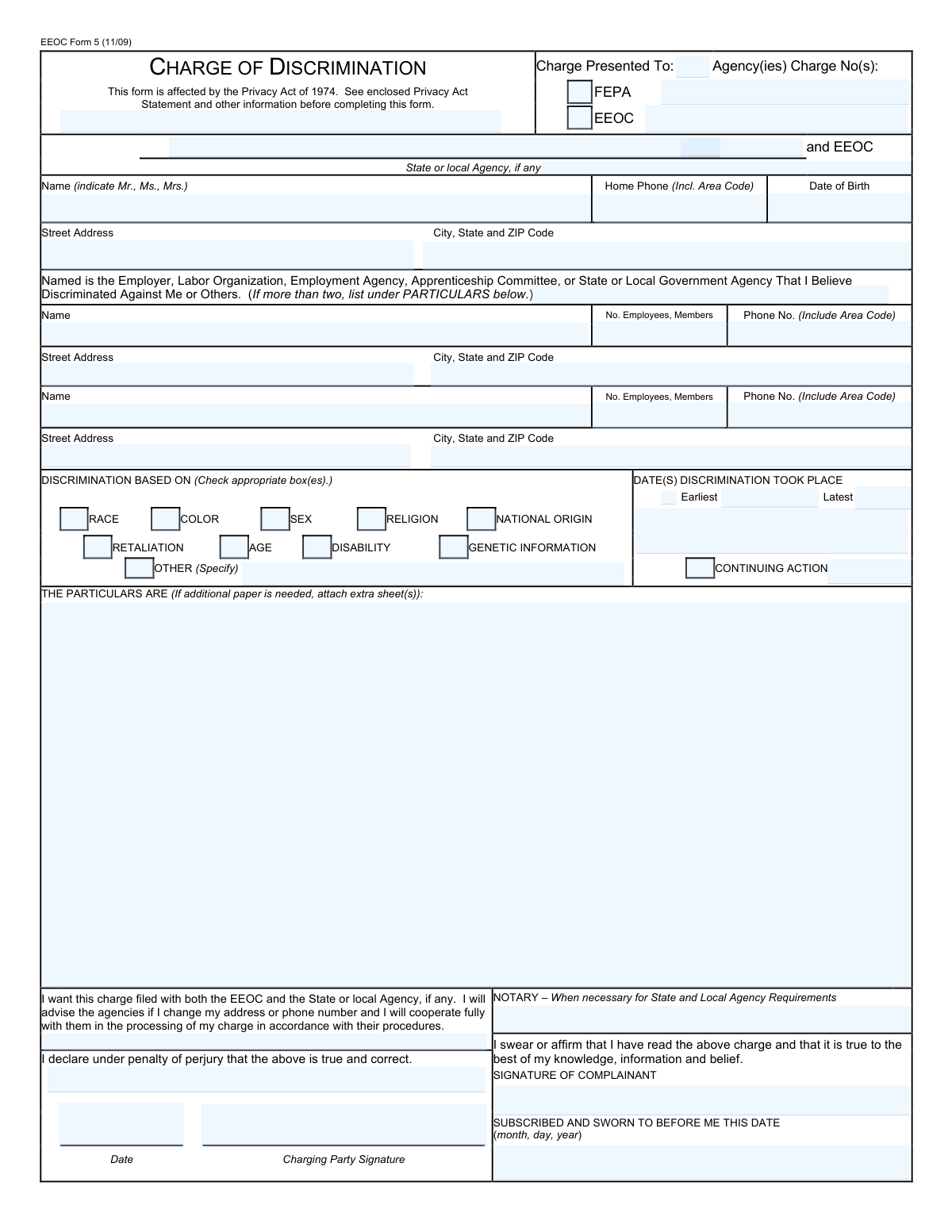
Yes! You can use AI to fill out EEOC Form 5, Charge of Discrimination
The EEOC Form 5, Charge of Discrimination, is the official document used to initiate an investigation into alleged employment discrimination based on race, color, religion, sex, national origin, age, disability, or genetic information. Filing this form is a critical first step for an individual seeking legal recourse and protection under federal anti-discrimination laws. Today, this form can be filled out quickly and accurately using AI-powered services like Instafill.ai, which can also convert non-fillable PDF versions into interactive fillable forms.
Our AI automatically handles information lookup, data retrieval, formatting, and form filling.
It takes less than a minute to fill out EEOC Form 5 using our AI form filling.
Securely upload your data. Information is encrypted in transit and deleted immediately after the form is filled out.
Form specifications
| Form name: | EEOC Form 5, Charge of Discrimination |
| Number of fields: | 457 |
| Number of pages: | 25 |
| Language: | English |
| Categories: | discrimination forms, EEOC forms |
Instafill Demo: How to fill out PDF forms in seconds with AI
How to Fill Out EEOC Form 5 Online for Free in 2026
Are you looking to fill out a EEOC FORM 5 form online quickly and accurately? Instafill.ai offers the #1 AI-powered PDF filling software of 2026, allowing you to complete your EEOC FORM 5 form in just 37 seconds or less.
Follow these steps to fill out your EEOC FORM 5 form online using Instafill.ai:
- 1 Navigate to Instafill.ai and upload or select the EEOC Form 5, Charge of Discrimination.
- 2 Provide your personal information (the charging party), including your full name, address, and contact details.
- 3 Enter the full name and address of the employer or organization you are filing the charge against (the respondent).
- 4 Select the basis for your discrimination claim by checking the appropriate boxes, such as race, sex, age, disability, or retaliation.
- 5 In the 'Particulars of Discrimination' section, write a detailed narrative of the discriminatory events, including dates, names, and specific actions.
- 6 Indicate the earliest and latest dates the discrimination occurred and check the 'continuing action' box if applicable.
- 7 Review all entered information for accuracy, then sign and date the form to declare under penalty of perjury that the information is true before submitting it to the EEOC or a state FEPA.
Our AI-powered system ensures each field is filled out correctly, reducing errors and saving you time.
Why Choose Instafill.ai for Your Fillable EEOC Form 5 Form?
Speed
Complete your EEOC Form 5 in as little as 37 seconds.
Up-to-Date
Always use the latest 2026 EEOC Form 5 form version.
Cost-effective
No need to hire expensive lawyers.
Accuracy
Our AI performs 10 compliance checks to ensure your form is error-free.
Security
Your personal information is protected with bank-level encryption.
Frequently Asked Questions About Form EEOC Form 5
This form, a Charge of Discrimination, is used to file a formal complaint against an employer for illegal discrimination. It is filed with the U.S. Equal Employment Opportunity Commission (EEOC) or a state/local Fair Employment Practices Agency (FEPA) to initiate an investigation.
You should fill out this form if you believe you have been discriminated against in an employment context based on your race, color, religion, sex, national origin, age, disability, or genetic information. This also applies if you believe you have been retaliated against for opposing discrimination.
The EEOC is the federal agency that enforces anti-discrimination laws, while a FEPA is a state or local equivalent agency. Filing with both, known as 'dual-filing,' ensures your rights are protected under both federal and state laws, which can sometimes offer different protections.
In this section, provide a clear and detailed narrative of the discriminatory events. Include specific dates, the names and titles of people involved, what was said or done, and why you believe these actions were discriminatory.
Enter the earliest date the discrimination began in the 'Earliest' field and the most recent date it occurred in the 'Latest' field. You should also check the box for 'Continuing action' to indicate the discrimination is ongoing.
Notarization is often required only when filing with a state or local agency (FEPA). If you are filing solely with the federal EEOC, your signature under penalty of perjury is typically sufficient.
The form includes sections for a 'First Respondent' and a 'Second Respondent.' Use these fields to provide the required information for each employer or organization you are filing the charge against.
Select 'Retaliation' if you believe your employer took an adverse action against you (like being fired, demoted, or harassed) because you reported discrimination, participated in a complaint, or otherwise opposed discriminatory practices.
After you file the charge, the agency will notify the employer and begin an investigation. The process may involve gathering evidence, interviewing witnesses, and potentially mediating a resolution between you and the employer.
Provide your best estimate for the number of employees. This information helps the agency determine if the employer is covered by the laws it enforces, as minimum employee thresholds apply (e.g., 15 for most laws, 20 for age discrimination).
Yes, services like Instafill.ai use AI to help you accurately auto-fill form fields, which can save time and help prevent common errors. This ensures your information is entered correctly before submission.
You can use a service like Instafill.ai to complete the form online. Simply upload the PDF, and the platform's AI will make it an interactive, fillable form so you can type your information directly into the fields.
If you have a non-fillable or 'flat' PDF, tools like Instafill.ai can instantly convert it into a fillable version. This allows you to easily type your answers, save your progress, and print a clean, professional-looking document.
Compliance EEOC Form 5
Validation Checks by Instafill.ai
1
Agency Selection Requirement
This check ensures that at least one of the 'EEOC' or 'FEPA' checkboxes is selected under the 'Charge Presented To' section. It is critical to identify the receiving agency for jurisdiction and processing purposes. If neither box is checked, the form submission will be rejected with an error message prompting the user to select at least one agency.
2
Discrimination Date Chronology
Validates that the 'Latest Discrimination Date' is on or after the 'Earliest Discrimination Date'. This check prevents logical errors in the timeline of events provided by the complainant. A failure would indicate a data entry mistake, and the system should prompt the user to correct the dates before proceeding, ensuring the reported timeline is coherent.
3
Age Discrimination Eligibility Check
If the 'Age' checkbox is selected as a basis for discrimination, this validation cross-references the complainant's 'Date of Birth'. It flags for review if the complainant is not 40 years of age or older, as required by the Age Discrimination in Employment Act (ADEA). While not an outright rejection, this check is crucial for ensuring the charge has a valid legal basis under federal law and may trigger an informational message to the user.
4
Conditional 'Other' Basis Specification
This validation ensures that if the 'Other (Specify)' checkbox under 'Discrimination Based On' is checked, the corresponding text field for specifying the other basis is not left empty. This prevents incomplete submissions where a basis for the charge is indicated but not defined. If the checkbox is checked and the text field is empty, the submission fails and the user is required to provide the specific reason.
5
Conditional FEPA Information
This check is triggered if the 'FEPA' (Fair Employment Practices Agency) checkbox is selected. It verifies that the 'State or Local Agency Name' field has been filled out. This is essential for routing the charge to the correct state or local partner agency for dual filing. A failure results in an error message requiring the user to name the specific FEPA.
6
Particulars of Discrimination Completeness
Verifies that the 'Particulars of Discrimination' narrative field is not empty and contains more than a minimum number of characters. This narrative is the core of the charge, detailing the alleged discriminatory acts. An empty or insufficient narrative makes it impossible to investigate the claim, so the form cannot be submitted without this crucial information.
7
Respondent Identification Completeness
Ensures that the 'First Respondent Name' and its corresponding address fields ('First Respondent Street Address', 'First Respondent City, State, and ZIP Code') are all populated. A charge cannot be processed or served without clearly identifying the entity being accused of discrimination. If these fields are incomplete, the form submission will be blocked until the information is provided.
8
Complainant Contact Information Completeness
This check validates that the charging party's essential contact information, including 'Complainant Name', 'Street Address', and 'City, State, and ZIP Code', is fully provided. This information is mandatory for the agency to communicate with the person filing the charge throughout the investigation process. Failure to provide a complete name and address will prevent the form from being submitted.
9
Signature and Date Requirement
Validates that if a 'Charging Party Signature' field is filled, the corresponding 'Date Signed' field is also filled and contains a valid date that is not in the future. A signature without a date, or a post-dated signature, can invalidate the legal standing of the document. The system will return an error if either field is missing or the date is invalid.
10
Phone Number Format Validation
This check applies to all phone number fields on the form, such as 'Home Phone Number' and 'First Respondent Phone Number'. It verifies that the input contains a valid number of digits (typically 10 for U.S. numbers) and strips formatting characters for consistent storage. This ensures data quality and the ability to successfully contact the parties involved. An invalid format will trigger a warning and request correction.
11
Conditional Notarization Fields
Based on the form's logic, if filing with a FEPA requires notarization (i.e., 'FEPA' is checked), this validation ensures the 'Notary Information', 'Complainant Signature (Notarized)', and 'Date Subscribed and Sworn' fields are not empty. This is critical for meeting specific state or local agency requirements. If these fields are required but empty, the submission is halted with an explanation.
12
Continuing Action Date Logic
If the 'Continuing action' checkbox is checked, this validation flags the entry for review if the 'Latest Discrimination Date' is not recent (e.g., not within the last 30 days). While not a hard stop, this check helps ensure consistency, as a 'continuing action' implies the discrimination is ongoing or has occurred very recently. It may prompt the user to confirm the dates or uncheck the box if the last act was long ago.
13
ZIP Code Format
This validation ensures that all ZIP code fields for the complainant and respondent(s) are in a valid 5-digit or 9-digit (ZIP+4) format. Correct ZIP codes are essential for mail delivery, jurisdiction determination, and data analysis. The system will reject entries that do not conform to the standard U.S. ZIP code structure.
14
Dual Filing Acknowledgment
This check verifies that if both the 'EEOC' and 'FEPA' checkboxes are selected, a corresponding 'Dual Filing Request Acknowledgment' field (which may require initials or a signature) is completed. This confirms the complainant's explicit consent to have their charge filed with both federal and state/local agencies. If this acknowledgment is missing during a dual-file attempt, the submission will be blocked until consent is provided.
Common Mistakes in Completing EEOC Form 5
Filers often write a narrative that is too emotional, lacks specific facts, or fails to connect the adverse action to their protected class. This happens because they are upset and focus on feelings rather than a clear, chronological account of events, which can lead investigators to dismiss the charge. To avoid this, clearly state what happened, when it happened, who was involved (names and titles), and precisely why you believe it was due to your race, sex, age, or other protected status.
People often list a brand name (e.g., 'McDonalds') or a supervisor's name instead of the precise legal name of the employer entity (e.g., 'Smith Franchise Holdings, LLC'). This can cause significant delays as the agency struggles to locate and notify the correct party, and in worst-case scenarios, it could render the charge legally ineffective. Always use the full legal business name found on a pay stub or W-2 form to ensure the charge is processed correctly.
The fields for 'Earliest Date,' 'Latest Date,' and 'Continuing Action' are critical and often misunderstood, as there are strict deadlines for filing (often 180 or 300 days). Filers may guess at dates or fail to check 'Continuing Action' for ongoing harassment, which can lead to the charge being dismissed as untimely. It is crucial to be as precise as possible with dates to protect your legal rights.
A person might be discriminated against for multiple reasons, such as their age and a disability, but in the stress of filling out the form, they may only check one box. This mistake limits the scope of the agency's investigation from the start and makes it difficult to add the claim later. Carefully review all protected categories and check every single one that you believe played a role in the discriminatory actions.
Many states have their own Fair Employment Practices Agencies (FEPAs) with laws that may offer greater protections, but filers often don't understand the 'dual-filing' system. They fail to check the box or provide the signature to have their charge filed with both the EEOC and the state FEPA. This can result in the loss of important rights and remedies available under state law, so it is almost always beneficial to request dual-filing.
This complex form has multiple signature lines and, depending on the filing agency (especially FEPAs), may require a notarized signature. Filers frequently miss a signature block or fail to get the document notarized when required. An unsigned or improperly notarized charge is not legally valid and will be rejected, causing critical delays that could push the filing past the legal deadline.
The number of employees is a critical jurisdictional question, as anti-discrimination laws apply differently to employers of different sizes (e.g., 15+ for Title VII). Filers often guess this number or leave it blank, which could lead the agency to mistakenly believe it lacks jurisdiction and dismiss the charge. It's important to provide the best possible estimate to ensure the agency can properly assert its authority.
Many people check the 'Retaliation' box because they feel they were treated unfairly. However, legal retaliation specifically means being punished for a legally protected activity, like reporting harassment or participating in an investigation. Mischaracterizing general workplace disputes as retaliation can weaken the charge and distract from the core discrimination claims.
A simple typo in an address or phone number is a frequent and damaging error. The investigating agency relies on this information for all communication, including scheduling interviews and mailing Right to Sue notices. If the agency cannot contact you, your case can be closed for 'failure to cooperate,' jeopardizing your entire claim. AI-powered tools like Instafill.ai can help prevent these data entry errors by validating formats and saving correct information for reuse.
This form is filled with conditional logic, such as fields that only need to be filled if 'FEPA' is checked. People often get confused and either fill out sections they shouldn't, or more commonly, they miss required fields related to their selections. This creates an incomplete submission that requires follow-up and delays processing. Since these forms are often flat, non-fillable PDFs, using a tool like Instafill.ai can convert them into smart, fillable versions that guide you through the conditional logic, ensuring all necessary fields are completed correctly.
Saved over 80 hours a year
“I was never sure if my IRS forms like W-9 were filled correctly. Now, I can complete the forms accurately without any external help.”
Kevin Martin Green
Your data stays secure with advanced protection from Instafill and our subprocessors

Robust compliance program
Transparent business model
You’re not the product. You always know where your data is and what it is processed for.
ISO 27001, HIPAA, and GDPR
Our subprocesses adhere to multiple compliance standards, including but not limited to ISO 27001, HIPAA, and GDPR.
Security & privacy by design
We consider security and privacy from the initial design phase of any new service or functionality. It’s not an afterthought, it’s built-in, including support for two-factor authentication (2FA) to further protect your account.
Fill out EEOC Form 5 with Instafill.ai
Worried about filling PDFs wrong? Instafill securely fills eeoc-form-5-charge-of-discrimination forms, ensuring each field is accurate.