Yes! You can use AI to fill out TIAA Trust, N.A. Authorization to receive client account information
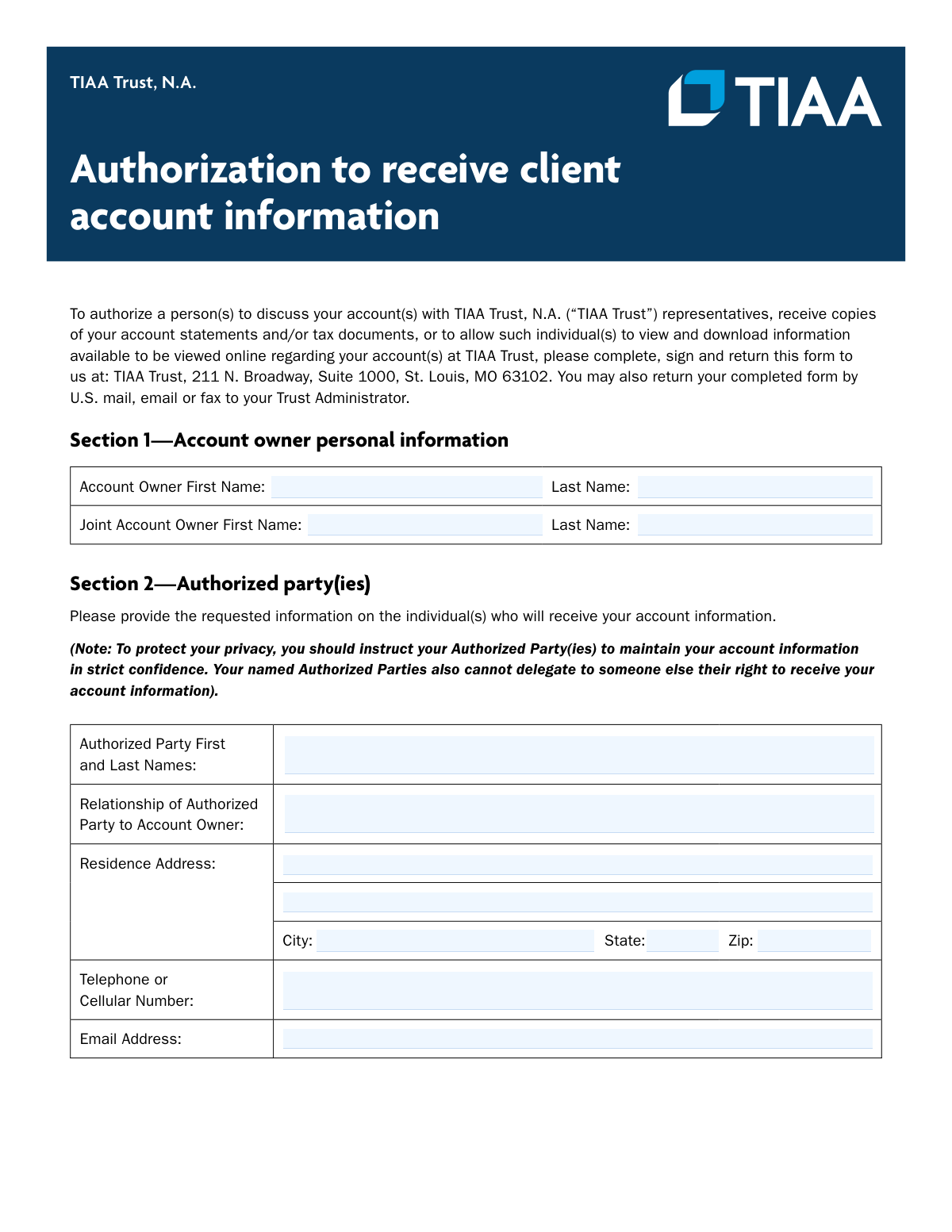
The TIAA Trust Authorization to Receive Client Account Information is a legal document used by TIAA Trust account holders to grant specific permissions to another person or entity. This authorization allows the designated party to discuss the account with TIAA representatives, receive copies of statements, access tax documents, or view account information online. It is crucial for securely managing account access for financial advisors, family members, or other trusted individuals. Today, this form can be filled out quickly and accurately using AI-powered services like Instafill.ai, which can also convert non-fillable PDF versions into interactive fillable forms.
P0470652 is part of the
trust forms, authorization forms, banking forms, TIAA forms, financial authorization forms and trust account forms categories on Instafill.
Rather not fill this in by hand? Instafill is an online form filler that completes PDF forms automatically — upload the blank form, answer a few questions, and the AI fills every field.
Form specifications
| Form name: | TIAA Trust, N.A. Authorization to receive client account information |
| Number of pages: | 1 |
| Language: | English |
Our AI automatically handles information lookup, data retrieval, formatting, and form filling.
It takes less than a minute to fill out P0470652 using our AI form filling.
Securely upload your data. Information is encrypted in transit and deleted immediately after the form is filled out.
Instafill Demo: How to fill out PDF forms in seconds with AI
How to Fill Out P0470652 Online for Free in 2026
Are you looking to fill out a P0470652 form online quickly and accurately? Instafill.ai offers the #1 AI-powered PDF filling software of 2026, allowing you to complete your P0470652 form in just 37 seconds or less.
Follow these steps to fill out your P0470652 form online using Instafill.ai:
- 1 Navigate to Instafill.ai and upload or select the 'TIAA Trust Authorization to receive client account information' form.
- 2 Use the AI assistant to automatically fill in your personal details as the Account Owner in Section 1.
- 3 Enter the full name, relationship, and contact information for the person(s) you are authorizing in Section 2.
- 4 Check the boxes to specify the type of information the authorized party can receive, such as account statements, tax documents, or online access.
- 5 List the specific TIAA Trust account numbers and names that this authorization applies to.
- 6 Carefully review the duration and indemnification clauses, then securely e-sign and date the form in Section 4.
- 7 Download the completed form and submit it to TIAA Trust as instructed via mail, email, or fax.
Our AI-powered system ensures each field is filled out correctly, reducing errors and saving you time.
Why Choose Instafill.ai for Your Fillable P0470652 Form?
Speed
Complete your P0470652 in as little as 37 seconds.
Up-to-Date
Always use the latest 2026 P0470652 form version.
Cost-effective
No need to hire expensive lawyers.
Accuracy
Our AI performs 10 compliance checks to ensure your form is error-free.
Security
Your personal information is protected with bank-level encryption.
Frequently Asked Questions About P0470652
This form allows you to authorize a specific person to discuss your accounts with TIAA Trust, receive copies of your statements or tax documents, and/or view your account information online.
Any TIAA Trust account owner who wishes to grant another individual permission to access their account information should complete and sign this form.
You must provide the authorized party's full name, their relationship to you, their residence address, telephone number, and email address in Section 2.
You can mail the signed form to the TIAA Trust address in St. Louis, MO, or you can return it via U.S. mail, email, or fax to your specific Trust Administrator.
Checking 'Discuss Account' allows your authorized party to speak with TIAA representatives about your account. 'Online Access' grants them the ability to view and download your account information directly from the online portal.
This authorization is effective until you modify or revoke it in writing. You must send the written notification to TIAA Trust for the change to take effect.
No, the form explicitly states that your authorized party cannot delegate their right to receive your account information to another person.
Yes, the form provides signature lines for both the primary account owner and a joint account owner, indicating that both signatures are required for authorization.
Yes, there is a section on the form where you can list all the specific TIAA Trust account numbers and names that you want this authorization to apply to.
This clause means you agree to hold TIAA Trust harmless from any claims or losses resulting from them acting on your instructions in this form. You are accepting responsibility for granting this access.
Yes, services like Instafill.ai use AI to help you accurately auto-fill form fields with your information, which saves time and reduces the chance of errors.
You can upload the PDF of this form to Instafill.ai, which makes the document interactive. You can then type your information directly into the fields, sign electronically, and download the completed form.
If you have a non-fillable or 'flat' PDF, you can use a service like Instafill.ai. It will convert the document into an interactive, fillable form that you can easily complete on your computer.
Yes, you have granular control over the information shared. You can select only 'Copies of Tax Documents' and leave the other options unchecked.
Compliance P0470652
Validation Checks by Instafill.ai
1
Ensures Primary Account Owner Name is Provided
This check verifies that both the First Name and Last Name fields for the primary Account Owner in Section 1 are filled out. This information is fundamental to identifying the individual granting authorization. If these fields are empty, the form is invalid and cannot be processed as the authorizer is unknown.
2
Verifies Complete Information for Each Authorized Party
This validation ensures that for every authorized party listed in Section 2, all associated fields (First and Last Names, Relationship, full Residence Address, Telephone Number, and Email Address) are completed. Incomplete information prevents TIAA Trust from properly identifying, verifying, and contacting the authorized individual. The submission should be rejected if any of these fields are missing for a listed party.
3
Requires Selection of at least one Authorization Type
For each authorized party, this check confirms that at least one authorization checkbox ('Copies of Account Statements', 'Copies of Tax Documents', 'Online Access', 'Discuss Account') is selected. The purpose of the form is unfulfilled if no permissions are granted. A failure in this check means the form is ambiguous and must be returned for clarification.
4
Ensures at least one TIAA Trust Account is Listed
This validation verifies that the user has specified at least one account by providing both an Account Number and Account Name in the 'Authorized accounts' section. An authorization is meaningless without knowing which accounts it applies to. If this section is empty, the form cannot be processed and must be returned to the user for completion.
5
Validates Format of TIAA Trust Account Number
This check ensures that each entered Account Number follows the expected format, which is likely a specific sequence of numbers or alphanumeric characters. This validation helps prevent typos and ensures the authorization is applied to the correct account. An invalid format would cause a processing failure and could lead to a data mismatch or rejection.
6
Validates Email Address Format for Authorized Party
This validation confirms that the email address provided for an authorized party adheres to the standard '[email protected]' format. This is essential for electronic communication and for granting online access. An invalid email address would prevent the authorized party from receiving notifications or setting up their online access.
7
Validates Phone Number Format
This check ensures the telephone or cellular number entered for the authorized party is a valid 10-digit number, potentially allowing for common formats like (XXX) XXX-XXXX. A valid phone number is necessary for TIAA representatives to contact the authorized party for verification or discussion purposes. An invalid number would hinder communication.
8
Validates ZIP Code Format
This validation verifies that the ZIP code entered in the authorized party's address is a valid 5-digit or 9-digit (ZIP+4) US postal code. An accurate ZIP code is critical for ensuring that mailed documents, such as account statements or tax forms, are delivered correctly. An invalid ZIP code will result in returned mail and failure to deliver sensitive information.
9
Ensures Statement Frequency is Selected when Applicable
This is a conditional validation that triggers if the 'Copies of Account Statements' box is checked. It then ensures that one of the frequency options ('Monthly', 'Quarterly', or 'Annually') has also been selected. Failure to select a frequency would leave the instruction incomplete, preventing the system from knowing how often to send statements.
10
Logical Check for Online Access and Statement Copies
This validation enforces the form's instruction that if 'Online Access' is checked, the 'Copies of Account Statements' box should also be checked. This ensures clarity and prevents ambiguity in the authorization granted, as online access typically includes viewing statements. If 'Online Access' is checked but 'Copies of Account Statements' is not, the system could prompt the user for clarification.
11
Verifies Signature and Date of Primary Account Owner
This check confirms that the primary 'Signature of Account Owner' field is signed and the adjacent 'Date' field is filled out. A signature and date are legally required to execute the authorization and establish when it became effective. An unsigned or undated form is legally invalid and cannot be acted upon.
12
Requires Joint Owner Signature if Listed
This conditional validation checks if a Joint Account Owner is named in Section 1. If so, it then requires that the second signature line and its corresponding date field are also completed. For joint accounts, authorization from all owners is typically required to grant third-party access, making this check crucial for legal and compliance reasons.
13
Validates Format of Signature Dates
This validation ensures that the dates entered next to the account owner signatures are in a recognizable and valid format, such as MM/DD/YYYY. An unambiguous date is essential for establishing the exact time the authorization was granted. An invalid or improperly formatted date could lead to legal challenges or processing errors.
14
Validates State Abbreviation in Address
This check ensures the 'State' field for the authorized party's address contains a valid two-letter postal abbreviation for a US state or territory (e.g., 'MO', 'CA'). Using standardized abbreviations is critical for mail delivery and address verification systems. An incorrect state could cause mail to be misdirected, compromising the delivery of sensitive financial documents.
Common Mistakes in Completing P0470652
Forgetting to sign and date the form is one of the most common reasons for rejection. For joint accounts, both owners must sign in their respective fields. An unsigned or undated authorization is legally invalid and will not be processed, requiring you to resubmit the entire form and causing significant delays.
Users often mistype account numbers or forget to list all the accounts they wish to grant access to. A single incorrect digit will prevent the authorization from being applied to the intended account. To avoid this, carefully copy the full account number from an official statement for each account and double-check for accuracy before submitting.
The purpose of the form is to specify what information an authorized party can access, but people sometimes forget to check any of the boxes (e.g., 'Copies of Account Statements', 'Online Access'). This makes the authorization void, as TIAA has no instruction on what permissions to grant. Always review Section 2 to ensure you have checked at least one box corresponding to the access you wish to provide.
The form instructs users to check 'Copies of Account Statements' if 'Online Access' is selected and the user wants the party to view statements electronically. Many people miss this note and only check 'Online Access', which may not grant the intended level of access to statements. To ensure full access, carefully read the instructions next to each checkbox.
When an account owner checks the box for 'Copies of Account Statements', they frequently overlook the subsequent requirement to select a delivery frequency (Monthly, Quarterly, or Annually). This omission creates ambiguity and forces the financial institution to either guess or contact the owner for clarification, delaying the setup. Always make a frequency selection if you authorize statement copies.
If an account is held jointly, the form requires information and a signature from both owners. People often only fill out the primary account owner's details, leading to the form being rejected for joint accounts. Ensure that if you have a joint account, the second owner's name is listed in Section 1 and their signature is provided in the signature section.
It is common for users to leave fields like the authorized party's zip code, email, or phone number blank. This incomplete information can prevent the delivery of mail or electronic documents and make it impossible for TIAA to contact the party if needed. To prevent this, fill out every field for the authorized party completely and accurately.
Account owners may fill in their name or the authorized party's name using a common nickname or an abbreviated version. This can cause a mismatch with the official records held by TIAA, leading to verification failure and rejection of the form. Always use the full, legal names as they appear on official documents and account records.
Since this form is a PDF, it is often printed and filled out by hand, where poor handwriting can make names, account numbers, and email addresses unreadable. This leads to data entry errors, returned mail, and processing failures. To avoid this, print clearly in block letters or use a tool like Instafill.ai, which can convert flat PDFs into digitally fillable forms to ensure perfect legibility.
Alongside the account number, the form asks for the 'Account Name'. Users may enter a generic description like 'My Trust' instead of the official account title on record. This can cause confusion and delays in processing. You should copy the exact account title as it appears on your official account statements to ensure it matches TIAA's records.
Saved over 80 hours a year
“I was never sure if my IRS forms like W-9 were filled correctly. Now, I can complete the forms accurately without any external help.”
Kevin Martin Green
Your data stays secure with advanced protection from Instafill and our subprocessors




Robust compliance program
Transparent business model
You’re not the product. You always know where your data is and what it is processed for.
ISO 27001, HIPAA, and GDPR
Our subprocesses adhere to multiple compliance standards, including but not limited to ISO 27001, HIPAA, and GDPR.
Security & privacy by design
We consider security and privacy from the initial design phase of any new service or functionality. It’s not an afterthought, it’s built-in, including support for two-factor authentication (2FA) to further protect your account.
Fill out P0470652 with Instafill.ai
Worried about filling PDFs wrong? Instafill securely fills tiaa-trust-na-authorization-to-receive-client-account-information forms, ensuring each field is accurate.
