Yes! You can use AI to fill out Merrill Lynch Margin Account Application and Agreement
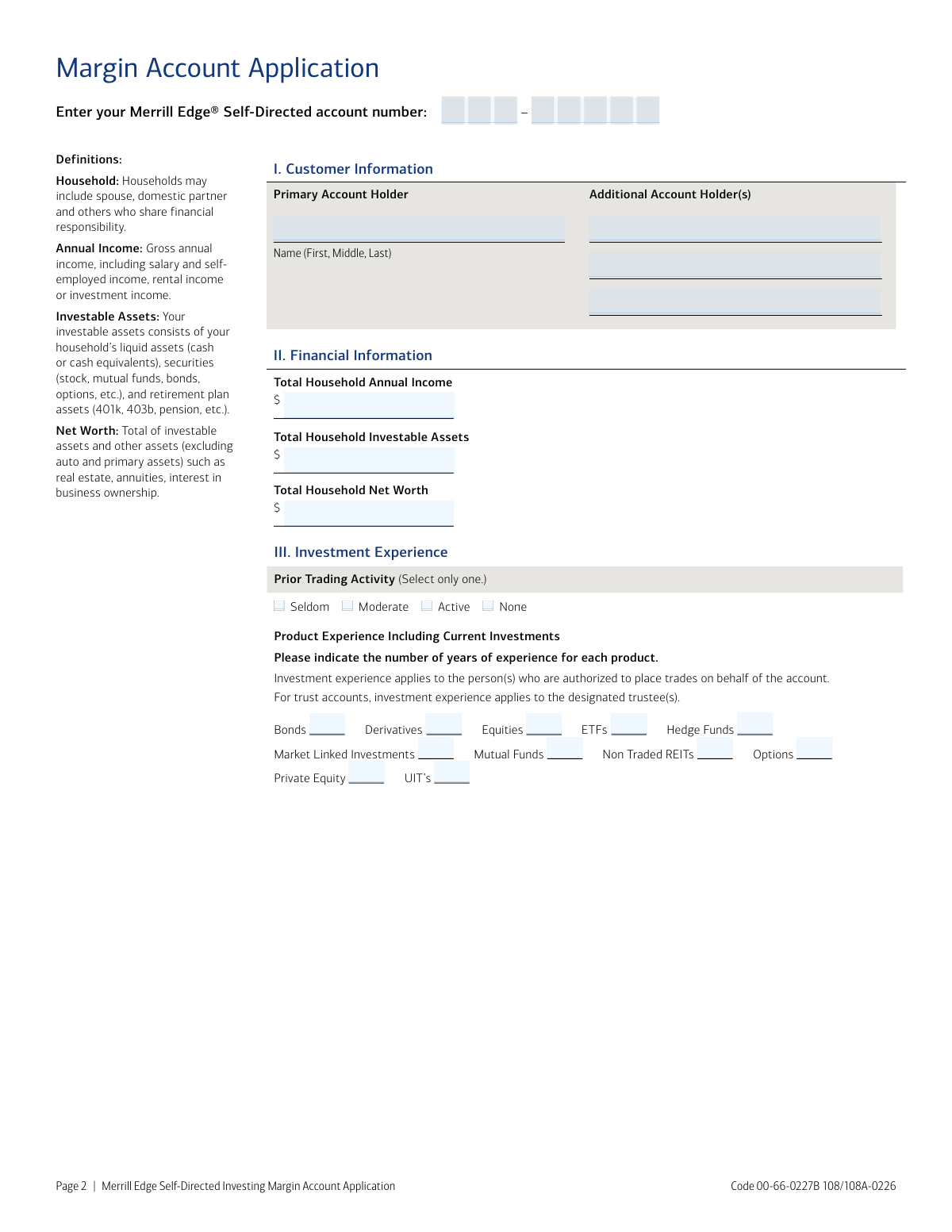
This form is an application and agreement for investors seeking to open a margin account with Merrill Lynch, which allows them to borrow funds using their securities as collateral. Applicants must provide detailed personal, financial, employment, and investment experience information for Merrill to assess their eligibility and risk profile. Today, this form can be filled out quickly and accurately using AI-powered services like Instafill.ai, which can also convert non-fillable PDF versions into interactive fillable forms.
Our AI automatically handles information lookup, data retrieval, formatting, and form filling.
It takes less than a minute to fill out 00-66-0227B using our AI form filling.
Securely upload your data. Information is encrypted in transit and deleted immediately after the form is filled out.
Form specifications
| Form name: | Merrill Lynch Margin Account Application and Agreement |
| Number of pages: | 1 |
| Language: | English |
| Categories: | Merrill forms |
Instafill Demo: How to fill out PDF forms in seconds with AI
How to Fill Out 00-66-0227B Online for Free in 2026
Are you looking to fill out a 00-66-0227B form online quickly and accurately? Instafill.ai offers the #1 AI-powered PDF filling software of 2026, allowing you to complete your 00-66-0227B form in just 37 seconds or less.
Follow these steps to fill out your 00-66-0227B form online using Instafill.ai:
- 1 Navigate to Instafill.ai and upload or select the Merrill Lynch Margin Account Application and Agreement.
- 2 Use the AI assistant to automatically populate the Customer Information section with the primary and any additional account holders' details.
- 3 Enter your household's financial information, including annual income, investable assets, and net worth.
- 4 Complete the Investment Experience section by indicating your prior trading activity and years of experience with various financial products.
- 5 Provide your employment status, employer details, and any relevant affiliations as required in Section IV.
- 6 Carefully review all the auto-filled information for accuracy, then read the terms and electronically sign the Acknowledgment section.
- 7 Download the completed and signed application to submit to Merrill Lynch via their specified mail or fax channels.
Our AI-powered system ensures each field is filled out correctly, reducing errors and saving you time.
Why Choose Instafill.ai for Your Fillable 00-66-0227B Form?
Speed
Complete your 00-66-0227B in as little as 37 seconds.
Up-to-Date
Always use the latest 2026 00-66-0227B form version.
Cost-effective
No need to hire expensive lawyers.
Accuracy
Our AI performs 10 compliance checks to ensure your form is error-free.
Security
Your personal information is protected with bank-level encryption.
Frequently Asked Questions About Form 00-66-0227B
This form is used to apply for margin privileges on a Merrill Edge® Self-Directed brokerage account. A margin account allows you to borrow against the value of eligible securities in your account for investment purposes.
This form should be completed by existing Merrill Edge® Self-Directed clients who wish to add margin trading capabilities to their account. It is not required for a standard, non-margin brokerage account.
You will need to provide your Merrill Edge account number, personal and employment details, and financial information including your household's annual income, investable assets, and net worth. You must also detail your investment experience.
This figure consists of your household’s liquid assets, such as cash, securities (stocks, bonds, mutual funds), and retirement plan assets like a 401(k) or pension. It represents assets that can be readily converted to cash for investment.
This question asks if you are employed by or affiliated with a stock exchange, a FINRA member firm, or a municipal securities broker/dealer. This information is required for regulatory purposes as such affiliations can subject your account to special rules.
By signing, you confirm you have received and agree to the Margin Lending Program Client Agreement, understand that your securities may be loaned to Merrill or others, and agree in advance to arbitrate any potential disputes.
You can send the completed and signed application via standard mail to Merrill Document Processing, PO Box 31024, Tampa, FL 33631-3024, or by fax to 877-229-7160.
Yes, the form includes signature lines for the primary account holder and up to three additional account holders. All individuals on a joint account must sign the acknowledgment section.
Processing times can vary. After submission, Merrill will review your application and financial standing to determine eligibility, and you will be notified once a decision is made on your account.
If your PDF is not interactive, you can use a service like Instafill.ai to convert it into a fillable form. This allows you to easily type your information into the fields before printing for signature.
Yes, you can use AI-powered services like Instafill.ai to help complete this application. These tools can accurately auto-fill form fields using your saved information, saving time and reducing potential errors.
To use Instafill.ai, you would upload the Margin Account Application PDF to the platform. The AI will make the fields fillable, allowing you to type in your information or use the auto-fill feature before downloading the completed document.
Margin trading increases your market risk, and you can lose more money than you have deposited in your account. You may be subject to a 'margin call,' which would require you to deposit additional funds or sell securities on short notice.
Compliance 00-66-0227B
Validation Checks by Instafill.ai
1
Validates Merrill Edge Account Number
This check ensures the 'Merrill Edge Self-Directed account number' is provided and matches the expected format (e.g., XXX-XXXXX). It should also perform a lookup to confirm the account exists and is eligible for a margin agreement. Failure to provide a valid, existing account number would prevent the application from being linked to the correct client profile.
2
Ensures Primary Account Holder Name is Provided
This validation confirms that the 'Name (First, Middle, Last)' field for the Primary Account Holder is not empty. This information is fundamental for identifying the applicant and is a legal requirement for opening a financial account. An application without a primary holder's name is incomplete and cannot be processed.
3
Financial Information Completeness Check
Verifies that all three financial fields ('Total Household Annual Income', 'Total Household Investable Assets', and 'Total Household Net Worth') are filled out. This information is critical for the firm to assess the applicant's financial suitability and risk tolerance for a margin account, as required by regulations. Incomplete financial data will result in the application being rejected pending completion.
4
Financial Figures Numeric Format Validation
This check ensures that the values entered for 'Total Household Annual Income', 'Total Household Investable Assets', and 'Total Household Net Worth' are valid, positive numeric characters. This prevents data entry errors, such as including text or symbols, which would corrupt financial calculations. If validation fails, the user will be prompted to enter a valid dollar amount.
5
Logical Consistency of Net Worth and Investable Assets
This validation rule checks that the 'Total Household Net Worth' is greater than or equal to the 'Total Household Investable Assets'. According to the form's definitions, net worth includes investable assets plus other assets, so it cannot be a smaller number. A failure indicates a data entry error or misunderstanding of the terms, requiring the applicant to review and correct their financial figures.
6
Exclusive Selection for Prior Trading Activity
Confirms that exactly one option ('Seldom', 'Moderate', 'Active', or 'None') is selected for 'Prior Trading Activity'. This is a radio button group, and selecting more than one or none at all would provide ambiguous information about the applicant's experience. The form should enforce a single selection to ensure data integrity.
7
Investment Experience Years Format
This check verifies that all entries for years of experience in various products (Bonds, Equities, Options, etc.) are non-negative integers. This ensures the data is clean and usable for experience assessment. An entry like 'a few' or '-2' would be invalid and require the user to input a valid number, such as '0' for no experience.
8
Consistency between Trading Activity and Experience Years
This rule validates the logical link between 'Prior Trading Activity' and the detailed 'Product Experience'. If an applicant selects 'None' for trading activity, all fields for years of experience should be '0'. Conversely, if any years of experience are greater than zero, the trading activity cannot be 'None', ensuring the application is internally consistent.
9
Mandatory Employment Status Selection
Ensures that one of the employment status options ('Employed', 'Not Employed', or 'Retired') has been checked. This information is a key part of the applicant's profile for regulatory and suitability purposes. An application cannot be considered complete without this declaration.
10
Conditional Requirement for Employer Details
This validation checks that if the 'Employment Status' is marked as 'Employed', then the 'Current or Former Employer/Name of Business' and 'Position/Title' fields must be filled. This information is required by FINRA Rule 4512 for customer account information. If the applicant is employed but leaves these fields blank, the submission will be flagged as incomplete.
11
Mandatory Declaration of Affiliations
Verifies that the applicant has answered the 'Affiliations' question with a 'Yes' or 'No'. This declaration is a critical regulatory requirement to identify individuals associated with broker-dealers or exchanges, which may subject their accounts to special rules. The form must not be submitted without a response to this question.
12
Primary Applicant Acknowledgment and Signature
This check confirms that the first acknowledgment section is fully completed, including the printed 'Name', a 'Signature', and the 'Date'. The signature and date are legally required to execute the agreement and make it binding. An unsigned application has no legal standing and will be rejected.
13
Valid Acknowledgment Date
Ensures that all 'Date' fields in the Acknowledgment section are in a valid format (e.g., MM/DD/YYYY) and are not a future date. An invalid or future date would render the signature and agreement invalid. The date must reflect the actual day of signing.
14
Consistency of Applicant and Acknowledgment Names
This validation cross-references the names provided in the 'Customer Information' section with the names printed in the 'Acknowledgment' section. The 'Primary Account Holder' name must match 'AcknoName1', and any 'Additional Account Holder(s)' must match the subsequent acknowledgment names. This ensures the person agreeing to the terms is the same person listed on the account.
15
Completeness of Joint Account Holder Acknowledgment
If any 'Additional Account Holder(s)' are listed in the Customer Information section, this rule ensures that a corresponding acknowledgment section is completed with their name, signature, and date. All parties to a joint account must legally agree to the terms. An incomplete acknowledgment from any party will halt the application process.
Common Mistakes in Completing 00-66-0227B
Applicants often confuse 'Total Household Investable Assets' with 'Total Household Net Worth,' for example, by including the value of their primary residence in investable assets. The form's definitions clarify that investable assets are liquid (cash, securities), while net worth is a broader measure. This mistake leads to an inaccurate financial profile, which can affect margin approval and limits. To avoid this, carefully read the definitions on page 2 before entering figures.
This application is designed to add margin capabilities to an existing Merrill Edge Self-Directed account, but applicants frequently leave the account number field at the top of the page blank. Without this number, the application cannot be linked to the correct account, causing significant processing delays or outright rejection. Always locate your existing account number from a statement or online portal and enter it clearly before filling out the rest of the form.
In an attempt to appear more qualified for a margin account, individuals may inflate their years of experience with products like options or equities. This is a dangerous error, as it can lead to the approval of a higher level of leverage than the applicant can responsibly manage, increasing the potential for substantial losses. Be honest and accurate about your experience; the firm uses this data to assess suitability and protect you from taking on inappropriate risk.
The question about affiliation with a stock exchange or FINRA member is a critical regulatory requirement that is often misunderstood. Applicants may answer 'No' without realizing that their employment, or that of a spouse or immediate family member, at a financial firm qualifies as an affiliation. An incorrect answer can lead to compliance violations and may require account restrictions or closure later. If you or a household member works in the financial industry, you should likely answer 'Yes'.
The form specifically requests 'Total Household Annual Income,' but applicants sometimes only provide their personal income, overlooking the 'Household' detail. This happens when they rush and don't consult the definitions provided. This understatement of financial capacity can lead to a lower margin limit or denial of the application. Ensure you include the gross annual income of all financially responsible members of your household.
When faced with the list of investment products, applicants with no experience in a certain area often leave the corresponding field blank instead of entering '0'. A blank field is ambiguous and can be interpreted as a missed question, causing the processing agent to halt the application for clarification. To ensure smooth processing, explicitly enter '0' for any product type where you have no years of experience.
For joint accounts, all account holders listed must sign and date the acknowledgment section. It's a common oversight for one party to sign, assuming it's sufficient, or for a signature to be missed entirely. An application with incomplete signatures is legally invalid and will be returned, delaying the activation of margin features. Carefully review the signature lines to ensure every account holder has printed their name, signed, and dated the form.
When the account is a trust, estate, or other legal entity, the 'Title' field (e.g., 'Trustee') next to the signature is mandatory but often overlooked. Applicants simply provide a name and signature, creating legal ambiguity about their capacity to act on behalf of the entity. This omission will halt the application until the information is corrected. For any non-individual account, always specify your legal title.
An applicant might select 'Active' for 'Prior Trading Activity' but then list zero or very few years of experience across all investment products. This contradiction raises red flags for the review team, suggesting either a misunderstanding of the terms or an inaccurate self-assessment. Ensure your stated trading frequency aligns logically with your detailed years of experience to present a credible and consistent profile.
Since this form is a non-fillable PDF, many applicants print it and fill it out by hand, leading to illegible entries for names, numbers, and employer details. This is a frequent source of errors during manual data entry, causing misspelled names, incorrect financial data, and processing delays. To prevent this, write clearly in block letters or use an AI-powered tool like Instafill.ai, which can convert the PDF into a fillable version, allowing you to type your answers for perfect clarity.
Saved over 80 hours a year
“I was never sure if my IRS forms like W-9 were filled correctly. Now, I can complete the forms accurately without any external help.”
Kevin Martin Green
Your data stays secure with advanced protection from Instafill and our subprocessors

Robust compliance program
Transparent business model
You’re not the product. You always know where your data is and what it is processed for.
ISO 27001, HIPAA, and GDPR
Our subprocesses adhere to multiple compliance standards, including but not limited to ISO 27001, HIPAA, and GDPR.
Security & privacy by design
We consider security and privacy from the initial design phase of any new service or functionality. It’s not an afterthought, it’s built-in, including support for two-factor authentication (2FA) to further protect your account.
Fill out 00-66-0227B with Instafill.ai
Worried about filling PDFs wrong? Instafill securely fills merrill-lynch-margin-account-application-and-agreement forms, ensuring each field is accurate.