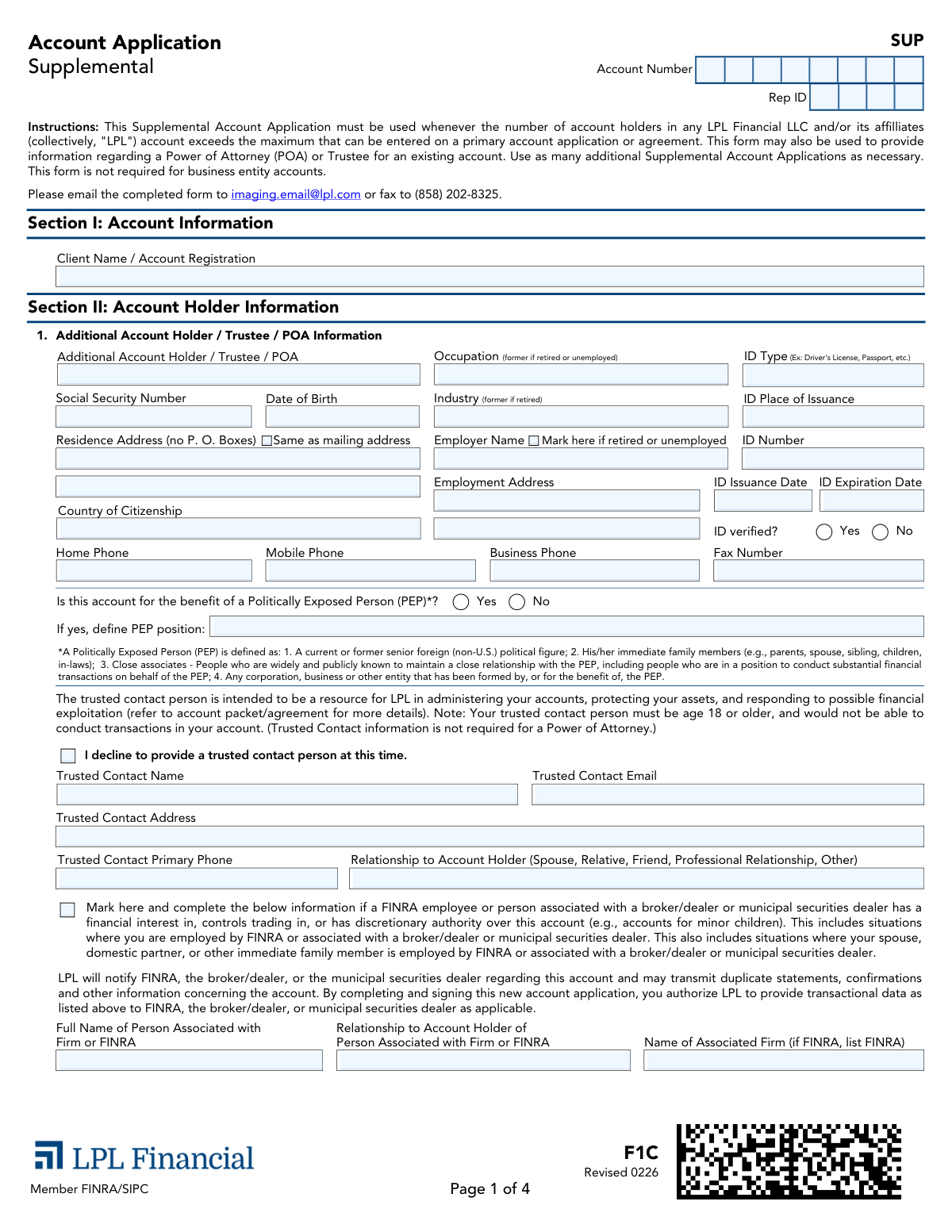
Yes! You can use AI to fill out Form F1C, Account Application Supplemental
Form F1C is a supplemental document for an LPL Financial account application. It is required when the number of account holders, trustees, or Powers of Attorney (POA) exceeds the space available on the primary application, ensuring all parties are properly documented. Today, this form can be filled out quickly and accurately using AI-powered services like Instafill.ai, which can also convert non-fillable PDF versions into interactive fillable forms.
Our AI automatically handles information lookup, data retrieval, formatting, and form filling.
It takes less than a minute to fill out F1C using our AI form filling.
Securely upload your data. Information is encrypted in transit and deleted immediately after the form is filled out.
Form specifications
| Form name: | Form F1C, Account Application Supplemental |
| Number of pages: | 4 |
| Language: | English |
Instafill Demo: How to fill out PDF forms in seconds with AI
How to Fill Out F1C Online for Free in 2026
Are you looking to fill out a F1C form online quickly and accurately? Instafill.ai offers the #1 AI-powered PDF filling software of 2026, allowing you to complete your F1C form in just 37 seconds or less.
Follow these steps to fill out your F1C form online using Instafill.ai:
- 1 Navigate to Instafill.ai and upload or select the LPL Form F1C, Account Application Supplemental.
- 2 Provide the primary Client Name, Account Number, and Rep ID in Section I to link the supplement to the correct account.
- 3 In Section II, use the AI assistant to accurately input the personal details, identification information, and contact numbers for each additional account holder, trustee, or Power of Attorney.
- 4 Complete the disclosures regarding any Politically Exposed Person (PEP) affiliations and provide Trusted Contact information, or decline if you choose.
- 5 Answer the questions regarding associations with FINRA or broker-dealers and disclose any roles as a corporate officer or director if applicable.
- 6 Carefully review all the information auto-filled by the AI for accuracy before proceeding to the final section.
- 7 In Section III, read the acknowledgments and electronically sign and date the form to certify its contents and finalize the application supplement.
Our AI-powered system ensures each field is filled out correctly, reducing errors and saving you time.
Why Choose Instafill.ai for Your Fillable F1C Form?
Speed
Complete your F1C in as little as 37 seconds.
Up-to-Date
Always use the latest 2026 F1C form version.
Cost-effective
No need to hire expensive lawyers.
Accuracy
Our AI performs 10 compliance checks to ensure your form is error-free.
Security
Your personal information is protected with bank-level encryption.
Frequently Asked Questions About Form F1C
This form is used when you need to add more account holders than the primary application allows. It can also be used to provide information for a Power of Attorney (POA) or Trustee for an existing LPL account.
You need to fill out this form if your account has more holders than can be listed on the main application, or if you are adding a Trustee or Power of Attorney to an account. This form is not for business entity accounts.
You must provide personal details such as full name, Social Security Number, date of birth, and contact information. You will also need to provide details from a valid, unexpired ID like a driver's license or passport.
You can submit the completed form by emailing it to [email protected] or by faxing it to (858) 202-8325.
A trusted contact is a person aged 18 or older who LPL can contact to help protect your account from potential financial exploitation. Providing this information is optional, and you can check a box to decline.
No, the form clearly states that a trusted contact person would not be able to conduct transactions in your account. Their role is solely as a resource for LPL to contact in specific situations.
A PEP is a current or former senior foreign political figure, their immediate family members, or their close associates. You must disclose if the account is for the benefit of a PEP.
You must complete this section if you, your spouse, or an immediate family member is employed by or associated with FINRA, a broker-dealer, or a municipal securities dealer. This also applies if such a person has a financial interest or control over the account.
By signing, you certify that all information is accurate, you agree to the account terms, and you understand the investment risks involved. You also authorize LPL to contact your trusted person if you provided one.
No, by signing the application, you acknowledge that proceeds from liquefied home equity on your primary residence will not be used to fund this account.
If you have a non-fillable PDF, you can use a service like Instafill.ai. It can convert flat PDFs into interactive, fillable forms that you can complete on your computer.
Yes, services like Instafill.ai use AI to accurately auto-fill form fields with your information, which can save you significant time and help avoid errors.
You can upload the LPL Supplemental Account Application PDF to the Instafill.ai platform. The service will make the form fillable online, allowing you to type your information directly into the fields and then download the completed document.
Compliance F1C
Validation Checks by Instafill.ai
1
Social Security Number Format Validation
This check ensures the Social Security Number is entered in a valid 9-digit format (XXX-XX-XXXX or XXXXXXXXX). This is critical for taxpayer identification (TIN) verification as required by the IRS and for Customer Identification Program (CIP) compliance. If the format is invalid, the submission will be rejected until a correctly formatted SSN is provided.
2
ID Expiration Date Check
Validates that the 'ID Expiration Date' is a future date. Submitting an expired identification document is not permissible for identity verification under federal anti-money laundering (AML) regulations. If the ID is expired, the form cannot be processed, and the applicant must provide a current, valid form of identification.
3
Logical Check for ID Issuance and Expiration Dates
This validation confirms that the 'ID Issuance Date' occurs before the 'ID Expiration Date'. This is a logical data integrity check to catch simple data entry errors. An issuance date that is after the expiration date is impossible and would invalidate the ID information, requiring the user to correct the dates before submission.
4
Residence Address 'No P.O. Box' Rule
Ensures the 'Residence Address' field does not contain 'P.O. Box' or similar text, as the form explicitly prohibits it. A physical address is a mandatory component of CIP rules to verify the customer's identity and physical location. If a P.O. Box is detected, the system will prompt the user to provide a valid physical street address.
5
Conditional Requirement for PEP Position
If the 'Is this account for the benefit of a Politically Exposed Person (PEP)?' box is marked 'Yes', this check mandates that the 'PEP position' field must be completed. This is a critical compliance step for performing enhanced due diligence on accounts that may pose a higher risk for corruption or money laundering. Failure to define the PEP position will block the form's submission.
6
Employment Status and Employer Information Consistency
This check verifies that if the 'Mark here if retired or unemployed' checkbox is selected, the 'Employer Name' and 'Employment Address' fields are left empty. This ensures logical consistency in the submitted data and prevents contradictory information. If a user marks themselves as retired but also provides employer details, an error will be flagged to resolve the discrepancy.
7
Trusted Contact Information Exclusivity
Validates that if the 'I decline to provide a trusted contact person at this time' box is checked, all other trusted contact fields (Name, Email, Address, Phone, Relationship) are empty. This prevents the submission of partial or conflicting data and ensures the applicant's intention is recorded clearly. If the decline box is checked and other fields are filled, the system will require the user to clear the conflicting information.
8
Conditional Requirement for FINRA Disclosure Details
Ensures that if the 'FINRA / Associated Person Disclosure' checkbox is marked, the dependent fields ('Full Name of Associated Person', 'Relationship to Account Holder', 'Name of Associated Firm') are all completed. This information is required by FINRA for regulatory oversight and to monitor potential conflicts of interest. The form will be considered incomplete if the box is checked but the details are missing.
9
Conditional Requirement for Corporate Officer Disclosure
This check mandates that if the 'Mark here if you or any member of your immediate family has been a corporate officer...' box is checked, the 'Name of Corporation(s)' field must be filled out. This disclosure is essential for compliance to identify and monitor control persons of public companies for potential insider trading risks. The submission will be blocked if this conditional requirement is not met.
10
Date of Birth and Legal Age Verification
Validates that the 'Date of Birth' is a valid date in the past and that the calculated age is 18 years or older. This is fundamental to ensure the individual has the legal capacity to enter into a financial agreement as an account holder, trustee, or POA. An invalid date or an age below 18 will result in a validation failure, requiring correction.
11
Account Number Consistency Across Pages
This validation verifies that the 'Account Number' entered in the header of each page is identical. Consistent account numbers are crucial for ensuring all pages of the supplemental application are correctly associated with the primary account during processing. A mismatch would trigger an error, requiring the user to correct the number to ensure data integrity.
12
Signature and Date Completeness
This check confirms that for each 'Additional Account Holder / Trustee / POA' listed in Section II, a corresponding signature and date are provided in the 'Signatures' section. These signatures are legally required to execute the agreement and make the application binding. An application with missing signatures or dates for any listed individual is incomplete and cannot be processed.
13
ID Verification Status Check
Ensures that the 'ID verified?' field has a selection of either 'Yes' or 'No' and is not left blank. This is a critical part of the firm's Customer Identification Program (CIP) obligations to record the verification status. A 'No' selection should trigger an immediate review or block submission, as unverified individuals cannot typically be added to an account.
Common Mistakes in Completing F1C
This mistake occurs when the 'Client Name / Account Registration' or 'Account Number' entered on this supplemental form does not exactly match the information on the primary account application. Because this is a supplemental document, any discrepancy can cause it to be rejected or linked to the wrong account. To avoid this, carefully copy the account registration name and number from the primary account statement or application, ensuring they are identical.
Applicants often enter a P.O. Box out of habit, but the form explicitly states 'Residence Address (no P. O. Boxes)' to comply with federal Know Your Customer (KYC) regulations that require a physical address. Submitting a P.O. Box will lead to an automatic rejection and delay the account setup process. Always provide a complete physical street address. AI-powered form fillers like Instafill.ai can help prevent this by flagging prohibited entries like 'P.O. Box' in address fields.
People frequently mistype their ID number, forget to check the expiration date, or leave fields like 'ID Place of Issuance' blank. An expired ID or incomplete information will halt the identity verification process, a critical step for financial accounts. Before filling out the form, ensure your ID is current and double-check that the ID number, issuance date, and expiration date are transcribed exactly as they appear on the document.
A common error is checking the box for 'Mark here if retired or unemployed' while also filling in details in the 'Employer Name' and 'Employment Address' fields. This creates conflicting data that requires clarification from the processing team, causing delays. You should only provide employer details if you are currently employed; otherwise, simply check the 'retired or unemployed' box and leave the employer fields blank.
Applicants sometimes leave the entire Trusted Contact section blank without checking the 'I decline to provide a trusted contact person' box, creating ambiguity. Conversely, some may fill out the contact's details and also check the decline box. To avoid processing holds, either complete all the trusted contact fields or check the single box to affirmatively decline. Since this form is a non-fillable PDF, tools like Instafill.ai can convert it into an interactive version with clear logic to prevent such contradictory entries.
The definition of a PEP is broad, including not just senior foreign political figures but also their immediate family and close associates. Applicants often fail to disclose a connection because they don't realize a family member's status applies to them. Failure to disclose this correctly is a serious regulatory violation. Carefully read the full definition provided on the form and consider all family and close relationships before answering.
Similar to the PEP rule, the disclosure requirement for association with FINRA or a broker-dealer extends to spouses, domestic partners, and other immediate family members. An applicant might not think to disclose their spouse's employment at another financial firm, leading to a compliance breach. It is crucial to ask all relevant family members about their employment to ensure this section is completed accurately if applicable.
When an applicant checks 'Yes' for the Politically Exposed Person (PEP) question or marks the box for FINRA association, they often forget to complete the required follow-up fields. For instance, checking 'Yes' for PEP requires defining the position, and marking the FINRA box requires filling in the associated person's name, firm, and relationship. An incomplete disclosure will render the form invalid and require it to be sent back for completion.
The signature page requires a signature from each 'Additional Account Holder, Trustee or Power of Attorney Agent' documented in Section II. A frequent mistake is having only one person sign when two were added, or the printed name not matching the name provided in Section II. An unsigned or improperly signed form is not legally binding and will be rejected immediately. Ensure every individual added to the account signs and prints their name exactly as it appears earlier on the form.
A signature on a legal document like an account application is invalid without a date. Applicants are often focused on signing their name and simply forget to fill in the 'Date (required)' field next to it. This small omission will cause the form to be returned for correction, delaying the entire process. Smart form-filling tools like Instafill.ai can automatically insert the current date or flag the required date field as empty to prevent this oversight.
Saved over 80 hours a year
“I was never sure if my IRS forms like W-9 were filled correctly. Now, I can complete the forms accurately without any external help.”
Kevin Martin Green
Your data stays secure with advanced protection from Instafill and our subprocessors

Robust compliance program
Transparent business model
You’re not the product. You always know where your data is and what it is processed for.
ISO 27001, HIPAA, and GDPR
Our subprocesses adhere to multiple compliance standards, including but not limited to ISO 27001, HIPAA, and GDPR.
Security & privacy by design
We consider security and privacy from the initial design phase of any new service or functionality. It’s not an afterthought, it’s built-in, including support for two-factor authentication (2FA) to further protect your account.
Fill out F1C with Instafill.ai
Worried about filling PDFs wrong? Instafill securely fills form-f1c-account-application-supplemental forms, ensuring each field is accurate.