Yes! You can use AI to fill out Missouri Application for Temporary Assistance (TA) and Supplemental Nutrition Assistance Program (SNAP) Benefits

The Missouri Application for Benefits is a comprehensive document required for individuals and families in Missouri seeking public assistance. It gathers detailed information about the applicant's household composition, income, assets, residency, and other personal circumstances to determine eligibility for programs like Temporary Assistance (TA) and SNAP. Completing this form accurately is crucial for accessing essential support services, and today this form can be filled out quickly and accurately using AI-powered services like Instafill.ai, which can also convert non-fillable PDF versions into interactive fillable forms.
Missouri Application for Benefits is part of the benefit forms, SNAP forms and supplemental forms categories on Instafill.
Our AI automatically handles information lookup, data retrieval, formatting, and form filling.
It takes less than a minute to fill out Missouri Application for Benefits using our AI form filling.
Securely upload your data. Information is encrypted in transit and deleted immediately after the form is filled out.

Form specifications

Form name: Missouri Application for Temporary Assistance (TA) and Supplemental Nutrition Assistance Program (SNAP) Benefits
Number of fields: 1124
Number of pages: 30
Language: English
main-image

Instafill Demo: How to fill out PDF forms in seconds with AI

How to Fill Out Missouri Application for Benefits Online for Free in 2026

Are you looking to fill out a MISSOURI APPLICATION FOR BENEFITS form online quickly and accurately? Instafill.ai offers the #1 AI-powered PDF filling software of 2026, allowing you to complete your MISSOURI APPLICATION FOR BENEFITS form in just 37 seconds or less.
Follow these steps to fill out your MISSOURI APPLICATION FOR BENEFITS form online using Instafill.ai:
  1. 1 Navigate to Instafill.ai and upload or select the Missouri Application for Benefits form.
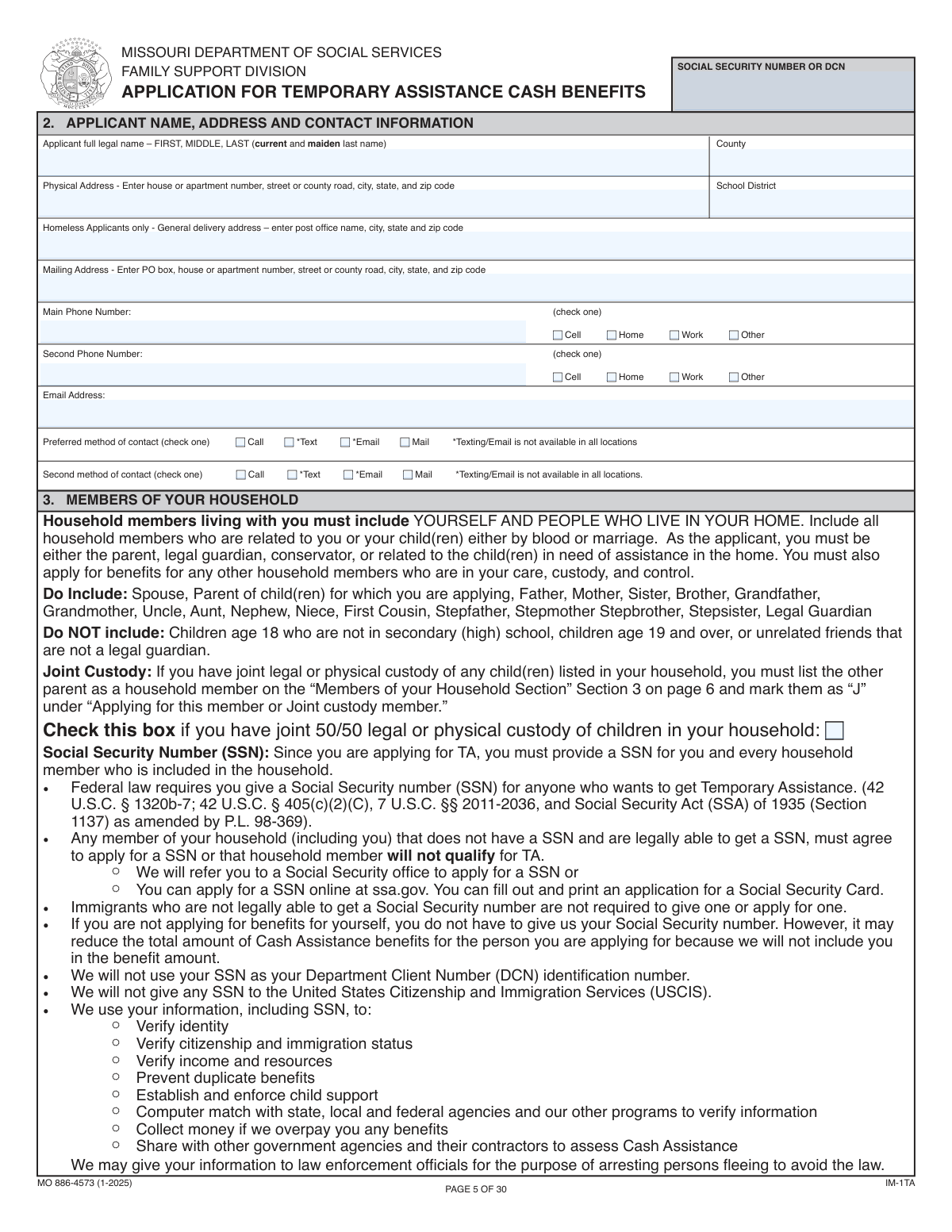
  2. 2 Use the AI assistant to fill in your primary applicant information, including your full legal name, address, contact details, and Social Security Number.
  3. 3 Provide detailed information for each household member, including their date of birth, relationship to you, SSN, and whether you are applying for benefits on their behalf.
  4. 4 Accurately report all household income from employment, self-employment, or other sources, as well as all assets like bank accounts, vehicles, and property.
  5. 5 Answer all screening questions regarding residency, citizenship, work history, legal background, and expenses like child support or child care for all household members.
  6. 6 Review all the information pre-filled by the AI for accuracy, make any necessary corrections, and provide your digital signature to certify and submit the application.

Our AI-powered system ensures each field is filled out correctly, reducing errors and saving you time.

Why Choose Instafill.ai for Your Fillable Missouri Application for Benefits Form?

Speed

Complete your Missouri Application for Benefits in as little as 37 seconds.

Up-to-Date

Always use the latest 2026 Missouri Application for Benefits form version.

Cost-effective

No need to hire expensive lawyers.

Accuracy

Our AI performs 10 compliance checks to ensure your form is error-free.

Security

Your personal information is protected with bank-level encryption.

Frequently Asked Questions About Form Missouri Application for Benefits

This form is an application for Temporary Assistance (TA) and potentially other benefits like the Supplemental Nutrition Assistance Program (SNAP). It gathers detailed information about you and your household to determine your eligibility for these programs.

DCN stands for Department Client Number. It is an identification number assigned by the social services agency if you have previously received benefits, and it can be used in place of a Social Security Number on this form.

You should list yourself first, followed by every other person who lives in your home, regardless of whether you are applying for benefits for them. This includes your spouse, children, other relatives, and any unrelated individuals living with you.

Your physical address is the actual location where you live. Your mailing address is where you receive mail, which could be a P.O. Box or a different address if you cannot receive mail at your physical residence.

Check the box for 'Joint 50/50 legal or physical custody' near the top of the form. When listing the child in the household section, enter 'J' in the field 'Applying for this member or joint custody member' to indicate the joint custody situation.

You should provide an SSN for each household member who has one. If a member does not have an SSN, you must indicate whether they plan to apply for one.

An authorized representative is a person you choose to help you apply for benefits and act on your behalf with the agency. You are not required to have one, but you can appoint someone if you need assistance managing your case.

These questions are asked to determine eligibility for certain program waivers and requirements. For example, answering the drug use question is mandatory, and refusing to answer can make you ineligible for TA for three years.

The form gives you the option to receive your Temporary Assistance cash benefits via direct deposit into a bank account or onto an Electronic Benefit Transfer (EBT) card.

The TA Diversion Program is an option for a one-time payment to help with a specific emergency, like an involuntary job loss or temporary loss of child care, instead of receiving ongoing monthly TA benefits. You must meet specific criteria to qualify for this program.

This means that by accepting TA benefits for a child, you are giving the state the right to collect child support payments from the non-custodial parent on your behalf. This helps reimburse the state for the assistance provided to your family.

The form provides space for up to ten household members. If your household is larger, you should attach a separate sheet of paper with all the same required information for each additional person.

Yes, you can use services like Instafill.ai to help complete this form. These AI-powered tools can accurately auto-fill your information into the correct fields, which saves time and helps reduce errors.

If you have a non-fillable or 'flat' PDF, you can use a service like Instafill.ai to make it interactive. The tool converts the document into a fillable format, allowing you to easily type your answers directly onto the form online.

Compliance Missouri Application for Benefits
Validation Checks by Instafill.ai

1
Validate SSN/DCN Format
This check ensures that the 'Social Security Number or DCN' field is either a valid 9-digit Social Security Number (in XXX-XX-XXXX or XXXXXXXXX format) or matches the defined format for a Department Client Number (DCN). This is crucial for correctly identifying the applicant in government systems and preventing data entry errors. If the number is invalid, the form submission should be blocked with a message asking the user to correct the entry.
2
Conditional Requirement for Marital Status Date
This validation checks that for any household member, if their 'Marital status' is set to 'M' (Married), 'D' (Divorced), 'W' (Widowed), or 'SEP' (Separated), the corresponding 'Date married/divorced/separated/widowed' field must be populated with a valid date. This ensures data completeness for life events that affect eligibility. If the status is 'SGL' (Single), the date field should be empty; if the rule is violated, an error should prompt the user to provide the required date.
3
Conditional Logic for 'Will Apply for SSN'
This check enforces the rule that the 'Will apply for SSN' field for any household member can only be answered if the main 'SSN' field for that member is left blank. This prevents contradictory information and ensures the question is only answered when relevant. If a user enters an SSN and also tries to answer 'Will apply for SSN', the system should show an error or automatically clear the secondary field.
4
Exclusive Selection for Main Phone Type
This validation ensures that for the 'Main Phone Number', only one of the type checkboxes ('Cell', 'Home', 'Work', 'Other') can be selected. A single phone number cannot be multiple types simultaneously, and this check prevents logically inconsistent data. If a user attempts to select a second type, the system should either prevent it or automatically deselect the previous choice.
5
Conditional Enablement of Email Contact Method
This check ensures that the 'Preferred method of contact — Email' and 'Second method of contact — Email' checkboxes are only enabled and selectable if the 'Email Address' field is populated with a validly formatted email address. This prevents users from selecting email as a contact method without providing an address to contact. If the email field is empty or invalid, these options should be disabled or trigger an error if selected.
6
Logical Consistency of Household Member Dates
This validation cross-references date fields for each household member, ensuring that the 'Date married/divorced/separated/widowed' is after the member's 'Date of birth'. This prevents logically impossible entries, such as a marriage date that precedes birth. If this check fails, the system should flag the dates as inconsistent and require the user to review and correct them before proceeding.
7
Requirement for 'Other Language' Specification
This validation rule checks that if the 'WHAT LANGUAGE DO YOU SPEAK?_OTHER#20-#20LIST' option is selected, the corresponding 'LIST OTHER LANGUAGE SPOKEN' text field must not be empty. This ensures that selecting 'Other' is followed by the necessary specification, which is critical for providing proper language assistance. If the 'Other' box is checked but the text field is blank, an error message should demand the user to specify the language.
8
Required Fields for Authorized Representative
This check is triggered if the 'I would like an authorized representative...' checkbox is selected. It validates that all associated fields, such as 'AUTHORIZED REPRESENTATIVE'S FULL LEGAL NAME', 'DATE OF BIRTH', and 'Mailing Address', are completed. This ensures that if an applicant designates a representative, all necessary information to identify and contact that person is collected. Failure to complete these fields after checking the box should result in a validation error.
9
Applicant Name Consistency with First Household Member
This validation compares the 'Applicant Full Legal Name' field with the 'Member name (First Household Member)' field to ensure they match. The form instructions specify that the applicant should list themselves first, and this check enforces that rule for data consistency and proper identification of the primary applicant within the household structure. A mismatch should trigger a warning asking the user to confirm the information is correct.
10
Uniqueness of Preferred and Secondary Contact Methods
This check ensures that the selected 'Preferred method of contact' is different from the 'Second method of contact'. For example, a user cannot select 'Call' as both their primary and secondary contact preference. This logic prevents redundant or nonsensical selections and helps clarify the applicant's true communication preferences. If a user selects the same method for both, the system should display an error and require them to choose a different secondary option.
11
Logical Date Relationship between Parent and Child
This validation ensures that any 'CHILDS DATE OF BIRTH' listed in the child support section is chronologically after the 'CUSTODIAL PARENT DATE OF BIRTH'. It also checks that the parent's age at the time of the child's birth is within a reasonable range (e.g., at least 12 years old). This is a critical data integrity check to catch significant data entry errors and prevent logically impossible family structures. A failure would require user correction.
12
Conditional Details for Previous Out-of-State Benefits
This validation rule activates if the applicant indicates 'Yes' to the question 'HAVE YOU OR ANYONE IN YOUR HOUSEHOLD EVER RECEIVED TA OR... BENEFITS IN ANOTHER STATE'. If 'Yes' is selected (i.e., the 'No' box is unchecked), the system must verify that at least one complete entry is made in the corresponding details section (member name, state, etc.). This ensures that affirmative answers are substantiated with required details for eligibility verification. If no details are provided, an error should prompt the user to add them.
13
Date of Violation Must Be After 1996
This check applies to all questions regarding criminal convictions or benefit violations that specify 'after 9/22/96'. If a user answers 'Yes' and provides a 'DATE OF VIOLATION', this validation ensures the provided date is on or after September 22, 1996. This is critical for correctly applying rules that are tied to specific legislative dates. An earlier date would be invalid and should be flagged for correction.
14
Employment Start Date vs. Date of Birth
This validation ensures that for any employed household member, the 'EMPLOYMENT Start date' is a valid date that occurs after the member's 'Date of birth'. It also verifies that the start date is not in the future. This check prevents data entry errors and ensures the employment history is logical and accurate, which is essential for calculating income and eligibility. An invalid date should block submission until corrected.

Common Mistakes in Completing Missouri Application for Benefits

Using Words Instead of Required Codes

Applicants often overlook instructions and write out the full word (e.g., 'Single', 'White') for fields like 'Marital status' or 'Race' instead of the required code (e.g., 'SGL', '1'). This happens due to haste or not reading the field-specific instructions. This mistake can cause data entry failures in automated systems or require a caseworker to manually correct the form, delaying the application process.

Incomplete or Inconsistent Household Member Information

Applicants are often confused about who to list as a 'household member,' sometimes omitting roommates, boarders, or temporarily absent individuals. They may also list a person in the demographics section but forget to include their income or assets later. This is a critical error as household composition directly impacts eligibility and benefit amounts, and omissions can lead to denial or accusations of fraud.

Answering 'Yes' but Leaving Follow-Up Details Blank

The form contains many questions that require detailed information if the answer is 'Yes' (e.g., 'Are you employed?'). Applicants frequently check 'Yes' but then fail to complete the subsequent fields for employer name, address, and income. An application with such missing information is considered incomplete and will be delayed until the applicant provides the necessary details, or it may be denied altogether.

Reporting Net (Take-Home) Pay Instead of Gross Pay

When asked for income, people often enter their net 'take-home' pay because it's the amount they see deposited in their bank account. However, the form specifically requests 'GROSS PAY BEFORE DEDUCTIONS'. Reporting the wrong amount can lead to an incorrect benefit calculation and, if discovered later, may result in an overpayment claim where the applicant must repay benefits, along with potential fraud penalties.

Incorrectly Filling Out Address Sections

Applicants may confuse the 'Physical Address' and 'Mailing Address' fields, for instance by putting a P.O. Box in the physical address line. This can cause critical documents, like EBT cards or eligibility notices, to be sent to the wrong place. It can also cause issues with verifying residency, which is a core eligibility requirement, leading to processing delays or denial.

Entering Incorrect or Improperly Formatted SSNs

Simple typos, transposed digits, or confusion about whether to include dashes in Social Security Numbers are very common. An incorrect SSN is a major error that prevents the agency from verifying identity and income through required data matches. This will halt the application process entirely until a corrected number is provided and can easily lead to a denial for failure to verify identity.

Forgetting to List All Assets and Resources

This long form asks about assets like bank accounts, vehicles, property, and insurance policies in multiple different sections. It's easy for applicants to forget a small savings account, a second vehicle, or a life insurance policy with cash value. Failure to disclose all assets is a serious violation that can lead to disqualification, fraud penalties, and a requirement to repay any benefits received.

Failing to Specify Phone Type and Contact Preferences

After providing a phone number or email, applicants often skip the checkboxes for 'Phone Type' (Cell, Home, Work) and 'Preferred method of contact'. This seemingly minor omission can prevent the agency from reaching the applicant effectively, as they might attempt to send a text to a landline or call at an inconvenient time. Missed communications can lead to missed appointments and deadlines, jeopardizing the application.

Misinterpreting the 'Applying for this member' Field

The instruction to use 'Y' (Yes), 'N' (No), or 'J' (Joint Custody) for each household member is frequently misunderstood. Applicants may not realize they must list all household members even if they aren't applying for benefits for them ('N'). Incorrectly coding a member can cause the wrong people to be included in the benefit calculation, directly affecting the household's eligibility and the final assistance amount.

Leaving Conditional Date Fields Blank or Filling Incorrectly

The form has fields like 'Date married/divorced/separated/widowed' that are conditional on the marital status. Applicants often leave this blank when it's required or fill it in when it's not (e.g., for a single person). This incomplete or incorrect data requires a caseworker to follow up for clarification, delaying the determination of household composition and financial responsibility.
Saved over 80 hours a year

“I was never sure if my IRS forms like W-9 were filled correctly. Now, I can complete the forms accurately without any external help.”

Kevin Martin Green

Your data stays secure with advanced protection from Instafill and our subprocessors

Robust compliance program

Transparent business model

You’re not the product. You always know where your data is and what it is processed for.

ISO 27001, HIPAA, and GDPR

Our subprocesses adhere to multiple compliance standards, including but not limited to ISO 27001, HIPAA, and GDPR.

Security & privacy by design

We consider security and privacy from the initial design phase of any new service or functionality. It’s not an afterthought, it’s built-in, including support for two-factor authentication (2FA) to further protect your account.

Fill out Missouri Application for Benefits with Instafill.ai

Worried about filling PDFs wrong? Instafill securely fills missouri-application-for-temporary-assistance-ta-and-supplemental-nutrition-assistance-program-snap-benefits forms, ensuring each field is accurate.