Yes! You can use AI to fill out Corestone® Electronic Only Account Application

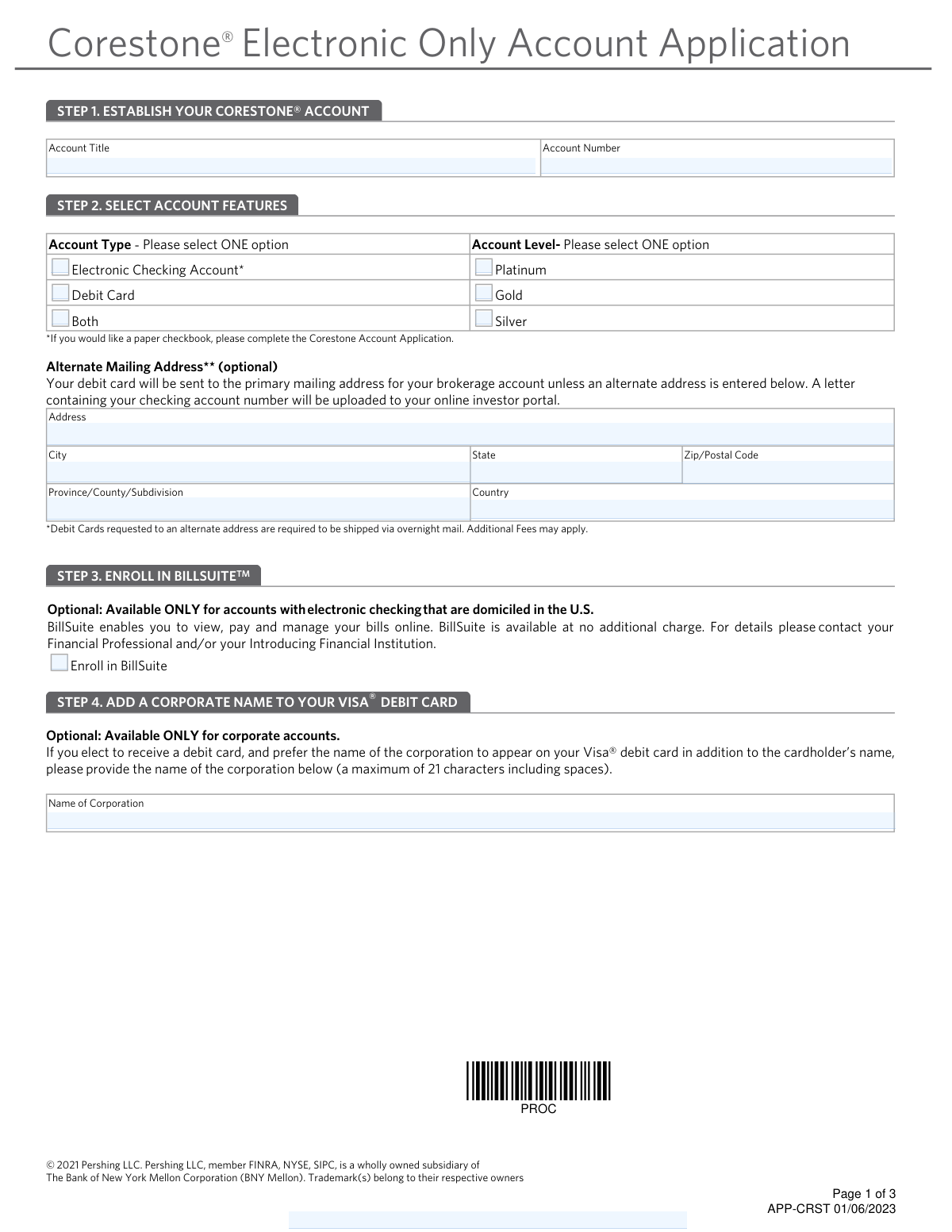
This form is an application to establish a Corestone® electronic-only brokerage account with Pershing LLC. It allows applicants to specify account details, select features such as electronic checking or a Visa® debit card, and enroll in the BillSuite™ online bill payment service. Today, this form can be filled out quickly and accurately using AI-powered services like Instafill.ai, which can also convert non-fillable PDF versions into interactive fillable forms.
Our AI automatically handles information lookup, data retrieval, formatting, and form filling.
It takes less than a minute to fill out APP-CRST using our AI form filling.
Securely upload your data. Information is encrypted in transit and deleted immediately after the form is filled out.

Form specifications

Form name: Corestone® Electronic Only Account Application
Number of pages: 1
Language: English
main-image

Instafill Demo: How to fill out PDF forms in seconds with AI

How to Fill Out APP-CRST Online for Free in 2026

Are you looking to fill out a APP-CRST form online quickly and accurately? Instafill.ai offers the #1 AI-powered PDF filling software of 2026, allowing you to complete your APP-CRST form in just 37 seconds or less.
Follow these steps to fill out your APP-CRST form online using Instafill.ai:
  1. 1 Navigate to Instafill.ai and upload or select the Corestone® Electronic Only Account Application.
  2. 2 In Step 1, provide your Account Title and Account Number to establish your Corestone® account.
  3. 3 Proceed to Step 2 to select your desired account features, including account type (e.g., Electronic Checking, Debit Card) and account level (e.g., Platinum, Gold).
  4. 4 Optionally, enroll in the BillSuite™ service in Step 3 and add a corporate name to your debit card in Step 4 if applicable.
  5. 5 Carefully review the Account Agreement in Step 5, noting the terms regarding margin privileges and the pre-dispute arbitration clause.
  6. 6 In Step 6, provide the required personal information for all account owners or authorized persons, including name, Social Security Number, and date of birth.
  7. 7 Review all entered information for accuracy, then electronically sign and date the application to finalize your submission.

Our AI-powered system ensures each field is filled out correctly, reducing errors and saving you time.

Why Choose Instafill.ai for Your Fillable APP-CRST Form?

Speed

Complete your APP-CRST in as little as 37 seconds.

Up-to-Date

Always use the latest 2026 APP-CRST form version.

Cost-effective

No need to hire expensive lawyers.

Accuracy

Our AI performs 10 compliance checks to ensure your form is error-free.

Security

Your personal information is protected with bank-level encryption.

Frequently Asked Questions About Form APP-CRST

This form is used to open a Corestone® brokerage account with Pershing LLC and add electronic-only features, such as a debit card and/or electronic checking, to your account.

This form should be completed by individuals or entities who have a brokerage account with Pershing and wish to add electronic banking services without the need for paper checks.

No, this application is for an 'Electronic Only' account. If you need a paper checkbook, you must complete the standard Corestone Account Application instead.

You will need your brokerage account title and number, as well as the full name, Social Security or Tax ID number, date of birth, and mother's maiden name for each account owner.

Your debit card will be sent to the primary mailing address on file for your brokerage account. You can specify an alternate address in Step 2, but this requires overnight shipping and may involve extra fees.

BillSuite™ is an optional, free service that lets you view and pay your bills online. Enrollment is only available for U.S. domiciled accounts that select the electronic checking feature.

Yes, for corporate accounts, you have the option in Step 4 to add the corporation's name to the Visa® debit card in addition to the cardholder's name.

Yes, margin privileges are granted by default when you open a Corestone account. If you do not want margin, you must check the 'I do not want margin privileges' box in Step 5.

If your account has already been approved for margin, checking the box on this form will not remove it. You must contact your financial organization directly to have margin privileges removed.

All individual and joint account owners must sign the application. For corporate or other legal entity accounts, all authorized persons with authority over the account must sign.

Submission instructions are not provided on the form. Please contact your Financial Professional or Introducing Financial Institution for guidance on where to send your completed application.

Yes, services like Instafill.ai use AI to accurately auto-fill form fields, which can save you time and help prevent common errors.

You can use a service like Instafill.ai to complete this form digitally. Simply upload the PDF to their platform to make it an interactive, fillable form you can complete and sign online.

If your PDF is not interactive, you can use a tool like Instafill.ai. It can convert flat, non-fillable PDFs into fillable forms that you can easily complete on your computer or mobile device.

Compliance APP-CRST
Validation Checks by Instafill.ai

1
Exclusive Account Type Selection
This check verifies that the user has selected exactly one option from the 'Account Type' section (Electronic Checking Account, Debit Card, or Both). Selecting none or more than one is invalid as the form specifies choosing one option. This is crucial for correctly setting up the account features and avoiding ambiguity in service provisioning. If validation fails, the form submission should be rejected with an error message prompting the user to select a single account type.
2
Exclusive Account Level Selection
This validation ensures that precisely one account level (Platinum, Gold, or Silver) is selected. The account level determines the benefits and fee structure associated with the account, and the form requires one selection. A missing or multiple selection would prevent proper account classification and processing. Failure will result in an error asking the user to choose one and only one level.
3
Mandatory Account Owner Signature
This check confirms that at least one account owner has provided a signature in STEP 6. A signature is legally required to accept the terms of the Account Agreement and open the account. Without a signature, the application is incomplete and legally non-binding. If no signatures are present, the submission must be blocked.
4
SSN/Tax ID Number Format Validation
This validation ensures that the 'Social Security or Tax ID Number' field for each account owner is entered in a valid format (e.g., XXX-XX-XXXX for SSN or XX-XXXXXXX for TIN). This number is critical for tax reporting and identity verification (KYC). An incorrectly formatted number can lead to processing delays and regulatory compliance issues, so the system should reject invalid formats and prompt for correction.
5
Date of Birth and Legal Age Verification
This check verifies that the 'Date of Birth' for each account owner is a valid date and that the calculated age meets the minimum legal requirement for opening a brokerage account (e.g., 18 years old). This is a fundamental compliance requirement to prevent establishing accounts for minors. An invalid date or an underage applicant will cause the application to be rejected.
6
Conditional Corporate Name on Card
This validation checks that the 'Name of Corporation' field in STEP 4 is only filled if the account is a corporate account and a debit card has been requested ('Debit Card' or 'Both' is selected in STEP 2). The form explicitly states this option is 'Available ONLY for corporate accounts'. This prevents individual account holders from incorrectly adding a corporate name, which would cause processing and card issuance errors.
7
Conditional BillSuite Enrollment
This check ensures that the 'Enroll in BillSuite' option is only selected for accounts that have electronic checking ('Electronic Checking Account' or 'Both' in STEP 2) and are domiciled in the U.S. The form states these are prerequisites for the service. This prevents users from enrolling in a service for which they are not eligible, avoiding backend processing errors and user confusion.
8
Alternate Mailing Address Completeness
This validation rule ensures that if any part of the 'Alternate Mailing Address' (Address, City, State, Zip) is provided, then all required parts of the address are completed. An incomplete address is unusable for mailing the debit card and would lead to delivery failure. The check prevents submission of partial address data, prompting the user to either complete the address or clear it.
9
Account Owner Printed Name Length
This check validates that the 'Print Name' field for each account owner in STEP 6 does not exceed the specified maximum of 21 characters, including spaces. This limit is likely due to physical constraints on the debit card or system database limitations. Exceeding this limit could result in a truncated, incorrect name on official documents and cards, so the system should enforce it upon entry.
10
Account Owner Section Integrity
This check ensures that for any account owner section in STEP 6 where a name is printed, all other corresponding fields (SSN/TIN, Code Name, DOB, Signature, and Date) are also completed. This prevents the submission of incomplete records for an individual owner, which would require manual follow-up and delay account opening. The validation enforces that each listed person's data is whole and actionable.
11
Account Number Presence
This validation confirms that the 'Account Number' field at the top of each page is populated. This number is the primary identifier linking the application to an existing or newly created brokerage account. A missing account number makes it impossible to process the application and associate it with the correct client. The form should not be submittable without this critical piece of information.
12
Signature Date Validity
This check verifies that the 'Date' field next to each signature is a valid calendar date and is not a future date. This date legally establishes when the agreement was signed. An invalid or future date can call the validity of the entire application into question and cause legal or compliance issues. The system should require a valid, current, or very recent date.
13
Corporate Name on Card Length
This validation enforces the 21-character maximum length (including spaces) for the 'Name of Corporation' field in STEP 4. This constraint is explicitly stated on the form and is likely tied to the physical printing limitations of the Visa debit card. Submitting a name that is too long would result in it being truncated, which may be unacceptable for a legal entity.
14
Account Title Completeness
This check ensures the 'Account Title' field in STEP 1 is filled out. The Account Title defines the legal name of the account owner(s) or entity, which is fundamental for account identification and legal ownership. An empty title makes the application invalid and unprocessable. The submission should be blocked if this field is left blank.

Common Mistakes in Completing APP-CRST

Overlooking the Default Margin Agreement

Applicants often miss the checkbox in Step 5 to opt-out of margin privileges. The form defaults to granting margin, and the dense legal text can be easily skimmed, leading individuals to unintentionally sign up for a margin account they may not want or understand. This can expose them to risks and interest charges associated with borrowing. To avoid this, carefully read all agreements and check the box labeled 'I do not want margin privileges' if you wish to have a cash-only account.

Exceeding Name Character Limits

The form specifies a maximum of 21 characters for the printed name in Step 6 and the corporate name in Step 4. People with longer names often write their full name without noticing this constraint. This can result in truncated, incorrect names on official documents and debit cards, causing identification issues and requiring correction paperwork. Always adhere to character limits; if your name is too long, use a standard, legally acceptable abbreviation.

Missing Signatures on Joint or Entity Accounts

Step 6 clearly states that all individual, joint, and authorized persons for an entity must sign the application. A common error is for only one party on a joint account to sign, rendering the application incomplete. This will halt the account opening process until all required signatures are collected, causing significant delays. Ensure every person listed as an account owner or authorized signer provides their printed name, personal details, and signature in the designated sections.

Incomplete Signatory Information

For each signature provided in Step 6, the form requires a corresponding printed name, Social Security or Tax ID Number, Mother's Maiden Name, and Date of Birth. It is very common for applicants to leave one or more of these fields blank, especially for second or third signatories. Missing data is a primary reason for application rejection, as this information is essential for identity verification and compliance. Double-check that every field for every signer is filled out completely and accurately before submission.

Incorrectly Requesting a Corporate Name on a Card

In Step 4, individuals applying for personal accounts sometimes fill in the optional field to add a corporate name to the debit card. This section is explicitly marked for corporate accounts only. This error creates confusion for the processing team, can delay the issuance of your debit card, and may lead to the card being issued with incorrect information. Avoid this by only completing optional sections that apply to your specific account type.

Misunderstanding the Alternate Mailing Address Rules

Applicants may enter an alternate address in Step 2 without reading the fine print, which states that debit cards sent to an alternate address require overnight shipping and may incur additional fees. This can lead to unexpected charges on their new account. Unless absolutely necessary, leave this section blank to have the card sent to the primary address on file for the brokerage account. This avoids extra costs and potential delivery complications.

Selecting Multiple Conflicting Options

In Step 2, the form asks the applicant to select 'ONE option' for both 'Account Type' and 'Account Level'. Applicants sometimes check multiple boxes in a single category (e.g., selecting both 'Debit Card' and 'Both'), creating ambiguity. This forces the financial institution to either guess the applicant's intent or return the form for clarification, delaying the account setup. Carefully choose only one option per category that best fits your needs.

Requesting Ineligible Features

The form has optional features with specific eligibility requirements, such as enrolling in BillSuite (Step 3), which is only for U.S.-domiciled accounts with electronic checking. Applicants who don't meet the criteria may still check the box, leading to failed enrollments and confusion. To prevent this, read the eligibility rules for any optional service before selecting it. AI-powered tools like Instafill.ai can help by validating selections against account criteria to prevent such errors.

Forgetting to Fill the Account Number on Each Page

The 'Account Number' field appears at the top of each page of the application. Applicants often fill it in on the first page but forget the subsequent pages. If the pages are separated during processing, it becomes difficult to link them to the correct application, causing significant delays or even lost information. Ensure the account number is written clearly on every single page. Since this form is a non-fillable PDF, a tool like Instafill.ai can convert it to a fillable version and automatically populate recurring fields like this across all pages.

Misunderstanding 'Electronic Only' Account Limitations

The application is titled 'Electronic Only Account Application' and a note in Step 2 specifies that a different application is needed for a paper checkbook. Some applicants may still complete this form expecting to receive paper checks. This leads to disappointment and the need to restart the process with the correct application. Always read the title and notes on a form to ensure it meets your needs before you begin filling it out.
Saved over 80 hours a year

“I was never sure if my IRS forms like W-9 were filled correctly. Now, I can complete the forms accurately without any external help.”

Kevin Martin Green

Your data stays secure with advanced protection from Instafill and our subprocessors

Robust compliance program

Transparent business model

You’re not the product. You always know where your data is and what it is processed for.

ISO 27001, HIPAA, and GDPR

Our subprocesses adhere to multiple compliance standards, including but not limited to ISO 27001, HIPAA, and GDPR.

Security & privacy by design

We consider security and privacy from the initial design phase of any new service or functionality. It’s not an afterthought, it’s built-in, including support for two-factor authentication (2FA) to further protect your account.

Fill out APP-CRST with Instafill.ai

Worried about filling PDFs wrong? Instafill securely fills corestone-electronic-only-account-application forms, ensuring each field is accurate.