Yes! You can use AI to fill out Supplemental Alternative Documentation of Income (for use when other income documentation is not available)
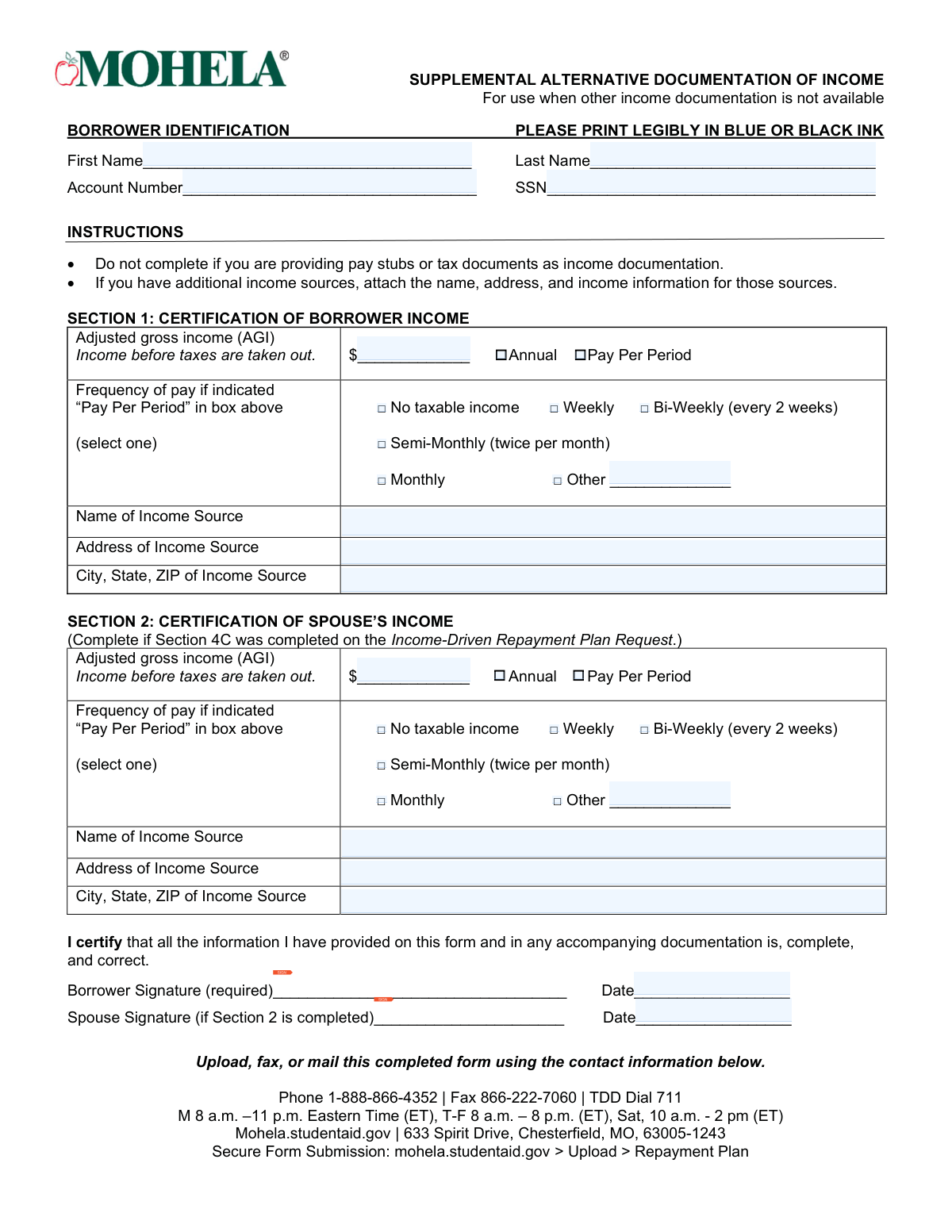
The Supplemental Alternative Documentation of Income form is a self-certification document used to report adjusted gross income (AGI) and pay frequency when standard income proof (such as pay stubs or tax returns) cannot be provided. It captures borrower identification details and income source information, and may also include spouse income if required for an IDR plan request. The form is important because it allows a loan servicer (MOHELA) to evaluate repayment plan eligibility and calculate payments when traditional documentation is unavailable. Submitting accurate information and signatures is required to process the request and avoid delays.
Our AI automatically handles information lookup, data retrieval, formatting, and form filling.
It takes less than a minute to fill out Supplemental Alternative Documentation of Income using our AI form filling.
Securely upload your data. Information is encrypted in transit and deleted immediately after the form is filled out.
Form specifications
| Form name: | Supplemental Alternative Documentation of Income (for use when other income documentation is not available) |
| Number of pages: | 1 |
| Filled form examples: | Form Supplemental Alternative Documentation of Income Examples |
| Language: | English |
| Categories: | income verification forms, financial aid forms, housing assistance forms, income documentation forms, income forms |
Instafill Demo: filling out a legal form in seconds
How to Fill Out Supplemental Alternative Documentation of Income Online for Free in 2026
Are you looking to fill out a SUPPLEMENTAL ALTERNATIVE DOCUMENTATION OF INCOME form online quickly and accurately? Instafill.ai offers the #1 AI-powered PDF filling software of 2026, allowing you to complete your SUPPLEMENTAL ALTERNATIVE DOCUMENTATION OF INCOME form in just 37 seconds or less.
Follow these steps to fill out your SUPPLEMENTAL ALTERNATIVE DOCUMENTATION OF INCOME form online using Instafill.ai:
- 1 Confirm you should use this form (only if you cannot provide pay stubs or tax documents) and gather your income details and income source address information.
- 2 Complete the Borrower Identification section: first name, last name, account number, and SSN.
- 3 Fill out Section 1 (Borrower Income): enter your adjusted gross income (AGI), indicate whether the amount is annual or pay-per-period, select your pay frequency, and provide the name and full address of the income source.
- 4 If applicable (only if your IDR request required it), complete Section 2 (Spouse’s Income) with spouse AGI, annual or pay-per-period selection, pay frequency, and spouse income source name and address.
- 5 Review the form for completeness and accuracy; attach additional income source details if you have more than one income source.
- 6 Sign and date the form (borrower signature required; spouse signature required if Section 2 is completed).
- 7 Submit the completed form through the online upload portal (MOHELA secure upload under Repayment Plan) or send via fax/mail using the provided contact information.
Our AI-powered system ensures each field is filled out correctly, reducing errors and saving you time.
Why Choose Instafill.ai for Your Fillable Supplemental Alternative Documentation of Income Form?
Speed
Complete your Supplemental Alternative Documentation of Income in as little as 37 seconds.
Up-to-Date
Always use the latest 2026 Supplemental Alternative Documentation of Income form version.
Cost-effective
No need to hire expensive lawyers.
Accuracy
Our AI performs 10 compliance checks to ensure your form is error-free.
Security
Your personal information is protected with bank-level encryption.
Frequently Asked Questions About Form Supplemental Alternative Documentation of Income
This form is used to document income when you cannot provide standard income documentation like pay stubs or tax documents. It helps MOHELA verify income for repayment-related requests.
Borrowers who need to provide income information but do not have pay stubs or tax documents available should complete it. If you can provide pay stubs or tax documents, you generally should not use this form.
Do not complete this form if you are providing pay stubs or tax documents as your income documentation. Use those standard documents instead.
You must provide your first and last name, account number, and Social Security number (SSN). The form also instructs you to print legibly in blue or black ink.
Section 1 asks for your adjusted gross income (AGI) and describes it as âincome before taxes are taken out.â Enter the amount and indicate whether it is an annual amount or a âpay per periodâ amount.
Select the option that matches how often you are paid. If none apply, choose âOtherâ and write in the frequency.
Check the box for âNo taxable incomeâ in the applicable section. You should still complete the rest of the section as appropriate and sign the certification.
You must list the name of the income source and its address, including city, state, and ZIP code. This is required in the section where you are reporting that income.
Attach additional pages that include the name, address, and income information for each additional income source. Make sure the attached information is clear and complete.
Complete Section 2 only if Section 4C was completed on the Income-Driven Repayment Plan Request. If that condition does not apply, you typically leave Section 2 blank.
Your spouse must sign only if you completed Section 2. The borrower signature is required in all cases.
Sign and date on the lines labeled âBorrower Signature (required)â and âDate.â If Section 2 is completed, your spouse must also sign and date on the spouse signature lines.
You can upload, fax, or mail the completed form. Upload via mohela.studentaid.gov > Upload > Repayment Plan, fax to 866-222-7060, or mail to 633 Spirit Drive, Chesterfield, MO 63005-1243.
Use MOHELAâs Secure Form Submission by going to mohela.studentaid.gov, selecting Upload, and choosing Repayment Plan. This is the formâs listed secure upload path.
You can call 1-888-866-4352 for assistance. TDD users can dial 711, and the form lists support hours for weekdays and Saturday in Eastern Time.
Compliance Supplemental Alternative Documentation of Income
Validation Checks by Instafill.ai
1
Borrower First and Last Name Required and Character Validation
Verify the borrowerâs first and last name fields are not blank and contain only valid name characters (letters, spaces, hyphens, apostrophes) with reasonable length limits. This ensures the submission can be matched to the correct borrower record and prevents downstream system errors caused by invalid characters. If validation fails, the form should be rejected or routed for manual review with a request to correct the name fields.
2
Account Number Presence and Format Validation
Confirm the account number is provided and matches the expected servicer format (e.g., numeric-only or specific alphanumeric pattern) and length constraints. This is critical for associating the income documentation with the correct loan account and avoiding misapplied updates. If the account number is missing or malformed, the submission should be flagged as incomplete and not processed until corrected.
3
SSN Required and Valid SSN Format Check
Validate that the SSN is present and follows a valid SSN format (XXX-XX-XXXX or 9 digits), and reject known invalid patterns (e.g., all zeros in any group, 000-00-0000). Accurate SSN capture is essential for identity verification and correct account matching. If the SSN fails validation, the form should be rejected or held for manual verification.
4
Mutual Exclusivity: 'No Taxable Income' vs AGI/Pay Amount
If the 'No taxable income' box is selected, ensure the AGI and any pay-per-period amount fields are blank or zero, and no pay frequency is selected. Conversely, if 'No taxable income' is not selected, require a positive AGI or pay amount. This prevents contradictory income declarations that could lead to incorrect repayment calculations. If inconsistent, the submission should be returned for clarification.
5
AGI Amount Numeric and Range Validation (Borrower and Spouse)
Check that AGI entries are numeric currency values (allowing commas and up to two decimals) and fall within reasonable bounds (e.g., not negative, not unrealistically large). This ensures the income figure can be used in calculations and reduces the risk of data entry errors (extra zeros, misplaced decimals). If invalid, the system should block processing and request corrected income amounts.
6
Pay Per Period Amount Numeric and Consistency with Frequency
When a pay-per-period amount is provided, validate it is numeric, non-negative, and includes at most two decimal places, and require a pay frequency selection. This is necessary to interpret the periodic income correctly and convert it to an annualized value if needed. If the amount is present without a frequency (or vice versa), the submission should be flagged as incomplete.
7
Pay Frequency Selection Validation (Single Choice + 'Other' Requirement)
Ensure exactly one pay frequency option is selected when income is reported (Weekly, Bi-Weekly, Semi-Monthly, Monthly, or Other). If 'Other' is selected, require the free-text 'Other' field to be completed with a meaningful value (not just punctuation or whitespace). This prevents ambiguous income interpretation and calculation errors. If validation fails, the form should be returned for correction.
8
Income Source Name Required When Income Reported
If the borrower (or spouse) reports AGI or pay-per-period income, require the 'Name of Income Source' field to be completed. This supports auditability and helps validate the plausibility of the income claim when other documentation is unavailable. If missing, the submission should be considered incomplete and not processed until the income source is provided.
9
Income Source Address Completeness (Street, City, State, ZIP)
When an income source is provided, validate that the address fields are complete: street address, city, state, and ZIP code. Also validate state as a valid US state/territory abbreviation and ZIP as 5 digits (optionally ZIP+4). Complete address information is important for verification and follow-up. If incomplete or malformed, the form should be flagged for correction or manual review.
10
Spouse Section Completion Conditional on Spouse Signature/Indication
If any fields in Section 2 (spouse income) are filled out, require the spouse signature and spouse date, and ensure the spouse income fields follow the same rules as borrower income fields. This ensures the spouse attests to the accuracy of their income information and prevents partial, unauthenticated spouse data from being used. If Section 2 is partially completed without signature/date, the spouse portion should be ignored or the submission returned depending on policy.
11
Borrower Signature Required and Non-Blank Validation
Verify the borrower signature field is present and not blank (for e-sign, ensure a valid signature token; for scanned forms, ensure the signature area contains ink/marking). The certification statement requires borrower attestation, and processing without a signature can create compliance and dispute risk. If missing, the form must be rejected as incomplete.
12
Signature Date Required and Valid Date Format
Validate that the borrower signature date is provided and is a valid calendar date in an accepted format (e.g., MM/DD/YYYY), including leap-year correctness. Dates are needed to establish timeliness and determine which income period applies. If the date is missing or invalid, the submission should be returned for correction.
13
Signature Date Logical Checks (Not in the Future; Spouse vs Borrower)
Ensure signature dates are not in the future relative to receipt/processing date, and if both borrower and spouse sign, ensure the spouse date is not unreasonably earlier/later than the borrower date (e.g., outside a configurable window). This reduces fraud risk and prevents processing based on improperly dated certifications. If the dates fail logic checks, route to manual review or request re-signing.
14
Required Fields Completeness Based on Income Reporting Path
Apply a completeness rule set: if borrower reports income (not 'No taxable income'), require at minimum AGI or pay-per-period amount, a pay frequency (if pay-per-period is used), and income source name/address. If borrower selects 'No taxable income', require that selection to be clearly marked and ensure income amount fields are empty/zero. This ensures the form contains enough information to support an income-driven repayment evaluation. If required elements are missing, the submission should be rejected as incomplete.
Common Mistakes in Completing Supplemental Alternative Documentation of Income
Many borrowers submit this supplemental form even though they can provide pay stubs or tax documents, often because they think âmore paperwork is better.â This can slow processing or lead to a request to resubmit using the preferred documentation. Only use this form when other income documentation is not available, and confirm you are not also submitting standard income documents unless instructed.
Applicants frequently write too lightly, use pencil, or use colors that do not scan well, which makes names, SSNs, and dollar amounts unreadable. Illegible entries can cause data entry errors, mismatched records, and processing delays. Print clearly in blue or black ink and consider completing electronically if allowed, then review the scanned/photographed copy for readability before submitting.
A common issue is leaving the Account Number or SSN blank, transposing digits, or providing only one identifier. Without accurate identifiers, the servicer may be unable to match the form to the correct account, delaying or preventing processing. Copy these numbers directly from your account portal or official documents and double-check every digit before submission.
People often report take-home pay because itâs what they see deposited, but the form asks for income before taxes are taken out (AGI/pre-tax). Reporting net pay can understate income and may result in incorrect repayment calculations or follow-up requests for clarification. Use your AGI if known, or otherwise provide gross income before deductions and ensure it matches the âIncome before taxes are taken outâ instruction.
Borrowers sometimes write a number in the income box but do not clearly indicate whether it is an annual amount or a per-paycheck amount. This can lead to major miscalculations (e.g., treating a monthly amount as annual) and incorrect payment amounts. Clearly select âAnnualâ or âPay Per Periodâ as intended and ensure the number you enter matches that selection.
Itâs common to forget to check a pay frequency box (weekly, bi-weekly, semi-monthly, monthly, other) or to select one that doesnât match the income figure entered. Missing or inconsistent frequency information can trigger processing delays or incorrect annualization of income. Always check exactly one frequency option and confirm it aligns with how you calculated the âPay Per Periodâ amount.
Some applicants check more than one frequency (e.g., bi-weekly and monthly) or check âOtherâ without writing what it is. This creates ambiguity and often results in the form being rejected or needing manual follow-up. Choose only one frequency and, if âOtherâ applies, write a clear description (e.g., âquarterly,â âirregular,â âseasonalâ).
Applicants frequently leave the income source name or address fields partially blank, especially the city/state/ZIP line. Missing employer/income source details can prevent verification and may lead to requests for additional documentation. Provide the full legal name of the income source and a complete mailing address including city, state, and ZIP.
The instructions require attaching details for additional income sources, but borrowers often report only their primary job and omit side income, multiple employers, or other sources. Omissions can lead to inaccurate repayment determinations and later corrections that change the payment amount. If you have more than one income source, attach a separate page listing each sourceâs name, address, and income information.
Section 2 is only required if Section 4C was completed on the Income-Driven Repayment Plan Request, but many people misunderstand and either fill it out unnecessarily or leave it blank when required. This can cause delays, incorrect household income calculations, or requests for resubmission. Confirm whether you completed Section 4C on the IDR request and complete Section 2 only if that condition applies.
A very common rejection reason is a missing borrower signature, missing date, or missing spouse signature/date when Section 2 is completed. Unsigned or undated certifications are typically considered incomplete and cannot be processed. Sign and date in all required places, and ensure the spouse signs and dates if you completed the spouse income section.
Saved over 80 hours a year
âI was never sure if my IRS forms like W-9 were filled correctly. Now, I can complete the forms accurately without any external help.â
Kevin Martin Green
Your data stays secure with advanced protection from Instafill and our subprocessors

Robust compliance program
Transparent business model
Youâre not the product. You always know where your data is and what it is processed for.
ISO 27001, HIPAA, and GDPR
Our subprocesses adhere to multiple compliance standards, including but not limited to ISO 27001, HIPAA, and GDPR.
Security & privacy by design
We consider security and privacy from the initial design phase of any new service or functionality. Itâs not an afterthought, itâs built-in, including support for two-factor authentication (2FA) to further protect your account.
Fill out Supplemental Alternative Documentation of Income with Instafill.ai
Worried about filling PDFs wrong? Instafill securely fills supplemental-alternative-documentation-of-income-f forms, ensuring each field is accurate.



