Yes! You can use AI to fill out Form I-134, Declaration of Financial Support

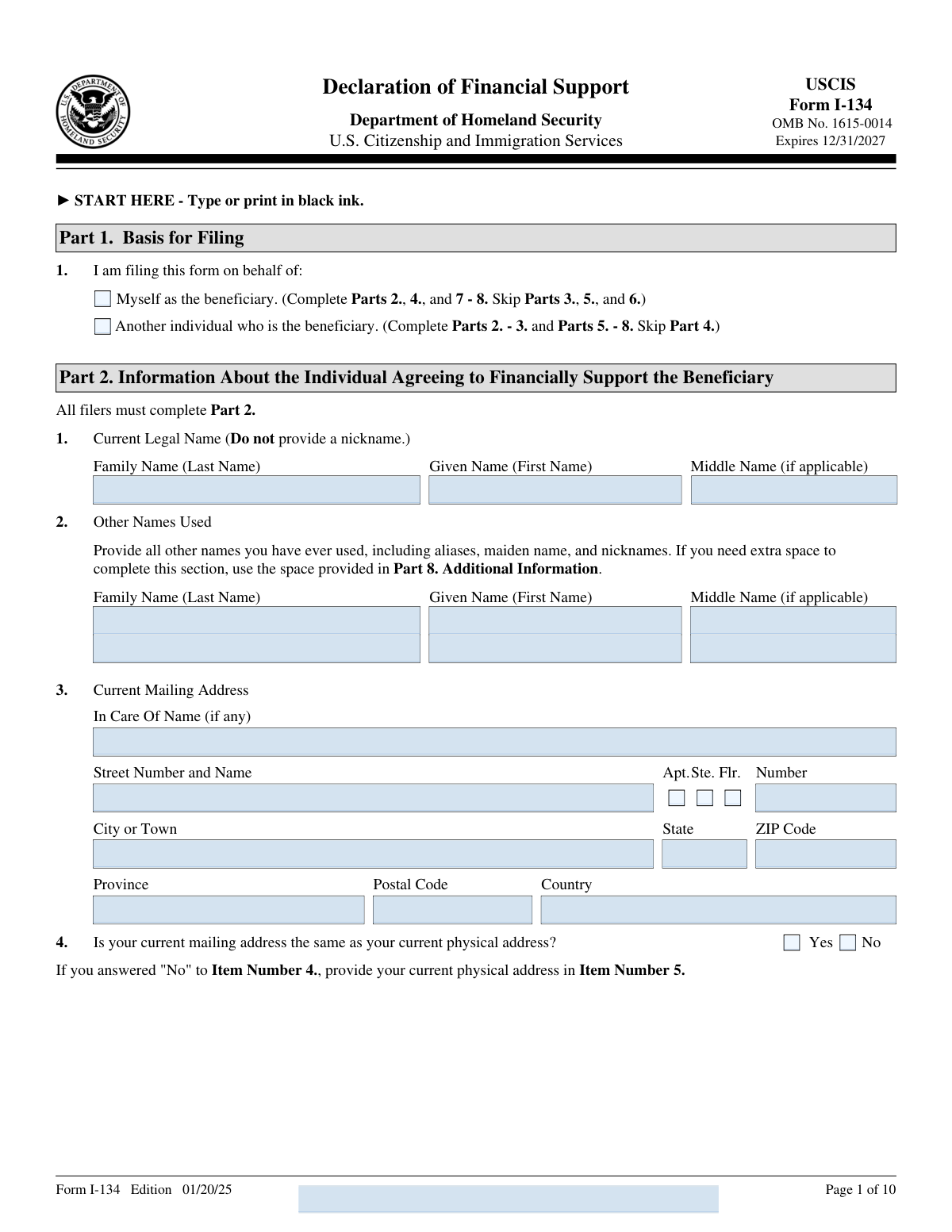
Form I-134 is a U.S. Citizenship and Immigration Services (USCIS) form used by a sponsor or the beneficiary themselves to declare financial support for a foreign national during a temporary stay in the United States. It requires detailed information about the supporter's income, assets, dependents, and the nature of support they intend to provide to the beneficiary. The form is critical in demonstrating to the U.S. government that the beneficiary will have sufficient financial resources and will not become a public charge. Today, this form can be filled out quickly and accurately using AI-powered services like Instafill.ai, which can also convert non-fillable PDF versions into interactive fillable forms.
Our AI automatically handles information lookup, data retrieval, formatting, and form filling.
It takes less than a minute to fill out I-134 using our AI form filling.
Securely upload your data. Information is encrypted in transit and deleted immediately after the form is filled out.

Form specifications

Form name: Form I-134, Declaration of Financial Support
Number of pages: 10
Language: English
main-image

Instafill Demo: filling out a legal form in seconds

How to Fill Out I-134 Online for Free in 2026

Are you looking to fill out a I-134 form online quickly and accurately? Instafill.ai offers the #1 AI-powered PDF filling software of 2026, allowing you to complete your I-134 form in just 37 seconds or less.
Follow these steps to fill out your I-134 form online using Instafill.ai:
  1. 1 Navigate to Instafill.ai and upload or select Form I-134 (Declaration of Financial Support) to begin filling it out online.
  2. 2 Complete Part 1 by selecting whether you are filing on behalf of yourself as the beneficiary or on behalf of another individual, then follow the instructions for which parts to complete.
  3. 3 Fill in Part 2 with your personal information, including your legal name, mailing and physical addresses, date and place of birth, immigration status, employment status, and financial information such as annual income, assets, and dependents you support.
  4. 4 If filing on behalf of another person, complete Part 3 with the beneficiary's personal details, including their legal name, date of birth, sex, place of birth, country of citizenship, mailing and physical addresses, marital status, and anticipated period of stay in the United States.
  5. 5 Complete the applicable statement and certification section — Part 4 if you are the beneficiary filing on your own behalf, or Part 5 if you are a supporter filing on behalf of another — providing your contact information and reviewing the certification language.
  6. 6 If an interpreter or preparer assisted in completing the form, have them fill out Part 6 (Interpreter's information) and/or Part 7 (Preparer's information) with their contact details and certifications.
  7. 7 Review all entries for accuracy, use Part 8 for any additional information that did not fit in earlier sections, then sign and date the form before submitting it to USCIS or the Department of State as required.

Our AI-powered system ensures each field is filled out correctly, reducing errors and saving you time.

Why Choose Instafill.ai for Your Fillable I-134 Form?

Speed

Complete your I-134 in as little as 37 seconds.

Up-to-Date

Always use the latest 2026 I-134 form version.

Cost-effective

No need to hire expensive lawyers.

Accuracy

Our AI performs 10 compliance checks to ensure your form is error-free.

Security

Your personal information is protected with bank-level encryption.

Frequently Asked Questions About Form I-134

Form I-134, Declaration of Financial Support, is a USCIS form used to demonstrate that a beneficiary (a foreign national) will have adequate financial support during their temporary stay in the United States. It is filed by either the beneficiary themselves or by another individual (such as a sponsor or family member) who agrees to financially support the beneficiary.

Form I-134 must be completed by either the beneficiary filing on their own behalf or by another individual (a sponsor) who is agreeing to financially support the beneficiary during their temporary stay in the U.S. U.S. citizens, lawful permanent residents, nationals, nonimmigrants, asylees, refugees, parolees, TPS holders, and others may serve as the supporting individual.

If you are filing on behalf of another individual (the beneficiary), you must complete Parts 2, 3, 5, 6 (if an interpreter was used), 7 (if a preparer was used), and 8. You should skip Part 4, which is only for beneficiaries filing on their own behalf.

If you are the beneficiary filing Form I-134 on your own behalf, you must complete Parts 2, 4, and 7–8, and skip Parts 3, 5, and 6. Part 4 contains your personal statement, contact information, certification, and signature.

You must provide your current annual income, a list of cash and assets available to you (with supporting evidence), information about all dependents and individuals you financially support, and the number of other active financial support obligations you have under Form I-134, I-134A, I-864, I-864EZ, or I-864A.

You should attach evidence of the assets you listed in Item 17, such as bank statements, investment account statements, property valuations, or other financial records. USCIS or the Department of State may also request original documents at a later date, so keep originals accessible.

No. When reporting your cash and assets in Part 2, Item 17, you must not include any assets belonging to the beneficiary named in Part 3. Only your own assets should be listed and evidenced.

A mailing address is where you receive mail (such as a P.O. Box or a relative's address), while a physical address is where you actually live. If both addresses are the same, check 'Yes' in Item 4; if they differ, check 'No' and provide your physical address separately in Item 5.

The signatures on Form I-134 — including those of the supporting individual (Part 5), the beneficiary (Part 4), the interpreter (Part 6), and the preparer (Part 7) — cannot be completed electronically and must be original handwritten signatures. Submitting the form without a proper signature will result in rejection.

If you used an interpreter, that person must complete Part 6, providing their full name, contact information, and a certification that they are fluent in both English and the language used, and that they accurately interpreted all questions and answers. The interpreter must also sign and date Part 6.

If someone other than the supporting individual prepared the form, that person must complete Part 7, providing their full name, business or organization name, contact information, and a signed certification confirming that the form was prepared based solely on information provided by the supporting individual.

Use Part 8 (Additional Information) to provide any overflow information. If Part 8 is also insufficient, you may attach additional sheets of paper or make copies of the Part 8 page. Each additional sheet must include your name, A-Number (if any), and the relevant page, part, and item number, and must be signed and dated.

Yes! Services like Instafill.ai use AI to auto-fill form fields accurately, saving you time and reducing errors. If you have a flat, non-fillable PDF version of Form I-134, Instafill.ai can also convert it into an interactive fillable form so you can complete it digitally.

To fill out Form I-134 online, visit Instafill.ai, upload your PDF of the form, and the AI will guide you through each field, auto-filling information where possible based on the details you provide. Once complete, you can download the filled form, print it, and sign it by hand before submitting it to USCIS or the Department of State.

All signatories certify under penalty of perjury that the information provided is complete, true, and correct. Providing false or misleading information on Form I-134 can result in serious legal consequences, including denial of the immigration benefit, removal proceedings, or criminal prosecution.

Compliance I-134
Validation Checks by Instafill.ai

1
Ensures Exactly One Basis for Filing Option is Selected
Validates that one and only one checkbox is selected in Part 1 — either 'Myself as the beneficiary' or 'Another individual who is the beneficiary.' This is the foundational routing decision that determines which parts of the form must be completed and which must be skipped. If neither or both boxes are checked, the form cannot be properly processed and USCIS will be unable to determine the filer's role or the applicable certification requirements.
2
Validates Correct Parts Completed Based on Basis for Filing Selection
Checks that the sections completed on the form are consistent with the Basis for Filing selection in Part 1. If 'Myself as the beneficiary' is selected, Parts 2, 4, and 7–8 must be completed and Parts 3, 5, and 6 must be left blank; if 'Another individual' is selected, Parts 2–3 and 5–8 must be completed and Part 4 must be left blank. Completing the wrong parts or leaving required parts blank will result in an incomplete or contradictory submission. USCIS may deny or not consider the declaration if required sections are missing.
3
Validates Date of Birth Format and Logical Range
Checks that all date of birth fields — for the supporting individual (Part 2, Item 6), the beneficiary (Part 3, Item 3), and all dependents listed in the Part 2 financial table — are entered in the required mm/dd/yyyy format with a valid two-digit month (01–12), two-digit day (01–31 appropriate to the month), and four-digit year. The date must represent a real calendar date and must not be a future date, as a person cannot have been born in the future. Invalid or improperly formatted dates of birth will prevent accurate identity verification and may cause the form to be rejected.
4
Ensures Supporting Individual's Legal Name Does Not Contain a Nickname
Validates that the Family Name, Given Name, and Middle Name fields in Part 2 (Current Legal Name) contain a formal legal name and not a nickname, informal name, or abbreviation, as explicitly instructed on the form. The name provided must match the individual's legal identity documents such as a passport, green card, or naturalization certificate. Submitting a nickname instead of a legal name can cause identity mismatches during USCIS processing and may result in delays or rejection of the declaration.
5
Validates Physical Address is Provided When Mailing Address Differs
Checks that if the answer to Item 4 (for the supporting individual) or Item 10 (for the beneficiary) indicates that the mailing address and physical address are NOT the same, then the corresponding physical address fields (Part 2, Item 5 or Part 3, Item 11 respectively) are fully completed with at minimum a street number and name, city or town, and country. Leaving the physical address blank when it differs from the mailing address creates an incomplete record that USCIS cannot use for correspondence or verification. Failure to provide the physical address may result in the form being considered incomplete.
6
Validates Alien Registration Number (A-Number) Format
Checks that any Alien Registration Number (A-Number) entered — for the supporting individual (Part 2, Item 8), the beneficiary (Part 3, Item 5), or dependents in the financial table — consists of exactly 7 to 9 numeric digits following the 'A-' prefix already printed on the form. The A-Number must not contain letters, spaces, or special characters beyond the prefix. An incorrectly formatted A-Number will prevent USCIS from locating the individual's immigration record and may cause significant processing delays.
7
Ensures Current Immigration Status Selection is Made and Explanation Provided if 'Other' is Selected
Validates that exactly one immigration status checkbox is selected in Part 2, Item 10, from the list including U.S. Citizen, Lawful Permanent Resident, U.S. National, Nonimmigrant, Asylee, Refugee, Parolee, TPS holder, Beneficiary of deferred action, or Other. If 'Other' is selected, the accompanying explanation field must not be left blank, as USCIS requires a specific description of the status. The immigration status of the supporting individual is a critical eligibility factor, and an incomplete or missing selection may result in the declaration being denied or not considered.
8
Validates Employment Status Selection and Required Sub-Fields are Completed
Checks that exactly one employment status option is selected in Part 2, Item 12 (Employed, Self-Employed, Unemployed, Retired, or Other), and that any dependent fields are populated accordingly — specifically, if 'Employed' is selected, both the occupation/job title and the Name of Employer fields must be filled in; if 'Self-Employed' is selected, the business or occupation description must be provided; if 'Other' is selected, an explanation must be entered. Employment information is directly tied to the financial support assessment and incomplete employment details undermine the credibility of the declaration. Missing sub-fields when a conditional status is selected will render the financial section incomplete.
9
Validates Annual Income is a Non-Negative Numeric Dollar Amount
Checks that the current annual income field in Part 2, Item 16 contains a valid numeric value expressed in U.S. dollars, is not negative, and does not contain non-numeric characters such as letters or symbols other than a decimal point. Annual income is a primary factor USCIS uses to assess whether the supporting individual has sufficient financial resources to support the beneficiary. A missing, zero, or improperly formatted income value may raise questions about the filer's ability to provide financial support and could result in the declaration being questioned or denied.
10
Validates Asset Table Total Matches Sum of Individual Asset Amounts
Checks that the TOTAL field at the bottom of the asset table in Part 2, Item 17 equals the arithmetic sum of all individual asset cash values entered in rows 1 through 6. Each row that has an asset type selected must also have a corresponding dollar amount entered, and rows with no asset type selected should have no dollar amount. A discrepancy between the sum of individual rows and the stated total suggests a data entry error that could misrepresent the filer's financial position and undermine the integrity of the declaration.
11
Ensures Beneficiary Information in Part 3 is Completed Only When Filing on Behalf of Another Individual
Validates that Part 3 (Information about the Beneficiary) is completed — including the beneficiary's legal name, date of birth, sex, place of birth, country of citizenship, marital status, and address — if and only if 'Another individual who is the beneficiary' was selected in Part 1. If 'Myself as the beneficiary' was selected, Part 3 should be entirely blank. Completing Part 3 when filing for oneself, or leaving it blank when filing for another, creates a logical inconsistency that will confuse USCIS reviewers and may result in the form being returned or rejected.
12
Validates Beneficiary's Anticipated Period of Stay Has a Valid Start Date and Consistent End Date
Checks that the 'From' date in Part 3, Item 12 (Beneficiary's Anticipated Period of Stay) is entered in mm/dd/yyyy format and represents a valid calendar date. If an anticipated end date is indicated (i.e., the 'No End Date' checkbox is not selected), the 'To' date must also be in mm/dd/yyyy format and must be a date that is the same as or later than the 'From' date. An end date that precedes the start date is logically impossible and would indicate a data entry error. Either an end date or the 'No End Date' checkbox must be selected, but not both simultaneously.
13
Ensures Interpreter Information in Part 6 is Completed When Interpreter Option is Selected
Validates that if the interpreter option (Item 1.B.) is selected in Part 4 or Part 5, then Part 6 must be fully completed, including the interpreter's given name, family name, daytime telephone number, the language of interpretation, and the interpreter's signature and date of signature. The interpreter's certification is a legal attestation under penalty of perjury, and an incomplete Part 6 when an interpreter was used renders the declaration legally deficient. USCIS requires this information to verify that the filer fully understood the declaration's contents.
14
Validates Telephone Number Format for All Contact Fields
Checks that all daytime and mobile telephone number fields — for the supporting individual (Part 5, Items 3–4), the beneficiary (Part 4, Items 3–4), the interpreter (Part 6, Items 3–4), and the preparer (Part 7, Items 3–4) — contain only numeric digits and conform to a valid telephone number format (e.g., 10 digits for U.S. numbers, or an appropriate international format). Telephone numbers containing letters, excessive digits, or invalid area codes cannot be used by USCIS to contact the relevant parties. The daytime telephone number for the supporting individual and beneficiary is a required contact field and must not be left blank.
15
Ensures Signature and Date of Signature Fields are Present for All Required Signatories
Validates that the appropriate signature and date of signature fields are completed for all required parties based on the filing scenario: the supporting individual must sign Part 5 (if filing for another) or the beneficiary must sign Part 4 (if filing for themselves), and if a preparer was used, Part 7 must include the preparer's signature and date. Dates of signature must be in mm/dd/yyyy format and must not be future dates. The form explicitly states it will be rejected without a valid signature, and an undated or future-dated signature raises questions about the authenticity and timing of the declaration.
16
Validates Specific Contributions Description is Provided When Item 18 is Answered 'Yes'
Checks that if the supporting individual selects 'Yes' for Item 18 (intending to make specific contributions to cover the beneficiary's basic living needs), then Item 19 must contain a substantive written description of those contributions and must not be left blank. The description should address at least one of the listed examples such as housing, employment opportunities, schooling, or benefits enrollment, and if room and board is offered, a residential address must be included. Selecting 'Yes' without providing a description in Item 19 creates an incomplete and contradictory response that USCIS cannot evaluate.

Common Mistakes in Completing I-134

Selecting the wrong basis for filing in Part 1

Many filers confuse whether they should check 'Myself as the beneficiary' or 'Another individual who is the beneficiary,' leading them to complete the wrong parts of the form. This mistake causes entire sections to be filled out incorrectly or skipped when they should be completed. If you are the person seeking financial support and filing on your own behalf, check 'Myself as the beneficiary' and complete Parts 2, 4, and 7–8 only. If you are a sponsor supporting someone else, check 'Another individual' and complete Parts 2–3 and 5–8. AI-powered tools like Instafill.ai can guide you through the correct sections based on your filing basis.

Using a nickname instead of a legal name

The form explicitly instructs filers not to provide a nickname in the Current Legal Name fields, yet many people habitually write the name they go by rather than the name on their legal documents such as a passport or birth certificate. This discrepancy can cause USCIS to flag the application for inconsistency or request additional documentation. Always enter your full legal name exactly as it appears on your government-issued identification. Tools like Instafill.ai can remind you to use your legal name and cross-check it against other fields for consistency.

Omitting aliases, maiden names, or other names ever used

Filers frequently leave the 'Other Names Used' section blank because they do not realize that all previous names—including maiden names, names used before naturalization, nicknames used on official documents, and aliases—must be disclosed. Failing to list all names can be considered a misrepresentation and may result in delays or denial. Review all documents you have ever used, including marriage certificates, prior passports, and school records, to ensure every name variation is listed. If more space is needed, use Part 8 Additional Information.

Entering an incorrect or improperly formatted date of birth

The form requires dates in mm/dd/yyyy format, but many filers enter dates in other formats such as dd/mm/yyyy (common in many countries) or omit leading zeros for single-digit months and days (e.g., writing '1/5/1990' instead of '01/05/1990'). An incorrectly formatted date of birth can cause processing errors or mismatches with immigration records. Always use two digits for the month and day and four digits for the year. Instafill.ai automatically formats dates correctly, preventing this common error.

Incorrectly reporting annual income or omitting supporting evidence for assets

Filers often report gross income instead of the correct figure, confuse annual income with monthly income, or fail to attach required supporting documentation such as tax returns, pay stubs, or bank statements to verify the assets listed in Item 17. USCIS or the Department of State may disregard or deny the declaration if evidence is not attached. Report your current annual income accurately and attach all required evidence for every asset type listed. Instafill.ai can prompt you to attach supporting documents and validate that asset totals are calculated correctly.

Including the beneficiary in the dependent/financial support table in Item 15

The instructions clearly state that the beneficiary named in Part 3 should not be included in the dependent table in Item 15, yet many filers inadvertently list the beneficiary there as well. This creates a double-counting error that can misrepresent the filer's financial obligations and confuse USCIS reviewers. Only list other dependents and individuals you financially support who are not the beneficiary named in Part 3. Similarly, do not include yourself in this table.

Failing to count all previously submitted financial support forms

Item 13 asks filers to count all previously submitted Form I-134, I-134A, I-864, I-864EZ, and I-864A declarations where the support obligation has not yet ended, but many people forget older submissions or do not realize their obligation is still active. Underreporting this number misrepresents the filer's existing financial commitments and can be considered a material misrepresentation. Review your immigration history carefully and count every active support obligation, excluding only the current beneficiary. Instafill.ai can help you track and accurately report this information.

Leaving the physical address blank when it differs from the mailing address

When a filer checks 'No' to indicate that their mailing address differs from their physical address, they are required to complete Item 5 with their current physical address, but many filers skip this step entirely. USCIS needs the physical address for biometrics appointments and official correspondence, and omitting it can delay processing. If your mailing and physical addresses are different, always complete both address sections in full, including the correct unit type (Apt., Ste., or Flr.) and number.

Selecting both Statement A and Statement B in the certification section

Parts 4 and 5 instruct filers to select either Item A (can read and understand English) or Item B (used an interpreter), but not both. Many filers check both boxes out of confusion or in an attempt to be thorough, which invalidates the certification. If you read and understood the form yourself in English, select only Item A. If an interpreter assisted you, select only Item B and complete Part 6 with the interpreter's information. Selecting both creates a contradiction that may cause the form to be rejected.

Attempting to sign the form electronically or leaving the signature field blank

The form explicitly states that signatures in Parts 4, 5, 6, and 7 cannot be completed electronically, yet filers who use digital form-filling tools often type their name into the signature field or leave it blank assuming it will be signed later. A missing or typed signature will result in the form being rejected by USCIS. The form must be printed and signed by hand with an original wet signature in each required signature field. Instafill.ai can flag signature fields and remind you to sign the printed form before submission.

Failing to complete Part 6 when an interpreter was used

When a filer selects Statement B in Part 4 or Part 5 indicating that an interpreter assisted them, they must also fully complete Part 6 with the interpreter's name, contact information, language of interpretation, certification, and signature. Many filers select the interpreter option but leave Part 6 blank or only partially completed. An incomplete Part 6 will cause the form to be rejected or returned. Ensure the interpreter personally completes and signs Part 6 before the form is submitted.

Not properly completing Part 8 Additional Information when extra space is needed

When filers run out of space in any section, they sometimes write in margins, attach unlabeled sheets, or simply truncate their answers rather than using Part 8 or additional copies of that page as instructed. USCIS requires that any continuation sheet include the filer's name and A-Number at the top, along with the specific Page Number, Part Number, and Item Number being continued, plus a signature and date on each sheet. Failure to properly label continuation sheets can result in the information being overlooked or the form being considered incomplete.
Saved over 80 hours a year

“I was never sure if my IRS forms like W-9 were filled correctly. Now, I can complete the forms accurately without any external help.”

Kevin Martin Green

Your data stays secure with advanced protection from Instafill and our subprocessors

Robust compliance program

Transparent business model

You’re not the product. You always know where your data is and what it is processed for.

ISO 27001, HIPAA, and GDPR

Our subprocesses adhere to multiple compliance standards, including but not limited to ISO 27001, HIPAA, and GDPR.

Security & privacy by design

We consider security and privacy from the initial design phase of any new service or functionality. It’s not an afterthought, it’s built-in, including support for two-factor authentication (2FA) to further protect your account.

Fill out I-134 with Instafill.ai

Worried about filling PDFs wrong? Instafill securely fills form-i-134-declaration-of-financial-support forms, ensuring each field is accurate.



