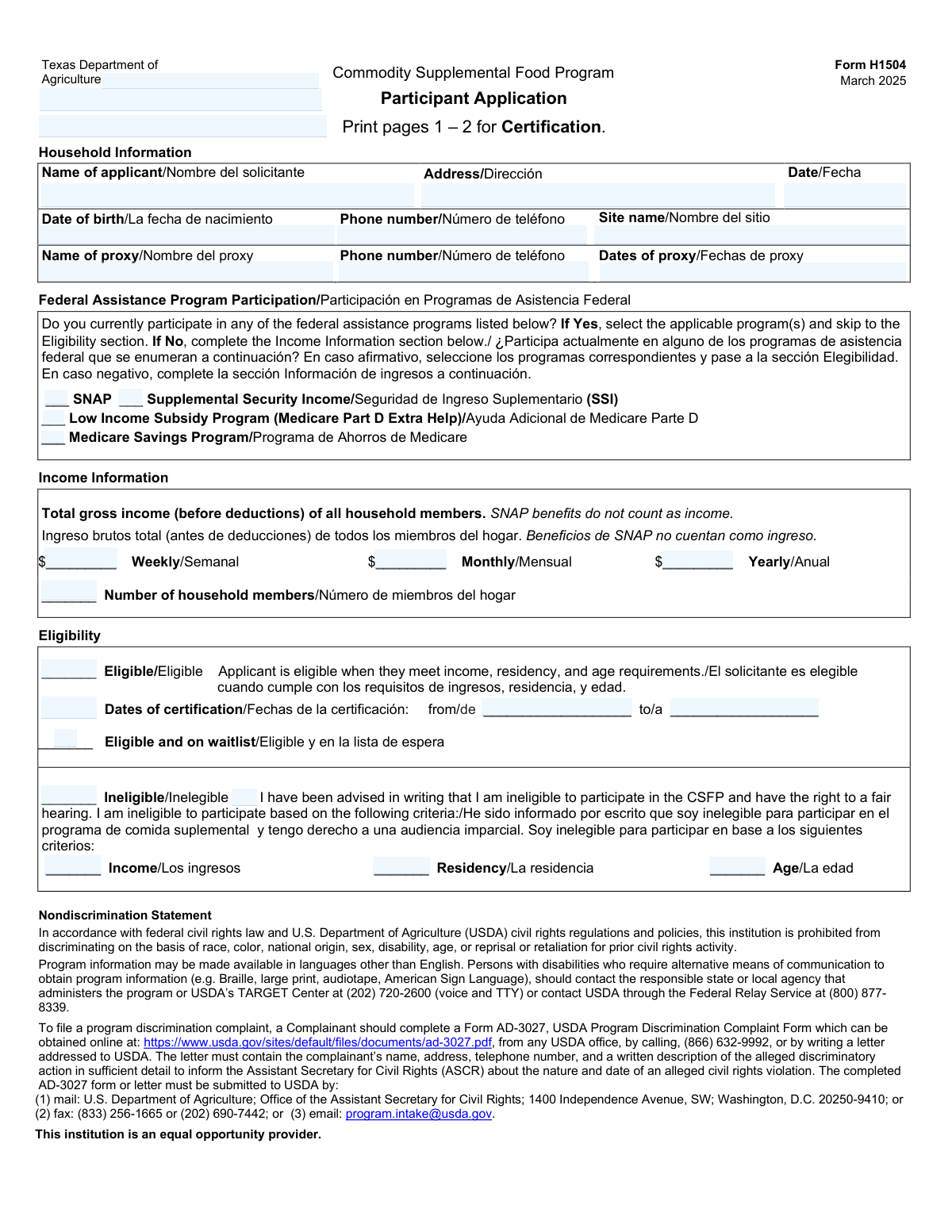
Yes! You can use AI to fill out Form H1504, Commodity Supplemental Food Program Participant Application
Form H1504 is the official application used by the Texas Department of Agriculture to determine an individual's eligibility for the Commodity Supplemental Food Program (CSFP). Applicants provide personal, household, and income information to see if they qualify for supplemental food assistance based on age, residency, and income requirements. Today, this form can be filled out quickly and accurately using AI-powered services like Instafill.ai, which can also convert non-fillable PDF versions into interactive fillable forms.
Our AI automatically handles information lookup, data retrieval, formatting, and form filling.
It takes less than a minute to fill out H1504 using our AI form filling.
Securely upload your data. Information is encrypted in transit and deleted immediately after the form is filled out.
Form specifications
| Form name: | Form H1504, Commodity Supplemental Food Program Participant Application |
| Number of pages: | 3 |
| Language: | English |
Instafill Demo: How to fill out PDF forms in seconds with AI
How to Fill Out H1504 Online for Free in 2026
Are you looking to fill out a H1504 form online quickly and accurately? Instafill.ai offers the #1 AI-powered PDF filling software of 2026, allowing you to complete your H1504 form in just 37 seconds or less.
Follow these steps to fill out your H1504 form online using Instafill.ai:
- 1 Navigate to Instafill.ai and upload the Form H1504 PDF or select it from their template library.
- 2 Use the AI assistant to accurately input your household information, including name, address, date of birth, and contact details.
- 3 Indicate your participation in other federal assistance programs like SNAP or SSI. If you don't participate in any, provide your household's gross income details.
- 4 Complete the ethnicity and race section for federal reporting purposes.
- 5 Carefully read the certification statement, decide whether to authorize the release of your information, and acknowledge receipt of your rights.
- 6 Review all the information pre-filled by the AI for accuracy and make any necessary corrections before signing.
- 7 Electronically sign the application and submit it to the appropriate Texas Department of Agriculture office or site.
Our AI-powered system ensures each field is filled out correctly, reducing errors and saving you time.
Why Choose Instafill.ai for Your Fillable H1504 Form?
Speed
Complete your H1504 in as little as 37 seconds.
Up-to-Date
Always use the latest 2026 H1504 form version.
Cost-effective
No need to hire expensive lawyers.
Accuracy
Our AI performs 10 compliance checks to ensure your form is error-free.
Security
Your personal information is protected with bank-level encryption.
Frequently Asked Questions About Form H1504
Form H1504 is the official application for the Texas Commodity Supplemental Food Program (CSFP). You must complete this form to apply for monthly supplemental food packages.
Anyone wishing to apply for the CSFP in Texas must fill out this form. Eligibility is determined based on your age, residency, and household income.
No, if you currently participate in SNAP, SSI, the Medicare Savings Program, or the Low Income Subsidy Program (Medicare Part D Extra Help), you can skip the income section. Simply check the box for the program you are enrolled in.
You will need to provide basic household information like your name, address, and date of birth. You must also provide information about your household income unless you qualify through another federal assistance program.
A proxy is a person you authorize to act on your behalf for program-related activities, like picking up your food package. You only need to complete this section if you have designated someone to be your proxy.
This is the total income of all members of your household before any taxes or deductions are taken out. Note that SNAP benefits do not count as income for this program.
Program officials will review your form to determine if you meet the eligibility criteria. You will be notified in writing whether you are eligible, eligible but on a waitlist, or ineligible.
This status means you meet all the program requirements, but there are no available openings at the moment. You will be contacted when a spot becomes available for you.
If you are found ineligible, you will receive a written notice explaining the reason. The form states that you have the right to request a fair hearing to appeal the decision.
The annual validation section is used to re-certify your eligibility each year. You will need to confirm your address and report any significant changes to your income or participation in other assistance programs.
Yes, services like Instafill.ai use AI to help you accurately auto-fill form fields. This can save you time and help prevent common mistakes.
To fill out the form online, you can upload the PDF to Instafill.ai. The platform's AI will make the form fillable, allowing you to type your answers directly into the fields before printing the completed document.
If you have a non-fillable or 'flat' PDF, you can use a service like Instafill.ai. It can convert the document into an interactive, fillable form so you can easily type in your information.
Compliance H1504
Validation Checks by Instafill.ai
1
Conditional Income vs. Federal Program Participation
This check ensures that an applicant either selects at least one Federal Assistance Program or provides information in the Income Information section, but not both. This is critical for determining the correct eligibility pathway and prevents contradictory data entry. If validation fails, the form should prompt the user to choose one section to complete and clear the other.
2
Applicant Date of Birth Validity
Validates that the 'Date of birth' is a real, correctly formatted date (e.g., MM/DD/YYYY) and that it is in the past. This is essential for verifying the applicant meets the program's age requirements, which is a primary eligibility criterion. An invalid or future date would make age verification impossible and should be rejected.
3
Proxy Information Completeness
This validation ensures that if the 'Name of proxy' field is filled, the corresponding 'Proxy phone number' and 'Proxy dates' fields are also completed. This is important because all three pieces of information are required to properly authorize and contact the proxy. A failure would result in an incomplete proxy designation, requiring the user to provide the missing details.
4
Mutually Exclusive Income Period
This check verifies that if the Income Information section is used, only one of the income fields (Weekly, Monthly, or Yearly) contains a value. Providing multiple income figures creates ambiguity and makes accurate eligibility calculation impossible. If more than one field is filled, the system should flag an error and require the user to specify a single income period.
5
Household Member Count Validation
Ensures that the 'Number of household members' field contains a positive integer (1 or greater) when the income section is completed. This number is a critical component, along with income, for determining if the household falls within the program's poverty guidelines. A zero, negative, or non-integer value would prevent a valid eligibility assessment.
6
Eligibility Status Exclusivity
This check confirms that only one of the final eligibility statuses ('Eligible', 'Eligible and on waitlist', or 'Ineligible') is selected. These statuses are mutually exclusive and selecting more than one would create a conflicting and invalid record of the application's outcome. The form should enforce a radio-button-like behavior for these options.
7
Conditional Certification Dates Requirement
Verifies that if the applicant's status is marked as 'Eligible', both the 'Certification start date' and 'Certification end date' fields are filled with valid dates. These dates define the period of program eligibility and are mandatory for administering benefits. Failure to provide them for an eligible applicant would result in an incomplete certification.
8
Certification Date Range Logic
This validation ensures the 'Certification end date' is on or after the 'Certification start date'. An end date that precedes the start date is a logical impossibility and indicates a data entry error. This check maintains the integrity of the certification period data.
9
Conditional Ineligibility Reason
This check ensures that if the 'Ineligible' status is selected, at least one of the corresponding reason checkboxes ('Income', 'Residency', or 'Age') is also marked. Program rules require that the reason for denial be documented and communicated to the applicant. An 'Ineligible' status without a specified reason is an incomplete determination.
10
Ethnicity Selection Exclusivity
Validates that exactly one of the two ethnicity options ('Hispanic or Latino' or 'Not Hispanic or Latino') is selected, as per the form's instruction to 'select one category'. This is required for federal reporting and demographic analysis. The system should prevent submission if zero or both options are selected.
11
Race Selection Completeness
This check ensures that at least one option is selected from the 'Race' category list. While the form allows for selecting one or more categories, failing to select any leaves the demographic data incomplete for reporting purposes. The validation should prompt the user to select at least one category before proceeding.
12
Signature Completeness
Verifies that both the 'Applicant or Proxy’s Signature' and the 'CE or Site’s Signature' fields are not empty. These signatures are legally required to certify the correctness of the information and to finalize the application processing. An application missing either signature is considered incomplete and not officially processed.
13
Application Date Validity
This check validates that the main application 'Date' is a valid calendar date and is not set in the future. This date establishes the official submission time for the application and is used for record-keeping and determining certification periods. A future date is a logical error and must be corrected.
14
Required Fields Completeness
Ensures that all mandatory fields, such as 'Name of applicant', 'Address', 'Date of birth', and 'Phone number', are filled out. These fields contain the core information needed to identify, contact, and determine basic eligibility for the applicant. The form cannot be processed without this fundamental data.
Common Mistakes in Completing H1504
Applicants who participate in a qualifying federal program (like SNAP or SSI) are instructed to skip the 'Income Information' section. A common mistake is to check 'Yes' for program participation but then also fill out the weekly or monthly income fields. This creates contradictory information, requires clarification, and delays the application processing. To avoid this, carefully follow the instructions to skip the income section if you are enrolled in one of the listed programs.
The form explicitly asks for 'Total gross income (before deductions),' but many people mistakenly enter their take-home pay (net income). This results in an under-reporting of income, which may be discovered during verification and could lead to application rejection or accusations of misrepresentation. Always refer to your pay stubs for the pre-tax, pre-deduction earnings amount to ensure accuracy.
The income section provides separate fields for weekly, monthly, and yearly income, but applicants should only fill out one. A frequent error is entering amounts in multiple fields, such as providing both a monthly and yearly total, which creates ambiguity for the processor. To prevent this, report your household's total gross income for only one consistent time period that best reflects your earnings.
Although SNAP is a benefit with a monetary value, the form clearly states, 'SNAP benefits do not count as income.' Applicants often include their monthly SNAP allotment in their household income calculation out of habit or misunderstanding. This inflates their reported income and can cause them to be wrongfully deemed ineligible. Always exclude SNAP benefits when calculating the total gross income for this application.
When an applicant designates a proxy, they sometimes only provide the proxy's name but forget to include their phone number or the authorized dates. Without complete contact information and a clear authorization period, the agency cannot communicate with the proxy or verify their status. If you name a proxy, ensure all three related fields—name, phone number, and dates—are filled out completely.
The 'Eligibility' section, which includes checkboxes for 'Eligible,' 'Ineligible,' and certification dates, is intended for completion by program staff only. Applicants sometimes mistakenly fill this section out, attempting to self-assess their eligibility. This can confuse the review process and may require a new form to be completed. Applicants should leave this entire section blank.
Forgetting to sign and date the application is one of the most common and critical errors, rendering the entire form invalid. The signature legally certifies that the information provided is true, and the date establishes the timeline of the application. An unsigned or undated form cannot be processed and will be returned, significantly delaying access to benefits. Always double-check for the applicant's signature and the current date before submission.
The form asks applicants to 'select one category' for Ethnicity (Hispanic or Latino / Not Hispanic or Latino) and 'select one or more categories' for Race. People often confuse the two, select more than one ethnicity, or skip the ethnicity question entirely. This results in incomplete demographic data for program reporting. To avoid this, make one selection for ethnicity and then select all applicable categories for race.
The 'Certification Statement' includes several mandatory acknowledgements, such as authorizing the release of information and confirming receipt of rights notices. Applicants often sign the form but neglect to check 'Yes' or 'No' for these statements. An incomplete certification can stall the application, as the agency requires explicit consent and acknowledgement. Carefully review and check all required boxes in this section before signing.
Page 3 of the form is explicitly for 'annual validation' and should not be filled out by someone submitting their first application. New applicants sometimes see the additional questions and fill them out, providing unnecessary and confusing information. For an initial submission, only pages 1 and 2 should be completed and printed, as stated in the form's instructions. AI-powered tools like Instafill.ai can help by presenting only the relevant sections for an initial application.
A simple typo or omitting an apartment number in the address field can prevent the applicant from receiving critical mail, including approval notices, requests for more information, or benefit distribution schedules. This often happens when filling out forms by hand. It is crucial to write the full, legible mailing address exactly as it appears on a piece of mail. Since this form is a non-fillable PDF, tools like Instafill.ai can convert it to a fillable version and use address validation to prevent such errors.
Saved over 80 hours a year
“I was never sure if my IRS forms like W-9 were filled correctly. Now, I can complete the forms accurately without any external help.”
Kevin Martin Green
Your data stays secure with advanced protection from Instafill and our subprocessors

Robust compliance program
Transparent business model
You’re not the product. You always know where your data is and what it is processed for.
ISO 27001, HIPAA, and GDPR
Our subprocesses adhere to multiple compliance standards, including but not limited to ISO 27001, HIPAA, and GDPR.
Security & privacy by design
We consider security and privacy from the initial design phase of any new service or functionality. It’s not an afterthought, it’s built-in, including support for two-factor authentication (2FA) to further protect your account.
Fill out H1504 with Instafill.ai
Worried about filling PDFs wrong? Instafill securely fills form-h1504-commodity-supplemental-food-program-participant-application forms, ensuring each field is accurate.