Yes! You can use AI to fill out Navy Federal Voluntary Removal of Joint Owner Request
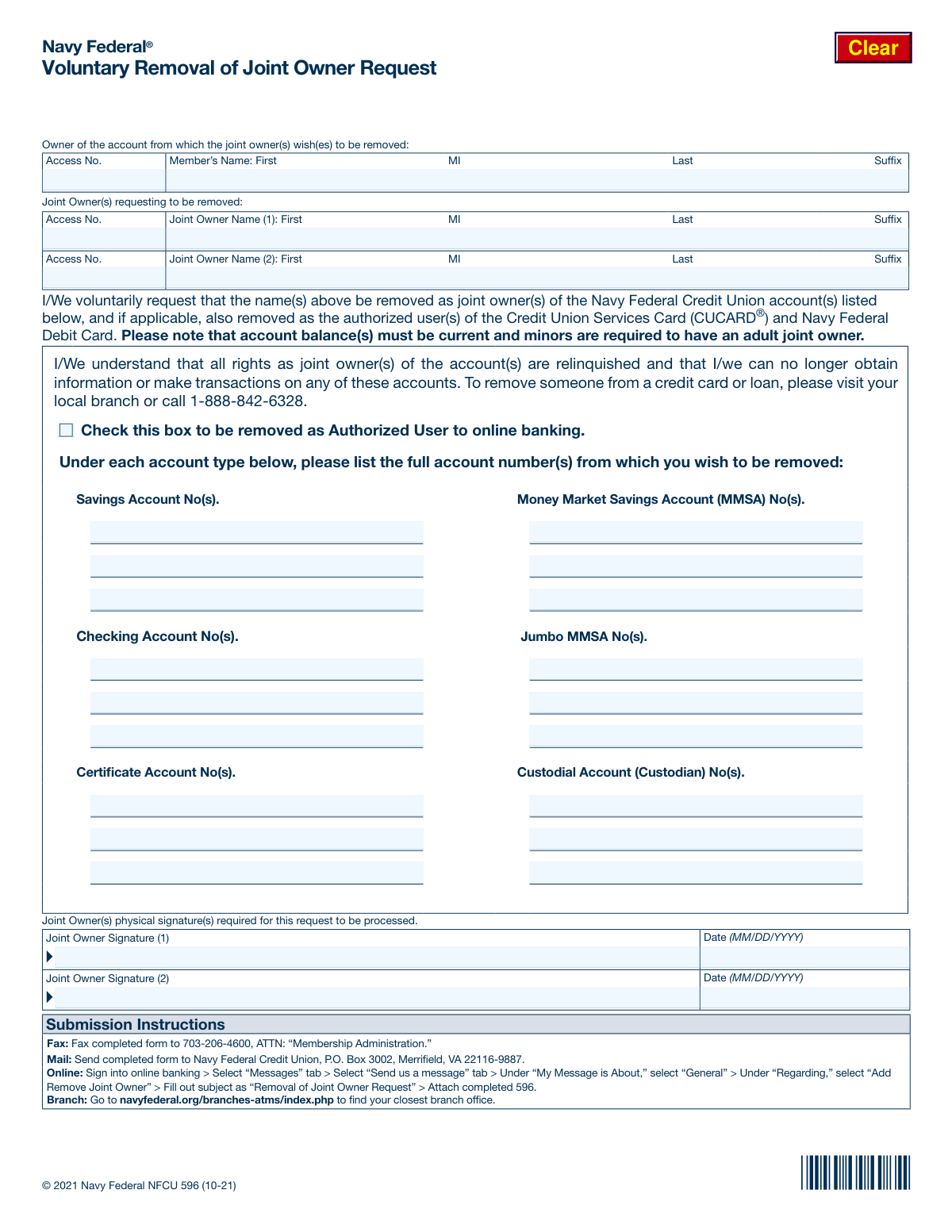
The NFCU 596, or Voluntary Removal of Joint Owner Request, is a legal document provided by Navy Federal Credit Union for joint owners who wish to relinquish their rights and access to shared deposit accounts. Completing this form is a crucial step to formally separate financial responsibilities and ensure account ownership is accurately reflected, preventing future disputes or liabilities. Today, this form can be filled out quickly and accurately using AI-powered services like Instafill.ai, which can also convert non-fillable PDF versions into interactive fillable forms for a seamless digital experience.
Our AI automatically handles information lookup, data retrieval, formatting, and form filling.
It takes less than a minute to fill out NFCU 596 using our AI form filling.
Securely upload your data. Information is encrypted in transit and deleted immediately after the form is filled out.
Form specifications
| Form name: | Navy Federal Voluntary Removal of Joint Owner Request |
| Number of pages: | 1 |
| Language: | English |
| Categories: | federal forms |
Instafill Demo: How to fill out PDF forms in seconds with AI
How to Fill Out NFCU 596 Online for Free in 2026
Are you looking to fill out a NFCU 596 form online quickly and accurately? Instafill.ai offers the #1 AI-powered PDF filling software of 2026, allowing you to complete your NFCU 596 form in just 37 seconds or less.
Follow these steps to fill out your NFCU 596 form online using Instafill.ai:
- 1 Navigate to Instafill.ai and upload the NFCU 596 form or select it from the template library.
- 2 Use the AI assistant to fill in the primary account holder's name and Access Number.
- 3 Provide the full name and Access Number for each joint owner who is requesting to be removed from the accounts.
- 4 List the full account numbers for all savings, checking, money market, and certificate accounts from which you wish to be removed.
- 5 Indicate if you also want to be removed as an Authorized User for online banking by checking the appropriate box.
- 6 Review all the information for accuracy, then apply your legally binding e-signature and the current date in the designated fields.
- 7 Download the completed form and submit it to Navy Federal Credit Union following the instructions provided on the document (fax, mail, online message, or branch visit).
Our AI-powered system ensures each field is filled out correctly, reducing errors and saving you time.
Why Choose Instafill.ai for Your Fillable NFCU 596 Form?
Speed
Complete your NFCU 596 in as little as 37 seconds.
Up-to-Date
Always use the latest 2026 NFCU 596 form version.
Cost-effective
No need to hire expensive lawyers.
Accuracy
Our AI performs 10 compliance checks to ensure your form is error-free.
Security
Your personal information is protected with bank-level encryption.
Frequently Asked Questions About Form NFCU 596
This form is used when a joint owner wants to voluntarily remove themselves from a Navy Federal Savings, Checking, Money Market, or Certificate account. The request must be initiated by the person being removed.
The joint owner who is requesting to be removed from the account must provide their physical signature. The primary account holder's signature is not required on this form for a voluntary removal.
If a joint owner is unwilling to be removed, the primary account holder must perform an 'Account Shutdown.' This involves closing the existing joint account and opening a new one in your name only or with a new joint owner.
No, this form is only for deposit accounts like savings and checking. For loans and credit cards, both parties typically remain responsible for the debt; you must contact Navy Federal for specific removal procedures.
You will need the primary account holder's name and Access Number, the name and Access Number of the joint owner being removed, and the full account numbers for all accounts they wish to be removed from.
You can submit the completed and signed form by fax, by mail, in person at a branch, or by attaching it to a secure message through your Navy Federal online banking portal.
Your old account will be closed, so you must provide your employer with your new account information for direct deposits. Your existing debit card will also become invalid, and a new one will be mailed to you.
Not automatically. To be removed from online banking, you must check the specific box on the form that says 'Check this box to be removed as Authorized User to online banking'.
This form cannot be used for IRAs, as they do not have joint owners. To change a beneficiary, you must complete the 'Designation of Beneficiaries for IRAs' form (NFCU 584).
Your Access Number is your unique member identification number at Navy Federal Credit Union. It is used to identify you and is different from your account numbers.
No, co-borrowers on a CLOC cannot be removed using this process. Both you and the co-borrower remain responsible for repaying any balance on the CLOC.
Yes, services like Instafill.ai use AI to accurately auto-fill form fields with your information. This can help save time and reduce the chance of errors.
Simply upload the NFCU 596 PDF to the Instafill.ai platform. The AI will identify the fields, allowing you to quickly populate your personal details and account information before printing the form for your required signature.
You can use a service like Instafill.ai, which is designed to convert flat, non-fillable PDFs into interactive forms. This allows you to type your information directly onto the document before printing it.
Compliance NFCU 596
Validation Checks by Instafill.ai
Common Mistakes in Completing NFCU 596
This form is exclusively for a joint owner to voluntarily request their own removal. Primary account holders often mistakenly use this form to try and remove an unwilling or unavailable joint owner. This will result in the request being rejected, as involuntary removals require a different process called an 'Account Shutdown,' which involves closing the joint account and opening a new one.
Users frequently assume this form applies to all account types, but it is only for deposit accounts like savings and checking. The form explicitly states that removing someone from a credit card or loan requires a different application process, typically by calling or visiting a branch. Submitting this form for credit products will lead to no action being taken and will delay the actual process.
The form explicitly requires a 'physical signature' from the joint owner(s) being removed. A common error, especially when submitting online, is to type a name or use a generic digital signature font. This will cause the form to be rejected, as the bank requires a handwritten signature for verification. To avoid this, you must print the form, sign it by hand, and then scan or photograph it for submission.
People often enter partial account numbers, transpose digits, or forget to list all the specific accounts from which they wish to be removed. This can result in the removal request being processed for the wrong accounts or, more commonly, only partially completed, leaving the joint owner still attached to some accounts. Carefully double-check and list the full account number for every savings, checking, and certificate account intended for removal.
The purpose of this form is for the joint owner to initiate their own removal, so it must be signed by the person who is leaving the account. A primary owner cannot use this form to remove another person, and their signature in the 'Joint Owner Signature' section is invalid. This misunderstanding of who needs to sign is a frequent cause for immediate rejection of the request.
The form includes a specific checkbox to be removed as an authorized user for online banking. Many people assume that being removed from an account automatically revokes their digital access, but this is not always the case. Forgetting to check this box can result in the individual retaining unintended visibility or access to the primary owner's online banking profile, which can be a significant privacy concern.
The form requires the name and Access Number for both the primary account holder and the joint owner being removed. Data entry errors such as typos, using a nickname, or entering the wrong Access Number are common. These mismatches prevent the credit union from verifying the identities involved, leading to processing delays or rejection of the form until the information is corrected.
The form provides space for two joint owners to request removal simultaneously. If two names are listed in the 'Joint Owner(s) requesting to be removed' section, but only one person signs the form, the request is incomplete. The credit union will only process the removal for the individual who provided a valid signature, leaving the second person on the account.
The instructions note that minor accounts require an adult joint owner. A frequent error is for the only adult on a minor's account to submit this form without first adding a new adult joint owner through the proper channels. Such a request will be denied to ensure the minor's account remains compliant and accessible, causing delays until a replacement custodian is established.
Often, individuals print, fill by hand, and then scan the form, which can result in illegible handwriting and processing errors. If the only available version is a flat PDF, it can be difficult to fill out cleanly on a computer. AI-powered tools like Instafill.ai can convert non-fillable PDFs into interactive forms, ensuring all entries are clear, legible, and correctly formatted to prevent rejection due to poor handwriting.
Saved over 80 hours a year
“I was never sure if my IRS forms like W-9 were filled correctly. Now, I can complete the forms accurately without any external help.”
Kevin Martin Green
Your data stays secure with advanced protection from Instafill and our subprocessors

Robust compliance program
Transparent business model
You’re not the product. You always know where your data is and what it is processed for.
ISO 27001, HIPAA, and GDPR
Our subprocesses adhere to multiple compliance standards, including but not limited to ISO 27001, HIPAA, and GDPR.
Security & privacy by design
We consider security and privacy from the initial design phase of any new service or functionality. It’s not an afterthought, it’s built-in, including support for two-factor authentication (2FA) to further protect your account.
Fill out NFCU 596 with Instafill.ai
Worried about filling PDFs wrong? Instafill securely fills navy-federal-voluntary-removal-of-joint-owner-request forms, ensuring each field is accurate.