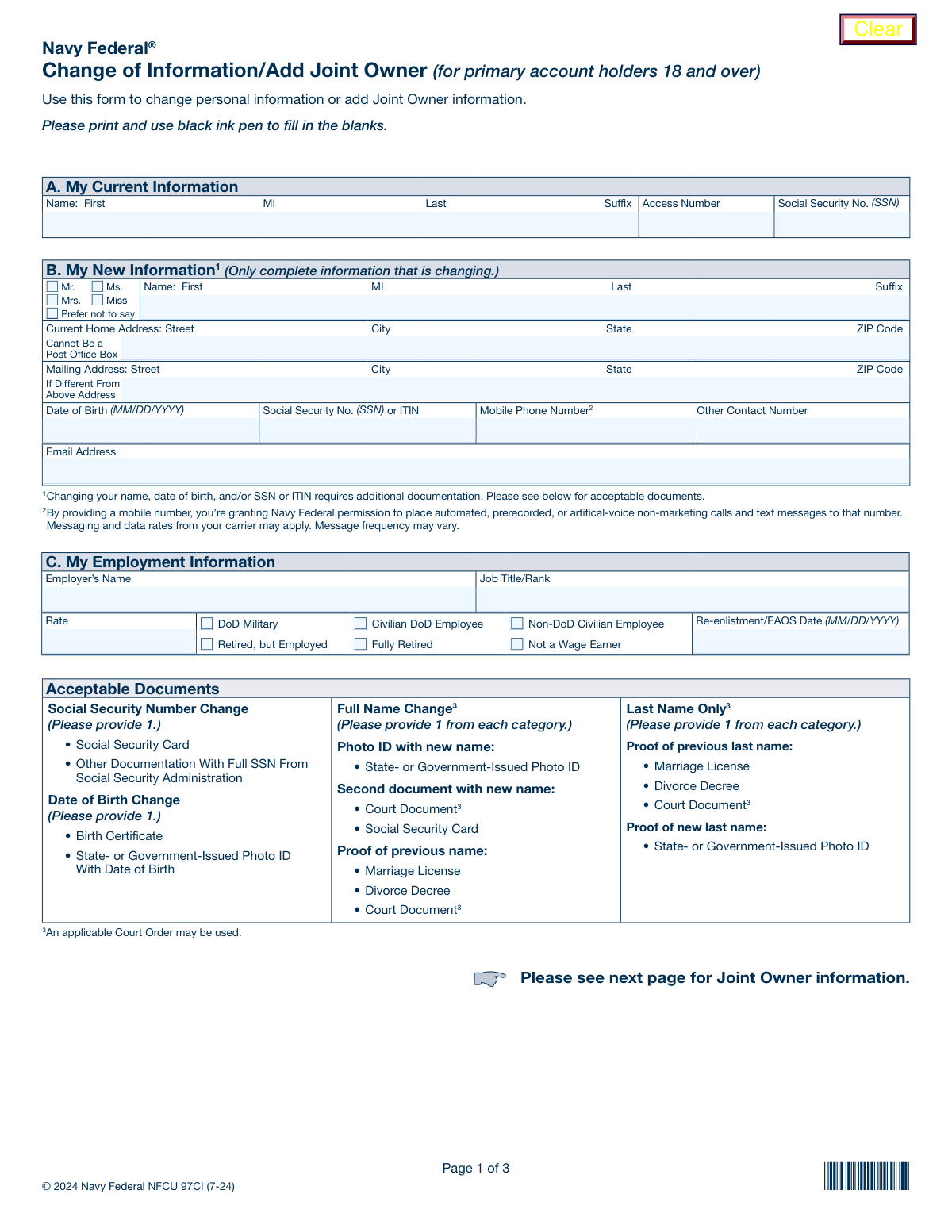
Yes! You can use AI to fill out Navy Federal Change of Information/Add Joint Owner (for primary account holders 18 and over)
Form NFCU 97CI, Change of Information/Add Joint Owner, is a document used by Navy Federal Credit Union members to officially update their personal details—such as name, address, or SSN—or to add a joint owner to their existing accounts. Keeping this information current is crucial for account security, proper communication, and legal ownership of funds. Today, this form can be filled out quickly and accurately using AI-powered services like Instafill.ai, which can also convert non-fillable PDF versions into interactive fillable forms.
Our AI automatically handles information lookup, data retrieval, formatting, and form filling.
It takes less than a minute to fill out NFCU 97CI using our AI form filling.
Securely upload your data. Information is encrypted in transit and deleted immediately after the form is filled out.
Form specifications
| Form name: | Navy Federal Change of Information/Add Joint Owner (for primary account holders 18 and over) |
| Number of fields: | 94 |
| Number of pages: | 3 |
| Language: | English |
| Categories: | federal forms |
Instafill Demo: How to fill out PDF forms in seconds with AI
How to Fill Out NFCU 97CI Online for Free in 2026
Are you looking to fill out a NFCU 97CI form online quickly and accurately? Instafill.ai offers the #1 AI-powered PDF filling software of 2026, allowing you to complete your NFCU 97CI form in just 37 seconds or less.
Follow these steps to fill out your NFCU 97CI form online using Instafill.ai:
- 1 Navigate to Instafill.ai and upload or select the Navy Federal Form 97CI to begin.
- 2 Use the AI assistant to accurately fill in your current information as it appears on your account in Section A.
- 3 Complete the sections for your new information (Section B) or provide the details for the new joint owner (Section D), including personal, contact, and identification information.
- 4 Fill out the employment information for yourself (Section C) and the joint owner (Section E) as required.
- 5 Select the specific accounts to which the joint owner will be added and choose the appropriate survivorship designation in Section F.
- 6 Carefully review all entered information for accuracy, then follow the prompts to electronically sign the document and download the completed form.
- 7 Submit the signed form and any required supporting documents to Navy Federal using one of the methods listed on the form, such as fax, mail, or online message center.
Our AI-powered system ensures each field is filled out correctly, reducing errors and saving you time.
Why Choose Instafill.ai for Your Fillable NFCU 97CI Form?
Speed
Complete your NFCU 97CI in as little as 37 seconds.
Up-to-Date
Always use the latest 2026 NFCU 97CI form version.
Cost-effective
No need to hire expensive lawyers.
Accuracy
Our AI performs 10 compliance checks to ensure your form is error-free.
Security
Your personal information is protected with bank-level encryption.
Frequently Asked Questions About Form NFCU 97CI
This form is used by primary account holders (18 and over) to update their personal information, such as their name, address, or employment details, or to add a joint owner to their accounts.
Any primary Navy Federal member aged 18 or older who needs to change their personal details on file or wants to grant another person joint access to their accounts should use this form.
No, you only need to complete the sections relevant to your change. For an address update, fill out your current information in Section A, your new address in Section B, and then sign and submit the form.
For a full name change, you must provide a photo ID with your new name, a second document with the new name (like a Social Security card), and proof of your previous name (like a marriage license). The form lists the specific acceptable documents for full and last name changes.
To change your SSN, you must provide your Social Security card or other official documentation from the Social Security Administration. For a DOB change, you need to submit either a birth certificate or a state/government-issued photo ID showing your date of birth.
Complete Section D with the new joint owner's personal, contact, and identification information, and specify which accounts they should be added to. The new joint owner must also sign the form in Section G.
No, this form is only for adding a joint owner. To remove a joint owner, you must use the 'Voluntary Removal of Joint Owner Request, NFCU 596' form.
'With Survivorship' means that if one account owner passes away, their share of the account automatically passes to the surviving owner. 'No Survivorship' means the deceased owner's share goes to their estate instead.
You can submit the form and any required documents by fax, by mail, in person at a branch, or online through the secure messaging center in your Navy Federal Online Banking account.
Yes, services like Instafill.ai use AI to accurately auto-fill form fields with your information, which can save you time and help prevent errors.
Simply upload the form to the Instafill.ai platform, and its AI will identify the fields and help you fill them in quickly and accurately. You can then download the completed form for printing and submission.
You can use a service like Instafill.ai, which can convert flat, non-fillable PDFs into interactive, fillable forms. This allows you to easily type your information into the fields before printing.
The primary account holder must always sign the form in Section G. If you are adding a joint owner, the new joint owner must also provide their signature in the designated space.
Compliance NFCU 97CI
Validation Checks by Instafill.ai
1
SSN and ITIN Format Validation
This check verifies that the Social Security Number (SSN) or Individual Taxpayer Identification Number (ITIN) for both the primary applicant and the joint owner consists of exactly nine digits. It is crucial for tax reporting and identity verification. If the number is not exactly nine digits, the form submission should be rejected with an error message prompting the user to enter a valid 9-digit number.
2
Home Address 'No P.O. Box' Rule
Validates that the 'Current Home Address' field for both the primary applicant and the joint owner does not contain 'P.O. Box', 'PO Box', or similar variations. Federal regulations require financial institutions to obtain a physical residential address for identity verification purposes. A submission with a P.O. Box in this field should be flagged for correction.
3
Conditional Re-enlistment/EAOS Date
This validation ensures that the 'Re-enlistment/EAOS Date' field is only filled out if the 'DoD Military' employment status checkbox is selected for the corresponding individual (primary or joint owner). This prevents irrelevant data from being collected and ensures logical consistency. If the date is provided without the 'DoD Military' status, the submission should be flagged for review or rejected.
4
Joint Owner Debit Card Prerequisite
This check confirms that if the 'Issue Navy Federal Debit Card' box is checked for a joint owner, a checking account is also being added for that joint owner. The form explicitly states a checking account is required for a debit card. If this validation fails, an error should be displayed stating that a checking account must be selected to issue a debit card.
5
PII Change Documentation Requirement
If any data is entered into the 'New Name', 'Date of Birth', or 'Social Security No. or ITIN' fields in Section B, this validation flags the submission as requiring supporting documentation. This is a critical compliance check based on the form's instructions. The system should prompt the user to confirm that they have included the required documents (e.g., Social Security Card, State ID) before allowing submission.
6
Joint Owner ID Expiration Date Logic
This check verifies that the 'Exp. Date' for the joint owner's government ID is a valid date that occurs after the 'Issue Date'. It also confirms that the expiration date is not in the past, ensuring the ID is currently valid. Submitting an expired ID can cause rejection, so this check prevents processing delays by catching the error upfront.
7
Conditional Online Banking Email Requirement
Validates that the 'Email Address (for Online Banking)' field for the joint owner is filled and contains a validly formatted email address if the 'Enroll me in Navy Federal Online Banking' box is checked. Online banking enrollment cannot be completed without a valid email. If the box is checked but the email is missing or invalid, the user should be prompted to provide it.
8
Mutually Exclusive Employment Status
This check ensures that for both the primary applicant and the joint owner, only one checkbox is selected from the list of employment statuses (e.g., 'DoD Military', 'Fully Retired'). Selecting multiple statuses would create conflicting data. The form interface should ideally use radio buttons to enforce this, but a backend validation is necessary to prevent invalid submissions.
9
Conditional Joint Owner Signature
Verifies that the 'Signature of Joint Owner' and the corresponding signature date are present if any information has been entered in Section D, 'Joint Owner Information'. Adding a joint owner is a significant legal action that requires their explicit consent via signature. If Section D is complete but the signature is missing, the form is incomplete and must be rejected.
10
Applicant Minimum Age Verification
This validation checks the primary applicant's 'Date of Birth' in Section B to ensure they are 18 years of age or older. The form title explicitly states it is for 'primary account holders 18 and over'. This check prevents ineligible individuals from using the form and ensures compliance with the credit union's policies. Submissions from underage applicants should be rejected.
11
Joint Account Selection Logic
If the 'All primary savings, checking, and MMSA accounts' checkbox is NOT selected in Section D, this validation ensures that at least one specific account type ('Savings', 'Checking', 'MMSA') is checked and its corresponding account number field is filled. This prevents an ambiguous request where a joint owner is being added but no accounts are specified. The submission should be rejected if no accounts are designated for the joint owner.
12
Standard Date Format (MM/DD/YYYY)
This check scans all date fields on the form (Date of Birth, Re-enlistment/EAOS Date, ID Issue/Exp. Date, Signature Dates) to confirm they are in the MM/DD/YYYY format. Consistent date formatting is essential for accurate data processing and record-keeping. Any date not matching this format should trigger an error, asking the user to correct the entry.
13
Email Address Syntax Validation
Verifies that all email address fields on the form adhere to a standard email format (e.g., '[email protected]'). This is important for ensuring that communications from the credit union, especially for online banking, are successfully delivered. An invalid format should trigger an error message requesting the user to enter a valid email address.
14
Unique Identity Validation
This check compares the SSN/ITIN of the primary applicant (Section B) against the SSN/ITIN of the joint owner (Section D). It ensures the two numbers are not identical, as an individual cannot be added as a joint owner to their own account. If the numbers match, the system should return an error explaining that the primary and joint owner must be different individuals.
Common Mistakes in Completing NFCU 97CI
Applicants requesting a change to their name, date of birth, or SSN often forget to include the required supporting documents listed on page 1. This happens because they focus only on filling the form fields and overlook the fine print. Submitting the form without the specified documents, such as a Social Security card or court order, will result in an automatic rejection of the change request and significant processing delays.
In Section B, applicants frequently fill in all fields, even those containing information that hasn't changed. The form explicitly states, '(Only complete information that is changing),' but this instruction is easily missed. This creates ambiguity for the processor, who may not know if the applicant is confirming old data or providing new data, potentially leading to incorrect updates or rejection of the form. AI-powered tools like Instafill.ai can help by only populating fields that are designated for updates.
The form clearly states that the 'Current Home Address' cannot be a Post Office Box, yet applicants often enter one out of habit. This requirement exists for identity verification and legal purposes (CIP regulations). Using a P.O. Box will cause the form to be returned for correction, delaying any requested changes or additions. It's crucial to provide a physical street address in this field and use the separate 'Mailing Address' field for a P.O. Box if needed.
One of the most common and critical errors is failing to sign and date the form in Section G. Applicants may be focused on the details in the main sections and simply overlook the final signature block. An unsigned or undated form is legally invalid and cannot be processed, forcing the credit union to return it and requiring the applicant to start the submission process over again.
When adding a joint owner in Section D, people often make mistakes specifying which accounts to add them to. They might check 'All primary savings, checking, and MMSA accounts' when they only intended to share one, or they may fail to write the complete and accurate account numbers on the provided lines. This can lead to unintended access being granted or the request being rejected for ambiguity. Using a tool like Instafill.ai can help ensure account numbers are entered correctly and completely.
In Section F, applicants must choose between 'Joint Account–With Survivorship' and 'No Survivorship,' which have significant legal and financial consequences. Many people don't understand the difference—that 'With Survivorship' passes funds directly to the surviving owner, while 'No Survivorship' passes them to the deceased's estate. Choosing the wrong option, or leaving it blank (which defaults to 'With Survivorship'), can disrupt estate plans and lead to unintended asset distribution.
The instructions for Section D state that if the person being added as a Joint Owner is already a Navy Federal member, they only need to provide their Access Number and signature. However, existing members often fill out their entire personal and employment information again unnecessarily. This creates redundant work and can introduce errors if the re-entered data doesn't perfectly match their existing file.
The form requires dates in MM/DD/YYYY format and SSNs without dashes, but applicants often use other formats (e.g., DD/MM/YYYY) or include dashes in the SSN field. These inconsistencies can cause data entry errors or trigger validation failures in the credit union's system. AI-powered form filling tools like Instafill.ai can prevent this by automatically formatting dates, SSNs, and other data to match the required specifications.
Non-U.S. citizens or non-resident aliens frequently miss the small checkbox below the signature line in Section G. This box is a required certification that they are not a U.S. person and have completed the necessary Form W-8BEN. Overlooking this step can lead to incorrect tax withholding and compliance issues with the IRS, causing future complications for the account holder.
The form provides four different submission methods (Fax, Mail, Online, Branch), each with specific instructions. Common mistakes include mailing original documents instead of photocopies, forgetting to attach the scanned form to the online message, or using an incorrect fax number. An improper submission can result in the loss of documents or the form never reaching the correct department, requiring the applicant to resubmit everything. Since this form is a non-fillable PDF, tools like Instafill.ai can convert it to a fillable version, making online submission easier and more legible.
Saved over 80 hours a year
“I was never sure if my IRS forms like W-9 were filled correctly. Now, I can complete the forms accurately without any external help.”
Kevin Martin Green
Your data stays secure with advanced protection from Instafill and our subprocessors

Robust compliance program
Transparent business model
You’re not the product. You always know where your data is and what it is processed for.
ISO 27001, HIPAA, and GDPR
Our subprocesses adhere to multiple compliance standards, including but not limited to ISO 27001, HIPAA, and GDPR.
Security & privacy by design
We consider security and privacy from the initial design phase of any new service or functionality. It’s not an afterthought, it’s built-in, including support for two-factor authentication (2FA) to further protect your account.
Fill out NFCU 97CI with Instafill.ai
Worried about filling PDFs wrong? Instafill securely fills navy-federal-change-of-informationadd-joint-owner-for-primary-account-holders-18-and-over forms, ensuring each field is accurate.