Yes! You can use AI to fill out New Account Agreement
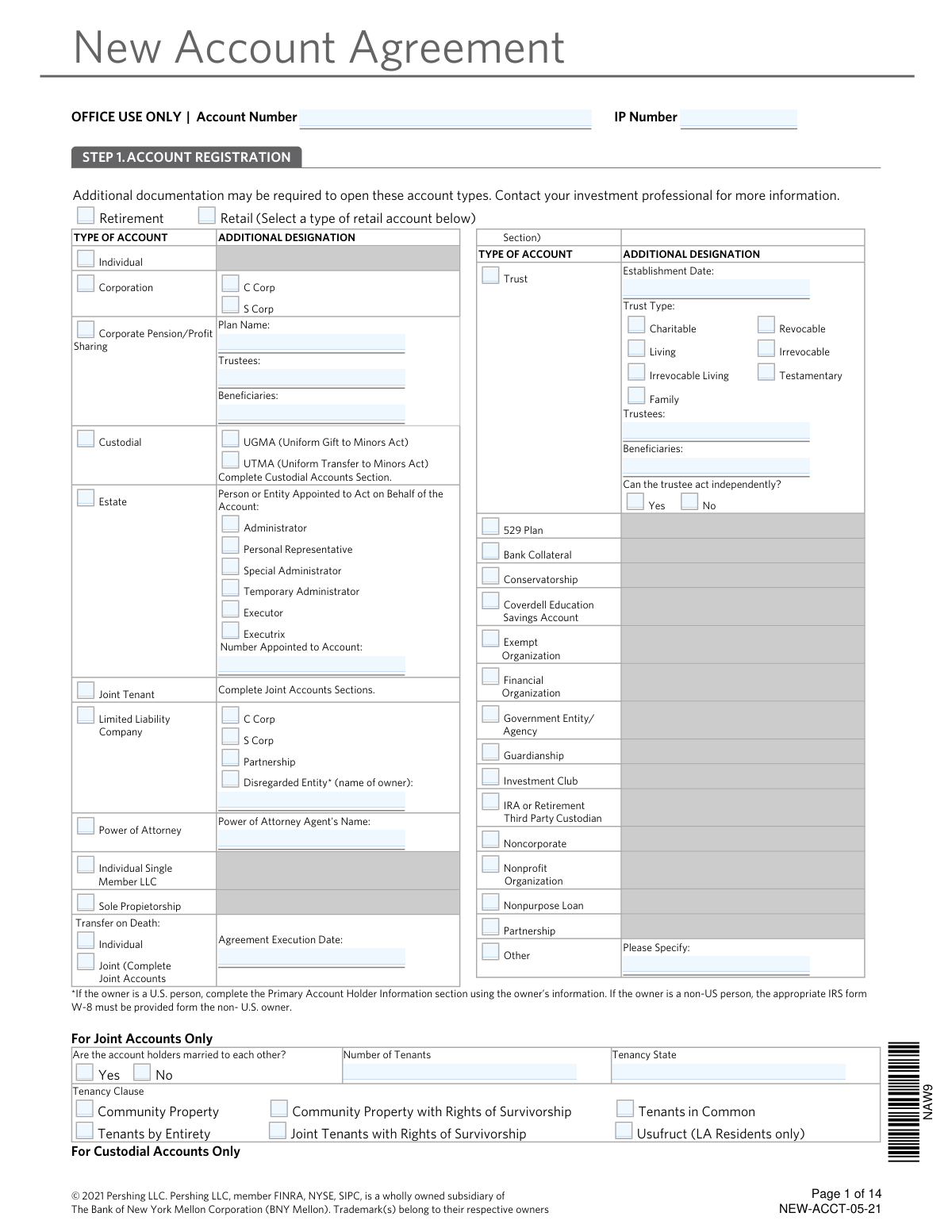
The New Account Agreement is a comprehensive document required to open a new investment or brokerage account with a financial institution. It gathers essential information about the account holder(s), including personal details, financial status, investment objectives, and information required for regulatory compliance such as the USA PATRIOT Act and FinCEN rules. Today, this form can be filled out quickly and accurately using AI-powered services like Instafill.ai, which can also convert non-fillable PDF versions into interactive fillable forms.
Our AI automatically handles information lookup, data retrieval, formatting, and form filling.
It takes less than a minute to fill out NEW-ACCT-05-21 using our AI form filling.
Securely upload your data. Information is encrypted in transit and deleted immediately after the form is filled out.
Form specifications
| Form name: | New Account Agreement |
| Number of pages: | 1 |
| Language: | English |
Instafill Demo: How to fill out PDF forms in seconds with AI
How to Fill Out NEW-ACCT-05-21 Online for Free in 2026
Are you looking to fill out a NEW-ACCT-05-21 form online quickly and accurately? Instafill.ai offers the #1 AI-powered PDF filling software of 2026, allowing you to complete your NEW-ACCT-05-21 form in just 37 seconds or less.
Follow these steps to fill out your NEW-ACCT-05-21 form online using Instafill.ai:
- 1 Navigate to Instafill.ai and upload or select the New Account Agreement form.
- 2 Use the AI assistant to accurately fill in the Account Registration (Step 1) and Primary Account Holder Information (Step 4), including name, address, SSN/EIN, and contact details.
- 3 Complete the compliance sections, including the Institutional/Non-Institutional Account (Step 2), USA Patriot Act Information (Step 3), and FinCEN Certification (Step 6).
- 4 Provide details on your financial profile, investment knowledge, and objectives in the relevant sections (Steps 4 & 11).
- 5 Specify your preferences for cash management (Step 9), tax lot disposition methods (Step 12), and bond elections (Step 13).
- 6 Carefully review all the information entered by the AI for accuracy, then complete the U.S. Taxpayer Number Certification (Step 16) and electronically sign the agreement in the Signatures section (Step 17).
Our AI-powered system ensures each field is filled out correctly, reducing errors and saving you time.
Why Choose Instafill.ai for Your Fillable NEW-ACCT-05-21 Form?
Speed
Complete your NEW-ACCT-05-21 in as little as 37 seconds.
Up-to-Date
Always use the latest 2026 NEW-ACCT-05-21 form version.
Cost-effective
No need to hire expensive lawyers.
Accuracy
Our AI performs 10 compliance checks to ensure your form is error-free.
Security
Your personal information is protected with bank-level encryption.
Frequently Asked Questions About Form NEW-ACCT-05-21
This form is used to open a new brokerage account with Pershing LLC. It collects the necessary personal, financial, and regulatory information required to establish and manage your investment account.
Any individual or entity wishing to open a new investment account, such as an individual, joint, corporate, or trust account, must complete this agreement. Your investment professional will help you determine which sections are required for your specific account type.
You will need to provide personal details like your name, address, date of birth, and Social Security Number. As required by federal law, you may also be asked for a copy of a government-issued photo ID, such as a driver's license, to verify your identity.
No, you must provide a physical street address for your legal residence. A post office box is not an acceptable legal address for opening the account.
A Trusted Contact is a person you authorize the financial institution to contact if they have concerns about your well-being or suspect fraudulent activity on your account. While optional, adding a trusted contact is a recommended security measure.
This method determines which shares of a security are sold first, which impacts the calculation of capital gains or losses for tax purposes. You should consult a tax advisor to choose the best method, such as FIFO or LIFO, for your financial situation.
If you are a nonresident alien or foreign entity, you should not sign the U.S. Taxpayer Certification. Instead, you must submit the appropriate IRS Form W-8, such as W-8BEN, along with your application.
Yes, for a joint account, all owners must sign the form in the Signatures section (Step 17). If there are more than two owners, you will need to use the additional participant supplement.
You can request a User ID and set your e-delivery preferences in Step 10. Once your account is open, you will receive an email with instructions to access your account online.
This information is required under the USA PATRIOT Act to help prevent money laundering and the financing of terrorism. All U.S. financial institutions are legally required to collect this information when opening a new account.
By signing this agreement, you agree to resolve most potential disputes with the firm through binding arbitration rather than in court. This means you are waiving your right to a jury trial for those issues.
Yes, services like Instafill.ai use AI to accurately auto-fill form fields with your information, which can save you time and help reduce errors. This is especially helpful for complex forms requiring repetitive data entry.
Simply upload the New Account Agreement PDF to the Instafill.ai platform. The AI will identify the fields, allowing you to use its secure features to automatically populate your personal, financial, and contact information quickly and efficiently.
You can use a service like Instafill.ai, which can convert flat, non-fillable PDFs into interactive, fillable forms. Once converted, you can easily type in your information or use the AI auto-fill feature to complete the agreement.
Compliance NEW-ACCT-05-21
Validation Checks by Instafill.ai
1
Verifies Legal Address is a Physical Street Address
This check ensures the legal address provided for the primary and any additional account holders is a physical street address and not a P.O. Box. This is a mandatory requirement under the USA PATRIOT Act to verify the identity and physical presence of the account holder. Submitting a P.O. Box will result in the rejection of the application until a valid street address is provided.
2
Validates SSN/EIN Format and Type Consistency
This check ensures the Social Security Number (SSN) or Employer Identification Number (EIN) is in the correct format (XXX-XX-XXXX for SSN, XX-XXXXXXX for EIN). It also cross-references that an SSN is provided if 'Person' is selected, and an EIN is provided if 'Entity' is selected. This is crucial for tax reporting and identity verification, and a mismatch or invalid format will prevent account opening.
3
Confirms Government ID is Not Expired
This validation checks that the 'Date of Expiration' for the provided government photo ID is a future date. This is a key part of the Customer Identification Program (CIP) to ensure the identity document is currently valid for verification. An expired ID will fail verification and require the applicant to submit a new, unexpired form of identification.
4
Mandatory Completion of USA PATRIOT Act Section
Verifies that all questions within Step 3, the 'USA PATRIOT Act Information' section, have been answered, including the source of funds and questions regarding foreign institutions and political officials. This section is critical for anti-money laundering (AML) compliance. Any unanswered questions will render the application incomplete and cause immediate rejection.
5
Ensures Secondary Holder Information for Joint Accounts
If the 'Account Registration' in Step 1 is selected as 'Joint Tenant', this validation ensures that the 'Additional Holder/Participant Information' section (Step 5) is completed for the secondary account holder. A joint account cannot be established without the complete legal and financial details of all tenants. An application for a joint account with missing secondary holder information will be considered incomplete.
6
Validates 'Specified Adult' Status Against Date of Birth
This check cross-references the applicant's 'Date of Birth' with their 'Specified Adult' designation. If the applicant is calculated to be 65 years or older, the 'Specified Adult' field should be marked 'Yes'. This is important for complying with FINRA Rule 2165, which provides protections for senior investors, and may trigger a review to ensure a trusted contact is considered.
7
Requires Details for Politically Exposed Person (PEP) Declaration
If the applicant answers 'Yes' to being a senior military, governmental, or political official (or being associated with one), this check ensures the official's name, office, and country are provided. This is a critical AML requirement for identifying and conducting enhanced due diligence on Politically Exposed Persons (PEPs). The application cannot proceed without these details if the applicant is identified as a PEP.
8
Validates Tax Certification for U.S. vs. Non-U.S. Persons
This check verifies that if an applicant is identified as a non-U.S. person (e.g., 'U.S. Resident Alien' is 'No'), the 'U.S. Taxpayer Number Certification' in Step 16 is not signed. The instructions mandate that non-U.S. persons must submit an appropriate IRS Form W-8 instead. Incorrectly signing the certification can lead to improper tax withholding and reporting, requiring correction before the account can be fully activated.
9
Requires Broker-Dealer Details upon Affirmative Affiliation
If the applicant answers 'Yes' to being an employee of, or related to an employee of, another broker-dealer, this check ensures that the corresponding 'Broker-Dealer Name' field is completed. This information is a regulatory requirement (FINRA Rule 3210) to monitor potential conflicts of interest. Failure to provide the name will halt the application process until the required details are supplied.
10
Ensures Consistent Financial Aggregation for Joint Accounts
For joint accounts, if the 'Check box if aggregated with other joint tenants' is selected, this validation confirms that all financial fields (Annual Income, Net Worth, Liquid Net Worth) are filled out. This ensures a complete and accurate financial profile for suitability assessments. Incomplete aggregated data can lead to a misrepresentation of the joint financial status and may require clarification before approval.
11
Verifies Completeness of Minor's Details for Custodial Accounts
If the account type is 'Custodial' (UGMA or UTMA), this validation confirms that the 'For Custodial Accounts Only' section is fully completed, including the Minor's Date of Birth and the state in which the gift was given. This information is legally required to establish the account for the benefit of the minor. Failure to provide the minor's details will prevent the creation of the custodial account.
12
Validates User ID Character Length Requirements
This check ensures that the desired User ID entered in Step 10 is between 7 and 15 characters long, as specified in the instructions. This is a system constraint for creating a valid online access profile. If the chosen ID does not meet the length criteria, the user will be prompted to select a different ID, and online access cannot be established until a valid one is provided.
13
Ensures Financial Range Validity
This validation checks that for 'Annual Income', 'Net Worth', and 'Liquid Net Worth', the 'From' value is less than or equal to the 'To' value. It also ensures that both fields in a range are populated if one is, and that the values are numeric. This prevents illogical data entry, ensuring the financial profile is coherent for suitability analysis.
14
Confirms Selection of Tax Lot Disposition Methods
This check verifies that the applicant has selected one disposition method for each of the three categories in Step 12: Mutual Funds, Stocks in Pershing’s Dividend Reinvestment Plans, and All other securities. The instructions state that if no choice is made, a federally mandated default will be applied. This validation ensures the client's preference is captured to avoid defaulting, which is important for managing tax implications.
Common Mistakes in Completing NEW-ACCT-05-21
Applicants often enter a P.O. Box out of habit, but the form explicitly states the legal address must be a physical street address for identity verification under the USA PATRIOT Act. This mistake will cause the application to be rejected or delayed until a valid street address is provided. To avoid this, always double-check address field requirements and use your permanent residence address. AI-powered tools like Instafill.ai can help by flagging P.O. boxes in fields that require a physical address.
The instructions require that if you provide a combined annual income for a joint account, you must also provide a combined net worth. Applicants frequently mix and match, providing one combined figure and one individual figure, which creates an inaccurate financial profile. This inconsistency can lead to processing delays and compliance reviews. Ensure all financial figures (income, net worth, liquid net worth) are reported consistently as either individual or combined.
This section is a common source of errors due to its complexity. For joint accounts, applicants may provide the wrong Social Security Number (it should be the person listed first), or for custodial accounts, they might use the custodian's SSN instead of the minor's. Non-U.S. persons often mistakenly sign this section instead of submitting the required IRS Form W-8. These errors can lead to incorrect tax reporting, backup withholding, and significant delays. Carefully read the instructions for your specific situation to ensure the correct TIN is used and certified.
The form clearly states that for a joint account, both the primary and secondary owners must sign in the Signatures section. It is a very common oversight for one party to sign while the other forgets, rendering the agreement incomplete and invalid. This will halt the account opening process entirely until all required signatures are obtained. Always verify that all listed account holders have printed their name, signed, and dated the document before submission.
The 'Tax Lot Disposition Methods' section is complex and filled with financial jargon, causing many applicants to skip it. If left blank, a federally mandated default (usually First-In, First-Out) is applied, which may not be the most tax-efficient strategy for the investor. This can result in higher-than-necessary capital gains taxes when securities are sold. While a tax advisor should be consulted, understanding the options is crucial; leaving it blank cedes an important financial decision to a default setting.
In Step 1, applicants often select an account type like 'Trust' or 'Corporation' but fail to provide the necessary nested details such as the 'Establishment Date', 'Trustees', or 'Plan Name'. Each special account type has sub-fields that are mandatory for proper setup and legal registration. Missing this information guarantees the application will be returned for completion, delaying the account opening. It is critical to fill out all fields relevant to the selected account type.
Applicants may misunderstand or overlook the questions regarding their or their immediate family's employment or affiliation with a broker-dealer, FINRA, or a publicly traded company. This information is a strict regulatory requirement to monitor for potential conflicts of interest or insider trading. Answering 'No' incorrectly can lead to serious compliance violations and potential account restrictions later. It is crucial to answer these questions accurately and completely.
The instructions repeatedly mention that additional documentation may be required for certain account types (e.g., Trust agreements, Corporate resolutions) or for non-U.S. persons (IRS W-8 forms). Applicants frequently submit only the main application, assuming it is sufficient. This is a primary cause of processing delays, as the financial institution cannot proceed without the complete set of legal documents. Always review the requirements for your specific account type to ensure all necessary attachments are included.
When adding an 'Additional Holder/Participant' in Step 5, the form requires specifying their role using a code from a long list (e.g., TSTE for Trustee, BENF for Beneficiary). Applicants often leave this blank or guess the wrong code, creating ambiguity about the individual's legal authority and rights on the account. This can cause legal and operational issues down the line. Using a tool like Instafill.ai, which can be trained on such forms, could help select the correct role from a dropdown, preventing errors. If the form is a non-fillable PDF, Instafill.ai can also convert it to a smart, fillable version.
Step 3, 'USA PATRIOT ACT INFORMATION,' requires applicants to declare the initial source of funds for the account (e.g., 'Accumulated Savings', 'Inheritance'). This is a mandatory anti-money laundering (AML) requirement. Leaving this section blank or providing a vague answer will immediately flag the application for review and halt the account opening process until the information is clarified. Always select the most accurate source to ensure a smooth application process.
Saved over 80 hours a year
“I was never sure if my IRS forms like W-9 were filled correctly. Now, I can complete the forms accurately without any external help.”
Kevin Martin Green
Your data stays secure with advanced protection from Instafill and our subprocessors

Robust compliance program
Transparent business model
You’re not the product. You always know where your data is and what it is processed for.
ISO 27001, HIPAA, and GDPR
Our subprocesses adhere to multiple compliance standards, including but not limited to ISO 27001, HIPAA, and GDPR.
Security & privacy by design
We consider security and privacy from the initial design phase of any new service or functionality. It’s not an afterthought, it’s built-in, including support for two-factor authentication (2FA) to further protect your account.
Fill out NEW-ACCT-05-21 with Instafill.ai
Worried about filling PDFs wrong? Instafill securely fills new-account-agreement forms, ensuring each field is accurate.