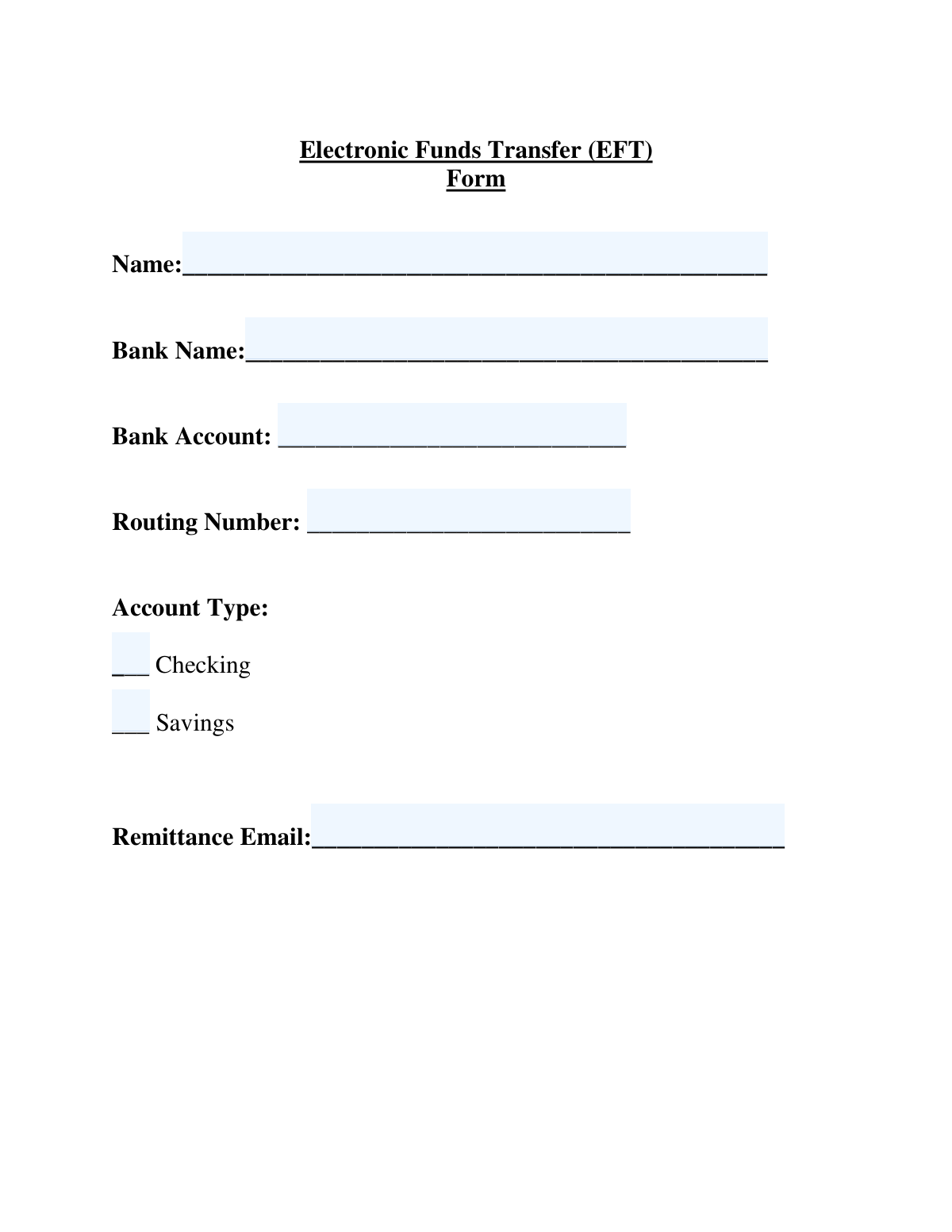
Yes! You can use AI to fill out Electronic Funds Transfer (EFT) Form
An Electronic Funds Transfer (EFT) Form is a document used to authorize an organization to send payments directly to an individual's or business's bank account. It provides the necessary banking details, such as routing and account numbers, to facilitate secure and efficient electronic payments, eliminating the need for paper checks. Today, this form can be filled out quickly and accurately using AI-powered services like Instafill.ai, which can also convert non-fillable PDF versions into interactive fillable forms.
Our AI automatically handles information lookup, data retrieval, formatting, and form filling.
It takes less than a minute to fill out EFT Form using our AI form filling.
Securely upload your data. Information is encrypted in transit and deleted immediately after the form is filled out.
Form specifications
| Form name: | Electronic Funds Transfer (EFT) Form |
| Number of pages: | 1 |
| Language: | English |
| Categories: | transfer forms, funds transfer forms |
Instafill Demo: How to fill out PDF forms in seconds with AI
How to Fill Out EFT Form Online for Free in 2026
Are you looking to fill out a EFT FORM form online quickly and accurately? Instafill.ai offers the #1 AI-powered PDF filling software of 2026, allowing you to complete your EFT FORM form in just 37 seconds or less.
Follow these steps to fill out your EFT FORM form online using Instafill.ai:
- 1 Navigate to Instafill.ai and upload or select the Electronic Funds Transfer (EFT) Form.
- 2 Use the AI assistant to automatically populate your name and contact information.
- 3 Enter your financial institution's details, including the bank name, routing number, and your specific account number.
- 4 Indicate the type of account by checking the appropriate box for 'Checking' or 'Savings'.
- 5 Provide the email address where you wish to receive payment remittance advice or notifications.
- 6 Carefully review all entered information for accuracy to prevent payment delays.
- 7 Securely sign the form electronically and submit it as instructed by the paying entity.
Our AI-powered system ensures each field is filled out correctly, reducing errors and saving you time.
Why Choose Instafill.ai for Your Fillable EFT Form Form?
Speed
Complete your EFT Form in as little as 37 seconds.
Up-to-Date
Always use the latest 2026 EFT Form form version.
Cost-effective
No need to hire expensive lawyers.
Accuracy
Our AI performs 10 compliance checks to ensure your form is error-free.
Security
Your personal information is protected with bank-level encryption.
Frequently Asked Questions About Form EFT Form
This form is used to authorize an organization to send payments directly to your bank account. It is a secure and efficient way to receive funds, such as payroll or vendor payments, without a paper check.
Any individual or business that wishes to receive electronic payments from a company or organization must complete this form. This includes employees for direct deposit, vendors for invoice payments, or individuals for reimbursements.
You can find your account and routing numbers on a physical check, through your bank's online portal, or on a bank statement. The routing number is a nine-digit code, and the account number is the unique identifier for your specific account.
A remittance email is the email address where you will receive notifications or advice slips when a payment is deposited into your account. This helps you track payments and reconcile your records.
While this form doesn't explicitly ask for one, many organizations require a voided check or a bank letter to verify your account details. It is best to confirm this requirement with the entity that requested the form.
Yes, providing your information on an EFT form is a standard and secure business practice for setting up direct deposits. The information is used exclusively for processing payments and is handled confidentially.
If you change banks or your account number is updated, you must submit a new, completed EFT form to the paying organization immediately. This ensures your payments continue without interruption.
Activation time varies by organization but typically takes one to two payment cycles. You should confirm the specific timeline with the company processing your payments.
Yes, you can generally use either a checking or savings account, but you must accurately mark the account type on the form. Check with your bank, as some savings accounts may have transfer limitations.
Yes, services like Instafill.ai use AI to accurately auto-fill form fields with your saved information. This can save you time and help prevent common errors when completing the form.
To fill this form online, upload the PDF to Instafill.ai. The platform will make the fields interactive, allowing you to type in your information or use the AI to auto-fill it from your saved profile.
If you have a non-fillable or 'flat' PDF, you can use a tool like Instafill.ai. It can convert the static document into an interactive, fillable form that you can complete and sign electronically.
Compliance EFT Form
Validation Checks by Instafill.ai
1
Name Field Completeness
Verifies that the 'Name' field is not left blank. The name is essential for identifying the account holder and matching records for the transaction. If this field is empty, the form submission will be rejected with an error message prompting the user to provide their full name.
2
Bank Name Completeness
Checks that the 'Bank Name' field has been filled out. The name of the financial institution is required to correctly route the funds and for internal record-keeping. If validation fails, the submission is blocked, and the user is notified that the bank name is a required field.
3
Bank Account Number Completeness
Ensures the 'Bank Account' number field is not empty. The account number is the primary identifier for the destination account within the bank. Without it, funds cannot be transferred, so an empty field will block the submission and prompt the user for input.
4
Bank Account Number Format
Validates that the 'Bank Account' field contains only numeric digits and is within a standard length range (e.g., 8 to 17 digits). Non-numeric characters or an incorrect length will cause the transaction to fail. This check prevents basic data entry errors before submission.
5
Routing Number Completeness
Verifies that the 'Routing Number' field is not empty. This number is critical for identifying the correct financial institution in the ACH network. An empty field will result in an immediate validation failure, preventing the form from being submitted.
6
Routing Number Format and Length
Ensures the 'Routing Number' field contains exactly 9 digits and consists only of numbers. All US bank routing numbers are precisely 9 digits long, and any deviation indicates an error. If the entry is not 9 digits, the form will be rejected, and the user will be instructed to enter a valid number.
7
Routing Number Checksum Validation
Performs a mathematical checksum calculation on the 9-digit routing number to confirm its authenticity. This validation catches typos and fabricated numbers that would otherwise appear syntactically correct, preventing failed transfers. A failed checksum indicates the number is invalid, and the submission will be blocked.
8
Exclusive Account Type Selection
Confirms that exactly one account type ('Checking' or 'Savings') has been selected. The system must know the specific account type to process the EFT correctly. Selecting none or both would create ambiguity and lead to transaction failure, so the user will be prompted to make a single choice.
9
Remittance Email Completeness
Checks that the 'Remittance Email' field is not left blank. This email is used to send payment confirmations and remittance advice. An empty field would prevent the user from receiving important notifications, so it is flagged as a required field.
10
Remittance Email Format Validation
Validates that the value entered in the 'Remittance Email' field conforms to a standard email address structure (e.g., '[email protected]'). An invalid email address will cause notifications to bounce. This check ensures the communication channel is viable before accepting the form.
11
Overall Form Completeness
Performs a final check to ensure all mandatory fields (Name, Bank Name, Bank Account, Routing Number, Account Type, Remittance Email) are filled out before allowing submission. This check guarantees that all necessary data for a successful EFT has been provided. If any required field is empty, the submission is prevented, and the empty fields are highlighted.
12
Bank Account Number Security Check
Scans the 'Bank Account' field for common, insecure test patterns like sequential numbers (e.g., '123456789') or repeating digits (e.g., '11111111'). This helps filter out placeholder data or simple fraudulent attempts. A detected pattern will cause the submission to be flagged or rejected, asking the user to enter a valid account number.
Common Mistakes in Completing EFT Form
This is one of the most critical errors, often caused by a simple typo or transposing two digits. If the account number is wrong, the funds could be sent to the wrong person's account or the transaction will fail entirely. To avoid this, carefully double-check the account number against a reliable source like a check or your online banking portal before submitting the form.
Banks often have different routing numbers for different types of transactions, such as ACH/EFT, domestic wires, and international wires. Using a wire transfer routing number on an EFT form will cause the transaction to be rejected. Always use the ACH or electronic routing number, which is the 9-digit number found at the bottom of a check, and verify it on your bank's official website.
People sometimes use a nickname, an initial, or a business DBA name instead of the full legal name associated with the bank account. If the name on the form does not exactly match the name on the bank account, the financial institution will reject the transfer, leading to payment delays. Always enter the full, official account holder name as it appears on your bank statements.
A small typo in the email address, such as 'gmal.com' instead of 'gmail.com', is a frequent mistake. This error prevents you from receiving crucial payment notifications, remittance advice, or alerts about failed transactions. Carefully review the email address for accuracy to ensure you stay informed about your payment status.
It's easy to overlook the simple checkbox for 'Checking' or 'Savings' when focusing on the long strings of numbers. Failing to specify the account type can cause the form to be rejected as incomplete or lead to a failed transaction, as some savings accounts have transfer limitations. Always ensure you have clearly marked one of the account type options.
Entering a common abbreviation like 'BofA' or 'WF' instead of the full legal name 'Bank of America, N.A.' or 'Wells Fargo Bank, N.A.' can cause processing issues. Automated systems may fail to recognize the bank, leading to manual intervention and delays. To prevent this, use the full, official name of your financial institution found on your bank statement.
When filling out a printed PDF by hand, poor handwriting can cause data entry clerks to misread numbers and letters. A misread '1' as a '7' in an account number can cause a payment to fail or be misdirected. To avoid this, print clearly in block letters or, ideally, use a tool like Instafill.ai that can make non-fillable PDFs fillable on your computer for perfectly legible text.
Individuals or businesses that have recently switched banks may accidentally provide details for a previously closed account out of habit. This guarantees the transaction will fail, forcing the payer to contact you for updated information and delaying your payment significantly. Always confirm you are providing details for a current, active bank account before submitting the form.
Some people add spaces or dashes to their bank account or routing numbers for readability, but this can confuse automated processing systems. Unless the form specifies otherwise, these numbers should be entered as a continuous string of digits. AI-powered tools like Instafill.ai can help prevent this by automatically formatting numbers correctly according to system requirements.
Saved over 80 hours a year
“I was never sure if my IRS forms like W-9 were filled correctly. Now, I can complete the forms accurately without any external help.”
Kevin Martin Green
Your data stays secure with advanced protection from Instafill and our subprocessors

Robust compliance program
Transparent business model
You’re not the product. You always know where your data is and what it is processed for.
ISO 27001, HIPAA, and GDPR
Our subprocesses adhere to multiple compliance standards, including but not limited to ISO 27001, HIPAA, and GDPR.
Security & privacy by design
We consider security and privacy from the initial design phase of any new service or functionality. It’s not an afterthought, it’s built-in, including support for two-factor authentication (2FA) to further protect your account.
Fill out EFT Form with Instafill.ai
Worried about filling PDFs wrong? Instafill securely fills electronic-funds-transfer-eft-form forms, ensuring each field is accurate.