Yes! You can use AI to fill out Form CMS-588, Electronic Funds Transfer (EFT) Authorization Agreement for Accountable Care Organizations
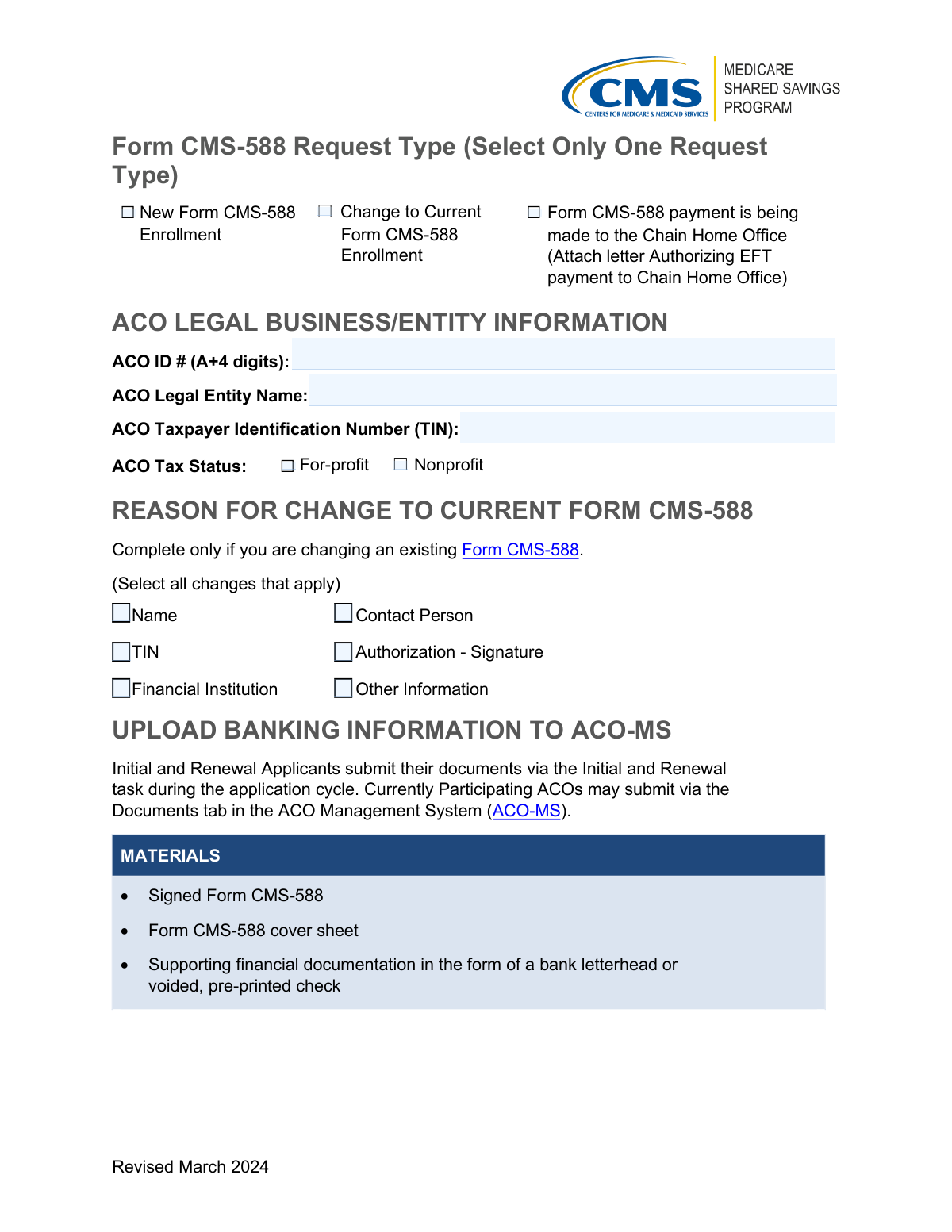
Form CMS-588 is an Electronic Funds Transfer Authorization Agreement required by the Centers for Medicare & Medicaid Services (CMS) for Accountable Care Organizations (ACOs) participating in Medicare shared savings programs. It collects the ACO's legal entity information, taxpayer identification number, tax status, and banking details to facilitate direct electronic payment of shared savings. The form is used for new enrollments, changes to existing EFT arrangements, or to authorize payments to a Chain Home Office. Today, this form can be filled out quickly and accurately using AI-powered services like Instafill.ai, which can also convert non-fillable PDF versions into interactive fillable forms.
Our AI automatically handles information lookup, data retrieval, formatting, and form filling.
It takes less than a minute to fill out CMS-588 using our AI form filling.
Securely upload your data. Information is encrypted in transit and deleted immediately after the form is filled out.
Form specifications
| Form name: | Form CMS-588, Electronic Funds Transfer (EFT) Authorization Agreement for Accountable Care Organizations |
| Number of pages: | 1 |
| Language: | English |
| Categories: | CAR forms, CMS forms, authorization forms, L.A. Care forms, ABLE account forms, account transfer forms, transfer forms, Medicare forms, funds transfer forms |
Instafill Demo: How to fill out PDF forms in seconds with AI
How to Fill Out CMS-588 Online for Free in 2026
Are you looking to fill out a CMS-588 form online quickly and accurately? Instafill.ai offers the #1 AI-powered PDF filling software of 2026, allowing you to complete your CMS-588 form in just 37 seconds or less.
Follow these steps to fill out your CMS-588 form online using Instafill.ai:
- 1 Navigate to Instafill.ai and upload the Form CMS-588 PDF or select it from the available form library to begin filling it out online.
- 2 Select the appropriate request type: New Form CMS-588 Enrollment, Change to Current Form CMS-588 Enrollment, or Chain Home Office EFT payment authorization.
- 3 Enter the ACO Legal Business/Entity Information, including the ACO ID number (A+4 digits), ACO Legal Entity Name, Taxpayer Identification Number (TIN), and tax status (For-profit or Nonprofit).
- 4 If submitting a change to an existing Form CMS-588, select all applicable reasons for the change, such as Name, Contact Person, TIN, Authorization/Signature, Financial Institution, or Other Information.
- 5 Provide the required banking and financial institution details to authorize EFT payments, ensuring accuracy to avoid payment delays.
- 6 Review all entered information for completeness and accuracy, then obtain the required authorized signature on the form.
- 7 Upload the signed Form CMS-588, the CMS-588 cover sheet, and supporting financial documentation (bank letterhead or voided pre-printed check) via the ACO Management System (ACO-MS) or through the Initial and Renewal task during the application cycle.
Our AI-powered system ensures each field is filled out correctly, reducing errors and saving you time.
Why Choose Instafill.ai for Your Fillable CMS-588 Form?
Speed
Complete your CMS-588 in as little as 37 seconds.
Up-to-Date
Always use the latest 2026 CMS-588 form version.
Cost-effective
No need to hire expensive lawyers.
Accuracy
Our AI performs 10 compliance checks to ensure your form is error-free.
Security
Your personal information is protected with bank-level encryption.
Frequently Asked Questions About Form CMS-588
Form CMS-588 is an Electronic Funds Transfer (EFT) enrollment form used by Accountable Care Organizations (ACOs) to set up or update their banking information for Medicare payments. It authorizes CMS to deposit payments directly into the ACO's designated bank account.
This form must be completed by ACOs participating in CMS programs who need to enroll in EFT payment, make changes to their existing EFT enrollment, or authorize EFT payments to a Chain Home Office. Both new applicants and currently participating ACOs may need to complete this form.
The three request types are: (1) New Form CMS-588 Enrollment for first-time EFT setup, (2) Change to Current Form CMS-588 Enrollment for updating existing information, and (3) Form CMS-588 payment being made to the Chain Home Office, which requires an attached authorization letter. You must select only one request type.
You will need your ACO ID number (formatted as the letter 'A' followed by 4 digits), your ACO Legal Entity Name, your ACO Taxpayer Identification Number (TIN), and your ACO Tax Status (either For-profit or Nonprofit).
If you are updating an existing enrollment, you can change your Name, Contact Person, TIN, Authorization Signature, Financial Institution, or Other Information. You must select all changes that apply in the 'Reason for Change' section.
You must submit a signed Form CMS-588, the Form CMS-588 cover sheet, and supporting financial documentation in the form of either a bank letterhead or a voided, pre-printed check. All documents must be uploaded to the ACO Management System (ACO-MS).
Initial and Renewal Applicants should submit their documents via the Initial and Renewal task during the application cycle. Currently Participating ACOs should submit their documents through the Documents tab in the ACO Management System (ACO-MS).
If you want payments directed to a Chain Home Office, select the third request type on the form and attach a letter authorizing EFT payment to the Chain Home Office. This letter must accompany your Form CMS-588 submission.
Yes, AI-powered services like Instafill.ai can help you accurately auto-fill Form CMS-588 by guiding you through each field, reducing errors, and saving time. This is especially helpful for ensuring all required sections, checkboxes, and entity information are completed correctly.
You can upload Form CMS-588 to Instafill.ai, and the AI will help you fill in all required fields such as ACO ID, Legal Entity Name, TIN, tax status, and banking information interactively. Once completed, you can download the filled form, sign it, and submit it through ACO-MS.
If you have a flat, non-fillable version of Form CMS-588, Instafill.ai can convert it into an interactive fillable form so you can complete it digitally. This eliminates the need to print and handwrite your information, making the process faster and more accurate.
Your ACO ID number should be formatted as the letter 'A' followed by 4 digits (e.g., A1234). Make sure to enter it exactly in this format in the ACO ID # field.
Yes, you must select your ACO's tax status by checking either the 'For-profit' or 'Nonprofit' checkbox in the ACO Legal Business/Entity Information section. This is a required field on the form.
Yes, Form CMS-588 must be signed before submission. The Authorization Signature is a key component of the form, and if you are changing the authorized signature on an existing enrollment, you must select 'Authorization - Signature' in the Reason for Change section.
Form CMS-588 was last revised in March 2024. Always ensure you are using the most current version of the form when submitting to CMS to avoid processing delays or rejections.
Compliance CMS-588
Validation Checks by Instafill.ai
1
ACO ID # Format Validation (A + 4 Digits)
Validates that the ACO ID # follows the required format of the letter 'A' followed by exactly 4 numeric digits (e.g., A1234). This identifier is the primary key used to locate and associate the submission with the correct ACO record in CMS systems. If the format is incorrect or the field is left blank, the form cannot be matched to an existing ACO enrollment record, causing processing delays or rejection.
2
Request Type Mutual Exclusivity Check
Ensures that exactly one of the three request type checkboxes is selected: 'New Form CMS-588 Enrollment,' 'Change to Current Form CMS-588 Enrollment,' or 'Form CMS-588 payment is being made to the Chain Home Office.' Selecting more than one or none of these options creates an ambiguous submission that cannot be properly routed or processed. If this validation fails, the form must be returned to the submitter for clarification before any action can be taken.
3
ACO Legal Entity Name Completeness Check
Verifies that the ACO Legal Entity Name field is not blank and contains the full legal name of the entity as registered with the IRS, not an abbreviation or DBA name. The legal entity name must match the name associated with the provided TIN to ensure accurate payment disbursement and compliance with federal enrollment requirements. Mismatches or missing values can result in EFT payment failures or fraud flags during processing.
4
ACO Taxpayer Identification Number (TIN) Format Validation
Validates that the ACO TIN is entered in the correct 9-digit format (XX-XXXXXXX for EINs), contains only numeric characters, and is not left blank. The TIN is critical for IRS reporting and accurate EFT payment routing, and an incorrectly formatted or missing TIN will prevent CMS from processing the enrollment or change request. The TIN must also be consistent with the ACO Legal Entity Name provided on the form.
5
Tax Status Selection Completeness Check
Ensures that exactly one of the two ACO Tax Status checkboxes—'For-profit' or 'Nonprofit'—is selected and that neither both nor neither are checked. Tax status is a required field that affects how CMS categorizes and processes the ACO's financial information. Leaving this field blank or selecting both options will result in an incomplete submission that cannot be processed without follow-up from the submitter.
6
Reason for Change Conditional Requirement Check
Validates that if the 'Change to Current Form CMS-588 Enrollment' request type is selected, at least one checkbox in the 'Reason for Change' section is also selected (Name, Contact Person, TIN, Authorization-Signature, Financial Institution, or Other Information). This section is only applicable for change requests, and submitting a change request without specifying what is being changed makes the form unprocessable. If no reason is selected alongside a change request, the form should be flagged for correction.
7
Reason for Change Section Not Populated for New Enrollments
Ensures that if the 'New Form CMS-588 Enrollment' request type is selected, no checkboxes in the 'Reason for Change' section are checked, as this section is explicitly designated for changes to existing enrollments only. Populating the change reason section on a new enrollment form creates a logical inconsistency that may confuse processors and delay the application. This cross-field validation prevents contradictory data from being submitted.
8
Chain Home Office Letter Attachment Validation
Verifies that when the 'Form CMS-588 payment is being made to the Chain Home Office' checkbox is selected, the required authorization letter is attached to the submission as specified in the form instructions. This letter is a mandatory supporting document that authorizes EFT payment to the Chain Home Office and without it the request cannot be approved. If the checkbox is selected but no letter is attached, the submission must be flagged as incomplete.
9
TIN Change Consistency Check
Validates that if the 'TIN' checkbox is selected in the Reason for Change section, the newly provided ACO TIN in the ACO Legal Business/Entity Information section differs from the TIN currently on file and is in the correct format. Submitting a TIN change with the same TIN as the existing record serves no purpose and may indicate a data entry error. Additionally, a TIN change may require additional supporting documentation to verify the new tax identification number.
10
Name Change Reason Requires Updated Legal Entity Name
Ensures that if the 'Name' checkbox is selected in the Reason for Change section, the ACO Legal Entity Name field contains a new, updated name that is different from the name currently on file. A name change submission with no updated name in the entity information section is logically inconsistent and cannot be processed. This validation prevents incomplete change requests from being submitted without the necessary updated information.
11
Authorization Signature Presence Check
Verifies that the Authorization-Signature field is completed and not left blank, as a valid authorized signature is required for the form to be legally binding and processable by CMS. The signature must come from an individual authorized to bind the ACO entity to the EFT enrollment agreement. An unsigned form cannot be accepted and must be returned to the submitter, potentially delaying enrollment or payment processing.
12
Financial Institution Information Completeness for New Enrollments
Validates that all required financial institution fields are populated when submitting a new Form CMS-588 enrollment, as banking information is the core purpose of this EFT authorization form. Incomplete banking details will prevent CMS from setting up the electronic funds transfer and may delay or block ACO payments. This check ensures that account number, routing number, and institution name fields are all present and properly formatted.
13
Supporting Financial Documentation Attachment Check
Ensures that the required supporting financial documentation—either a bank letterhead or a voided, pre-printed check—is attached to the submission as specified in the upload instructions. This documentation is required to verify the authenticity of the banking information provided and protect against fraudulent EFT redirections. Submissions lacking this supporting documentation are considered incomplete and cannot be processed regardless of whether all form fields are correctly filled.
14
ACO ID # Existence and Active Status Validation
Verifies that the ACO ID # provided on the form corresponds to an existing, active ACO record in the CMS ACO Management System (ACO-MS) before processing the submission. Submitting a form with a non-existent or inactive ACO ID will result in the form being unprocessable and returned to the submitter. This validation is especially critical for change requests, which require an existing enrollment record to modify.
15
Contact Person Information Completeness Check
Validates that the Contact Person field contains sufficient identifying information, including at minimum a full name and contact details, to allow CMS staff to follow up if there are questions or issues with the submission. An incomplete or missing contact person entry can significantly delay resolution of any discrepancies found during processing. If the 'Contact Person' checkbox is selected in the Reason for Change section, the new contact information must be fully populated and different from the existing record.
16
Submission Pathway Consistency Check
Verifies that the submission method aligns with the ACO's participation status as described in the upload instructions: Initial and Renewal Applicants must submit via the Initial and Renewal task during the application cycle, while Currently Participating ACOs must submit via the Documents tab in ACO-MS. Submitting through the incorrect pathway may result in the form not being received or processed by the appropriate CMS team. This validation ensures the submitter has acknowledged and followed the correct document upload procedure.
Common Mistakes in Completing CMS-588
Many applicants enter their ACO ID number without the required 'A' prefix followed by exactly 4 digits (e.g., entering '1234' instead of 'A1234'). This happens because the format requirement is easy to overlook or misremember. An incorrectly formatted ACO ID can cause the form to be rejected or misrouted, delaying enrollment. Always double-check that your ACO ID follows the exact 'A+4 digits' format as specified on the form, and consider using AI-powered tools like Instafill.ai to automatically validate field formats before submission.
Applicants frequently check more than one of the three request type options (New Form CMS-588, Change to Current Form CMS-588, or Chain Home Office payment), even though the form explicitly instructs selecting only one. This confusion often arises when someone is both updating information and changing a payment arrangement. Selecting multiple request types can cause processing errors and delays. Carefully read the instruction 'Select Only One Request Type' and determine which single option best describes your situation before marking any checkbox.
When selecting 'Change to Current Form CMS-588,' many filers forget to also complete the 'Reason for Change' section by checking the applicable change categories (Name, Contact Person, TIN, Authorization-Signature, Financial Institution, or Other Information). This section is only required for change requests, so applicants may overlook it entirely. Leaving this section blank makes it unclear what information is being updated, potentially causing the submission to be returned. Always ensure that if you select the change request type, you also check every applicable reason for the change.
Applicants sometimes enter a TIN that does not match IRS records for the ACO legal entity, either by transposing digits, using a personal SSN instead of an EIN, or entering a TIN associated with a different entity. This mismatch can result in payment failures, compliance issues, or form rejection. The TIN entered must exactly match the IRS-issued Employer Identification Number (EIN) for the ACO legal entity. Tools like Instafill.ai can help flag formatting inconsistencies in TIN fields to reduce transcription errors.
Many filers fill in the ACO Tax Status text field but forget to check either the 'For-profit' or 'Nonprofit' checkbox, or vice versa. This happens because the field has both a text entry area and checkboxes, causing confusion about which element is required. Leaving the tax status incomplete can delay processing as reviewers must follow up for clarification. Ensure both the tax status label and the corresponding checkbox are completed to fully satisfy this field's requirements.
When selecting the 'Form CMS-588 payment is being made to the Chain Home Office' option, applicants frequently forget to attach the required letter authorizing EFT payment to the Chain Home Office. The form explicitly states this letter must be attached, but it is easy to overlook during submission preparation. Submitting without this letter will result in the request being returned or denied. Before submitting, create a checklist that includes this attachment whenever the Chain Home Office payment option is selected.
The form requires three specific materials to be uploaded: the signed Form CMS-588, the Form CMS-588 cover sheet, and supporting financial documentation (bank letterhead or a voided, pre-printed check). Applicants commonly forget one or more of these items, particularly the cover sheet or the bank documentation. Incomplete submissions are returned, causing significant delays in enrollment or payment setup. Review the 'Upload Banking Information to ACO-MS' section carefully and confirm all three documents are prepared and attached before submitting.
Initial and Renewal Applicants must submit documents via the Initial and Renewal task during the application cycle, while Currently Participating ACOs must use the Documents tab in ACO-MS. Applicants frequently confuse these two pathways, especially those transitioning from applicant to participating status. Submitting through the wrong channel can result in documents not being received or processed correctly. Confirm your current enrollment status before submission and follow the specific upload instructions that apply to your situation.
Applicants sometimes enter a shortened, informal, or trade name instead of the full legal entity name as registered with the IRS and CMS. For example, entering 'Springfield ACO' instead of 'Springfield Accountable Care Organization, LLC' can create a mismatch with official records. This discrepancy can trigger compliance reviews or payment delays. Always use the exact legal entity name as it appears on your IRS EIN documentation and CMS enrollment records, and verify spelling carefully before submission.
One of the most common reasons Form CMS-588 is rejected is that it is submitted without a proper authorization signature, or the signature does not come from an authorized representative of the ACO. This often happens when the form is filled out digitally but the signature step is skipped before uploading. An unsigned form has no legal validity and will be returned for correction. Ensure the form is physically or electronically signed by an authorized ACO official before scanning and uploading, and if making a change, check the 'Authorization - Signature' reason-for-change box as applicable.
The form requires supporting financial documentation in the form of bank letterhead or a voided, pre-printed check. Applicants sometimes submit a handwritten check, a counter check, or a personal check that does not have the account holder's name pre-printed, which does not meet the requirement. Non-qualifying documentation will cause the submission to be rejected. Ensure the voided check is pre-printed with the ACO's account information, or obtain an official letter on bank letterhead that confirms the account details.
When submitting a change to an existing Form CMS-588, applicants sometimes only update the specific field that changed (e.g., the financial institution) without reviewing whether other fields such as the contact person or authorization signature also need to be refreshed. This results in outdated information remaining on file with CMS. Additionally, filers may forget to check all applicable change reason checkboxes in the 'Reason for Change' section. Conduct a full review of all form fields whenever submitting a change, and use tools like Instafill.ai to cross-reference previously submitted data against current information.
Saved over 80 hours a year
“I was never sure if my IRS forms like W-9 were filled correctly. Now, I can complete the forms accurately without any external help.”
Kevin Martin Green
Your data stays secure with advanced protection from Instafill and our subprocessors

Robust compliance program
Transparent business model
You’re not the product. You always know where your data is and what it is processed for.
ISO 27001, HIPAA, and GDPR
Our subprocesses adhere to multiple compliance standards, including but not limited to ISO 27001, HIPAA, and GDPR.
Security & privacy by design
We consider security and privacy from the initial design phase of any new service or functionality. It’s not an afterthought, it’s built-in, including support for two-factor authentication (2FA) to further protect your account.
Fill out CMS-588 with Instafill.ai
Worried about filling PDFs wrong? Instafill securely fills form-cms-588-electronic-funds-transfer-eft-authorization-agreement-for-accountable-care-organizations forms, ensuring each field is accurate.