
Yes! You can use AI to fill out Contribute to a Charitable Gift Account
Don't type 84 fields by hand. Tell our AI about yourself, or upload a document you already have, and it fills every field in seconds. You check it, then download, print or sign.
The AI does the filling. You just check it.
No typing into boxes, nothing to install.
What this form asks for
The AI fills all of it, from your answers or your documents.
The AI checks your answers before you download
14 checks built for this form, so a wrong date or a missing answer is caught before anyone else sees it.
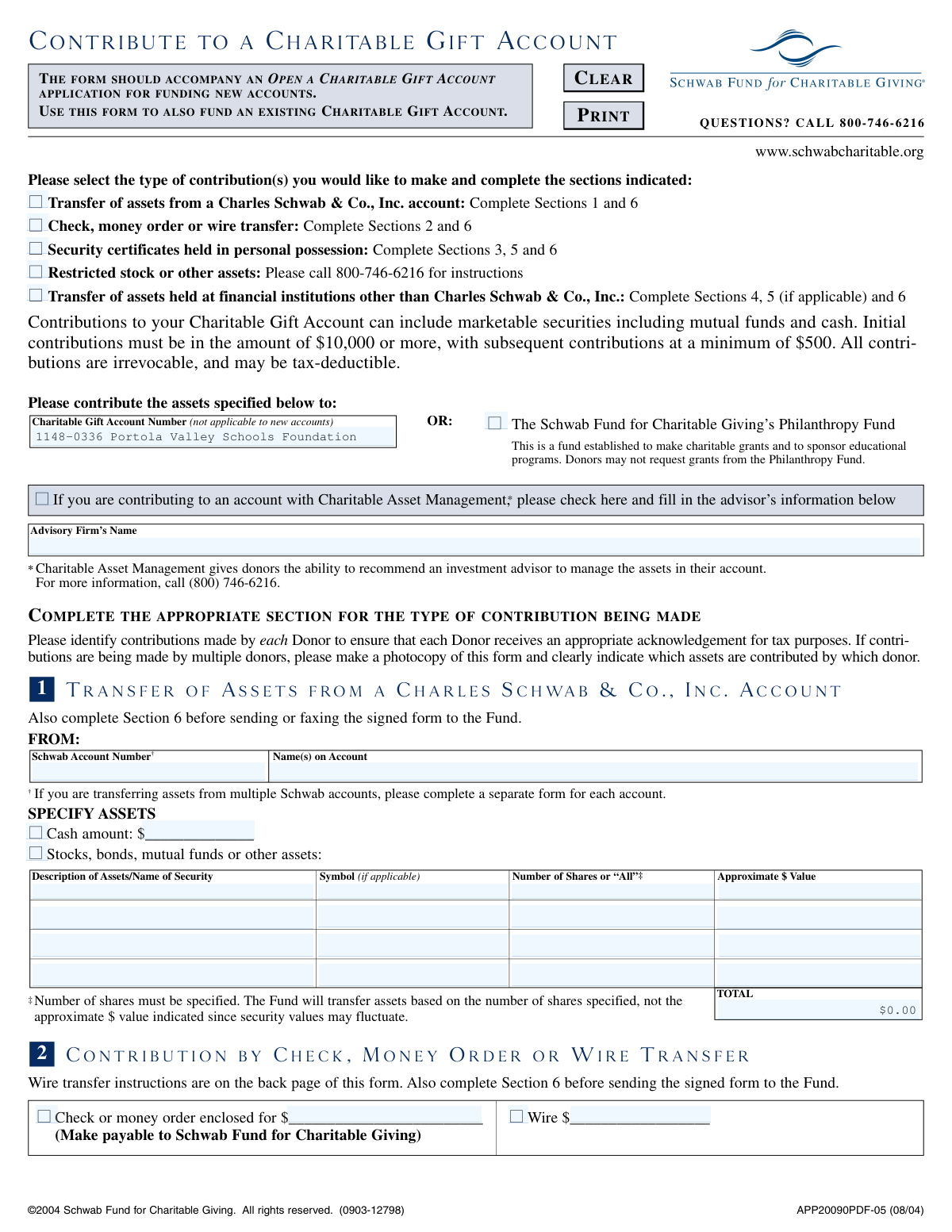
This check verifies that the user has selected at least one of the main contribution type checkboxes at the top of the form (e.g., 'Transfer of assets from a Charles Schwab & Co., Inc. account'). This selection is critical as it dictates which subsequent sections of the form are required for processing. If no selection is made, the form is considered incomplete and cannot be processed correctly.
When a contribution is made from a Schwab account (Section 1), this validation ensures the 'Schwab Account Number' field is not empty and conforms to the expected format (e.g., an 8-digit number). An invalid or missing account number will prevent the system from locating the source account for the transfer. The validation failure would prompt the user to enter a valid account number.
For asset transfers from Schwab (Section 1) or security certificates (Section 3), the 'Number of Shares' field must contain a specific numeric value. The form explicitly states that transfers are based on the number of shares, not the approximate value. This check prevents ambiguity by rejecting non-numeric values or the word 'All' in these sections, ensuring the correct quantity of assets is transferred.
In Section 2, for contributions by check, money order, or wire, the user should only fill out one amount field: either 'Check or money order enclosed for $' or 'Wire $'. This validation ensures that a monetary value is entered into only one of these two fields. If both are filled, it creates ambiguity about the contribution method and amount, and the user should be prompted to clarify.
If a user is transferring assets from an external financial institution (Section 4), all fields identifying that firm must be completed. This includes 'Name of Firm Holding Assets', 'Firm Telephone Number', 'Firm Mailing Address', 'Account Number', and 'Name(s) on Account'. Missing information would make it impossible to initiate the transfer, so this check ensures all required contact and account details are present.
The 'Firm Telephone Number' provided in Section 4 for an external institution should be validated to ensure it follows a standard US phone number format (e.g., XXX-XXX-XXXX). This check helps ensure the data is clean and the number is usable for contacting the firm to facilitate the asset transfer. An improperly formatted number would trigger a correction prompt.
And 8 more checks
- Ensures Transfer Instruction Method is Selected in Section 4
- Confirms Donor Initials for Authorization in Section 4
- Checks for Conditionally Required Notarization in Section 5
- Ensures Final Authorization is Signed and Dated
- Validates Date Field Format and Plausibility
- Prevents Conflicting Contribution Section Entries
- Verifies Minimum Contribution Amount
- Validates Charitable Gift Account Number for Existing Accounts
Let AI fill out your APP20090PDF-05
No typing. Every field filled in seconds, checked, ready to sign.
How to Fill Out APP20090PDF-05 Online for Free in 2026
What the AI walks you through.
- Navigate to Instafill.ai and upload the "Contribute to a Charitable Gift Account" form or select it from their template library.
- Use the AI assistant to automatically fill in your personal information and the details of your Charitable Gift Account.
- Select the type of contribution you are making (e.g., transfer from a Schwab account, check, securities) and provide the specific asset details in the corresponding sections.
- If transferring from another institution or contributing security certificates, complete the necessary authorization and signature guarantee sections as prompted.
- Carefully review all the information entered by the AI for accuracy, including account numbers, asset descriptions, and contribution amounts.
- Securely e-sign the form within the Instafill.ai platform and download the completed document.
- Submit the signed form and any accompanying materials (like checks or certificates) to the Schwab Fund for Charitable Giving via mail or fax as per the delivery instructions on the form.
Common Mistakes in Completing APP20090PDF-05
The ones the AI is built to catch.
Specifying Dollar Value Instead of Share Quantity
Forgetting the Signature Guarantee or Notarization
Completing the Incorrect Contribution Section
Omitting Donor Details in Wire Transfers
Making Checks Payable to the Wrong Entity
Providing Signatures That Don't Match Account Ownership
Using an Invalid Submission Method
Forgetting to Include Supporting Documentation
Consolidating Multiple Accounts onto a Single Form
Improperly Endorsing Security Certificates
Frequently Asked Questions About APP20090PDF-05
Is it really free for 7 days?
Can I fill other forms too?
How do I cancel?
How does the AI fill out APP20090PDF-05?
What happens to my information?
How complex is APP20090PDF-05 to fill out?
What is the purpose of the 'Contribute to a Charitable Gift Account' form?
Who needs to fill out this form?
Is there a minimum amount I can contribute?
What is the difference between Section 1 and Section 4?
How do I submit the completed form?
When do I need to get a signature guarantee or have my signature notarized?
I'm opening a new account. Is this the only form I need?
Can I get my money back after I make a contribution?
How do I contribute via a wire transfer?
If I'm donating stock, should I write the number of shares or the dollar value?
My spouse and I own the account jointly. Do we both need to sign?
Can AI tools help me fill out this form?
How can I fill out this Schwab Charitable form online?
The PDF I downloaded is not fillable. What can I do?
Get your APP20090PDF-05 filled out by AI
$0 today. Cancel before Nov 1 and you pay nothing.
Other forms like this one
charitable forms: Form 8283, Noncash Charitable Contributions, Form 501A, Fantasy Contest Operator Personal Information Form (Commonwealth of Virginia, VDACS Office of Charitable & Regulatory Programs), Fidelity Charitable 144/145 Contribution Form, Fidelity Charitable Letter of Authorization, Transfer of Assets Out - Partial Account or Charitable Gift Transfers, Schwab Charitable Fund Transfer of Assets, Charles Schwab Charitable Gift Donation - Letter Of Authorization for DTC Transfer, Sample IRA Distribution Letter for a Qualified Charitable Distribution (QCD), Charles Schwab Charitable Gift Transfer Letter of Authorization, Make a contribution - Vanguard Charitable, IRA Distribution to Charitable Beneficiary, IRA Distribution to Charitable Beneficiary, Fidelity Charitable Contribution Form, Fidelity Charitable Irrevocable Contribution Form and Letter of Instruction, Request for a Qualified Charitable Distribution (QCD) from a Brokerage Individual Retirement Account (IRA), Request for qualified charitable distribution from individual retirement account, Request for a Charitable Distribution from an Individual Retirement Account (IRA), Merrill Lynch One-Time Qualified Charitable Distribution, Individual Retirement Account (IRA) — Qualified Charitable Distribution Form, Fidelity Charitable Investment Advisor Program Application
ABLE account forms: Transfer of Assets Out - Partial Account or Charitable Gift Transfers, Rollover/Transfer Request — ABLE Account, Rollover/Transfer Request — ABLE Account, Request for a Qualified Charitable Distribution (QCD) from a Brokerage Individual Retirement Account (IRA), Request for qualified charitable distribution from individual retirement account, Request for a Charitable Distribution from an Individual Retirement Account (IRA), Letter of Authorization to Change Account Title to a Grantor Revocable Trust, Individual Retirement Account (IRA) — Qualified Charitable Distribution Form, Vanguard Charitable Open a Philanthropic Account, Form CMS-588, Electronic Funds Transfer (EFT) Authorization Agreement for Accountable Care Organizations, ACORD 145, Accounts Receivable / Valuable Papers
charitable gift forms: Transfer of Assets Out - Partial Account or Charitable Gift Transfers, Charles Schwab Charitable Gift Donation - Letter Of Authorization for DTC Transfer, Charles Schwab Charitable Gift Transfer Letter of Authorization
charitable account forms: Vanguard Charitable Open a Philanthropic Account, Transfer of Assets Out - Partial Account or Charitable Gift Transfers, Request for a Qualified Charitable Distribution (QCD) from a Brokerage Individual Retirement Account (IRA), Request for qualified charitable distribution from individual retirement account, Request for a Charitable Distribution from an Individual Retirement Account (IRA), Individual Retirement Account (IRA) — Qualified Charitable Distribution Form
Let AI fill out your APP20090PDF-05
Your trial starts once a card is added. You pay nothing before Nov 1.
Our AI already knows this form, all 84 fields of it. Skip the typing: tell it about yourself, or upload what you have, and it fills the whole form in seconds.
- AI fills every field on all 4 pages, checkboxes included
- No typing into boxes: answer a few questions, or upload a document you already have, an old copy of this form, a photo of a document
- The AI checks the answers; you review and change anything before you download
- Download the finished PDF, print it, or sign it online
- Encrypted, and never used to train AI
Cancel before Nov 1 and you pay nothing.
A card is needed to start the trial. Cancel in two clicks from your account.
Terms · Privacy