Yes! You can use AI to fill out Individual Retirement Account (IRA) — Qualified Charitable Distribution Form
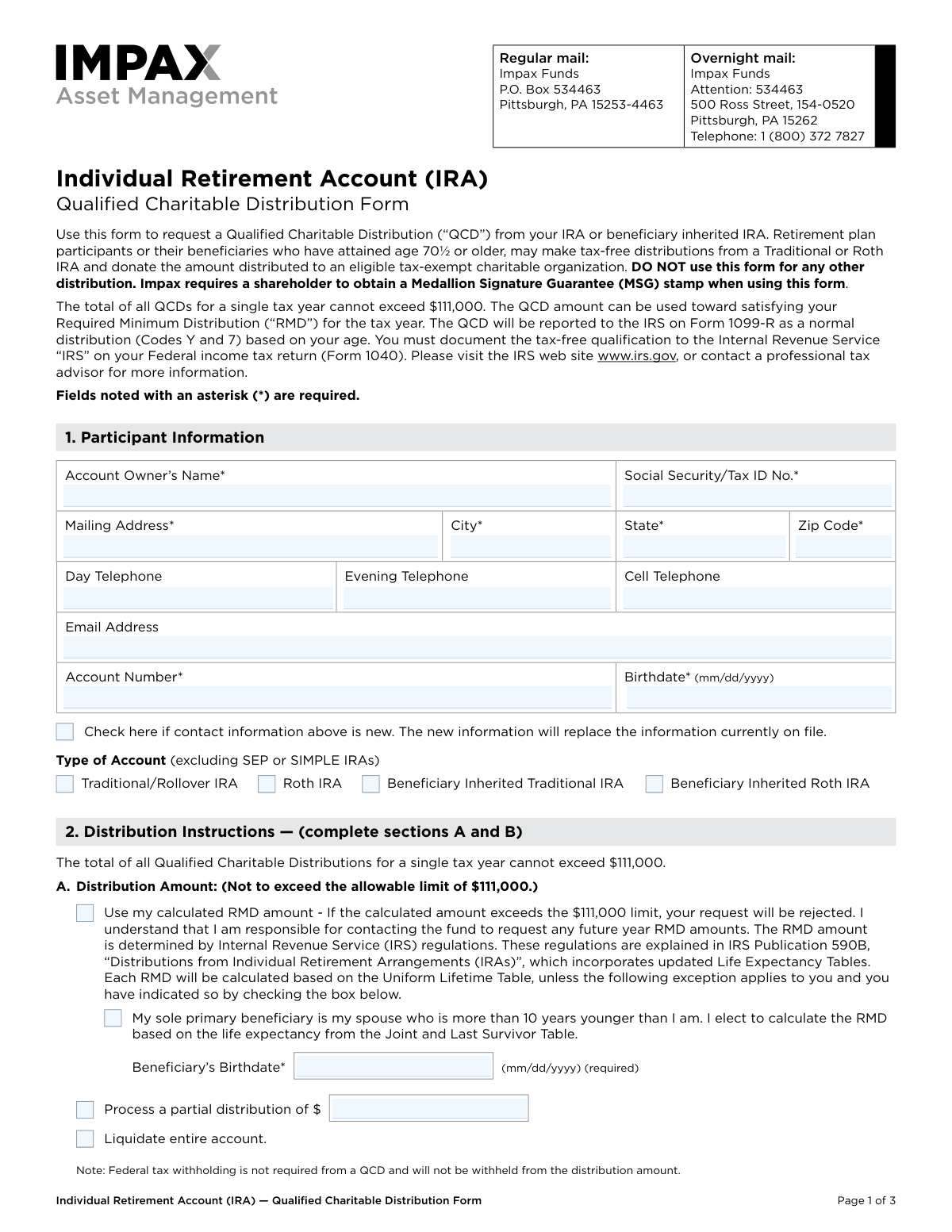
This form allows an IRA owner who is age 70½ or older to request a Qualified Charitable Distribution (QCD) from their Traditional, Roth, or beneficiary inherited IRA. A QCD is a direct transfer of funds to an eligible charitable organization, which can satisfy the owner's Required Minimum Distribution (RMD) for the year, up to $111,000, without being included in their taxable income. Today, this form can be filled out quickly and accurately using AI-powered services like Instafill.ai, which can also convert non-fillable PDF versions into interactive fillable forms.
Our AI automatically handles information lookup, data retrieval, formatting, and form filling.
It takes less than a minute to fill out IRA Qualified Charitable Distribution Form using our AI form filling.
Securely upload your data. Information is encrypted in transit and deleted immediately after the form is filled out.
Form specifications
| Form name: | Individual Retirement Account (IRA) — Qualified Charitable Distribution Form |
| Number of pages: | 1 |
| Language: | English |
| Categories: | retirement forms, IRA forms, charitable forms, ABLE account forms, retirement account forms, distribution forms, charitable distribution forms |
Instafill Demo: How to fill out PDF forms in seconds with AI
How to Fill Out IRA Qualified Charitable Distribution Form Online for Free in 2026
Are you looking to fill out a IRA QUALIFIED CHARITABLE DISTRIBUTION FORM form online quickly and accurately? Instafill.ai offers the #1 AI-powered PDF filling software of 2026, allowing you to complete your IRA QUALIFIED CHARITABLE DISTRIBUTION FORM form in just 37 seconds or less.
Follow these steps to fill out your IRA QUALIFIED CHARITABLE DISTRIBUTION FORM form online using Instafill.ai:
- 1 Navigate to Instafill.ai and upload or select the IRA Qualified Charitable Distribution Form.
- 2 Use the AI assistant to accurately fill in your personal details and account information in Section 1, including your name, Social Security number, and account number.
- 3 In Section 2, specify the distribution instructions, including the total amount to be distributed and how it should be allocated across your funds.
- 4 Complete Section 3 by providing the payment and mailing instructions, including the name and address of the charitable organization(s).
- 5 Carefully review all the information entered by the AI for accuracy and completeness.
- 6 Provide your signature and the date in Section 4. Obtain a Medallion Signature Guarantee as required by the form.
- 7 Download the completed, signed form and submit it to your financial institution via mail as instructed.
Our AI-powered system ensures each field is filled out correctly, reducing errors and saving you time.
Why Choose Instafill.ai for Your Fillable IRA Qualified Charitable Distribution Form Form?
Speed
Complete your IRA Qualified Charitable Distribution Form in as little as 37 seconds.
Up-to-Date
Always use the latest 2026 IRA Qualified Charitable Distribution Form form version.
Cost-effective
No need to hire expensive lawyers.
Accuracy
Our AI performs 10 compliance checks to ensure your form is error-free.
Security
Your personal information is protected with bank-level encryption.
Frequently Asked Questions About Form IRA Qualified Charitable Distribution Form
This form is used to request a tax-free distribution from your IRA or beneficiary inherited IRA, which is then donated directly to an eligible charitable organization.
IRA or beneficiary inherited IRA owners who have reached age 70½ or older are eligible. This form cannot be used for SEP or SIMPLE IRAs.
Yes, the total amount for all your Qualified Charitable Distributions in a single tax year cannot be more than $111,000.
Yes, the amount you donate through a QCD can be used to satisfy your RMD for the tax year.
In Section 3, you must provide the charity's name, the amount to be donated, and the full mailing address for the organization.
No, a notarization is not sufficient. You must obtain a Medallion Signature Guarantee (MSG) from a participating financial institution like a bank or broker.
You can send the form via regular mail to the P.O. Box in Pittsburgh, PA, or via overnight mail to the Ross Street address, both of which are listed at the top of the form.
In Section 2B, you can elect to have the distribution taken proportionately from all funds in your account or specify the exact percentage to be taken from each fund.
Yes, in Section 3 you can choose to have the check mailed to your address on file, allowing you to forward it to the charity, or you can have it mailed directly to the organization.
The distribution is reported on Form 1099-R as a normal distribution. You are responsible for documenting the tax-free qualification of the QCD on your personal tax return.
Yes, the form has space to list up to three charitable organizations. If you wish to donate to more, you can check the box and attach a separate page with the additional details.
Yes, services like Instafill.ai use AI to accurately auto-fill form fields with your saved information, which can save time and reduce errors.
You can upload the PDF to the Instafill.ai platform, where its AI will make the fields fillable and help you enter your information before you print the form for your signature.
Services like Instafill.ai can convert flat, non-fillable PDFs into interactive forms that you can easily complete on your computer.
Compliance IRA Qualified Charitable Distribution Form
Validation Checks by Instafill.ai
1
Participant Age Eligibility for QCD
This check validates that the account owner's age, calculated from the 'Birthdate' provided in Section 1, is 70½ years or older. This is a strict IRS requirement for making a Qualified Charitable Distribution (QCD). If the account owner is younger than 70½, the request is ineligible for QCD treatment and the form submission will be rejected.
2
SSN/Tax ID Number Format
Verifies that the 'Social Security/Tax ID No.' in Section 1 is entered in a valid format (e.g., XXX-XX-XXXX for an SSN or XX-XXXXXXX for a TIN). This is critical for correct IRS tax reporting (Form 1099-R) and for uniquely identifying the account holder. A malformed number will cause the submission to fail and require the user to correct the entry.
3
Account Holder and Number Match
This validation cross-references the provided 'Account Owner’s Name' and 'Account Number' against the system's records. This is a security measure to prevent unauthorized access or fraudulent distributions from an incorrect account. If the name and account number do not match an existing record, the transaction will be blocked pending verification.
4
Completeness of Required Fields
Ensures that all fields marked with an asterisk (*) have been filled out by the user. These fields, such as 'Account Owner's Name', 'Address', and 'Account Number', are essential for processing the request accurately and legally. An incomplete form will be rejected with a notification indicating which required fields are missing.
5
Exclusive Distribution Amount Selection
This check ensures that in Section 2A, the user has selected exactly one distribution amount option: 'Use my calculated RMD amount', 'Process a partial distribution', or 'Liquidate entire account'. Selecting more than one or none of these options creates ambiguity in the distribution instruction. The form will be returned for correction if this rule is violated.
6
Maximum Annual QCD Limit
Validates that the requested distribution amount does not exceed the $111,000 maximum annual limit for Qualified Charitable Distributions. This applies whether the amount is a partial sum, a full liquidation, or a calculated RMD. If the requested amount is over the limit, the form will be rejected to prevent a non-compliant distribution.
7
Conditional Beneficiary Birthdate for RMD Calculation
If the user checks the box in Section 2A to indicate their sole primary beneficiary is a spouse more than 10 years younger, this validation ensures the 'Beneficiary’s Birthdate' field is completed. This date is required to use the Joint and Last Survivor Table for RMD calculation, as per IRS rules. Failure to provide the birthdate will prevent the RMD calculation and halt the request.
8
Fund Distribution Percentage Summation
If the user opts to distribute from specific funds in Section 2B, this check verifies that the entered percentages for each fund sum to exactly 100%. An incorrect total would lead to an imbalance in the distribution and an inability to process the transaction as instructed. The submission will fail if the percentages do not total 100%.
9
Charity Allocation Total Consistency
This validation ensures that the sum of all amounts (either percentages or dollar amounts) allocated to the charities in Section 3 equals the total distribution amount specified in Section 2. For example, if percentages are used, they must sum to 100%. A mismatch would mean the payment instructions do not align with the distribution request, causing the form to be rejected.
10
Conditional Charity Information Completeness
If the user selects 'Mail directly to the organization(s)' in Section 3, this check confirms that the details for at least one charitable organization (Name, Address, City, State, Zip) are fully completed. Without this information, the check cannot be mailed as requested. The form will be considered incomplete and rejected if this information is missing.
11
Medallion Signature Guarantee Presence
This check verifies that a valid Medallion Signature Guarantee (MSG) has been provided on the form as required. The MSG is a high-level security measure that protects against fraudulent transactions by guaranteeing the signature is genuine. A missing or invalid MSG will result in the immediate rejection of the distribution request.
12
Eligible IRA Account Type
Validates that the 'Type of Account' selected in Section 1 is an eligible IRA (Traditional, Roth, or Beneficiary Inherited). The form explicitly excludes SEP or SIMPLE IRAs from being used for QCDs. If an ineligible account type is selected or detected, the request will be denied as it does not meet the plan's requirements.
Common Mistakes in Completing IRA Qualified Charitable Distribution Form
People often confuse a Medallion Signature Guarantee (MSG) with a standard notarization, but they are not interchangeable. This form explicitly requires an MSG from a participating financial institution and states a notary public stamp is not an acceptable substitute. Submitting the form without the correct MSG will lead to immediate rejection and significant processing delays, requiring you to resubmit the form correctly.
The form clearly states that the total of all Qualified Charitable Distributions (QCDs) for a tax year cannot exceed $111,000. Filers may forget about other QCDs made during the year or simply enter a larger amount, causing the request to be rejected. It's crucial to track all QCDs for the year and ensure the requested amount, whether a specific dollar value or the RMD, does not surpass the IRS limit.
A simple typo in the Account Owner's Name, Social Security Number, or Account Number can cause a mismatch with the information on file. This happens due to manual data entry errors and leads to processing delays or rejection while the firm verifies the identity of the requestor. To prevent this, carefully proofread all personal and account identifiers against an account statement. AI-powered form filling tools like Instafill.ai can help by auto-filling this information accurately from saved profiles.
In Section 2, filers might select multiple conflicting options, such as checking both 'Use my calculated RMD amount' and 'Process a partial distribution of $...'. They may also fail to specify how to distribute funds (proportionately vs. by fund) or provide fund percentages that do not total 100%. These inconsistencies force the processor to reject the form, delaying the distribution. Carefully select only one amount option and ensure your fund allocation method is complete and accurate.
When electing to calculate the Required Minimum Distribution (RMD) using the Joint and Last Survivor Table (for a spouse more than 10 years younger), filers often check the box but forget to provide the spouse's birthdate. This field is required for the special calculation, and its omission will halt the processing of the request. Always double-check that all conditional required fields, like the beneficiary's birthdate, are filled when you select a specific option.
When directing payment to a charity, filers may provide a partial name, an incorrect address, or omit the 'To the Attention of' line. This can result in the check being delayed, lost in the mail, or sent to the wrong department within the organization, jeopardizing the timely completion of the donation. Always verify the charity's full legal name and correct mailing address for donations before filling out the form.
A common error occurs when the sum of the dollar amounts or percentages allocated to the charities in Section 3 does not equal the total distribution amount requested in Section 2. For example, requesting a $50,000 distribution but only allocating $45,000 to the listed charities. This discrepancy makes the instructions unclear and will cause the form to be returned for correction. Always double-check your math to ensure the total requested distribution is fully allocated.
Forgetting to sign and date the form in Section 4 is one of the most frequent and easily avoidable mistakes. An unsigned form is legally invalid and cannot be processed, leading to an automatic rejection and significant delays. Always perform a final review of the entire form before submission, paying special attention to the signature and date fields to ensure they are completed.
The form explicitly states it is for Traditional, Roth, and Beneficiary IRAs, and excludes SEP or SIMPLE IRAs. Account holders may not be aware of this distinction and incorrectly select their account type, leading to a rejected request. It is essential to confirm your IRA type is eligible for a QCD before completing the form. If you are unsure, check your account statements or contact the financial institution.
Filers may enter their birthdate in a format other than the required MM/DD/YYYY, or enter a date that indicates they are not yet age 70½, the minimum age for a QCD. Both errors will cause the form to be flagged for review or rejected, as age is a critical eligibility requirement. Since this form is a non-fillable PDF, tools like Instafill.ai can convert it to a fillable version and use data validation to ensure the date format is correct and help prevent such errors.
Saved over 80 hours a year
“I was never sure if my IRS forms like W-9 were filled correctly. Now, I can complete the forms accurately without any external help.”
Kevin Martin Green
Your data stays secure with advanced protection from Instafill and our subprocessors

Robust compliance program
Transparent business model
You’re not the product. You always know where your data is and what it is processed for.
ISO 27001, HIPAA, and GDPR
Our subprocesses adhere to multiple compliance standards, including but not limited to ISO 27001, HIPAA, and GDPR.
Security & privacy by design
We consider security and privacy from the initial design phase of any new service or functionality. It’s not an afterthought, it’s built-in, including support for two-factor authentication (2FA) to further protect your account.
Fill out IRA Qualified Charitable Distribution Form with Instafill.ai
Worried about filling PDFs wrong? Instafill securely fills individual-retirement-account-ira-qualified-charitable-distribution-form forms, ensuring each field is accurate.