Yes! You can use AI to fill out Individual 401(k) Account Application
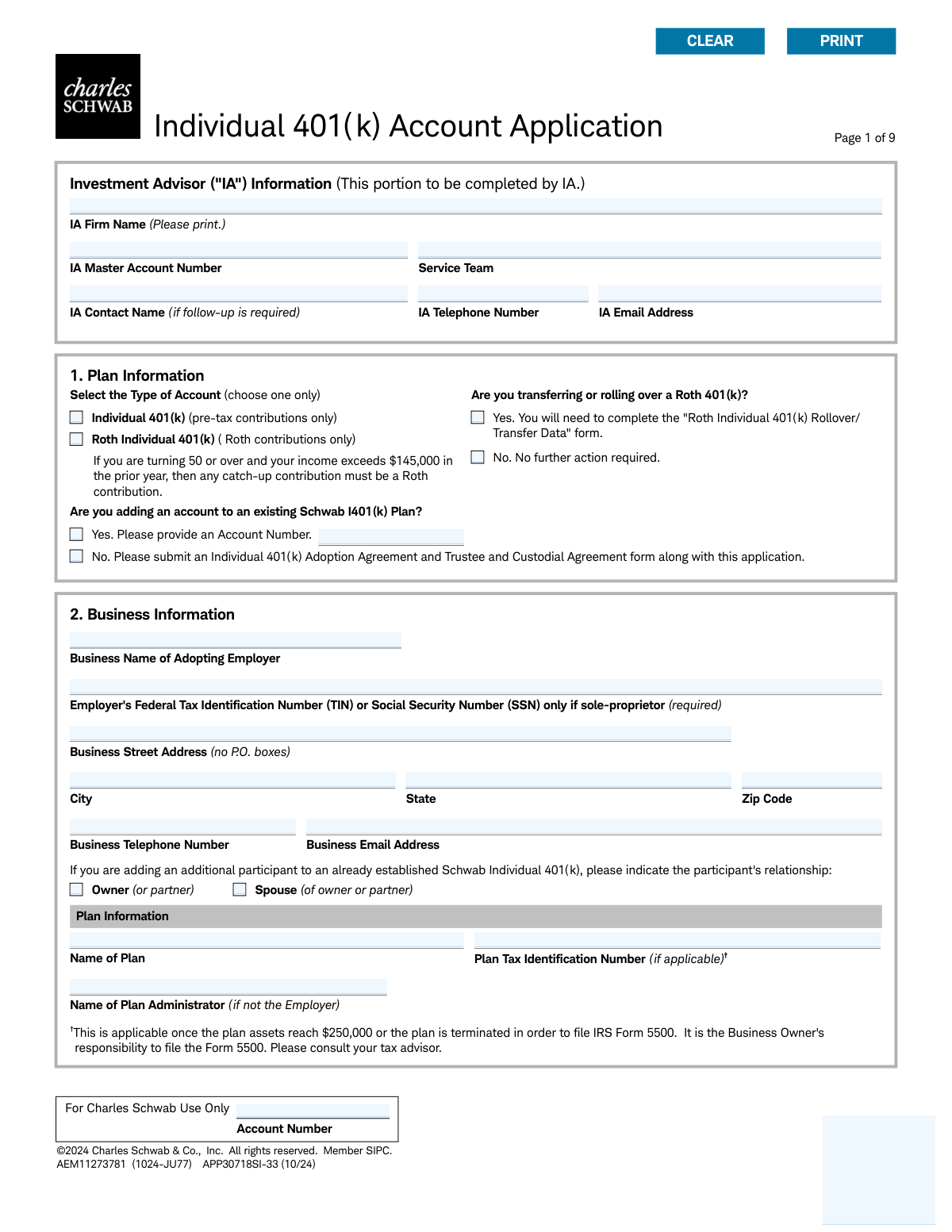
This form is an application to establish an Individual 401(k) retirement account with Charles Schwab, designed for self-employed individuals and small business owners (and their spouses). It allows them to make tax-deductible contributions for retirement, choosing between a traditional pre-tax 401(k) or a Roth 401(k). Today, this form can be filled out quickly and accurately using AI-powered services like Instafill.ai, which can also convert non-fillable PDF versions into interactive fillable forms.
APP30718SI-33 is part of the
account application forms and individual application forms categories on Instafill.
Rather not fill this in by hand? Instafill is an online form filler that completes PDF forms automatically — upload the blank form, answer a few questions, and the AI fills every field.
Form specifications
| Form name: | Individual 401(k) Account Application |
| Number of pages: | 1 |
| Language: | English |
Our AI automatically handles information lookup, data retrieval, formatting, and form filling.
It takes less than a minute to fill out APP30718SI-33 using our AI form filling.
Securely upload your data. Information is encrypted in transit and deleted immediately after the form is filled out.
Instafill Demo: How to fill out PDF forms in seconds with AI
How to Fill Out APP30718SI-33 Online for Free in 2026
Are you looking to fill out a APP30718SI-33 form online quickly and accurately? Instafill.ai offers the #1 AI-powered PDF filling software of 2026, allowing you to complete your APP30718SI-33 form in just 37 seconds or less.
Follow these steps to fill out your APP30718SI-33 form online using Instafill.ai:
- 1 Navigate to Instafill.ai and upload or select the Individual 401(k) Account Application form.
- 2 Provide the required Plan Information in Section 1, including the type of account (Individual or Roth) and details about any existing plans.
- 3 Complete Section 2 with your Business Information, such as the employer name, Tax Identification Number (TIN), and business address.
- 4 Fill in the Account Holder Information in Section 3, including personal details, contact information, citizenship, and employment status.
- 5 Designate your primary and contingent beneficiaries in Section 7, providing their personal information and the percentage of assets they will receive.
- 6 Review all the information auto-filled by the AI for accuracy, make any necessary corrections, and e-sign the authorization in Section 8.
- 7 If required, obtain your spouse's consent signature and have it notarized before submitting the completed application to Charles Schwab.
Our AI-powered system ensures each field is filled out correctly, reducing errors and saving you time.
Why Choose Instafill.ai for Your Fillable APP30718SI-33 Form?
Speed
Complete your APP30718SI-33 in as little as 37 seconds.
Up-to-Date
Always use the latest 2026 APP30718SI-33 form version.
Cost-effective
No need to hire expensive lawyers.
Accuracy
Our AI performs 10 compliance checks to ensure your form is error-free.
Security
Your personal information is protected with bank-level encryption.
Frequently Asked Questions About APP30718SI-33
This form is used to open an Individual 401(k) or Roth Individual 401(k) retirement account with Charles Schwab. It is designed for self-employed individuals and small business owners, including their spouses.
The 'Individual 401(k)' is for pre-tax contributions, which can lower your current taxable income. The 'Roth Individual 401(k)' is for after-tax contributions, allowing for potentially tax-free withdrawals in retirement.
If you are adding an account to a new plan, you must also submit an 'Individual 401(k) Adoption Agreement and Trustee and Custodial Agreement' form along with this application, as stated in Section 1.
As a sole proprietor, you can use your Social Security Number (SSN) in place of the Employer's Federal Tax Identification Number (TIN) in the Business Information section.
A Trusted Contact is a person Schwab can contact on your behalf regarding potential financial exploitation or if they have trouble reaching you. Providing this information is voluntary but highly encouraged.
Yes, if you are married, the plan requires you to name your spouse as the 100% primary beneficiary. To name someone else, your spouse must provide signed and notarized consent in Section 7B of the form.
No. In addition to this application, you must also complete the 'Roth Individual 401(k) Rollover/Transfer Data' form to process the rollover from your existing Roth 401(k).
This program automatically invests (sweeps) any uninvested cash in your account into an interest-earning feature. This allows your idle cash to earn income while you decide on long-term investments.
If you or an immediate family member are associated with a FINRA member firm, you must attach a letter from that employer approving the establishment of your account when you submit this application.
The form has space for four beneficiaries. If you wish to designate more, you should attach a separate sheet of paper with the additional information, ensuring it is signed and dated the same as your application.
Yes, services like Instafill.ai use AI to accurately auto-fill form fields with your information. This can save you significant time and help reduce the chance of errors.
You can use a service like Instafill.ai to complete this form online. Simply upload the PDF, and the platform will make it an interactive, fillable form that you can complete and sign digitally.
If you have a non-fillable or 'flat' PDF, you can use a tool like Instafill.ai. It can convert the document into an interactive, fillable form that you can easily complete on your computer.
Compliance APP30718SI-33
Validation Checks by Instafill.ai
1
Validate Account Holder's Social Security Number Format
This check ensures the Social Security/Tax ID Number provided in Section 3 is in a valid XXX-XX-XXXX format and contains exactly nine digits. This is critical for identity verification as required by federal law and for accurate tax reporting to the IRS. If the format is incorrect, the application cannot be processed and must be returned to the applicant for correction.
2
Verify Account Holder's Age from Date of Birth
This validation confirms that the Date of Birth in Section 3 is a valid date and that the applicant is of legal age to open a retirement account, typically 18 years or older. This prevents the creation of accounts for minors who are not legally eligible to enter into such agreements. An invalid or underage date will result in the application being rejected.
3
Ensure ID Expiration Date is in the Future
This check validates that the 'Expiration Date' for the government-issued ID in Section 3 is a future date. Financial institutions are required to collect and verify identity using unexpired government-issued identification. An expired ID is not a valid form of identification and will cause the application to fail verification.
4
Prohibit P.O. Boxes for Legal and Business Addresses
This validation scans the 'Business Street Address' in Section 2 and the 'Home/Legal Street Address' in Section 3 to ensure they are physical addresses and not P.O. boxes. Federal regulations, such as the USA PATRIOT Act, require financial institutions to obtain a physical address for identity verification purposes. An entry containing 'P.O. Box' will be flagged as invalid.
5
Conditional Requirement for Existing Plan Account Number
This check enforces a rule in Section 1: if the applicant indicates 'Yes' to adding an account to an existing plan, the 'Account Number' field must be populated. Conversely, if 'No' is selected, this field should be empty. This logic ensures that new accounts are correctly linked to existing plans or that the necessary new plan paperwork is submitted, preventing processing delays and errors.
6
Conditional Requirement for FINRA Affiliation Details
This validation checks the response to the first FINRA question in Section 3. If the applicant answers 'Yes,' indicating an association with a broker-dealer, the 'List the company name' field must be completed. This is a mandatory regulatory disclosure to identify and manage potential conflicts of interest. Failure to provide the company name will halt the application process.
7
Validate Beneficiary Percentage Summation
This check ensures the percentages assigned to beneficiaries in Section 7 sum to exactly 100% for each beneficiary type (Primary and Contingent). This is crucial to ensure there is no ambiguity in how assets are to be distributed upon the account holder's death. If the percentages do not total 100%, the designation is considered unclear and will be rejected to prevent future legal disputes.
8
Enforce Spousal Consent Requirement
This is a critical logical check for Section 7. If the applicant's marital status is 'Married' and their spouse is not named as the 100% primary beneficiary, the 'Consent of Spouse' section (7B) must be fully completed, including the spouse's signature and a valid notary seal. This is a legal requirement under ERISA to protect spousal rights to retirement assets, and its absence will render the beneficiary designation invalid.
9
Ensure Completeness of Employment and Occupation Information
This validation ensures that if 'Employed' or 'Self-Employed' is selected in Section 3, the subsequent 'Occupation' section is also completed. Furthermore, if 'Other' is chosen as the occupation, the corresponding text field specifying the occupation must be filled in. This data is required for regulatory client profiling and risk assessment.
10
Mandatory Account Type Selection
This check verifies that one, and only one, option is selected for 'Type of Account' in Section 1 ('Individual 401(k)' or 'Roth Individual 401(k)'). This selection is fundamental as it determines the tax treatment of contributions and distributions for the life of the account. An application with no selection or multiple selections is ambiguous and cannot be processed.
11
Validate Employer's Tax Identification Number (TIN/SSN)
This check confirms that the 'Employer's Federal Tax Identification Number (TIN) or Social Security Number (SSN)' in Section 2 is provided and follows a valid 9-digit format. This number is essential for identifying the sponsoring business entity of the 401(k) plan for legal and tax purposes. An invalid or missing number will prevent the plan from being established correctly.
12
Verify Completeness of Trusted Contact Information
This validation ensures that if a name is entered for a 'Trusted Contact Person' in Section 3, at least one method of contact (mailing address, phone number, or email) is also provided. A name without contact information is useless for its intended purpose of protecting the account holder from potential financial exploitation. The application will be flagged for incompleteness if contact details are missing.
13
Participant Signature and Date are Mandatory
This check confirms that the participant has signed and dated the application in Section 8. The signature legally binds the account holder to the terms and agreements of the account, including the arbitration clause. An unsigned or undated application is not legally valid and will be immediately rejected.
14
Logical Consistency in Proxy Voting Authorization
This check validates the selections in Section 6A, 'Proxy Voting Authorization'. According to the form's instructions, the Investment Advisor ('IA') can only be selected to receive informational, non-voting copies if the 'Account Holder' is selected to vote the proxy ballots. This rule prevents an invalid authorization combination and ensures instructions for corporate actions are handled correctly.
Common Mistakes in Completing APP30718SI-33
Married applicants often designate non-spouse primary beneficiaries (like children) in Section 7A without getting their spouse's signature and notarization in Section 7B. This is a legal requirement to waive the spouse's rights, and its absence will cause the application to be rejected or significantly delayed. To avoid this, either name your spouse as the 100% primary beneficiary or ensure your spouse signs the consent form in the presence of a notary public. Since this form is a non-fillable PDF, tools like Instafill.ai can convert it into an interactive version that can help flag such conditional requirements.
In Section 7A, applicants must assign percentage portions to beneficiaries that total 100% for each type (Primary and Contingent). People frequently make calculation errors, list dollar amounts, or leave the portions blank, creating ambiguity that can lead to legal disputes and delays in distributing assets. To prevent this, carefully calculate and enter percentages for each beneficiary, ensuring they sum to exactly 100%. AI-powered form-filling tools like Instafill.ai can automatically validate these fields to ensure the totals are correct before submission.
The application requires additional forms based on answers in Section 1, such as the 'Roth Individual 401(k) Rollover/Transfer Data' form or the 'Individual 401(k) Adoption Agreement.' Applicants often check 'Yes' to these questions but forget to include the corresponding documents, resulting in an incomplete submission and processing delays. Always review your answers in Section 1 to identify if any additional paperwork is triggered and ensure all required documents are submitted together.
The form explicitly states 'no P.O. boxes' for the Business Street Address (Section 2) and Home/Legal Street Address (Section 3), as a physical address is required by federal law for identity verification. Submitting a P.O. Box in these fields will cause the application to be rejected, delaying the account opening. Applicants must provide a valid physical street address; a separate mailing address field is available for P.O. Boxes if needed.
Section 3 requires complete details for a government-issued ID, including the number, issuance country/state, and both issue and expiration dates. Applicants frequently omit a date, enter it in the wrong format, or provide an ID that is already expired, which is invalid for identity verification. An incomplete or invalid ID section will halt the account opening process. Using a tool like Instafill.ai can help by validating date formats and reminding you to fill all required fields for the selected ID type.
In Section 2, the form requires an Employer's Federal Tax ID Number (TIN) or a Social Security Number (SSN) only if the business is a sole proprietorship. Applicants may mistakenly provide their personal SSN for a corporation or LLC that has its own TIN, leading to tax reporting issues and delays. Ensure you are using the correct identification number that corresponds to your legal business structure as registered with the IRS.
On page 3, if an applicant answers 'Yes' to being associated with a broker-dealer or being a director of a public company, they must attach supporting documentation like an approval letter. Many people check 'Yes' but forget to include the required letter, which is a strict regulatory requirement. The absence of this documentation will prevent the account from being opened until it is received.
Section 7A asks for marital status and notes that if left blank, the status is assumed to be 'Single.' A married individual who misses this checkbox will have their account set up incorrectly, which can invalidate a non-spouse beneficiary designation that lacks spousal consent. This oversight can lead to serious legal and inheritance complications, so always explicitly check either 'Single' or 'Married'.
While the Trusted Contact section is optional, applicants who choose to fill it out sometimes only provide a name without any contact information like a phone number or email. The form requires at least one method of contact for the designation to be useful, and an incomplete entry defeats its purpose. If you choose to name a Trusted Contact, ensure you provide their full name and at least one valid method of contact to allow Schwab to reach them if needed.
In Section 1, applicants must specify if they are adding an account to an existing Schwab I401(k) plan or establishing a new one. People opening their very first account sometimes mistakenly check 'Yes' and provide an unrelated account number, or check 'No' but fail to submit the required 'Adoption Agreement' form. This confusion leads to processing errors and requires follow-up to clarify the applicant's intent. Carefully read the question to determine if you are creating a brand new plan or adding a participant to one that is already established.
Saved over 80 hours a year
“I was never sure if my IRS forms like W-9 were filled correctly. Now, I can complete the forms accurately without any external help.”
Kevin Martin Green
Your data stays secure with advanced protection from Instafill and our subprocessors




Robust compliance program
Transparent business model
You’re not the product. You always know where your data is and what it is processed for.
ISO 27001, HIPAA, and GDPR
Our subprocesses adhere to multiple compliance standards, including but not limited to ISO 27001, HIPAA, and GDPR.
Security & privacy by design
We consider security and privacy from the initial design phase of any new service or functionality. It’s not an afterthought, it’s built-in, including support for two-factor authentication (2FA) to further protect your account.
Fill out APP30718SI-33 with Instafill.ai
Worried about filling PDFs wrong? Instafill securely fills individual-401k-account-application forms, ensuring each field is accurate.
