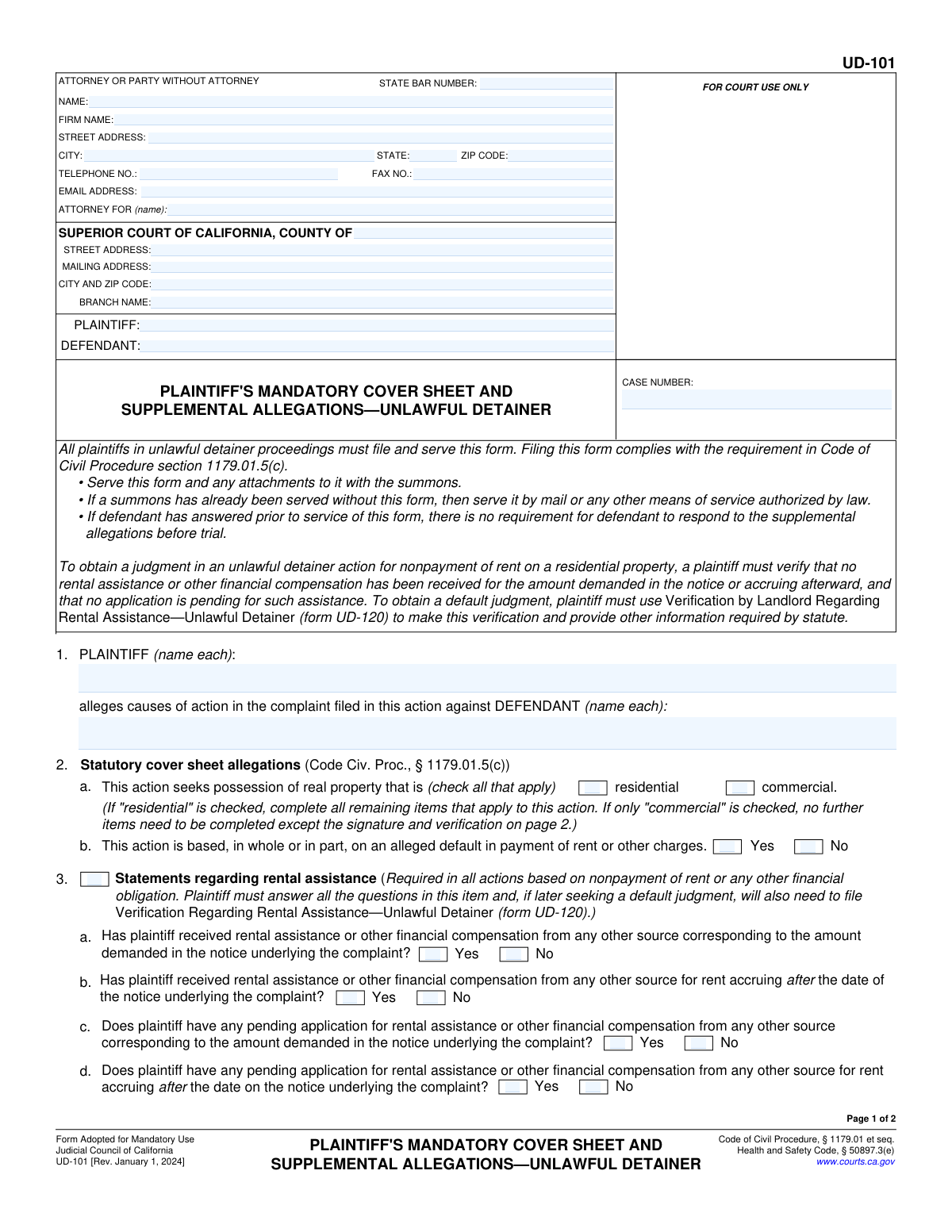
Yes! You can use AI to fill out Form UD-101, Plaintiff's Mandatory Cover Sheet and Supplemental Allegations—Unlawful Detainer
Form UD-101 is a required judicial council form in California that must be filed along with a complaint in an unlawful detainer (eviction) action. It serves as a cover sheet that summarizes key information for the court, such as whether the property is residential or commercial and provides critical details about rental assistance if the case involves non-payment of rent. Today, this form can be filled out quickly and accurately using AI-powered services like Instafill.ai, which can also convert non-fillable PDF versions into interactive fillable forms.
UD-101 is part of the
ETA forms, ATO forms, plaintiff forms, supplemental forms and unlawful detainer forms categories on Instafill.
Our AI automatically handles information lookup, data retrieval, formatting, and form filling.
It takes less than a minute to fill out UD-101 using our AI form filling.
Securely upload your data. Information is encrypted in transit and deleted immediately after the form is filled out.
Form specifications
| Form name: | Form UD-101, Plaintiff's Mandatory Cover Sheet and Supplemental Allegations—Unlawful Detainer |
| Number of fields: | 50 |
| Number of pages: | 2 |
| Language: | English |
More forms in ETA forms
Instafill Demo: How to fill out PDF forms in seconds with AI
How to Fill Out UD-101 Online for Free in 2026
Are you looking to fill out a UD-101 form online quickly and accurately? Instafill.ai offers the #1 AI-powered PDF filling software of 2026, allowing you to complete your UD-101 form in just 37 seconds or less.
Follow these steps to fill out your UD-101 form online using Instafill.ai:
- 1 Navigate to Instafill.ai and upload or select Form UD-101.
- 2 Use the AI assistant to fill in the attorney/party information, court details, and case caption with plaintiff and defendant names.
- 3 Specify whether the unlawful detainer action concerns a residential or commercial property.
- 4 If the case is residential, answer the required questions about whether the action is based on non-payment of rent.
- 5 Complete the detailed section regarding any rental assistance that has been applied for, received, or is pending.
- 6 Indicate if there are other allegations and attach Form MC-025 if necessary.
- 7 Review all the information for accuracy, then provide the date and printed name for verification before downloading the completed form for filing with the court.
Our AI-powered system ensures each field is filled out correctly, reducing errors and saving you time.
Why Choose Instafill.ai for Your Fillable UD-101 Form?
Speed
Complete your UD-101 in as little as 37 seconds.
Up-to-Date
Always use the latest 2026 UD-101 form version.
Cost-effective
No need to hire expensive lawyers.
Accuracy
Our AI performs 10 compliance checks to ensure your form is error-free.
Security
Your personal information is protected with bank-level encryption.
Frequently Asked Questions About Form UD-101
This form is a required cover sheet for filing an unlawful detainer (eviction) lawsuit in California. It provides the court with essential summary information about the case, such as whether it involves a residential or commercial property and if it's related to non-payment of rent.
The plaintiff (the landlord or property owner) or their attorney must complete and file this form along with the main complaint when starting an eviction lawsuit.
The Plaintiff is the person or entity filing the lawsuit, typically the landlord or property manager. The Defendant is the person being sued, which is usually the tenant or occupant of the property.
The court clerk will assign a Case Number when you file your lawsuit. If you are filing this cover sheet with your initial complaint, you can leave this field blank for the clerk to fill in.
Yes, if your case involves a residential property, you must complete this section. You need to disclose whether you have received or applied for any rental assistance for the amount demanded in your notice.
Select 'Residential' if the eviction is for a home, apartment, or other living space. Select 'Commercial' if the property is used for business purposes, as different rules and form sections apply.
You can check the 'Other allegations' box and either write them in the space provided or attach a separate MC-025 form. This is for claims that are not covered by the standard complaint form.
You will need the name of the county, the full street and mailing address of the specific courthouse, and the court's branch name where you are filing the case. This information is available on the local Superior Court's website.
The Verification section is where you legally swear that all the information provided in the document is true and correct to the best of your knowledge. You must date it and provide your printed name.
Yes, services like Instafill.ai use AI to help you accurately auto-fill form fields, which can save time and help prevent common errors. This is especially useful for repetitive information like names and addresses.
If you have a flat, non-fillable PDF, you can use a service like Instafill.ai. It can convert the document into an interactive, fillable form that you can easily complete and print online.
Simply upload the form to the Instafill.ai platform. The AI will identify the fields, and you can then type your information directly into the interactive form before downloading or printing the completed document.
For your security, the form recommends pressing the 'Clear This Form' button after you have finished printing. This removes all your personal information from the digital copy to protect your privacy.
You are not required to have an attorney and can fill out the form yourself as a 'self-represented party'. If you choose to represent yourself, you will enter your own name and contact information in the 'Attorney or Party' section.
Compliance UD-101
Validation Checks by Instafill.ai
1
Case Number Format and Presence
This check ensures the 'Case Number' field is not empty and conforms to the specific format required by the court system. It prevents submission of forms with missing or improperly formatted case identifiers, which are essential for correct filing and retrieval. A failed validation would prompt the user to enter a valid case number before proceeding.
2
Attorney vs. Self-Represented Logic
Validates the relationship between the 'State Bar Number', 'Firm Name', and 'Attorney For' fields. If a 'State Bar Number' is provided, the 'Attorney For' field must be completed. If no 'State Bar Number' is entered, it implies the party is self-represented, and the 'Attorney For' field should be disabled or empty. This ensures clarity on legal representation.
3
Party Name Consistency Across Form
This validation cross-references all instances of 'Plaintiff Name' and 'Defendant Name' throughout the document, including the case caption, allegations, and verification sections. It ensures the names are spelled identically in every location to maintain legal consistency and prevent ambiguity. A mismatch would trigger an alert to correct the discrepancy.
4
Mutually Exclusive Property Type Selection
Ensures that the user selects either 'Residential' or 'Commercial' but not both. These options are mutually exclusive and dictate which subsequent sections of the form are applicable. This check prevents contradictory information and ensures the correct legal path is followed based on the property type.
5
Conditional Rent Default Declaration
If the 'Residential' property type is selected, this check verifies that one, and only one, of the options ('Yes' or 'No') for 'based on default in payment of rent/charges' is chosen. This is a mandatory declaration for residential unlawful detainer cases. The form cannot be submitted for a residential case without this information.
6
Conditional Rental Assistance Section Completion
This check enforces the dependency of the rental assistance questions on the 'Statements regarding rental assistance' checkbox. If this primary box is checked, the system must then verify that each sub-question (3a, 3b, 3c, 3d) has a 'Yes' or 'No' response. This ensures that if the section is declared applicable, it is completed in its entirety.
7
Mutually Exclusive Yes/No Responses
For each question pair that offers a 'Yes' and 'No' checkbox (e.g., 'Rental Assistance Received'), this validation ensures that only one of the two options can be selected at a time. This prevents logical contradictions in the legal statements being made on the form. If a user selects one, the other should be automatically deselected.
8
Attachment Count Logic
Validates that if the 'Number of pages attached (specify)' checkbox is checked, the corresponding 'Number of Pages Attached' field contains a positive integer. If the box is unchecked, the number field should be empty or zero. This ensures accurate accounting of all documents included in the filing.
9
Verification Date Validity
This check ensures the 'Verification Date' is a valid calendar date and is not set in the future. It confirms the date is plausible for a legal signature. An invalid or future date would render the verification legally unsound and could lead to rejection of the filing.
10
Verification Name and Party Consistency
Verifies that the 'Printed Name of Plaintiff' in the final verification section matches the 'Plaintiff Name' entered in the case caption. This is a critical check to confirm that the person verifying the complaint's contents is the actual plaintiff or an authorized individual. A mismatch would call the validity of the entire document into question.
11
Address Block Completeness
Ensures that if any part of the 'Attorney/Party Address' is filled, then 'Street Address', 'City', 'State', and 'ZIP Code' are all present. It also validates the 'ZIP Code' against a 5 or 9-digit format and 'State' against a 2-letter abbreviation. This is crucial for ensuring legal notices can be successfully mailed.
12
Contact Information Formatting
This validation checks that the 'Telephone Number' and 'Fax Number' fields follow a standard numerical format (e.g., 10 digits, with optional formatting characters) and that the 'Email Address' contains a valid structure (e.g., '[email protected]'). Correctly formatted contact information is essential for communication from the court and opposing parties.
Common Mistakes in Completing UD-101
Filers often enter the address for the main county courthouse instead of the specific branch where the case is filed. This happens due to confusion or not verifying the correct location for unlawful detainer cases, and an incorrect court address can lead to the document being rejected or misrouted, causing significant delays. Always verify the exact street address, mailing address, and branch name for the specific court handling your case before filling out the form. AI-powered tools like Instafill.ai can help prevent this by using validated databases to populate correct court information automatically.
This form requires plaintiff and defendant names in multiple sections, but a common mistake is to have slight variations in spelling or the use of abbreviations between these sections. This inconsistency can create ambiguity and may lead to the court clerk rejecting the filing for correction. To avoid this, carefully enter the full legal name identically in every field where it is requested. Using a tool like Instafill.ai can ensure consistency by auto-populating recurring information like party names across the entire document from a single entry.
Parties representing themselves often get confused by fields intended for attorneys, like 'State Bar Number' and 'Firm Name,' and may incorrectly write 'N/A' or leave the entire contact section blank. This can result in the court being unable to contact them. If you are self-represented, you must leave attorney-specific fields blank but completely fill out your own name, address, and contact details. Smart form-filling tools like Instafill.ai can guide users by highlighting required fields based on their role.
The form contains several checkboxes with specific instructions, such as the rental assistance questions which should only be answered if the property is 'Residential.' People often miss this conditional logic, either answering questions that don't apply or failing to answer required ones, which can invalidate the form. Pay close attention to instructions like 'Fill only if...' to ensure you are completing the form correctly. Advanced tools like Instafill.ai can enforce this logic, automatically showing or hiding relevant sections based on your previous answers.
The case number is the primary identifier for a court filing, but it's often left blank on initial filings or entered with incorrect formatting. Since the form asks for it in multiple places, it's also easy to create inconsistencies, which will cause the document to be rejected by the court clerk. Always double-check the court-assigned number for accuracy and consistency across the entire document. Form-filling software like Instafill.ai can help by validating the format and ensuring it is replicated perfectly in all required fields.
In cases with multiple landlords or tenants, filers sometimes only list one name in the 'Plaintiff Name(s)' or 'Defendant Name(s)' fields. This is a critical error, as a judgment may only apply to the parties explicitly named in the complaint, creating legal hurdles later. Ensure every single plaintiff and defendant is listed by their full legal name. If the form is a non-fillable PDF, a tool like Instafill.ai can convert it to make it easier to list all parties without space constraints.
The rental assistance section (Item 3) requires a series of 'Yes/No' answers. A frequent error is checking both 'Yes' and 'No' for the same question or providing answers that logically contradict each other, which can lead a judge to question the filing's validity. Read each question carefully and select only one answer ('Yes' or 'No') for each sub-part. AI-powered form fillers like Instafill.ai can help prevent this by enforcing rules that only allow one selection per question.
When additional information is required on an attachment, people often forget to check the corresponding box on the main form or fail to enter the correct number of attached pages. This can lead to the court not considering the attached information because it wasn't properly referenced. Always check the 'Other allegations' or 'Number of pages attached' box and accurately count and specify the total number of pages you are including. Tools like Instafill.ai can help manage attachments and automatically update page count fields.
The verification section is a legally required sworn statement, but filers frequently forget to enter the date, print their name, or sign the document. An unverified or improperly verified complaint is invalid and will be rejected by the court, causing delays and requiring refiling. Always complete the verification section in its entirety. Tools like Instafill.ai can ensure all other fields in the section are filled out and can flag them as mandatory to prevent submission with missing information.
In all fields asking for a name, it is crucial to use the full legal name as it appears on official documents. People sometimes use nicknames or abbreviations out of habit, which can create a legal loophole or cause issues with enforcing a judgment. Always use complete and accurate legal names for all parties. To ensure accuracy, especially if the original form is a non-fillable PDF, you can use Instafill.ai to convert it into a fillable version, making it easier to type and review information.
Saved over 80 hours a year
“I was never sure if my IRS forms like W-9 were filled correctly. Now, I can complete the forms accurately without any external help.”
Kevin Martin Green
Your data stays secure with advanced protection from Instafill and our subprocessors

Robust compliance program
Transparent business model
You’re not the product. You always know where your data is and what it is processed for.
ISO 27001, HIPAA, and GDPR
Our subprocesses adhere to multiple compliance standards, including but not limited to ISO 27001, HIPAA, and GDPR.
Security & privacy by design
We consider security and privacy from the initial design phase of any new service or functionality. It’s not an afterthought, it’s built-in, including support for two-factor authentication (2FA) to further protect your account.
Fill out UD-101 with Instafill.ai
Worried about filling PDFs wrong? Instafill securely fills form-ud-101-plaintiffs-mandatory-cover-sheet-and-supplemental-allegationsunlawful-detainer forms, ensuring each field is accurate.