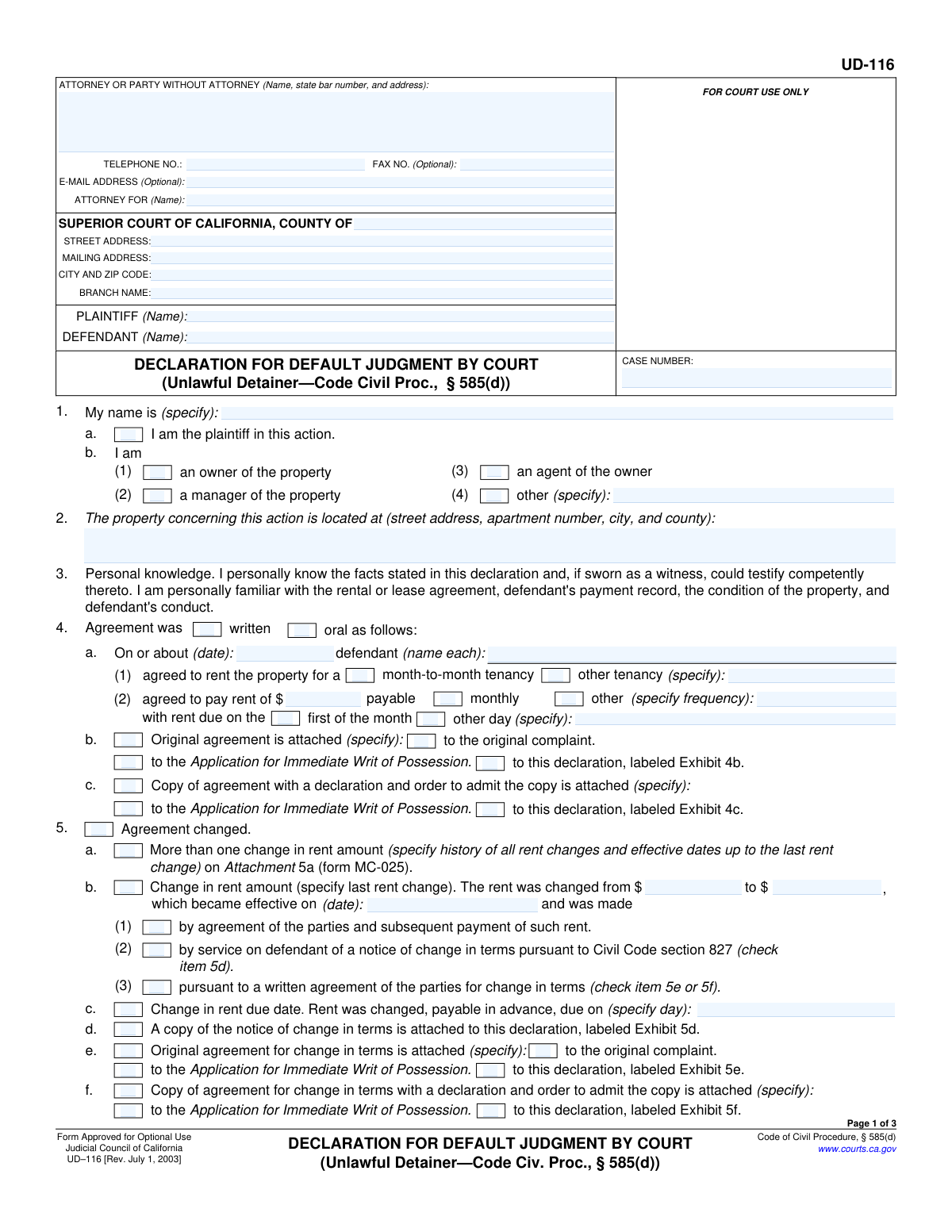
Yes! You can use AI to fill out Form UD-116, Declaration for Default Judgment by Court (Unlawful Detainer—Civ. Proc., § 585(d))
Form UD-116 is a legal document used in California Superior Courts for unlawful detainer (eviction) lawsuits. A plaintiff (landlord) files this declaration to ask the court for a default judgment against a defendant (tenant) who has not filed a response to the eviction complaint, providing the judge with a sworn statement of the facts, including details about the rental agreement, notices served, and the amount of money owed. Today, this form can be filled out quickly and accurately using AI-powered services like Instafill.ai, which can also convert non-fillable PDF versions into interactive fillable forms.
UD-116 is part of the
California court forms, landlord tenant forms and unlawful detainer forms categories on Instafill.
Our AI automatically handles information lookup, data retrieval, formatting, and form filling.
It takes less than a minute to fill out UD-116 using our AI form filling.
Securely upload your data. Information is encrypted in transit and deleted immediately after the form is filled out.
Form specifications
| Form name: | Form UD-116, Declaration for Default Judgment by Court (Unlawful Detainer—Civ. Proc., § 585(d)) |
| Number of fields: | 150 |
| Number of pages: | 1 |
| Language: | English |
Instafill Demo: How to fill out PDF forms in seconds with AI
How to Fill Out UD-116 Online for Free in 2026
Are you looking to fill out a UD-116 form online quickly and accurately? Instafill.ai offers the #1 AI-powered PDF filling software of 2026, allowing you to complete your UD-116 form in just 37 seconds or less.
Follow these steps to fill out your UD-116 form online using Instafill.ai:
- 1 Navigate to Instafill.ai and upload or select Form UD-116.
- 2 Provide the case information, including the court, county, case number, and the names of the plaintiff and defendant.
- 3 Fill in your personal details as the declarant, specifying your relationship to the property (e.g., owner, manager).
- 4 Detail the rental agreement terms, such as the date it was made, rent amount, and payment frequency, and attach any required documents.
- 5 Document the notice served to the defendant (e.g., 3-day notice to pay rent or quit), including service dates and the expiration of the notice period.
- 6 Calculate and enter the total money judgment requested, breaking it down into past-due rent, holdover damages, attorney fees, and court costs.
- 7 Review the completed declaration for accuracy, then date and sign under penalty of perjury before downloading for court submission.
Our AI-powered system ensures each field is filled out correctly, reducing errors and saving you time.
Why Choose Instafill.ai for Your Fillable UD-116 Form?
Speed
Complete your UD-116 in as little as 37 seconds.
Up-to-Date
Always use the latest 2026 UD-116 form version.
Cost-effective
No need to hire expensive lawyers.
Accuracy
Our AI performs 10 compliance checks to ensure your form is error-free.
Security
Your personal information is protected with bank-level encryption.
Frequently Asked Questions About Form UD-116
This form is a declaration used by a landlord in an eviction (unlawful detainer) lawsuit to ask the court for a default judgment. It is filed when the tenant has not responded to the court case within the legal time limit.
The form must be completed and signed by the plaintiff (landlord), property owner, property manager, or an agent of the owner who has direct personal knowledge of the rental agreement and the facts of the case.
You must attach copies of the rental agreement, the notice served to the tenant (like a 3-day notice to pay or quit), and the proof of service for that notice, unless these documents were already attached to your original complaint.
The form allows for this. In section 4, you can check the box for an 'oral' agreement and then fill in the required details, such as the date the agreement was made, the monthly rent amount, and the due date.
The form provides two common methods: dividing the monthly rent by 30 or multiplying it by 0.03288. You can choose one of these options or specify a different valuation method if applicable.
Holdover damages are the rent owed for each day the tenant remains in the property after the notice to quit has expired. You calculate the total by multiplying the daily rental value (from section 10) by the number of days the tenant has held over.
You can only request attorney fees if your written rental agreement includes a clause authorizing them for the prevailing party in a lawsuit. You must reference the specific paragraph in the agreement on the form.
The total judgment is the sum of all amounts you are claiming. This includes past-due rent, holdover damages, court costs, and any authorized attorney fees.
You must accurately account for any payments received. Section 6c is provided for you to explain any partial payments and show how you arrived at the final balance due in the notice.
No, you can fill it out electronically. The form is designed to be completed on a computer before printing.
Yes, services like Instafill.ai use AI to help you accurately auto-fill form fields. This can save time and help prevent common errors.
You can upload the UD-116 PDF to the Instafill.ai platform. Its AI will make the document interactive, allowing you to easily type your information into the correct fields online.
If you have a non-fillable or 'flat' PDF, you can use a service like Instafill.ai. It can convert the document into an interactive, fillable form that you can complete on your computer.
Compliance UD-116
Validation Checks by Instafill.ai
1
Validates Case Number Presence and Format
This check ensures that the 'CASE NUMBER' field is not empty and conforms to the court's expected format. A valid case number is essential for correctly filing the document and associating it with the proper legal action. If the case number is missing or incorrectly formatted, the document will be rejected by the court clerk, causing delays in the judgment process.
2
Ensures Declarant Role is Specified if 'Other'
This validation checks that if the box for 'other' is selected in item 1b(4), the corresponding text field specifying the declarant's role is filled out. This is important for establishing the declarant's legal standing and authority to make the declaration. Failure to specify the role can lead to the declaration being deemed invalid by the court.
3
Verifies Agreement Date is in the Past
This check ensures the date entered in item 4a, for when the rental agreement was made, is a valid date that occurs before the current date. An agreement date in the future is a logical impossibility and would invalidate the basis of the claim. This prevents data entry errors and ensures the timeline of events is legally coherent.
4
Validates Completeness of Rent Change Information
If item 5b, 'Change in rent amount,' is checked, this validation ensures that the 'from' rent, 'to' rent, and the effective date fields are all completed. Incomplete information about a rent change would make it impossible to verify the correct amount of rent due. This check is crucial for accurately calculating past-due rent and justifying the amount claimed.
5
Confirms Rent Demand Details for 3-Day Notice
This check verifies that if '3-day notice to pay rent or quit' (item 6a(1)) is selected, then the amount of rent demanded and the corresponding rental period start and end dates in item 6b are all filled. These details are the foundation of a non-payment eviction case. Missing this information would render the default judgment request defective and likely to be rejected.
6
Ensures Logical Rental Period in Notice
This validation confirms that for the rental period specified in item 6b, the 'beginning on' date is chronologically before the 'ending on' date. An inverted or illogical date range would invalidate the notice and the claim for rent for that period. This check prevents simple but critical data entry errors.
7
Verifies Notice Expiration Date Logic
This check ensures the 'notice expired' date in item 9 is chronologically after the 'service of notice' date in item 7, accounting for the legally required notice period (e.g., 3, 30, or 60 days). An incorrect expiration date means the defendant may not have been given the full time required by law to respond. This is a critical legal requirement, and failure to comply can cause the entire case to be dismissed.
8
Validates Mandatory Attachment of Notice to Quit
This check confirms that one of the options in item 6d is selected, indicating that the notice to quit is attached to either the complaint or this declaration. The form explicitly states the notice MUST be attached if not already filed with the complaint. Failure to attach this crucial piece of evidence will result in an immediate rejection of the default judgment application.
9
Verifies Calculation of Fair Rental Value
This check validates the 'fair rental value' per day in item 10. If method 'a' or 'b' is selected, the system calculates the expected value based on the monthly rent (from item 4 or 5) and compares it to the entered amount. An incorrect daily rental value will lead to an incorrect calculation of holdover damages. This ensures the financial claims are arithmetically sound.
10
Validates Holdover Damages Calculation
This validation ensures the 'Total holdover damages' in item 12d is the correct product of the 'daily rental value' (item 10) and the 'number of days that damages accrued' (item 12c). This is a critical calculation that determines a significant portion of the monetary judgment. An error here would lead to an incorrect judgment amount and could be challenged.
11
Ensures Holdover Damages Start Date is Logical
This check verifies that the date damages began, as specified in item 12a, occurs after the notice expiration date from item 9. A landlord cannot claim holdover damages for a period when the tenant was not yet illegally holding over. This ensures the damages claim is legally and chronologically valid.
12
Verifies Total Judgment Summation
This check confirms that the 'TOTAL JUDGMENT' amount in item 15a(6) is the correct sum of all preceding monetary claims (past-due rent, holdover damages, attorney fees, costs, and other). This is a final arithmetic check to ensure the total amount requested from the court is accurate. An incorrect total will cause the form to be rejected or require correction, delaying the judgment.
13
Cross-Validates Past-Due Rent Amount
This validation ensures that the 'Past-due rent' amount requested in the judgment summary (item 15a(1)) exactly matches the amount specified as due in the 3-day notice (item 6b). Any discrepancy between the amount demanded in the notice and the amount requested in the judgment can invalidate the claim. This maintains consistency and legal integrity.
14
Cross-Validates Holdover Damages Amount
This validation ensures that the 'Holdover damages' amount requested in the judgment summary (item 15a(2)) exactly matches the total calculated holdover damages from item 12d. This check prevents transcription errors between different sections of the form. It ensures the final judgment request accurately reflects the detailed calculations performed earlier.
15
Ensures Header Information is Consistent Across Pages
This check verifies that the Plaintiff name, Defendant name, and Case Number are identical in the header sections of all three pages. Inconsistent identifying information can lead to confusion and processing errors by the court clerk. This ensures the integrity and proper identification of the multi-page document as a single, coherent filing.
Common Mistakes in Completing UD-116
Users often meticulously fill out the header on the first page but forget to repeat the Plaintiff, Defendant, and Case Number on pages 2 and 3. This happens because it feels repetitive, but each page is a distinct part of the court filing. An incomplete header on any page can lead to the document being rejected by the court clerk, causing delays in obtaining the default judgment.
A critical error is entering a rent amount in Section 6b that does not exactly match the amount demanded on the attached 3-day notice to pay rent or quit. Even a one-cent discrepancy can invalidate the entire unlawful detainer action, as the law requires the notice to be precise. This mistake often occurs from typos or failing to double-check the source document before filling out the form.
The form explicitly states that the Notice to Quit (Exhibit 6d) and its Proof of Service (Exhibit 8b) MUST be attached if not already filed with the complaint. People often overlook this, assuming the court already has the documents. Failure to attach these required exhibits will result in an immediate rejection of the declaration, halting the judgment process until the packet is resubmitted correctly.
Calculating holdover damages in Section 12 involves correctly identifying start and end dates and performing accurate multiplication. Common errors include miscounting the number of days or using the wrong daily rental value from Section 10. These mathematical errors lead to an incorrect judgment amount, which the court may reject or reduce, requiring an amended filing.
In Section 9, filers often miscalculate the date the notice expired by not correctly applying legal rules for counting days, which exclude the day of service and may extend for weekends or holidays. An incorrect expiration date can render the entire action premature and legally defective. This can be a basis for the defendant to challenge the judgment later.
Section 15 requires adding up past-due rent, damages, fees, and costs to arrive at a total judgment. Simple arithmetic errors are common, where the sum in line 15a(6) does not match the total of the individual amounts listed above it. A court clerk will likely catch this inconsistency and reject the filing, delaying the entry of judgment.
Filers sometimes provide an incomplete property address in Section 2, such as omitting an apartment or unit number, or failing to list the county. This creates legal ambiguity about the specific premises subject to the eviction order. An imprecise address can make the resulting judgment unenforceable and cause significant issues for the Sheriff when attempting to execute the writ of possession.
Submitting an unsigned or undated declaration is a frequent and fatal mistake. The signature and date under penalty of perjury are what give the document its legal force. An unsigned form is legally worthless and will be rejected outright by the court, causing significant and unnecessary delays.
When the rent has changed, filers often fail to properly complete Section 5 by not attaching the required notice of change in terms (Exhibit 5d) or not using the separate MC-025 form for a complex rent history. This omission creates a discrepancy between the rent claimed and the original agreement, which can be grounds for the court to deny the requested rent and damages. AI-powered tools like Instafill.ai can help by prompting users for necessary attachments based on their checkbox selections.
A user may request attorney fees in Section 13 without verifying that the rental agreement contains a specific clause authorizing them. Requesting fees not supported by the contract can lead to the court striking that portion of the judgment. It is crucial to review the lease and cite the specific paragraph number that permits the recovery of fees.
The form requires checking boxes to indicate how documents like the rental agreement (Section 4) or notice (Section 6) are attached. Users often forget to check the correct box (e.g., 'to this declaration, labeled Exhibit 6d') or fail to label the physical attachments accordingly. This disorganization can confuse the court clerk and judge, potentially leading to rejection or delays while they try to locate the necessary evidence in the file.
Saved over 80 hours a year
“I was never sure if my IRS forms like W-9 were filled correctly. Now, I can complete the forms accurately without any external help.”
Kevin Martin Green
Your data stays secure with advanced protection from Instafill and our subprocessors

Robust compliance program
Transparent business model
You’re not the product. You always know where your data is and what it is processed for.
ISO 27001, HIPAA, and GDPR
Our subprocesses adhere to multiple compliance standards, including but not limited to ISO 27001, HIPAA, and GDPR.
Security & privacy by design
We consider security and privacy from the initial design phase of any new service or functionality. It’s not an afterthought, it’s built-in, including support for two-factor authentication (2FA) to further protect your account.
Fill out UD-116 with Instafill.ai
Worried about filling PDFs wrong? Instafill securely fills form-ud-116-declaration-for-default-judgment-by-court-unlawful-detainerciv-proc-585d forms, ensuring each field is accurate.