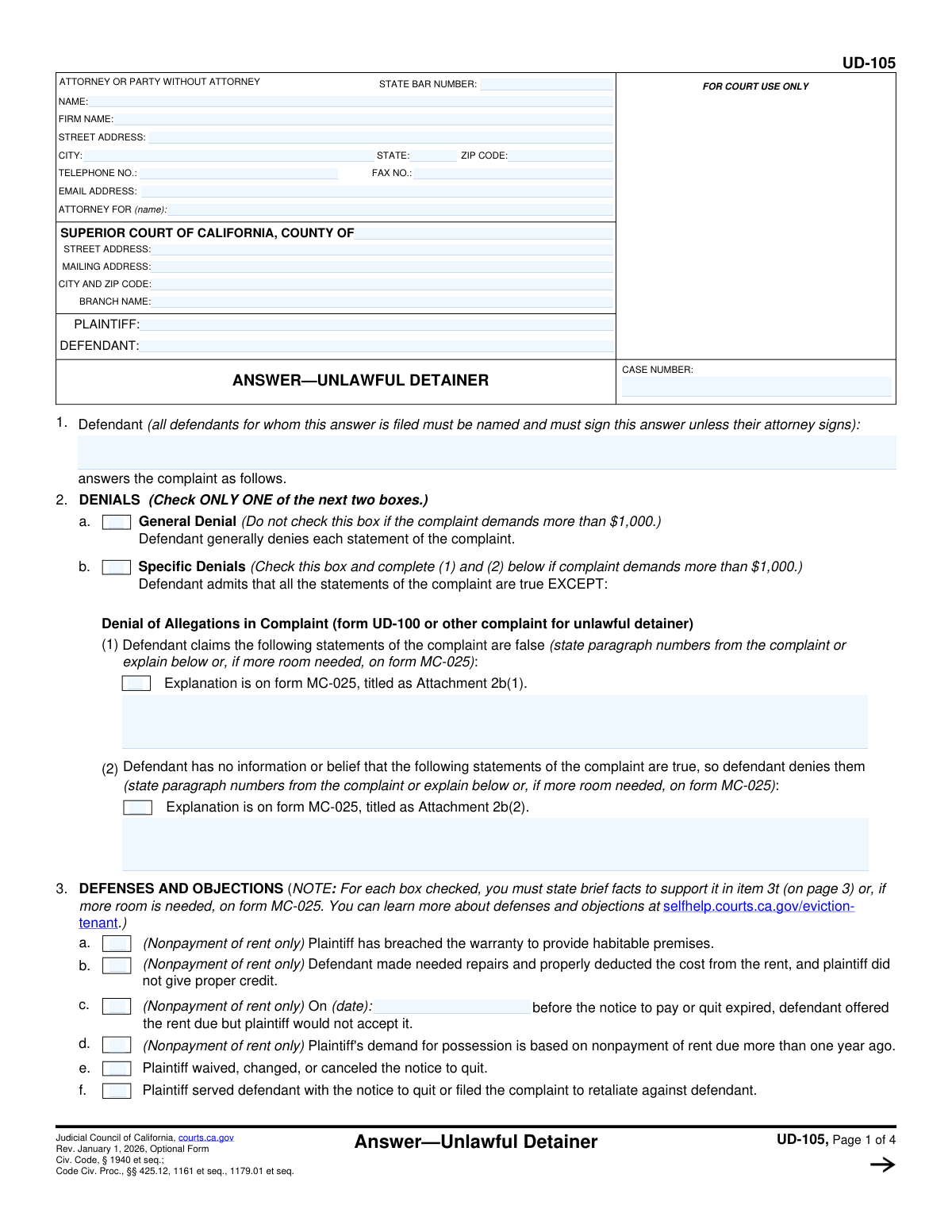
Yes! You can use AI to fill out Form UD-105, Answer—Unlawful Detainer
Form UD-105, Answer—Unlawful Detainer, is a crucial legal form used in California Superior Courts by a tenant (defendant) to formally respond to an eviction complaint filed by a landlord (plaintiff). It allows the tenant to either generally or specifically deny the landlord's claims and to assert various legal defenses, such as breach of warranty of habitability, retaliation, or improper notice. Filing this answer is a critical step for a tenant to avoid a default judgment and present their side of the case. Today, this form can be filled out quickly and accurately using AI-powered services like Instafill.ai, which can also convert non-fillable PDF versions into interactive fillable forms.
Our AI automatically handles information lookup, data retrieval, formatting, and form filling.
It takes less than a minute to fill out UD-105 using our AI form filling.
Securely upload your data. Information is encrypted in transit and deleted immediately after the form is filled out.
Form specifications
| Form name: | Form UD-105, Answer—Unlawful Detainer |
| Number of fields: | 105 |
| Number of pages: | 4 |
| Language: | English |
| Categories: | unlawful detainer forms |
Instafill Demo: How to fill out PDF forms in seconds with AI
How to Fill Out UD-105 Online for Free in 2026
Are you looking to fill out a UD-105 form online quickly and accurately? Instafill.ai offers the #1 AI-powered PDF filling software of 2026, allowing you to complete your UD-105 form in just 37 seconds or less.
Follow these steps to fill out your UD-105 form online using Instafill.ai:
- 1 Navigate to Instafill.ai and upload or select Form UD-105, Answer—Unlawful Detainer.
- 2 Use the AI assistant to accurately enter the court, case number, plaintiff, and defendant information from the complaint you received.
- 3 In the 'DENIALS' section, choose whether to generally deny the complaint (for claims under $1,000) or specifically deny certain allegations.
- 4 Go through the 'AFFIRMATIVE DEFENSES' section and check the boxes for all legal reasons that apply to your situation, such as issues with habitability, improper notice, or retaliation.
- 5 Provide specific facts and details for the defenses you selected, using the designated spaces or attaching a separate form (MC-025) if necessary.
- 6 Complete the 'OTHER STATEMENTS' and 'REQUESTS' sections if you have additional claims, such as an excessive fair rental value or a request for attorney's fees.
- 7 Carefully review the entire completed form for accuracy, then date, sign, and download the document to be filed with the court and served on the plaintiff.
Our AI-powered system ensures each field is filled out correctly, reducing errors and saving you time.
Why Choose Instafill.ai for Your Fillable UD-105 Form?
Speed
Complete your UD-105 in as little as 37 seconds.
Up-to-Date
Always use the latest 2026 UD-105 form version.
Cost-effective
No need to hire expensive lawyers.
Accuracy
Our AI performs 10 compliance checks to ensure your form is error-free.
Security
Your personal information is protected with bank-level encryption.
Frequently Asked Questions About Form UD-105
This form is used by a defendant (tenant) to respond to an unlawful detainer (eviction) lawsuit filed by a plaintiff (landlord). It allows you to deny the landlord's claims and state your legal defenses for why you should not be evicted.
Any tenant who has been served with a Summons and Complaint for Unlawful Detainer and wishes to contest the eviction must fill out and file this form with the court. If you do not file an answer, the landlord may win the case by default.
You will need a copy of the Complaint for Unlawful Detainer to get the exact plaintiff and defendant names, the court case number, and the specific allegations you need to respond to. Gather any documents that support your defenses, such as rent receipts or repair requests.
A 'General Denial' denies every statement in the complaint, but you can only use it if the complaint does not demand more than $1,000. If the complaint demands more than $1,000, you must use a 'Specific Denial' to address each specific allegation.
This section allows you to explain the legal reasons why the landlord should not win the eviction case. You should check the box for each defense that applies to your situation, such as the landlord breaching the warranty of habitability or retaliating against you.
If you run out of space, you can use an Attachment form (MC-025). Be sure to check the box on the main form indicating that an attachment is included and label the attachment clearly (e.g., 'Attachment 3t').
This defense claims that the landlord failed to maintain the rental unit in a livable condition, with issues like a lack of heat, broken plumbing, or pest infestations. If you check this box, you are arguing that you should not have to pay full rent because of these serious problems.
This refers to a state law that provides tenants with certain protections, including requiring 'just cause' for most evictions. If your tenancy is covered, you can check the relevant boxes if the landlord failed to comply with the Act's requirements.
You must file the completed form with the Superior Court listed on the complaint and serve a copy on the plaintiff or their attorney. Be aware of strict deadlines, as you typically only have a few days to respond after being served with the lawsuit.
The case number is assigned by the court and will be printed on the top of the Summons and Complaint documents you received from the plaintiff. It is crucial to enter this number correctly on all pages of your answer form.
Yes, if you are representing yourself, you must fill this section out with your own name, address, and contact information. Where it asks for 'Attorney For,' you can write your own name or 'Defendant, In Pro Per.'
Yes, services like Instafill.ai use AI to accurately auto-fill form fields from your saved information, which can save you significant time and help prevent errors. While AI can assist with filling the form, it cannot provide legal advice.
Simply upload the 'ANSWER—UNLAWFUL DETAINER' form to the Instafill.ai platform. The AI will identify the fields, allowing you to type your information directly into the interactive form, save your progress, and download the completed document.
You can use a service like Instafill.ai, which can convert flat, non-fillable PDFs into interactive, fillable forms. Just upload your document, and the platform will make it easy to type your answers directly into the fields.
Compliance UD-105
Validation Checks by Instafill.ai
1
Case Number Consistency Across Form
This check verifies that all fields designated for the 'Case Number' contain the exact same value throughout the entire document. Mismatched case numbers can lead to filing errors, document rejection by the court, or incorrect association with the legal case. If validation fails, the user must correct the case numbers to ensure they are identical.
2
Mutually Exclusive Denial Selection
Validates that only one of the two main denial options, 'General Denial' or 'Specific Denials', is selected, as instructed by the form. Selecting both is a logical contradiction and can invalidate the defendant's answer, potentially leading to a default judgment. A failure requires the user to choose only one of the two options.
3
Conditional Requirement for Specific Denials
Ensures that if the 'Specific Denials' box is checked, the filer provides the required details. The user must either fill in the 'Denied Paragraph Numbers or Explanation' text area or check the box indicating that an attachment (MC-025) is being used for this purpose. Failure to provide this information makes the specific denial incomplete and legally insufficient.
4
Party Name Consistency
This validation confirms that the names entered in the 'Plaintiff Name(s)' and 'Defendant Name(s)' fields are consistent with the 'PLAINTIFF' and 'DEFENDANT' fields in the document's header/footer sections. Inconsistent party names can cause confusion and processing delays with the court clerk. A validation failure would prompt the user to standardize the names across all fields.
5
State Bar Number Format
Verifies that the 'State Bar Number' field contains a valid numerical format, as this is a unique identifier for a licensed attorney. Submitting an incorrectly formatted or non-numeric bar number can prevent the court from verifying the attorney's status and authority to represent the client. The check ensures the entry is numeric and may check for a specific length.
6
Attorney Representation Logic
Checks that if a 'State Bar Number' is provided, the 'Attorney For (Client Name)' field is also filled out. This is a logical check to ensure that if an attorney is filing the form, they have clearly identified which party they are representing. An omission could lead to ambiguity about who is being represented in the legal action.
7
Conditional Date for Rent Offer Defense
If the checkbox 'Offered rent before notice expired but plaintiff refused' is checked, this validation ensures the corresponding 'Date rent offered...' field is populated with a valid date. This date is a critical piece of evidence for the defense, and its absence renders the claim unsubstantiated. The system should flag this as a required field when the defense is claimed.
8
Conditional Requirement for Local Ordinance Defense
This check ensures that if the 'Plaintiff's demand violates local rent or eviction control ordinance' box is checked, the associated text field for the ordinance details (city/county, title, date) is filled. Without these specifics, the defense is vague and lacks the necessary information for the court to consider it. A failure would require the user to provide the specific ordinance information.
9
Tenant Protection Act Defense Logic
Validates that if the parent checkbox 'Demand subject to Tenant Protection Act (noncompliance)' is selected, at least one of the specific sub-violation checkboxes is also selected. Checking the parent box alone is insufficient; the filer must specify the exact nature of the noncompliance. This ensures the defense is articulated with the required specificity.
10
Attachment Page Count Verification
This check verifies that if any checkbox indicating that an attachment (e.g., form MC-025) is used, the 'Pages attached' field contains a numerical value greater than zero. This ensures the court is aware of and can account for all submitted parts of the legal filing. A mismatch could result in the court overlooking critical information provided in the attachment.
11
ZIP Code Format Validation
Ensures that all ZIP code fields (for both the party and the court) adhere to a standard 5-digit or 9-digit (ZIP+4) format. Correctly formatted ZIP codes are essential for the proper delivery of mail from the court and opposing parties. An invalid format could lead to missed deadlines and communications.
12
Email Address Format Validation
This validation checks that the 'Email Address' field contains a string in a valid format (e.g., [email protected]). As email is often used for official service and communication in legal cases, an invalid address would prevent the party or attorney from receiving critical notices. The check prevents submission with a malformed email address.
13
Signature Date Requirement
Verifies that for every signature block where a name is typed or printed, the corresponding 'Date' field is also filled out. An undated signature can call the validity and timing of the document's execution into question. This check ensures the form is properly executed before submission.
14
Defendant Name for Answer Consistency
This check ensures the 'Defendant name(s)' listed specifically for the Answer are also present in the main 'Defendant Name(s)' list for the case. This confirms which of the named defendants are actually responding with this document. A mismatch could create confusion about which party has officially filed an answer.
15
Conditional Requirement for Rental Assistance Defense
If the 'Demand based on nonpayment of rent or other financial obligations' checkbox is checked, this validation ensures at least one of the subsequent checkboxes related to rental assistance is also checked. This forces the filer to specify the exact rental-assistance-related defense being claimed, rather than making a general, unsupported assertion. Failure to specify makes the defense legally incomplete.
Common Mistakes in Completing UD-105
Users often mistype the case number or omit parts of it, such as letters or leading zeros. The case number must be entered exactly as it appears on the Complaint or Summons to ensure the document is filed correctly in the court's system. An incorrect number can lead to the rejection of the filing, significant delays, or the answer not being associated with the correct case, potentially resulting in a default judgment.
Filers frequently use nicknames, abbreviations, or misspell the names of the plaintiff(s) or defendant(s). It is critical that the names listed on the answer match the full legal names on the original complaint exactly. Any discrepancy can create legal ambiguity, cause confusion in court records, and may even provide grounds for the opposing party to challenge the validity of the response.
This form requires the defendant to choose between a 'General Denial' and a 'Specific Denial,' but not both. A common error is checking 'General Denial' when the complaint demands more than $1,000, which is not permitted and invalidates the denial. This mistake can have severe legal consequences, as it may result in the court deeming all allegations in the complaint to be admitted by the defendant.
Many defendants check boxes for various affirmative defenses (e.g., 'breached warranty to provide habitable premises' or 'retaliatory eviction') but fail to provide the required factual explanation in the designated space or on an attached MC-025 form. Simply checking a box is legally insufficient; you must state the specific facts that support the defense. Without this explanation, the court will likely disregard the defense entirely, weakening your case.
Leaving the contact information section partially blank is a frequent oversight. Fields like the State Bar number (for attorneys), email address, and telephone number are essential for the court and opposing counsel to provide notices and other communications. Missing information can lead to missed hearings, crucial updates, or filing deadlines, which could jeopardize the outcome of the case.
The form contains many fields that are conditional, meaning they should only be filled out if a corresponding checkbox is marked (e.g., providing a date only if the 'Offered rent before notice expired' box is checked). People often fill in these dependent fields without checking the primary box, or vice versa, creating a confusing and contradictory answer. This can undermine the credibility of the response and cause the court to ignore the information.
When a user checks a box for 'Other' defenses or requests, they often forget to provide the mandatory explanation in the space provided or on an attachment. An 'Other' selection is meaningless without a clear, written specification of the claim or request. The court cannot guess the filer's intent, so failing to provide this detail means the defense or request will be completely overlooked.
The form frequently instructs users to use form MC-025 for additional space and to note the number of pages attached. A critical error is writing 'see attachment' or checking a box indicating an attachment is used, but then failing to physically or electronically include the MC-025 form with the filing. If the attachment is missing, any facts, defenses, or explanations it was supposed to contain will not be considered by the court.
Filers sometimes enter a generic county court address instead of the specific street address and branch name where the case is being heard, as listed on the summons. Filing documents at the wrong courthouse location can cause them to be rejected or significantly delayed in reaching the correct department. It is crucial to copy the exact court address and branch name from the official court papers to ensure timely and proper filing.
Saved over 80 hours a year
“I was never sure if my IRS forms like W-9 were filled correctly. Now, I can complete the forms accurately without any external help.”
Kevin Martin Green
Your data stays secure with advanced protection from Instafill and our subprocessors

Robust compliance program
Transparent business model
You’re not the product. You always know where your data is and what it is processed for.
ISO 27001, HIPAA, and GDPR
Our subprocesses adhere to multiple compliance standards, including but not limited to ISO 27001, HIPAA, and GDPR.
Security & privacy by design
We consider security and privacy from the initial design phase of any new service or functionality. It’s not an afterthought, it’s built-in, including support for two-factor authentication (2FA) to further protect your account.
Fill out UD-105 with Instafill.ai
Worried about filling PDFs wrong? Instafill securely fills form-ud-105-answerunlawful-detainer forms, ensuring each field is accurate.