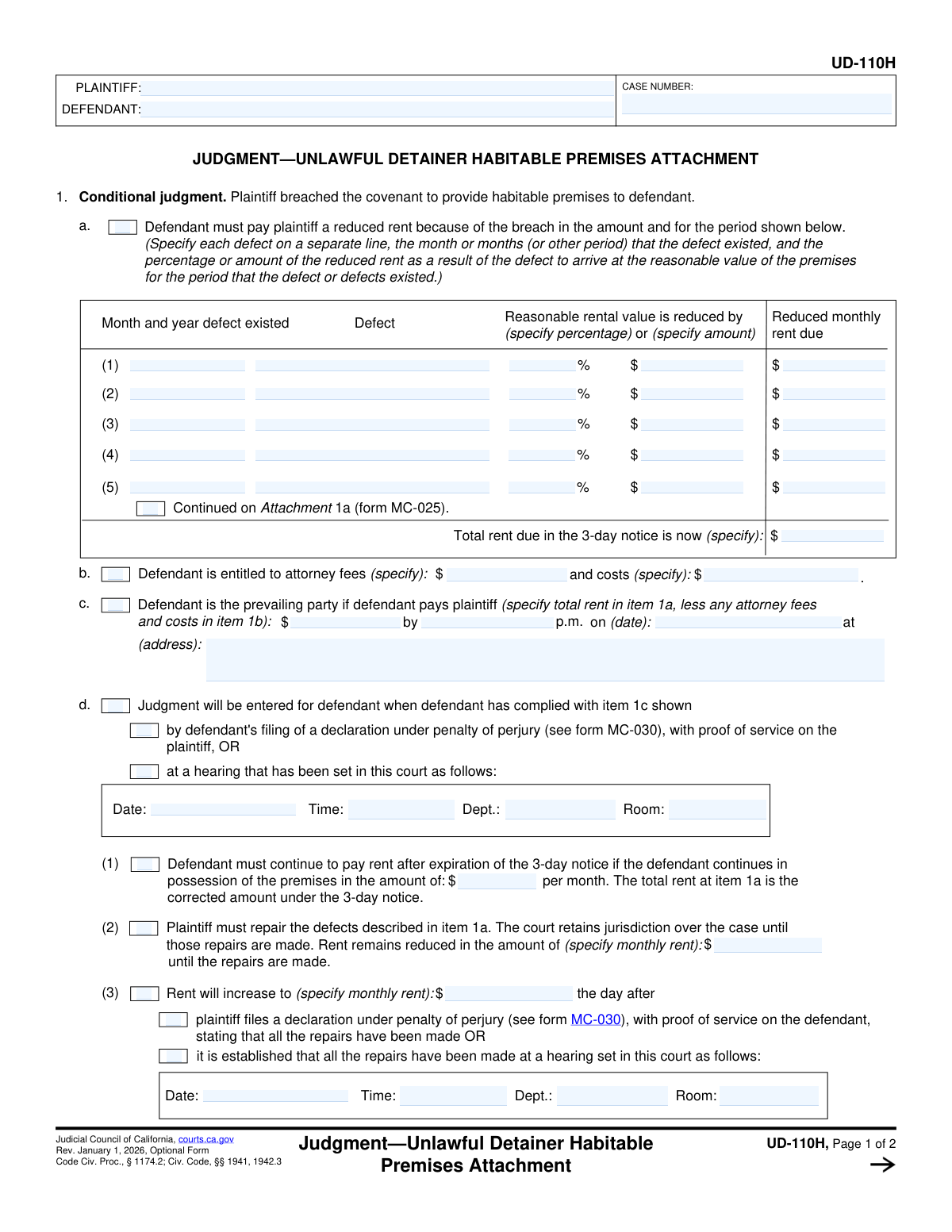
Yes! You can use AI to fill out Judicial Council of California Form UD-110H, Judgment—Unlawful Detainer Habitable Premises Attachment
Form UD-110H, Judgment—Unlawful Detainer Habitable Premises Attachment, is a legal document used in California courts for eviction cases. It is attached to a judgment when a judge rules that the landlord breached the warranty of habitability by failing to maintain the rental property. The form specifies the details of the ruling, including rent reductions for the period the defects existed, a list of required repairs, and the conditions for either the tenant or landlord to be the prevailing party. Today, this form can be filled out quickly and accurately using AI-powered services like Instafill.ai, which can also convert non-fillable PDF versions into interactive fillable forms.
UD-110H is part of the
California court forms, California judicial forms, Judicial Council forms, landlord tenant forms and unlawful detainer forms categories on Instafill.
Our AI automatically handles information lookup, data retrieval, formatting, and form filling.
It takes less than a minute to fill out UD-110H using our AI form filling.
Securely upload your data. Information is encrypted in transit and deleted immediately after the form is filled out.
Form specifications
| Form name: | Judicial Council of California Form UD-110H, Judgment—Unlawful Detainer Habitable Premises Attachment |
| Number of fields: | 97 |
| Number of pages: | 1 |
| Language: | English |
Instafill Demo: How to fill out PDF forms in seconds with AI
How to Fill Out UD-110H Online for Free in 2026
Are you looking to fill out a UD-110H form online quickly and accurately? Instafill.ai offers the #1 AI-powered PDF filling software of 2026, allowing you to complete your UD-110H form in just 37 seconds or less.
Follow these steps to fill out your UD-110H form online using Instafill.ai:
- 1 Navigate to Instafill.ai and upload your UD-110H form or select it from the platform's template library.
- 2 Enter the case number, plaintiff name, and defendant name in the header section of the form.
- 3 In Section 1, detail each property defect, the dates it existed, and the court-ordered rent reduction as a percentage or specific dollar amount.
- 4 Input any awarded attorney fees and costs in section 1b, and calculate the total amount the defendant must pay to be the prevailing party in section 1c.
- 5 Complete the conditional judgment details in section 1d, including payment deadlines, hearing dates, and instructions for ongoing rent payments and required repairs.
- 6 If the defendant fails to comply, fill out the sections for the plaintiff as the prevailing party, calculating the total judgment including past-due rent and holdover damages.
- 7 Review all entered information for accuracy with the AI assistant, then download, print, or e-file the completed UD-110H as required for your court case.
Our AI-powered system ensures each field is filled out correctly, reducing errors and saving you time.
Why Choose Instafill.ai for Your Fillable UD-110H Form?
Speed
Complete your UD-110H in as little as 37 seconds.
Up-to-Date
Always use the latest 2026 UD-110H form version.
Cost-effective
No need to hire expensive lawyers.
Accuracy
Our AI performs 10 compliance checks to ensure your form is error-free.
Security
Your personal information is protected with bank-level encryption.
Frequently Asked Questions About Form UD-110H
The UD-110H is a court attachment used in an unlawful detainer (eviction) case when a judge finds that the landlord breached the 'warranty of habitability.' It details the judge's orders regarding reduced rent for the tenant and required repairs for the landlord.
The court fills out this form to document the official judgment. Both the plaintiff (landlord) and defendant (tenant) receive a copy and are legally required to follow the orders detailed within it.
This means the judge has ordered a legal reduction in the rent the tenant owes due to specific defects that made the property less habitable. The form specifies the defect, the time it existed, and the exact amount of the rent reduction.
If the tenant pays the court-ordered reduced amount on time, they become the 'prevailing party.' This means they win the eviction case and are allowed to stay in the property, provided they continue to meet their obligations.
If the tenant does not pay the specified amount by the deadline, the landlord (plaintiff) becomes the prevailing party. The landlord can then get a final judgment to evict the tenant and recover the money owed.
You must file a Declaration (Form MC-030) with the court, stating under penalty of perjury that all repairs are finished, and serve a copy on the tenant. The court may also schedule a hearing to confirm the repairs are complete.
The rent will increase back to the normal amount after the landlord files a declaration proving all court-ordered repairs have been made, or after a court hearing confirms it. The form specifies what the new rent amount will be.
A conditional judgment means the final outcome of the case depends on whether a party fulfills a specific condition. In this case, the judgment depends on whether the tenant pays the reduced rent by the court's deadline.
Form MC-030 is a standard 'Declaration' form used to make a sworn statement to the court in writing. It is used by both parties to prove that they have complied with the court's orders, such as making a payment or completing repairs.
If you need to list more defects than the form has lines for, you should use an attachment. The form indicates that you can continue listing defects on Attachment 1a (form MC-025).
Yes, services like Instafill.ai use AI to help you accurately auto-fill related forms, such as the MC-030 Declaration, saving time and reducing errors. While the court completes the UD-110H, AI can assist with other required documents.
You can use a service like Instafill.ai to easily complete your legal forms online. Simply upload the form, and the AI-powered platform will guide you in filling out the fields accurately and efficiently.
If you have a non-fillable or 'flat' PDF, you can upload it to Instafill.ai. The service can convert it into an interactive, fillable form that you can complete, save, and print digitally.
Compliance UD-110H
Validation Checks by Instafill.ai
1
Validate Case Number Format
Ensures the 'CASE NUMBER' field conforms to the court's required format. This is crucial for correctly identifying and filing the document within the court's system. A malformed case number could lead to the document being rejected or misfiled, causing significant delays in the legal process.
2
Mutually Exclusive Rent Reduction in Item 1a
For each defect row in section 1a, this check verifies that either a percentage reduction OR a specific dollar amount reduction is entered, but not both. This prevents ambiguity in calculating the reduced rent. If both fields are filled, the form submission should be flagged for user correction to ensure the intended reduction is clear.
3
Validate Rent Reduction Percentage Range
If a percentage is used for rent reduction in section 1a, this validation ensures the value is within a logical range, specifically between 0 and 100. This prevents data entry errors, such as entering a value like '200' for 20%. An out-of-range value would lead to an incorrect rent calculation and must be corrected before processing.
4
Verify Total Rent Calculation in Item 1a
This check confirms that the 'Total rent due in the 3-day notice is now' amount at the bottom of section 1a is the correct sum of all 'Reduced monthly rent due' values from the defect rows. This is a critical calculation for determining the base amount owed. A mismatch indicates a calculation error that must be resolved to ensure the judgment is based on accurate figures.
5
Verify Defendant's Payment Calculation in Item 1c
Validates that the payment amount in section 1c correctly equals the total rent from item 1a minus any attorney fees and costs specified in item 1b. This calculation determines the exact amount the defendant must pay to be considered the prevailing party. An incorrect total could lead to disputes over compliance and the final judgment.
6
Validate Payment Deadline in Item 1c
Ensures the date and time specified in section 1c for the defendant's payment is a valid, future date and time. This prevents the entry of impossible or past deadlines. An invalid deadline would make the condition unenforceable and requires correction to establish a clear and fair timeframe for compliance.
7
Ensure Completeness of Conditional Hearing Details
Checks that if a hearing option is selected in sections 1d, 1d(3), or 1f, the corresponding 'Date', 'Time', and 'Dept.' fields are all filled out. Missing hearing information would render the notice incomplete and prevent parties from knowing when and where to appear. The validation ensures all necessary logistical details are provided when that option is chosen.
8
Cross-Reference Past-Due Rent Amount in Item 1f(1)
Verifies that the 'Past-due rent' amount listed in the plaintiff's judgment table (item 1f(1)) is identical to the 'Total rent due' calculated in item 1a. This maintains consistency across the document and prevents discrepancies in the amounts being judged. A mismatch would require correction to ensure the judgment is based on a single, agreed-upon figure for past-due rent.
9
Cross-Reference Attorney Fees and Costs in Item 1f
Confirms that the 'Attorney fees' and 'Costs' amounts in the plaintiff's judgment table (items 1f(3) and 1f(4)) match the amounts specified in item 1b. This ensures that the fees and costs are carried over accurately into the final judgment calculation. Any discrepancy could lead to an incorrect total judgment amount.
10
Validate Holdover Damages Calculation in Item 1f(2)
This check validates the 'Holdover damages' calculation in section 1f. It ensures that if damages are claimed, one of the two calculation formulas is selected, all necessary inputs (number of days, reduced rent) are provided, and the final total is arithmetically correct. An error in this calculation would result in an inaccurate judgment amount and must be flagged for review.
11
Verify Total Judgment Summation in Item 1f(6)
This is a critical check that verifies the 'TOTAL JUDGMENT' amount in item 1f(6) is the correct sum of all preceding lines in the table (items 1f(1) through 1f(5)). This final calculation is the ultimate monetary award for the plaintiff if the defendant fails to comply. An error here would invalidate the entire financial portion of the judgment.
12
Ensure Possession Address is Complete in Item 1g
If section 1g is used to award possession of the premises, this validation ensures the full address, including street, apartment number, city, and county, is provided. A partial or missing address would make the possession order ambiguous and potentially unenforceable. This check guarantees the subject property is clearly and legally identified.
13
Validate All Monetary Field Formats
Performs a universal check on all fields intended to contain a dollar amount to ensure they are entered in a valid currency format (e.g., 1234.56). This prevents non-numeric characters or improperly formatted values from being entered, which would cause calculation errors. This validation is essential for maintaining data integrity for all financial figures on the form.
14
Ensure Defect Row Completeness in Item 1a
For any row in the defect table (section 1a) that is partially filled, this check ensures all required fields for that row are completed. This includes the 'Month and year', 'Defect' description, and a value for either percentage or amount reduction. Incomplete rows create ambiguity and prevent accurate calculation of the total reduced rent.
Common Mistakes in Completing UD-110H
In section 1a, users must calculate the 'Reduced monthly rent due' and the 'Total rent due' based on specified defects and reduction percentages or amounts. These manual calculations are highly prone to arithmetic errors, leading to an incorrect judgment amount and potential disputes. To avoid this, meticulously double-check all calculations or use a calculator. AI-powered tools like Instafill.ai can prevent these mistakes by performing the calculations automatically based on the initial inputs.
Section 1f requires calculating 'Holdover damages' using one of two complex formulas involving specific multipliers (e.g., 0.03228). Users often choose the wrong formula or make mathematical errors during this multi-step calculation, resulting in an incorrect total judgment. Carefully read the instructions to select the correct formula and verify your math. Advanced form-filling tools can automate these complex, rule-based calculations to ensure accuracy.
The 'TOTAL JUDGMENT' in section 1f requires summing multiple fields, including past-due rent, holdover damages, attorney fees, and costs. It is common for filers to make simple addition errors, leading to a final judgment amount that does not match the sum of its parts. This can cause the form to be rejected or require correction, delaying the case. Always use a calculator to sum the final total, or rely on a tool that can auto-sum the fields for you.
Users frequently enter a Case Number, Plaintiff name, or Defendant name that does not exactly match the official court record, often due to a typo or transposition. Even a small error can lead to the document being rejected by the court clerk, as it cannot be correctly filed with the existing case. To prevent this, carefully copy all information directly from other official court documents related to the case.
In section 1a, the form requires a specific description for each 'Defect.' People often write vague entries like 'plumbing issues' or 'broken heater,' which are insufficient for a legal judgment. This ambiguity can lead to disputes about which repairs are required. Be specific, describing the exact problem and location (e.g., 'Leaking faucet in kitchen sink') as determined by the court.
Section 1c specifies the exact conditions under which the defendant can pay to be considered the prevailing party, including the amount, date, time, and location. A common mistake is omitting the time of day or providing an incomplete address for payment. This ambiguity can make the judgment unenforceable and lead to further litigation over compliance. Ensure every single field in this section is filled out completely and accurately.
When detailing the rent reduction in section 1a, the form asks for a reduction by 'percentage OR amount.' A frequent error is filling in both fields, creating confusion as to which value should be used for the calculation. This can invalidate the calculation and require clarification from the court. Always choose only one method—either the percentage or the flat dollar amount—for each defect listed.
The form contains several critical checkboxes in sections 1d, 1f, and 1h that define the terms of the judgment, such as scheduling a future hearing, forfeiting the lease, or canceling the rental agreement. Overlooking these checkboxes results in an incomplete judgment that doesn't fully reflect the court's orders. Review the entire form before finalizing to ensure all applicable boxes corresponding to the judge's ruling have been checked.
In section 1g, the form requires the full address of the premises for the award of possession. Filers sometimes provide an incomplete address, omitting the apartment or unit number, city, or county. An incomplete address can cause significant delays and problems when the sheriff's department attempts to execute the writ of possession. Always provide the complete and exact address as it appears on the lease agreement.
This form is often found as a non-fillable PDF, forcing users to fill it out by hand. This leads to illegible handwriting, text that doesn't fit in the designated spaces, and a higher likelihood of calculation errors. These issues can cause the form to be misinterpreted or rejected by the court. To avoid this, use a service like Instafill.ai that can convert any flat PDF into an interactive, fillable form, ensuring clarity, proper formatting, and the ability to automate calculations.
Saved over 80 hours a year
“I was never sure if my IRS forms like W-9 were filled correctly. Now, I can complete the forms accurately without any external help.”
Kevin Martin Green
Your data stays secure with advanced protection from Instafill and our subprocessors

Robust compliance program
Transparent business model
You’re not the product. You always know where your data is and what it is processed for.
ISO 27001, HIPAA, and GDPR
Our subprocesses adhere to multiple compliance standards, including but not limited to ISO 27001, HIPAA, and GDPR.
Security & privacy by design
We consider security and privacy from the initial design phase of any new service or functionality. It’s not an afterthought, it’s built-in, including support for two-factor authentication (2FA) to further protect your account.
Fill out UD-110H with Instafill.ai
Worried about filling PDFs wrong? Instafill securely fills judicial-council-of-california-form-ud-110h-judgmentunlawful-detainer-habitable-premises-attachment forms, ensuring each field is accurate.