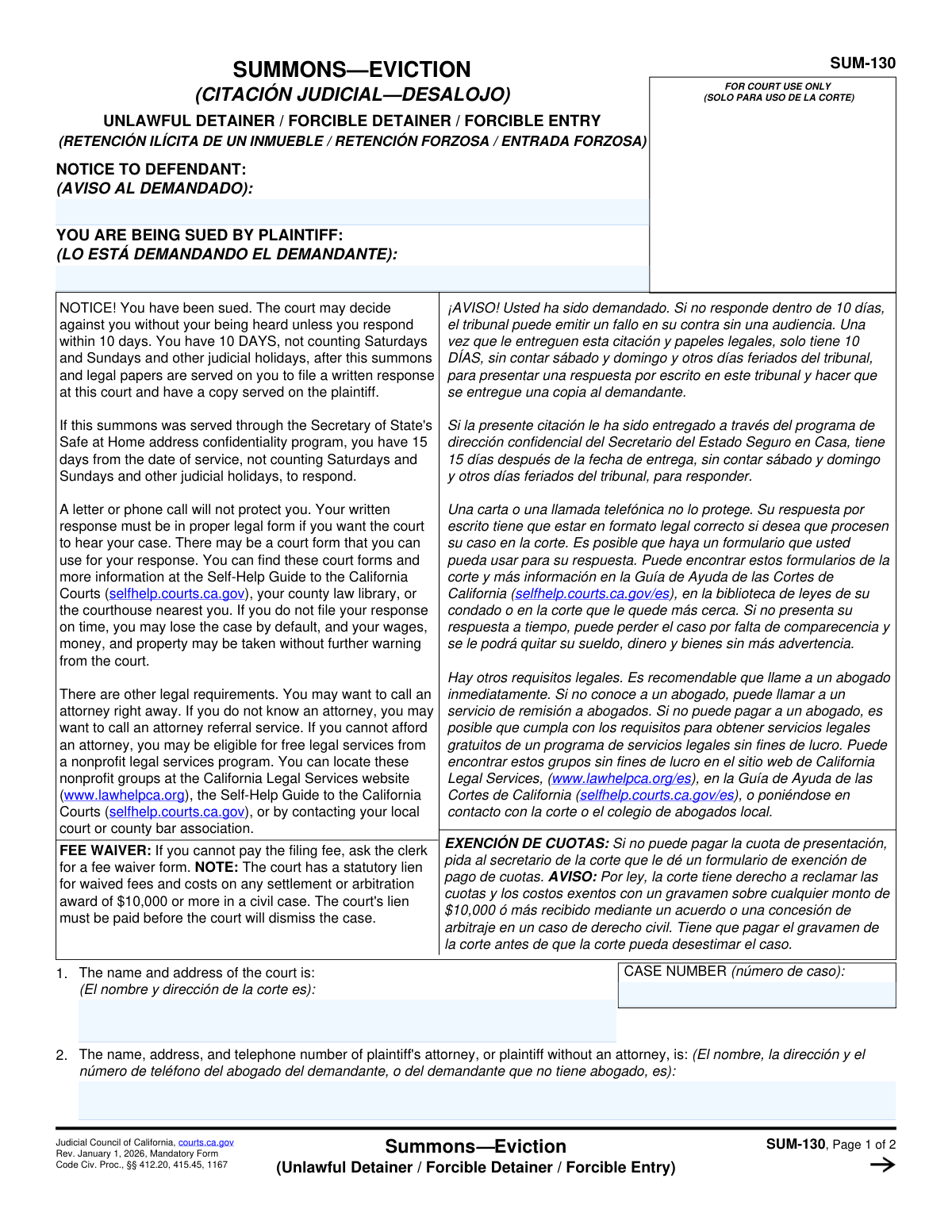
Yes! You can use AI to fill out Form SUM-130, Summons - Unlawful Detainer - Eviction
California Form SUM-130 is a legal summons used in unlawful detainer (eviction) cases to inform the defendant(s) that a lawsuit has been started and that they have a limited time to respond. It is a critical document that officially commences the legal eviction process and must be properly served to the tenant. Today, this form can be filled out quickly and accurately using AI-powered services like Instafill.ai, which can also convert non-fillable PDF versions into interactive fillable forms.
SUM-130 is part of the
ETA forms, eviction forms and unlawful detainer forms categories on Instafill.
Our AI automatically handles information lookup, data retrieval, formatting, and form filling.
It takes less than a minute to fill out SUM-130 using our AI form filling.
Securely upload your data. Information is encrypted in transit and deleted immediately after the form is filled out.
Form specifications
| Form name: | Form SUM-130, Summons - Unlawful Detainer - Eviction |
| Number of fields: | 38 |
| Number of pages: | 2 |
| Language: | English |
More forms in ETA forms
Instafill Demo: How to fill out PDF forms in seconds with AI
How to Fill Out SUM-130 Online for Free in 2026
Are you looking to fill out a SUM-130 form online quickly and accurately? Instafill.ai offers the #1 AI-powered PDF filling software of 2026, allowing you to complete your SUM-130 form in just 37 seconds or less.
Follow these steps to fill out your SUM-130 form online using Instafill.ai:
- 1 Navigate to Instafill.ai and upload or select Form SUM-130.
- 2 Allow the AI to scan and process the form, identifying all the necessary fields for the summons.
- 3 Enter the plaintiff, defendant, and court information, including the case number if available.
- 4 Declare whether an Unlawful Detainer Assistant was used and provide their details if applicable.
- 5 Complete the 'Notice to Person Served' section, indicating how and on whose behalf the summons is being served, referencing the relevant CCP codes.
- 6 Review all the information entered for accuracy, then use the platform to save, print, or electronically file the completed SUM-130 form.
Our AI-powered system ensures each field is filled out correctly, reducing errors and saving you time.
Why Choose Instafill.ai for Your Fillable SUM-130 Form?
Speed
Complete your SUM-130 in as little as 37 seconds.
Up-to-Date
Always use the latest 2026 SUM-130 form version.
Cost-effective
No need to hire expensive lawyers.
Accuracy
Our AI performs 10 compliance checks to ensure your form is error-free.
Security
Your personal information is protected with bank-level encryption.
Frequently Asked Questions About Form SUM-130
This form is a summons for an unlawful detainer (eviction) case. It is a legal document used to officially notify a defendant that they are being sued for eviction and must respond to the court.
The plaintiff (the landlord or property owner filing the eviction) or their attorney is responsible for completing this form. It is then formally served to the defendant (the tenant).
You will need the full legal names of the plaintiff(s) and defendant(s), the name and address of the court where the case is filed, and the court-assigned case number.
The case number is assigned by the court clerk when you file your initial complaint. You must have this number to properly complete the summons, as it links the document to your specific case.
An unlawful detainer assistant is a non-attorney paid to help prepare eviction documents. If you used such a service, you are legally required to disclose their information, including their name and registration number, on the form.
If you are the plaintiff and do not have an attorney, you should enter your own full name, address, and telephone number in this section.
This applies if you are suing an occupant whose legal name you do not know, using a placeholder like 'Jane Doe'. You would check this box and enter the fictitious name you used in the lawsuit.
These codes from the California Code of Civil Procedure (CCP) specify the legal basis for serving someone representing an entity. For example, you would check CCP 416.10 when serving a corporation or CCP 416.60 when serving a minor.
Personal delivery means the summons was handed directly to the person being served. You must check this box and enter the exact date the delivery occurred.
Yes, services like Instafill.ai use AI to help you accurately auto-fill form fields from your case information. This can save time and reduce the chance of making errors on legal documents.
You can upload the form to the Instafill.ai platform, and its AI will make the document fillable online. It will then guide you in entering the required information, such as names, case numbers, and addresses, into the correct fields.
If you have a non-fillable or 'flat' PDF, you can use a service like Instafill.ai. It can convert the document into an interactive, fillable form that you can complete on your computer.
These fields are typically completed by the court clerk, not by you. The clerk will stamp or write the date the document was officially filed with the court and may add their name or initials.
Compliance SUM-130
Validation Checks by Instafill.ai
1
Case Number Consistency Check
This validation ensures that the 'Case Number' entered in the 'Court and Case Information' section is identical to the 'Case Number' in the 'Case Header'. Maintaining consistency is critical for the legal document's integrity and ensures it is correctly filed and tracked by the court system. A mismatch will trigger an error, forcing the user to correct the discrepancy before submission.
2
Plaintiff and Defendant Name Consistency
Verifies that the plaintiff and defendant names entered in the main section ('Defendant and Plaintiff Names') match the names in the 'Case Header'. Consistent party identification is fundamental for a legally valid document, preventing ambiguity about who is suing and who is being sued. If the names do not match, the submission is blocked to prevent filing a potentially invalid or confusing document.
3
Unlawful Detainer Assistant Declaration Exclusivity
Ensures that the user selects exactly one of the two checkboxes: 'Did' or 'Did not' receive assistance. The user cannot select both options, nor can they leave both unselected, as this is a mandatory declaration. This check guarantees a clear and unambiguous statement regarding assistance, which is a legal requirement for the form.
4
Conditional Requirement for Assistant Details
This check makes the 'Unlawful Detainer Assistant Details' section (name, phone, address, etc.) mandatory if the user checks the 'Did' box in the declaration. This information is legally required to identify the assistant who provided help. If the 'Did' box is checked but the details are missing, the form is considered incomplete and cannot be processed.
5
Assistant Registration Expiration Date Validity
Validates that the 'Registration Expiration Date' for the unlawful detainer assistant is a valid date and is not in the past. This is important to ensure the assistant was legally registered and authorized to provide services at the time the form was prepared. An expired registration would invalidate the assistant's role, and the system will flag the date as an error.
6
Conditional Requirement for Fictitious Name
This validation ensures that if the 'As the person sued under a fictitious name' checkbox is selected, the corresponding 'Fictitious Name (Served Under)' text field is not empty. The form must specify the exact fictitious name being used for the service to be legally valid. Failure to provide the name makes the service declaration incomplete and legally insufficient.
7
Conditional Requirement for 'On Behalf Of' Specification
Checks that if the 'On behalf of (specify)' checkbox is marked, the 'On Behalf Of (Specify)' text field is filled with the name of the person or entity. It is legally necessary to identify who the recipient is representing for the service to be effective. An empty field would create ambiguity and could invalidate the service attempt.
8
Conditional Requirement for CCP Basis
Verifies that if service is made 'On behalf of' an entity, at least one of the corresponding CCP basis checkboxes (e.g., 'CCP 416.10 (Corporation)', 'Other (Specify)') is selected. The legal basis for serving an individual on behalf of an entity must be clearly stated. Without this specification, the legal grounds for the service are unclear, and the submission will be flagged as incomplete.
9
Clerk Filing Date Logical Check
Validates that the 'Clerk Filing Date' is a valid date format and is not set in the future. Court documents cannot be filed on a future date, so this check prevents logical errors and ensures data integrity. A future date would be rejected as it is impossible and indicates a data entry error.
10
Personal Delivery Date vs. Filing Date Logic
This validation compares the 'Personal Delivery Date' with the 'Clerk Filing Date'. The delivery date must be on or after the filing date, as a case cannot be served before it is officially filed with the court. This logical check prevents impossible timelines and ensures the sequence of legal events is correctly recorded.
11
Required Court and Case Information
This check verifies that the 'Court Name and Address' and 'Case Number' fields are not left empty. These details are fundamental to identifying the specific case and jurisdiction, without which the document is meaningless. The form cannot be submitted until this core information is provided to ensure it can be correctly routed and filed.
12
Plaintiff Contact Information Completeness
Ensures that the 'Plaintiff Attorney or Contact Information' field, which includes name, address, and telephone number, is fully completed. This information is legally required so the defendant or their representative knows who to contact in response to the summons. An incomplete contact section prevents the defendant from being able to properly respond and will cause the form to be rejected.
Common Mistakes in Completing SUM-130
This form requires the Plaintiff Name, Defendant Name, and Case Number to be entered in two separate locations. A common error is entering conflicting information between the main section and the case header. This often happens due to typos or copy-paste errors and can create confusion, potentially leading to filing rejections or delays. To avoid this, carefully review both sections to ensure the names and case number are identical, or use a tool like Instafill.ai which can automatically populate repeated fields consistently.
The form specifies entering the 'full legal name(s)' for both the plaintiff and defendant, but people often use nicknames, initials, or abbreviations. This can create a fatal defect in the legal notice, potentially allowing the defendant to challenge the validity of the summons and dismiss the case. Always use the complete legal name as it appears on official documents like leases or government-issued IDs. Ensure all parties, including corporations, are named correctly.
Case numbers often have a specific and complex format of letters, numbers, and dashes that is easy to mistype. An incorrect case number will cause the document to be misfiled or rejected by the court clerk, delaying the legal process significantly. It is crucial to double-check the case number against the official court-stamped complaint or other documents. AI-powered tools like Instafill.ai can help by validating formats and reducing manual data entry errors.
Users often get confused by the conditional logic in this declaration. A frequent mistake is checking the 'Did' box (indicating an assistant was used) but then failing to provide all the required details like the assistant's name, address, and registration number. This omission can invalidate the form. It is essential to either check 'Did not' or fully complete all six fields if an assistant provided compensated help.
The 'Notice to Person Served' section is critical for establishing valid service of process. A common error is checking the wrong box, such as selecting 'As an individual defendant' when the person was actually served on behalf of a corporation. This mistake can invalidate the service, forcing the plaintiff to restart the process and causing significant delays. Carefully determine the capacity in which the person is being served and select the single most appropriate option.
When serving someone on behalf of an entity (like a corporation or as a conservator), users often check the 'On behalf of (specify)' box but forget to fill in the name of the entity or select the corresponding CCP code. Without this information, the service is incomplete and legally insufficient. If this box is checked, you must specify both the entity's name and the legal basis (CCP code) for the service.
The form allows for serving a person under a 'fictitious name' (e.g., 'John Doe, Occupant'). A frequent mistake is to check the box 'As the person sued under a fictitious name' but then neglect to enter the actual fictitious name in the corresponding text field. This leaves a critical piece of information missing and can invalidate the service. If you check this box, you must specify the name being used.
Submitting a form with the wrong court name or an incomplete mailing address can lead to documents being rejected, lost, or severely delayed. This often happens when filers are dealing with multiple jurisdictions and confuse court locations. Always verify the full, correct name and mailing address of the specific court branch where the case is filed before filling out the form. Using a form-filling tool can help pre-populate correct court information based on the case.
The fields for 'Clerk Filing Date' and 'Clerk Name' are reserved for official use by the court clerk upon filing. A common misunderstanding is for the filer to enter the current date or their own name in these fields. This can cause confusion and may require the form to be resubmitted. These fields should always be left blank by the person completing the form.
Many fields on this form are conditional, meaning they only need to be filled out if a specific checkbox is selected. Users often check a box (e.g., 'Other (Specify)' or 'By personal delivery') but then forget to enter the required corresponding information (the CCP basis or the delivery date). This renders the selection incomplete and can be grounds for rejection. Advanced form-filling software like Instafill.ai can help by highlighting required fields based on your selections, ensuring you don't miss these crucial details, and can even make flat PDFs fillable.
Saved over 80 hours a year
“I was never sure if my IRS forms like W-9 were filled correctly. Now, I can complete the forms accurately without any external help.”
Kevin Martin Green
Your data stays secure with advanced protection from Instafill and our subprocessors

Robust compliance program
Transparent business model
You’re not the product. You always know where your data is and what it is processed for.
ISO 27001, HIPAA, and GDPR
Our subprocesses adhere to multiple compliance standards, including but not limited to ISO 27001, HIPAA, and GDPR.
Security & privacy by design
We consider security and privacy from the initial design phase of any new service or functionality. It’s not an afterthought, it’s built-in, including support for two-factor authentication (2FA) to further protect your account.
Fill out SUM-130 with Instafill.ai
Worried about filling PDFs wrong? Instafill securely fills form-sum-130-summons-unlawful-detainer-eviction forms, ensuring each field is accurate.