Yes! You can use AI to fill out Illinois Eviction Order
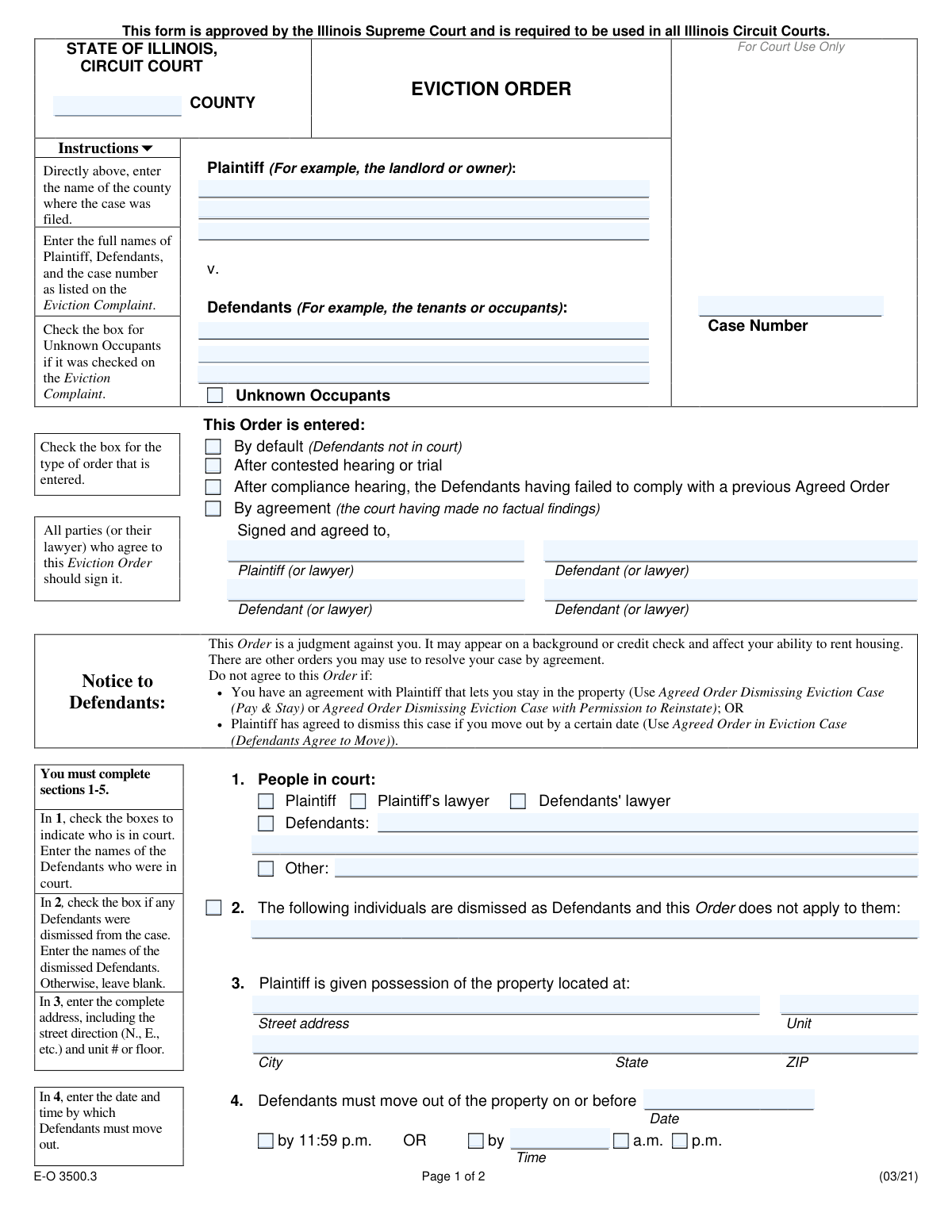
The Illinois Eviction Order is a legal document issued by a circuit court in Illinois to formalize the judgment in an eviction lawsuit. It officially grants the plaintiff (landlord or property owner) possession of the property and sets a firm deadline for the defendants (tenants) to vacate. This order is crucial as it can also include monetary judgments for unpaid rent, court costs, and attorney's fees, and it serves as the legal basis for the sheriff to carry out the eviction if the tenants do not comply. Today, this form can be filled out quickly and accurately using AI-powered services like Instafill.ai, which can also convert non-fillable PDF versions into interactive fillable forms.
Our AI automatically handles information lookup, data retrieval, formatting, and form filling.
It takes less than a minute to fill out E-O 3500.3 using our AI form filling.
Securely upload your data. Information is encrypted in transit and deleted immediately after the form is filled out.
Form specifications
| Form name: | Illinois Eviction Order |
| Number of fields: | 94 |
| Number of pages: | 2 |
| Language: | English |
| Categories: | eviction forms |
Instafill Demo: How to fill out PDF forms in seconds with AI
How to Fill Out E-O 3500.3 Online for Free in 2026
Are you looking to fill out a E-O 3500.3 form online quickly and accurately? Instafill.ai offers the #1 AI-powered PDF filling software of 2026, allowing you to complete your E-O 3500.3 form in just 37 seconds or less.
Follow these steps to fill out your E-O 3500.3 form online using Instafill.ai:
- 1 Navigate to Instafill.ai and upload or select the Illinois Eviction Order form.
- 2 Use the AI assistant to input the case caption details, including the county, case number, and the full names of the plaintiff and defendants.
- 3 Specify the basis for the order (e.g., default, hearing, agreement) and identify all parties present in court.
- 4 Enter the complete property address and the exact date and time by which the defendants must vacate the premises.
- 5 Detail any monetary judgments in Section 6 (for landlords) or Section 7 (for associations), specifying amounts for rent, costs, and fees as applicable.
- 6 Provide the preparer's contact information at the end of the form.
- 7 Review the entire document for accuracy, then download the completed Eviction Order to be signed and filed with the court.
Our AI-powered system ensures each field is filled out correctly, reducing errors and saving you time.
Why Choose Instafill.ai for Your Fillable E-O 3500.3 Form?
Speed
Complete your E-O 3500.3 in as little as 37 seconds.
Up-to-Date
Always use the latest 2026 E-O 3500.3 form version.
Cost-effective
No need to hire expensive lawyers.
Accuracy
Our AI performs 10 compliance checks to ensure your form is error-free.
Security
Your personal information is protected with bank-level encryption.
Frequently Asked Questions About Form E-O 3500.3
This is an official court form used in Illinois to finalize an eviction case. It serves as a legal judgment granting the plaintiff (landlord/owner) possession of a property and ordering the defendants (tenants) to move out by a specific date.
Typically, the plaintiff or their attorney prepares the Eviction Order form for the judge's review. The judge then officially signs and enters the order to make it legally binding.
You will need the court case number, the full names of the plaintiff and defendants, the complete property address, and the specific move-out date and time. If a money judgment is included, you'll also need the amounts owed for rent, costs, and fees.
Yes, the form advises you not to agree if you have a separate agreement with the plaintiff, such as a 'Pay & Stay' agreement or an agreement to dismiss the case if you move out. Other specific court forms should be used for those situations.
Section 6 is for landlords to claim money owed for rent, court costs, and attorney's fees. Section 7 is specifically for condominium or homeowner associations (HOAs) to claim money for unpaid assessments and related costs.
This box is checked to ensure the eviction order applies to anyone living in the property, even if their names are not on the lease or known to the plaintiff. It should only be checked if it was also checked on the original Eviction Complaint.
The order becomes a legal judgment. If the defendants do not move out by the specified deadline, the plaintiff can provide the order to the sheriff's office to forcibly remove the defendants from the property.
Yes, the form explicitly states this order is a judgment against you. It may appear on background checks or credit reports, which can affect your ability to rent housing in the future.
This indicates the judge is issuing the eviction order because the defendants did not show up for their scheduled court date. The plaintiff wins the case by default without a contested hearing.
Yes, services like Instafill.ai use AI to help you accurately auto-fill form fields, which saves time and reduces the risk of errors. This is particularly useful for landlords or attorneys who frequently handle these documents.
You can use a service like Instafill.ai to upload the PDF document. Their platform allows you to fill in all the required fields digitally, save your progress, and print the completed form for filing with the court.
If you have a non-fillable or 'flat' PDF, you can upload it to a service like Instafill.ai. Their technology can convert the document into an interactive, fillable form that you can complete easily on your computer.
In Section 6 or 7, you would check the box that says 'The Court is not yet ruling on the money claim.' You must then enter the date, time, and courtroom for the next scheduled hearing on that matter.
Compliance E-O 3500.3
Validation Checks by Instafill.ai
1
Validates Case Number Presence
This check ensures the 'Case Number' field is not empty. The case number is a critical identifier that links the eviction order to the correct court file. Without a valid case number, the document cannot be properly filed or tracked by the court system, rendering it legally ineffective.
2
Ensures Complete Property Address in Section 3
This validation verifies that the 'Street address', 'City', 'State', and 'ZIP' fields for the property in Section 3 are all filled out. A complete and unambiguous address is legally required for the order to be enforceable. An incomplete address could lead to the Sheriff being unable to execute the eviction at the correct location.
3
Validates Future Move-Out Date
This check ensures the 'Move-Out Deadline Date' in Section 4 is a valid date that is on or after the date the order is entered. An eviction order cannot legally require a defendant to have moved out on a past date. This validation prevents logical impossibilities and ensures the order is legally sound and enforceable.
4
Enforces Exclusive Move-Out Time Selection
In Section 4, this validation ensures that the user selects either the 'by 11:59 p.m.' checkbox OR the 'By (specific time)' checkbox, but not both. If the specific time option is chosen, it also validates that the time field and an AM/PM selection are present. This prevents ambiguity about the exact deadline for the defendants to vacate the property.
5
Requires Signatures for Agreed Orders
This is a logical check that verifies if the 'By agreement' box is checked, then the signature fields for both the Plaintiff (or lawyer) and at least one Defendant (or lawyer) must be filled. An agreed order is a contract, and its validity depends on the documented consent of the involved parties. An error would indicate the agreement is not properly documented and may be invalid.
6
Requires Names for Defendants in Court
This validation ensures that if the 'Defendants' checkbox in Section 1 ('People in court') is checked, the corresponding text field for 'Defendants in Court (Names)' is not empty. This is necessary to create an accurate court record of which specific parties were present for the proceeding. A failure would result in an incomplete and potentially inaccurate record of attendance.
7
Requires Names for Dismissed Defendants
This validation ensures that if the checkbox in Section 2 ('The following individuals are dismissed as Defendants') is checked, the corresponding name field is not empty. It is crucial to explicitly name who is being dismissed from the case to avoid confusion and ensure the order is not incorrectly applied to them. An empty field would make the dismissal declaration meaningless and ineffective.
8
Prevents Conflicting Money Claim Entries in Sections 6 and 7
This validation ensures that data is entered in either Section 6 (for landlords) or Section 7 (for HOA/condo associations), but not both. These sections are mutually exclusive based on the plaintiff's type. Allowing entries in both would create a conflicting and invalid financial judgment on the order.
9
Verifies Section 6 Total Judgment Calculation
If amounts are entered for 'Rent Owed', 'Court Costs Owed', and 'Attorneys' Fees Owed' in Section 6, this check confirms that the 'Total Judgment Amount' equals the sum of these individual amounts. This prevents mathematical errors in the legal judgment. An incorrect total could lead to legal challenges or incorrect enforcement of the debt.
10
Ensures Completeness of Money Judgment
This check verifies that if the 'Plaintiff is owed' checkbox is selected in Section 6 or 7, then the 'Total Judgment Amount' field and the 'Defendants Owing Money Judgment' field are both filled. A money judgment is unenforceable without specifying both the total amount and who is legally responsible for paying it. This check prevents the creation of an incomplete and ineffective judgment.
11
Validates Future Continuance Date
This check ensures that if a case is continued (in Section 6 or 7), the 'Continued Case Date' is a valid date that occurs after the date the order is entered. Scheduling a court date in the past is a logical impossibility. This validation prevents data entry errors and ensures the scheduling information is correct and actionable.
12
Requires Singular Emergency Statute Selection
If the 'Order entered after an Emergency Housing Proceeding' box in Section 8 is checked, this validation ensures that exactly one of the three subsequent statute checkboxes (735 ILCS 5/9-118, 5/9-119, or 5/9-120) is also checked. The legal basis for the emergency proceeding must be clearly and singularly identified. Selecting none, or more than one, would make the order legally ambiguous and potentially invalid.
13
Validates Preparer's Telephone Number Format
This check verifies that the 'Telephone #' field for the order preparer follows a standard North American phone number format (e.g., 10 digits, possibly with parentheses, spaces, or hyphens). This ensures that the contact information is valid and usable if the court or other parties need to contact the preparer. An invalid format would be rejected to ensure data quality.
14
Validates Preparer's Email Address Format
This validation checks that the value entered in the 'Email Address' field conforms to a standard email format (e.g., [email protected]). While optional, if an email is provided, it must be in a valid format to ensure communications are deliverable. This improves the reliability of contact information on the legal document.
Common Mistakes in Completing E-O 3500.3
Users often enter plaintiff names, defendant names, or the case number that do not exactly match the original Eviction Complaint. This happens due to typos or not having the complaint for reference. Any discrepancy can lead to the court clerk rejecting the order or creating legal ambiguity, potentially delaying the eviction process.
In Section 3, filers frequently omit crucial details like the unit number, floor, or street direction (e.g., N., S., E., W.). An incomplete or ambiguous address can render the Eviction Order unenforceable, as the Sheriff may be unable to identify the correct property to legally carry out the eviction. Always double-check that the address is complete and precise.
The form clearly separates money claims for landlords (Section 6) from those for condominium/homeowner associations (Section 7). A common error is for a landlord to fill out Section 7 or an association to use Section 6. This mistake can invalidate the money judgment portion of the order, requiring a corrected form to be submitted to the court.
If the original Eviction Complaint included 'Unknown Occupants,' this must be reflected by checking the box in both the top case caption and in Section 5. Forgetting to do so means the final order may not legally apply to unnamed individuals residing at the property. This can prevent the Sheriff from removing everyone, complicating the final step of the eviction.
In Section 4, users may enter a date but forget to specify a time, fail to select 'a.m.' or 'p.m.', or confusingly check both the '11:59 p.m.' box and the specific time box. This ambiguity creates an unclear and potentially unenforceable deadline, which can lead to disputes and require further court action to clarify.
The form warns defendants not to agree to this order if a 'Pay & Stay' or other dismissal is an option. However, defendants under pressure may sign this final Eviction Order by mistake, resulting in a negative judgment on their record. This is a critical error, as it bypasses more favorable resolutions that might have allowed them to stay or leave without a formal eviction judgment.
When filling out the money judgment details in Section 6 or 7, simple arithmetic errors are common when adding up rent, court costs, and attorney's fees. An incorrect total can lead to the court rejecting the proposed order or entering a wrong judgment amount, which is legally complicated to correct later. Using a calculator or an automated tool can prevent these costly mistakes.
The form explicitly instructs parties not to complete Section 8 (Emergency Housing Proceeding) or the final 'ENTERED' date and 'Judge' signature block. Parties who fill in these court-only sections may have their form rejected by the clerk or be admonished by the judge. It is crucial to only complete the sections designated for the plaintiff or defendant.
After calculating the total judgment in Section 6 or 7, the form requires the filer to list the specific defendant(s) against whom the money judgment is entered. Forgetting to write in the names on this line makes the money judgment unenforceable, as it is not legally tied to any specific person. This oversight completely undermines the effort to recover funds.
Many parts of the form require providing details after checking a box, such as listing the names of defendants present in court (Section 1) or the date of a continued hearing (Section 6). A frequent mistake is checking the box but forgetting to fill in the corresponding information. This leaves the order incomplete and can nullify the intended action for that section, causing delays. AI-powered tools like Instafill.ai can help prevent this by ensuring all required follow-up fields are completed.
Saved over 80 hours a year
“I was never sure if my IRS forms like W-9 were filled correctly. Now, I can complete the forms accurately without any external help.”
Kevin Martin Green
Your data stays secure with advanced protection from Instafill and our subprocessors

Robust compliance program
Transparent business model
You’re not the product. You always know where your data is and what it is processed for.
ISO 27001, HIPAA, and GDPR
Our subprocesses adhere to multiple compliance standards, including but not limited to ISO 27001, HIPAA, and GDPR.
Security & privacy by design
We consider security and privacy from the initial design phase of any new service or functionality. It’s not an afterthought, it’s built-in, including support for two-factor authentication (2FA) to further protect your account.
Fill out E-O 3500.3 with Instafill.ai
Worried about filling PDFs wrong? Instafill securely fills illinois-eviction-order forms, ensuring each field is accurate.