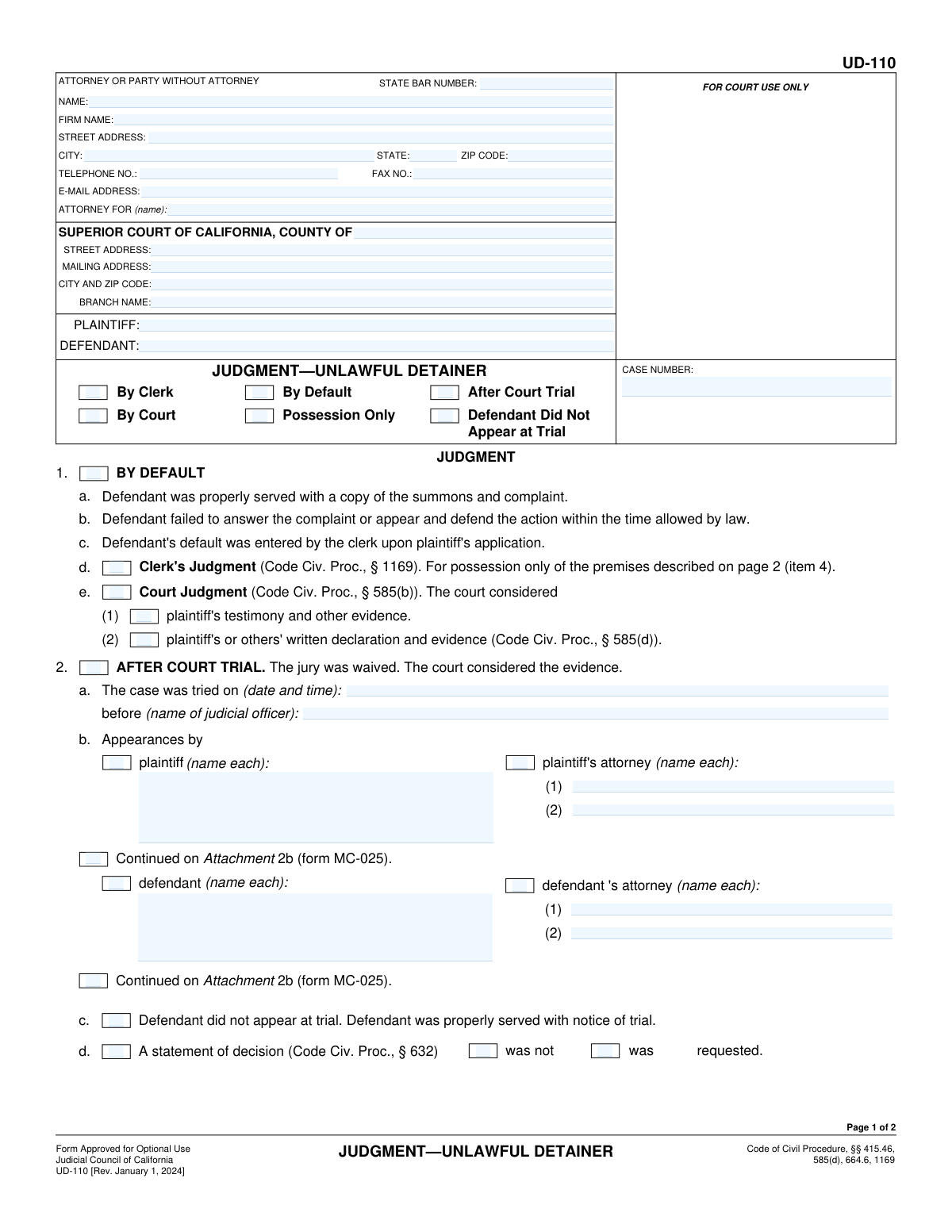
Yes! You can use AI to fill out Form UD-110, Judgment—Unlawful Detainer

Form UD-110, Judgment—Unlawful Detainer, is a legal document issued by a California Superior Court that officially concludes an eviction case. It specifies whether the landlord (plaintiff) or tenant (defendant) is awarded possession of the property and details any financial judgment, such as past-due rent, damages, and attorney fees. This form is critical as it represents the court's final, enforceable order in the matter. Today, this form can be filled out quickly and accurately using AI-powered services like Instafill.ai, which can also convert non-fillable PDF versions into interactive fillable forms.
UD-110 is part of the California court forms, landlord tenant forms and unlawful detainer forms categories on Instafill.
Our AI automatically handles information lookup, data retrieval, formatting, and form filling.
It takes less than a minute to fill out UD-110 using our AI form filling.
Securely upload your data. Information is encrypted in transit and deleted immediately after the form is filled out.

Form specifications

Form name: Form UD-110, Judgment—Unlawful Detainer
Number of fields: 100
Number of pages: 1
Language: English
main-image

Instafill Demo: How to fill out PDF forms in seconds with AI

How to Fill Out UD-110 Online for Free in 2026

Are you looking to fill out a UD-110 form online quickly and accurately? Instafill.ai offers the #1 AI-powered PDF filling software of 2026, allowing you to complete your UD-110 form in just 37 seconds or less.
Follow these steps to fill out your UD-110 form online using Instafill.ai:
  1. 1 Navigate to Instafill.ai and upload your Form UD-110 or select it from the platform's template library.
  2. 2 Provide the case information, including the court name, county, case number, and the full names of the plaintiff and defendant.
  3. 3 Indicate how the judgment was reached by checking the appropriate boxes in Section 1 (By Default) or Section 2 (After Court Trial).
  4. 4 Specify the party the judgment is for in Section 3 and enter the full address of the premises in Section 4.
  5. 5 Detail the monetary judgment in Section 6, entering the amounts for past-due rent, damages, attorney fees, and costs.
  6. 6 Review all the information populated by the AI for accuracy, make any necessary edits, and then download the completed UD-110 form, ready for the judge's signature and filing with the court.

Our AI-powered system ensures each field is filled out correctly, reducing errors and saving you time.

Why Choose Instafill.ai for Your Fillable UD-110 Form?

Speed

Complete your UD-110 in as little as 37 seconds.

Up-to-Date

Always use the latest 2026 UD-110 form version.

Cost-effective

No need to hire expensive lawyers.

Accuracy

Our AI performs 10 compliance checks to ensure your form is error-free.

Security

Your personal information is protected with bank-level encryption.

Frequently Asked Questions About Form UD-110

This form is the court's final order in an eviction lawsuit. It officially states who wins the case, who is legally entitled to possession of the property, and the amount of any money awarded for damages or costs.

Typically, the attorney for the prevailing party (usually the plaintiff/landlord) prepares this form for the judge or court clerk to sign. It is not a form that a defendant/tenant would initiate.

A 'Judgment by Default' (Section 1) is entered when the defendant does not respond to the lawsuit or appear in court. A judgment 'After Court Trial' (Section 2) is entered after both parties have presented their case before a judge.

You will need the court case number, the full names and addresses of all parties, the property address, and the specific details of the court's ruling, including any monetary amounts for rent, damages, and fees.

This means the court has legally ordered the defendant (tenant) to move out and return the property to the plaintiff (landlord). The landlord can then ask the sheriff to enforce the eviction.

Section 6 details the money the defendant is ordered to pay, which can include past-due rent, damages for staying after the notice period expired, attorney fees, and court filing costs.

Once signed, the form becomes an official and legally enforceable court judgment. The winning party can use it to reclaim the property and begin collection efforts for any money awarded.

The judgment allows the landlord to get a 'Writ of Possession,' which the Sheriff serves. After the Sheriff posts the notice on your door, you typically have five days to move out before being forcibly removed.

A conditional judgment is sometimes issued if the court finds the landlord failed to maintain a habitable property. It may allow the tenant to stay if they pay a reduced amount of rent determined by the court.

This indicates that the court has officially and permanently terminated the lease or rental agreement between the landlord and tenant as part of the judgment.

Yes, services like Instafill.ai use AI to accurately auto-fill form fields with your case information. This can save significant time and help prevent errors when preparing the form for the court.

You can use a service like Instafill.ai to upload the form, fill it out using a simple online interface, and then download the completed document for filing.

If you have a non-fillable or 'flat' PDF, you can use a tool like Instafill.ai. It can convert the document into an interactive, fillable form that you can easily complete on your computer.

Compliance UD-110
Validation Checks by Instafill.ai

1
Case Number Consistency Across Pages
This check ensures the 'CASE NUMBER' field is identical on both page 1 and page 2 of the form. The case number is the primary identifier for the legal proceeding, and any discrepancy could lead to misfiling or incorrect association of the judgment with the case file. If the numbers do not match, the form should be rejected for correction to maintain data integrity.
2
Mutually Exclusive Judgment Basis
Validates that only one primary basis for the judgment is selected, such as 'By Default' (item 1) or 'After Court Trial' (item 2). These are fundamentally different legal pathways, and selecting both is a logical impossibility. This check prevents ambiguity in the court's final order, and a failure would require the user to clarify the correct basis for the judgment.
3
Default Judgment Prerequisite Check
If 'BY DEFAULT' (item 1) is checked, this validation confirms that the prerequisite conditions in items 1a, 1b, and 1c are also marked as true. These items affirm proper service, failure to answer, and entry of default, which are legally required for a default judgment. An omission would render the judgment legally questionable, so the form must be complete.
4
Trial Date Requirement for Trial Judgment
Ensures that if 'AFTER COURT TRIAL' (item 2) is selected, the trial date field in item 2a is filled with a valid, non-future date. A judgment after trial must specify when the trial occurred. This check guarantees that essential context for the judgment is recorded, and failure would halt processing until the date is provided.
5
Party Name Consistency
Verifies that the plaintiff and defendant names listed in the header of the form match the names specified in the judgment outcome section (item 3). Consistent naming is crucial for the enforceability of the judgment and to avoid legal challenges based on ambiguity. A mismatch would require manual review and correction to ensure the judgment is applied to the correct parties.
6
Singular Judgment Outcome
This check ensures that judgment is not entered for both the plaintiff (item 3a) and the defendant (item 3b) simultaneously. A single judgment cannot favor both opposing parties on the primary claim. The system must enforce that only one of these options is selected to reflect a clear and legally sound outcome.
7
Possession Address Completeness
Validates that if a party is granted possession of a property in item 4, the full address of the premises is provided, including street address, city, and county. This is the most critical piece of information for an unlawful detainer judgment, as it identifies the property subject to the court's order. An incomplete address would make the judgment unenforceable by law enforcement.
8
Total Judgment Calculation Accuracy
This validation automatically calculates the sum of the individual monetary awards in items 6a(1) through 6a(5) and compares it to the 'TOTAL JUDGMENT' entered in 6a(6). This prevents mathematical errors in the final judgment amount, which could lead to disputes and correction filings. If the total is incorrect, the system should flag the discrepancy or auto-correct the sum.
9
Monetary Award and Prevailing Party Consistency
If any monetary amounts (rent, damages, fees) are entered in item 6a, this check confirms that item 3a ('Judgment is for plaintiff') is selected. A monetary award to the plaintiff is inconsistent with a judgment for the defendant. This logical check ensures the form's sections are in agreement and reflect a coherent legal decision.
10
Defendant's Award Consistency
If costs or attorney fees are awarded to the defendant in item 6b, this validation ensures that item 3b ('Judgment is for defendant') is selected. It is logically inconsistent to award costs to the defendant if the judgment was for the plaintiff. This prevents contradictory entries on the form.
11
State Bar Number Format
Verifies that the 'STATE BAR NUMBER' field contains only numbers. The State Bar number is a unique numerical identifier for attorneys licensed in California. This validation ensures data quality and proper identification of the legal counsel involved, which is important for court records and communication.
12
Email Address Format Validation
Checks that the entry in the 'E-MAIL ADDRESS' field follows the standard '[email protected]' format. This is important for ensuring that electronic communications and service from the court or other parties are deliverable. An invalid format would lead to communication failures and potential delays in the case.
13
Conditional Judgment Attachment Requirement
If item 7 ('Conditional judgment') is checked, this validation flags that the 'Judgment—Unlawful Detainer Habitable Premises Attachment (form UD-110H)' is required. The main form indicates the attachment contains the specific terms of the judgment. This check ensures all necessary documents are filed together to form a complete and understandable court order.
14
Signature Date Validity
Ensures the date entered next to the Judicial Officer's signature (or the Clerk's signature) is a valid date and is not set in the future. The signature date authenticates the judgment and establishes when it was officially made. A future date or invalid format would invalidate the document, so this check is critical for legal authenticity.
15
ZIP Code Format Validation
This check verifies that all ZIP code fields contain a valid 5-digit or 9-digit (ZIP+4) numerical format. Correctly formatted ZIP codes are essential for accurate mail delivery of legal notices and documents to attorneys, parties, and the court itself. This prevents mail from being returned as undeliverable due to a simple data entry error.

Common Mistakes in Completing UD-110

Inconsistent or Incorrect Case Information

Users often enter the Case Number, Plaintiff, or Defendant names incorrectly, or provide information that is inconsistent between page 1 and page 2. This typically happens due to typographical errors or by not referencing the original complaint. Such mistakes can lead to the court clerk rejecting the filing or the judgment being misfiled, causing significant delays in the legal process. To avoid this, meticulously double-check that all names and numbers match the official court record on all pages of the form. AI-powered tools like Instafill.ai can prevent this by auto-populating recurring information consistently across the entire document.

Selecting Contradictory Judgment Types

A frequent error is checking mutually exclusive boxes under the 'JUDGMENT' heading, such as selecting both 'By Default' and 'After Court Trial'. This indicates a fundamental misunderstanding of the case's procedural posture and creates a logical contradiction that makes the form invalid. The court cannot process a judgment with conflicting bases, leading to immediate rejection and requiring the filer to resubmit a corrected form. Carefully select only the one option that accurately reflects how the judgment was reached.

Incomplete Property Address in Section 4

Filers often provide an incomplete address for the premises in Section 4, omitting crucial details like the apartment or unit number, or even the county. This happens when rushing and assuming a street address is sufficient. An incomplete address can render the judgment unenforceable, as the Sheriff's department may be unable to identify the correct property to execute the writ of possession for the eviction. Always provide the full, specific address as it appears on the lease and other court documents.

Errors in Monetary Award Calculation

In Section 6a, filers frequently make mathematical errors when calculating the 'TOTAL JUDGMENT' or enter amounts in the wrong sub-fields (e.g., putting costs under attorney fees). These data entry mistakes can result in an incorrect judgment amount, which may be challenged or require a separate motion to correct. To prevent this, carefully itemize each amount and double-check the final sum before submission. Using a tool with calculation capabilities can help ensure accuracy.

Confusing Judgment for Plaintiff vs. Defendant

A critical mistake is entering monetary values in both Section 6a (for the plaintiff) and Section 6b (for the defendant). This creates a nonsensical judgment where the court is asked to award money to both opposing parties. This error guarantees the form's rejection. It is essential to understand that only one of these sections should be completed, depending on which party won the case.

Misunderstanding Default Judgment Types (Clerk vs. Court)

When filing for a default judgment in Section 1, people often confuse a 'Clerk's Judgment' (1d) with a 'Court Judgment' (1e). A Clerk's Judgment is typically for possession only, while a Court Judgment is required when monetary damages are also being awarded. Selecting the wrong type can lead to rejection or an incomplete judgment that doesn't include the requested financial award. Understanding the difference based on the relief sought is crucial for proper filing.

Omitting Mandatory Attachments

Filers may check the box for a 'Conditional judgment' (Section 7) or 'Judgment for partial eviction' (Section 8) without attaching the required forms (UD-110H or UD-110P, respectively). This oversight occurs when the filer is unaware that these specific judgments require a separate, detailed attachment. Submitting the form without the necessary addenda will result in an incomplete filing that the court will reject, delaying the final resolution. Always ensure any checked box referencing an attachment is accompanied by that document.

Incomplete Attorney or Party Contact Information

It is common for filers, especially those representing themselves, to leave the header section at the top of page 1 incomplete, omitting their phone number, email address, or full mailing address. This oversight can severely hamper communication, as the court clerk will have no way to contact the filer regarding issues with the form or to provide updates. Always fill out this section completely to ensure you can be reached. If the form is a non-fillable PDF, a tool like Instafill.ai can convert it into an interactive version, making it easier to fill every required field.

Incorrectly Listing Trial Appearances

In Section 2b, for judgments after a court trial, filers may forget to list all parties or attorneys who appeared, or they may misspell names. This creates an inaccurate record of the court proceedings. The judgment should precisely reflect who was present at the trial. To avoid this, refer to the court's minute order or your own notes from the trial date to ensure every name is listed correctly.
Saved over 80 hours a year

“I was never sure if my IRS forms like W-9 were filled correctly. Now, I can complete the forms accurately without any external help.”

Kevin Martin Green

Your data stays secure with advanced protection from Instafill and our subprocessors

Robust compliance program

Transparent business model

You’re not the product. You always know where your data is and what it is processed for.

ISO 27001, HIPAA, and GDPR

Our subprocesses adhere to multiple compliance standards, including but not limited to ISO 27001, HIPAA, and GDPR.

Security & privacy by design

We consider security and privacy from the initial design phase of any new service or functionality. It’s not an afterthought, it’s built-in, including support for two-factor authentication (2FA) to further protect your account.

Fill out UD-110 with Instafill.ai

Worried about filling PDFs wrong? Instafill securely fills form-ud-110-judgmentunlawful-detainer forms, ensuring each field is accurate.

Related forms by category

California court forms Judicial Council of California Form SC-105, Request for Court Order and Answer (Small Claims), Judicial Council of California Form SC-120, Defendant’s Claim and ORDER to Go to Small Claims Court (Small Claims), Judicial Council of California Form SER-001, Request for Sheriff to Serve Court Papers, Judicial Council of California Form SER-001, Request for Sheriff to Serve Court Papers, Affidavit for Collection of Personal Property California Probate Code Section 13100, Form POS-040, Proof of Service—Civil, Declaration of Facts of Death (California Superior Court), declaration-of-marriage-for-court-proceeding-california-family-law, ADOPT-200, Adoption Request, ADOPT-200, Stepparent Adoption Request, ADOPT-210, Adoption Agreement, ADOPT-310, Contact After Adoption Agreement, Judicial Council of California Form ADOPT-200, Adoption Request, Form ADR-107, Mediation Attendance Sheet, Form ADR-110, Order Appointing Referee, Form ADR-109, Stipulation or Motion for Order Appointing Referee, Form ADR-102, Request for Trial De Novo After Judicial Arbitration, Form ADR-108, Referee's Report (Code Civ. Proc., §§ 638, 639), Form ADR-106, Petition to Confirm, Correct, or Vacate Contractual Arbitration Award, Form ADR-104, Rejection of Award and Request for Trial After Attorney-Client Fee Arbitration · + 557 more →
landlord tenant forms Judicial Council of California, Form UD-110P, Judgment—Unlawful Detainer Partial Eviction Attachment, Form UD-115, Stipulation for Entry of Judgment (Unlawful Detainer), Form UD-116, Declaration for Default Judgment by Court (Unlawful Detainer—Civ. Proc., § 585(d)), Form UD-120, Verification by Landlord Regarding Rental Assistance—Unlawful Detainer, UD-155, Eviction Case (Unlawful Detainer) Stipulation, judicial-council-of-california-form-ud-110h-judgmentunlawful-detainer-habitable-premises-attachment
unlawful detainer forms Judicial Council of California Form UD-150, Request/Counter-Request to Set Case for Trial—Unlawful Detainer, Form UD-100, Complaint—Unlawful Detainer, Judicial Council of California Form UD-105, Answer—Unlawful Detainer, Judicial Council of California Form UD-105, Answer—Unlawful Detainer, Judicial Council of California Form UD-150, Request/Counter-Request to Set Case for Trial—Unlawful Detainer, Judicial Council of California Form UD-100, Complaint—Unlawful Detainer, Form UD-105, Answer—Unlawful Detainer, Form UD-101, Plaintiff's Mandatory Cover Sheet and Supplemental Allegations—Unlawful Detainer, Form SUM-130, Summons - Unlawful Detainer - Eviction, Form DISC-003/UD-106, Form Interrogatories—Unlawful Detainer, Judicial Council of California, Form UD-110P, Judgment—Unlawful Detainer Partial Eviction Attachment, Form UD-115, Stipulation for Entry of Judgment (Unlawful Detainer), Form UD-116, Declaration for Default Judgment by Court (Unlawful Detainer—Civ. Proc., § 585(d)), Form UD-120, Verification by Landlord Regarding Rental Assistance—Unlawful Detainer, UD-155, Eviction Case (Unlawful Detainer) Stipulation, judicial-council-of-california-form-ud-110h-judgmentunlawful-detainer-habitable-premises-attachment