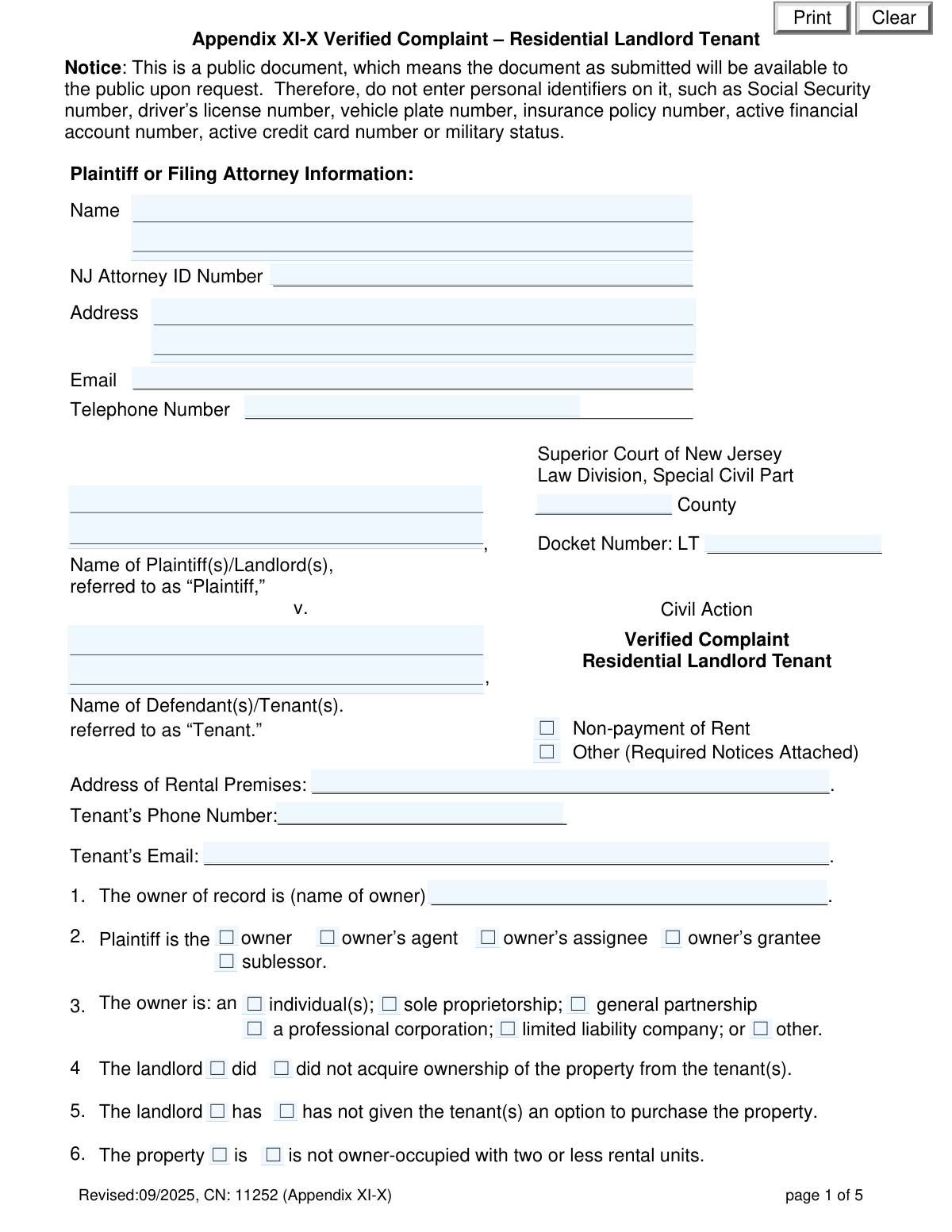
Yes! You can use AI to fill out Appendix XI-X Verified Complaint – Residential Landlord Tenant
The Appendix XI-X Verified Complaint is a legal document filed in the Superior Court of New Jersey, Law Division, Special Civil Part, by a landlord (plaintiff) to begin the eviction process against a tenant (defendant). It is used to formally state the reasons for the eviction, which are typically for non-payment of rent or for other lease violations, known as a holdover tenancy. Today, this form can be filled out quickly and accurately using AI-powered services like Instafill.ai, which can also convert non-fillable PDF versions into interactive fillable forms.
Appendix XI-X is part of the
landlord tenant forms category on Instafill.
Our AI automatically handles information lookup, data retrieval, formatting, and form filling.
It takes less than a minute to fill out Appendix XI-X using our AI form filling.
Securely upload your data. Information is encrypted in transit and deleted immediately after the form is filled out.
Form specifications
| Form name: | Appendix XI-X Verified Complaint – Residential Landlord Tenant |
| Number of fields: | 169 |
| Number of pages: | 5 |
| Language: | English |
Instafill Demo: How to fill out PDF forms in seconds with AI
How to Fill Out Appendix XI-X Online for Free in 2026
Are you looking to fill out a APPENDIX XI-X form online quickly and accurately? Instafill.ai offers the #1 AI-powered PDF filling software of 2026, allowing you to complete your APPENDIX XI-X form in just 37 seconds or less.
Follow these steps to fill out your APPENDIX XI-X form online using Instafill.ai:
- 1 Navigate to Instafill.ai and upload or select the Appendix XI-X Verified Complaint form.
- 2 Provide the plaintiff/landlord and defendant/tenant information, including names, addresses, and contact details for the court filing.
- 3 Detail the property and lease specifics, such as ownership details, property registration status, and whether the lease is oral or written.
- 4 Specify the reason for the complaint, either by itemizing unpaid rent and other charges for a non-payment case or by explaining the cause for a holdover eviction.
- 5 Attach all required supporting documents, such as a copy of the written lease or any notices that were served to the tenant.
- 6 Review all the information populated by the AI for accuracy, then complete the landlord verification section by signing and dating the form.
- 7 Download the completed, signed complaint, ready for filing with the appropriate New Jersey Superior Court.
Our AI-powered system ensures each field is filled out correctly, reducing errors and saving you time.
Why Choose Instafill.ai for Your Fillable Appendix XI-X Form?
Speed
Complete your Appendix XI-X in as little as 37 seconds.
Up-to-Date
Always use the latest 2026 Appendix XI-X form version.
Cost-effective
No need to hire expensive lawyers.
Accuracy
Our AI performs 10 compliance checks to ensure your form is error-free.
Security
Your personal information is protected with bank-level encryption.
Frequently Asked Questions About Form Appendix XI-X
This form is used by a landlord in New Jersey to initiate an eviction lawsuit against a tenant in the Superior Court's Special Civil Part. It is primarily used for cases involving non-payment of rent but can also be used for other lease violations.
A landlord, or their authorized agent or attorney, must fill out this form to formally file a complaint for eviction against a tenant.
Once filed, this complaint becomes a public document. To protect the privacy of all parties involved, you must not include sensitive information like Social Security numbers, driver's license numbers, or active financial account numbers.
You must attach any required legal notices served to the tenant. If there is a written lease, you must also attach a copy of it, or at least the relevant portions if it exceeds ten pages.
You can only include charges like late fees or attorneys' fees if your written lease specifically defines them as 'additional rent.' These charges must also be legally permissible under all applicable laws.
The form allows you to indicate an oral lease in section 11. However, be aware that you cannot claim 'additional rent' for things like late fees, as those must be specified in a written lease.
You must check the box in section 12, specify the type of subsidy, and confirm that all required notices have been served to both the tenant and the relevant housing authority. Copies of these notices must be attached to the complaint.
The form provides two calculations in section 23. The total includes all base rent, permissible additional rent, and filing fees, and may also include the next month's rent if the trial is scheduled after its due date.
This is a sworn statement where you certify, under penalty of punishment for falsehood, that you are authorized to file the complaint and that all information provided is true and accurate to your personal knowledge.
You must file the completed complaint with the Superior Court of New Jersey, Law Division, Special Civil Part, in the county where the rental property is located.
Yes, services like Instafill.ai use AI to accurately auto-fill form fields, which can save you time and help reduce errors. This is especially helpful for ensuring all required information is entered correctly.
Simply upload the PDF of the form to the Instafill.ai platform. The AI will identify all the fields, allowing you to enter your information once and have it populated accurately throughout the document.
You can use a service like Instafill.ai to solve this issue. Instafill.ai can convert flat, non-fillable PDFs into interactive, fillable forms that you can easily complete and save online.
The 'owner of record' is the legal owner of the property. The 'Plaintiff' is the person or entity filing the lawsuit, who could be the owner, but could also be an agent, assignee, or property manager acting on the owner's behalf.
Compliance Appendix XI-X
Validation Checks by Instafill.ai
1
Complaint Type Selection and Conditional Logic
Validates that one, and only one, of the primary complaint type checkboxes ('Non-payment of Rent' or 'Other') is selected. This is a critical check as it dictates which subsequent sections of the form are required. If validation fails, the user should be prompted to select a complaint type before proceeding, as the system cannot determine which data entry path to enforce.
2
Conditional Requirement for Non-Payment Details
Ensures that if the 'Non-payment of Rent' checkbox is selected, then the fields in the 'Non-Payment of Rent' section (questions 14-23) are completed. This includes base rent amount, due date, and the itemized list of rent owed. This is important for substantiating the claim. If this validation fails, the form submission should be blocked with a message indicating that rent details are required for a non-payment complaint.
3
Conditional Requirement for Holdover Explanation
Ensures that if the 'Other (Required Notices Attached)' checkbox is selected, then the 'Reasons Other Than Non-Payment for Rent (Holdover)' section (question 24) is filled out. The user must select a cause of action and provide an explanation. This is crucial for the court and defendant to understand the basis of the eviction. If this validation fails, the user must be prompted to provide the reason for the holdover complaint.
4
Total Base Rent Due Calculation
Verifies that the 'Total Base Rent Due from Tenant' field in question 15 is the correct sum of all the individual monthly/weekly base rent amounts entered above it. This prevents mathematical errors in the complaint. If the calculated sum does not match the user-entered total, the field should be auto-corrected or flagged for user review.
5
Total Amount Due Calculation
Validates that the 'Total Amount Due' in question 20 is the correct sum of 'Total Base Rent Due' (Q15), 'Total Permissible Additional Rent Due' (Q18), and 'Filing Fees' (Q19). This is a critical financial calculation that determines the total judgment sought. If the calculation is incorrect, the submission should be halted and the user prompted to review the constituent amounts.
6
Written Lease Attachment Logic
Checks that if 'Written Lease' is selected in question 11, the user must also select either 'has been attached' or 'has not been attached'. This ensures completeness and avoids ambiguity regarding supporting documentation. A failure should trigger a prompt requiring the user to specify the attachment status of the written lease.
7
Subsidy Type Specification
Validates that if the 'Tenancy is subsidized' checkbox (question 12) is checked, the 'Specify type of subsidy' text field is not empty. This information is legally significant and affects case processing. If the subsidy type is missing, the form should not be accepted until the user provides the specific program name (e.g., Section 8, State Rental Assistance).
8
Registration Exemption Justification
Ensures that if the 'Property is exempt from registration requirement' checkbox (question 9) is selected, the corresponding text field for the 'specific exemption' is filled. This provides the necessary legal basis for the exemption claim. If the justification is missing, the user should be prompted to either provide the specific exemption or change their selection.
9
Mandatory Party Identification
Verifies that the 'Name of Plaintiff(s)/Landlord(s)' and 'Name of Defendant(s)/Tenant(s)' fields are not empty. These fields are fundamental to establishing the parties in the legal action. A submission attempt with either of these fields empty should be rejected, with a clear error message indicating that plaintiff and defendant names are required.
10
Additional Rent Prerequisite Check
Performs a logical check to ensure that if a user claims 'additional rent' in question 18, they must also have indicated that there is a 'Written Lease' (Q11) and that such fees 'are specified in the written lease' (Q17). This prevents landlords from claiming fees not supported by a lease agreement. If this logic fails, an error message should explain that additional rent can only be claimed if specified in an attached written lease.
11
Dismissal Amount Consistency
Validates that the amount listed in question 23(a), 'the total amount you must pay to have this complaint dismissed,' is identical to the 'Total Amount Due' calculated in question 20. This ensures consistency in the financial amounts presented to the tenant. If the amounts do not match, the system should flag the discrepancy and require correction before submission.
12
Interpreter and Accommodation Specificity
Checks that if 'Yes' is selected for needing an interpreter or an accommodation for a disability, the corresponding text field ('Indicate language' or 'Required accommodation') must be filled out. This ensures the court can make the necessary arrangements. If the specificity is missing, a prompt should appear asking the user to provide the required details.
13
Date Format Validation
Ensures that all date fields, including 'nextRentDue' and the signature dates, are entered in a valid and recognizable format (e.g., MM/DD/YYYY). This maintains data integrity and prevents errors in scheduling and record-keeping. An invalid format should trigger an inline error message prompting the user to correct the entry.
14
Personal Identifier Redaction Check
Validates that the user has certified in the Landlord Verification section (point 4) that confidential personal identifiers have been redacted. While the system cannot scan the documents, it can enforce the certification. This is a critical check to ensure compliance with court rules (Rule 1:38-7(b)) and protect privacy. If the certification is not made, the submission should be blocked.
Common Mistakes in Completing Appendix XI-X
Filers often confuse the property manager or agent (Plaintiff) with the legal owner of record (Question 1). The name of the owner of record must be the exact legal entity, for example, 'Main Street Properties LLC,' not just 'Main Street Properties.' This error can lead to the complaint being dismissed because the party bringing the action may not have legal standing. To avoid this, verify the property's deed or ownership documents and ensure the names in the caption and Question 1 are correct and consistent.
The form requires attaching several documents under specific conditions, such as the written lease (Question 11), required notices for 'Other' causes of action, or the rent ledger (Question 22). People frequently forget to attach these documents or attach incorrect versions, which can result in case delays or dismissal. Always create a checklist of required attachments based on your answers before filing. AI-powered tools can help by flagging fields that trigger an attachment requirement.
The form requires several manual calculations, including totaling base rent (Question 15), permissible additional rent (Question 18), and the final amount due (Question 20). It's common to make arithmetic errors or improperly include fees not defined as 'additional rent' in the lease. These inaccuracies can jeopardize the entire claim or require amendment. Double-check all calculations and ensure any 'additional rent' is explicitly supported by the lease agreement.
The form explicitly warns on page 1 not to include personal identifiers like Social Security or driver's license numbers. Despite this, filers sometimes include this information on the complaint or in attached documents out of habit. This creates a public record of sensitive data, violating the individual's privacy and court rules. Carefully review the complaint and all attachments to redact any prohibited information before submission.
This form has many conditional checkboxes, such as Questions 7-9 on registration and Question 11 on the lease. A common error is to provide conflicting answers, like stating a property is exempt from registration but failing to explain why, or checking 'Written Lease' but not indicating if it's attached. Such inconsistencies create ambiguity and can lead to the court rejecting the filing. Review all checkbox sections to ensure your answers are logical and complete.
Failing to check box 12 for a subsidized tenancy (e.g., Section 8) is a critical error, as these tenancies have specific notice requirements and rules about what can be claimed as rent. Forgetting to specify the subsidy type or failing to serve and attach notices to the housing authority can be fatal to the case. Always verify if a subsidy is involved and follow the specific procedures meticulously. AI-powered form-filling tools like Instafill.ai can help by using conditional logic to remind you to provide this information.
In Question 18, landlords often try to claim late fees, legal fees, or other charges that are not explicitly defined as 'additional rent' within the written lease. The form and the law are very strict on this point, and including unauthorized charges can invalidate the amount claimed and show bad faith to the court. Only include charges that the lease clearly and unambiguously labels as 'additional rent' and ensure they are legally permissible.
When filing for reasons other than non-payment of rent (a 'holdover' case), Question 24 requires a specific legal reason and explanation. Filers often provide a narrative of tenant issues without citing the correct statutory cause of action. This is insufficient and will likely lead to dismissal. You must select a valid cause from the official list and provide facts that support that specific legal claim.
The Landlord Verification on page 5 must be signed by the actual landlord, a general partner, or an authorized officer of the owning corporation/LLC. A property manager who is merely an agent cannot sign this verification unless they are also an officer of the company. An improper signature can invalidate the entire complaint. Ensure the person signing has the correct legal authority as specified in the verification section.
This form is often provided as a non-fillable PDF, leading people to print it and fill it out by hand. This can result in illegible handwriting, missed fields, and an unprofessional appearance that may be rejected by the court clerk. To avoid this, use a tool like Instafill.ai, which can convert a flat PDF into an interactive, fillable form. This ensures all entries are clear, properly formatted, and complete, reducing the risk of rejection due to legibility issues.
The top of the first page requires the filer to enter the County and Docket Number. First-time filers may not know the docket number or might forget to specify the correct county where the property is located. Filing in the wrong county will get the case rejected, and omitting the docket number (if one has been assigned) will cause processing delays. Always confirm the correct venue (county) and include the docket number if you have it.
Saved over 80 hours a year
“I was never sure if my IRS forms like W-9 were filled correctly. Now, I can complete the forms accurately without any external help.”
Kevin Martin Green
Your data stays secure with advanced protection from Instafill and our subprocessors

Robust compliance program
Transparent business model
You’re not the product. You always know where your data is and what it is processed for.
ISO 27001, HIPAA, and GDPR
Our subprocesses adhere to multiple compliance standards, including but not limited to ISO 27001, HIPAA, and GDPR.
Security & privacy by design
We consider security and privacy from the initial design phase of any new service or functionality. It’s not an afterthought, it’s built-in, including support for two-factor authentication (2FA) to further protect your account.
Fill out Appendix XI-X with Instafill.ai
Worried about filling PDFs wrong? Instafill securely fills appendix-xi-x-verified-complaint-residential-landlord-tenant-1 forms, ensuring each field is accurate.