Yes! You can use AI to fill out Form UD-115, Stipulation for Entry of Judgment (Unlawful Detainer)

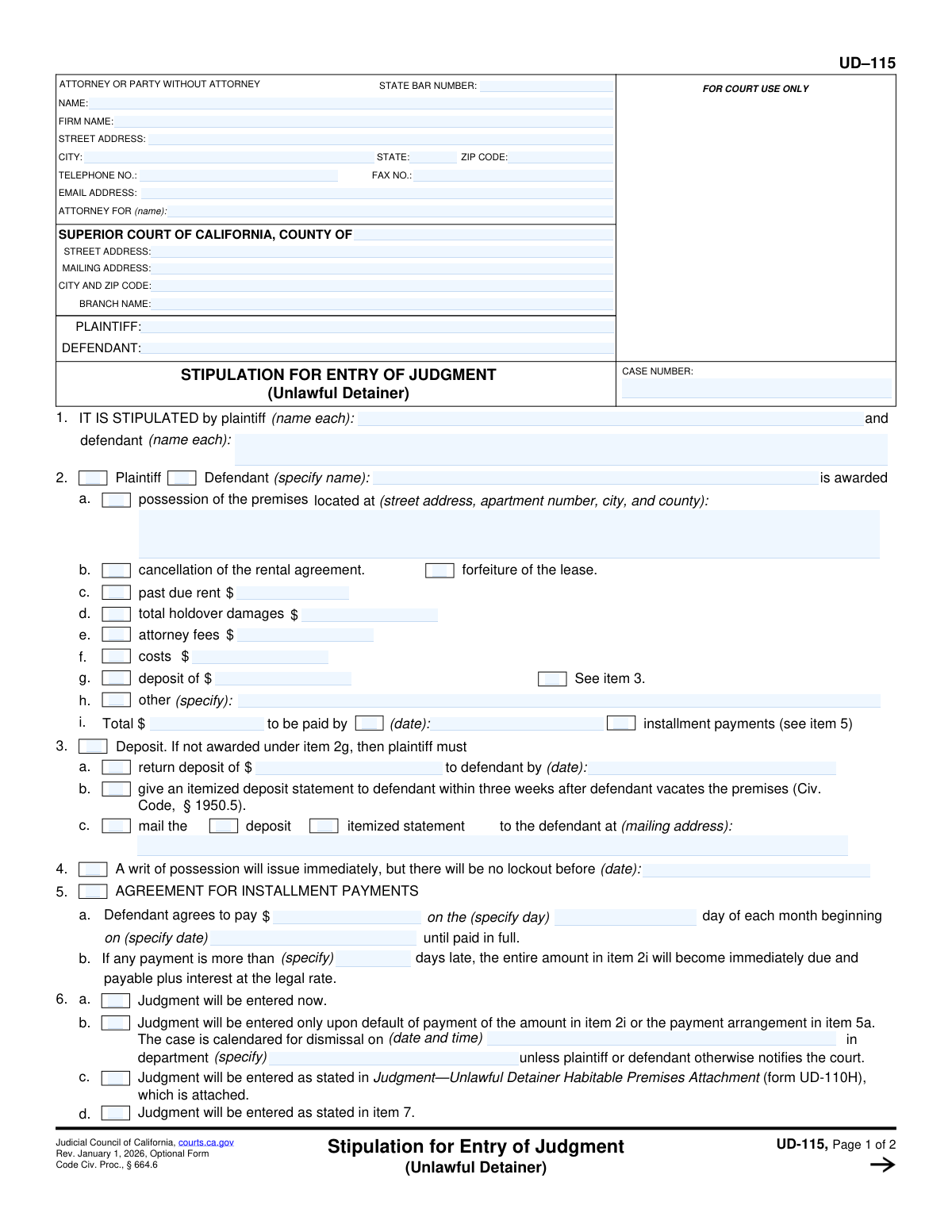
Form UD-115, the Stipulation for Entry of Judgment (Unlawful Detainer), is a crucial legal document in California used by a landlord and tenant to settle an eviction lawsuit out of court. This binding agreement details the terms both parties have agreed upon, such as a payment schedule for past-due rent and a date for the tenant to vacate the property, which is then approved by a judge. Today, this form can be filled out quickly and accurately using AI-powered services like Instafill.ai, which can also convert non-fillable PDF versions into interactive fillable forms.
UD-115 is part of the California court forms, landlord tenant forms and unlawful detainer forms categories on Instafill.
Our AI automatically handles information lookup, data retrieval, formatting, and form filling.
It takes less than a minute to fill out UD-115 using our AI form filling.
Securely upload your data. Information is encrypted in transit and deleted immediately after the form is filled out.

Form specifications

Form name: Form UD-115, Stipulation for Entry of Judgment (Unlawful Detainer)
Number of fields: 86
Number of pages: 1
Language: English
main-image

Instafill Demo: How to fill out PDF forms in seconds with AI

How to Fill Out UD-115 Online for Free in 2026

Are you looking to fill out a UD-115 form online quickly and accurately? Instafill.ai offers the #1 AI-powered PDF filling software of 2026, allowing you to complete your UD-115 form in just 37 seconds or less.
Follow these steps to fill out your UD-115 form online using Instafill.ai:
  1. 1 Navigate to Instafill.ai and upload the UD-115 form or select it from the template library.
  2. 2 Use the AI assistant to fill in the court information, case number, and the full names of the plaintiff(s) and defendant(s).
  3. 3 Detail the terms of the stipulation in section 2, including possession of the premises, amounts for past due rent, damages, attorney fees, and costs.
  4. 4 Specify arrangements for the security deposit and any installment payment plans in sections 3 and 5.
  5. 5 Indicate the conditions for the entry of judgment and any additional stipulations agreed upon by both parties in sections 6 and 7.
  6. 6 Carefully review all entered information for accuracy before the plaintiff(s) and defendant(s) or their attorneys electronically sign and date the document.
  7. 7 Download the completed and signed form to be filed with the court.

Our AI-powered system ensures each field is filled out correctly, reducing errors and saving you time.

Why Choose Instafill.ai for Your Fillable UD-115 Form?

Speed

Complete your UD-115 in as little as 37 seconds.

Up-to-Date

Always use the latest 2026 UD-115 form version.

Cost-effective

No need to hire expensive lawyers.

Accuracy

Our AI performs 10 compliance checks to ensure your form is error-free.

Security

Your personal information is protected with bank-level encryption.

Frequently Asked Questions About Form UD-115

This form is a legally binding agreement between a landlord (plaintiff) and a tenant (defendant) to settle an unlawful detainer (eviction) case out of court. It outlines the agreed-upon terms for the tenant to move out and for any money owed to be paid.

Both the plaintiff(s) and the defendant(s) in the eviction lawsuit must agree to the terms and sign the form. If either party is represented by an attorney, the attorney will sign on their behalf.

You will need the court case information, the full names of all parties, the property address, and the specific financial terms of the agreement. This includes amounts for past-due rent, damages, attorney fees, and details of any payment plan.

If judgment is entered 'now,' it immediately goes on the defendant's record. If it's entered 'upon default,' the judgment is only filed if the defendant fails to meet the agreement's terms, giving them a chance to comply without an immediate negative record.

If a payment is late by more than the specified number of days, the entire remaining balance of the judgment typically becomes due immediately. The plaintiff can then proceed with collections and request a lockout.

A writ of possession is a court order authorizing the sheriff to physically remove the tenant from the property. This form sets the earliest date that a lockout can occur, even if the writ is issued sooner.

This section is for any additional terms of the agreement not covered elsewhere on the form. This could include agreements about property condition, return of personal belongings, or providing a neutral reference.

After all parties sign the stipulation, it must be filed with the court. A judge will then review and sign it, making the agreement an official and enforceable court order.

While not legally required, it is highly recommended to consult with an attorney because this is a binding legal document with significant consequences. The form itself states that parties have the right to have an attorney present.

Item 3 specifies how the security deposit will be handled. It can be awarded to the plaintiff as part of the judgment, returned to the defendant by a certain date, or handled according to standard California law (Civ. Code, § 1950.5).

Yes, services like Instafill.ai use AI to auto-fill form fields accurately with your case and personal information, which helps save time and reduce errors.

You can upload the PDF of form UD-115 to Instafill.ai. The platform will make the document interactive, allowing you to type your information directly into the fields before downloading or printing the completed form.

If you have a flat or non-fillable PDF, you can use a service like Instafill.ai. It can convert the document into an interactive, fillable form so you can easily complete it on your computer.

Compliance UD-115
Validation Checks by Instafill.ai

1
Case Number Consistency Across Pages
This check verifies that the 'CASE NUMBER' entered in the header of Page 1 is identical to the 'CASE NUMBER' in the header of Page 2. This is critical for ensuring the document pages are correctly associated with each other and the correct court file. A mismatch could lead to the document being rejected or misfiled by the court clerk.
2
Completeness of Stipulating Party Names
Validates that the names for both the plaintiff and defendant are filled in under Item 1. These fields legally identify the parties bound by the stipulation. Failure to provide these names would render the agreement unenforceable and legally void, as it would be unclear who agreed to the terms.
3
Total Award Calculation Accuracy
This validation ensures that the sum of the monetary amounts listed in items 2c through 2h correctly equals the value entered in the 'Total' field (item 2i). This prevents mathematical errors and ensures the judgment amount is accurate and unambiguous. An incorrect total could lead to disputes over the amount owed and complications in enforcing the judgment.
4
Exclusive Award Recipient Selection
Verifies that in Item 2, either the 'Plaintiff' or 'Defendant' checkbox is selected, but not both. The award must be granted to a single party. Selecting both or neither creates an ambiguous and invalid term in the stipulation, which would require clarification and correction before the court could accept it.
5
Conditional Installment Plan Details
Checks that if the 'installment payments' option is selected in Item 2i, then all fields in Item 5a (payment amount, day of the month, and start date) are completed. This ensures that an agreement for installment payments is fully defined with all necessary terms. Missing details would make the payment plan unenforceable and could trigger a default.
6
Exclusive Judgment Entry Method
Ensures that exactly one of the checkboxes in Item 6 (6a, 6b, 6c, or 6d) is selected. These options are mutually exclusive and provide the court with a single, clear instruction on how and when the judgment should be entered. Selecting multiple or no options would create ambiguity, forcing the court to reject the stipulation for clarification.
7
Conditional Dismissal Information in 6b
If the option for judgment upon default (Item 6b) is selected, this check validates that the 'dismissal on (date and time)' and 'department' fields are filled. This information is required for the court to properly calendar the case for dismissal. Omitting these details would prevent the court from processing the conditional judgment as stipulated.
8
Logical Consistency of Deposit Handling
This check validates the logic between Item 2g and Item 3. If the security deposit is awarded to the plaintiff in Item 2g, then Item 3 should be blank. Conversely, if the deposit is not awarded in 2g, then an option in Item 3 (regarding its return or itemization) must be selected. This prevents contradictory terms regarding the disposition of the security deposit.
9
Valid Date Format
This validation scans all date fields on the form (e.g., in items 2i, 3a, 4, 5a, 6b, 8b, 8c) to ensure they are in a valid format, such as MM/DD/YYYY. It also checks for plausible dates (e.g., not in the distant past or a non-existent date). Proper date formatting is essential for legal deadlines and scheduling, and invalid formats can lead to rejection of the form.
10
Signature and Date Correlation
Verifies that for each party's signature block in Item 8, if a name is typed or printed, the corresponding 'Date' field is also filled out. The date of signature is legally significant as it indicates when the party agreed to the terms. A missing signature date can call the timing and validity of the agreement into question.
11
Monetary Field Numeric Format
This check ensures that all fields intended for dollar amounts (e.g., 2c, 2d, 2e, 2f, 2g, 2i, 3a, 5a) contain only valid numeric characters and at most one decimal point. This maintains data integrity for financial calculations and prevents processing errors. Non-numeric characters in these fields would invalidate the financial terms of the stipulation.
12
Attorney Information Completeness
Validates that if a name is entered in the 'ATTORNEY FOR' field, then the attorney's name, address, and State Bar Number fields are also completed. The State Bar Number should be checked to ensure it contains only digits. This information is required for the court to identify and communicate with the legal representative of a party.

Common Mistakes in Completing UD-115

Entering Incorrect Case or Party Information

People often mistype the case number, use incorrect court branch details, or fail to list the full, correct names of all plaintiffs and defendants as they appear on the complaint. These errors can cause the court clerk to reject the filing or lead to the document being misfiled, delaying the entire process. To prevent this, always double-check information against official court documents; AI tools like Instafill.ai can also help by auto-populating consistent data across all fields.

Providing an Incomplete Property Address

In Item 2a, parties sometimes provide a partial address, omitting the apartment number, city, or county. An incomplete or ambiguous address can render the judgment for possession unenforceable, as the Sheriff's department may be unable to identify the correct premises for a lockout. Always provide the full, specific address, which can be validated for completeness using form-filling software like Instafill.ai.

Miscalculating Monetary Award Totals

A frequent mistake is incorrectly summing the past-due rent, damages, fees, and costs to arrive at the total judgment amount in Item 2i. A simple arithmetic error can create disputes over the owed amount and may require an amended stipulation, delaying the entry of judgment. It is crucial to carefully calculate the total; smart tools can perform these calculations automatically to prevent errors.

Specifying Ambiguous Payment and Default Terms

Parties often create confusion by not clearly defining payment terms in Items 2i and 5. Common errors include failing to specify a lump-sum due date, omitting the installment amount or start date, or leaving the default grace period in Item 5b blank. This ambiguity leads to future conflicts over payment defaults and makes the agreement difficult to enforce.

Forgetting the 'No Lockout Before' Date

Item 4 contains a critical negotiated term: the earliest date a lockout can occur. Parties frequently overlook this field, leaving the date blank. This omission creates uncertainty and could result in the tenant being locked out immediately after a writ is issued, which may contradict the parties' verbal agreement and cause significant hardship.

Missing Signatures, Dates, or Printed Names

A stipulation is invalid unless signed and dated by all parties listed in Item 1 (or their attorneys). It is extremely common for one or more parties to forget to sign, date their signature, or legibly print their name, which is required for identification. The court will reject any form with incomplete signature blocks, forcing the parties to resubmit and causing significant delays.

Incorrectly Handling the Security Deposit

The form's conditional logic for the security deposit (Items 2g and 3) often causes confusion. Parties may incorrectly apply the deposit to the judgment while also filling out the section for its return, creating a contradiction. This leads to post-judgment disputes over the deposit and requires further legal clarification, defeating the purpose of the stipulation.

Making Conflicting Selections for Judgment Entry

Item 6 requires parties to select only one option for when the judgment will be entered. A common mistake is checking multiple boxes (e.g., both 'Judgment will be entered now' and 'Judgment will be entered only upon default') or leaving the section entirely blank. This makes the court's required action unclear and will result in the form being returned for correction.

Forgetting to Complete the Header on Page 2

The second page of the form includes a header that requires the plaintiff, defendant, and case number to be entered again. Parties often focus on the main body of the form and forget to fill out this repetitive information. Leaving the page 2 header blank can cause processing issues and may lead to the page being separated or misfiled.

Using a Non-Fillable PDF and Submitting Illegible Text

Many people find this form as a flat, non-fillable PDF and are forced to print and complete it by hand. This often results in illegible handwriting, especially for addresses, names, and monetary amounts, which can cause the court clerk to reject the document. Using a service like Instafill.ai can convert the non-fillable PDF into an interactive, fillable form, ensuring all entries are clear, legible, and correctly formatted.
Saved over 80 hours a year

“I was never sure if my IRS forms like W-9 were filled correctly. Now, I can complete the forms accurately without any external help.”

Kevin Martin Green

Your data stays secure with advanced protection from Instafill and our subprocessors

Robust compliance program

Transparent business model

You’re not the product. You always know where your data is and what it is processed for.

ISO 27001, HIPAA, and GDPR

Our subprocesses adhere to multiple compliance standards, including but not limited to ISO 27001, HIPAA, and GDPR.

Security & privacy by design

We consider security and privacy from the initial design phase of any new service or functionality. It’s not an afterthought, it’s built-in, including support for two-factor authentication (2FA) to further protect your account.

Fill out UD-115 with Instafill.ai

Worried about filling PDFs wrong? Instafill securely fills form-ud-115-stipulation-for-entry-of-judgment-unlawful-detainer forms, ensuring each field is accurate.

Related forms by category

California court forms Judicial Council of California Form SC-105, Request for Court Order and Answer (Small Claims), Judicial Council of California Form SC-120, Defendant’s Claim and ORDER to Go to Small Claims Court (Small Claims), Judicial Council of California Form SER-001, Request for Sheriff to Serve Court Papers, Judicial Council of California Form SER-001, Request for Sheriff to Serve Court Papers, Affidavit for Collection of Personal Property California Probate Code Section 13100, Form POS-040, Proof of Service—Civil, Declaration of Facts of Death (California Superior Court), declaration-of-marriage-for-court-proceeding-california-family-law, ADOPT-200, Adoption Request, ADOPT-200, Stepparent Adoption Request, ADOPT-210, Adoption Agreement, ADOPT-310, Contact After Adoption Agreement, Judicial Council of California Form ADOPT-200, Adoption Request, Form ADR-107, Mediation Attendance Sheet, Form ADR-110, Order Appointing Referee, Form ADR-109, Stipulation or Motion for Order Appointing Referee, Form ADR-102, Request for Trial De Novo After Judicial Arbitration, Form ADR-108, Referee's Report (Code Civ. Proc., §§ 638, 639), Form ADR-106, Petition to Confirm, Correct, or Vacate Contractual Arbitration Award, Form ADR-104, Rejection of Award and Request for Trial After Attorney-Client Fee Arbitration · + 557 more →
landlord tenant forms Form UD-110, Judgment—Unlawful Detainer, Judicial Council of California, Form UD-110P, Judgment—Unlawful Detainer Partial Eviction Attachment, Form UD-116, Declaration for Default Judgment by Court (Unlawful Detainer—Civ. Proc., § 585(d)), Form UD-120, Verification by Landlord Regarding Rental Assistance—Unlawful Detainer, UD-155, Eviction Case (Unlawful Detainer) Stipulation, judicial-council-of-california-form-ud-110h-judgmentunlawful-detainer-habitable-premises-attachment
unlawful detainer forms Judicial Council of California Form UD-150, Request/Counter-Request to Set Case for Trial—Unlawful Detainer, Form UD-100, Complaint—Unlawful Detainer, Judicial Council of California Form UD-105, Answer—Unlawful Detainer, Judicial Council of California Form UD-105, Answer—Unlawful Detainer, Judicial Council of California Form UD-150, Request/Counter-Request to Set Case for Trial—Unlawful Detainer, Judicial Council of California Form UD-100, Complaint—Unlawful Detainer, Form UD-105, Answer—Unlawful Detainer, Form UD-101, Plaintiff's Mandatory Cover Sheet and Supplemental Allegations—Unlawful Detainer, Form SUM-130, Summons - Unlawful Detainer - Eviction, Form DISC-003/UD-106, Form Interrogatories—Unlawful Detainer, Form UD-110, Judgment—Unlawful Detainer, Judicial Council of California, Form UD-110P, Judgment—Unlawful Detainer Partial Eviction Attachment, Form UD-116, Declaration for Default Judgment by Court (Unlawful Detainer—Civ. Proc., § 585(d)), Form UD-120, Verification by Landlord Regarding Rental Assistance—Unlawful Detainer, UD-155, Eviction Case (Unlawful Detainer) Stipulation, judicial-council-of-california-form-ud-110h-judgmentunlawful-detainer-habitable-premises-attachment