
Instafill.ai
7 days free
AI form filling · 31 fields · 1 page · done in seconds

Yes! You can use AI to fill out New Jersey Judiciary Application to Serve as a Landlord/Tenant Settlor (CN 12743)

Don't type 31 fields by hand. Tell our AI about yourself, or upload a document you already have, and it fills every field in seconds. You check it, then download, print or sign.
7 days free, then $19.99/month · Cancel anytime
AI fills it, no typingEncrypted, never used to train AICancel in two clicks
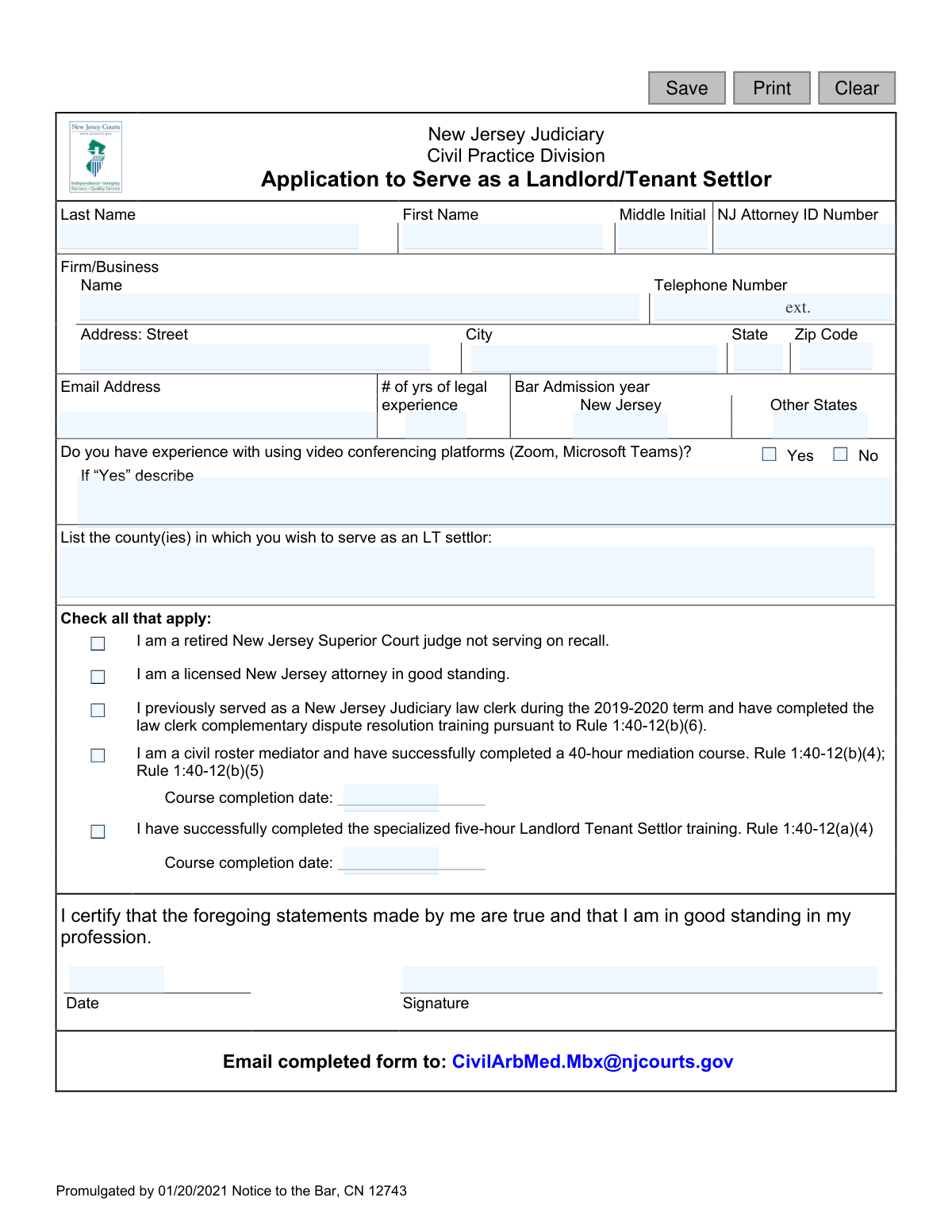
New Jersey Judiciary Application to Serve as a Landlord/Tenant Settlor (CN 12743), page 1
Basic · 31/100Form Complexity Index

The AI does the filling. You just check it.

No typing into boxes, nothing to install.

Tell the AI about youAnswer a few questions in plain words, or upload a document you already have. That is all the typing there is.
AI fills every field in secondsIt puts each answer in the right box on every page, checkboxes included.
Check it and downloadReview every field, change anything, then download, print or sign the PDF.

What this form asks for

The AI fills all of it, from your answers or your documents.

This form is an application for legal professionals in New Jersey to volunteer or be appointed as a settlor in landlord-tenant cases, helping parties reach a resolution outside of a formal trial. It is crucial for the New Jersey Judiciary to vet and approve qualified individuals to ensure fair and effective dispute resolution. Today, this form can be filled out quickly and accurately using AI-powered services like Instafill.ai, which can also convert non-fillable PDF versions into interactive fillable forms.
Fillable fields31
Pages1
Form Complexity IndexBasic, 31/100

The AI checks your answers before you download

14 checks built for this form, so a wrong date or a missing answer is caught before anyone else sees it.

NJ Attorney ID Format and Requirement

This check ensures that if the applicant indicates they are a licensed New Jersey attorney, the 'NJ Attorney ID Number' field is not empty and follows the official format. This is critical for verifying the applicant's credentials and good standing with the state bar. A failed validation would prevent submission and prompt the user to enter a valid ID number.

Email Address Format Validation

Verifies that the value entered in the 'Email Address' field is a valid email format (e.g., [email protected]). This is essential for all future communication regarding the application, scheduling, and other official notices. If the format is invalid, the system will reject the entry and ask the user to provide a correctly formatted email address.

Phone Number Format Validation

This validation checks that the 'Telephone Number' field contains a valid 10-digit phone number, accommodating common formats like (XXX) XXX-XXXX or XXX-XXX-XXXX. A valid phone number is a primary contact method and necessary for timely communication. An invalid entry will trigger an error message, requiring the user to correct the number before proceeding.

ZIP Code Format Validation

Ensures the 'Zip Code' field contains a valid 5-digit or 9-digit (ZIP+4) numeric code. Correctly formatted ZIP codes are crucial for mail delivery and for accurately identifying the applicant's location for administrative purposes. The form will not be accepted until a valid ZIP code is entered.

Applicant Full Name Completeness

This check confirms that both the 'Last Name' and 'First Name' fields are filled out. A full name is the primary identifier for the applicant and is required for all official records and certifications. If either field is left blank, the application submission will be blocked until the required information is provided.

County Service Area Selection

Verifies that the applicant has selected at least one county from the 'county(ies) in which you wish to serve' list. This information is fundamental to the application's purpose, as it determines where the settlor can be assigned. An application without a selected county is incomplete and cannot be processed.

And 8 more checks
  • Minimum Qualification Requirement
  • Conditional Roster Mediator Date
  • Conditional LT Settlor Training Date
  • Conditional Video Conferencing Description
  • Bar Admission Year Logic
  • Full Address Completeness
  • Signature Date Presence and Validity
  • Signature Name Matches Applicant Name

Let AI fill out your NJ Landlord/Tenant Settlor Application

No typing. Every field filled in seconds, checked, ready to sign.

7 days free, then $19.99/month · Cancel anytime

How to Fill Out NJ Landlord/Tenant Settlor Application Online for Free in 2026

What the AI walks you through.

  1. Navigate to Instafill.ai and upload the Application to Serve as a Landlord/Tenant Settlor form.
  2. Provide your personal and professional information, including your full name, NJ Attorney ID number, firm details, and contact information.
  3. Enter your years of legal experience, bar admission dates for New Jersey and other states, and specify the counties where you wish to serve.
  4. Indicate your experience with video conferencing platforms like Zoom or Microsoft Teams.
  5. Check all applicable boxes to certify your qualifications, such as being a retired judge, a licensed NJ attorney, or having completed specific mediation training courses, and provide completion dates where required.
  6. Review all the information populated by the AI for accuracy, then digitally sign and date the certification statement.
  7. Download the completed application to your device, ready for submission via email to [email protected] as instructed on the form.

Common Mistakes in Completing NJ Landlord/Tenant Settlor Application

The ones the AI is built to catch.

Confusing Bar Admission Year with Years of Experience
The form's layout confusingly places the label "# of yrs of legal experience" near the field for "Bar Admission year." Applicants often mistakenly enter the total number of years they've practiced (e.g., "15") instead of the year they were admitted (e.g., "2009"). This error provides incorrect data to the reviewer, potentially delaying the verification of the applicant's standing and experience. To avoid this, carefully read the field label and enter the specific four-digit year of your New Jersey Bar admission.
Incomplete Eligibility Information
Applicants frequently check a box indicating their qualification (e.g., "I am a civil roster mediator") but forget to fill in the mandatory corresponding information, such as the "Course completion date." An application with missing dates is considered incomplete because the reviewer cannot verify that the prerequisites have been met. This will lead to delays or outright rejection. Always double-check that any required dates or details are provided for every box you check.
Vague Description of Video Conferencing Experience
When asked to describe video conferencing experience, many applicants provide generic answers like "Yes, I use it" or leave the field blank. This fails to demonstrate the technical proficiency required for conducting remote settlement conferences. A weak description puts the applicant at a disadvantage. To stand out, provide specific details, including the platforms used (Zoom, Microsoft Teams), the frequency of use, and the context (e.g., "Conducted 50+ virtual depositions and client meetings on Zoom in the last year").
Missing Signature or Date
Forgetting to sign or date the certification is one of the most common and critical errors. An unsigned or undated application is legally invalid and cannot be processed by the Judiciary. This oversight results in immediate rejection, forcing the applicant to resubmit and causing significant delays. Before emailing the form, make it a final habit to confirm that the signature and date fields are properly completed.
Incorrect NJ Attorney ID Number
Entering an incorrect or incomplete New Jersey Attorney ID number is a frequent data entry mistake. The ID number is the primary way the Judiciary verifies an attorney's identity and good standing with the bar. A typo can prevent the system from finding the applicant's record, leading to processing delays or a request for corrected information. Carefully proofread this number against your official record to ensure accuracy.
Using a Personal Email Address with Typos
Applicants often make small typos when entering their own email address, which has major consequences. All official communication, including questions about the application, scheduling, and the final decision, will be sent to this address. An incorrect email means the applicant will receive no communication and may miss their opportunity to serve. AI-powered form filling tools like Instafill.ai can help prevent this by autocompleting contact information from a verified profile.
Submitting a Low-Quality or Illegible Scanned Form
Since the form is a PDF, applicants may print it, fill it out by hand, and submit a poor-quality scan or photo. Illegible handwriting can lead to data entry errors by court staff or cause the application to be rejected as unprofessional and unreadable. To ensure clarity, fill out the form electronically using a PDF editor. If the original document is not a fillable PDF, a tool like Instafill.ai can convert it into an interactive, fillable version for a clean, professional submission.
Omitting County Selection
The application requires applicants to list the counties where they wish to serve, but this field is sometimes left blank. If no counties are listed, the Judiciary does not know where to assign the applicant, effectively removing them from consideration for any vicinage. This simple omission can render an otherwise perfect application useless. Be sure to clearly list the full names of all counties in which you are willing to serve.
Failing to Check Any Qualification Box
Some applicants fill out their personal and firm information but neglect to check any of the boxes under the "Check all that apply" section. These checkboxes are not optional; they are the basis of eligibility for the program (e.g., being a licensed NJ attorney, a retired judge, etc.). An application without at least one of these boxes checked demonstrates no grounds for qualification and will be rejected immediately.
Incorrect Training Completion Date Format
When providing dates for mediation or settlor training, applicants may use inconsistent formats (e.g., 5/1/21, May 1, 2021) or guess the date if they cannot find their certificate. This can cause data validation issues for the court and slow down the verification of training credentials. Before you begin, locate your completion certificates and enter the dates in a clear, consistent MM/DD/YYYY format to avoid any ambiguity.

Frequently Asked Questions About NJ Landlord/Tenant Settlor Application


Is it really free for 7 days?
Yes. You pay $0 today. Cancel before Nov 5 and you are never charged. Keep it, and it is $19.99 a month for 5 fills of your NJ Landlord/Tenant Settlor Application.
Can I fill other forms too?
This plan is for your NJ Landlord/Tenant Settlor Application: your own AI agent fills it as often as 5 times a month. To fill other forms and upload your own, choose a Professional plan from your account.
How do I cancel?
From your account, in two clicks, any time. No email, no call.
How does the AI fill out NJ Landlord/Tenant Settlor Application?
You answer a few questions in plain words, or upload a document you already have. The AI reads what you give it and puts each answer into the right field of NJ Landlord/Tenant Settlor Application, on every page, in seconds. It checks the answers against the form's own rules, and you review and change anything before you download, print or sign.
What happens to my information?
It is encrypted in transit and at rest, and it is never used to train AI.
How complex is NJ Landlord/Tenant Settlor Application to fill out?
NJ Landlord/Tenant Settlor Application has a Form Complexity Index of 31 out of 100, in the basic tier: 31 fillable fields across 1 page. Instafill.ai's AI fills it in under a minute, with every field there for you to review before you download.
What is the purpose of the 'Application to Serve as a Landlord/Tenant Settlor' form?
This form is used by qualified legal professionals to apply to serve as a neutral third-party, known as a settlor, to help landlords and tenants resolve their disputes within the New Jersey Judiciary system.
Who is eligible to fill out this application?
You are eligible if you are a retired NJ Superior Court judge, a licensed NJ attorney, a former 2019-2020 law clerk with specific training, or a qualified civil roster mediator, and have completed the required settlor training.
Do I need to complete the specialized Landlord Tenant Settlor training before applying?
Yes, the form requires you to certify that you have successfully completed the specialized five-hour Landlord Tenant Settlor training and to provide the course completion date.
Where do I submit the completed application?
You should email the completed form to the New Jersey Judiciary's Civil Practice Division at [email protected].
Why does the form ask about my experience with video conferencing platforms?
Settlement conferences are often conducted remotely using platforms like Zoom or Microsoft Teams, so the court needs to ensure you have the technical skills to participate in these virtual proceedings.
What information do I need to provide on the application?
You will need your personal and professional contact information, NJ Attorney ID number, bar admission details, and the completion dates for your required training courses.
Can I apply to serve as a settlor in multiple counties?
Yes, the form provides a space for you to list all the counties in which you are willing to serve as a Landlord/Tenant settlor.
I am a mediator but not an attorney. Can I still apply?
Yes, you can apply if you are on the civil roster of mediators, have completed the 40-hour mediation course, and have also completed the specialized five-hour Landlord Tenant Settlor training.
What happens after I submit my application?
The Civil Practice Division will review your application to verify your qualifications. If you are approved, you will be added to the roster of available settlors for the counties you selected.
Do I need to meet all the criteria listed in the checkboxes?
No, you must meet at least one of the primary qualifications (e.g., being a licensed attorney) in addition to completing the mandatory five-hour Landlord Tenant Settlor training.
Can I use an AI tool to help me fill out this form?
Yes, services like Instafill.ai use AI to accurately auto-fill form fields with your saved information, which can save you time and help prevent errors.
How can I fill out this form online if it's a PDF?
You can use a service like Instafill.ai to upload the PDF and fill it out directly on your computer. The platform allows you to type into the fields, add a digital signature, and download the completed form for emailing.
What should I do if the PDF form I have is not fillable?
If you have a non-fillable or 'flat' PDF, you can use a tool like Instafill.ai to automatically convert it into an interactive, fillable form that you can easily complete online.
Encrypted in transit and at restNever used to train AIDelete your forms any time

Get your NJ Landlord/Tenant Settlor Application filled out by AI

$0 today. Cancel before Nov 5 and you pay nothing.

Other forms like this one

landlord tenant forms: Form UD-110, Judgment—Unlawful Detainer, Judicial Council of California, Form UD-110P, Judgment—Unlawful Detainer Partial Eviction Attachment, Form UD-115, Stipulation for Entry of Judgment (Unlawful Detainer), Form UD-116, Declaration for Default Judgment by Court (Unlawful Detainer—Civ. Proc., § 585(d)), Form UD-120, Verification by Landlord Regarding Rental Assistance—Unlawful Detainer, UD-155, Eviction Case (Unlawful Detainer) Stipulation, Judicial Council of California Form UD-110H, Judgment—Unlawful Detainer Habitable Premises Attachment, Appendix XI-X, Verified Complaint - Residential Landlord Tenant, New Jersey Judiciary Landlord Tenant Procedures, New Jersey Judiciary Civil Division Landlord/Tenant (LT) Trial Sheet, Appendix XI-X Verified Complaint – Residential Landlord Tenant

New Jersey forms: State of New Jersey Alternate Benefit Program Withdrawal Request Acknowledgement Receipt, Horizon Blue Cross Blue Shield of New Jersey Applied Behavior Analysis Supplemental Information Form, State of New Jersey Application for Employment (Form DPF-663), New Jersey Judiciary Plea Form (Plea 01), Supplemental Plea Form for Certain Sexual Offenses: Megan’s Law/Parole Supervision for Life/Community Supervision for Life (Plea 05), Financial Questionnaire to Establish Indigency, New Jersey Judiciary Resource Family Information Form, Foreclosure Case Information Statement (FCIS) - Appendix XII-B2, New Jersey Judiciary Records Request Form, Superior Court of New Jersey, Application for Appeal and Order, FL Certification of Requested Background Checks for Kinship Legal Guardianship, Certification of Caregiver as to Knowledge of Identity and/or Location of Parents, FL Order Judgment for Kinship Legal Guardianship, New Jersey Judiciary Certification of Repair and Plea of Guilty, Uniform Summary Support Order (USSO), New Jersey Judiciary Volunteer Application (CN 10293), Application to Take the New Jersey Court Interpreter Oral Examination, New Jersey Judiciary Attorney Fee Arbitration Request, Order to Show Cause with Temporary Restraints Pursuant to Rule 4:52, Tax Court of New Jersey, State Tax Complaint

7 days free, then $19.99/month · Cancel anytime