
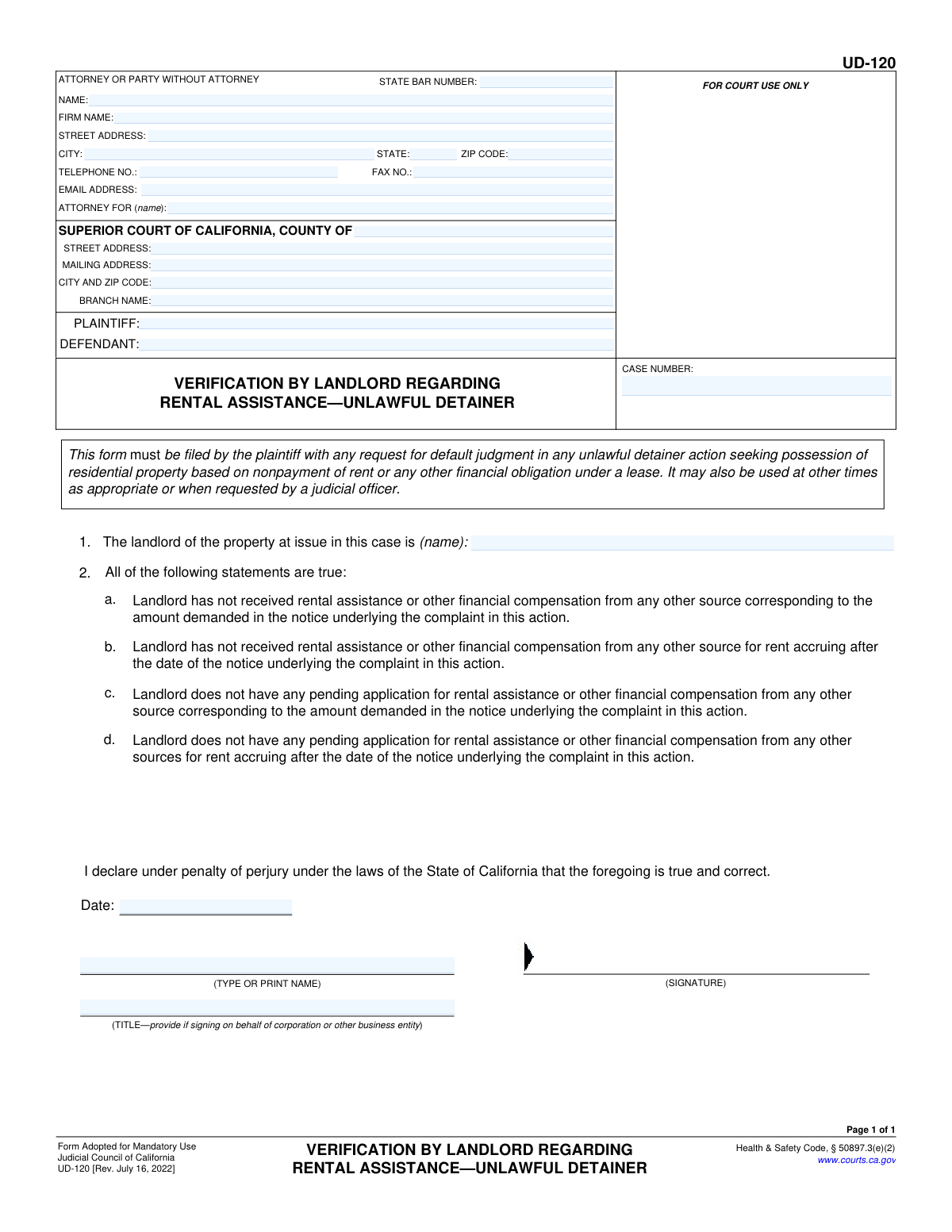
Yes! You can use AI to fill out Form UD-120, Verification by Landlord Regarding Rental Assistance—Unlawful Detainer
Don't type 24 fields by hand. Tell our AI about yourself, or upload the listing or an old lease, and it fills every field in seconds. You check it, then download, print or sign.
The AI does the filling. You just check it.
No typing into boxes, nothing to install.
What this form asks for
The AI fills all of it, from your answers or your documents.
The AI checks your answers before you download
13 checks built for this form, so a wrong date or a missing answer is caught before anyone else sees it.
Verifies the Case Number field is populated and follows a format typical for California court cases. The case number is the primary identifier for the legal action, and an incorrect or missing number will cause the document to be rejected by the court clerk or misfiled. This check ensures the document can be correctly associated with its corresponding case file.
Ensures that if the 'ATTORNEY FOR' field is filled, the 'STATE BAR NUMBER' field is also populated. For attorneys filing on behalf of a client, providing a valid State Bar Number is mandatory to prove they are licensed to practice. Failure to provide this number when required will result in the filing being rejected.
Validates that the name listed in the 'ATTORNEY FOR (name)' field is the same as the name in the 'PLAINTIFF' field. This check confirms that the person filing the form is legally representing the plaintiff in the case. A mismatch indicates a critical error that could invalidate the filing and requires correction before submission.
Ensures the landlord's name entered in Item 1 matches the name listed for the 'PLAINTIFF' in the case caption. In an unlawful detainer action, the plaintiff is the landlord, so these names must be identical for the declaration to be valid. A discrepancy can lead to legal challenges and the rejection of the verification by the court.
Checks that both the 'PLAINTIFF' and 'DEFENDANT' fields are filled out in the case caption. These names identify the parties involved in the lawsuit and are essential for the document's legal context. A form submitted without identifying both parties is fundamentally incomplete and will be rejected.
Verifies that the text field for Item 1, which identifies the landlord, is not empty. The entire purpose of this form is for the landlord to make a specific declaration. Failing to name the landlord in this section makes the declaration legally meaningless and will result in the form being deemed insufficient.
And 7 more checks
- Completeness of Signature Block
- Validate Signature Date Format and Logic
- Completeness of Filer's Address
- Mandatory Court County
- Validate Telephone Number Format
- Validate Email Address Format
- Validate ZIP Code Format
Let AI fill out your UD-120
No typing. Every field filled in seconds, checked, ready to sign.
How to Fill Out UD-120 Online for Free in 2026
What the AI walks you through.
- Navigate to Instafill.ai and upload or select the UD-120 form.
- Use the AI assistant to automatically populate your attorney or personal information, including name, address, and state bar number.
- Enter the specific court and case information, such as the county, case number, and the names of the plaintiff and defendant.
- Provide the name of the landlord in the designated field as required by item 1.
- Carefully review the four declarations in item 2 to confirm their accuracy, as this is a statement made under penalty of perjury.
- Date and sign the form. The AI tool will help you place your signature, typed name, and title in the correct fields.
- Review the entire completed document for accuracy before downloading the final version for filing with the court.
Common Mistakes in Completing UD-120
The ones the AI is built to catch.
Entering an Incorrect or Incomplete Case Number
Improperly Filling the Attorney/Party Information
Using Inconsistent Plaintiff or Defendant Names
Incorrectly Identifying the Landlord in Item 1
Falsely Attesting to No Rental Assistance in Item 2
Omitting the Signer's Title for a Business Entity
Forgetting to Date or Sign the Declaration
Specifying the Incorrect Court Location or Branch
Confusing the Signature and Printed Name Lines
Submitting a Poorly Hand-filled or Scanned Form
Frequently Asked Questions About UD-120
Is it really free for 7 days?
Can I fill other forms too?
How do I cancel?
How does the AI fill out UD-120?
What happens to my information?
How complex is UD-120 to fill out?
What is the purpose of the UD-120 form?
Who is required to fill out and file Form UD-120?
When do I need to file the UD-120 form?
What information do I need to have ready to complete this form?
What am I confirming by checking the boxes in section 2?
What if I have applied for rental assistance but haven't received it yet?
What happens if I don't file this form when requesting a default judgment?
Who signs the declaration at the bottom of the form?
How do I submit this form to the court?
Can I use an AI tool to help me fill out this form?
How can I use Instafill.ai to complete the UD-120 form online?
The PDF version of the form I found is not fillable. What can I do?
Get your UD-120 filled out by AI
$0 today. Cancel before Nov 5 and you pay nothing.
Other forms like this one
California rental forms: California Association of REALTORS® (C.A.R.) Form LR, Residential Lease or Month-to-Month Rental Agreement (Revised 12/19), California/National Apartment Association Official Form B-15, Rental Application for Residents and Occupants (May 2015) with Application Agreement, Form FL-220, Response to Petition to Determine Parental Relationship (Uniform Parentage), Form FL-200, Petition to Determine Parental Relationship (Uniform Parentage)
California court forms: Judicial Council of California Form SC-105, Request for Court Order and Answer (Small Claims), Judicial Council of California Form SC-120, Defendant’s Claim and ORDER to Go to Small Claims Court (Small Claims), Judicial Council of California Form SER-001, Request for Sheriff to Serve Court Papers, Judicial Council of California Form SER-001, Request for Sheriff to Serve Court Papers, Affidavit for Collection of Personal Property California Probate Code Section 13100, Form POS-040, Proof of Service—Civil, Declaration of Facts of Death (California Superior Court), declaration-of-marriage-for-court-proceeding-california-family-law, ADOPT-200, Adoption Request, ADOPT-200, Stepparent Adoption Request, ADOPT-210, Adoption Agreement, ADOPT-310, Contact After Adoption Agreement, Judicial Council of California Form ADOPT-200, Adoption Request, Form ADR-107, Mediation Attendance Sheet, Form ADR-110, Order Appointing Referee, Form ADR-109, Stipulation or Motion for Order Appointing Referee, Form ADR-102, Request for Trial De Novo After Judicial Arbitration, Form ADR-108, Referee's Report (Code Civ. Proc., §§ 638, 639), Form ADR-106, Petition to Confirm, Correct, or Vacate Contractual Arbitration Award, Form ADR-104, Rejection of Award and Request for Trial After Attorney-Client Fee Arbitration
landlord tenant forms: Form UD-110, Judgment—Unlawful Detainer, Judicial Council of California, Form UD-110P, Judgment—Unlawful Detainer Partial Eviction Attachment, Form UD-115, Stipulation for Entry of Judgment (Unlawful Detainer), Form UD-116, Declaration for Default Judgment by Court (Unlawful Detainer—Civ. Proc., § 585(d)), UD-155, Eviction Case (Unlawful Detainer) Stipulation, Judicial Council of California Form UD-110H, Judgment—Unlawful Detainer Habitable Premises Attachment, Appendix XI-X, Verified Complaint - Residential Landlord Tenant, New Jersey Judiciary Application to Serve as a Landlord/Tenant Settlor (CN 12743), New Jersey Judiciary Landlord Tenant Procedures, New Jersey Judiciary Civil Division Landlord/Tenant (LT) Trial Sheet, Appendix XI-X Verified Complaint – Residential Landlord Tenant
unlawful detainer forms: Judicial Council of California Form UD-150, Request/Counter-Request to Set Case for Trial—Unlawful Detainer, Form UD-100, Complaint—Unlawful Detainer, Judicial Council of California Form UD-105, Answer—Unlawful Detainer, Judicial Council of California Form UD-105, Answer—Unlawful Detainer, Judicial Council of California Form UD-150, Request/Counter-Request to Set Case for Trial—Unlawful Detainer, Judicial Council of California Form UD-100, Complaint—Unlawful Detainer, Form UD-105, Answer—Unlawful Detainer, Form UD-101, Plaintiff's Mandatory Cover Sheet and Supplemental Allegations—Unlawful Detainer, Form SUM-130, Summons - Unlawful Detainer - Eviction, Form DISC-003/UD-106, Form Interrogatories—Unlawful Detainer, Form UD-110, Judgment—Unlawful Detainer, Judicial Council of California, Form UD-110P, Judgment—Unlawful Detainer Partial Eviction Attachment, Form UD-115, Stipulation for Entry of Judgment (Unlawful Detainer), Form UD-116, Declaration for Default Judgment by Court (Unlawful Detainer—Civ. Proc., § 585(d)), UD-155, Eviction Case (Unlawful Detainer) Stipulation, Judicial Council of California Form UD-110H, Judgment—Unlawful Detainer Habitable Premises Attachment
Let AI fill out your UD-120
Your trial starts once a card is added. You pay nothing before Nov 5.
Our AI already knows this form, all 24 fields of it. Skip the typing: tell it about yourself, or upload what you have, and it fills the whole form in seconds.
- AI fills every field on the form, checkboxes included
- No typing into boxes: answer a few questions, or upload the listing or an old lease, an old copy of this form, a photo of a document
- The AI checks the answers; you review and change anything before you download
- Download the finished PDF, print it, or sign it online
- Encrypted, and never used to train AI
Cancel before Nov 5 and you pay nothing.
A card is needed to start the trial. Cancel in two clicks from your account.
Terms · Privacy