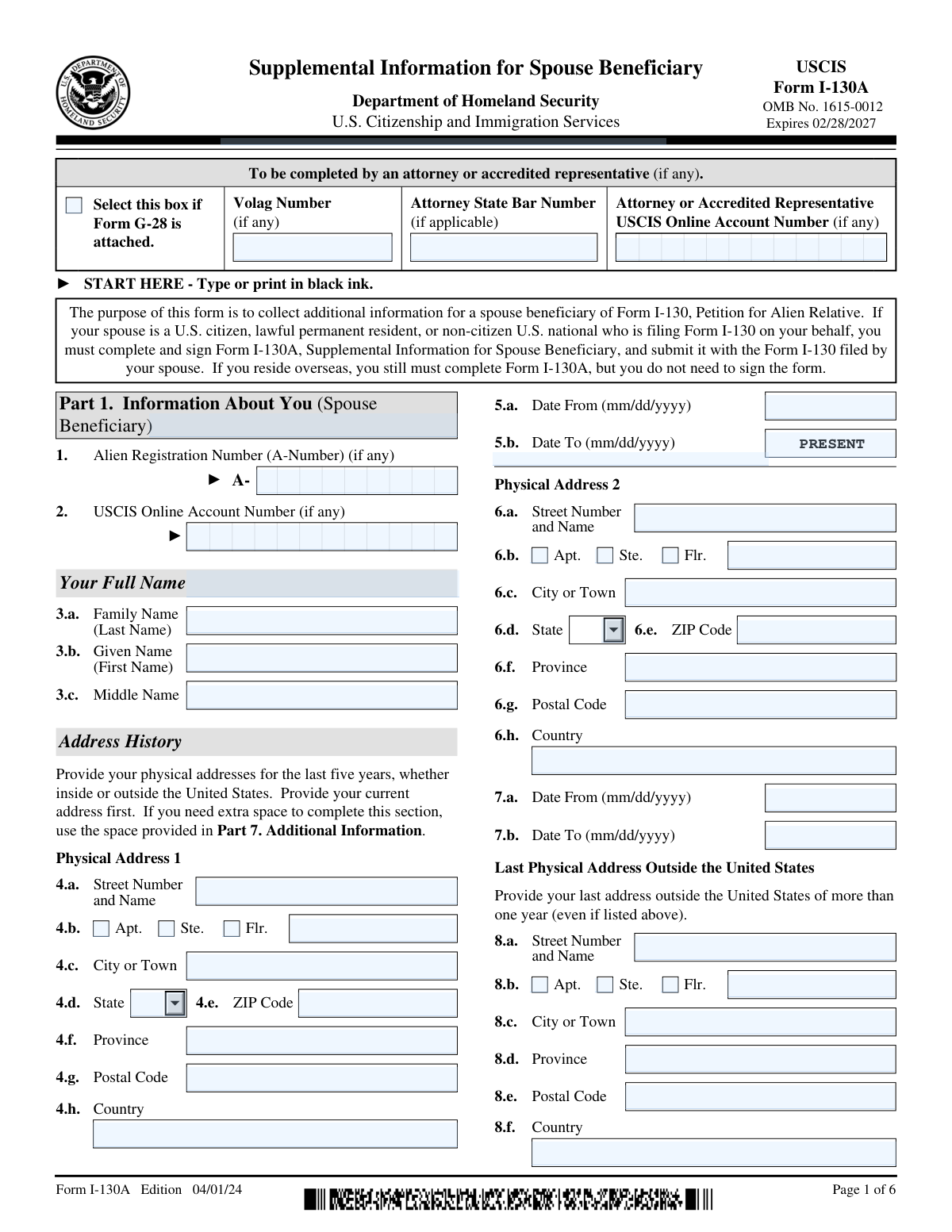
Yes! You can use AI to fill out Form I-130A, Supplemental Information for Spouse Beneficiary
Form I-130A, Supplemental Information for Spouse Beneficiary, is a U.S. Citizenship and Immigration Services (USCIS) form that must be completed by the foreign spouse (beneficiary) when a U.S. citizen, lawful permanent resident, or non-citizen U.S. national files Form I-130 on their behalf. The form collects detailed personal information including address history, employment history, and parental information to help USCIS evaluate the beneficiary's eligibility. It must be submitted together with the Form I-130 petition and requires the beneficiary's signature unless they reside overseas. Today, this form can be filled out quickly and accurately using AI-powered services like Instafill.ai, which can also convert non-fillable PDF versions into interactive fillable forms.
Our AI automatically handles information lookup, data retrieval, formatting, and form filling.
It takes less than a minute to fill out I-130A using our AI form filling.
Securely upload your data. Information is encrypted in transit and deleted immediately after the form is filled out.
Form specifications
| Form name: | Form I-130A, Supplemental Information for Spouse Beneficiary |
| Number of pages: | 6 |
| Language: | English |
| Categories: | immigration forms, USCIS forms |
Instafill Demo: filling out a legal form in seconds
How to Fill Out I-130A Online for Free in 2026
Are you looking to fill out a I-130A form online quickly and accurately? Instafill.ai offers the #1 AI-powered PDF filling software of 2026, allowing you to complete your I-130A form in just 37 seconds or less.
Follow these steps to fill out your I-130A form online using Instafill.ai:
- 1 Navigate to Instafill.ai and search for or upload Form I-130A, Supplemental Information for Spouse Beneficiary, to begin filling it out online.
- 2 Complete Part 1 by entering the spouse beneficiary's personal identification details, including full name, Alien Registration Number (A-Number), USCIS Online Account Number, and physical address history for the last five years.
- 3 Fill in Part 2 by providing the spouse beneficiary's employment history for the last five years, including employer names, addresses, occupations, and dates of employment, starting with the most current employer.
- 4 Complete Part 3 with the spouse beneficiary's last occupation outside the United States if not already listed in Part 2, and provide information about both parents including their full names, dates of birth, sex, birthplaces, and current residences.
- 5 Review and complete Part 4 (Spouse Beneficiary's Statement, Contact Information, Certification, and Signature), providing daytime telephone number, mobile number, email address, and signing and dating the form to certify the accuracy of all information.
- 6 If an interpreter was used, complete Part 5 with the interpreter's full name, contact information, mailing address, and signature certifying they accurately translated the form.
- 7 If a preparer other than the spouse beneficiary completed the form, fill out Part 6 with the preparer's full name, business name, contact information, and signature, then use Part 7 for any additional information that did not fit in earlier sections before submitting the completed form with Form I-130.
Our AI-powered system ensures each field is filled out correctly, reducing errors and saving you time.
Why Choose Instafill.ai for Your Fillable I-130A Form?
Speed
Complete your I-130A in as little as 37 seconds.
Up-to-Date
Always use the latest 2026 I-130A form version.
Cost-effective
No need to hire expensive lawyers.
Accuracy
Our AI performs 10 compliance checks to ensure your form is error-free.
Security
Your personal information is protected with bank-level encryption.
Frequently Asked Questions About Form I-130A
Form I-130A, Supplemental Information for Spouse Beneficiary, is used to collect additional information about the spouse who is being petitioned for immigration benefits. It must be completed and submitted alongside Form I-130, Petition for Alien Relative, when a U.S. citizen, lawful permanent resident, or non-citizen U.S. national files on behalf of their spouse.
The spouse beneficiary (the person being petitioned) must complete and sign Form I-130A. If the spouse beneficiary resides overseas, they still must complete the form but are not required to sign it. The petitioning spouse files Form I-130, while the beneficiary spouse completes Form I-130A.
You must provide your physical addresses for the last five years, whether inside or outside the United States, starting with your most current address first. You also need to provide your last address outside the United States where you lived for more than one year, even if it is already listed in your address history.
You must provide your employment history for the last five years, whether inside or outside the United States, listing your current or most recent employer first. If you are currently unemployed, you should type or print 'Unemployed' in the employer name field. You also need to provide your last occupation outside the United States if it is not already covered in your employment history.
You must provide information about both parents, including their full names (family name, given name, and middle name), date of birth, sex, city/town/village of birth, country of birth, city/town/village of residence, and country of residence. Parent 1's maiden name is also requested.
If you reside overseas, you are still required to complete Form I-130A, but you do not need to sign the form. However, if you reside in the United States, you must sign the form in ink as part of the Spouse Beneficiary's Certification in Part 4.
If you do not completely fill out Form I-130A or fail to submit the required supporting documents, USCIS may deny the Form I-130 filed on your behalf. It is important to answer all applicable questions thoroughly and accurately to avoid delays or denial.
Yes, you may use an interpreter or a preparer to help you complete Form I-130A. If an interpreter is used, they must complete Part 5 with their contact information and certification. If a preparer (other than yourself) fills out the form, they must complete Part 6 with their information and sign the preparer's certification.
You only need to attach Form G-28 (Notice of Entry of Appearance as Attorney or Accredited Representative) if an attorney or accredited representative is representing you and their representation extends beyond just preparing the form. If Form G-28 is attached, you must check the designated box and provide the attorney's state bar number, USCIS online account number, and Volag number (if applicable).
If you need extra space for any section, use Part 7 (Additional Information) at the end of the form. If Part 7 is not sufficient, you may make copies of that page or attach a separate sheet of paper. Be sure to include your name and A-Number (if any) at the top of each additional sheet, and indicate the page number, part number, and item number your answer refers to, then sign and date each sheet.
Yes, AI-powered services like Instafill.ai can help you accurately auto-fill Form I-130A by guiding you through each field and reducing the chance of errors or omissions. Using such a tool can save significant time and help ensure your form is complete before submission.
You can visit Instafill.ai, upload or select Form I-130A, and the AI will walk you through each section—entering your personal details, address history, employment history, and parental information—automatically populating the fields for you. Once complete, you can review, sign, and download the filled form ready for submission with your Form I-130.
If you have a flat, non-fillable PDF version of Form I-130A, Instafill.ai can convert it into an interactive fillable form so you can type your information directly into the document. This eliminates the need to print and handwrite your responses, making the process faster and more legible.
An A-Number (Alien Registration Number) is a unique identifier assigned by USCIS to certain non-citizens. You should enter your A-Number on Form I-130A if you have one; if you do not have an A-Number, you can leave that field blank. The A-Number begins with the letter 'A' followed by up to nine digits.
You should use the edition dated 04/01/24 (April 1, 2024), which is the current version of Form I-130A with OMB No. 1615-0012, expiring 02/28/2027. Using an outdated edition may result in your form being rejected by USCIS, so always download the latest version from the official USCIS website.
Compliance I-130A
Validation Checks by Instafill.ai
1
Spouse Beneficiary Full Name — Required Fields Completeness
Validates that the spouse beneficiary's Family Name (Last Name) and Given Name (First Name) in Part 1, Items 3.a and 3.b are both populated with non-empty values. The Middle Name (Item 3.c) is optional and may be left blank. These fields are foundational to the entire petition and must match the beneficiary's legal identity documents. If either the family name or given name is missing, the form cannot be properly associated with the correct individual and USCIS may reject or deny the I-130 petition.
2
Date Format Validation — All Date Fields Must Follow mm/dd/yyyy
Checks that every date field on the form — including Physical Address 1 Date From/To (Items 5.a/5.b), Physical Address 2 Date From/To (Items 7.a/7.b), Employment Date From/To fields (Items 4.a/4.b and 8.a/8.b), Parent 1 Date of Birth (Item 11), Parent 2 Date of Birth (Item 18), and all signature dates — strictly conform to the mm/dd/yyyy format. Dates entered in any other format (e.g., yyyy-mm-dd, dd/mm/yyyy, or partial dates) will cause processing errors. Invalid date formats may result in the form being rejected or returned to the petitioner for correction.
3
Address History Date Range Continuity — Five-Year Coverage
Validates that the combined date ranges provided across Physical Address 1 and Physical Address 2 (and any additional addresses in Part 7) collectively cover the full five-year period preceding the form's submission date without unexplained gaps. The form explicitly requires the beneficiary to provide all physical addresses for the last five years. Any gap in the address timeline may raise questions about the beneficiary's whereabouts and could trigger a Request for Evidence (RFE) or denial of the petition.
4
Physical Address 1 — Required Street and City Fields
Ensures that the current physical address (Physical Address 1) contains at minimum a Street Number and Name (Item 4.a) and a City or Town (Item 4.c), as these are the core components of any valid address. The ZIP Code (Item 4.e) should be present if the address is within the United States, while the Postal Code (Item 4.h) and Country (Item 4.g) should be present for international addresses. An incomplete current address prevents USCIS from corresponding with or locating the beneficiary, which can delay or jeopardize the petition.
5
Alien Registration Number (A-Number) Format Validation
Validates that if an A-Number is provided in Item 1, it follows the correct USCIS format: the letter 'A' followed by 7 to 9 numeric digits (e.g., A012345678). The field should not contain spaces, special characters other than the leading 'A', or alphabetic characters beyond the prefix. An incorrectly formatted A-Number will prevent USCIS from matching the form to the beneficiary's existing immigration records, potentially causing significant processing delays.
6
USCIS Online Account Number Format Validation
Checks that if a USCIS Online Account Number is entered (Item 2 for the beneficiary, or the attorney/representative field), it conforms to the expected numeric format of exactly 12 digits with no letters, spaces, or special characters. This number links the paper form to the beneficiary's or representative's online USCIS account. An incorrectly entered account number will prevent proper cross-referencing of the submission with the online account, potentially causing duplicate records or processing errors.
7
Employment History — Employer Name or 'Unemployed' Required
Validates that the Name of Employer/Company field for Employer 1 (Item 1 in Part 2) is not left blank; it must contain either a valid employer name or the word 'Unemployed' as instructed by the form. If 'Unemployed' is entered, all associated address and occupation fields for that employer entry should be left blank or flagged as not applicable. Leaving the employer name field entirely empty violates the form's instructions and may result in the form being considered incomplete by USCIS.
8
Employment Address Fields Conditional on Non-Unemployed Status
Ensures that when the Employer 1 or Employer 2 name is not 'Unemployed,' the associated address fields — including Street Number and Name, City or Town, Country, and the Date From/Date To range — are all populated with valid values. Conversely, if the employer name is 'Unemployed,' these address and occupation fields should remain blank. Providing employment address details without a corresponding employer name, or omitting them when an employer is named, creates an inconsistency that USCIS officers will flag during adjudication.
9
Employment Date Range — Date From Must Precede Date To
Validates that for each employment record (Employer 1 Items 4.a/4.b and Employer 2 Items 8.a/8.b, as well as the outside-U.S. employment in Part 3), the Date From value is chronologically earlier than the Date To value, unless the Date To is marked as 'Present.' Overlapping or reversed date ranges across employment entries should also be flagged as a logical inconsistency. Illogical employment date ranges undermine the credibility of the beneficiary's history and may prompt additional scrutiny or an RFE.
10
Parent Information — Required Name and Birth Fields for Both Parents
Checks that for both Parent 1 (Items 10.a–10.c, 11, 13–14) and Parent 2 (Items 17.a–17.c, 18, 20–21), at minimum the family name, given name, date of birth, city/town/village of birth, and country of birth are provided. Sex (Items 12 and 19) must have exactly one option selected — either Male or Female — for each parent. Missing or incomplete parental information is a common cause of RFEs on I-130 petitions and can significantly delay processing.
11
Parent Sex Field — Exactly One Option Must Be Selected
Validates that for Parent 1 (Item 12) and Parent 2 (Item 19), exactly one of the two sex options (Male or Female) is selected, and that both options are not simultaneously checked or both left unchecked. This is a required field for each parent's biographical information. Selecting both options or neither option is an invalid response that will cause the form to be considered incomplete, potentially resulting in rejection or a request for a corrected submission.
12
Spouse Beneficiary Statement — Exactly One Language Proficiency Option Selected
Ensures that in Part 4 (Spouse Beneficiary's Statement), exactly one of the two statement options is selected: either Item 1.a (the beneficiary can read and understand English) or Item 1.b (an interpreter was used). Both options must not be selected simultaneously, and at least one must be chosen. If Item 1.b is selected, the interpreter's language must be specified and Part 5 (Interpreter's Contact Information, Certification, and Signature) must be fully completed. Selecting neither or both options invalidates the beneficiary's certification.
13
Interpreter Section Completeness — Required When Item 1.b Is Selected
Validates that if the beneficiary selects Item 1.b in Part 4 (indicating an interpreter was used), then Part 5 must be fully completed, including the interpreter's full name (Items 1.a and 1.b), at minimum one contact method (daytime telephone number, Item 4), the interpreter's mailing address, the language in which interpretation was provided, and the interpreter's signature and date of signature (Items 7.a and 7.b). An incomplete interpreter section when an interpreter was used renders the beneficiary's certification legally insufficient and may invalidate the entire form submission.
14
Attorney/Representative Fields Conditional on Form G-28 Checkbox
Checks that the Attorney State Bar Number, Volag Number, and Attorney or Accredited Representative USCIS Online Account Number fields are only populated when the 'Select this box if Form G-28 is attached' checkbox is marked. Conversely, if the G-28 checkbox is checked, the preparer's statement in Part 6 (Item 7.b) should reflect attorney or accredited representative status. Populating attorney fields without attaching Form G-28, or failing to complete attorney fields when G-28 is attached, creates a procedural inconsistency that USCIS will flag during intake review.
15
Signature and Date of Signature — Required for All Certifying Parties
Validates that the Spouse Beneficiary's Signature (Part 4, Item 6.a) and Date of Signature (Item 6.b) are both present, and that any interpreter (Part 5, Items 7.a and 7.b) or preparer (Part 6, Items 8.a and 8.b) who completed their respective sections has also provided a signature and date. The date of signature must be a valid calendar date in mm/dd/yyyy format and cannot be a future date. Missing signatures or dates on any certifying section will cause USCIS to reject the form as unsigned, which is a non-waivable deficiency.
16
Last Physical Address Outside the United States — Country Field Required
Ensures that the Last Physical Address Outside the United States section (Items 8.a–8.f) includes at minimum the Country (Item 8.f) and City or Town (Item 8.c), since this section is required for all beneficiaries regardless of current residence. If the beneficiary has never lived outside the United States for more than one year, this must be noted in Part 7 (Additional Information) rather than leaving the section blank. An entirely blank section without a corresponding Part 7 explanation will be treated as an incomplete form by USCIS adjudicators.
Common Mistakes in Completing I-130A
Many applicants only list their current address and forget that Form I-130A requires a complete physical address history for the last five years, including addresses outside the United States. Leaving gaps in the address history can cause USCIS to issue a Request for Evidence (RFE) or deny the petition. Applicants should carefully list every address they lived at during the past five years in chronological order, starting with the most current, and use Part 7 (Additional Information) if more space is needed. Tools like Instafill.ai can help prompt users to complete all required address entries and flag missing date ranges.
The form explicitly requires all dates to be entered in mm/dd/yyyy format, but applicants frequently enter dates in other formats such as dd/mm/yyyy, yyyy-mm-dd, or abbreviated forms like '01/24' instead of '01/15/2024.' Incorrect date formats can cause processing delays or lead USCIS officers to misread critical dates such as employment periods or address durations. Always double-check every date field to ensure it follows the exact mm/dd/yyyy format. AI-powered tools like Instafill.ai automatically format dates correctly, eliminating this common error.
Applicants who have lived in the United States for many years often skip the 'Last Physical Address Outside the United States' section (Item 8), assuming it does not apply to them. However, this section is required even if the address was listed elsewhere on the form, and it must reflect any address outside the U.S. where the applicant lived for more than one year. Leaving it blank can trigger an RFE. If the applicant has never lived outside the U.S. for more than one year, they should note this in Part 7.
The instructions clearly state that if the applicant is currently unemployed, they must type or print 'Unemployed' in the Name of Employer/Company field for Employer 1. Many applicants simply leave the entire employment section blank, which USCIS may interpret as an incomplete form rather than a declaration of unemployment. This can result in processing delays or an RFE. Always enter 'Unemployed' explicitly in the employer name field if you do not currently have a job.
The Alien Registration Number (A-Number) must be entered with the leading 'A' followed by exactly 8 or 9 digits (e.g., A012345678). Applicants commonly omit the 'A' prefix, add extra digits, or transpose numbers, which can cause a mismatch with USCIS records and delay processing. If the applicant does not have an A-Number, the field should be left blank rather than filled with zeros or 'N/A.' Instafill.ai can validate the A-Number format automatically to prevent these entry errors.
The form has separate fields for ZIP Code (used for U.S. addresses) and Postal Code (used for international addresses). Applicants frequently enter a foreign postal code in the ZIP Code field or vice versa, or they fill in both fields for the same address. For U.S. addresses, only the ZIP Code field should be completed; for addresses outside the United States, only the Postal Code field should be used. Mixing these up can cause address validation issues during USCIS processing.
Part 4 requires the spouse beneficiary to select either Item 1.a. (they can read and understand English) or Item 1.b. (an interpreter was used), but not both. Many applicants skip this selection entirely or check both boxes, which invalidates the certification. If an interpreter was used, Item 1.b. must be selected and Part 5 (Interpreter's section) must be fully completed. Failing to make this selection or completing it incorrectly can result in the form being rejected as incomplete.
Similar to the address history requirement, the form requires a complete employment history for the last five years, including jobs held outside the United States. Applicants often only list their current job or leave unexplained gaps between employers, which raises red flags for USCIS adjudicators. Every period of employment (or unemployment) should be accounted for, and if more space is needed, Part 7 should be used. Instafill.ai can help users track and fill in all required employment periods without gaps.
The form requires detailed information about both parents, including full names (using maiden names for Parent 1), dates of birth, sex, city/town/village of birth, country of birth, and current city and country of residence. Applicants frequently omit the maiden name for Parent 1, skip the sex selection, or leave birth and residence details incomplete. Incomplete parent information can delay adjudication. All fields for both parents should be filled in as completely as possible using official documents as a reference.
The form explicitly requires the spouse beneficiary to sign in ink (Item 6.a. in Part 4). A surprisingly common mistake is forgetting to sign altogether, signing in pencil, or having someone else sign on the beneficiary's behalf without proper authorization. An unsigned form will be rejected by USCIS. Note that if the beneficiary resides overseas, they are not required to sign, but they must still complete the form. Always review the signature field before submission and ensure the signature is made in black or blue ink.
When a beneficiary selects Item 1.b. in Part 4 indicating that an interpreter assisted them, they must also fully complete Part 5 with the interpreter's full name, contact information, mailing address, and signature. Many applicants check the interpreter box in Part 4 but leave Part 5 entirely blank, which creates an inconsistency that USCIS will flag. The interpreter must also certify and sign the form. Ensure that both Part 4 and Part 5 are consistently completed whenever an interpreter is involved.
Form I-130A is a supplemental form that must be submitted together with Form I-130 (Petition for Alien Relative) filed by the petitioning spouse. Some applicants mistakenly submit Form I-130A alone or fail to include it with the I-130 package, either of which will result in rejection or an RFE. The form should always be treated as an attachment to Form I-130, not a standalone filing. If a Form G-28 is also being submitted, the corresponding checkbox at the top of the form must be selected and the attorney information fields completed.
Saved over 80 hours a year
“I was never sure if my IRS forms like W-9 were filled correctly. Now, I can complete the forms accurately without any external help.”
Kevin Martin Green
Your data stays secure with advanced protection from Instafill and our subprocessors

Robust compliance program
Transparent business model
You’re not the product. You always know where your data is and what it is processed for.
ISO 27001, HIPAA, and GDPR
Our subprocesses adhere to multiple compliance standards, including but not limited to ISO 27001, HIPAA, and GDPR.
Security & privacy by design
We consider security and privacy from the initial design phase of any new service or functionality. It’s not an afterthought, it’s built-in, including support for two-factor authentication (2FA) to further protect your account.
Fill out I-130A with Instafill.ai
Worried about filling PDFs wrong? Instafill securely fills form-i-130a-supplemental-information-for-spouse-beneficiary forms, ensuring each field is accurate.