Yes! You can use AI to fill out Fidelity Advisor Entity New Account Application
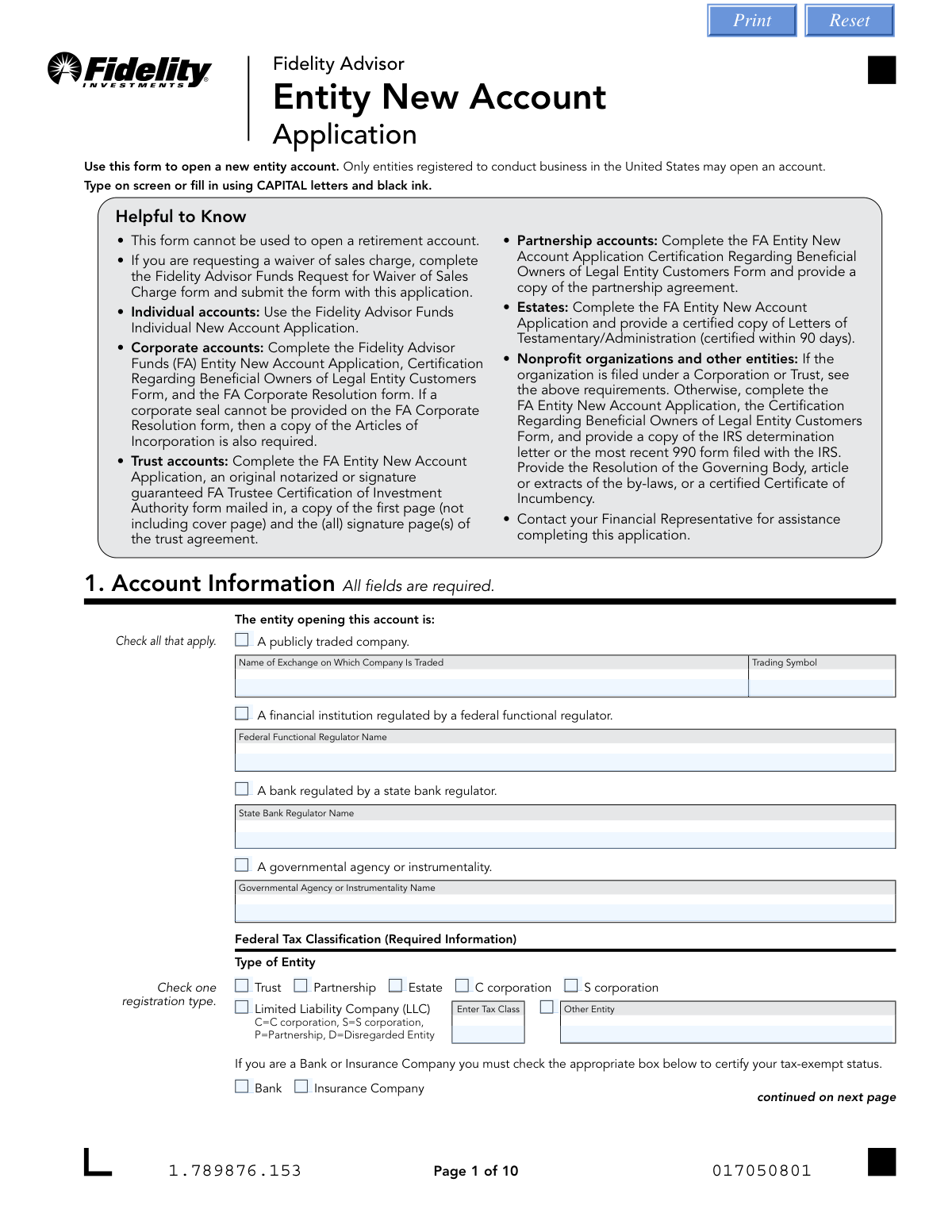
The Fidelity Advisor Entity New Account Application is a comprehensive form required for legal entities such as corporations, trusts, and partnerships to open a new investment account with Fidelity. This document is essential for establishing the account, defining authorized individuals, and outlining initial investment instructions, and its accurate completion is critical for legal and financial compliance. Today, this form can be filled out quickly and accurately using AI-powered services like Instafill.ai, which can also convert non-fillable PDF versions into interactive fillable forms.
Our AI automatically handles information lookup, data retrieval, formatting, and form filling.
It takes less than a minute to fill out FA Entity New Account Application using our AI form filling.
Securely upload your data. Information is encrypted in transit and deleted immediately after the form is filled out.
Form specifications
| Form name: | Fidelity Advisor Entity New Account Application |
| Number of pages: | 1 |
| Language: | English |
| Categories: | Fidelity forms |
Instafill Demo: How to fill out PDF forms in seconds with AI
How to Fill Out FA Entity New Account Application Online for Free in 2026
Are you looking to fill out a FA ENTITY NEW ACCOUNT APPLICATION form online quickly and accurately? Instafill.ai offers the #1 AI-powered PDF filling software of 2026, allowing you to complete your FA ENTITY NEW ACCOUNT APPLICATION form in just 37 seconds or less.
Follow these steps to fill out your FA ENTITY NEW ACCOUNT APPLICATION form online using Instafill.ai:
- 1 Navigate to Instafill.ai and upload or select the Fidelity Advisor Entity New Account Application.
- 2 Use the AI assistant to accurately input your entity's details in Section 1, including the legal name, Tax ID Number (TIN/EIN), and entity type.
- 3 Provide your Financial Representative's information in Section 3 and specify your investment choices and allocations in Section 4.
- 4 Indicate your preferences for dividend and capital gains distributions (Sections 5 & 6) and provide bank information for electronic transfers in Section 8.
- 5 Designate authorized persons and their level of authority for the account in Section 9.
- 6 Carefully review all entered information for accuracy, then use the platform's tools to provide the required electronic signatures in Section 11. The AI will guide you on notarization requirements if applicable.
- 7 Download the completed application and submit it to Fidelity through the approved channels (upload, fax, or mail) as instructed on the form.
Our AI-powered system ensures each field is filled out correctly, reducing errors and saving you time.
Why Choose Instafill.ai for Your Fillable FA Entity New Account Application Form?
Speed
Complete your FA Entity New Account Application in as little as 37 seconds.
Up-to-Date
Always use the latest 2026 FA Entity New Account Application form version.
Cost-effective
No need to hire expensive lawyers.
Accuracy
Our AI performs 10 compliance checks to ensure your form is error-free.
Security
Your personal information is protected with bank-level encryption.
Frequently Asked Questions About Form FA Entity New Account Application
This form is used by entities, such as corporations, trusts, partnerships, and estates, to open a new non-retirement investment account with Fidelity Advisor Funds. It is intended only for entities registered to conduct business within the United States.
No, this form is strictly for entities. For personal accounts, you must use the 'Fidelity Advisor Funds Individual New Account Application,' and this form cannot be used to open any type of retirement account.
For a corporate account, you must submit this completed application, the 'Certification Regarding Beneficial Owners of Legal Entity Customers Form,' and the 'FA Corporate Resolution form.' If a corporate seal isn't provided on the resolution, a copy of the Articles of Incorporation is also required.
For a trust account, you need to submit this application, an original notarized or signature-guaranteed 'FA Trustee Certification of Investment Authority' form, and copies of the first and signature pages of the trust agreement.
For an estate, you must complete the FA Entity New Account Application and provide a certified copy of the Letters of Testamentary or Administration. This certification must have been issued within the last 90 days.
If you submit a check purchase without specific fund instructions, the money will be automatically invested in the Fidelity Government Money Market Fund, Daily Money Class. It is recommended to specify your investment choices to ensure your funds are allocated as you intend.
If you do not make a selection in Sections 5 and 6, both your dividend and capital gains distributions will automatically be reinvested into the same fund share class.
The cost basis method determines how your gains or losses are calculated for tax purposes when you sell shares. If you do not elect a method, Fidelity will apply its default method, which is Average Cost (AC) for mutual funds.
Notarization is required in Section 11 if the bank account you list in Section 8 does not have at least one owner in common with the new Fidelity account. Additionally, all owners of that bank account must sign and have their signatures notarized in Section 12.
You can submit the form by uploading it online via the Fidelity website, sending it by fax, or mailing it. However, if your form requires an original signature guarantee or a notary seal, you must mail the physical document to the provided address.
Yes, services like Instafill.ai can help you complete this form accurately and efficiently. These tools use AI to auto-fill your information, which can save time and reduce the chance of errors.
To fill this form online, you can upload it to Instafill.ai. The platform will make the PDF interactive, allowing you to type your information directly into the fields and then download the completed document.
If you have a non-fillable or 'flat' PDF, you can use a service like Instafill.ai to convert it into an interactive, fillable form. Simply upload the document to the platform, and it will automatically detect the fields for you to complete online.
Yes, the form states that you are required to appoint a Financial Representative as an agent for your Fidelity Advisor account. This section should be completed by your chosen representative.
For each trustee or authorized signer, you must provide their full name, Social Security Number (SSN) or Taxpayer Identification Number (TIN), date of birth, mobile phone number, and email address. The mobile number and email are used for transaction verification.
Compliance FA Entity New Account Application
Validation Checks by Instafill.ai
1
Trustee Minimum Age Verification
This check validates that the Date of Birth (DOB) provided for each Trustee or Authorized Signee in Section 1 corresponds to an age of at least 18 years. This is crucial for legal and compliance reasons, as individuals under 18 cannot legally act as trustees or authorized signers on such an account. If the validation fails, the application cannot be processed and must be returned for correction.
2
LLC Tax Classification Requirement
This validation ensures that if 'Limited Liability Company (LLC)' is selected as the Federal Tax Classification in Section 1, the subsequent 'Enter Tax Class' field (C, S, P, or D) is also completed. This information is mandatory for the IRS to correctly identify the tax structure of the LLC. Failure to provide this will result in an incomplete application and tax reporting issues.
3
Investment Allocation Percentage Total
This check verifies that if percentages are used to allocate investments in Section 4, the sum of all percentage fields equals exactly 100%. This ensures the client's entire investment is allocated according to their instructions, preventing unallocated funds or over-allocation errors. If the total is not 100%, the form is considered invalid and requires correction before processing.
4
Conditional Bank Information for Cash Payouts
This validation confirms that if the user selects to receive dividend or capital gains distributions in cash via ACH (Sections 5 or 6), then the Bank Information in Section 8 must be fully completed. This is a logical dependency check to ensure Fidelity has a valid bank account to send payments to, preventing payout failures. If bank details are missing, the system should flag the application as incomplete.
5
ABA Routing Number Format and Validity
This check ensures the ABA Routing Number provided in Section 8 is a valid 9-digit number. It should perform a format check for 9 digits and then validate the number against a standard check-digit algorithm. This is critical for ensuring electronic fund transfers (ACH) are sent to the correct financial institution, preventing failed or misdirected transactions.
6
P.O. Box and Permanent Address Rule
This validation enforces the rule that if a P.O. Box is entered as the Mailing Address in Section 1, the 'U.S. Permanent Address' section must also be completed with a physical street address. Federal regulations require a physical address of record for identity verification purposes. If the mailing address is a P.O. Box and the permanent address is not provided, the application is non-compliant.
7
Mandatory Account Owner Signature and Date
This check verifies that at least one signature and a corresponding date are present in the 'Account Owner Signatures and Dates' section (Section 11). The signature legally binds the entity to the terms of the agreement, making it the most critical element for form execution. An unsigned or undated form is legally non-binding and cannot be processed under any circumstances.
8
Trust-Specific Field Completion
This validation is triggered if the 'Type of Entity' in Section 1 is marked as 'Trust'. It then ensures that the 'Trust Date' and the 'for benefit of' name fields are both completed. These details are essential for correctly identifying and registering the trust account. An application for a trust account missing this information is incomplete and cannot be set up correctly.
9
Systematic Investment Program Prerequisite Check
This check ensures that if any information is entered into the Systematic Investment Program section (Section 14), the Bank Information in Section 8 is also complete. The program functions by making automatic withdrawals from a bank account, so the bank details are a mandatory prerequisite. If Section 14 is filled but Section 8 is not, the request cannot be fulfilled and must be flagged.
10
TIN/SSN Format and Presence
This validation confirms that a Tax Identification Number (TIN/EIN) or Social Security Number (SSN) is provided in Section 1 and that it adheres to the correct format (e.g., XX-XXXXXXX for EIN, XXX-XX-XXXX for SSN). This number is required by the IRS for tax reporting on all financial accounts. An invalid or missing number will cause the application to be rejected.
11
Investment Allocation Method Exclusivity
For each fund listed in the Investment Options (Section 4), this check ensures that the user has entered either a dollar amount or a percentage, but not both. This prevents ambiguity in the investment instructions. If both fields are filled for a single fund, the application must be rejected and sent back to the client for clarification.
12
Future Date Prohibition on All Date Fields
This is a global check across the entire form to ensure that no date fields (e.g., Date of Birth, Trust Date, Signature Date) contain a future date. Entering a future date is illogical and indicates a data entry error. Such an error could have legal or processing implications, so the form must be rejected if any date is post-dated.
13
Notarization Requirement for Mismatched Bank Ownership
This check compares the bank account owner names in Section 8 with the entity/trustee names in Section 1. If there is no common owner, the system should flag that notarized signatures are required in both Section 11 and Section 12 as per the form's instructions. This is a critical compliance step to prevent unauthorized third-party access to funds.
14
Entity Sub-Type Detail Requirement
In Section 1, this validation ensures that if a primary entity description checkbox is selected (e.g., 'A publicly traded company', 'A financial institution'), the corresponding detail field (e.g., 'Name of Exchange', 'Federal Functional Regulator Name') is filled out. This additional information is required for proper classification and due diligence. An empty detail field would render the selection incomplete.
Common Mistakes in Completing FA Entity New Account Application
The form's instructions detail specific supplementary documents required for different entity types, such as a Corporate Resolution, Trust Agreement pages, or Partnership Agreement. Applicants often overlook these requirements and submit only the application itself. This results in an immediate rejection of the application and significant delays, as Fidelity cannot open the account without the complete legal and compliance documentation. To avoid this, carefully review the checklist on the first page for your specific entity type and gather all necessary forms and documents before submission.
This form is specifically for entities like corporations, trusts, and partnerships, and explicitly states it cannot be used for individual or retirement accounts. People often find the form through a search engine and fail to notice it's the incorrect version for their needs. Submitting the wrong form leads to an automatic rejection and wasted time, requiring the applicant to start over with the correct application. Always double-check the form title and instructions to ensure it matches your account type (e.g., 'Entity' vs. 'Individual').
In Section 1, an LLC must specify its federal tax classification (C corp, S corp, Partnership, or Disregarded Entity). Many business owners are unsure of this detail and either leave it blank or guess incorrectly. An incorrect classification can lead to serious tax reporting errors, IRS penalties, and delays in account setup while Fidelity seeks clarification. To prevent this, consult your entity's formation documents or a tax advisor to confirm the correct classification before filling out the form.
The application requires the entity's legal name exactly as it appears on tax returns, linked to the provided Tax Identification Number (TIN/EIN). Applicants sometimes enter a trade name (DBA) or a slight variation of the legal name. This mismatch will cause a validation failure when Fidelity verifies the information with the IRS, halting the account opening process until the discrepancy is resolved. Always use the official name registered with the IRS for the given TIN/EIN.
The form allows a P.O. Box for the mailing address but requires a separate U.S. permanent street address for regulatory purposes (AML/KYC). Applicants often provide only the P.O. Box and neglect to fill out the permanent address section. This is a compliance failure that will prevent the account from being opened. If you use a P.O. Box, you must also provide a valid, physical street address in the designated section.
In Section 4, applicants must specify fund numbers and either dollar amounts or percentages for their initial investment, ensuring percentages total 100%. People often write only the fund name, which defaults to Class A shares, or provide allocations that do not sum correctly. This leads to unintended investments or requires Fidelity to contact the applicant for clarification, delaying the investment. Use the provided QR code or website to find the exact fund numbers and double-check your math to ensure allocations are clear and complete.
The form requires notarization in Sections 11 and 12 if the bank account listed for ACH/wire transfers is not owned by the entity opening the Fidelity account. This is a critical security step that is frequently missed. Submitting the form without the necessary notary seal and signature will cause the bank link feature to be rejected, preventing electronic fund transfers. Carefully read the instructions in Section 8 and 11 to determine if notarization is required for your situation.
Section 11 requires signatures and dates from all authorized account owners or trustees. It is a simple but very common error to miss a signature, especially when multiple parties are involved. The form explicitly states it cannot be processed without all required signatures and dates. An incomplete signature block results in an automatic rejection and requires the form to be re-circulated and re-submitted, causing significant delays. AI-powered tools like Instafill.ai can highlight all required signature fields to help prevent this oversight.
The submission instructions at the end of the form clearly state that if an original signature guarantee or notary is required, the form must be mailed. Many applicants miss this fine print and will upload or fax a scanned copy of the notarized document. This is not acceptable to Fidelity for compliance reasons and will be rejected, forcing the applicant to mail the original and delaying the process. Always mail the physical copy when a notary seal is present.
Section 9 allows you to grant specific authority levels (Inquiry, Limited Trading, or All) to individuals. If this selection is left blank, the authority defaults to 'Inquiry Only.' This can severely restrict the ability of a designated manager or trader to perform their duties, as they will be unable to place trades or request distributions. To avoid operational issues, ensure you explicitly check the intended authority level for each authorized individual.
Section 7 asks the applicant to choose a tax accounting method for tracking investment cost basis, which has direct financial implications when selling shares. Many people are unfamiliar with terms like FIFO, LIFO, or Average Cost and either leave it blank (defaulting to Average Cost) or pick one randomly. This can lead to a less-than-optimal tax outcome in the future. It is crucial to discuss this section with a tax advisor to choose the method that best suits your entity's investment strategy.
Manually entering the ABA routing and bank account numbers in Section 8 is prone to data entry errors like transposed digits. A single incorrect number will cause all electronic fund transfer attempts via Money Line (ACH) to fail, leading to payment delays and returned transaction fees. To avoid this, double-check your numbers carefully or, as the form prefers, attach a preprinted voided check from which the information can be accurately captured. Since this form is a flat PDF, a tool like Instafill.ai can convert it to a fillable version and use AI to extract this data from a check image, reducing error.
Saved over 80 hours a year
“I was never sure if my IRS forms like W-9 were filled correctly. Now, I can complete the forms accurately without any external help.”
Kevin Martin Green
Your data stays secure with advanced protection from Instafill and our subprocessors

Robust compliance program
Transparent business model
You’re not the product. You always know where your data is and what it is processed for.
ISO 27001, HIPAA, and GDPR
Our subprocesses adhere to multiple compliance standards, including but not limited to ISO 27001, HIPAA, and GDPR.
Security & privacy by design
We consider security and privacy from the initial design phase of any new service or functionality. It’s not an afterthought, it’s built-in, including support for two-factor authentication (2FA) to further protect your account.
Fill out FA Entity New Account Application with Instafill.ai
Worried about filling PDFs wrong? Instafill securely fills fidelity-advisor-entity-new-account-application-1 forms, ensuring each field is accurate.