Yes! You can use AI to fill out Fidelity Mutual Fund Account Application

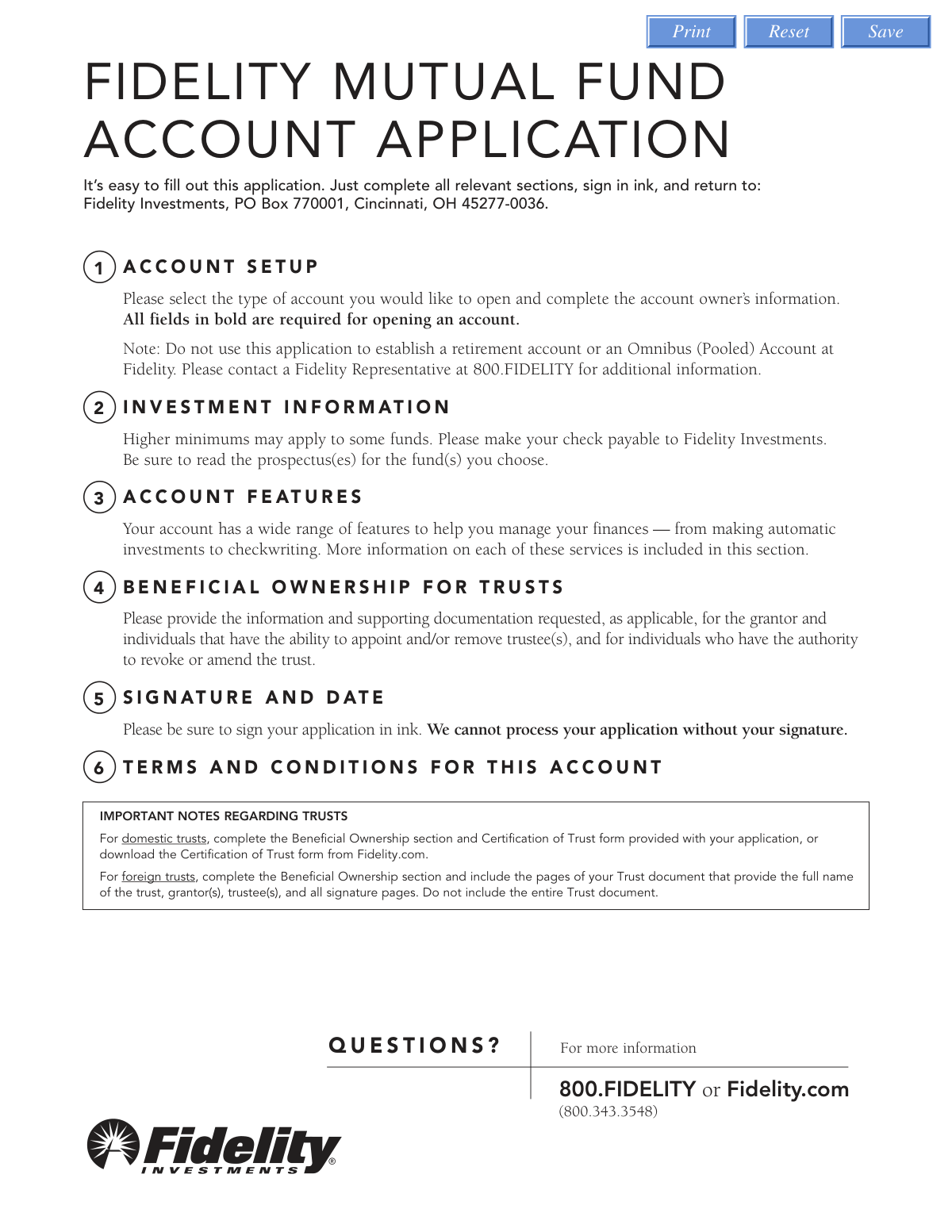
This is an application form provided by Fidelity Investments for customers wishing to open a new mutual fund account. It is used to establish various types of non-retirement accounts, including individual, joint, custodial, and trust accounts, and to specify initial investment choices and account features. Completing this form is the first step for new investors to start investing in Fidelity's mutual funds. Today, this form can be filled out quickly and accurately using AI-powered services like Instafill.ai, which can also convert non-fillable PDF versions into interactive fillable forms.
Our AI automatically handles information lookup, data retrieval, formatting, and form filling.
It takes less than a minute to fill out MF-APP-05/24 using our AI form filling.
Securely upload your data. Information is encrypted in transit and deleted immediately after the form is filled out.

Form specifications

Form name: Fidelity Mutual Fund Account Application
Number of pages: 1
Language: English
Categories: Fidelity forms, mutual fund forms
main-image

Instafill Demo: How to fill out PDF forms in seconds with AI

How to Fill Out MF-APP-05/24 Online for Free in 2026

Are you looking to fill out a MF-APP-05/24 form online quickly and accurately? Instafill.ai offers the #1 AI-powered PDF filling software of 2026, allowing you to complete your MF-APP-05/24 form in just 37 seconds or less.
Follow these steps to fill out your MF-APP-05/24 form online using Instafill.ai:
  1. 1 Navigate to Instafill.ai and upload or select the Fidelity Mutual Fund Account Application.
  2. 2 In Section 1 (Account Setup), provide your personal details, select the account type (e.g., Individual, Joint, Trust), and enter all required owner information. Let the AI assist by pre-filling information from your profile.
  3. 3 Complete Section 2 (Investment Information) by listing the Fidelity funds you wish to invest in and the initial investment amount for each.
  4. 4 In Section 3 (Account Features), choose optional services like automatic investments (EFT), checkwriting, or direct deposit, providing bank details as needed.
  5. 5 If you are opening a trust account, fill out the required details in Section 4 (Beneficial Ownership for Trusts).
  6. 6 Carefully review all sections auto-populated by the AI to ensure accuracy and completeness.
  7. 7 Proceed to Section 5 to electronically sign and date the application before submitting it directly or downloading the completed form for mailing.

Our AI-powered system ensures each field is filled out correctly, reducing errors and saving you time.

Why Choose Instafill.ai for Your Fillable MF-APP-05/24 Form?

Speed

Complete your MF-APP-05/24 in as little as 37 seconds.

Up-to-Date

Always use the latest 2026 MF-APP-05/24 form version.

Cost-effective

No need to hire expensive lawyers.

Accuracy

Our AI performs 10 compliance checks to ensure your form is error-free.

Security

Your personal information is protected with bank-level encryption.

Frequently Asked Questions About Form MF-APP-05/24

This application is used to open a non-retirement Fidelity Mutual Fund Account, such as an individual, joint, custodial (UGMA/UTMA), or trust account.

You should not use this form to establish a retirement account (like an IRA) or an Omnibus (Pooled) Account. Please contact a Fidelity Representative at 800-FIDELITY for those account types.

The initial investment is generally $2,500, but higher minimums may apply for certain funds like index funds or municipal bond funds. Be sure to read the specific fund's prospectus for exact requirements.

All fields printed in bold are required, including your full legal name, date of birth, physical address (no P.O. boxes), and Taxpayer Identification Number (e.g., SSN). A mobile number and email address are also required for account security.

For trust accounts, you must provide a Certification of Trust form or specific pages from your trust document. If setting up electronic transfers (EFT), you'll need to attach a voided check or bank statement.

To open a trust account, you must complete the account owner information for the trustee(s) in Section 1 and provide details for all beneficial owners in Section 4. You must also submit required trust documentation along with the application.

By default, any dividends and capital gains will be automatically reinvested into the fund. If you prefer to receive them as cash, you can select to have them sent to your bank via EFT or by check in Section 2.

You can fund your account by mailing a check made payable to 'Fidelity Investments' with your application. Alternatively, you can set up Electronic Funds Transfer (EFT) in Section 3 to pull funds directly from your bank account.

Mail your completed application, signed in ink, to: Fidelity Investments, PO Box 770001, Cincinnati, OH 45277-0036.

Your application cannot be processed without your signature in ink, as it confirms you have read and agree to the account's terms and conditions. All account owners or fiduciaries must sign and date the form.

Yes, services like Instafill.ai use AI to auto-fill form fields accurately and save time. This can help you complete the application more efficiently and reduce the chance of errors.

You can use a service like Instafill.ai to upload the PDF and fill it out on your computer. The platform allows you to type directly into the fields and then download the completed form for printing and signing.

If your PDF is not interactive, you can use a tool like Instafill.ai to convert it into a fillable format. Simply upload the flat PDF, and the service will make the fields interactive so you can easily type in your information.

Compliance MF-APP-05/24
Validation Checks by Instafill.ai

1
Required Fields Completeness
This check ensures that all fields marked in bold or explicitly labeled as 'Required' have been filled out by the applicant. This is a fundamental check for data integrity, as missing information in key fields like name, address, or Taxpayer ID can prevent the account from being opened. If validation fails, the application is considered incomplete and cannot be processed until the missing information is provided.
2
Taxpayer ID Number (TIN/SSN) Format
This validation verifies that the Social Security Number (SSN), Individual Taxpayer Identification Number (ITIN), or Entity ID Number (TIN) is in the correct 9-digit format. This number is critical for tax reporting purposes (IRS) and identity verification. An incorrectly formatted number will lead to rejection and requires the applicant to correct the entry before the application can proceed.
3
Date of Birth and Legal Age Verification
This check validates that the 'Date of Birth' is a real calendar date in MM DD YYYY format and confirms the applicant is of legal age to open a financial account (e.g., 18 years or older). This is a legal requirement to ensure the account holder has the capacity to enter into a contract, unless the account is a Custodial (UGMA/UTMA) account. An invalid date or underage applicant (for non-custodial accounts) will halt the application process.
4
Legal Address 'No PO Box' Rule
This validation ensures that the 'Street Address' provided as the legal/permanent address does not contain 'P.O. Box' or similar variations. Federal regulations require a physical residential address for identity verification and anti-money laundering (AML) purposes. If a PO Box is detected in a required physical address field, the application will be flagged for correction.
5
Citizenship Status and Conditional Field Requirement
This check enforces logical consistency based on the applicant's citizenship status. If 'U.S. citizen' is selected, the system verifies that the foreign citizen details section is left blank. Conversely, if 'Foreign citizen' is selected, it confirms that all associated fields, such as Country of Citizenship, residency status, and government ID information, are mandatory and have been completed.
6
Foreign Citizen Government ID Expiration Date
This validation confirms that the 'ID Expiration Date' provided by a foreign citizen is a valid date that occurs in the future. Financial institutions are required to maintain records of unexpired government-issued identification for non-U.S. persons as part of Customer Identification Programs. An expired ID will result in the application being rejected until valid, unexpired identification is provided.
7
Trust Account Section Dependency
This check verifies that if the 'Account Type' is selected as 'Trust', then the 'Trust Accounts' details section and the 'Beneficial Ownership for Trusts' (Section 4) are fully completed. These sections are legally required to identify the trust itself, its trustees, and its beneficial owners for regulatory and compliance reasons. Failure to complete these dependent sections will prevent the trust account from being established.
8
Joint Account Holder Information Completeness
This validation is triggered when a joint account type (e.g., 'Joint Tenants') is selected. It ensures that all required personal and contact information for the 'Joint Account Owner' or 'Co-Trustee' has been fully provided, including their name, date of birth, Taxpayer ID, and signature. Since all owners have rights and responsibilities, their information is just as critical as the primary owner's, and missing data will stop the application.
9
Louisiana Joint Account Restriction
This is a state-specific logical check that prevents the account from being opened if there is a conflict with state law. It verifies that if the primary account owner's 'State' is 'LA' (Louisiana), the selected 'Account Type' is not 'Joint Tenants — Rights of Survivorship', as explicitly forbidden by the form instructions. If this condition is met, the application must be rejected and the user prompted to select a different account type.
10
EFT Bank Information Completeness
This check ensures that if the applicant opts to set up Electronic Funds Transfer (EFT) for dividends or automatic investments, all required bank information fields in Section 3 are completed. This includes the bank name, the 9-digit routing number, and the bank account number. Without this complete information, Fidelity cannot establish the electronic link to the bank, and the requested feature will fail.
11
Bank Routing Number Validity
This validation checks that the provided 'Bank Routing/ABA Number' is exactly 9 digits long and conforms to the ABA routing number checksum formula. This is crucial for ensuring that electronic fund transfers are sent to the correct financial institution. An invalid routing number will cause transfers to fail and can lead to processing delays or lost funds, so the application is halted until a valid number is entered.
12
Signature and Date Presence for All Owners
This check verifies that a signature and date are present for the primary account owner and, if applicable, the joint account owner. A signature legally binds the applicant to the terms and conditions of the account and certifies the accuracy of the provided information under penalty of perjury. An application without all required signatures is legally incomplete and cannot be processed.
13
Initial Investment Amount and Fund Selection
This validation ensures that the applicant has specified at least one Fidelity Fund and an associated 'Initial Investment Amount' in Section 2. It also checks that the amount is a valid number and meets the general fund minimum (e.g., $2,500). An account cannot be opened without an initial investment, so failure to provide this information would render the application incomplete.
14
Contact Information Format (Email and Phone)
This check validates that the provided 'Mobile Phone' and 'Email' fields adhere to standard formats (e.g., a 10-digit phone number and an email with an '@' symbol and domain). The form states this information is required for account security, transactional alerts, and electronic delivery of documents. Invalid contact information compromises security and communication, so it must be corrected before submission.

Common Mistakes in Completing MF-APP-05/24

Using an Incorrect or Incomplete Legal Name

Applicants often enter a nickname, an initial instead of a middle name, or a version of their name that does not exactly match their government-issued ID. The form requires the full legal name as it appears on an unexpired driver's license or passport for identity verification. A mismatch will cause the application to be rejected, delaying the account opening process until a corrected form is submitted.

Providing a PO Box for the Permanent Address

Section 1 explicitly states that the permanent legal address cannot be a PO box, as this address is used for legal and tax reporting purposes. Applicants sometimes overlook this and enter a PO box, which is only permissible for the separate mailing address. This error requires correction and resubmission, delaying the establishment of the account.

Incomplete or Incorrect Trust Documentation

When opening a trust account, applicants frequently miss the requirement to submit a separate 'Certification of Trust' form for domestic trusts or submit the entire trust document for foreign trusts instead of only the specified pages. These documentation errors are common due to the complexity of trust setups and will halt the application process. Fidelity cannot open the account until all required and correctly formatted documents are received.

Forgetting to Attach Proof for Electronic Funds Transfer (EFT)

To set up EFT for automatic investments or dividend payouts to a bank account, the applicant must attach a voided check, preprinted deposit slip, or bank statement. It is a very common oversight to complete the bank information in Section 3 but forget to include the required physical document. Without this proof, Fidelity cannot establish the EFT link, and the feature will not be activated.

Entering an Investment Amount Below the Fund's Minimum

The application states a general minimum of $2,500 but notes that higher minimums apply to specific funds like index or municipal bond funds. Applicants may not consult the fund's prospectus and enter an amount that is too low for their chosen investment. This results in the rejection of the initial investment, and the funds are either returned or held until the applicant provides instructions and the correct amount.

Missing Signatures for All Required Parties

For joint or trust accounts, the form requires signatures from all owners, co-trustees, or custodians in Section 5. Applicants often secure their own signature but forget to have the other party sign, especially if they are not physically present. An application with a missing signature is considered incomplete and cannot be processed, representing one of the most frequent causes for rejection.

Using a Digital Signature Instead of an Ink Signature

The instructions in Section 5 explicitly state 'sign in ink,' but in an increasingly digital world, applicants may attempt to use a typed or digital signature. Financial institutions often require a physical 'wet' signature on initial applications for legal and compliance reasons. Submitting a digitally signed form will lead to its rejection. AI-powered tools like Instafill.ai can convert this PDF into a fillable version, but the final document must still be printed to be signed in ink.

Forgetting the Fiduciary Title in the Signature Section

When signing for a trust or custodial account, the applicant must print their title (e.g., 'Trustee,' 'Custodian') in the designated field in Section 5. This detail is often overlooked, but it is a required piece of information that legally clarifies the capacity in which the person is signing. Omitting the title can cause processing delays while Fidelity requests clarification.

Incorrectly Handling the Backup Withholding Certification

On the signature page, U.S. persons must certify their tax status to avoid backup withholding by the IRS. Applicants who have been notified by the IRS that they are subject to backup withholding often forget to cross out the specific text as instructed. This mistake can lead to incorrect tax withholding and reporting, creating future complications with the IRS.

Submitting Incomplete Information for a Foreign Citizen

The 'Citizenship' section for non-U.S. citizens requires detailed government ID information, including number, country of issuance, and expiration date, plus a physical copy of the unexpired ID. Applicants frequently miss one of these fields or forget to attach the photocopy of their passport or resident card. This incomplete information prevents Fidelity from fulfilling federal identity verification requirements, stopping the application from being processed. Using a tool like Instafill.ai can help ensure all required fields are populated before printing.
Saved over 80 hours a year

“I was never sure if my IRS forms like W-9 were filled correctly. Now, I can complete the forms accurately without any external help.”

Kevin Martin Green

Your data stays secure with advanced protection from Instafill and our subprocessors

Robust compliance program

Transparent business model

You’re not the product. You always know where your data is and what it is processed for.

ISO 27001, HIPAA, and GDPR

Our subprocesses adhere to multiple compliance standards, including but not limited to ISO 27001, HIPAA, and GDPR.

Security & privacy by design

We consider security and privacy from the initial design phase of any new service or functionality. It’s not an afterthought, it’s built-in, including support for two-factor authentication (2FA) to further protect your account.

Fill out MF-APP-05/24 with Instafill.ai

Worried about filling PDFs wrong? Instafill securely fills fidelity-mutual-fund-account-application forms, ensuring each field is accurate.