Yes! You can use AI to fill out Fidelity Investments Householding Form

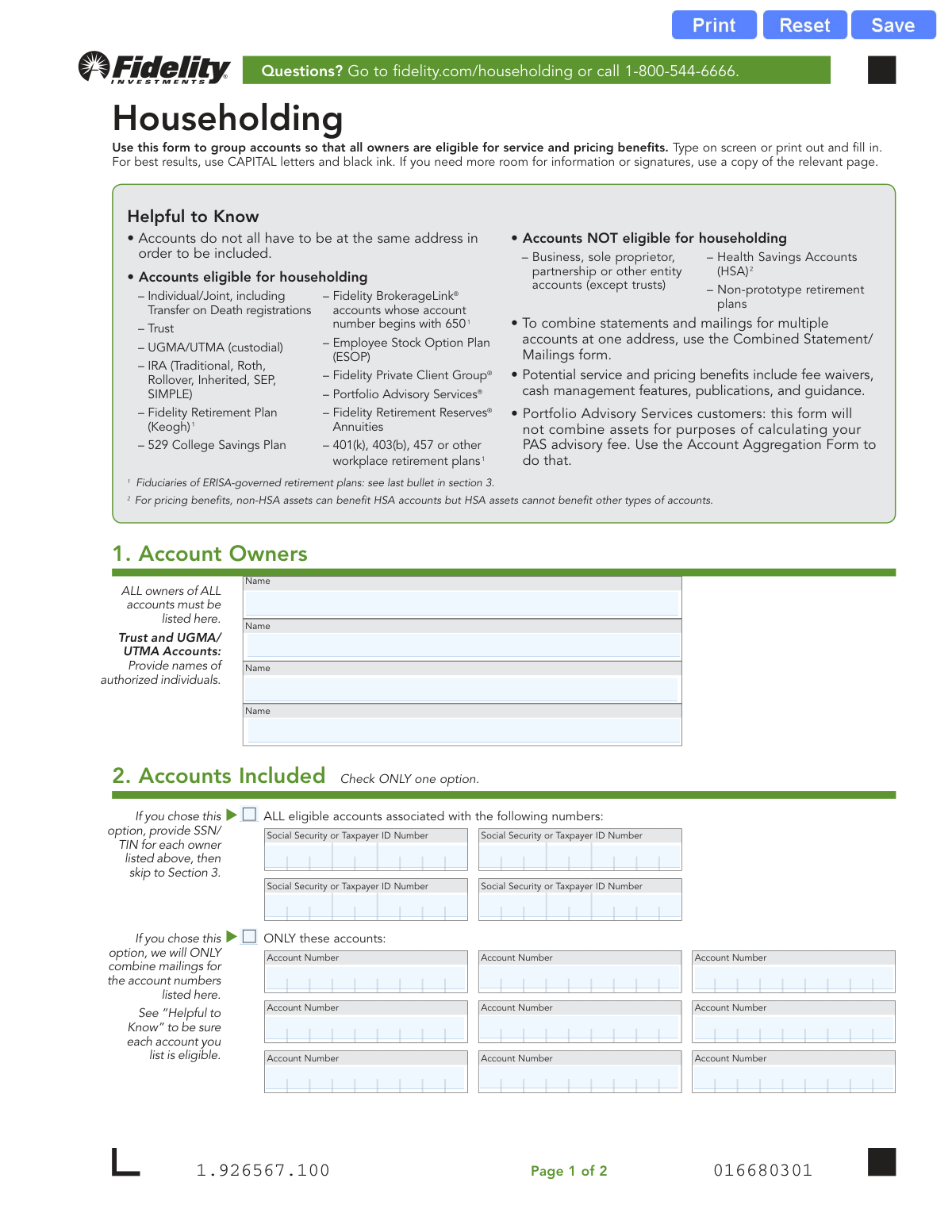
The Fidelity Householding Form allows clients to link various eligible accounts, such as IRAs, brokerage accounts, and 529 plans, into a single household group. This consolidation enables all account owners within the group to access potential benefits like fee waivers and premium services based on the combined assets. Today, this form can be filled out quickly and accurately using AI-powered services like Instafill.ai, which can also convert non-fillable PDF versions into interactive fillable forms.
Our AI automatically handles information lookup, data retrieval, formatting, and form filling.
It takes less than a minute to fill out Householding Form using our AI form filling.
Securely upload your data. Information is encrypted in transit and deleted immediately after the form is filled out.

Form specifications

Form name: Fidelity Investments Householding Form
Number of pages: 1
Language: English
Categories: investment forms, Fidelity forms
main-image

Instafill Demo: How to fill out PDF forms in seconds with AI

How to Fill Out Householding Form Online for Free in 2026

Are you looking to fill out a HOUSEHOLDING FORM form online quickly and accurately? Instafill.ai offers the #1 AI-powered PDF filling software of 2026, allowing you to complete your HOUSEHOLDING FORM form in just 37 seconds or less.
Follow these steps to fill out your HOUSEHOLDING FORM form online using Instafill.ai:
  1. 1 Navigate to Instafill.ai and upload or select the Fidelity Householding Form.
  2. 2 In Section 1, provide the full names of all account owners or authorized individuals to be included in the household.
  3. 3 Choose one option in Section 2: either household all eligible accounts by providing the Social Security or Taxpayer ID Numbers for all owners, or list specific account numbers to be included.
  4. 4 Carefully review the list of eligible and non-eligible accounts to ensure you are only including valid accounts in your request.
  5. 5 In Section 3, have all listed account owners or authorized individuals sign and date the form to provide authorization.
  6. 6 Review the entire form for accuracy and completeness before finalizing.
  7. 7 Download the completed form and submit it to Fidelity Investments using the regular or overnight mail addresses provided.

Our AI-powered system ensures each field is filled out correctly, reducing errors and saving you time.

Why Choose Instafill.ai for Your Fillable Householding Form Form?

Speed

Complete your Householding Form in as little as 37 seconds.

Up-to-Date

Always use the latest 2026 Householding Form form version.

Cost-effective

No need to hire expensive lawyers.

Accuracy

Our AI performs 10 compliance checks to ensure your form is error-free.

Security

Your personal information is protected with bank-level encryption.

Frequently Asked Questions About Form Householding Form

This form is used to group multiple eligible Fidelity accounts together. This allows all account owners within the group to potentially qualify for enhanced service and pricing benefits, such as fee waivers.

You should use this form if you have multiple Fidelity accounts, or if you and your family members want to link your accounts to be treated as one 'household' for service and pricing benefits. All account owners must agree and sign the form.

Most personal accounts are eligible, including Individual/Joint, IRAs, 529 College Savings Plans, and certain workplace retirement plans like 401(k)s. Business accounts and Health Savings Accounts (HSAs) are generally not eligible.

No, the accounts do not need to share the same address to be grouped together in a household.

The first option links ALL eligible accounts associated with the Social Security Numbers you provide. The second option is more restrictive and links ONLY the specific account numbers you list on the form.

Every individual account owner and authorized person listed in Section 1 must sign and date the form. This is required to authorize Fidelity to group the accounts as requested.

No, this form is only for grouping assets for service and pricing benefits. To combine statements and mailings for accounts at one address, you must use the separate 'Combined Statement/Mailings' form.

After printing and signing the form, you can mail it to Fidelity using the addresses provided for regular or overnight mail. The regular mail address is a P.O. Box in Cincinnati, OH, and the overnight address is in Covington, KY.

No, submitting the form does not automatically guarantee any specific benefits. Fidelity may add, modify, or withdraw service and pricing benefits at any time.

No, this form will not combine your assets for the purpose of calculating your PAS advisory fee. You must use the separate 'Account Aggregation Form' to do that.

You will need the full names of all account owners, and either their Social Security/Taxpayer ID Numbers or the specific Fidelity account numbers you wish to include. All owners must be available to sign the completed form.

Yes, services like Instafill.ai can help you fill out this form accurately and quickly. These tools use AI to auto-fill your information, saving you time and reducing the chance of errors.

You can use a service like Instafill.ai to complete the form digitally. Simply upload the PDF to their platform, and their AI will help you fill in the fields before you print it for signature.

If you have a non-fillable or 'flat' PDF, you can use a tool like Instafill.ai. It can convert the static PDF into an interactive, fillable form that you can easily complete on your screen.

Compliance Householding Form
Validation Checks by Instafill.ai

1
Exclusive Account Grouping Method Selection
This check ensures that the user selects exactly one of the two available options in Section 2: either grouping by Social Security/Taxpayer ID Numbers OR by specific Account Numbers. It is critical to prevent ambiguity in processing instructions, as selecting both or neither would make the form's intent unclear. If this validation fails, the form submission should be rejected with an error message prompting the user to choose only one method.
2
Conditional Requirement for SSN/TIN
Validates that if the user chooses to group 'ALL eligible accounts', at least one Social Security Number or Taxpayer ID Number is provided. This information is essential for Fidelity to identify the universe of accounts to be householded under this option. A failure to provide at least one SSN/TIN would render this selection meaningless and the form cannot be processed.
3
Conditional Requirement for Account Numbers
Verifies that if the user selects the 'ONLY these accounts' option, at least one account number is entered in the provided fields. This option is explicitly for listing specific accounts, so the form is incomplete and cannot be acted upon without at least one number. If no account numbers are listed, the submission must be blocked until the information is provided.
4
SSN/TIN Format Validation
Ensures that each Social Security or Taxpayer ID Number entered is a valid 9-digit number, potentially allowing for hyphens (###-##-####). This check prevents data entry errors and ensures the numbers can be successfully looked up in Fidelity's systems. An invalid format would lead to processing failure and rejection of the request.
5
Fidelity Account Number Format and Eligibility
This validation checks that each provided account number conforms to a valid Fidelity format and, crucially, is an eligible type for householding as listed in the 'Helpful to Know' section. It prevents attempts to include ineligible accounts like HSAs or business accounts, which have different rules. Submitting an ineligible account number would result in a processing exception and partial or full rejection of the form.
6
Account Owner Name Completeness
This check confirms that at least one account owner's name is listed in Section 1. Since all owners of all accounts must be listed and provide a signature, the form is fundamentally incomplete without at least one owner identified. A submission without any owner names is invalid and must be rejected.
7
Owner and Signature Count Consistency
Verifies that the number of unique account owners listed in Section 1 is equal to the number of completed signature blocks in Section 3. This is a critical cross-referencing check to ensure all required parties have provided authorization. A mismatch indicates either a missing owner or a missing signature, and the form must be returned for correction.
8
Signature Presence for Each Owner
For each owner name printed in a signature block in Section 3, this check ensures a corresponding signature is present. A signature signifies legal authorization and acceptance of the terms. A missing signature for a listed owner invalidates their consent, making the form legally incomplete and requiring it to be sent back for completion.
9
Printed Name and Signature Correspondence
This validation ensures that each 'Print Owner/Authorized Individual Name' in Section 3 exactly matches one of the owner names listed in Section 1. This confirms that the person signing is an authorized party for the accounts being householded. If a printed name in the signature block does not match an owner in Section 1, the signature is invalid and the form cannot be processed.
10
Signature Date Format and Validity
Checks that each date provided in Section 3 is in a valid MM-DD-YYYY format and represents a real calendar date (e.g., not '02-30-2023'). This ensures data integrity and provides a clear, unambiguous record of when the authorization was given. An invalid date format would cause a processing error and require correction.
11
Signature Date Presence
Ensures that every signature in Section 3 is accompanied by a date. The date is a critical piece of the legal authorization, establishing the time at which consent was given. A signature without a date is considered incomplete, and the form would be rejected.
12
Prohibition of Future Dates
This check validates that the signature date entered in Section 3 is not a date in the future. A future-dated signature is legally invalid as it purports to provide authorization for an action before the date it was actually signed. The system should reject any form with a future date and prompt the user for the correct, current date.
13
Unique Account Number Entry
Verifies that all account numbers entered under the 'ONLY these accounts' option are unique. Entering the same account number multiple times is redundant and could indicate a user error. This check helps maintain clean data and prevents potential confusion during processing.

Common Mistakes in Completing Householding Form

Incomplete List of Account Owners

Users often forget to list every single owner for all accounts being included, as instructed in Section 1. For example, they might list the primary owner of a joint account but forget the secondary owner. This leads to an immediate rejection because all owners must provide a signature to authorize the householding. To avoid this, carefully review every account you wish to include and list all associated owners, joint owners, or authorized individuals for trusts and custodial accounts before proceeding to the signature section.

Missing Signatures from All Owners

A frequent and critical error is failing to obtain a signature from every individual listed in Section 1. If four owners are listed, four corresponding signatures are required in Section 3. This mistake renders the form 'Not In Good Order' (NIGO), making it legally invalid and causing it to be returned. To prevent this, use the list of names in Section 1 as a checklist to ensure each person signs and dates the form in the correct spot.

Conflicting Selections in Section 2

In Section 2, users must choose only one of two options: householding 'ALL eligible accounts' via SSN or 'ONLY these accounts' via account number. A common mistake is checking both boxes or filling out information for both options, which creates ambiguity. This forces the processing agent to reject the form and request clarification, delaying the request. Carefully decide which method you prefer and fill out only the corresponding part of Section 2.

Listing Ineligible Account Types

The form's 'Helpful to Know' section clearly lists accounts that are not eligible for householding, such as Health Savings Accounts (HSAs) and business accounts. People often miss this detail and list ineligible account numbers in Section 2. This will not work; the ineligible accounts will simply be ignored, or the entire form may be delayed while Fidelity clarifies the user's intent. Always cross-reference the accounts you want to add with the eligibility list provided on the first page.

Data Entry Errors in SSN or Account Numbers

Transposing digits or making simple typos when entering Social Security Numbers or account numbers is a very common mistake. An incorrect number means Fidelity's system cannot locate the person or account, leading to an incomplete householding or outright rejection of the form. To avoid this, slowly and carefully double-check every digit you enter. AI-powered form-filling tools like Instafill.ai can help prevent these errors by validating number formats and ensuring accuracy.

Mismatched Printed Name and Signature

In Section 3, each signature must correspond to the printed name on the same line. People sometimes sign in the wrong box, especially when multiple signatures are required. This mismatch between the printed name and the signature is a compliance failure that will cause the form to be rejected. To avoid this, each person should carefully print their name and then sign on the line directly below it, ensuring they are in the correct signature block.

Forgetting SSN for the 'All Accounts' Option

When selecting the option to household 'ALL eligible accounts' in Section 2, it is crucial to provide the Social Security or Taxpayer ID Number for each owner listed in Section 1. Users sometimes check this box but then fail to enter the corresponding SSN/TINs. Without this number, Fidelity cannot identify and link all of an individual's eligible accounts, defeating the purpose of this option. Ensure an SSN/TIN is provided for every owner whose accounts you wish to group automatically.

Using an Incorrect Date Format

The signature section explicitly requests the date in MM-DD-YYYY format. A common error is to use a different format, such as DD-MM-YYYY, or to write out the month's name, which can cause processing delays or errors, especially if the date is ambiguous (e.g., 03-04-2024). To ensure compliance, always enter the date exactly as specified. Using a digital tool to fill the form can often auto-format the date correctly.

Illegible Handwriting on Printed Forms

Although the form allows for typing, many users print it and fill it out by hand. Illegible handwriting, especially for names and numbers, is a major source of errors. If a processor cannot read the information, the form will be rejected. The form recommends using CAPITAL letters and black ink to improve clarity. For best results, fill the form out electronically before printing or use a service like Instafill.ai, which can convert flat PDFs into easily fillable digital forms.

Misunderstanding the Form's Purpose

Users sometimes fill out this form believing it will combine their account statements into a single mailing, which is a different function. The form clearly states, 'To combine statements and mailings... use the Combined Statement/Mailings form.' Submitting this form for that purpose is a mistake that wastes time and will not achieve the desired outcome. Always read the introductory text to confirm the form's specific purpose before filling it out.
Saved over 80 hours a year

“I was never sure if my IRS forms like W-9 were filled correctly. Now, I can complete the forms accurately without any external help.”

Kevin Martin Green

Your data stays secure with advanced protection from Instafill and our subprocessors

Robust compliance program

Transparent business model

You’re not the product. You always know where your data is and what it is processed for.

ISO 27001, HIPAA, and GDPR

Our subprocesses adhere to multiple compliance standards, including but not limited to ISO 27001, HIPAA, and GDPR.

Security & privacy by design

We consider security and privacy from the initial design phase of any new service or functionality. It’s not an afterthought, it’s built-in, including support for two-factor authentication (2FA) to further protect your account.

Fill out Householding Form with Instafill.ai

Worried about filling PDFs wrong? Instafill securely fills fidelity-investments-householding-form forms, ensuring each field is accurate.