Yes! You can use AI to fill out Merrill Lynch IRA Contribution Recharacterization Election Form

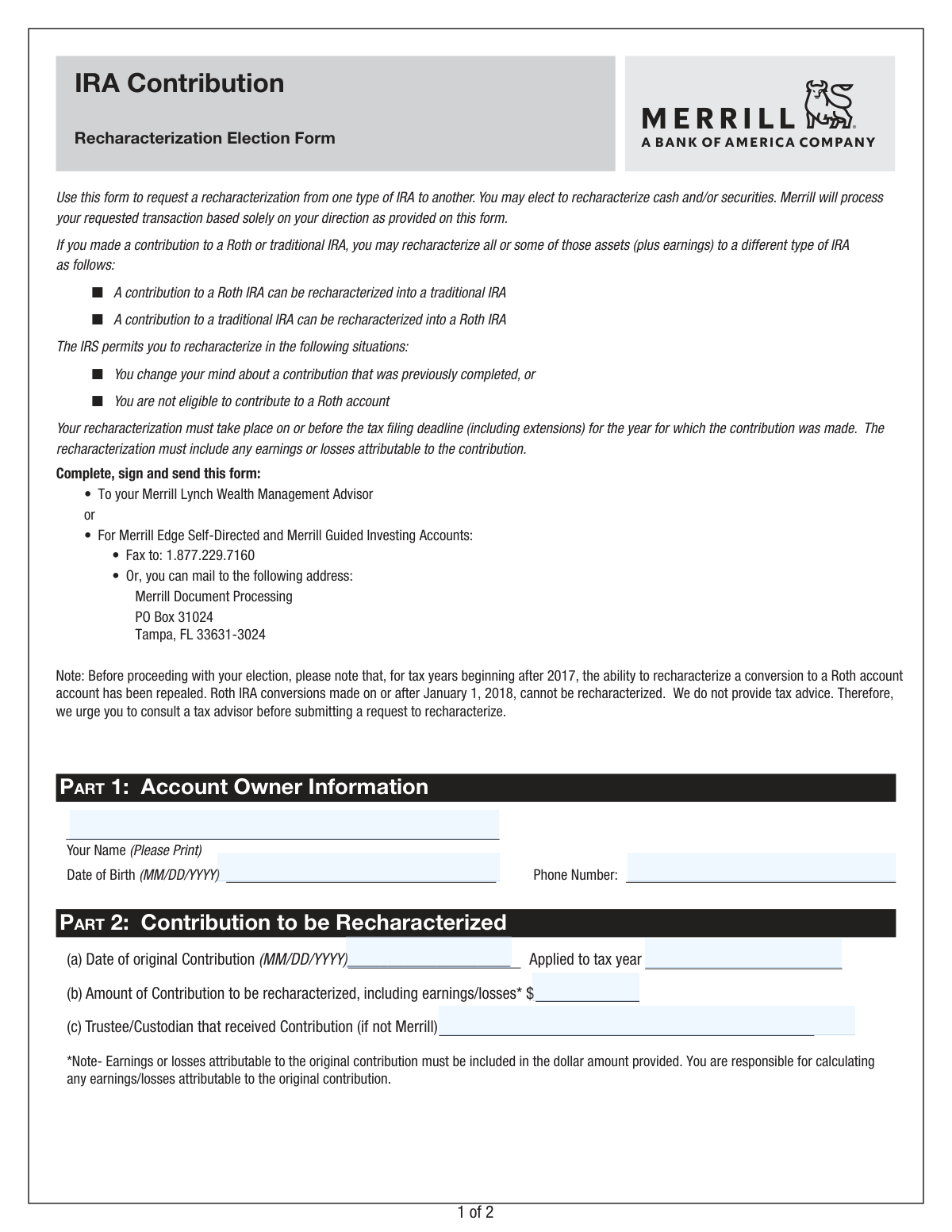
This form allows an individual to formally request the recharacterization of a contribution made to an IRA account. It's used to change a contribution from one type of IRA (e.g., Roth) to another (e.g., Traditional), which can be necessary to correct an ineligible contribution or to adjust a financial strategy before the tax filing deadline. Today, this form can be filled out quickly and accurately using AI-powered services like Instafill.ai, which can also convert non-fillable PDF versions into interactive fillable forms.
Our AI automatically handles information lookup, data retrieval, formatting, and form filling.
It takes less than a minute to fill out 0872RECH using our AI form filling.
Securely upload your data. Information is encrypted in transit and deleted immediately after the form is filled out.

Form specifications

Form name: Merrill Lynch IRA Contribution Recharacterization Election Form
Number of pages: 1
Language: English
Categories: IRA forms, Merrill forms
main-image

Instafill Demo: How to fill out PDF forms in seconds with AI

How to Fill Out 0872RECH Online for Free in 2026

Are you looking to fill out a 0872RECH form online quickly and accurately? Instafill.ai offers the #1 AI-powered PDF filling software of 2026, allowing you to complete your 0872RECH form in just 37 seconds or less.
Follow these steps to fill out your 0872RECH form online using Instafill.ai:
  1. 1 Navigate to Instafill.ai and upload the IRA Contribution Recharacterization Election Form or select it from their template library.
  2. 2 Provide your personal account owner information in Part 1, including your full name, date of birth, and phone number.
  3. 3 In Part 2, specify the details of the contribution you wish to recharacterize, such as the original contribution date, the amount (including earnings/losses), and the tax year it applied to.
  4. 4 Complete Part 3 with the recharacterization instructions, clearly stating the 'losing' and 'gaining' Merrill account numbers.
  5. 5 Indicate whether you are recharacterizing a part of your account or the entire account, and specify the amounts for cash and/or securities.
  6. 6 Carefully review all the information populated by the AI for accuracy, then electronically sign and date the form in Part 4.
  7. 7 Download the completed form and submit it to Merrill Lynch according to the instructions provided on the form (e.g., via your advisor, fax, or mail).

Our AI-powered system ensures each field is filled out correctly, reducing errors and saving you time.

Why Choose Instafill.ai for Your Fillable 0872RECH Form?

Speed

Complete your 0872RECH in as little as 37 seconds.

Up-to-Date

Always use the latest 2026 0872RECH form version.

Cost-effective

No need to hire expensive lawyers.

Accuracy

Our AI performs 10 compliance checks to ensure your form is error-free.

Security

Your personal information is protected with bank-level encryption.

Frequently Asked Questions About Form 0872RECH

This form is used to move a contribution you made to one type of IRA (like a Roth) to another type of IRA (like a Traditional). This process is called a recharacterization and is useful if you change your mind or find you were ineligible for the original contribution.

You should fill out this form if you contributed to a Roth or Traditional IRA and want to treat that contribution as if it were made to the other type of IRA. For example, you might do this if your income is too high to be eligible for a Roth IRA contribution you already made.

You must complete the recharacterization on or before your tax filing deadline, including any extensions, for the year in which the original contribution was made.

The form states that you are responsible for calculating any earnings or losses on the contribution. You will need to review your account activity since the contribution date or consult a tax advisor for help with this calculation.

No, this form is only for recharacterizing contributions. Roth IRA conversions made on or after January 1, 2018, cannot be recharacterized back to a Traditional IRA.

You will need your personal details, the Merrill account numbers for the IRA you are moving funds from (losing) and to (gaining), the date of the original contribution, and the total amount to be moved, including earnings or losses.

The 'losing' account is the IRA you originally contributed to. The 'gaining' account is the IRA you want to move the contribution to.

You can submit the form to your Merrill Lynch Wealth Management Advisor. For Merrill Edge accounts, you can fax it to 1.877.229.7160 or mail it to the Merrill Document Processing address listed on the form.

No, the form specifies that this is an irrevocable transaction. It is highly recommended that you consult a tax advisor before submitting the request to ensure it is the correct action for your financial situation.

You can recharacterize cash, securities, or a combination of both. In Part 3 of the form, you can specify whether to move cash only, securities in-kind, or both.

No, you have the option to recharacterize all or just a part of your original contribution. You must specify your choice in Part 3 of the form.

Yes, services like Instafill.ai use AI to auto-fill form fields accurately and save time. While AI can help with standard information, you are still responsible for calculating financial figures like the contribution's earnings or losses.

You can upload the PDF of the IRA Contribution Recharacterization Election Form to the Instafill.ai platform. The service will make the fields interactive so you can type in your information, then download the completed document for submission.

If you have a non-fillable or 'flat' PDF, you can use a tool like Instafill.ai. It can convert the document into an interactive, fillable form online, allowing you to easily enter your information before printing.

Compliance 0872RECH
Validation Checks by Instafill.ai

1
Ensures Signature and Date are Provided
This check verifies that the account owner has both signed the form in Part 4 and provided a signature date. A signature and date are required to authorize the transaction and certify that the provided information is correct. If either the signature or the date is missing, the form is considered incomplete and cannot be processed.
2
Validates Date of Birth Format and Plausibility
This check ensures the 'Date of Birth' in Part 1 is entered in the correct MM/DD/YYYY format and represents a valid, plausible date. It prevents future dates or dates that would make the account holder a minor, as IRA rules typically require the owner to be of legal age. An invalid format or date will cause a rejection, requiring the user to correct the entry.
3
Verifies Losing and Gaining Accounts are Different
This validation confirms that the 'Losing Account Number' and 'Gaining Account Number' in Part 3 are not identical. A recharacterization involves moving funds between two distinct accounts, typically from a Roth IRA to a Traditional IRA or vice versa. Submitting the same account number for both fields would result in an invalid request and processing will be halted.
4
Checks for Complete Recharacterization Instructions
This check ensures that the user has made a clear choice in Part 3(b) by selecting either 'Part of my account' or 'The entire account'. If 'Part of my account' is selected, it further validates that the specific cash and/or securities to be moved are detailed. Ambiguous or incomplete instructions prevent Merrill from executing the transaction as intended, leading to rejection.
5
Validates Original Contribution Date
This check confirms the 'Date of original Contribution' in Part 2 is a valid date in MM/DD/YYYY format and occurs in the past. A contribution cannot be recharacterized before it has been made, so future dates are invalid. This ensures the request is based on a historical transaction, which is a prerequisite for a recharacterization.
6
Confirms Positive Contribution Amount
This validation ensures that the 'Amount of Contribution to be recharacterized' in Part 2 is a positive numerical value greater than zero. A zero or negative amount is not a valid value for a contribution. This check prevents nonsensical or erroneous data from being submitted for processing.
7
Ensures Completeness of Securities Information
If the user elects to recharacterize securities in Part 3, this check verifies that for each security listed, both a 'Quantity' and a 'Security Name or Symbol' are provided. Missing either piece of information makes the instruction ambiguous and non-actionable. The form will be rejected if a security is listed without a quantity or vice versa.
8
Validates Tax Year and Contribution Date Coherence
This check verifies that the 'Applied to tax year' is logically consistent with the 'Date of original Contribution'. For example, a contribution made in June 2024 can only apply to the 2024 tax year, not the 2023 tax year. This is crucial for correct tax reporting and compliance with IRS regulations, and a mismatch will cause the form to be flagged for correction.
9
Verifies Recharacterization Deadline Compliance
This validation compares the form's submission date against the IRS tax filing deadline (including extensions) for the 'Applied to tax year' specified in Part 2. The form explicitly states this is a requirement for a valid recharacterization. If the form is submitted after the deadline, the transaction is not permissible for that tax year and the request will be denied.
10
Checks for Valid Phone Number Format
This check validates that the 'Phone Number' provided in Part 1 conforms to a standard format (e.g., 10 digits with an optional country code). A valid phone number is essential for the financial institution to contact the account owner if there are any questions or issues with the request. An invalid format would trigger an error, prompting the user to provide correct contact information.
11
Ensures Account Owner Name is Provided
This validation confirms that the 'Your Name' field in Part 1 is not empty. The account owner's full name is a fundamental piece of identifying information required to locate the correct accounts and process the request. A missing name will result in an immediate failure, as the request cannot be attributed to any client.
12
Logical Signature Date Check
This check ensures the 'Signature Date' in Part 4 is not earlier than the 'Date of original Contribution' in Part 2. A person cannot authorize the recharacterization of a contribution before the contribution itself was made. This logical check prevents data entry errors and ensures the timeline of events is valid, and a failure would require date correction.

Common Mistakes in Completing 0872RECH

Miscalculating the Recharacterization Amount

The form requires the recharacterized amount to include any earnings or losses attributable to the original contribution. A common mistake is to only enter the initial contribution amount, ignoring market fluctuations. This can lead to an incomplete or invalid recharacterization, causing tax complications and requiring correction. To avoid this, you must carefully calculate the current value of the specific contribution being moved; if unsure, consult a financial advisor.

Confusing the Contribution Year with the Tax Year

In Part 2, filers must specify the tax year the contribution was for, not necessarily the calendar year it was made. For example, a contribution made in February 2024 can apply to the 2023 tax year. Entering the current calendar year by default can result in the recharacterization being applied to the wrong tax period, leading to incorrect tax reporting and potential penalties. Always double-check which tax year the original contribution was designated for before filling out this field.

Transposing Losing and Gaining Account Numbers

This form requires you to specify the account the funds are coming from (Losing) and going to (Gaining). It's easy to accidentally swap these two account numbers, which would cause the transaction to be processed in the opposite direction of what was intended, or fail entirely. This can create a significant administrative headache to unwind. To prevent this, carefully verify each account number against your statements and confirm its role in the transaction before writing it down.

Incomplete or Ambiguous Recharacterization Instructions

Part 3 contains several checkboxes to specify if you are moving cash, securities, or both, and whether it's a partial or full account transfer. People often check conflicting boxes or fail to fill in the required dollar amounts or security details, leaving the instructions unclear. This ambiguity will cause the form to be rejected, delaying the time-sensitive recharacterization. Carefully read all options and select only the ones that apply to your specific request, ensuring all corresponding fields are filled.

Providing Inaccurate Security Names or Symbols

When recharacterizing securities in-kind, the form requires the exact security name or symbol as it appears on your account statement. Using informal names, outdated symbols, or making typos will cause the transaction to fail for those specific securities. This requires a corrected form to be submitted, risking missing the tax deadline. To avoid this, have your most recent account statement handy and copy the security information precisely as it is listed.

Forgetting to Sign or Date the Form

A missing signature is one of the most common and critical errors, as it renders the entire form invalid. Similarly, a missing date can cause processing delays, which is risky for a transaction that must be completed by the tax filing deadline. This mistake often happens when people are in a rush to complete and send the form. Always perform a final review of the entire document, paying special attention to the signature and date fields in Part 4 before submission.

Selecting 'The Entire Account' Unintentionally

The form provides an option to recharacterize 'The entire account,' which results in the closure of the 'Losing Account'. Filers who only intend to recharacterize a single contribution from a specific year may mistakenly check this box. This leads to the unintended closure of their IRA and the transfer of all its assets, a far more significant transaction than intended. If you only want to move a specific contribution, you must select 'Part of my account' and specify the exact amount.

Omitting the Original Contribution Date

Part 2 asks for the exact date the original contribution was made. This date is crucial for correctly calculating the associated earnings or losses that must be included in the recharacterization. People may forget the date and leave the field blank or enter an approximation, which can lead to processing delays or an incorrect calculation. It is essential to look up this date in your account transaction history to ensure accuracy.

Using Illegible Handwriting on a Printed Form

Since this form is a non-fillable PDF that must be printed, illegible handwriting is a frequent problem. Poorly written account numbers, dollar amounts, and security symbols can be misinterpreted by the processing team, leading to data entry errors. This could cause the transaction to be rejected or applied incorrectly. To prevent this, print clearly in block letters or use a tool like Instafill.ai, which can convert a flat PDF into a fillable form, allowing you to type your information for perfect clarity.

Failing to Specify the Original Custodian

If the contribution being recharacterized was originally made to an IRA at a different financial institution (not Merrill), that institution's name must be listed in Part 2(c). Filers often overlook this field, assuming it's not needed if the funds are now at Merrill. Omitting this information can complicate the verification process and delay the recharacterization. If the contribution originated outside of Merrill, you must provide the name of the original trustee or custodian.
Saved over 80 hours a year

“I was never sure if my IRS forms like W-9 were filled correctly. Now, I can complete the forms accurately without any external help.”

Kevin Martin Green

Your data stays secure with advanced protection from Instafill and our subprocessors

Robust compliance program

Transparent business model

You’re not the product. You always know where your data is and what it is processed for.

ISO 27001, HIPAA, and GDPR

Our subprocesses adhere to multiple compliance standards, including but not limited to ISO 27001, HIPAA, and GDPR.

Security & privacy by design

We consider security and privacy from the initial design phase of any new service or functionality. It’s not an afterthought, it’s built-in, including support for two-factor authentication (2FA) to further protect your account.

Fill out 0872RECH with Instafill.ai

Worried about filling PDFs wrong? Instafill securely fills merrill-lynch-ira-contribution-recharacterization-election-form forms, ensuring each field is accurate.