Yes! You can use AI to fill out Indiana Health Coverage Programs Prior Authorization Request Form (Version 9.2, July 2024)
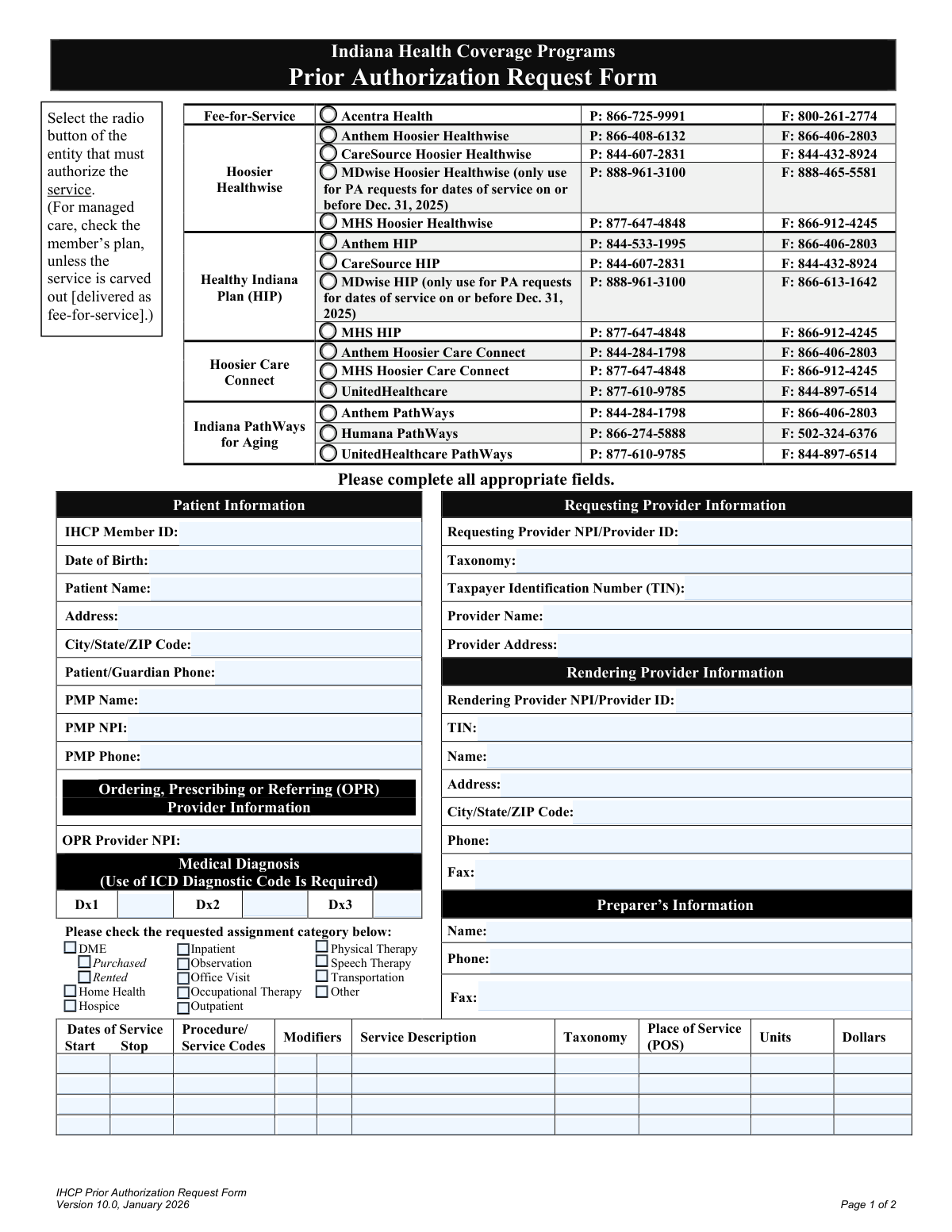
This form is a critical document for healthcare providers in Indiana to obtain pre-approval from various managed care entities for specific medical services, procedures, or equipment for patients covered by state health programs. Submitting this form ensures that the requested services are reviewed for medical necessity and are eligible for coverage, preventing claim denials. Today, this form can be filled out quickly and accurately using AI-powered services like Instafill.ai, which can also convert non-fillable PDF versions into interactive fillable forms.
IHCP Prior Authorization Request Form is part of the
prior authorization forms and health coverage forms categories on Instafill.
Rather not fill this in by hand? Instafill is an online form filler that completes PDF forms automatically — upload the blank form, answer a few questions, and the AI fills every field.
Form specifications
| Form name: | Indiana Health Coverage Programs Prior Authorization Request Form (Version 9.2, July 2024) |
| Number of fields: | 99 |
| Number of pages: | 2 |
| Language: | English |
Our AI automatically handles information lookup, data retrieval, formatting, and form filling.
It takes less than a minute to fill out IHCP Prior Authorization Request Form using our AI form filling.
Securely upload your data. Information is encrypted in transit and deleted immediately after the form is filled out.
Instafill Demo: How to fill out PDF forms in seconds with AI
How to Fill Out IHCP Prior Authorization Request Form Online for Free in 2026
Are you looking to fill out a IHCP PRIOR AUTHORIZATION REQUEST FORM form online quickly and accurately? Instafill.ai offers the #1 AI-powered PDF filling software of 2026, allowing you to complete your IHCP PRIOR AUTHORIZATION REQUEST FORM form in just 37 seconds or less.
Follow these steps to fill out your IHCP PRIOR AUTHORIZATION REQUEST FORM form online using Instafill.ai:
- 1 Navigate to Instafill.ai and upload or select the IHCP Prior Authorization Request Form.
- 2 Use the AI assistant to automatically populate patient information, such as name, date of birth, and IHCP Member ID.
- 3 Enter the details for the requesting, rendering, and referring providers, including NPI numbers, taxonomy codes, and contact information.
- 4 Input the relevant ICD medical diagnosis codes and specify the services requested by filling out the procedure codes, modifiers, dates, and units for each service line.
- 5 Select the correct managed care entity or fee-for-service program that needs to authorize the service.
- 6 Review all entered information for accuracy, attach any required supporting medical documentation, and have the qualified practitioner sign and date the form.
- 7 Securely submit the completed and signed form to the appropriate entity as indicated in the form's instructions.
Our AI-powered system ensures each field is filled out correctly, reducing errors and saving you time.
Why Choose Instafill.ai for Your Fillable IHCP Prior Authorization Request Form Form?
Speed
Complete your IHCP Prior Authorization Request Form in as little as 37 seconds.
Up-to-Date
Always use the latest 2026 IHCP Prior Authorization Request Form form version.
Cost-effective
No need to hire expensive lawyers.
Accuracy
Our AI performs 10 compliance checks to ensure your form is error-free.
Security
Your personal information is protected with bank-level encryption.
Frequently Asked Questions About IHCP Prior Authorization Request Form
This form is used by healthcare providers to request pre-approval from Indiana Health Coverage Programs (IHCP) for specific medical services, procedures, or equipment. This process, known as prior authorization (PA), confirms that the requested service is medically necessary before it is provided to the patient.
A healthcare provider's office, such as the requesting, ordering, or rendering provider, is responsible for completing and submitting this form. It is submitted on behalf of an IHCP member to get approval for a service.
You must identify the patient's specific managed care plan (e.g., Hoosier Healthwise, HIP, PathWays for Aging) and then select the corresponding insurance entity, such as Anthem or CareSource. If a service is 'carved out,' it is handled by Fee-for-Service (Acentra Health) regardless of the member's plan.
You must include all relevant medical documentation that supports the medical necessity of the requested service. The form explicitly states that requests submitted without this documentation will not be reviewed.
The 'Requesting Provider' is the clinician or facility initiating the prior authorization request. The 'Rendering Provider' is the clinician or facility that will actually perform the service, if different from the requesting provider.
You should fax the form to the number listed next to the authorizing entity you selected at the top of the page. For mailing addresses, the form advises consulting the IHCP Quick Reference Guide.
Yes, the use of ICD diagnostic codes is required. You must enter at least the primary diagnosis code (Dx1) to justify the medical need for the requested services.
A signature from a qualified practitioner is mandatory for the form to be processed. An unsigned form is considered incomplete and will likely be rejected, delaying the authorization process.
If your request includes more than four distinct services or procedures, you will need to complete and submit an additional Prior Authorization Request Form. You can make a note in the 'Notes' section to link the forms together.
A 'carved-out' service is a type of healthcare service that is paid for directly by the state's Fee-for-Service program (Acentra Health) instead of through the member's managed care plan. For these specific services, you must select Acentra Health as the authorizing entity.
Yes, you can use AI-powered services like Instafill.ai to help complete this form. These tools can auto-fill recurring information like provider details and patient data, saving you time and helping to prevent errors.
To fill this form out online, you can upload it to a platform like Instafill.ai. The service will make the form interactive, allowing you to type directly into the fields, add your signature, and download the completed document.
If you have a non-fillable or 'flat' PDF, you can use a tool like Instafill.ai to make it interactive. Simply upload the file, and the platform will automatically convert it into a fillable form you can complete on your computer.
Compliance IHCP Prior Authorization Request Form
Validation Checks by Instafill.ai
1
Exclusive Authorization Entity Selection
This check verifies that exactly one authorization entity (e.g., Acentra Health, Anthem, CareSource) is selected from the list of checkboxes at the top of the form. Selecting a single entity is crucial for routing the request to the correct payer for review. If zero or more than one entity is selected, the form submission will be rejected, and the user will be prompted to choose only one.
2
National Provider Identifier (NPI) Format
This validation ensures that all entered National Provider Identifier (NPI) fields (Requesting, Rendering, PMP, OPR) contain a valid 10-digit number. The NPI is a unique identifier essential for processing claims and authorizations correctly. An invalid NPI format will cause a processing failure, so the submission will be blocked until a valid 10-digit NPI is provided.
3
Patient Date of Birth Logic
This check validates that the 'Date of Birth' field is a valid date in MM/DD/YYYY format and that the date is in the past. This is critical for correctly identifying the patient and verifying their eligibility for coverage. A future date or an invalid format would render the patient identification impossible, leading to a validation error and rejection of the form.
4
Primary Diagnosis Code Requirement
This validation ensures that the 'Dx1' field for the primary medical diagnosis is populated with a valid International Classification of Diseases (ICD) code. A primary diagnosis is mandatory to establish medical necessity for the requested services. If this field is empty or contains an invalid code format, the request cannot be clinically reviewed and will be rejected for incompleteness.
5
Service Line Date Consistency
For each service line entered, this check verifies that the 'Stop' date is on or after the 'Start' date. A stop date that precedes a start date is a logical impossibility and indicates a data entry error. This validation prevents incorrect service period authorizations, and if it fails, the user must correct the dates before the form can be submitted.
6
Minimum Service Line Entry
This validation confirms that at least one complete service line (including Start/Stop Dates, Procedure Code, Units, and Dollars) has been filled out. A prior authorization request is meaningless without a specific service being requested. If no service lines are completed, the form will be considered incomplete and rejected, as there is no action to authorize.
7
Taxpayer Identification Number (TIN) Format
This check ensures that the Taxpayer Identification Number (TIN) for both the requesting and rendering providers is a 9-digit number. The TIN is required for financial and regulatory reporting and must be accurate for payment processing. A submission with an incorrectly formatted TIN will be flagged and rejected to prevent downstream billing and payment issues.
8
Core Patient Information Completeness
This validation verifies that the essential patient identifier fields—'IHCP Member ID', 'Patient Name', and 'Date of Birth'—are all populated. Without this complete set of information, the patient cannot be uniquely and accurately identified within the health coverage system. A failure to provide any of these fields will result in an immediate rejection of the form for being incomplete.
9
Service Unit Value
This check ensures that for any service line entered, the 'Units' field contains a positive numerical value greater than zero. The number of units is fundamental to defining the scope of the requested service and calculating reimbursement. A zero, negative, or non-numeric value is invalid and will cause the form submission to fail until a valid quantity is entered.
10
Signature Date Validity
This validation confirms that the 'Date' next to the practitioner's signature is a valid date, is not in the future, and is on or after the latest 'Stop' date of all requested services. The signature date attests to the accuracy of the information at a specific point in time. A future date is illogical, and a date preceding the service completion would be invalid, causing the form to be rejected.
11
Phone Number Structure
This check validates that all phone number fields (Patient/Guardian, PMP, Rendering Provider, Preparer) adhere to a standard 10-digit format, with or without common separators. Correctly formatted phone numbers are essential for communication if questions arise during the review process. An invalid format will trigger an error, prompting the user to correct the entry to ensure contact can be made if needed.
12
Place of Service (POS) Code Format
This validation ensures the 'Place of Service (POS)' code entered in each service line is a valid two-digit code. POS codes are standardized by CMS and are critical for determining how a service will be paid. An invalid or incorrectly formatted code will lead to processing errors and potential claim denials, so the form will be rejected until a valid 2-digit code is provided.
13
Procedure Code and Units Correlation
This check ensures that if a 'Procedure/Service Code' is entered on a service line, the corresponding 'Units' field must also be populated with a value greater than zero. A procedure code without a specified quantity is an incomplete request. This validation prevents ambiguous requests from being submitted, and failure will require the user to enter the number of units for the specified procedure.
14
Requested Assignment Category Selection
This validation verifies that at least one checkbox under 'Requested assignment category' (e.g., DME, Inpatient, Home Health) has been selected. This information helps categorize the request and may influence the review criteria or workflow. Submitting a request without this classification makes it difficult to process, so the form will be rejected until a category is chosen.
Common Mistakes in Completing IHCP Prior Authorization Request Form
Providers often select the wrong Managed Care Organization (MCO) or program from the extensive list at the top of the form, such as choosing an Anthem HIP plan for a patient enrolled in Anthem Hoosier Healthwise. This error sends the entire request to the wrong processing center, leading to significant delays or an outright rejection that requires starting the process over. To avoid this, always verify the patient's active MCO and specific plan using their insurance card or an eligibility portal before selecting the corresponding checkbox.
The form requires multiple unique provider numbers like NPI, TIN, and Taxonomy codes for the Requesting, Rendering, and OPR providers. Common mistakes include typos, using a group NPI instead of an individual NPI, or leaving a required field blank. These errors cause processing failures and denials because the system cannot correctly identify and validate the providers involved. Always verify these numbers against a master provider file or the NPPES NPI Registry. AI-powered tools like Instafill.ai can help by storing and auto-populating correct, validated provider information.
The form explicitly states that the request MUST include medical documentation to be reviewed for medical necessity. Preparers frequently forget to attach clinical notes, test results, or a letter of medical necessity when faxing or mailing the form. Submitting a request without this documentation will lead to an automatic rejection or a request for additional information, significantly delaying patient care. Always use a checklist to ensure all required attachments are included with the submission.
The service line grid is highly prone to data entry errors, such as typos in CPT/HCPCS codes, omitting necessary modifiers (e.g., -RT, -LT), or requesting an incorrect number of units. For example, requesting '1' unit for a service that is billed in 15-minute increments will likely be denied. These mistakes are a primary cause of authorization denials and require a full resubmission. Double-check all coding, modifiers, and units against payer policies before submitting.
The form requires current ICD diagnostic codes to establish medical necessity. Common errors include using outdated ICD-9 codes, entering codes that lack the required level of specificity, or not listing the primary diagnosis that supports the service in the 'Dx1' field. An invalid or non-specific code can result in an immediate denial for lack of medical necessity. Use the latest ICD-10-CM codebook and ensure the primary diagnosis directly justifies the requested service.
Staff may incorrectly list the same provider in the 'Requesting', 'Rendering', and 'OPR' (Ordering, Prescribing, or Referring) sections when they are, in fact, distinct entities. For example, a primary care physician (Requesting/OPR) may order a wheelchair from a DME company (Rendering). This confusion leads to processing errors and claim denials. Carefully identify and enter the correct NPI and information for each distinct provider role involved in the patient's care.
An unsigned or undated prior authorization form is considered invalid and will be immediately rejected, halting the entire review process. This simple oversight often happens in busy offices where the form is filled out by administrative staff but not properly routed for a practitioner's signature before submission. To prevent this, implement a final review step to ensure the 'Signature of Qualified Practitioner' and 'Date' fields are completed before the form is sent.
When a form is only available as a non-fillable PDF, it is often printed and filled out by hand. Rushed or unclear handwriting can make critical information like Member IDs, NPIs, and diagnosis codes unreadable to data entry personnel. This leads to processing errors, denials due to incorrect data, or rejection for being illegible. To avoid this, use a tool like Instafill.ai, which can convert flat PDFs into digitally fillable forms, ensuring all information is clear and accurate.
Errors in the 'Start' and 'Stop' dates for services are common, including using the wrong date format (e.g., MM-DD-YY), transposing the start and stop dates, or requesting a date range not supported by clinical documentation. Requesting a full year of physical therapy when the doctor's notes only support 3 months will cause a partial denial or a request for more information. Ensure all dates are accurate, logical, and clinically justified. AI form-filling tools like Instafill.ai can help by validating date formats automatically.
The 'Preparer's Information' section, including name and phone number, is sometimes left blank, especially when the preparer is not a clinical staff member. If the MCO has a question or needs to clarify a minor detail, they have no direct contact person, which can turn a simple query into a formal request for more information or a denial. Always fill out this section so the payer has a point of contact to resolve issues quickly and avoid unnecessary delays.
Saved over 80 hours a year
“I was never sure if my IRS forms like W-9 were filled correctly. Now, I can complete the forms accurately without any external help.”
Kevin Martin Green
Your data stays secure with advanced protection from Instafill and our subprocessors




Robust compliance program
Transparent business model
You’re not the product. You always know where your data is and what it is processed for.
ISO 27001, HIPAA, and GDPR
Our subprocesses adhere to multiple compliance standards, including but not limited to ISO 27001, HIPAA, and GDPR.
Security & privacy by design
We consider security and privacy from the initial design phase of any new service or functionality. It’s not an afterthought, it’s built-in, including support for two-factor authentication (2FA) to further protect your account.
Fill out IHCP Prior Authorization Request Form with Instafill.ai
Worried about filling PDFs wrong? Instafill securely fills indiana-health-coverage-programs-prior-authorization-request-form-version-9-2-july-2024 forms, ensuring each field is accurate.