Yes! You can use AI to fill out Applied Behavior Analysis Prior Authorization Request Form
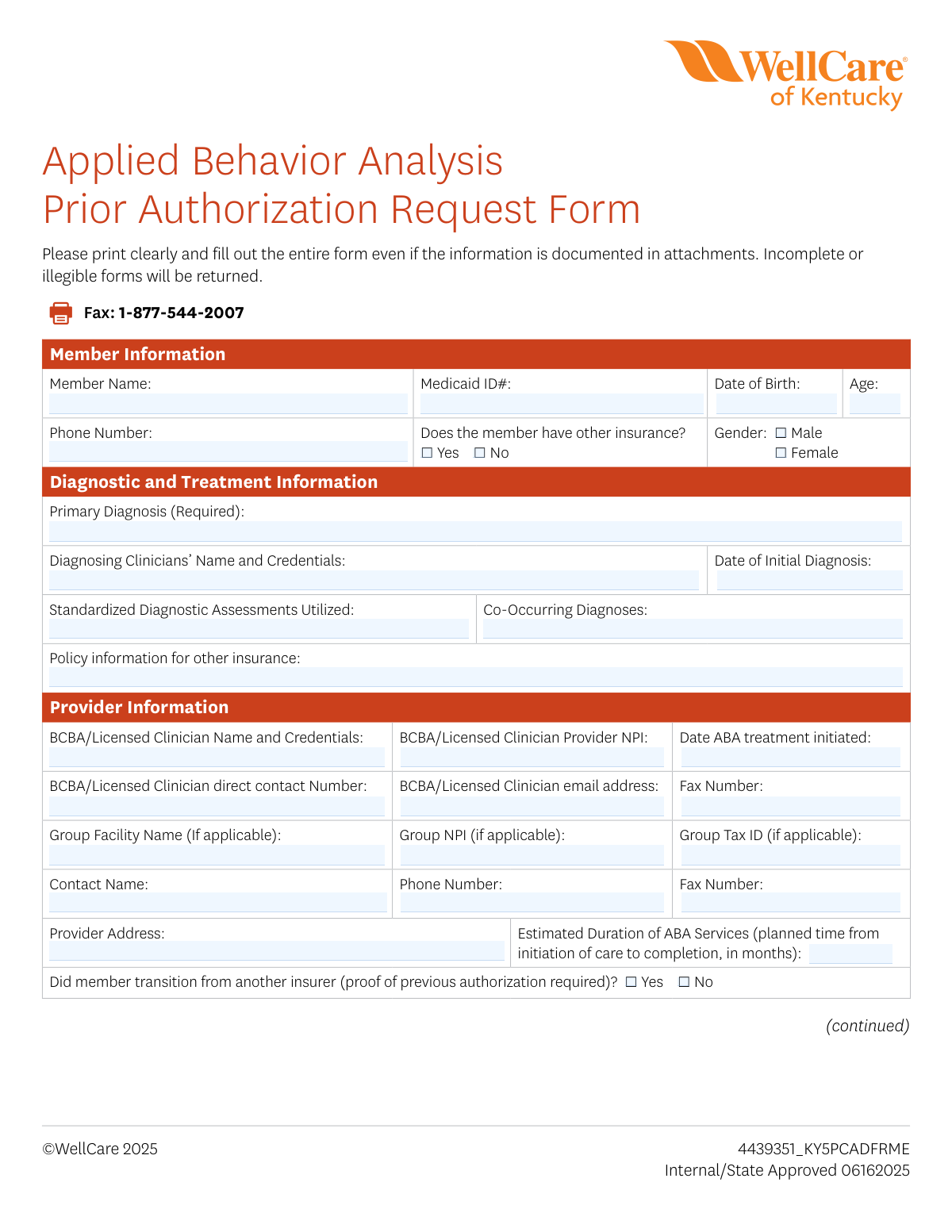
The Applied Behavior Analysis Prior Authorization Request Form is an official WellCare document that licensed clinicians and BCBAs must submit to obtain prior authorization for ABA therapy services on behalf of Medicaid members. The form captures member demographics, diagnostic information, provider credentials, requested service codes and units, assessment tool results, and clinical details including functional impairments and discharge planning. It is a critical step in ensuring that members with autism spectrum disorder or related diagnoses receive timely, covered ABA treatment. Today, this form can be filled out quickly and accurately using AI-powered services like Instafill.ai, which can also convert non-fillable PDF versions into interactive fillable forms.
Our AI automatically handles information lookup, data retrieval, formatting, and form filling.
It takes less than a minute to fill out ABA Prior Authorization Request using our AI form filling.
Securely upload your data. Information is encrypted in transit and deleted immediately after the form is filled out.
Form specifications
| Form name: | Applied Behavior Analysis Prior Authorization Request Form |
| Number of pages: | 3 |
| Language: | English |
Instafill Demo: filling out a legal form in seconds
How to Fill Out ABA Prior Authorization Request Online for Free in 2026
Are you looking to fill out a ABA PRIOR AUTHORIZATION REQUEST form online quickly and accurately? Instafill.ai offers the #1 AI-powered PDF filling software of 2026, allowing you to complete your ABA PRIOR AUTHORIZATION REQUEST form in just 37 seconds or less.
Follow these steps to fill out your ABA PRIOR AUTHORIZATION REQUEST form online using Instafill.ai:
- 1 Navigate to Instafill.ai and upload the ABA Prior Authorization Request Form PDF or select it from the available form library to begin filling it out online.
- 2 Complete the Member Information section by entering the member's full name, Medicaid ID number, date of birth, age, phone number, gender, and whether the member has other insurance coverage.
- 3 Fill in the Diagnostic and Treatment Information section, including the primary diagnosis, diagnosing clinician's name and credentials, date of initial diagnosis, standardized diagnostic assessments utilized, and any co-occurring diagnoses.
- 4 Enter all required Provider Information, including the BCBA or licensed clinician's name, credentials, NPI, contact number, email address, fax number, group facility details, and the estimated duration of ABA services.
- 5 Select the appropriate request type (Initial ABA Assessment, Initial ABA Treatment, or Concurrent ABA Treatment), then specify the service location, requested CPT codes (97151–97158), dates of service, and total units requested.
- 6 Complete the ABA Assessment Tools section by recording the assessment names, most recent and previous assessment dates, and corresponding scores for each tool used.
- 7 Fill in the Clinical Details section describing the discharge plan, care coordination with other providers, and functional impairments in areas such as safety, communication, and socialization, then have the BCBA or licensed clinician sign and date the form before faxing it to 1-877-544-2007.
Our AI-powered system ensures each field is filled out correctly, reducing errors and saving you time.
Why Choose Instafill.ai for Your Fillable ABA Prior Authorization Request Form?
Speed
Complete your ABA Prior Authorization Request in as little as 37 seconds.
Up-to-Date
Always use the latest 2026 ABA Prior Authorization Request form version.
Cost-effective
No need to hire expensive lawyers.
Accuracy
Our AI performs 10 compliance checks to ensure your form is error-free.
Security
Your personal information is protected with bank-level encryption.
Frequently Asked Questions About Form ABA Prior Authorization Request
This form is used to request prior authorization from WellCare for Applied Behavior Analysis (ABA) services for Medicaid members. It must be completed by a BCBA or licensed clinician and submitted before ABA services can be approved and rendered.
A Board Certified Behavior Analyst (BCBA) or licensed clinician must complete and sign this form on behalf of the member receiving ABA services. The clinician must provide their credentials, NPI number, and contact information, and attest that all service providers have appropriate training and education.
The completed form should be faxed to WellCare at 1-877-544-2007. Make sure the form is fully and legibly completed before submitting, as incomplete or illegible forms will be returned without processing.
Required attachments depend on the request type: an Initial ABA Assessment requires a Comprehensive Diagnostic Evaluation (CDE); an Initial ABA Treatment request requires a CDE, Behavior Assessment, and Behavior Plan; and a Concurrent ABA Treatment request requires a CDE, Behavior Assessment, and Behavior Plan with graphs. If the member is transitioning from another insurer, proof of previous authorization is also required.
You can request authorization for one of three service types: (1) Initial ABA Assessment, (2) Initial ABA Treatment, or (3) Concurrent ABA Treatment. Each request type has specific documentation requirements that must be included as attachments.
The form covers CPT codes 97151 through 97158, which include Behavioral Identification Assessment, Supporting Assessment, Adaptive Behavioral Treatment by Protocol, Group Adaptive Behavior Treatment, Adaptive Behavior Treatment with Protocol Modification, Family Adaptive Behavior Treatment Guidance, Multiple Family Group Guidance, and Group Adaptive Behavior Treatment with Protocol Modification — all billed in 15-minute units.
You must provide the member's full name, Medicaid ID number, date of birth, age, phone number, and gender. You must also indicate whether the member has other insurance, and if so, include the policy information for that other insurance.
The form requires the primary diagnosis, the diagnosing clinician's name and credentials, date of initial diagnosis, standardized diagnostic assessments utilized, and any co-occurring diagnoses. You must also document the member's current functional impairment in areas such as safety, communication, socialization, and repetitive behaviors.
For each assessment tool used, you must provide the name of the assessment, the date and score of the most recent assessment, and the date and score of the previous assessment. The form allows you to document up to four different assessment tools.
The discharge plan section requires you to provide the anticipated date for the member to transition to a lower level of care. You should also describe how ABA treatment is being coordinated with other providers involved in the member's care, such as the PCP, psychiatrist, occupational therapist, speech therapist, school, or other behavioral health services.
If the member is transitioning from another insurer, you must check 'Yes' on the form and include proof of the previous authorization. Failure to provide this documentation may delay or result in denial of the authorization request.
Yes, AI-powered services like Instafill.ai can help you accurately auto-fill form fields, saving time and reducing errors. These tools are especially useful for complex forms like this one that require detailed clinical and provider information across multiple sections.
You can upload the ABA Prior Authorization Request Form PDF to Instafill.ai, and the AI will guide you through filling out each field accurately and completely. Once finished, you can download the completed form and fax it to WellCare at 1-877-544-2007.
If you have a flat, non-fillable version of this PDF, Instafill.ai can convert it into an interactive fillable form so you can type directly into the fields. This eliminates the need to print and handwrite the form, making the process faster and more legible.
Forms that are incomplete or illegible will be returned by WellCare without processing. To avoid delays, make sure every section of the form is fully completed — even if the information is also included in attachments — and that all handwriting or typed text is clearly readable before faxing.
Compliance ABA Prior Authorization Request
Validation Checks by Instafill.ai
1
Member Name is Present and Contains Full Legal Name
Validates that the Member Name field is not blank and contains both a first and last name, with no numeric characters or special symbols. A full legal name is required to accurately match the member to their Medicaid record and avoid processing delays. If this field is missing or contains only a partial name, the form will be returned as incomplete and the prior authorization request cannot be processed.
2
Medicaid ID Number Format is Valid
Checks that the Medicaid ID field is populated and conforms to the expected alphanumeric format for Kentucky Medicaid identifiers. An incorrectly formatted or missing Medicaid ID prevents the system from linking the request to the correct member account, which could result in denial or misrouting of the authorization. The field must not contain spaces, dashes in incorrect positions, or extraneous characters beyond the standard ID format.
3
Date of Birth is a Valid Date and Consistent with Member Age
Validates that the Date of Birth field contains a properly formatted date (MM/DD/YYYY) that represents a real calendar date and is not a future date. Additionally, the system cross-checks that the Age field is mathematically consistent with the Date of Birth relative to today's date, within a one-year tolerance. Discrepancies between Date of Birth and Age may indicate a data entry error that could cause the authorization to be applied to the wrong member or age-inappropriate service tier.
4
Gender Selection is Made
Ensures that exactly one of the Gender checkboxes (Male or Female) is selected and that both are not simultaneously checked. Gender is a required demographic field used to validate member identity against Medicaid records. If neither or both options are selected, the form is considered incomplete and will be returned to the submitting provider.
5
Other Insurance Checkbox is Selected and Policy Information is Provided When Applicable
Validates that one of the Yes or No checkboxes for 'Does the member have other insurance?' is selected. If 'Yes' is selected, the Policy Information for Other Insurance field must also be populated with carrier name, policy number, or equivalent details. Failure to disclose other insurance coverage can result in incorrect billing coordination and potential compliance violations under Medicaid coordination of benefits rules.
6
Primary Diagnosis is Present and Uses a Valid ICD-10 Code Format
Checks that the Primary Diagnosis field is not blank, as it is explicitly marked as required on the form, and that the diagnosis code entered conforms to ICD-10-CM formatting (e.g., F84.0 for Autism Spectrum Disorder). ABA services are only authorized for specific qualifying diagnoses, and an absent or improperly formatted code will result in automatic rejection of the prior authorization request. The diagnosing clinician's name and credentials must also be present alongside the diagnosis.
7
BCBA/Licensed Clinician NPI is a Valid 10-Digit Number
Validates that the BCBA/Licensed Clinician Provider NPI field contains exactly 10 numeric digits with no letters, spaces, or special characters, consistent with the National Provider Identifier standard. The NPI is used to verify that the rendering provider is enrolled and credentialed with WellCare/Medicaid, and an invalid or missing NPI will prevent the authorization from being linked to a billable provider. If the NPI fails the Luhn algorithm check used for NPI validation, the form should be flagged for correction.
8
Request Type Checkbox Selection is Made and Required Documentation is Indicated
Ensures that exactly one of the three Request Type checkboxes is selected: Initial ABA Assessment, Initial ABA Treatment, or Concurrent ABA Treatment. Each request type has specific required documentation (e.g., Concurrent ABA Treatment requires a Behavior Plan with graphs), and the validation should confirm that the selection is consistent with the supporting materials referenced. Submitting a form without a request type selection or with conflicting documentation references will result in the form being returned as incomplete.
9
At Least One ABA Service Code Has Dates of Service and Units Requested
Validates that at least one of the eight ABA procedure codes (97151–97158) has both a Dates of Services Requested and a Total Units Requested value populated. A prior authorization request with no service codes, dates, or units provides no actionable information for the utilization management review and cannot be approved. Units must be numeric and positive, and dates must be valid future or current dates in MM/DD/YYYY format.
10
Dates of Service Requested are Not in the Past
Checks that all Dates of Services Requested entered for any ABA procedure code are on or after the submission date of the form, as prior authorizations are prospective approvals and cannot be retroactively granted under standard policy. If a date of service falls before the submission date, the system should flag it as a potential retroactive authorization request, which requires separate handling and justification. This check helps prevent billing errors and ensures compliance with authorization timelines.
11
ABA Assessment Tool Entries are Internally Consistent
For each assessment tool block where any field is populated, validates that all related fields—Assessment Used, Date of Most Recent Assessment, Score of Most Recent Assessment—are also completed. Partial assessment entries (e.g., a score without a corresponding assessment name or date) are insufficient for clinical review and may cause the authorization to be pended for additional information. If a previous assessment date and score are provided, the previous assessment date must be earlier than the most recent assessment date.
12
Date of Initial Diagnosis is Not a Future Date and Precedes ABA Treatment Initiation Date
Validates that the Date of Initial Diagnosis is a valid past date and that it is chronologically earlier than or equal to the Date ABA Treatment Initiated. A diagnosis must logically precede the initiation of treatment, and any reversal of these dates indicates a data entry error that could undermine the clinical justification for services. Both fields must be in MM/DD/YYYY format and represent real calendar dates.
13
Previous Insurance Transition Requires Proof of Prior Authorization
Checks that if the 'Did member transition from another insurer?' checkbox is marked 'Yes,' the submission includes or references proof of previous authorization as required by the form instructions. Without documentation of prior authorization from the previous insurer, the concurrent treatment request cannot be validated for continuity of care purposes. If 'Yes' is selected but no supporting documentation is attached or referenced, the form should be flagged with a warning requiring the provider to supply the missing evidence.
14
BCBA/Licensed Clinician Contact Number and Email Address are Properly Formatted
Validates that the BCBA/Licensed Clinician Direct Contact Number contains exactly 10 digits (formatted as a US phone number) and that the email address field contains a valid email format with an '@' symbol, a domain name, and a recognized top-level domain. Accurate contact information is critical for the utilization management team to reach the provider for clinical peer-to-peer reviews or requests for additional information. Malformed phone numbers or email addresses will delay the review process and may result in the form being returned.
15
All Required Clinical Detail Functional Impairment Fields are Completed
Ensures that each of the five functional impairment areas—Safety, Communication, Socialization, Repetitive Patterns of Behavior and Interests, and Other Behaviors—contains a written response, even if that response is 'No functional impairment present' as instructed on the form. These fields are essential for the clinical reviewer to assess medical necessity and determine the appropriate level of ABA services. Leaving any of these fields blank constitutes an incomplete clinical submission and will result in the form being returned to the provider.
16
BCBA/Licensed Clinician Signature and Date are Present
Validates that the Signature Field contains a valid signature entry and that the accompanying Date field is populated with a valid date that is not in the future. The clinician's signature serves as a legal attestation that all individuals rendering services under the proposed treatment plan have the appropriate training and education, and an unsigned form cannot be processed or approved. The signature date should also be on or before the submission date to confirm the attestation was made prior to or at the time of submission.
Common Mistakes in Completing ABA Prior Authorization Request
Many applicants confuse their Medicaid ID with other insurance ID numbers, or accidentally transpose digits when entering it manually. An incorrect or missing Medicaid ID will cause the form to be returned as incomplete, delaying authorization and potentially interrupting ABA services. Always double-check the Medicaid ID directly from the member's Medicaid card before entering it. AI-powered tools like Instafill.ai can help auto-populate and validate this field to prevent transcription errors.
Submitters often check 'Yes' for other insurance but then leave the 'Policy information for other insurance' field completely blank, or vice versa — they have other coverage but forget to check 'Yes.' This inconsistency triggers a return of the form and can delay coordination of benefits processing. If the member has other insurance, both the checkbox and the policy details field must be completed together. Review both fields as a pair before submitting.
Providers frequently enter only their name without including their professional credentials (e.g., BCBA, BCBA-D, LCSW), or they omit the NPI number entirely. Since this is an ABA-specific authorization, the insurer requires verification that the clinician holds appropriate licensure, and missing credentials will result in the form being returned. Always include the full credential designation alongside the clinician's name and confirm the 10-digit NPI is accurate using the NPPES registry. Instafill.ai can help pre-fill verified provider NPI and credential data to avoid this common oversight.
Each request type (Initial ABA Assessment, Initial ABA Treatment, Concurrent ABA Treatment) has specific required attachments listed in parentheses on the form, and submitters often check a box without attaching the corresponding documents such as the Comprehensive Diagnostic Evaluation (CDE), Behavior Assessment, or Behavior Plan with graphs. Submitting without the required supporting documents will result in an automatic denial or return. Carefully read the documentation requirements listed next to each checkbox and assemble all attachments before faxing. Create a checklist based on the selected request type to ensure nothing is missed.
Providers sometimes enter dates of service that fall before the date ABA treatment was initiated, or request future dates that extend beyond a reasonable authorization window, creating logical inconsistencies that flag the form for review. Additionally, date formats may be entered inconsistently (e.g., MM/DD/YYYY vs. DD/MM/YYYY), causing confusion. Always ensure requested service dates are consistent with the treatment initiation date and use a uniform date format throughout the entire form. Instafill.ai can enforce consistent date formatting automatically across all date fields.
The form provides space for up to four assessment tools, and submitters often fill in the assessment name and most recent score but forget to include the date of the most recent assessment, the previous assessment date, or the previous score. Incomplete assessment data prevents the reviewer from tracking progress over time, which is critical for concurrent authorization requests. All six sub-fields for each assessment tool used (assessment name, most recent date, most recent score, previous date, previous score) should be completed for every assessment listed. If a previous assessment does not exist, note 'N/A' rather than leaving the field blank.
Clinicians frequently leave one or more of the functional impairment categories (Safety, Communication, Socialization, Repetitive patterns of behavior, Other behaviors) blank, assuming that silence implies no impairment. However, the form explicitly instructs providers to indicate if no functional impairment is present in a given area. Blank fields are treated as incomplete rather than as 'no impairment,' which can result in the form being returned. Write 'No functional impairment present' in any category that does not apply to the member.
When the 'Did member transition from another insurer?' box is checked 'Yes,' submitters often forget to attach the required proof of previous authorization, or they check 'Yes' without realizing the documentation requirement. Without this proof, the transition request cannot be processed, causing a gap in the member's ABA services. If the member is transitioning, gather the prior authorization documentation from the previous insurer before submitting this form. Attach it clearly labeled to avoid any processing delays.
ABA CPT codes 97151–97158 are all billed in 15-minute increments, and providers sometimes enter the total number of hours or sessions rather than converting to units (e.g., entering '10' for 10 hours instead of '40' units). This results in a significant undercounting or overcounting of requested services, which can lead to authorization for far fewer services than needed or a denial for excessive units. Always convert planned service hours to 15-minute units before entering totals (multiply hours by 4). Double-check each code's unit total against the treatment plan.
The discharge plan field asking for the anticipated date to transition to a lower level of care is frequently left blank or filled with vague language like 'TBD' or 'when goals are met,' which does not satisfy the clinical review requirement. Reviewers need a concrete, clinically justified timeframe to assess the appropriateness and duration of the requested services. Provide a specific estimated date or timeframe (e.g., '12 months from initiation') along with a brief clinical rationale. This demonstrates that the treatment plan has a defined endpoint and measurable goals.
Providers often leave the care coordination field blank or write only one provider name without describing how services are actually being coordinated, such as shared treatment goals, communication frequency, or joint planning meetings. Insufficient care coordination information can raise concerns about fragmented care and may result in a request for additional information, delaying authorization. List all involved providers (PCP, psychiatrist, OT, PT, speech therapist, school, etc.) and briefly describe the coordination method, such as monthly team meetings or shared progress notes. If no other providers are involved, explicitly state that.
The form requires a wet or electronic signature from the BCBA or licensed clinician along with a date, and it is frequently submitted unsigned — especially when the form is completed by administrative staff and the clinician forgets to sign before faxing. An unsigned form is legally incomplete and will be returned, causing authorization delays that can interrupt member services. Establish a workflow where the clinician reviews and signs the form as the final step before submission. If using a digital version, Instafill.ai can prompt for the required signature field before allowing the form to be submitted.
Saved over 80 hours a year
“I was never sure if my IRS forms like W-9 were filled correctly. Now, I can complete the forms accurately without any external help.”
Kevin Martin Green
Your data stays secure with advanced protection from Instafill and our subprocessors

Robust compliance program
Transparent business model
You’re not the product. You always know where your data is and what it is processed for.
ISO 27001, HIPAA, and GDPR
Our subprocesses adhere to multiple compliance standards, including but not limited to ISO 27001, HIPAA, and GDPR.
Security & privacy by design
We consider security and privacy from the initial design phase of any new service or functionality. It’s not an afterthought, it’s built-in, including support for two-factor authentication (2FA) to further protect your account.
Fill out ABA Prior Authorization Request with Instafill.ai
Worried about filling PDFs wrong? Instafill securely fills applied-behavior-analysis-prior-authorization-request-form forms, ensuring each field is accurate.