
Yes! You can use AI to fill out Form SY061, Medical statement - Assistance for Isolated Children (AIC) Scheme
Don't type 117 fields by hand. Tell our AI about yourself, or upload your insurance card, and it fills every field in seconds. You check it, then download, print or sign.
The AI does the filling. You just check it.
No typing into boxes, nothing to install.
What this form asks for
The AI fills all of it, from your answers or your documents.
The AI checks your answers before you download
14 checks built for this form, so a wrong date or a missing answer is caught before anyone else sees it.
Checks that the 'Family Name' and 'First Given Name' fields for the applicant are not empty. These fields are essential for identifying the person submitting the form and for official records. If this validation fails, the form submission should be blocked with an error message prompting the user to fill in the required name fields.
Validates that the 'Student's Date of Birth' is a real, past date in the correct format (e.g., DD/MM/YYYY). This prevents impossible dates, such as future dates or non-existent dates like February 30th, ensuring data accuracy for student records. A failed validation would require the user to correct the date before proceeding.
Ensures that if a standard title ('Mr', 'Mrs', 'Miss', 'Ms', 'Mx') is selected, the 'Other Title' text field is empty, and vice-versa. This maintains data integrity by preventing contradictory information. If both a standard title and 'Other Title' are provided, an error should be displayed asking the user to choose only one option.
Verifies that if the 'I have read, understood and agree' checkbox is checked, the 'Declaration Date' field is also filled with a valid date. The date provided must be on or before the current submission date and not in the future. This is crucial for legal and compliance purposes, confirming when the declaration was made.
Checks that the phone number for the medical professional is exactly 10 digits and contains no spaces or special characters, as specified in the field instructions. This ensures the phone number is in a consistent, usable format for future contact. Submissions with incorrectly formatted numbers will be rejected until corrected.
Validates that only one of 'Medical Practitioner/Specialist' or 'Registered Allied Health Professional' is selected when a special need is indicated. This choice determines which subsequent sections of the form are relevant and required. Selecting both or neither would create ambiguity, so the form should halt and request the user to select only one role.
And 8 more checks
- Conditional Specialisation Field Requirement
- Temporary Condition Duration Details
- Exceptional Circumstances Justification
- Applicant Postcode Format
- Withholding Medical Information Justification
- Professional Declaration Requirement
- Student Name Completeness
- Required Facilities Description Requirement
Let AI fill out your SY061
No typing. Every field filled in seconds, checked, ready to sign.
How to Fill Out SY061 Online for Free in 2026
What the AI walks you through.
- Navigate to Instafill.ai and upload your SY061 PDF or find it in the form library.
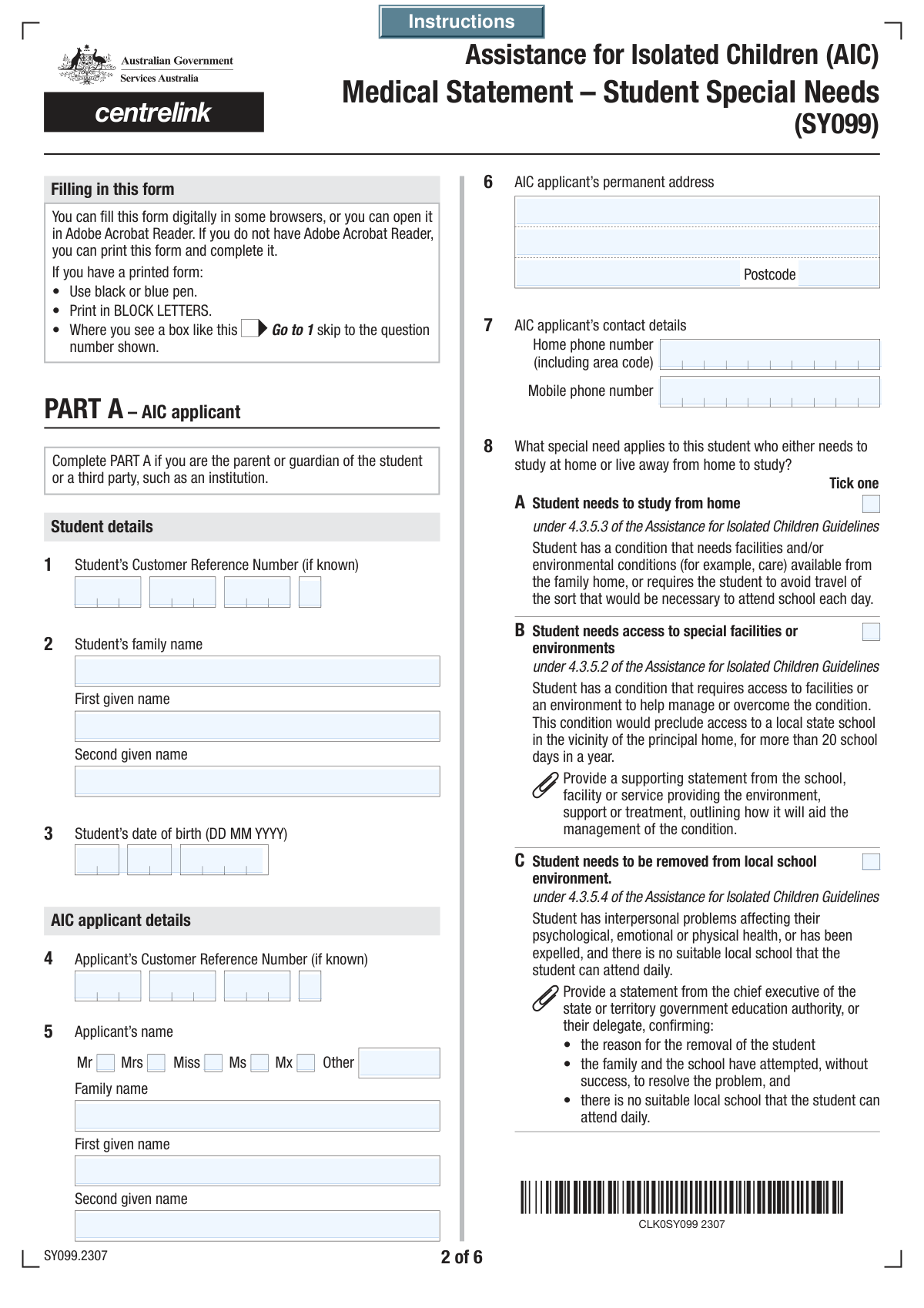
- The applicant provides their personal details and the student's information, including names, date of birth, and Customer Reference Numbers (CRN).
- The designated medical practitioner or allied health professional enters their contact details, professional role, qualifications, and registration information.
- The medical professional provides a detailed diagnosis, describes the condition's duration and treatment, and specifies the student's special educational needs.
- The professional answers a series of questions to justify why the student cannot attend a local school, detailing the impact of the medical condition.
- The applicant and the medical professional review all entered information for accuracy, sign the respective declarations, and date the form before submission.
Common Mistakes in Completing SY061
The ones the AI is built to catch.
Confusing Student and Applicant Information
Failing to Follow Conditional Logic and Branching Questions
Providing Vague or Insufficient Justifications
Misunderstanding Medical vs. Allied Health Professional Sections
Incorrectly Formatting Reference Numbers and Phone Numbers
Missing Signatures, Dates, or Declaration Checkboxes
Contradictory or Incomplete Yes/No Responses
Incomplete or Incorrectly Distributed Address Information
Failing to Properly Detail Information for Withholding
Incorrectly Identifying the Primary Special Need Category
Frequently Asked Questions About SY061
Is it really free for 7 days?
Can I fill other forms too?
How do I cancel?
How does the AI fill out SY061?
What happens to my information?
How complex is SY061 to fill out?
What is the purpose of this form?
Who needs to complete this form?
What is a Customer Reference Number (CRN) and what if I don't have one?
Which type of medical professional can fill out the second part of the form?
My child is being treated by a psychologist, not a medical doctor. Can they fill out this form?
What information is required if my child's condition is temporary?
What does the 'Release of Medical Information' section mean?
What is the difference between the 'Applicant' and the 'Student' on the form?
Do I need to attach any other documents?
Can I use an AI tool to help fill out this form?
How can I fill out this form online using Instafill.ai?
The PDF I have is not fillable. What should I do?
Get your SY061 filled out by AI
$0 today. Cancel before Nov 10 and you pay nothing.
Other forms like this one
medical forms: Form OWCP-915, Claim for Medical Reimbursement, Form 8994, Employer Credit for Paid Family and Medical Leave, Form OF-178, Certificate of Medical Examination, Form N-648, Medical Certification for Disability Exceptions, U.S. Coast Guard Form CG-719K, Application for Medical Certificate, The Department of Medical Assistance Services Applied Behavior Analysis Preservice Service Authorization Request Form (Effective Dates of Service 09/01/2025 and after), State of Illinois Department of Children and Family Services Medical Report on an Adult in a Child Care Facility (CFS 602), Carer Payment and Carer Allowance – Medical Report (SA431) for a child under 16 years, Medically Prescribed Treatment (Non-Medication) Form — Provider Treatment Order Form | Office of School Health | School Year 2025–2026, VA Form 10-7959f-2, Foreign Medical Program (FMP) Claim Cover Sheet, Department of Medical Assistance Services Applied Behavior Analysis (97155, Et al.) Initial Service Authorization Request Form, Applied Behavior Analysis Concurrent Service Authorization Request Form (CPT Codes 97153, 97154, 97155, 97156, 97157, 97158, 0373T) – Virginia Department of Medical Assistance Services, Department of Medical Assistance Services Enhanced Services Individual Service Plan (ISP) Template, Form DS-1843, Medical History and Examination for Individuals Age 12 and Older, Scheduled Medical Leave of Absence (MLOA) - BLET 13, Admissions Application, School of Diagnostic Imaging, Mills-Peninsula Medical Center, Albany Medical Center 2024 Benefits Guide, Form BWC-1141, Request for Medical Information, VA Form 21P-8416, Medical Expense Report, Medicare Enrollment Application for Durable Medical Equipment, Prosthetics, Orthotics, and Supplies (DMEPOS) Suppliers, CMS-855S
VA medical forms: Form OWCP-915, Claim for Medical Reimbursement, Form 8994, Employer Credit for Paid Family and Medical Leave, Form OF-178, Certificate of Medical Examination, Form N-648, Medical Certification for Disability Exceptions, U.S. Coast Guard Form CG-719K, Application for Medical Certificate, The Department of Medical Assistance Services Applied Behavior Analysis Preservice Service Authorization Request Form (Effective Dates of Service 09/01/2025 and after), State of Illinois Department of Children and Family Services Medical Report on an Adult in a Child Care Facility (CFS 602), Carer Payment and Carer Allowance – Medical Report (SA431) for a child under 16 years, Medically Prescribed Treatment (Non-Medication) Form — Provider Treatment Order Form | Office of School Health | School Year 2025–2026, VA Form 10-7959f-2, Foreign Medical Program (FMP) Claim Cover Sheet, Department of Medical Assistance Services Applied Behavior Analysis (97155, Et al.) Initial Service Authorization Request Form, Applied Behavior Analysis Concurrent Service Authorization Request Form (CPT Codes 97153, 97154, 97155, 97156, 97157, 97158, 0373T) – Virginia Department of Medical Assistance Services, Department of Medical Assistance Services Enhanced Services Individual Service Plan (ISP) Template, Form DS-1843, Medical History and Examination for Individuals Age 12 and Older, Scheduled Medical Leave of Absence (MLOA) - BLET 13, Admissions Application, School of Diagnostic Imaging, Mills-Peninsula Medical Center, Albany Medical Center 2024 Benefits Guide, Form BWC-1141, Request for Medical Information, VA Form 21P-8416, Medical Expense Report, Medicare Enrollment Application for Durable Medical Equipment, Prosthetics, Orthotics, and Supplies (DMEPOS) Suppliers, CMS-855S
Medi-Cal forms: Form OWCP-915, Claim for Medical Reimbursement, Form 8994, Employer Credit for Paid Family and Medical Leave, Form OF-178, Certificate of Medical Examination, Form N-648, Medical Certification for Disability Exceptions, U.S. Coast Guard Form CG-719K, Application for Medical Certificate, The Department of Medical Assistance Services Applied Behavior Analysis Preservice Service Authorization Request Form (Effective Dates of Service 09/01/2025 and after), State of Illinois Department of Children and Family Services Medical Report on an Adult in a Child Care Facility (CFS 602), Carer Payment and Carer Allowance – Medical Report (SA431) for a child under 16 years, Medically Prescribed Treatment (Non-Medication) Form — Provider Treatment Order Form | Office of School Health | School Year 2025–2026, VA Form 10-7959f-2, Foreign Medical Program (FMP) Claim Cover Sheet, ABA Authorization Request (Medi-Cal) – Initial and Concurrent Requests, Department of Medical Assistance Services Applied Behavior Analysis (97155, Et al.) Initial Service Authorization Request Form, Applied Behavior Analysis Concurrent Service Authorization Request Form (CPT Codes 97153, 97154, 97155, 97156, 97157, 97158, 0373T) – Virginia Department of Medical Assistance Services, Department of Medical Assistance Services Enhanced Services Individual Service Plan (ISP) Template, Form DS-1843, Medical History and Examination for Individuals Age 12 and Older, Scheduled Medical Leave of Absence (MLOA) - BLET 13, Admissions Application, School of Diagnostic Imaging, Mills-Peninsula Medical Center, Albany Medical Center 2024 Benefits Guide, Form BWC-1141, Request for Medical Information, VA Form 21P-8416, Medical Expense Report
PA state forms: Form 1095-A, Health Insurance Marketplace Statement, Form W-2, Wage and Tax Statement, Form 593, Real Estate Withholding, Form 8938, Statement of Specified Foreign Financial Assets, Form CMS-2567, Statement of Deficiencies, Form 1098, Mortgage Interest Statement, Form 1098-T, Tuition Statement, Form 1099-S, Proceeds From Real Estate Transactions, Form 1098-E, Student Loan Interest Statement, Form DS-3053, Statement of Consent, Form DS-86, Statement of Non-Receipt of a U.S. Passport, Form DS-86, Statement of Non-Receipt of a U.S. Passport, Form 108, Statement of Intention, Form 107, Statement of Financial Affairs, Form 121, Statement About Your SSNs, Form 122A-1, Chapter 7 Statement of Current Monthly Income, Center for Infertility & Reproductive Surgery – New Patient Questionnaire and Patient/Guarantor Statement (Brigham and Women’s Hospital, Department of Obstetrics and Gynecology), Adult Travel Document Application for Stateless and Protected Persons in Canada (16 years of age or over) (PPTC 190), Form W-8IMY (Rev. October 2021), Certificate of Foreign Intermediary, Foreign Flow-Through Entity, or Certain U.S. Branches for United States Tax Withholding and Reporting, Form W-2, Wage and Tax Statement (2025)
medical assistance forms: Department of Medical Assistance Services Applied Behavior Analysis (97155, Et al.) Initial Service Authorization Request Form, The Department of Medical Assistance Services Applied Behavior Analysis Preservice Service Authorization Request Form (Effective Dates of Service 09/01/2025 and after), Applied Behavior Analysis Concurrent Service Authorization Request Form (CPT Codes 97153, 97154, 97155, 97156, 97157, 97158, 0373T) – Virginia Department of Medical Assistance Services, Department of Medical Assistance Services Enhanced Services Individual Service Plan (ISP) Template, Form HFS 2243, Provider Enrollment Application Illinois Medical Assistance Program, Addendum for Maryland Medical Assistance Program Application School Based Health Center
NJ state forms: Form 1095-A, Health Insurance Marketplace Statement, Form W-2, Wage and Tax Statement, Form 593, Real Estate Withholding, Form 8938, Statement of Specified Foreign Financial Assets, Form CMS-2567, Statement of Deficiencies, Form 1098, Mortgage Interest Statement, Form 1098-T, Tuition Statement, Form 1099-S, Proceeds From Real Estate Transactions, Form 1098-E, Student Loan Interest Statement, Form DS-3053, Statement of Consent, Form DS-86, Statement of Non-Receipt of a U.S. Passport, Form DS-86, Statement of Non-Receipt of a U.S. Passport, Form 108, Statement of Intention, Form 107, Statement of Financial Affairs, Form 121, Statement About Your SSNs, Form 122A-1, Chapter 7 Statement of Current Monthly Income, Center for Infertility & Reproductive Surgery – New Patient Questionnaire and Patient/Guarantor Statement (Brigham and Women’s Hospital, Department of Obstetrics and Gynecology), Adult Travel Document Application for Stateless and Protected Persons in Canada (16 years of age or over) (PPTC 190), Form W-8IMY (Rev. October 2021), Certificate of Foreign Intermediary, Foreign Flow-Through Entity, or Certain U.S. Branches for United States Tax Withholding and Reporting, Form W-2, Wage and Tax Statement (2025)
state ID forms: Application for Renewal or Duplicate of Alabama Driver License or ID card, Form 1095-A, Health Insurance Marketplace Statement, Form W-2, Wage and Tax Statement, Form 593, Real Estate Withholding, Form 8938, Statement of Specified Foreign Financial Assets, Form CMS-2567, Statement of Deficiencies, Form 1098, Mortgage Interest Statement, Form 1098-T, Tuition Statement, Form 1099-S, Proceeds From Real Estate Transactions, Form 1098-E, Student Loan Interest Statement, Form DS-3053, Statement of Consent, Form DS-86, Statement of Non-Receipt of a U.S. Passport, Form 108, Statement of Intention, Form 107, Statement of Financial Affairs, Form 121, Statement About Your SSNs, Form 122A-1, Chapter 7 Statement of Current Monthly Income, Center for Infertility & Reproductive Surgery – New Patient Questionnaire and Patient/Guarantor Statement (Brigham and Women’s Hospital, Department of Obstetrics and Gynecology), Adult Travel Document Application for Stateless and Protected Persons in Canada (16 years of age or over) (PPTC 190), Form W-8IMY (Rev. October 2021), Certificate of Foreign Intermediary, Foreign Flow-Through Entity, or Certain U.S. Branches for United States Tax Withholding and Reporting, Form W-2, Wage and Tax Statement (2025)
Let AI fill out your SY061
Your trial starts once a card is added. You pay nothing before Nov 10.
Our AI already knows this form, all 117 fields of it. Skip the typing: tell it about yourself, or upload what you have, and it fills the whole form in seconds.
- AI fills every field on all 6 pages, checkboxes included
- No typing into boxes: answer a few questions, or upload your insurance card, an old copy of this form, a photo of a document
- The AI checks the answers; you review and change anything before you download
- Download the finished PDF, print it, or sign it online
- Encrypted, and never used to train AI
Cancel before Nov 10 and you pay nothing.
A card is needed to start the trial. Cancel in two clicks from your account.
Terms · Privacy