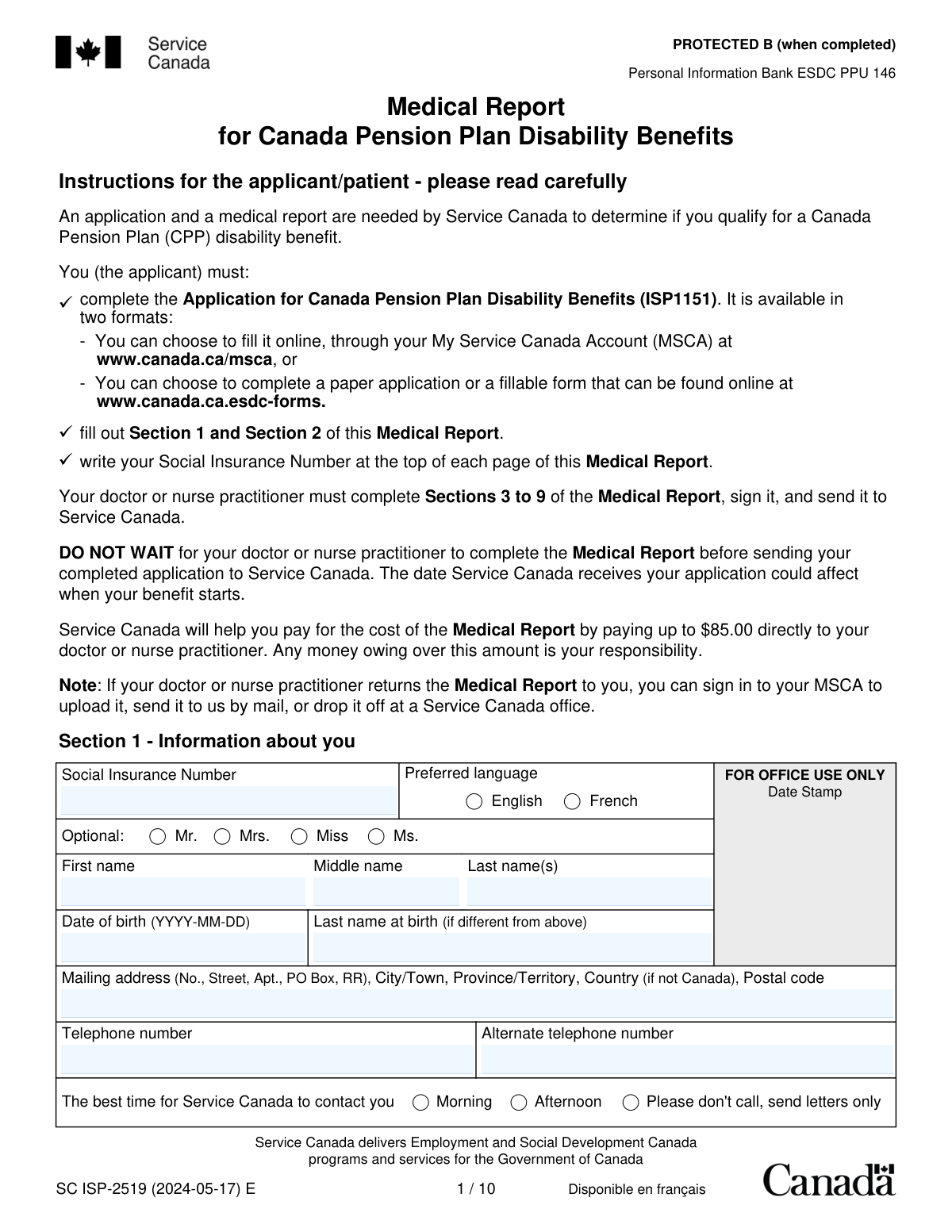
Yes! You can use AI to fill out SC ISP-2519, Medical Report for Canada Pension Plan Disability Benefits

SC ISP-2519 is Service Canada’s official medical report used to assess whether a person meets the CPP disability definition of “severe and prolonged.” It captures the applicant’s identifying information and consent for Service Canada to collect relevant third‑party information, and it requires a clinician to document diagnoses, functional limitations, prognosis, treatment, and supporting records. This report is important because Service Canada relies on it—along with the CPP disability application (ISP1151)—to determine eligibility and benefit start timing. In some cases (terminal or listed grave conditions), it supports expedited processing.
Our AI automatically handles information lookup, data retrieval, formatting, and form filling.
It takes less than a minute to fill out ISP-2519 using our AI form filling.
Securely upload your data. Information is encrypted in transit and deleted immediately after the form is filled out.

Form specifications

Form name: SC ISP-2519, Medical Report for Canada Pension Plan Disability Benefits
Number of pages: 15
Filled form examples: Form ISP-2519 Examples
Language: English
Categories: disability forms
main-image

Instafill Demo: filling out a legal form in seconds

How to Fill Out ISP-2519 Online for Free in 2026

Are you looking to fill out a ISP-2519 form online quickly and accurately? Instafill.ai offers the #1 AI-powered PDF filling software of 2026, allowing you to complete your ISP-2519 form in just 37 seconds or less.
Follow these steps to fill out your ISP-2519 form online using Instafill.ai:
  1. 1 Confirm you are using the correct form (SC ISP-2519) and start/submit your CPP Disability application separately (ISP1151) via My Service Canada Account (MSCA) or paper—do not wait for the medical report to be finished before submitting the application.
  2. 2 Enter your Social Insurance Number (SIN) at the top of each page and complete Section 1 (personal details, contact information, preferred language, and best time to contact).
  3. 3 Complete Section 2 (consent) by selecting either consent or no-consent, then sign and date; if signing with a mark, have a witness complete the witness fields.
  4. 4 Provide the partially completed form to your doctor or nurse practitioner and ensure they complete Sections 3–9 (relationship duration, any terminal/grave condition screening, medical conditions with ICD-9-CM codes, impairments, functional limitations, prognosis, treatments, and employment-related medical expectations).
  5. 5 Ask the clinician to attach copies of relevant supporting documents (e.g., specialist reports, investigation results, hospital discharge summaries, longitudinal notes) and to identify them in Section 8.
  6. 6 Ensure the clinician signs and dates Section 9 (declaration) and includes their name, role (physician/NP, etc.), and contact details; if invoicing Service Canada for the report, ensure the invoice includes required identifiers (BN or GST/HST number or SIN).
  7. 7 Submit the completed medical report to Service Canada as instructed (typically the clinician sends it directly; if returned to you, upload via MSCA, mail it, or drop it off at a Service Canada office) and keep copies for your records.

Our AI-powered system ensures each field is filled out correctly, reducing errors and saving you time.

Why Choose Instafill.ai for Your Fillable ISP-2519 Form?

Speed

Complete your ISP-2519 in as little as 37 seconds.

Up-to-Date

Always use the latest 2026 ISP-2519 form version.

Cost-effective

No need to hire expensive lawyers.

Accuracy

Our AI performs 10 compliance checks to ensure your form is error-free.

Security

Your personal information is protected with bank-level encryption.

Frequently Asked Questions About Form ISP-2519

This Medical Report provides medical information Service Canada needs to decide whether you qualify for Canada Pension Plan (CPP) disability benefits. It is submitted along with your CPP disability application.

Yes. Service Canada needs both the Application for Canada Pension Plan Disability Benefits (ISP1151) and this Medical Report (ISP-2519) to assess eligibility.

You (the applicant/patient) must complete Sections 1 and 2 and write your Social Insurance Number (SIN) at the top of each page. Your doctor or nurse practitioner must complete Sections 3 to 9, sign the declaration, and send the report to Service Canada.

No. The form instructs you not to wait—send your completed application as soon as possible because the date Service Canada receives it can affect when benefits start.

You must write your SIN at the top of each page of the Medical Report. This helps ensure all pages are correctly matched to your file.

In Section 1, you can select “Please don't call, send letters only” and indicate the best time to contact you if you do want phone calls. Providing accurate contact details can help avoid delays.

Section 2 authorizes Service Canada to collect relevant medical and other personal information from listed third parties to assess your eligibility and possible appeals. You must choose either “I give my consent” or “I do not give my consent,” or processing may be delayed.

Service Canada may decide your case based only on the information already in your file and may require you to provide missing information. If you are already receiving benefits, they may stop payments if they cannot confirm ongoing eligibility.

The signed consent is valid for up to 5 years unless you cancel it in writing. You can submit an original signed copy, a scan, a photocopy, or a fax.

Yes. Service Canada will pay up to $85 directly to the doctor or nurse practitioner; any amount above $85 is your responsibility.

They must submit the completed report and an invoice that includes the patient’s name, address, and identification number, plus a Business Number (BN) or GST/HST number or the provider’s SIN. Without these numbers, the invoice cannot be processed.

Yes. If your provider returns it to you, you can upload it through your My Service Canada Account (MSCA), mail it, or drop it off at a Service Canada office.

If the doctor confirms a terminal illness (expected to result in death within 6 months) or a “grave” condition listed in Annex A, the application may be prioritized. Service Canada’s goal is to make a decision within 5 business days for terminal illness cases and within 30 calendar days for grave conditions once a complete application (including the Medical Report) is received.

Section 8 allows the provider to include copies of relevant records such as longitudinal clinical notes, investigation reports, specialist reports, and hospital discharge summaries. Including supporting documents can help Service Canada understand the diagnosis, treatment, and functional limitations.

The report is mailed to the Service Canada Disability office that serves the province/territory where you live (addresses are listed on the form). If you live outside Canada, it should be mailed to the office serving the province/territory where you last lived in Canada.

Compliance ISP-2519
Validation Checks by Instafill.ai

1
Validates Social Insurance Number (SIN) format and presence on all pages/sections
Checks that the applicant SIN is provided and matches the Canadian SIN format (9 digits, optionally spaced) and passes the SIN check-digit (Luhn) validation. Because the form instructs the applicant to write the SIN at the top of each page, the system should also verify the SIN is present/consistent across all captured pages/sections. If the SIN is missing, malformed, or inconsistent, the submission should be rejected or routed to manual review because it cannot be reliably matched to the correct applicant file.
2
Ensures Section 1 required identity fields are complete
Validates that required personal identity fields in Section 1 are present: preferred language selection, name (first and last), date of birth, and mailing address components. These fields are essential for identity verification, correspondence, and service delivery. If any required field is blank, the system should flag the submission as incomplete and prevent processing until corrected.
3
Validates preferred language selection is exactly one option
Checks that the preferred language field has exactly one selection (English or French) and not both or neither. This ensures communications and notices are issued in the correct official language and avoids downstream rework. If validation fails, the form should be returned for correction or defaulted only under a documented business rule with an audit trail.
4
Validates applicant date of birth format and plausibility
Ensures the date of birth is in YYYY-MM-DD format and represents a real calendar date. Also checks plausibility (e.g., not in the future and within a reasonable human age range) to reduce identity errors and data entry mistakes. If invalid, the system should block submission or require confirmation/correction before acceptance.
5
Validates mailing address completeness and Canadian postal code rules
Checks that the mailing address includes street/PO box details, city/town, province/territory, and postal code; if country is not Canada, a country value must be present and postal code rules should be relaxed accordingly. For Canadian addresses, validates postal code format (A1A 1A1) and that province/territory is one of the valid Canadian abbreviations. If the address is incomplete or inconsistent (e.g., Canada selected but non-Canadian postal code), the submission should be flagged because correspondence may fail.
6
Validates telephone numbers format and contact preference consistency
Validates that telephone and alternate telephone numbers (if provided) follow acceptable formats (e.g., North American numbering plan for Canada/US, or E.164 if international is allowed) and contain enough digits to be dialable. Also checks that if “Please don't call, send letters only” is selected, phone numbers are optional and the system does not require a “best time to contact.” If phone formats are invalid or contact preference conflicts exist, the system should prompt correction to avoid failed outreach.
7
Ensures Section 2 consent choice is selected (exactly one)
Checks that the applicant selected either “I give my consent” or “I do not give my consent,” but not both and not neither. The form explicitly states failure to choose an option may delay processing, so this must be enforced as a required decision. If missing/ambiguous, the submission should be treated as incomplete and held until clarified.
8
Validates applicant/representative signature and consent date
Ensures the consent section includes a signature (or acceptable electronic signature indicator per channel rules) and a date in YYYY-MM-DD format. Also checks the date is not in the future and is reasonably close to the submission date to support authenticity and auditability. If signature or date is missing/invalid, the consent is not legally reliable and the form should be rejected or routed for remediation.
9
Conditional witness completion when applicant signs with a mark
If the applicant signature is indicated as a mark (e.g., “X”) or the system flags a non-standard signature type, validates that the witness block is fully completed: witness name, telephone number, witness signature, and witness date (YYYY-MM-DD). This is required to support informed consent when the applicant cannot sign normally. If the witness section is incomplete when required, the submission should be rejected as non-compliant.
10
Validates Section 3 relationship timeline and visit count logic
Checks that one duration-of-care option is selected and that the number of visits in the past 12 months is a non-negative integer within a reasonable range. Validates that “date of last office visit” and “date first started treating primary condition” are in YYYY-MM-DD format and that first-treating date is not after the last visit date. If dates are illogical or visit counts are invalid, the system should flag for correction because it undermines the credibility of the medical history timeline.
11
Validates Section 4 terminal condition details when ‘Terminal = Yes’
If terminal is marked “Yes,” requires completion of diagnosis, ICD-9-CM code in the XXX.X pattern, and symptom onset in YYYY-MM format. Also validates that symptom onset is not in the future and is not after key clinical dates (e.g., last office visit) when those are provided. If required terminal details are missing or malformed, expedited processing cannot be applied and the submission should be flagged.
12
Validates Section 5 medical condition entries: required fields and ICD-9-CM format
For each medical condition page used, checks that medical condition name, ICD-9-CM code (XXX.X), and symptom onset (YYYY-MM) are provided, along with impairment(s) and functional limitation(s) narrative. These are core elements for assessing severity and employability under CPP disability criteria. If any required elements are missing or ICD code/onset format is invalid, the system should mark the report incomplete and request completion.
13
Validates Section 5 prognosis/duration/frequency selections and ‘unknown’ explanation requirement
Ensures exactly one prognosis option is selected (improve/deteriorate/remain the same/unknown), exactly one expected duration option is selected, and exactly one frequency option is selected. If prognosis or frequency is marked “unknown,” requires an explanation in Section 7 as instructed on the form. If selections are missing/multiple or the required Section 7 explanation is absent, the submission should be flagged because it prevents a complete adjudication.
14
Validates treatment and medication date ranges and ordering
For each medication and other treatment row, validates start and end dates are in YYYY-MM format (or a permitted value such as “Ongoing” if supported) and that end date is not earlier than start date. This prevents impossible treatment timelines and supports accurate assessment of response to therapy. If date ordering fails or formats are invalid, the system should require correction or route to manual review.
15
Validates Section 6 employment recommendations and return-to-work branching logic
If the provider answered “Yes” to recommending the patient stop working, requires a stop-work date in YYYY-MM-DD format and ensures it is not in the future. If the patient is marked terminal in Section 4, validates that the remainder of Section 6 is blank or ignored per instructions; otherwise, enforces that questions 2–4 follow the branching rules (e.g., if Q2=Yes then Q3 and Q4 must be completed; if Q2=No/Unknown then Q3/Q4 must be empty). If branching is inconsistent, the system should flag the section as internally contradictory.
16
Validates Section 9 provider declaration: provider type, identity, and signature/date
Ensures the medical professional selected exactly one provider type (or provided a specialty when ‘other physician specialist’ is chosen), and that name, address/telephone, signature, and date (YYYY-MM-DD) are present. This is necessary to establish authorship, professional accountability, and a valid attestation of accuracy. If any declaration elements are missing or the date is invalid/future-dated, the report should be considered unsigned and not acceptable for adjudication.

Common Mistakes in Completing ISP-2519

Not writing the Social Insurance Number (SIN) on every page

Applicants often write the SIN only in Section 1 and miss the instruction to put it at the top of each page. Pages can become separated during scanning or mail handling, and missing SINs can prevent Service Canada from matching medical information to the correct file. To avoid delays, write the SIN in the designated header area on all pages before the form leaves your hands (or confirm the clinic has done it if they complete the package).

Using the wrong date format (or leaving dates incomplete)

This form requires specific formats such as YYYY-MM-DD (full date) and YYYY-MM (month/year) depending on the field, but people frequently enter DD/MM/YYYY, write only a year, or use words like “ongoing” in date boxes. Incorrect or partial dates can trigger follow-ups, slow adjudication, and weaken the timeline of disability onset and treatment. Always follow the exact format shown beside each field and, if a date is unknown, provide the best estimate and explain in Section 7 when prompted.

Failing to choose a consent option in Section 2

Section 2 requires selecting either “I give my consent” or “I do not give my consent,” but applicants sometimes sign and date without checking a box. The form explicitly warns that not choosing an option can delay processing or affect benefit amount determinations. To avoid this, check exactly one consent option, then sign and date; if you decline consent, be prepared to supply supporting information yourself to prevent gaps.

Missing signatures, dates, or witness details (when signing with a mark)

Common omissions include an unsigned consent, an undated signature, or forgetting the witness section when the applicant signs with an “X” or other mark. Missing execution details can invalidate the consent and force Service Canada to request corrections, delaying the medical decision. Ensure the applicant (or authorized representative) signs and dates Section 2, and if a mark is used, the witness must print their name, provide a phone number, sign, and date.

Applicant completes (or alters) Sections 3–9 meant for the clinician

Because the package is long, applicants sometimes fill in clinical sections themselves, or clinics allow patients to pre-fill medical content that should be professional opinion. This can reduce credibility, create inconsistencies, and lead to requests for clarification or a weaker medical record. To avoid this, the applicant should complete only Sections 1–2, and the doctor/nurse practitioner should complete Sections 3–9 in their own words and sign the declaration.

Submitting an incomplete package (missing pages or removing pages/annexes incorrectly)

Clinics sometimes return only the “relevant” pages, or applicants mail partial sections, despite the instruction that all 10 pages must be returned and no pages removed. Missing pages can result in the report being treated as incomplete and can pause processing until the full report is received. Return the entire 10-page medical report; only remove the annexes (A–C) before mailing, as instructed.

Misusing Section 4 expedited processing (terminal/grave) or not providing required details

Providers sometimes check “terminal” without meeting the CPP definition (expected death within 6 months), or they skip the required diagnosis/ICD-9-CM code/onset date fields. Incorrect use can cause confusion, re-triage, and follow-up requests that negate the intended speed of expedited handling. Only complete Section 4 when criteria are met, and include the diagnosis, ICD-9-CM code, and symptom onset date; otherwise skip directly to Section 5.

Listing diagnoses without functional limitations (or mixing up impairment vs limitation)

A frequent issue in Section 5 is documenting medical conditions and test results but not clearly describing how symptoms restrict work-related functioning (e.g., sitting, standing, concentration, stress tolerance). CPP disability decisions consider severity and employability, so missing functional limitations can make the file look medically “diagnosed” but not “disabling.” Use Section 5 to separate impairments (clinical findings) from functional limitations (what the person cannot reliably do), and quantify limits (time, frequency, weight, pace) using Annex B examples.

Leaving prognosis, expected duration, or frequency blank (especially when marked 'unknown')

Section 5 requires selecting prognosis, expected duration, and frequency, but forms are often returned with these fields empty or “unknown” checked without explanation. This weakens the “prolonged” analysis and can lead to requests for more information. If prognosis or frequency is unknown, explicitly explain why in Section 7 (e.g., pending investigations, new treatment trial, specialist consult not yet completed).

Incomplete treatment history (missing dosages, start/end dates, response, or side effects)

People often list medications or therapies without dosage, frequency, dates, or whether they helped, and may omit side effects that limit function. Service Canada assesses whether treatment has been tried/optimized and what residual limitations remain, so vague treatment entries can delay decisions or prompt additional medical requests. For each medication and therapy, include dosage and frequency, start/end (or “ongoing” with an estimated end date if applicable), and a brief response statement (efficacy, intolerance, adverse effects).

Employment section inconsistencies (skipping required follow-ups or not following skip logic)

In Section 6, providers sometimes answer “Yes” to expecting a return to work but leave questions 3–4 blank, or they continue the section even when the form instructs them to skip it for terminal conditions. Inconsistent answers create ambiguity about work capacity and can trigger clarification requests. Follow the skip instructions exactly: if terminal, skip the rest of Section 6; if “Yes” to return to work, complete both timing (Q3) and type of work (Q4).
Saved over 80 hours a year

“I was never sure if my IRS forms like W-9 were filled correctly. Now, I can complete the forms accurately without any external help.”

Kevin Martin Green

Your data stays secure with advanced protection from Instafill and our subprocessors

Robust compliance program

Transparent business model

You’re not the product. You always know where your data is and what it is processed for.

ISO 27001, HIPAA, and GDPR

Our subprocesses adhere to multiple compliance standards, including but not limited to ISO 27001, HIPAA, and GDPR.

Security & privacy by design

We consider security and privacy from the initial design phase of any new service or functionality. It’s not an afterthought, it’s built-in, including support for two-factor authentication (2FA) to further protect your account.

Fill out ISP-2519 with Instafill.ai

Worried about filling PDFs wrong? Instafill securely fills sc-isp-2519-medical-report-for-canada-pension-plan forms, ensuring each field is accurate.