Yes! You can use AI to fill out Medicare Enrollment Application - Enrollment for Eligible Ordering/Certifying Physicians and Other Eligible Professionals, Form CMS-855O

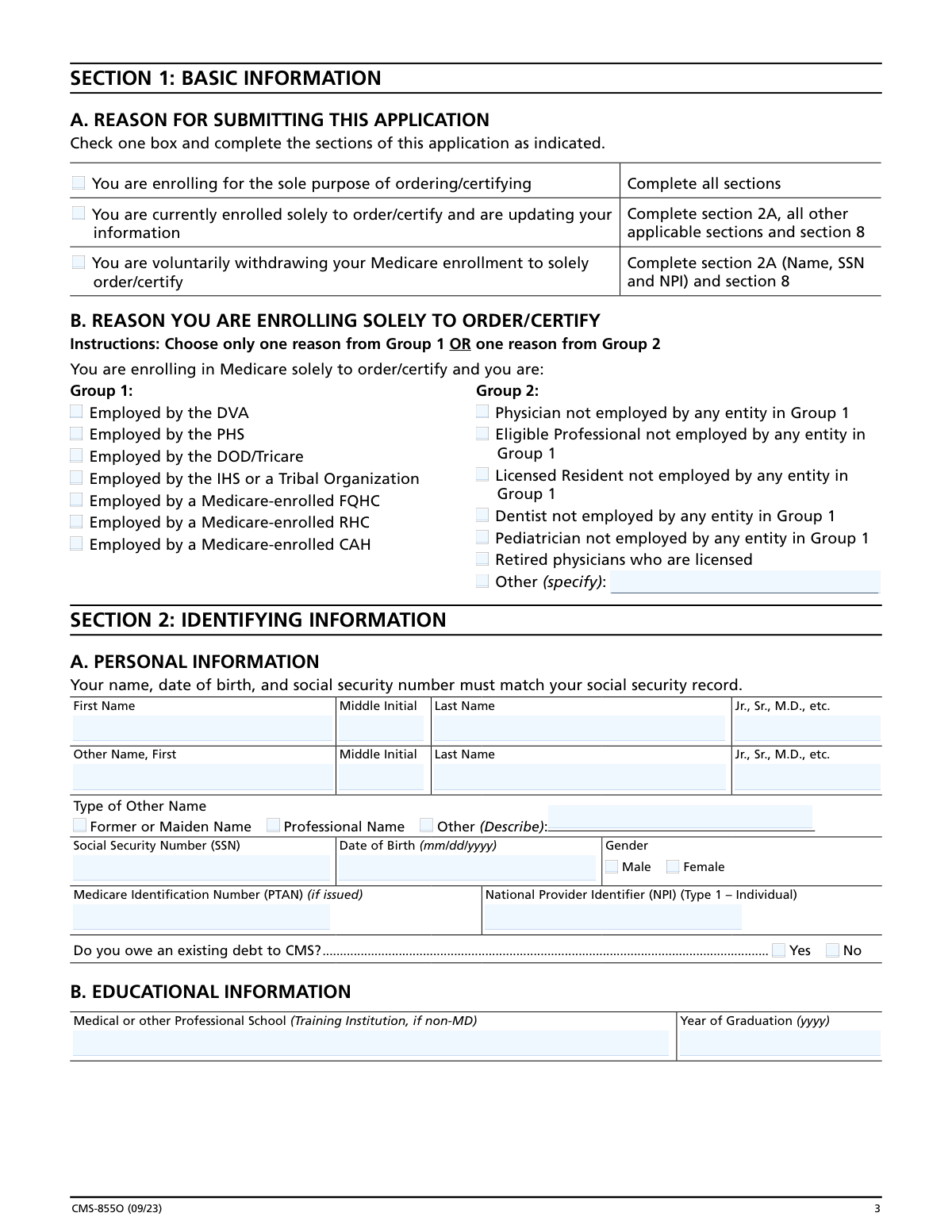
Form CMS-855O is an official Centers for Medicare & Medicaid Services (CMS) application that allows physicians and eligible professionals—such as those employed by the VA, DOD, Indian Health Service, or working as licensed residents, dentists, or pediatricians—to enroll in Medicare exclusively to order or certify items and services for beneficiaries, without submitting claims for reimbursement. The form collects personal identifying information, educational background, license and certification details, specialty information, correspondence address, and requires a signed certification statement attesting to compliance with Medicare laws. It is a critical document for ensuring that only properly enrolled providers can authorize Medicare-covered items and services, helping to reduce fraud and protect beneficiaries. Today, this form can be filled out quickly and accurately using AI-powered services like Instafill.ai, which can also convert non-fillable PDF versions into interactive fillable forms.
Our AI automatically handles information lookup, data retrieval, formatting, and form filling.
It takes less than a minute to fill out CMS-855O using our AI form filling.
Securely upload your data. Information is encrypted in transit and deleted immediately after the form is filled out.

Form specifications

Form name: Medicare Enrollment Application - Enrollment for Eligible Ordering/Certifying Physicians and Other Eligible Professionals, Form CMS-855O
Number of pages: 1
Language: English
Categories: CAR forms, healthcare provider forms, CMS forms, physician forms, enrollment forms, L.A. Care forms, enrollment application forms, Medicare forms
main-image

Instafill Demo: How to fill out PDF forms in seconds with AI

How to Fill Out CMS-855O Online for Free in 2026

Are you looking to fill out a CMS-855O form online quickly and accurately? Instafill.ai offers the #1 AI-powered PDF filling software of 2026, allowing you to complete your CMS-855O form in just 37 seconds or less.
Follow these steps to fill out your CMS-855O form online using Instafill.ai:
  1. 1 Navigate to Instafill.ai and either upload the CMS-855O PDF or search for and select the form from the available form library.
  2. 2 Complete Section 1 by selecting your reason for submitting the application (new enrollment, updating information, or voluntary withdrawal) and indicating your reason for enrolling solely to order/certify from Group 1 or Group 2.
  3. 3 Fill out Section 2 with your personal identifying information (name, SSN, date of birth, gender, NPI, PTAN), educational background, and license/certification/DEA registration details, ensuring your name matches your Social Security record.
  4. 4 Complete Section 3 by disclosing any final adverse legal actions, including federal or state convictions, exclusions, license revocations, or suspensions within the applicable timeframes.
  5. 5 Select your primary physician specialty in Section 4A or your eligible professional specialty in Section 4B, then provide your correspondence mailing address in Section 5 and optional contact person information in Section 6.
  6. 6 Review Section 7 carefully to understand the penalties for falsifying information on the application.
  7. 7 Sign and date the Certification Statement in Section 8, then submit the completed application along with all required supporting documentation to your designated Medicare Administrative Contractor (MAC).

Our AI-powered system ensures each field is filled out correctly, reducing errors and saving you time.

Why Choose Instafill.ai for Your Fillable CMS-855O Form?

Speed

Complete your CMS-855O in as little as 37 seconds.

Up-to-Date

Always use the latest 2026 CMS-855O form version.

Cost-effective

No need to hire expensive lawyers.

Accuracy

Our AI performs 10 compliance checks to ensure your form is error-free.

Security

Your personal information is protected with bank-level encryption.

Frequently Asked Questions About Form CMS-855O

The CMS-855O is a Medicare Enrollment Application specifically for physicians and eligible professionals who want to enroll in Medicare solely for the purpose of ordering or certifying items and/or services for Medicare beneficiaries. Unlike the CMS-855I, this form does not allow you to bill Medicare for services — it only grants you the ability to order or certify covered items and services.

Physicians and eligible professionals who need to order or certify Medicare items/services but do not bill Medicare directly should complete this form. This includes those employed by the DVA, DOD/Tricare, Public Health Service, Indian Health Service, FQHCs, RHCs, CAHs, licensed residents, dentists, pediatricians, and retired licensed physicians, among others.

Yes, you must obtain an NPI before enrolling in Medicare using the CMS-855O. You can apply for an NPI online at NPPES.cms.hhs.gov. Applying for an NPI is a separate process from Medicare enrollment, and your NPI must be included on this application.

The LBN and TIN you provide in Section 2A must exactly match the LBN and TIN you used when obtaining your NPI in NPPES. Once entered into PECOS, your LBN, TIN, and NPI must match exactly in both PECOS and NPPES, so it is critical that these are consistent across all systems.

No, the form must be typed — handwritten forms are not accepted. If portions of the form are handwritten, your Medicare Administrative Contractor (MAC) may return the application to you, causing delays in your enrollment.

If you are enrolling for the first time, you must complete all sections of the form. If you are updating existing information, you must complete Section 2A and all other applicable sections plus Section 8. If you are voluntarily withdrawing, you only need to complete Section 2A (Name, SSN, and NPI) and Section 8. All fields not specifically marked 'optional' are required.

Yes, Section 3 requires you to disclose all final adverse legal actions, including federal and state convictions within the preceding 10 years, license revocations or suspensions, OIG exclusions, and other federal sanctions. You must report these regardless of whether records were expunged or appeals are pending.

Only you, as the individual practitioner, can sign the application. The authority to sign cannot be delegated to any other person. The signature must be made in ink on Section 8, and the application must be both signed and dated in order to be processed.

You must send the completed application with original signatures and all required documentation to your designated Medicare Administrative Contractor (MAC). The MAC that services your state is responsible for processing your enrollment. To find your MAC's mailing address, visit CMS.gov/Medicare/Provider-Enrollment-and-Certification.

If your MAC requests additional documentation to support or validate information on your application, you are responsible for providing that documentation within 30 days of the request, as required by 42 C.F.R. section 424.525(a)(1). Failure to respond in time may delay or affect your enrollment.

Providing false information on this application can result in serious criminal, civil, and administrative penalties. These include fines up to $250,000 and imprisonment up to five years under 18 U.S.C. section 1001, civil penalties under the False Claims Act of $5,000–$10,000 per violation plus three times the damages, and potential exclusion from the Medicare program.

Yes, AI-powered services like Instafill.ai can help you accurately auto-fill the CMS-855O form fields, saving you time and reducing the risk of errors. Instafill.ai can also convert flat, non-fillable PDF versions of the form into interactive fillable forms, making the process even easier.

To fill out the CMS-855O online, visit Instafill.ai and upload your copy of the form. The AI will guide you through each section, auto-filling fields based on the information you provide. Once complete, you can review, download, and print the form for submission to your designated MAC with an original ink signature.

If your copy of the CMS-855O is a flat, non-fillable PDF, Instafill.ai can convert it into an interactive fillable form so you can type your responses directly into the document. This ensures your application is typed (as required) and neatly completed before submission.

According to the Paperwork Reduction Act notice on the form, the estimated time to complete the CMS-855O is approximately 30 minutes per response, including reviewing instructions, gathering required data, and completing the form. Having your NPI, SSN, license information, and specialty details ready in advance can help speed up the process.

Compliance CMS-855O
Validation Checks by Instafill.ai

1
Ensures Exactly One Reason for Submission is Selected in Section 1A
The form requires the applicant to check exactly one box in Section 1A indicating whether they are enrolling for the first time, updating existing information, or voluntarily withdrawing. If no box is selected, the application cannot be processed as the MAC will not know which sections are required. If more than one box is selected, the application is ambiguous and may be returned, causing significant enrollment delays.
2
Ensures Exactly One Enrollment Reason is Selected from Either Group 1 or Group 2 in Section 1B
Section 1B requires the applicant to select only one reason for enrolling solely to order/certify, choosing from either Group 1 (federal employment categories) or Group 2 (non-federally employed categories), but not both. Selecting multiple reasons or selecting from both groups simultaneously is invalid and contradictory. Failure to comply with this mutual exclusivity rule may result in the application being returned or rejected by the MAC.
3
Validates Social Security Number (SSN) Format in Section 2A
The SSN entered in Section 2A must conform to the standard nine-digit format (XXX-XX-XXXX), containing only numeric characters with no letters or special characters other than hyphens. The SSN is a critical identifier used to match the applicant's information against Social Security Administration records and PECOS. An incorrectly formatted or invalid SSN will prevent identity verification and cause the application to be rejected or returned.
4
Validates Date of Birth Format and Logical Plausibility in Section 2A
The Date of Birth field in Section 2A must be entered in the mm/dd/yyyy format and must represent a real, plausible calendar date (e.g., month between 01–12, day appropriate for the given month, and year indicating the applicant is of a reasonable age to be a licensed medical professional). A date of birth in the future or one that would make the applicant implausibly young or old should trigger a validation warning. Incorrect date formats or impossible dates will cause a mismatch with Social Security records and delay enrollment.
5
Ensures Applicant Name in Section 2A Matches Social Security Record
The first name, middle initial, and last name provided in Section 2A must exactly match the name on the applicant's Social Security record, as explicitly required by the form instructions. Discrepancies between the name on the application and the Social Security Administration's records will prevent successful identity verification in PECOS. If the name does not match, the MAC may return the application, requiring the applicant to correct and resubmit, causing significant processing delays.
6
Validates National Provider Identifier (NPI) Format and Presence in Section 2A
The NPI entered in Section 2A must be a Type 1 (Individual) NPI, consisting of exactly 10 numeric digits as assigned by NPPES. The NPI is a mandatory field and cannot be left blank, as enrollment in Medicare requires a valid NPI to be on file. If the NPI is missing, incorrectly formatted, or does not correspond to a Type 1 individual identifier, the application will be rejected since the NPI must match exactly between PECOS and NPPES.
7
Ensures LBN, TIN, and NPI Consistency Between Application and NPPES Records
The Legal Business Name (LBN) and Tax Identification Number (TIN) provided in Section 2A must be identical to those used when the applicant obtained their NPI from NPPES. The form explicitly states that once entered into PECOS, the LBN, TIN, and NPI must match exactly in both PECOS and NPPES. Any mismatch between these identifiers across systems will result in enrollment failure and require the applicant to correct either their NPPES record or their application before resubmission.
8
Validates License, Certification, and DEA Registration Dates in Section 2C
All effective dates entered in Section 2C for active licenses, certifications, and DEA registrations must follow the mm/dd/yyyy format and must represent valid, non-future dates (i.e., the license or certification must already be in effect). If a subsection is not applicable, the corresponding 'Not Applicable' checkbox must be checked rather than leaving the fields blank. Submitting expired, future-dated, or improperly formatted credential dates may result in the application being flagged for additional documentation or returned by the MAC.
9
Ensures Specialty Selection Consistency Between Section 2C and Section 4
The license and certification information provided in Section 2C must be appropriate and consistent with the physician specialty or eligible professional type selected in Section 4A or 4B. For example, a Dentist selected in Section 4A should have dental licensure in Section 2C, not a medical license. Inconsistencies between the reported specialty and the credentials provided may raise compliance concerns and prompt the MAC to request additional documentation or return the application.
10
Ensures Exactly One Specialty is Selected in Section 4A or 4B, But Not Both
The applicant must select exactly one primary specialty, either from the physician specialty list in Section 4A or from the eligible professional specialty list in Section 4B, but not from both sections simultaneously. Selecting multiple specialties within a section or selecting from both sections is invalid, as the form explicitly instructs applicants to check only one specialty. Failure to comply will result in an ambiguous application that the MAC cannot process without clarification.
11
Validates Correspondence Mailing Address Completeness and Format in Section 5
All required fields in the correspondence mailing address (Address Line 1, City/Town, State, and ZIP Code) must be completed, and the ZIP Code must follow the standard 5-digit or ZIP+4 (9-digit) numeric format. The address provided cannot be that of a billing agent, billing agency, or medical management company, as explicitly prohibited by the form instructions. An incomplete or prohibited address will prevent the MAC from sending correspondence to the applicant, potentially causing missed communications and enrollment delays.
12
Validates Telephone Number Format in Sections 5 and 6
Telephone numbers entered in the Correspondence Address section (Section 5) and the optional Contact Person section (Section 6) must follow a standard 10-digit U.S. phone number format (e.g., XXX-XXX-XXXX or (XXX) XXX-XXXX) and must not contain letters or invalid special characters. The telephone number in Section 5 is a required field, while the fax number and email address are optional. An invalid or missing required telephone number will impede the MAC's ability to contact the applicant if questions arise during processing.
13
Ensures Final Adverse Legal Action History is Fully Completed in Section 3
If the applicant answers 'YES' to having a final adverse legal action in Section 3C, they must complete the table detailing each action, the date it occurred, and the agency or court that imposed it, and must include all required attachments. Leaving the table incomplete or omitting attachments when adverse actions exist constitutes an incomplete application and may be treated as a misrepresentation. The form explicitly states that Section 3 must be filled out in its entirety to satisfy the reporting requirement, and failure to do so can result in denial of enrollment.
14
Ensures Signature in Section 8B is Provided by the Individual Practitioner Only
The certification statement in Section 8 must be signed and dated by the individual practitioner applying for enrollment, as the authority to sign cannot be delegated to any other person. The signature must be an original ink signature (for paper submissions), and the date must be in mm/dd/yyyy format and must not be a future date. An unsigned or undated application cannot be processed, and a signature by anyone other than the individual practitioner renders the application invalid and potentially fraudulent.
15
Validates Signature Date is Not Prior to Application Completion or in the Future in Section 8B
The date entered in the Date Signed field of Section 8B must be in mm/dd/yyyy format, must represent a valid calendar date, and must not be a future date or an implausibly old date. The signature date should logically align with or follow the dates of any other dated fields on the form, such as the correspondence address change effective date. A missing, future, or illogical signature date will cause the application to be returned as incomplete or invalid by the MAC.
16
Ensures Required Sections Are Completed Based on the Reason for Submission Selected in Section 1A
The sections required to be completed vary depending on the reason for submission checked in Section 1A: new enrollees must complete all sections, those updating information must complete Section 2A and all applicable sections plus Section 8, and those voluntarily withdrawing must complete only Section 2A (Name, SSN, and NPI) and Section 8. Submitting an application with missing required sections based on the selected submission reason will result in the MAC returning the application as incomplete. Conversely, completing unnecessary sections for a withdrawal may not cause rejection but wastes processing time.

Common Mistakes in Completing CMS-855O

Submitting the wrong CMS-855 application form

Many physicians and eligible professionals confuse the CMS-855O with other CMS-855 forms (such as the CMS-855I or CMS-855B). The CMS-855O is specifically for those enrolling solely to order or certify items and services for Medicare beneficiaries — not for those seeking reimbursement. Submitting the wrong form causes significant processing delays and may result in the application being returned entirely. Always verify on page 1 of the application that you are completing the correct form for your specific enrollment purpose, and check CMS.gov for the most current version.

Name mismatch between the application and Social Security records

A very common mistake is entering a name in Section 2A that does not exactly match the name on the applicant's Social Security record. This includes using nicknames, abbreviations, omitting middle names, or failing to include suffixes. Because the MAC cross-references this information, even minor discrepancies can cause the application to be rejected or delayed. Always use your full legal name exactly as it appears on your Social Security card, and double-check spelling before submitting. AI-powered form filling tools like Instafill.ai can help flag name format inconsistencies before submission.

Mismatched Legal Business Name (LBN), TIN, and NPI across PECOS and NPPES

The form explicitly warns that the Legal Business Name and Tax Identification Number entered in Section 2A must exactly match what was used to obtain the NPI in NPPES. Applicants frequently enter a variation of their name or a different TIN than what is registered in NPPES, causing a critical mismatch between PECOS and NPPES records. This mismatch can result in enrollment denial or revocation. Before completing the form, log into NPPES to confirm your exact LBN and TIN on file, and replicate them character-for-character on this application.

Failing to obtain an NPI before submitting the application

Some applicants submit the CMS-855O without first obtaining a Type 1 (Individual) National Provider Identifier, which is a mandatory prerequisite for Medicare enrollment. The NPI must be obtained through NPPES (nppes.cms.hhs.gov) in a separate process before this application can be processed. Submitting without a valid NPI will result in the application being returned or rejected. Ensure your NPI is active and correctly entered in Section 2A before mailing the completed application to your designated MAC.

Selecting the wrong reason for enrollment in Section 1B

Section 1B requires applicants to choose only one reason from either Group 1 (employment-based, e.g., DVA, DOD, IHS) or Group 2 (non-employment-based, e.g., independent physician, dentist, retired physician). Applicants often select multiple reasons or choose from both groups simultaneously, which is not permitted. Selecting an incorrect or ineligible category can lead to processing delays or denial. Carefully read the definitions for each group and select only the single option that most accurately reflects your employment and professional status.

Handwriting portions of the form instead of typing

The instructions explicitly state that this form must be typed and may not be handwritten. Despite this clear requirement, many applicants fill out portions of the form by hand — particularly fields like names, addresses, and dates — either out of habit or because they are working from a printed copy. The MAC is authorized to return any application that contains handwritten entries, causing significant delays in enrollment. Use a computer to complete all fields electronically, or use a fillable PDF version of the form. Instafill.ai can convert flat PDF versions of this form into a fillable digital format to prevent this issue.

Failing to report all Final Adverse Legal Actions in Section 3

Applicants frequently omit adverse legal actions they believe are irrelevant, were expunged, or are under appeal. However, the form explicitly requires that ALL applicable final adverse legal actions be reported regardless of expungement or pending appeals, including convictions, exclusions, license revocations, and suspensions within the preceding 10 years. Omitting this information — even unintentionally — can be treated as deliberate falsification, resulting in criminal or civil penalties. Review all six categories in Section 3 carefully and include all required attachments for each reported action.

Selecting more than one medical specialty in Section 4

Section 4A and 4B each instruct applicants to check only one specialty, yet many applicants check multiple boxes — either because they practice in multiple areas or because they misread the instructions. Selecting more than one specialty can cause the application to be flagged, delayed, or returned for correction. Choose only your primary specialty that aligns with your licensure and the services you will be ordering or certifying. If your specialty is not listed, use the 'Undefined Physician Specialty' or 'Unlisted Practitioner Type' field and provide a specific description.

Using a billing agent or management company address as the correspondence address

Section 5 explicitly states that the correspondence mailing address cannot be a billing agent's, billing agency's, or medical management company's address. Many applicants, particularly those who outsource their administrative functions, mistakenly enter their billing company's address here. This will result in the application being returned or correspondence being sent to an unauthorized party. Always provide your own direct mailing address — such as your practice location or personal address — where you can reliably receive official MAC communications.

Incorrect date format or missing dates in required fields

Throughout the form, dates must be entered in the specific mm/dd/yyyy format, including in Sections 2A (Date of Birth), 2C (License/Certification effective dates), and Section 8B (Date Signed). Applicants commonly enter dates in incorrect formats (e.g., MM/YYYY, DD/MM/YYYY, or abbreviated years), leave date fields blank, or enter illegible dates. Incorrect or missing dates are a leading cause of application delays and returns. Always verify that every date field is completed in the exact mm/dd/yyyy format required. Tools like Instafill.ai can automatically validate and format date fields to prevent these errors.

Delegating the signature in Section 8 to another person

Section 8 clearly states that as an individual practitioner, you are the only person who can sign the application and that this authority cannot be delegated to any other person. Despite this, some applicants have office managers, spouses, or authorized representatives sign on their behalf, which renders the application invalid. The application will be rejected if it is not signed by the individual practitioner themselves. The practitioner must personally sign and date Section 8B in ink, and the printed name in Section 8B must match the name provided in Section 2A.

Mailing the application to the wrong address

A surprisingly common mistake is mailing the completed CMS-855O to the CMS address printed on the last page of the form (the Paperwork Reduction Act address in Baltimore, MD), which the form explicitly warns will significantly delay processing. The application must be sent to the applicant's designated MAC, which varies by state. Applicants must look up their specific MAC's mailing address at CMS.gov/Medicare/Provider-Enrollment-and-Certification before submitting. Sending to the wrong address can delay enrollment by weeks or months, as the application must be rerouted to the correct MAC.
Saved over 80 hours a year

“I was never sure if my IRS forms like W-9 were filled correctly. Now, I can complete the forms accurately without any external help.”

Kevin Martin Green

Your data stays secure with advanced protection from Instafill and our subprocessors

Robust compliance program

Transparent business model

You’re not the product. You always know where your data is and what it is processed for.

ISO 27001, HIPAA, and GDPR

Our subprocesses adhere to multiple compliance standards, including but not limited to ISO 27001, HIPAA, and GDPR.

Security & privacy by design

We consider security and privacy from the initial design phase of any new service or functionality. It’s not an afterthought, it’s built-in, including support for two-factor authentication (2FA) to further protect your account.

Fill out CMS-855O with Instafill.ai

Worried about filling PDFs wrong? Instafill securely fills medicare-enrollment-application-enrollment-for-eligible-orderingcertifying-physicians-and-other-eligible-professionals forms, ensuring each field is accurate.



