Yes! You can use AI to fill out Aetna Dental Provider Network Application (CAQH)
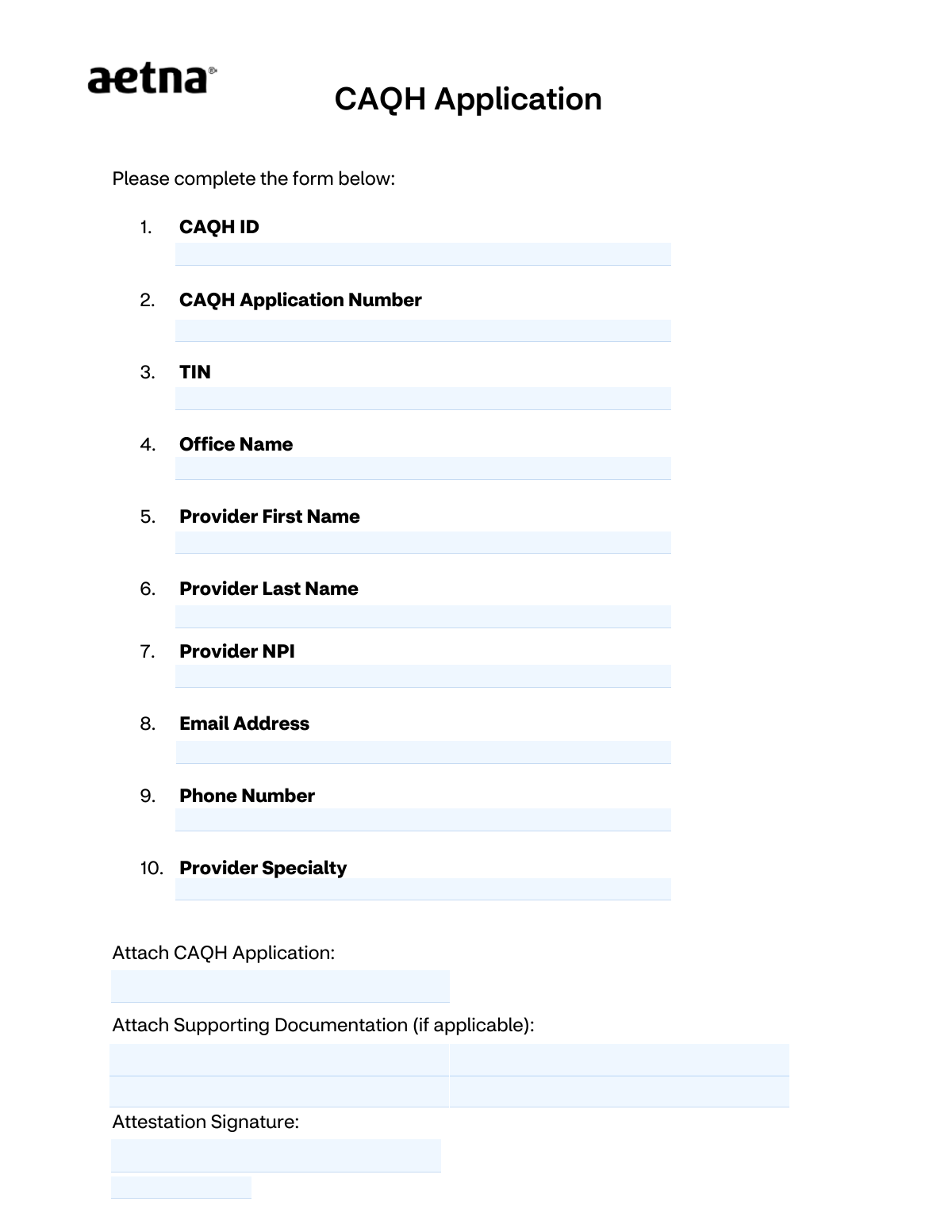
This form is an application for dental providers who wish to join the Aetna network of participating dentists. It collects essential provider information, including their CAQH ID, NPI, and TIN, to begin the credentialing and contracting process with Aetna. Today, this form can be filled out quickly and accurately using AI-powered services like Instafill.ai, which can also convert non-fillable PDF versions into interactive fillable forms.
Our AI automatically handles information lookup, data retrieval, formatting, and form filling.
It takes less than a minute to fill out Aetna Dental CAQH Application using our AI form filling.
Securely upload your data. Information is encrypted in transit and deleted immediately after the form is filled out.
Form specifications
| Form name: | Aetna Dental Provider Network Application (CAQH) |
| Number of pages: | 2 |
| Language: | English |
| Categories: | dental provider forms, dental network forms |
Instafill Demo: How to fill out PDF forms in seconds with AI
How to Fill Out Aetna Dental CAQH Application Online for Free in 2026
Are you looking to fill out a AETNA DENTAL CAQH APPLICATION form online quickly and accurately? Instafill.ai offers the #1 AI-powered PDF filling software of 2026, allowing you to complete your AETNA DENTAL CAQH APPLICATION form in just 37 seconds or less.
Follow these steps to fill out your AETNA DENTAL CAQH APPLICATION form online using Instafill.ai:
- 1 Navigate to Instafill.ai and upload or select the Aetna Dental Provider Application form.
- 2 Use the AI to automatically pre-fill your personal and practice information, such as provider name, office name, and contact details.
- 3 Carefully enter your specific identification numbers, including the CAQH ID, CAQH Application Number, TIN, and NPI, into the designated fields.
- 4 Digitally attach your full CAQH application and any other required supporting documentation directly to the form.
- 5 Complete the attestation section by providing your digital signature and the current date.
- 6 Thoroughly review all entered information and attached documents for accuracy and completeness.
- 7 Securely download the completed application to submit to Aetna or submit it directly if the platform supports it.
Our AI-powered system ensures each field is filled out correctly, reducing errors and saving you time.
Why Choose Instafill.ai for Your Fillable Aetna Dental CAQH Application Form?
Speed
Complete your Aetna Dental CAQH Application in as little as 37 seconds.
Up-to-Date
Always use the latest 2026 Aetna Dental CAQH Application form version.
Cost-effective
No need to hire expensive lawyers.
Accuracy
Our AI performs 10 compliance checks to ensure your form is error-free.
Security
Your personal information is protected with bank-level encryption.
Frequently Asked Questions About Form Aetna Dental CAQH Application
This form is an application for dental providers who are interested in joining the Aetna network of participating dentists. It serves as the initial request for participation and begins the credentialing process.
Any dental provider or dental office seeking to become an in-network provider for Aetna must complete and submit this application.
No, submission of this application is only a request and does not guarantee acceptance. Aetna will evaluate your application based on its business needs and credentialing standards.
You will need the provider's CAQH ID, CAQH Application Number, Taxpayer Identification Number (TIN), and National Provider Identifier (NPI). You must also have a copy of your CAQH application ready to attach.
A CAQH ID is a unique number from the Council for Affordable Quality Healthcare used to streamline provider data for credentialing. Aetna requires it to access your professional and practice information efficiently.
You should expect a response from an Aetna Provider Relations team member within 14 days. For immediate assistance, you can call the Customer Service team at 1-800-451-7715.
The system will time out after 60 minutes of inactivity, and your work will not be saved. It is highly recommended to gather all necessary information before you begin to avoid losing your progress.
You are required to attach your full CAQH Application. You should also attach any other supporting documentation that may be relevant to your practice or credentials.
In this section, you must provide your full name and the date to electronically sign the form. This signature certifies that all the information you have provided is accurate and complete.
Yes, services like Instafill.ai use AI to accurately auto-fill form fields with your saved information. This can help you complete the application quickly and avoid the 60-minute timeout.
Simply upload the form to Instafill.ai, and its AI will map and populate the fields using your securely stored provider data. After a quick review, you can download the completed form for submission.
If you have a flat, non-fillable PDF, you can use a service like Instafill.ai to instantly convert it into an interactive, fillable form. This allows you to easily type in your information and complete it digitally.
After you submit your inquiry, a dedicated Provider Relations team member will be assigned to your office. They will guide you through the contracting requirements and answer any questions you may have.
Compliance Aetna Dental CAQH Application
Validation Checks by Instafill.ai
1
Validates TIN is a 9-digit number
This check ensures that the Taxpayer Identification Number (TIN) field contains exactly 9 digits. A valid TIN is crucial for tax reporting and legally identifying the business entity for payment and contracting purposes. If the entry is not 9 digits, the form submission will be blocked, and the user will be prompted to correct the number.
2
Ensures Provider NPI is a valid 10-digit number
This validation confirms that the National Provider Identifier (NPI) is a 10-digit numeric value. The NPI is a standard, unique identifier for health care providers, and its accuracy is essential for credentialing, billing, and network processing. An invalid format will result in a validation error, preventing submission until a valid 10-digit NPI is entered.
3
Validates Email Address Format
This check verifies that the entry in the Email Address field follows the standard '[email protected]' format. A valid email is the primary method for Aetna to communicate with the provider regarding application status, requests for information, and contracting details. If the format is invalid, the user will receive an error message and must provide a correctly formatted email address to proceed.
4
Validates Phone Number Format
This check ensures the phone number is entered in a recognizable US format (e.g., 10 digits, with or without common separators like parentheses or hyphens). Accurate contact information is vital for the Provider Relations team to communicate directly with the office. An invalid phone number format will trigger an error, requiring the user to re-enter the number correctly.
5
Ensures Provider First and Last Name are Provided
This validation confirms that both the 'Provider First Name' and 'Provider Last Name' fields are not empty. These fields are fundamental for identifying the individual provider applying for network participation. Failure to provide a full name will prevent form submission, as the application cannot be processed without this core identifying information.
6
Requires Office Name to be Completed
This check verifies that the 'Office Name' field is filled out. The office or practice name is necessary to identify the legal business entity and physical location associated with the provider's application. An empty field will result in a validation error, as this information is required for credentialing and contracting.
7
Ensures Provider Specialty is Specified
This validation ensures that the 'Provider Specialty' field is not left blank. Aetna uses this information to assess network needs and correctly categorize the provider within its system. Submitting the form without a specialty will be blocked, as it is a critical data point for the application evaluation process.
8
Confirms CAQH Application Attachment is Present
This check verifies that a file has been successfully uploaded for the 'CAQH Application Attachment'. The form is a request to process an attached CAQH application, making the attachment itself the most critical component. If no file is detected, the system will display an error and will not allow the user to submit the form.
9
Requires Signature Name for Attestation
This validation confirms that the 'Signature Name' field is completed. The signature name serves as a legal attestation that the information provided is true and accurate. An empty signature field invalidates the attestation, so the form cannot be submitted until a name is entered.
10
Validates Signature Date is a Logical and Correctly Formatted Date
This check ensures the 'Signature Date' is in a valid format (e.g., MM/DD/YYYY) and is not a future date. The date of signature legally marks when the attestation was made and must be current or in the past. An invalid format or a future date will trigger an error, requiring the user to enter a valid date to complete the attestation.
11
Validates CAQH ID is a Numeric Value
This check verifies that the 'CAQH ID' field contains only numbers. The CAQH ID is a unique numerical identifier used to locate the provider's profile in the CAQH ProView system. Entering non-numeric characters would lead to a lookup failure, so the form will reject invalid entries to ensure data integrity.
12
Ensures Name Fields Contain Valid Characters
This validation checks that fields like 'Provider First Name', 'Provider Last Name', and 'Signature Name' do not contain numbers or prohibited special characters. This maintains data quality and prevents processing errors in downstream systems that expect standard name formats. If invalid characters are found, the user will be prompted to correct the entry.
13
Requires CAQH Application Number
This check ensures the 'CAQH Application Number' field is not empty. This number is a key identifier for the specific application being submitted and is used for tracking and processing. Leaving this field blank would make it difficult to locate the correct record, so submission is blocked until it is provided.
Common Mistakes in Completing Aetna Dental CAQH Application
Providers often mix up their permanent CAQH ID with a temporary or specific CAQH Application Number, as both are requested. This error happens due to the similar naming and can lead to Aetna being unable to locate the correct provider profile for credentialing, causing significant delays. To avoid this, carefully double-check the numbers against your CAQH portal and ensure each is entered into its designated field.
A frequent error is entering a provider's personal Social Security Number (SSN) when the practice's Employer Identification Number (EIN) is required. This mismatch between the provider name, office name, and TIN will flag the application for manual review, delaying contracting and payment setup. Always verify if the individual or group TIN is needed and ensure it matches the legal entity name on file with the IRS.
Providers sometimes enter a common nickname (e.g., 'Mike' for 'Michael') or an abbreviated first name instead of their full legal name as it appears on their dental license and other official documents. This creates a data mismatch that halts the automated credentialing process and requires manual intervention. To ensure a smooth verification, always use your full legal name as it appears on your license and CAQH profile.
The 10-digit National Provider Identifier (NPI) is highly susceptible to simple data entry errors like transposed numbers. An incorrect NPI will result in an immediate failure to identify the provider in the national registry, stopping the application process entirely. Carefully proofread the NPI before submission; AI-powered form filling tools like Instafill.ai can help by validating the NPI's format and checksum digit to catch errors instantly.
Entering a general term like 'Dentist' instead of a specific, recognized specialty (e.g., 'Pediatric Dentistry,' 'Prosthodontics') can cause processing delays. Aetna uses specialty information for network adequacy analysis and directory listings, so ambiguity requires manual clarification from your office. To avoid this, refer to the official ADA list of dental specialties or your CAQH profile to provide the precise designation.
Applicants may forget to attach the CAQH application PDF, upload an outdated version, or attach a completely different document by mistake. This is a critical failure, as the attached application is the primary source for credentialing verification and its absence or inaccuracy will lead to immediate rejection or delay. To prevent this, download a fresh copy of your application from the CAQH portal right before you begin and double-check the file name before uploading.
The form vaguely mentions 'Supporting Documentation (if applicable),' leading many applicants to skip this step, assuming it's not needed. This often results in follow-up requests for essential items like malpractice insurance certificates, DEA registration, or W-9 forms, delaying the contracting process by weeks. Proactively attach current copies of all relevant licenses, insurance, and registration documents to avoid these back-and-forth communications.
The form explicitly warns of a 60-minute session timeout without saving progress, a detail many applicants overlook while gathering information. Users often start the form, get distracted, and return to find all their work has been lost, causing frustration and rework. To avoid this, gather all necessary information and documents (CAQH ID, NPI, TIN, application PDF) before starting the form to ensure you can complete it in one session.
An application can be invalidated if the signature name does not match the provider's legal name or if the date is missing or incorrectly formatted. This happens when an office manager signs with their own name or the provider rushes through the final step. The person signing must be the provider or an authorized signatory, and their full legal name must be used to ensure the attestation is valid.
Applicants may enter a 'Doing Business As' (DBA) name or an informal practice name that doesn't match official records tied to the TIN and NPI. This discrepancy forces manual verification and can delay the application process significantly while Aetna confirms the legal entity. Ensure the Office Name entered is the exact legal entity name used for tax and credentialing purposes. Since this form is a non-fillable PDF, a tool like Instafill.ai can convert it to a fillable version and help maintain consistency across fields.
Saved over 80 hours a year
“I was never sure if my IRS forms like W-9 were filled correctly. Now, I can complete the forms accurately without any external help.”
Kevin Martin Green
Your data stays secure with advanced protection from Instafill and our subprocessors

Robust compliance program
Transparent business model
You’re not the product. You always know where your data is and what it is processed for.
ISO 27001, HIPAA, and GDPR
Our subprocesses adhere to multiple compliance standards, including but not limited to ISO 27001, HIPAA, and GDPR.
Security & privacy by design
We consider security and privacy from the initial design phase of any new service or functionality. It’s not an afterthought, it’s built-in, including support for two-factor authentication (2FA) to further protect your account.
Fill out Aetna Dental CAQH Application with Instafill.ai
Worried about filling PDFs wrong? Instafill securely fills aetna-dental-provider-network-application-caqh forms, ensuring each field is accurate.