Yes! You can use AI to fill out Connection Dental Network – Provider Application
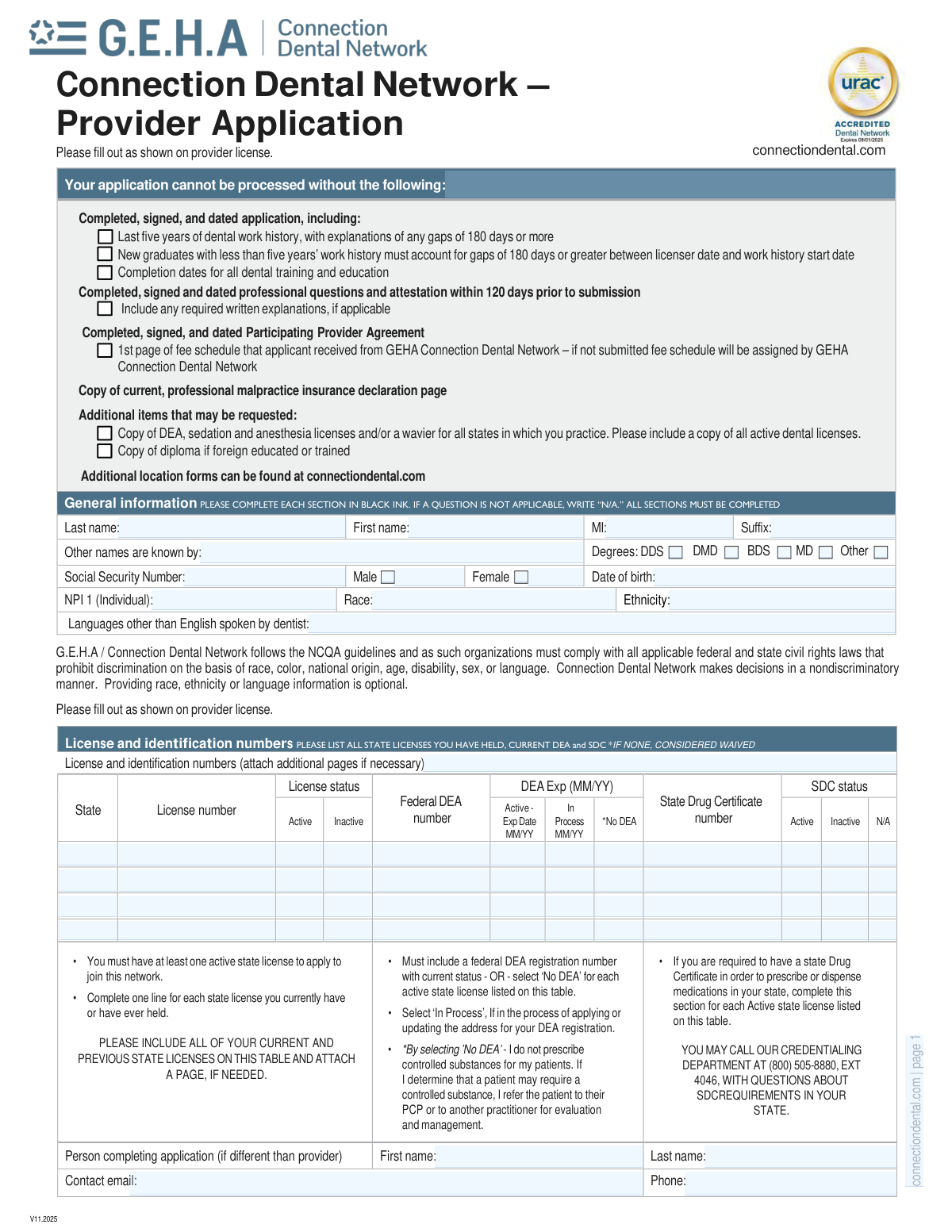
The Connection Dental Network Provider Application is a detailed form for dentists and dental specialists seeking to join the GEHA Connection Dental Network. It requires comprehensive information about the provider's personal details, education, professional training, licensure, work history, and practice locations to facilitate the credentialing process. Today, this form can be filled out quickly and accurately using AI-powered services like Instafill.ai, which can also convert non-fillable PDF versions into interactive fillable forms.
Our AI automatically handles information lookup, data retrieval, formatting, and form filling.
It takes less than a minute to fill out V11.2025 using our AI form filling.
Securely upload your data. Information is encrypted in transit and deleted immediately after the form is filled out.
Form specifications
| Form name: | Connection Dental Network – Provider Application |
| Number of pages: | 7 |
| Language: | English |
| Categories: | dental provider forms, dental network forms |
Instafill Demo: How to fill out PDF forms in seconds with AI
How to Fill Out V11.2025 Online for Free in 2026
Are you looking to fill out a V11.2025 form online quickly and accurately? Instafill.ai offers the #1 AI-powered PDF filling software of 2026, allowing you to complete your V11.2025 form in just 37 seconds or less.
Follow these steps to fill out your V11.2025 form online using Instafill.ai:
- 1 Navigate to Instafill.ai and upload or select the Connection Dental Network Provider Application form.
- 2 Use the AI assistant to automatically fill in your general information, including your name, contact details, Social Security Number, NPI, and professional education history.
- 3 Input your license and identification numbers for all states, along with any DEA registrations and American Board Certifications.
- 4 Detail your last five years of dental employment history, ensuring you provide explanations for any work gaps of 180 days or more.
- 5 Complete the sections for each of your current practice locations, specifying office hours, services offered, and information about sedation or anesthesia administration.
- 6 Carefully review and answer the 'Professional Questions and Attestation' section, providing written explanations for any 'Yes' answers as required.
- 7 Review all the information populated by the AI for accuracy, then electronically sign and date the authorization to finalize and submit your application.
Our AI-powered system ensures each field is filled out correctly, reducing errors and saving you time.
Why Choose Instafill.ai for Your Fillable V11.2025 Form?
Speed
Complete your V11.2025 in as little as 37 seconds.
Up-to-Date
Always use the latest 2026 V11.2025 form version.
Cost-effective
No need to hire expensive lawyers.
Accuracy
Our AI performs 10 compliance checks to ensure your form is error-free.
Security
Your personal information is protected with bank-level encryption.
Frequently Asked Questions About Form V11.2025
This form is an application for dental providers who wish to join the GEHA Connection Dental Network. Completing it is the first step in the credentialing process to become a participating provider.
You must submit the completed, signed, and dated application, a signed Participating Provider Agreement, the first page of your fee schedule, and a copy of your current professional malpractice insurance declaration page. Other documents like licenses or diplomas may also be requested.
You must list all dental employment for the last five years, including your current practice. It is crucial to provide a written explanation for any employment gaps of 180 days or more during this period.
If you are a new graduate with less than five years of work history, you must still account for any gaps of 180 days or more between your initial licensure date and the start of your work history.
If you do not have a Federal DEA number, you can select the 'No DEA' option for each active state license listed. By doing so, you are attesting that you do not prescribe controlled substances for your patients.
For every 'Yes' response in the 'Professional questions and attestation' section, you are required to include a detailed written explanation along with your application form.
The form includes sections to detail up to three different practice locations. If you have more than three, you can find additional location forms at connectiondental.com to attach to your application.
You can submit your completed application and all required documents via email to [email protected] or by mail to the PO Box listed on the form. Ensure all required signatures and dates are completed before submission.
Yes, if you were foreign educated or trained, you must include a copy of your diploma with your application packet.
If you do not submit the first page of the fee schedule you received, one will be assigned to you by the GEHA Connection Dental Network upon processing your application.
For questions about the application, you can call the Credentialing Department at (800) 505-8880, extension 4046.
Yes, services like Instafill.ai use AI to accurately auto-fill form fields, which can save you significant time and help reduce errors. This is especially useful for lengthy forms with repetitive information.
If your PDF is not interactive, you can use a service like Instafill.ai. It can convert flat, non-fillable PDFs into interactive forms that you can easily complete online.
Simply upload the Connection Dental Network Provider Application PDF to the Instafill.ai platform. The AI will identify the fields, and you can then fill them out online, save your progress, and download the completed document.
Compliance V11.2025
Validation Checks by Instafill.ai
1
Validates Social Security Number Format
This check ensures the Social Security Number is entered as a 9-digit numeric value, without dashes or other characters. This is crucial for correct provider identification and tax reporting purposes. An invalid format will prevent the system from processing the application and require the applicant to correct the entry.
2
Validates NPI Number Format
This validation verifies that both the individual (NPI 1) and organizational (NPI 2) National Provider Identifier numbers are exactly 10 digits long. The NPI is a standard, unique identifier for health care providers, and an incorrect format will lead to claim rejections and identification errors. Failure will halt the application until a valid 10-digit NPI is provided.
3
Ensures At Least One Active State License
The form explicitly states that an applicant must have at least one active state license to join the network. This check verifies that in the 'License and identification numbers' table, at least one entry has the 'License status' marked as 'Active'. Without an active license, the provider is not eligible to practice, and the application will be rejected immediately.
4
Conditional DEA Status for Active Licenses
This check ensures that for every state license marked as 'Active', the corresponding DEA section is completed. The applicant must provide a Federal DEA number and expiration date, select 'In Process', or explicitly select 'No DEA'. This is critical for compliance and understanding the provider's prescription authority, and an incomplete entry will require correction before the application can proceed.
5
Validates Explanation for Employment Gaps
This validation cross-references the dates in the 'Five-year dental employment history' to identify any gaps of 180 days or more. If such a gap is found, it verifies that a corresponding entry exists in the 'Reason for gap' section. This is a critical credentialing requirement to ensure a continuous and accounted-for professional history, and a missing explanation will flag the application for manual review and follow-up.
6
Conditional Requirement for Specialty Details
This is a logical check that ensures if a provider identifies as a specialist, they must specify what that specialty is. It verifies that if the 'Yes' box is checked for 'Are you a specialist?', the 'list specialty' text field is populated. This prevents incomplete data and ensures the provider is correctly categorized in the network directory and for referrals.
7
Requires Explanation for 'Yes' Attestation Answers
This check verifies that for every question in the attestation section (questions 1-11) answered with 'Yes', a corresponding written explanation is included with the submission. These questions pertain to critical issues like license sanctions, lawsuits, and health conditions. A 'Yes' answer without an explanation makes it impossible to assess risk and eligibility, and the application will be considered incomplete.
8
Verifies Chronological Order of Employment Dates
This validation ensures the logical integrity of the employment history data by checking that for each listed job, the 'End date' is not before the 'Start date'. This prevents data entry errors that would make the work history timeline nonsensical and impossible to verify. An application with illogical dates will be returned for correction.
9
Conditional Requirement for Sedation Permit Information
This check is triggered if the provider indicates they administer sedation by answering 'Yes' to question 2 in the sedation section. It then verifies that if a permit type is checked 'Yes', the corresponding Permit/License #, Expiration date, and State fields are filled. This is essential for verifying the provider's legal authority to perform sedation, and failure to provide these details will result in an incomplete application.
10
Ensures Practitioner Signature and Date are Present
This validation confirms that the 'Practitioner signature' and 'Date (required)' fields in the final authorization section are not blank. The signature and date legally bind the provider to the truthfulness of the application and their agreement to the terms. An unsigned or undated application is legally invalid and cannot be processed.
11
Validates NPI and Tax ID on Authorization Page
This check ensures the 'NPI 1 (Individual)' and 'Tax ID#' fields on the final authorization page are completed. These identifiers are critical for linking the legal attestation to the correct provider and practice entity for payment and credentialing. Missing this information would create ambiguity and prevent the final processing of the agreement.
12
Flags Requirement for Foreign Diploma Copy
This validation identifies if the provider's professional education was completed outside the United States by checking the 'Country' field. If the country is not the US, the system flags the application to ensure a copy of the diploma has been included as required by the form's instructions. This is a critical step for verifying the credentials of foreign-trained dentists, and its absence will halt the credentialing process.
13
Validates DEA Expiration Date Format and Validity
This check ensures that any provided DEA expiration date is in the correct MM/YY format and represents a future or current date. This is crucial for ensuring the provider has a currently valid registration to prescribe controlled substances. An expired or improperly formatted date will fail validation and require correction.
14
Validates Logical Patient Age Limits
This check verifies the logical consistency of the patient age limits for a practice location. If both 'Min age' and 'Max age' fields are filled, it ensures the minimum age is not greater than the maximum age. This prevents data entry errors and ensures accurate information is displayed in the provider directory.
Common Mistakes in Completing V11.2025
Applicants often fail to list a complete five-year dental employment history or neglect to provide a written explanation for any employment gaps of 180 days or more. This happens because they may forget short-term positions, miscalculate dates, or overlook the specific requirement to explain gaps. An incomplete or unexplained history is a primary reason for application rejection, as it prevents the network from verifying continuous professional activity. To avoid this, carefully map out your last five years of employment and any significant breaks before filling out the form, ensuring all required explanations are attached.
The form explicitly requires a detailed written explanation for every 'Yes' answer in the 'Professional Questions and Attestation' section. Applicants frequently check 'Yes' to a question but forget to attach the mandatory explanation, assuming the answer itself is sufficient. This omission leads to an immediate halt in the credentialing process, as these questions pertain to critical issues like disciplinary actions, lawsuits, or health conditions. Always double-check this section and prepare your written explanations beforehand for any question you must answer affirmatively.
This section requires listing all state licenses ever held (not just active ones) and providing DEA information for each active license. Common errors include only listing current licenses or forgetting to fill out the DEA number, expiration date, or the 'No DEA' waiver for an active state license. These mistakes cause significant delays as they require manual follow-up to verify a provider's full licensing history and prescribing authority. Ensure you list every license you've ever held and complete the corresponding DEA/SDC line for each active license.
Forgetting to sign and date the authorization page is a simple but surprisingly common error that instantly invalidates the application. This often happens when rushing to complete the lengthy form. Furthermore, the instructions specify that any attached extra pages for work history must be initialed and dated, a detail that is easily missed. An unsigned application cannot be processed, so it's crucial to perform a final review specifically to check for all required signatures, dates, and initials before submission.
The first page lists several required documents, such as a copy of the malpractice insurance declaration page and the first page of the fee schedule, without which the application cannot be processed. Applicants often focus solely on the form itself and forget to gather and include all the necessary supporting paperwork. This results in an incomplete submission and significant processing delays until all documents are received. Create a checklist based on the form's requirements and gather all documents before you begin to ensure nothing is missed.
The instructions clearly state to write 'N/A' if a question is not applicable, but many applicants leave these fields blank. This happens out of habit, but a blank field can be interpreted as an accidental omission rather than a deliberate 'not applicable' response, forcing reviewers to seek clarification. This ambiguity slows down the review process. To prevent this, diligently write 'N/A' in any field that does not apply to you, ensuring your application is clear and complete.
In the 'Current Practice and Office Information' section, providers must enter their individual NPI (Type 1) and the organization's NPI (Type 2). It is common for applicants to mistakenly enter their individual NPI in the organization field or vice versa, especially if they are a solo practitioner. This error can cause significant billing and claims processing issues down the line. Carefully distinguish between your personal provider number and your practice's or group's organizational number when filling out these fields.
This section contains complex conditional logic (e.g., 'If yes, complete questions 3-6. If no, skip to question 5 and 6'), which is a common source of confusion and errors. Applicants may answer questions out of sequence, fail to provide permit details when required, or answer 'Yes' to having other clinicians provide sedation but then fail to complete the compliance confirmation. Such mistakes can lead to incorrect credentialing for sedation services. To avoid this, read the instructions for each question carefully and follow the branching logic precisely.
Since this form is a non-fillable PDF, it must be printed and completed by hand in black ink, which can lead to illegible entries, smudges, or using the wrong color ink. Data entry teams may misinterpret poorly written numbers or letters, causing errors in the provider's profile, or reject the form outright if it's unreadable. To prevent this, write slowly and clearly in block letters. AI-powered tools like Instafill.ai can be particularly helpful here, as they can convert flat PDFs into fillable forms, allowing you to type your answers for perfect legibility and format validation.
The practice information section asks for a physical address and provides separate fields for mailing and billing addresses if they are different. Applicants often assume all correspondence will go to the physical address and neglect to fill out the separate billing or mailing address sections when necessary. This can result in critical documents like payments or credentialing notices being sent to the wrong location. Carefully verify if your practice uses different addresses for these functions and complete all relevant fields to ensure proper communication.
Saved over 80 hours a year
“I was never sure if my IRS forms like W-9 were filled correctly. Now, I can complete the forms accurately without any external help.”
Kevin Martin Green
Your data stays secure with advanced protection from Instafill and our subprocessors

Robust compliance program
Transparent business model
You’re not the product. You always know where your data is and what it is processed for.
ISO 27001, HIPAA, and GDPR
Our subprocesses adhere to multiple compliance standards, including but not limited to ISO 27001, HIPAA, and GDPR.
Security & privacy by design
We consider security and privacy from the initial design phase of any new service or functionality. It’s not an afterthought, it’s built-in, including support for two-factor authentication (2FA) to further protect your account.
Fill out V11.2025 with Instafill.ai
Worried about filling PDFs wrong? Instafill securely fills connection-dental-network-provider-application forms, ensuring each field is accurate.