Yes! You can use AI to fill out Attending Physician’s Statement
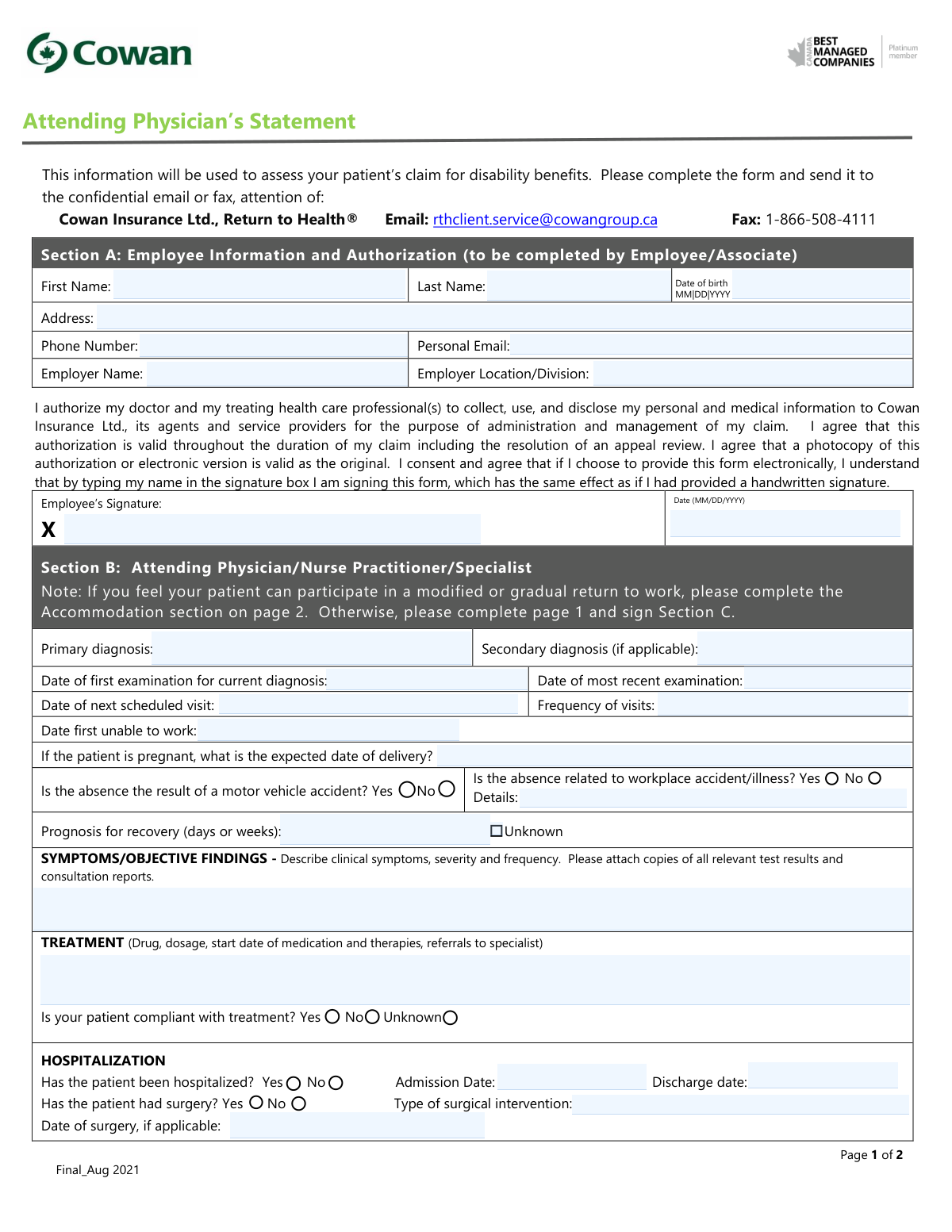
This form is an Attending Physician’s Statement required by Cowan Insurance Ltd. to evaluate a patient's claim for disability benefits. A physician or specialist completes it to provide detailed medical information, including diagnosis, treatment, prognosis, and specific physical or cognitive limitations that may affect the patient's ability to work. Today, this form can be filled out quickly and accurately using AI-powered services like Instafill.ai, which can also convert non-fillable PDF versions into interactive fillable forms.
Our AI automatically handles information lookup, data retrieval, formatting, and form filling.
It takes less than a minute to fill out Attending Physician’s Statement using our AI form filling.
Securely upload your data. Information is encrypted in transit and deleted immediately after the form is filled out.
Form specifications
| Form name: | Attending Physician’s Statement |
| Number of fields: | 126 |
| Number of pages: | 2 |
| Language: | English |
| Categories: | NJ state forms, PA state forms, physician forms |
Instafill Demo: How to fill out PDF forms in seconds with AI
How to Fill Out Attending Physician’s Statement Online for Free in 2026
Are you looking to fill out a ATTENDING PHYSICIAN’S STATEMENT form online quickly and accurately? Instafill.ai offers the #1 AI-powered PDF filling software of 2026, allowing you to complete your ATTENDING PHYSICIAN’S STATEMENT form in just 37 seconds or less.
Follow these steps to fill out your ATTENDING PHYSICIAN’S STATEMENT form online using Instafill.ai:
- 1 Navigate to Instafill.ai and upload the Attending Physician’s Statement form.
- 2 The employee uses the AI tool to complete Section A with their personal information, employer details, and provides an electronic signature to authorize the release of medical information.
- 3 The form is then provided to the attending physician, nurse practitioner, or specialist.
- 4 The healthcare professional fills out Section B, detailing the primary and secondary diagnoses, treatment plans, and prognosis for recovery.
- 5 If the patient can participate in modified work, the physician completes the 'Accommodation' section, specifying any physical and cognitive restrictions.
- 6 The physician completes Section C by providing their name, license number, contact information, and an electronic signature.
- 7 Review the entire form for accuracy and completeness before submitting it to Cowan Insurance Ltd. via the specified email or fax number.
Our AI-powered system ensures each field is filled out correctly, reducing errors and saving you time.
Why Choose Instafill.ai for Your Fillable Attending Physician’s Statement Form?
Speed
Complete your Attending Physician’s Statement in as little as 37 seconds.
Up-to-Date
Always use the latest 2026 Attending Physician’s Statement form version.
Cost-effective
No need to hire expensive lawyers.
Accuracy
Our AI performs 10 compliance checks to ensure your form is error-free.
Security
Your personal information is protected with bank-level encryption.
Frequently Asked Questions About Form Attending Physician’s Statement
This form is used to collect medical information from your doctor to assess your claim for disability benefits. It helps Cowan Insurance Ltd. understand your diagnosis, treatment, and functional abilities to determine your eligibility for benefits.
The form has two parts. You, the employee, must complete and sign Section A, and your attending physician, nurse practitioner, or specialist must complete the medical information in Sections B and C.
As noted at the bottom of the form, it is the patient's responsibility to cover any costs charged by the physician for the completion of the Attending Physician's Statement.
The completed form can be securely submitted to Cowan Insurance Ltd. by email to [email protected], by fax to 1-866-508-4111, or by mail. Either you or your physician's office can send it.
Yes, the form asks your physician to attach copies of all relevant test results and consultation reports to provide objective medical evidence supporting your claim.
If you are completing the form electronically, you can simply type your full name in the signature box. This typed signature is considered as legally valid as a handwritten one.
Your physician should complete the Accommodation section if they believe you are able to participate in a modified or gradual return to work. This section helps your employer understand your specific physical and cognitive limitations.
If the prognosis for your recovery is uncertain, your physician can check the 'Unknown' box in Section B. They should still provide their best estimate if possible.
In Section B, your physician must indicate if the absence is related to a motor vehicle accident or a workplace accident/illness. If it is, they may need to provide additional details as requested.
Yes, services like Instafill.ai use AI to help you accurately auto-fill your personal information in Section A, which can save time and prevent errors. Your physician is still required to complete the medical sections.
You can upload the PDF of the Attending Physician's Statement to Instafill.ai. The platform will make the form fillable online, allowing you to easily complete Section A before sending it to your doctor.
If you have a non-fillable PDF, you can use a tool like Instafill.ai to convert it into an interactive, fillable form. This makes it easy for both you and your physician to type information directly into the fields.
By signing Section A, you authorize your doctor and other healthcare professionals to release your medical information to Cowan Insurance Ltd. for the purpose of managing your disability claim. This consent is valid for the duration of your claim, including any appeals.
Compliance Attending Physician’s Statement
Validation Checks by Instafill.ai
1
Date Chronology Validation
This check ensures that all dates on the form are in a logical sequence. For example, the 'Date of first examination' must be before or on the 'Date of most recent examination', which in turn must be before or on the Physician's signature date. This is critical for establishing a clear and accurate timeline of the medical condition and disability claim. A failure would flag the form for manual review to correct chronological inconsistencies.
2
Employee Authorization Completeness
Verifies that both the 'Employee’s Signature' and the corresponding 'Date' in Section A are present. The signature and date are required to legally authorize the release of medical information to the insurance provider. If either field is missing, the form is considered incomplete and cannot be processed, as the consent is not legally valid.
3
Physician Certification Completeness
Ensures that the 'Physician’s Signature' and 'Date' in Section C are both filled out. The physician's signature certifies the accuracy of the medical information provided on the form. Without a signature and date, the statement is not authenticated and holds no value for assessing the disability claim, leading to rejection of the form.
4
Primary Diagnosis Requirement
This validation confirms that the 'Primary diagnosis' field in Section B is not empty. The primary diagnosis is the fundamental reason for the disability claim and is the most critical piece of medical information on the form. If this field is left blank, the entire basis for the claim is missing, and the form must be returned to the physician for completion.
5
Conditional Hospitalization Details
Checks that if the 'Yes' box is checked for 'Has the patient been hospitalized?', then the 'Admission Date' and 'Discharge date' fields must be populated. This information is essential for understanding the severity and timeline of the condition. If the 'Yes' box is checked but the dates are missing, the form is flagged as incomplete, as crucial details supporting the hospitalization claim are absent.
6
Conditional Surgery Details
This rule validates that if the 'Yes' box is checked for 'Has the patient had surgery?', then the 'Type of surgical intervention' and 'Date of surgery' fields are required. This provides specific details about significant medical procedures that support the disability claim. A failure in this check means the form lacks necessary context about the surgery and will require follow-up with the physician.
7
Conditional Workplace Accident Explanation
Verifies that if the 'Yes' box is checked for 'Is the absence related to workplace accident/illness?', the 'Details' field must contain an explanation. This is crucial for determining if the claim should be processed under disability insurance or a workers' compensation program. If the details are missing, it can cause significant delays and misdirection in claim processing.
8
Restriction Details Mandate
For every physical and cognitive ability in the Accommodation section, this check ensures that if the 'Restricted' box is checked, the corresponding details field describing the limitations and duration is filled out. These details are vital for creating a safe and effective return-to-work plan. If a restriction is noted without explanation, the employer cannot accommodate the employee, and the form is considered insufficient.
9
Mutually Exclusive Prognosis
Ensures that either a value is entered for 'Prognosis for recovery (days or weeks)' OR the 'Unknown' checkbox is selected, but not both. This prevents contradictory information about the patient's expected recovery timeline. If both are filled or neither is filled, the system cannot determine the prognosis, and the form will be flagged for correction.
10
Date of Birth Plausibility
Validates that the 'Date of birth' is a valid date in the past and represents a plausible age for a member of the workforce (e.g., over 16 and less than 100 years from the current date). This acts as a basic sanity check to catch data entry errors and ensure the identity of the claimant is reasonable. An invalid or implausible date would require manual verification.
11
Physician Identification Completeness
This check confirms that the physician's 'Name', 'License No.', and 'Telephone' number are all provided in Section C. This information is essential for verifying the credentials of the person completing the form and for any necessary follow-up communication. Missing information in these fields compromises the form's authenticity and will halt the claim's assessment until it is provided.
12
Hospitalization Date Consistency
Validates that the 'Discharge date' for a hospitalization is on or after the 'Admission Date'. It is logically impossible for a discharge to occur before an admission. This check prevents data entry errors that would create an invalid record of the hospitalization event. If the dates are inconsistent, the form is flagged for correction.
Common Mistakes in Completing Attending Physician’s Statement
The form specifies the MM|DD|YYYY format for dates like Date of Birth and signature dates. Applicants often use their local format (e.g., DD/MM/YYYY) or an inconsistent one, which can cause data entry errors and processing delays. To avoid this, carefully follow the specified format for all date fields. AI-powered tools like Instafill.ai can automatically format dates correctly, ensuring compliance and preventing rejections.
An employee may forget to sign or date Section A, or misunderstand that typing their name constitutes a valid electronic signature. An unsigned or undated authorization is invalid, legally preventing the insurance company from accessing medical information or processing the claim. This mistake immediately halts the entire process until a correctly signed form is submitted.
In Section B, physicians sometimes provide overly brief or jargon-filled descriptions in the 'Symptoms/Objective Findings' and 'Treatment' fields, omitting the required severity, frequency, and dosage details. This lack of clarity forces the claims assessor to request additional information, significantly delaying the assessment. To prevent this, physicians should provide detailed, plain-language explanations and ensure all relevant test results are attached as requested.
A very common error is checking a 'Restricted' box on page 2 for a physical or cognitive ability but failing to describe the specific limitation and its duration in the corresponding text field. This makes the information unusable for creating a modified return-to-work plan, as the employer has no actionable guidance. The form becomes effectively incomplete, requiring follow-up with the physician's office.
The top of page 2 requires the employee and employer names to be filled out again. It is easy to overlook these fields, but they are critical for ensuring the pages are correctly associated if they become separated during processing. Submitting a form with a blank header on the second page risks having crucial accommodation details lost or misfiled, delaying the return-to-work process.
The form contains multiple date fields, such as 'Date of first examination' and 'Date first unable to work'. A common mistake is entering dates that are logically inconsistent (e.g., the date first unable to work is before the first examination for the condition). These discrepancies act as red flags for reviewers and will always trigger a request for clarification, delaying the claim's approval.
The form explicitly states to 'attach copies of all relevant test results and consultation reports.' Physicians, being busy, may complete the form but forget to include these crucial attachments. An incomplete submission package cannot be fully assessed, leading to inevitable delays while the insurance provider waits for the missing documentation.
When the PDF is printed and filled out by hand, a physician's handwriting can render critical medical diagnoses, treatment plans, and restrictions unreadable. This forces the claims processor to contact the physician's office for clarification, wasting time and delaying the claim. Using a tool like Instafill.ai can convert a non-fillable PDF into a fillable one, allowing for typed, legible entries that eliminate this problem entirely.
The claim cannot be processed without the physician's verification in Section C. Forgetting to include the physician's signature, the date of signing, or the license number invalidates the entire medical statement. This is a critical error that brings the claim review to a complete stop until a fully completed and signed form is provided.
The 'Prognosis for recovery' field asks for a timeframe in 'days or weeks'. Physicians may write vague statements like 'uncertain' without checking the 'Unknown' box, or use different units like 'months'. This ambiguity makes it difficult for the case manager to plan for the disability duration and potential return to work, often requiring a follow-up call to get a more precise estimate.
Saved over 80 hours a year
“I was never sure if my IRS forms like W-9 were filled correctly. Now, I can complete the forms accurately without any external help.”
Kevin Martin Green
Your data stays secure with advanced protection from Instafill and our subprocessors

Robust compliance program
Transparent business model
You’re not the product. You always know where your data is and what it is processed for.
ISO 27001, HIPAA, and GDPR
Our subprocesses adhere to multiple compliance standards, including but not limited to ISO 27001, HIPAA, and GDPR.
Security & privacy by design
We consider security and privacy from the initial design phase of any new service or functionality. It’s not an afterthought, it’s built-in, including support for two-factor authentication (2FA) to further protect your account.
Fill out Attending Physician’s Statement with Instafill.ai
Worried about filling PDFs wrong? Instafill securely fills attending-physicians-statement forms, ensuring each field is accurate.