
Yes! You can use AI to fill out Form 1776, Physician’s Statement for Disabled License Plates or Placards
Don't type 31 fields by hand. Tell our AI about yourself, or upload a document you already have, and it fills every field in seconds. You check it, then download, print or sign.
The AI does the filling. You just check it.
No typing into boxes, nothing to install.
What this form asks for
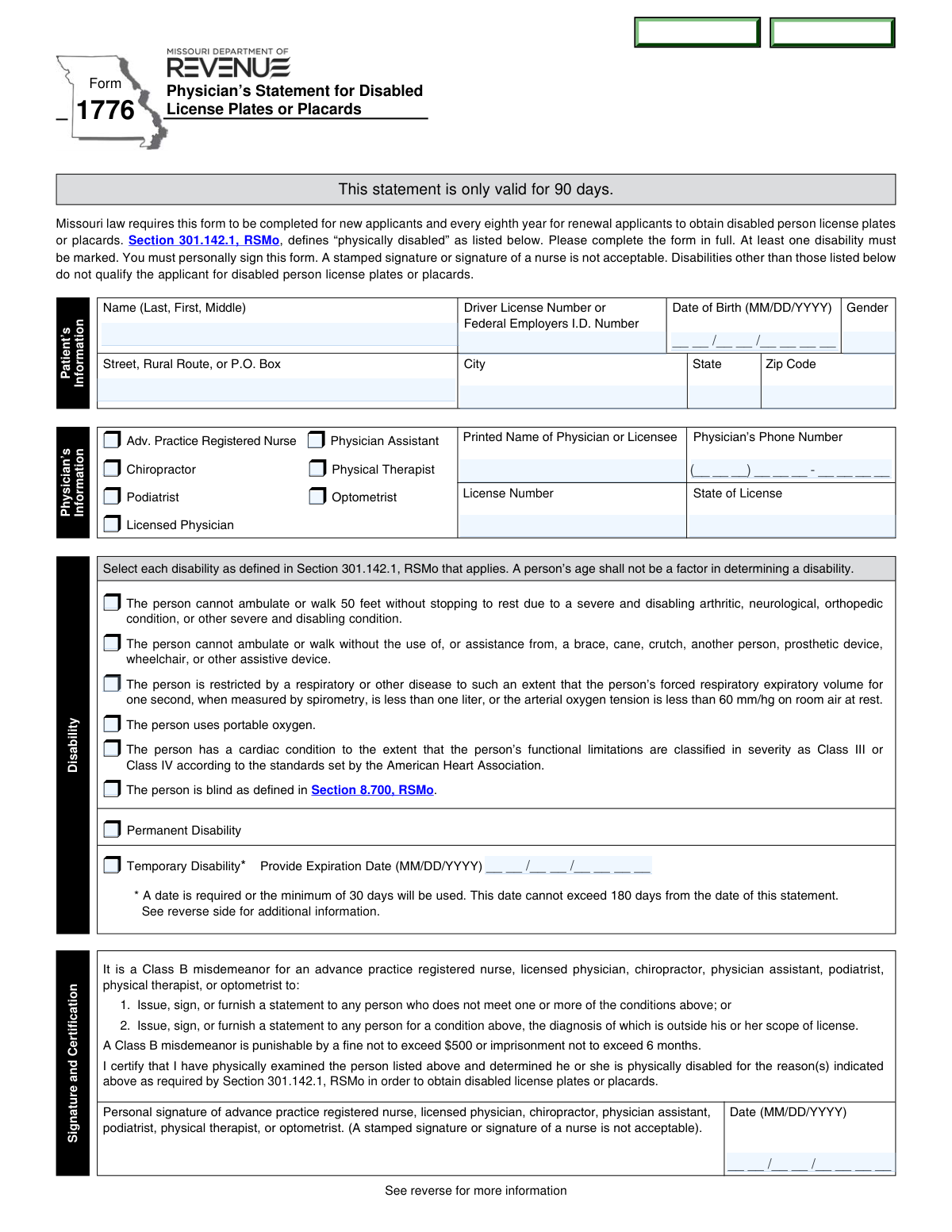
The AI fills all of it, from your answers or your documents.
The AI checks your answers before you download
14 checks built for this form, so a wrong date or a missing answer is caught before anyone else sees it.
Validate that the patient name includes at minimum Last and First name, with Middle optional, and that the field is not left blank. Check for invalid characters (e.g., only punctuation, excessive numerals) and enforce reasonable length limits to prevent truncation in downstream systems. This is important for identity matching and record retrieval. If validation fails, reject submission and prompt for a complete legal name as entered on identification.
Ensure the form includes at least one patient identifier: a Driver License Number or a Date of Birth, as the form presents these as key identifying fields. If both are provided, allow both but validate each independently. This prevents duplicate records and supports accurate applicant identification. If neither is present, block submission and require one identifier before acceptance.
Validate the Date of Birth is in MM/DD/YYYY format and represents a real calendar date (e.g., no 02/30/2020). Also check plausibility (not in the future and not unreasonably old, e.g., older than 120 years) to catch data entry errors. Accurate DOB is critical for identity verification and eligibility processing. If invalid, require correction before the form can be processed.
If the system treats Gender as required, validate it is present and matches allowed values (e.g., M/F/X or the specific options configured for the form). If optional, still validate that any provided value is within the allowed set and not free-text garbage. Consistent coding supports reporting and reduces manual cleanup. If validation fails, prompt the user to select a valid option or leave it blank if permitted.
Validate that Street/Rural Route/PO Box, City, State, and ZIP Code are all provided and not placeholders. State should be a valid two-letter abbreviation (expecting MO for Missouri applicants, unless out-of-state is explicitly allowed), and ZIP should be 5 digits or ZIP+4. A complete address is necessary for mailing placards/plates and for jurisdictional processing. If incomplete or malformed, prevent submission and request corrected address details.
Ensure the Printed Name of the physician/licensee is present and appears to be a person name (not blank, not only initials unless your policy allows). This is required to identify the certifying professional and to support audits or follow-up. Missing or unclear provider identity can invalidate the certification. If it fails, flag as incomplete and require the printed name before acceptance.
And 8 more checks
- Provider Phone Number Format Validation
- Provider License Number and State of License Required
- Provider Type Selection (Exactly One) and Consistency
- Provider Signature Presence and Non-Stamped Attestation
- Certification Date Format and 90-Day Validity Window
- At Least One Qualifying Disability Checkbox Selected
- Permanent vs Temporary Disability Selection (Mutual Exclusivity)
- Temporary Disability Expiration Date Required and Range-Limited
Let AI fill out your MO Form 1776
No typing. Every field filled in seconds, checked, ready to sign.
How to Fill Out MO Form 1776 Online for Free in 2026
What the AI walks you through.
- Enter the patient/applicant information (full name, driver license number or date of birth, gender, and address details).
- Provide the certifying practitioner’s information (printed name, phone number, license number, and state of license) and select the practitioner type (e.g., licensed physician, APRN, PA, chiropractor, etc.).
- Select at least one qualifying disability category that applies under Section 301.142.1, RSMo (mobility limitation, assistive device use, respiratory impairment, portable oxygen use, cardiac class III/IV, or blindness).
- Indicate whether the disability is permanent or temporary; if temporary, enter the expiration date (must be within 180 days of the statement date).
- Have the authorized practitioner complete the certification statement confirming a physical examination and the qualifying reason(s).
- Obtain the practitioner’s personal signature and the date (no stamped signatures; nurse signature not acceptable unless the signer is an authorized APRN).
- Submit the completed Form 1776 with the appropriate Missouri DOR application form(s) for plates/placards (e.g., Form 2769 and/or other required vehicle/plate applications) within the 90-day validity period.
Common Mistakes in Completing MO Form 1776
The ones the AI is built to catch.
Leaving all disability checkboxes unmarked
Checking a non-qualifying condition or writing in a diagnosis not on the list
Using an unacceptable signature (stamped signature or wrong signer)
Missing the certification date or using the wrong date format
Submitting an expired statement (outside the 90-day validity window)
Selecting Temporary Disability but not providing an expiration date (or providing an invalid one)
Checking both Permanent and Temporary disability (or neither)
Incomplete or mismatched patient identification (name, driver license number, or date of birth)
Incomplete address information (missing apartment/unit, ZIP code, or using an outdated address)
Provider section errors: missing license number/state, phone number, or wrong provider type checked
Illegible handwriting or unclear checkbox marks
Frequently Asked Questions About MO Form 1776
Is it really free for 7 days?
Can I fill other forms too?
How do I cancel?
How does the AI fill out MO Form 1776?
What happens to my information?
How complex is MO Form 1776 to fill out?
What is Form 1776 used for?
Who needs to complete Form 1776?
How long is Form 1776 valid after it is signed?
Do I fill out Form 1776 myself, or does my medical provider fill it out?
Which medical professionals are allowed to sign Form 1776?
Can a nurse sign the form or can the provider use a stamped signature?
Do I have to mark a disability on the form?
What disabilities qualify under this form?
Does age alone qualify someone for disabled plates or placards?
What is the difference between permanent and temporary disability on the form?
If I apply for a temporary placard, do I have to provide an expiration date?
Can a temporary placard be renewed?
What other forms might I need to submit along with Form 1776?
Where do I send questions or get more information about disabled placards and plates in Missouri?
Are there penalties if a medical professional signs the form for someone who does not qualify?
Get your MO Form 1776 filled out by AI
$0 today. Cancel before Nov 4 and you pay nothing.
Other forms like this one
CAR forms: Form SSA-44, Medicare Income-Related Monthly Adjustment Amount - Life-Changing Event, Form I-90, Application to Replace Permanent Resident Card, Form 2441, Child and Dependent Care Expenses, Form WH-380-E, Certification of Health Care Provider, Form 4137, Social Security and Medicare Tax on Unreported Tip Income, Form 8959, Additional Medicare Tax, Form 8919, Uncollected Social Security and Medicare Tax, Form CMS-1763, Request for Termination of Medicare Coverage, Form CMS-855O, Medicare Enrollment Application, Form CMS-460, Medicare Participation Agreement, Form CMS-4040, Request for Enrollment in Medicare Part B, Form WH-380-F, Certification of Health Care Provider, Form W-10, Dependent Care Provider’s Identification, Form 1099-K, Payment Card and Third Party Network Transactions, Form CMS-40B, Application for Enrollment in Medicare Part B, Form SS-5-FS, Application for a Social Security Card, Form REG 195, Disabled Person Placard, Form AR-11, Alien's Change of Address Card, Form I-905, Application for Authorization to Issue Certification for Health Care Workers, Form I-131A, Application for Carrier Documentation
license plate forms: Form VTR-60, Application for Replacement License Plate(s) and/or Registration Sticker, California DMV Form REG 17 (Rev. 7/2012), Special Interest License Plate Application, California DMV Form REG 17 (Rev. 7/2012), Special Interest License Plate Application, Form VR-210, Application for Maryland Parking Placards/License Plates for Individuals with a Disability
PA state forms: Form 1095-A, Health Insurance Marketplace Statement, Form W-2, Wage and Tax Statement, Form 593, Real Estate Withholding, Form 8938, Statement of Specified Foreign Financial Assets, Form CMS-2567, Statement of Deficiencies, Form 1098, Mortgage Interest Statement, Form 1098-T, Tuition Statement, Form 1099-S, Proceeds From Real Estate Transactions, Form 1098-E, Student Loan Interest Statement, Form DS-3053, Statement of Consent, Form DS-86, Statement of Non-Receipt of a U.S. Passport, Form DS-86, Statement of Non-Receipt of a U.S. Passport, Form 108, Statement of Intention, Form 107, Statement of Financial Affairs, Form 121, Statement About Your SSNs, Form 122A-1, Chapter 7 Statement of Current Monthly Income, Center for Infertility & Reproductive Surgery – New Patient Questionnaire and Patient/Guarantor Statement (Brigham and Women’s Hospital, Department of Obstetrics and Gynecology), Adult Travel Document Application for Stateless and Protected Persons in Canada (16 years of age or over) (PPTC 190), Form W-8IMY (Rev. October 2021), Certificate of Foreign Intermediary, Foreign Flow-Through Entity, or Certain U.S. Branches for United States Tax Withholding and Reporting, Form W-2, Wage and Tax Statement (2025)
physician forms: Form CA-20, Attending Physician's Report, Continental American Insurance Company (CAIC) / Aflac Group Critical Illness Claim Form (with Attending Physician’s Statement, HIPAA Authorization to Obtain Information, and Electronic Funds Transaction Authorization), Assurity Life Insurance Company Disability Claim Form — Attending Physician’s Statement, Physician’s Statement of Disability / Functional Limitations (ICD Diagnosis Codes, Treatment, ADLs, and Return-to-Work), California Participating Physician Application, National Fire & Marine Insurance Company Physicians Professional Liability Application, CMS-855I, Medicare Enrollment Application for Physicians and Non-Physician Practitioners, Physician Certification Statement for Non-Emergency Medical Transportation, Form CMS L564, Physician's/Supplier's Statement for Emergency Services, Physician's Professional Liability Insurance Application, Attending Physician’s Statement, Attending Physician's Statement for Disability Claim, Physician's Report for Child Care, Rule 12.36—Form 4: Physician or Mental Health Professional’s Report of Examination, Form CMS-460, Medicare Participation Agreement, Form CMS-855O, Medicare Enrollment Application
NJ state forms: Form 1095-A, Health Insurance Marketplace Statement, Form W-2, Wage and Tax Statement, Form 593, Real Estate Withholding, Form 8938, Statement of Specified Foreign Financial Assets, Form CMS-2567, Statement of Deficiencies, Form 1098, Mortgage Interest Statement, Form 1098-T, Tuition Statement, Form 1099-S, Proceeds From Real Estate Transactions, Form 1098-E, Student Loan Interest Statement, Form DS-3053, Statement of Consent, Form DS-86, Statement of Non-Receipt of a U.S. Passport, Form DS-86, Statement of Non-Receipt of a U.S. Passport, Form 108, Statement of Intention, Form 107, Statement of Financial Affairs, Form 121, Statement About Your SSNs, Form 122A-1, Chapter 7 Statement of Current Monthly Income, Center for Infertility & Reproductive Surgery – New Patient Questionnaire and Patient/Guarantor Statement (Brigham and Women’s Hospital, Department of Obstetrics and Gynecology), Adult Travel Document Application for Stateless and Protected Persons in Canada (16 years of age or over) (PPTC 190), Form W-8IMY (Rev. October 2021), Certificate of Foreign Intermediary, Foreign Flow-Through Entity, or Certain U.S. Branches for United States Tax Withholding and Reporting, Form W-2, Wage and Tax Statement (2025)
state ID forms: Application for Renewal or Duplicate of Alabama Driver License or ID card, Form 1095-A, Health Insurance Marketplace Statement, Form W-2, Wage and Tax Statement, Form 593, Real Estate Withholding, Form 8938, Statement of Specified Foreign Financial Assets, Form CMS-2567, Statement of Deficiencies, Form 1098, Mortgage Interest Statement, Form 1098-T, Tuition Statement, Form 1099-S, Proceeds From Real Estate Transactions, Form 1098-E, Student Loan Interest Statement, Form DS-3053, Statement of Consent, Form DS-86, Statement of Non-Receipt of a U.S. Passport, Form 108, Statement of Intention, Form 107, Statement of Financial Affairs, Form 121, Statement About Your SSNs, Form 122A-1, Chapter 7 Statement of Current Monthly Income, Center for Infertility & Reproductive Surgery – New Patient Questionnaire and Patient/Guarantor Statement (Brigham and Women’s Hospital, Department of Obstetrics and Gynecology), Adult Travel Document Application for Stateless and Protected Persons in Canada (16 years of age or over) (PPTC 190), Form W-8IMY (Rev. October 2021), Certificate of Foreign Intermediary, Foreign Flow-Through Entity, or Certain U.S. Branches for United States Tax Withholding and Reporting, Form W-2, Wage and Tax Statement (2025)
Let AI fill out your MO Form 1776
Your trial starts once a card is added. You pay nothing before Nov 4.
Our AI already knows this form, all 31 fields of it. Skip the typing: tell it about yourself, or upload what you have, and it fills the whole form in seconds.
- AI fills every field on the form, checkboxes included
- No typing into boxes: answer a few questions, or upload a document you already have, an old copy of this form, a photo of a document
- The AI checks the answers; you review and change anything before you download
- Download the finished PDF, print it, or sign it online
- Encrypted, and never used to train AI
Cancel before Nov 4 and you pay nothing.
A card is needed to start the trial. Cancel in two clicks from your account.
Terms · Privacy