Yes! You can use AI to fill out Physician's Report for Child Care
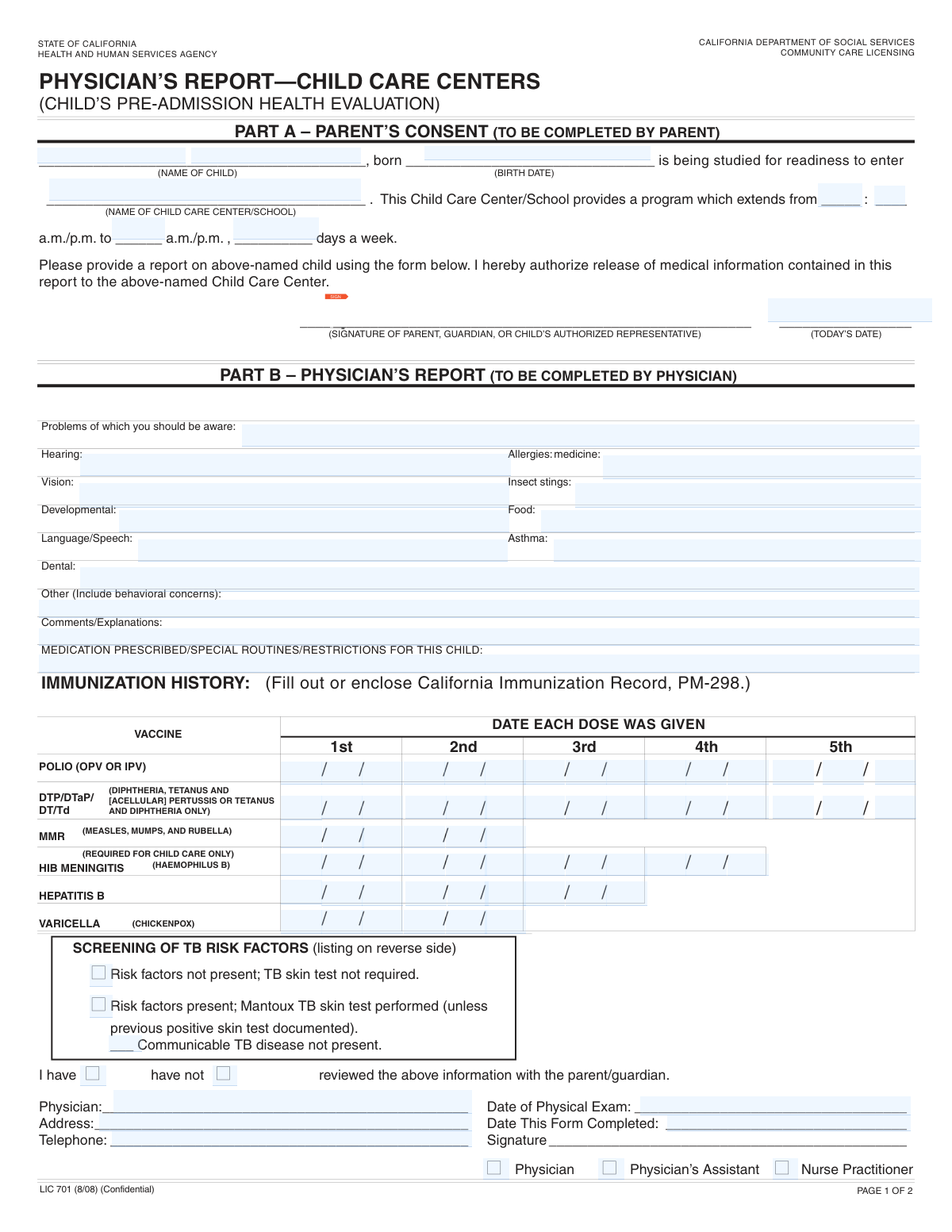
The Physician's Report for Child Care is a detailed health record required for enrolling a child in a daycare or school program. It consists of sections for parents to provide basic information and for a physician to report on a recent physical examination, list any medical conditions or allergies, and document the child's complete immunization history. This form is crucial for ensuring the child's safety and the facility's compliance with health regulations. Today, this form can be filled out quickly and accurately using AI-powered services like Instafill.ai, which can also convert non-fillable PDF versions into interactive fillable forms.
Child Care Physician's Report is part of the
CAR forms, child care forms, physician forms and L.A. Care forms categories on Instafill.
Our AI automatically handles information lookup, data retrieval, formatting, and form filling.
It takes less than a minute to fill out Child Care Physician's Report using our AI form filling.
Securely upload your data. Information is encrypted in transit and deleted immediately after the form is filled out.
Form specifications
| Form name: | Physician's Report for Child Care |
| Number of fields: | 100 |
| Number of pages: | 2 |
| Filled form examples: | Form Child Care Physician's Report Examples |
| Language: | English |
More forms in CAR forms
Instafill Demo: How to fill out PDF forms in seconds with AI
How to Fill Out Child Care Physician's Report Online for Free in 2026
Are you looking to fill out a CHILD CARE PHYSICIAN'S REPORT form online quickly and accurately? Instafill.ai offers the #1 AI-powered PDF filling software of 2026, allowing you to complete your CHILD CARE PHYSICIAN'S REPORT form in just 37 seconds or less.
Follow these steps to fill out your CHILD CARE PHYSICIAN'S REPORT form online using Instafill.ai:
- 1 Navigate to Instafill.ai and upload or select the Physician's Report for Child Care form.
- 2 Use the AI assistant to fill in the parent/guardian section with the child's personal details and the child care center's information.
- 3 Bring the partially completed form to your child's pediatrician or healthcare provider for the medical examination section.
- 4 The physician's office can use Instafill.ai to quickly populate the immunization records, medical findings, allergies, and any special instructions or restrictions.
- 5 The physician or an authorized representative (PA/NP) reviews the information, makes any necessary additions, and then digitally signs and dates the form.
- 6 The parent/guardian provides their final signature and date before downloading or submitting the completed document directly to the child care center or school.
Our AI-powered system ensures each field is filled out correctly, reducing errors and saving you time.
Why Choose Instafill.ai for Your Fillable Child Care Physician's Report Form?
Speed
Complete your Child Care Physician's Report in as little as 37 seconds.
Up-to-Date
Always use the latest 2026 Child Care Physician's Report form version.
Cost-effective
No need to hire expensive lawyers.
Accuracy
Our AI performs 10 compliance checks to ensure your form is error-free.
Security
Your personal information is protected with bank-level encryption.
Frequently Asked Questions About Form Child Care Physician's Report
This is a child health and immunization record required for enrollment in a child care center or school. A parent/guardian must fill out the child's information, and a physician or other authorized medical provider must complete the medical examination and immunization sections.
You will need your child's official immunization record to accurately enter the vaccination dates. You should also have the name and program hours of the child care center or school your child will be attending.
All sections labeled 'Physician' must be completed by a licensed physician, physician's assistant (PA), or nurse practitioner (NP). They will provide details from your child's physical exam, list any health concerns, and verify the immunization record.
The form has separate, dedicated fields for different types of allergies. Your physician should list any food allergies, medication allergies, and insect sting allergies in their respective sections.
Your physician should use this section to list any prescribed medications with dosages, any special care routines your child needs, and any restrictions on activities like physical education.
This form requires the date of your child's most recent physical exam. Policies on how recent the exam must be can vary, so it is best to check the specific requirements of your child care center or school.
While you can refer to your child's records to gather the dates, a physician or authorized clinician must officially record or verify the immunization dates on the form and sign it.
Your physician should document any medical exemptions or contraindications for vaccines. This information can be noted in the 'Physician Comments / Explanations' section.
Services like Instafill.ai can convert non-fillable PDFs into interactive forms. You can upload the file, and the tool will make the fields fillable online.
Yes, AI-powered services like Instafill.ai can help you complete this form faster and more accurately. It can auto-fill your child's information, immunization dates, and other details from your saved profile.
To use Instafill.ai, you upload the form to its platform. The AI will identify the form fields, allowing you to click and auto-fill them with your saved information, saving you time on data entry.
This section is for your physician to document your child's risk assessment for tuberculosis (TB). The provider will indicate whether risk factors were present, if a test was performed, and confirm the child does not have communicable TB.
Compliance Child Care Physician's Report
Validation Checks by Instafill.ai
1
Child's Birth Date is a Valid Past Date
This check ensures that the 'Child's Birth Date' is a real, correctly formatted calendar date that occurs before the current date. It prevents the entry of future or impossible dates, which are common data entry errors. If the date is invalid or in the future, the form submission should be rejected with an error message prompting the user to enter a valid birth date.
2
Program Time Sequence is Logical
This validation confirms that the 'Program start time' is chronologically before the 'Program end time'. This is crucial for calculating program duration and ensuring the data makes logical sense. If the end time is earlier than or the same as the start time, the system should flag it as an error and require correction before proceeding.
3
Days Per Week is Within Range
This check verifies that the value entered for 'Days per week program operates' is a whole number between 1 and 7. This maintains data integrity and prevents nonsensical entries like '0', '8', or text. An invalid entry would corrupt scheduling and attendance records, so the system must enforce this numerical range.
4
Parent Signature Date is Logical
This validation ensures the 'Parent/Guardian Signature Date' is not before the 'Child's Birth Date' and not a date in the future. It confirms the form was signed after the child was born and on or before the day of submission. This is important for establishing the legal validity and timeline of the document.
5
Immunization Dates Occur After Birth
This check cross-references every entered immunization date (Polio, DTP, MMR, etc.) against the 'Child's Birth Date'. It ensures that no vaccination is recorded as having been administered before the child was born. This is a critical logical check for medical record accuracy; a failure should require immediate review and correction of the dates.
6
Immunization Doses are in Chronological Order
This validation verifies that for a multi-dose vaccine series (e.g., DTP/DTaP), the date for Dose 2 is after the date for Dose 1, Dose 3 is after Dose 2, and so on. This ensures the immunization record follows a logical and medically valid sequence. An out-of-order entry likely indicates a typo and must be flagged for correction to ensure the record is accurate.
7
Physical Exam Date is Logically Placed
This check ensures the 'Date of Physical Exam' is after the 'Child's Birth Date' and on or before the 'Date Form Completed'. This confirms the exam is for the correct child and that the form was filled out after the exam took place. This validation is essential for verifying the recency and relevance of the medical information provided.
8
TB Screening Options are Mutually Exclusive
This validation ensures that the user cannot select both 'Risk factors not present' and 'Risk factors present' at the same time. These two options are contradictory, and allowing both to be selected would make the data ambiguous and unusable. If a user tries to select both, the system should show an error and force a choice of only one.
9
TB Review Options are Mutually Exclusive
This check verifies that only one of the two 'TB Review with Parent/Guardian' checkboxes ('I have reviewed' or 'I have not reviewed') is selected. These are mutually exclusive statements, and one must be chosen to accurately reflect the physician's actions. The system should prevent the submission if neither or both are checked.
10
Physician Role Selection is Exclusive
This validation ensures that only one role ('Physician', 'Physician's Assistant', or 'Nurse Practitioner') is checked. A single provider completes the form, so selecting multiple roles is a logical impossibility. This check prevents ambiguity about the signer's credentials and ensures data clarity.
11
Conditional Requirement for Physician Details
This check makes the 'Physician Name', 'Physician/Clinic Address', and 'Physician Telephone' fields mandatory if and only if one of the signature roles ('Physician', 'PA', 'NP') is checked. This ensures that if a provider role is indicated, their contact information is also supplied for verification or follow-up. If no role is checked, these fields can remain empty.
12
Physician Telephone Number Format
This validation checks that the 'Physician Telephone' field contains a valid phone number format (e.g., (XXX) XXX-XXXX or similar patterns). This ensures that the contact information is usable and correctly formatted for database storage and potential communication. An invalid format should trigger an error message asking the user to correct the number.
13
Polio Date Fields Combine to a Valid Date
This check validates the three separate fields for each Polio dose date. It ensures that when combined, 'date field 1', 'date field 2', and 'date field 3' form a single, valid calendar date (e.g., MM/DD/YYYY). This is critical because the data is fragmented across multiple fields and must be reassembled correctly to be useful; failure to form a valid date indicates a data entry error.
14
Completeness of Child's Full Name
This validation ensures that both the 'Child's Last Name' and 'Child's First and Middle Name(s)' fields are not empty. A complete name is the primary identifier for the child and is essential for all record-keeping. If either part of the name is missing, the form is incomplete and should be rejected until the information is provided.
Common Mistakes in Completing Child Care Physician's Report
Users often list an allergy with a general term like 'nuts' or 'medication' without specifying the exact allergen (e.g., peanuts, penicillin) and the nature of the reaction (e.g., hives, anaphylaxis). This happens because they assume the general term is sufficient, but it can lead to improper care or a delayed emergency response. To avoid this, provide full details for each allergy, including the specific trigger, typical reaction, and any required emergency treatment.
The immunization section is long and detailed, leading to frequent data entry errors when transcribing dates from a child's official vaccination record. Users may transpose numbers, enter the wrong year, or skip a dose entirely. This can result in the form being rejected by the school or daycare, requiring a corrected version from the physician's office. Double-checking each date against the source record is crucial to prevent delays.
The Polio immunization section uses a confusing 'date field 1, date field 2, date field 3' format for each dose. Users often struggle to understand if they should enter month, day, and year separately, leading to inconsistent and unreadable data that can invalidate the record. When faced with ambiguous fields, it's best to use a standard MM/DD/YYYY format in the first field and contact the receiving institution for clarification.
The 'Parent/Guardian Signature Date' field specifically requests 'today's date,' but people often enter the child's birth date or the date of the physician's exam by mistake. This happens due to rushing or misreading the field's label. An incorrect signature date can invalidate the attestation, potentially delaying enrollment, so it's important to always enter the actual date you are signing the form.
Users frequently enter abbreviations or acronyms for the 'Child care center / school name' or 'Physician Name' (e.g., 'P.S. 101' instead of 'Public School 101 Elementary'). This occurs out of habit but can cause confusion and processing delays if the receiving party cannot identify the exact entity. Always write out the full, official name as it appears on official documents or websites to ensure clarity.
When a child has no known issues, users may leave sections like 'Allergies' or 'Medication' completely blank. This creates ambiguity, as it's unclear if the section was missed or if the child truly has no condition, leading to unnecessary follow-up calls. The best practice is to explicitly write 'None' or 'N/A' to confirm the section has been reviewed and is not applicable.
A significant process error occurs when parents attempt to fill out the extensive medical sections intended for a physician, such as 'Physician - Comments/Explanations' or the immunization record. This usually happens due to a misunderstanding of the workflow. Forms completed by a parent instead of a licensed medical professional will be rejected, requiring the family to start the process over with their doctor's office.
The form asks for both the 'Date of Physical Exam' and 'Date Form Completed' in the physician's section. Medical staff sometimes enter the same date for both out of convenience, even if the form was filled out days later. This can create compliance issues, as many institutions require the form to be completed within a certain timeframe of the exam. Ensure both dates are entered accurately to reflect the true timeline.
The form separates 'Program start time — hour' and 'Program start time — minutes' into two distinct fields. A common mistake is to enter the full time (e.g., '9:30') into the hour field, ignoring the separate minute field. This leads to invalid data that cannot be processed correctly. To avoid this, carefully read the field labels and enter only the requested number in each box (e.g., '9' in the hour field and '30' in the minute field).
The form requires the person completing the medical report to check a box indicating their role: 'Physician,' 'Physician's Assistant,' or 'Nurse Practitioner.' This checkbox is often overlooked by busy medical staff. A form without this selection lacks proper validation of the signer's credentials and will likely be returned for correction, causing delays.
These forms are often distributed as flat, non-fillable PDFs, forcing users to print them and fill them out by hand. This frequently results in illegible handwriting, which can cause critical data entry errors for medical information and immunization dates. Using a tool like Instafill.ai can convert the non-fillable PDF into an interactive, fillable form, ensuring all entries are clear, legible, and properly formatted.
Saved over 80 hours a year
“I was never sure if my IRS forms like W-9 were filled correctly. Now, I can complete the forms accurately without any external help.”
Kevin Martin Green
Your data stays secure with advanced protection from Instafill and our subprocessors

Robust compliance program
Transparent business model
You’re not the product. You always know where your data is and what it is processed for.
ISO 27001, HIPAA, and GDPR
Our subprocesses adhere to multiple compliance standards, including but not limited to ISO 27001, HIPAA, and GDPR.
Security & privacy by design
We consider security and privacy from the initial design phase of any new service or functionality. It’s not an afterthought, it’s built-in, including support for two-factor authentication (2FA) to further protect your account.
Fill out Child Care Physician's Report with Instafill.ai
Worried about filling PDFs wrong? Instafill securely fills physicians-report-for-child-care forms, ensuring each field is accurate.



