Yes! You can use AI to fill out Physician’s Statement of Disability / Functional Limitations (ICD Diagnosis Codes, Treatment, ADLs, and Return-to-Work)
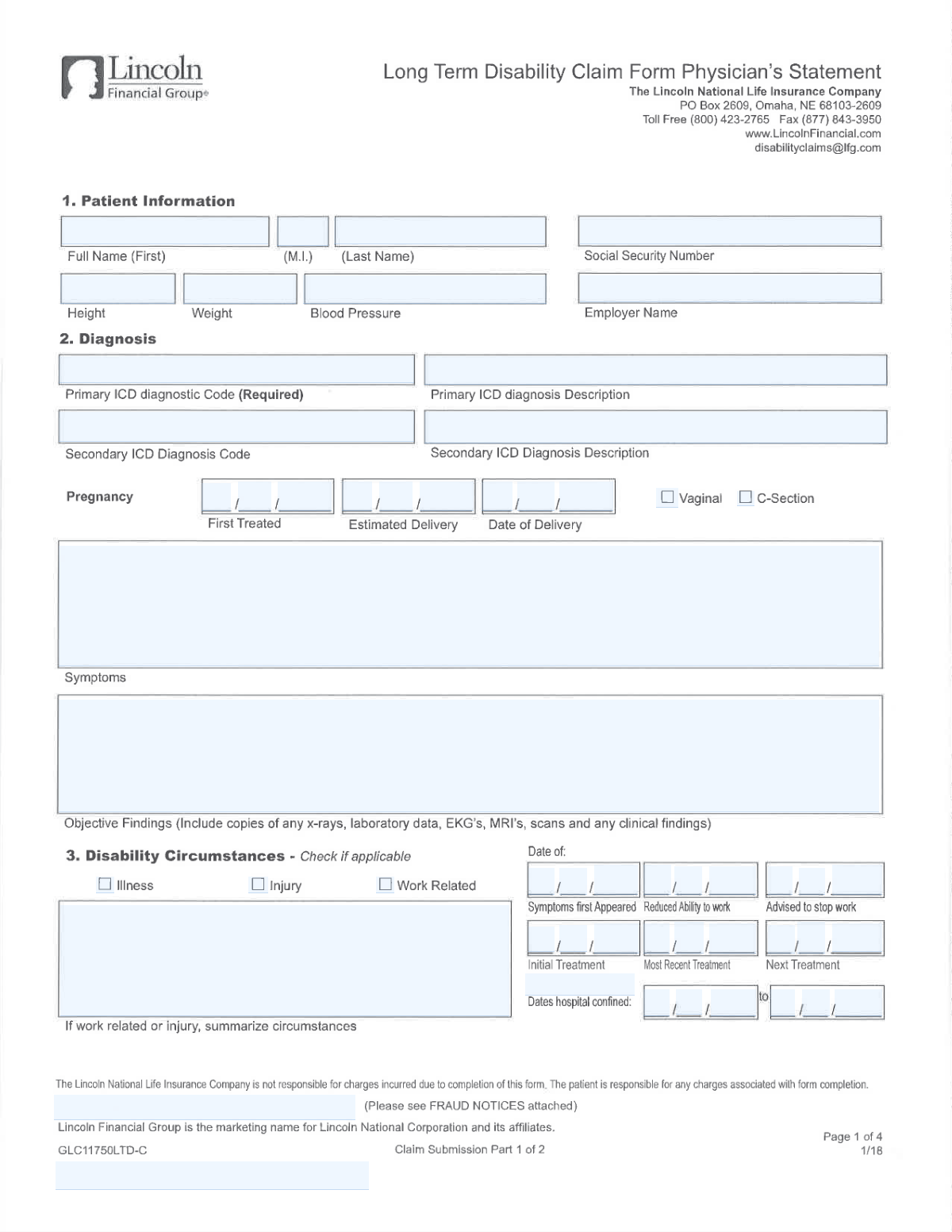
This is a medical provider statement used to support a disability, leave, or work-capacity determination by capturing the patientâs identifying information, ICD diagnosis codes and descriptions, symptom history, objective clinical findings, treatment details, and prognosis. It also documents functional limitations (including activities of daily living and lifting/carrying/reaching frequency tables), any work-related or injury circumstances, hospital confinement dates, and anticipated return-to-work timing and restrictions. The form is important because insurers/employers rely on it to evaluate eligibility, duration, and accommodations for disability benefits or job-protected leave. Today, this form can be filled out quickly and accurately using AI-powered services like Instafill.ai, which can also convert non-fillable PDF versions into interactive fillable forms.
Our AI automatically handles information lookup, data retrieval, formatting, and form filling.
It takes less than a minute to fill out Physician Statement of Disability using our AI form filling.
Securely upload your data. Information is encrypted in transit and deleted immediately after the form is filled out.
Form specifications
| Form name: | Physician’s Statement of Disability / Functional Limitations (ICD Diagnosis Codes, Treatment, ADLs, and Return-to-Work) |
| Number of pages: | 2 |
| Language: | English |
| Categories: | healthcare forms, disability forms, medical forms, physician forms |
Instafill Demo: filling out a legal form in seconds
How to Fill Out Physician Statement of Disability Online for Free in 2026
Are you looking to fill out a PHYSICIAN STATEMENT OF DISABILITY form online quickly and accurately? Instafill.ai offers the #1 AI-powered PDF filling software of 2026, allowing you to complete your PHYSICIAN STATEMENT OF DISABILITY form in just 37 seconds or less.
Follow these steps to fill out your PHYSICIAN STATEMENT OF DISABILITY form online using Instafill.ai:
- 1 Go to Instafill.ai and upload the PDF (or select the Physician Statement of Disability/Functional Limitations form from the form library).
- 2 Enter or import patient identifiers and demographics (name, SSN, employer, height/weight, blood pressure) and confirm accuracy.
- 3 Add diagnosis information by entering the primary (and any secondary) ICD code(s) and plain-language diagnosis descriptions, plus the symptoms first appeared date.
- 4 Complete the clinical narrative sections: symptoms description, objective findings (tests/imaging/labs), current and recommended treatment, ongoing treatment frequency, and prognosis for recovery.
- 5 Fill in key disability timeline dates (initial/most recent/next treatment, advised-to-stop-work date, reduced-ability-to-work date, hospital confinement from/to, and pregnancy details if applicable).
- 6 Document functional impact: activities of daily living dates (eating, bathing, dressing, toileting, continence, transferring, cognitive functioning) and the functional limitations table (N/O/F/C frequencies) plus restrictions and job modifications.
- 7 Review for completeness, then add physician contact details, signature, and date; export the completed form and share/submit it to the insurer/employer as required.
Our AI-powered system ensures each field is filled out correctly, reducing errors and saving you time.
Why Choose Instafill.ai for Your Fillable Physician Statement of Disability Form?
Speed
Complete your Physician Statement of Disability in as little as 37 seconds.
Up-to-Date
Always use the latest 2026 Physician Statement of Disability form version.
Cost-effective
No need to hire expensive lawyers.
Accuracy
Our AI performs 10 compliance checks to ensure your form is error-free.
Security
Your personal information is protected with bank-level encryption.
Frequently Asked Questions About Form Physician Statement of Disability
This form documents a patientâs medical condition, treatment, functional limitations, and work capacity for a disability-related claim or leave request. It captures diagnosis codes, clinical findings, restrictions, and key dates (symptom onset, treatment, hospital confinement, and return-to-work).
Most medical sections (diagnosis, objective findings, treatment plan, restrictions, prognosis, and signature) should be completed by the treating physician. The patient may provide basic identifying information (name, SSN, employer) if the providerâs office does not already have it.
The Primary ICD Diagnostic Code is explicitly required, and the physician signature/date are typically essential for acceptance. Missing key dates (symptoms first appeared, reduced ability to work, advised to stop work) and incomplete objective findings commonly cause processing delays.
Enter the exact ICD code assigned by the physician (e.g., M54.5) and a plain-language description that matches it (e.g., âLow back painâ). If youâre unsure, confirm the code and wording with the treating provider or medical records.
Use the secondary diagnosis fields only if the physician has documented an additional condition relevant to the disability. If there is no secondary diagnosis, leave both the secondary code and description blank.
Objective findings include measurable or documented clinical evidence such as imaging results (X-ray/MRI/CT), lab data, EKGs, exam findings, and other diagnostic reports. If the form allows attachments, include copies or concise summaries to support the diagnosis and limitations.
Describe the symptomsâ onset date/time, severity, location, frequency, progression, and what makes them better or worse. Include how symptoms affect daily activities and work tasks to align with the restrictions and functional limitations sections.
âSymptoms First Appearedâ is when the condition began or was first noticed, âReduced Ability to Workâ is when work capacity first decreased, and âAdvised to Stop Workâ is the date the physician instructed the patient to stop working. These dates can be different and should reflect the medical timeline accurately.
Enter the start (âFromâ) and end (âToâ) dates of the hospital stay (or expected end date if ongoing) and provide a brief reason for confinement (diagnosis/procedure). Use the month/day checkboxes only as the form instructs for the date-part fields.
Check the appropriate circumstance boxes (Illness, Injury, Work Related) and complete the âDisability Circumstances â Summaryâ with a clear timeline and how the injury/illness occurred. Only fill that summary if the form indicates itâs required when Injury/Work Related is âYes.â
Enter the date the patient was first treated for the pregnancy and the estimated delivery date; if delivery has occurred, enter the actual delivery date and check the delivery method (Vaginal or C-Section). Use the âEstimated Deliveryâ vs âDate of Deliveryâ checkboxes to indicate which date you are providing.
The return-to-work range indicates when the patient is expected to resume full-time work, with a start date and (if applicable) an end date for a limited period estimate. If the date is unknown, the physician should provide the best medical estimate and note that it may change based on recovery.
Enter the date the patient was first unable to perform each activity, using the month/day/year parts as shown on the form. If an activity is not affected, leave it blank unless the form specifically requires a date for all items.
The table records how often the patient can perform specific actions (e.g., reaching, walking, stooping) at different weight ranges using the formâs frequency scale (N/O/F/C). The physician should select the appropriate frequency for each relevant task and add clarifying details in the âAdditional Commentsâ section when needed.
Yesâtools like Instafill.ai can use AI to auto-fill form fields accurately from your provided information, saving time and reducing missed fields. Upload the PDF to Instafill.ai, map or confirm the patient/physician details and dates, review the populated fields for accuracy (especially ICD codes and medical statements), then export the completed form for signature and submission.
If the PDF is âflatâ (non-fillable), Instafill.ai can convert it into an interactive fillable form so you can type into fields normally. After conversion, you can auto-fill the new fields and download a completed, legible version.
Compliance Physician Statement of Disability
Validation Checks by Instafill.ai
1
Primary ICD Diagnostic Code is present and in valid ICD-10/ICD-9 format
Validate that the Primary ICD Diagnostic Code field is not blank (required) and matches an expected ICD pattern (e.g., ICD-10 like 'M54.5' or ICD-9 like '401.9'), allowing an optional decimal in the correct position. This prevents downstream claim/clinical coding failures and ensures the diagnosis can be interpreted by payers and systems. If validation fails, block submission and prompt the user to enter a valid primary ICD code.
2
ICD Code–Description consistency (Primary and Secondary)
Check that the Primary ICD Diagnosis Description is present when a Primary ICD code is provided, and that the Secondary ICD Diagnosis Description is present only when a Secondary ICD code is provided. Also validate that descriptions are not identical placeholders (e.g., 'N/A', 'same as above') and are reasonably descriptive (minimum length). If inconsistent, flag the record and require correction to avoid mismatched coding and ambiguous clinical documentation.
3
Secondary ICD fields are either both filled or both blank
If a Secondary ICD Diagnostic Code is entered, require a corresponding Secondary ICD Diagnosis Description; if the code is blank, the description must also be blank. This ensures the secondary diagnosis is complete and prevents partial data that can cause adjudication or clinical review issues. On failure, return an error indicating which secondary field is missing or should be cleared.
4
Patient name fields completeness and character validation
Validate that First Name and Last Name are present and contain only expected characters (letters, spaces, hyphens, apostrophes), and that Middle Initial (if provided) is exactly one alphabetic character. This reduces identity matching errors and prevents invalid characters from breaking integrations. If validation fails, require correction and highlight the specific field and allowed format.
5
Social Security Number format and basic plausibility checks
Validate SSN is either 9 digits or formatted as 'XXX-XX-XXXX', and reject known invalid patterns (all zeros in any group, 000/00/0000, or non-numeric characters besides dashes). This is critical for patient identification and claim processing. If invalid, block submission and request a corrected SSN format.
6
Height and Weight numeric + unit validation with reasonable ranges
Validate Height includes a numeric value and unit (either feet/inches like 5'10" or centimeters) and Weight includes a numeric value and unit (lb/lbs or kg). Apply reasonable range checks (e.g., height 50â250 cm; weight 20â400 kg equivalent) to catch entry mistakes like swapped units or missing decimals. If validation fails, prompt for corrected values and units.
7
Blood Pressure format and physiological plausibility
Validate Blood Pressure is entered as 'systolic/diastolic' with two integers separated by a slash (e.g., 120/80). Apply plausibility rules (e.g., systolic 60â260, diastolic 30â160, and systolic > diastolic) to detect transpositions and typos. If invalid, reject the value and request a corrected reading.
8
All date fields use valid calendar dates and consistent entry method
Validate that each date provided (Symptoms First Appeared, Reduced Ability to Work Date, Advised to Stop Work Date, Hospital confinement start/end, Most Recent Treatment, Next Treatment, pregnancy dates, ADL dates, Date Signed) is a real calendar date (valid month/day/year, leap-year handling). Where the form uses separate month/day/year parts or year-digit boxes, ensure all required parts are present and combine into a single valid date. If invalid or incomplete, fail validation and identify the missing/incorrect date component.
9
Chronological consistency across key clinical timeline dates
Enforce logical ordering: Symptoms First Appeared Date should be on/before Most Recent Treatment Date; Next Treatment Date should be on/after Most Recent Treatment Date; Hospital confinement start date must be on/before end date; Date Signed by Physician should not be before key clinical events it attests to (at minimum not before Symptoms First Appeared). This prevents impossible timelines that undermine medical credibility and claim review. If checks fail, flag the conflicting dates and require correction or confirmation.
10
Reduced Ability to Work checkbox-to-date dependency
If either 'Reduced Ability to Work' checkbox is checked, require Reduced Ability to Work Date to be present and valid; if neither checkbox is checked, the Reduced Ability to Work Date should be blank (or explicitly allowed but flagged). This ensures the date is only captured when the form indicates it is applicable. On failure, prompt the user to either provide the date or uncheck the box(es).
11
Hospital confinement summary required when confinement dates are provided
If Hospital confinement start and/or end date is entered, require Hospital confinement summary to be non-empty and sufficiently descriptive (e.g., minimum character count) to explain the stay. This supports medical necessity and reduces follow-up requests. If missing, block submission until a summary is provided or the dates are cleared.
12
Pregnancy section internal consistency (First Treated, Estimated Delivery, Actual Delivery, Delivery Method)
If any pregnancy date/checkbox is used (First Treated, Estimated Delivery, Date of Delivery), require the corresponding date field to be present and valid. Enforce chronology: First Treated <= Estimated Delivery, and if Actual Date of Delivery is present it should be on/after First Treated and typically on/before or near Estimated Delivery (allow configurable tolerance). Also require exactly one delivery method (Vaginal or C-Section) if an actual delivery date is provided; otherwise flag for completion.
13
Physician contact information format validation (phone, fax, address, ZIP, state)
Validate Physician Phone Number and Fax Number contain a valid 10-digit NANP number (allow punctuation, spaces, and optional extension) and reject clearly invalid lengths. Validate Physician ZIP Code is 5 digits or ZIP+4, and Physician State is a valid US state abbreviation/name. If invalid, return field-level errors to prevent failed communications and mailing issues.
14
Physician attestation completeness (name, signature, date signed)
Require Physician Name, Physician Signature, and Date Signed by Physician to be present together; do not allow a signature without a date or vice versa. This is essential for legal/medical attestation and auditability. If any component is missing, block submission and indicate which attestation element is required.
15
Disability circumstances conditional requirement for summary
If Injury and/or Work Related is checked (as indicated by the form instructions), require Disability Circumstances â Summary to be completed with a meaningful narrative (minimum length, not just 'see notes'). This ensures the claim has the necessary context for causation and work-relatedness determinations. If missing, fail validation and request the summary or uncheck the circumstance boxes if not applicable.
16
Functional Limitations table values restricted to allowed N/O/F/C codes and single selection per cell
For each Functional Limitations Table item, validate that the recorded frequency is one of the allowed codes (N/O/F/C) and that at most one code is selected per activity/weight cell. This prevents ambiguous functional capacity reporting and supports consistent interpretation. If invalid (multiple selections or out-of-set values), reject the entry and require a single valid code.
Common Mistakes in Completing Physician Statement of Disability
People often enter a diagnosis description (e.g., âback painâ) instead of a valid ICD code, use an outdated ICD-9 code, or forget the Primary ICD code even though itâs required. This can cause claim delays, requests for correction, or mismatches with the physicianâs documentation. Always confirm the code is the physician-assigned ICD code (ICD-10 format where applicable) and that it matches the clinical record. AI-powered form filling tools like Instafill.ai can help validate ICD formatting and reduce missing required fields.
A very common error is entering a correct-looking ICD code but pairing it with a description that doesnât correspond (or is too vague), especially when copying from prior notes. This creates inconsistencies that trigger follow-up questions and can undermine medical necessity or disability rationale. Cross-check that the âPrimary ICD Diagnosis Descriptionâ is the plain-language equivalent of the exact code entered, and do the same for any secondary diagnosis. Instafill.ai can flag mismatches and standardize descriptions to align with the entered codes.
Many people enter a secondary diagnosis description without a code, enter a code without a description, or put âN/Aâ instead of leaving it blank as instructed. Partial or contradictory entries can confuse reviewers and lead to rework. If there is no secondary diagnosis, leave both secondary fields blank; if there is one, complete both the code and the matching description. Instafill.ai can enforce conditional logic so secondary fields are only completed when applicable.
This form uses multiple date fields and also separate âmonth/day/yearâ checkbox indicators, which people frequently misinterpret or complete inconsistently. The result is ambiguous dates (e.g., 03/07 could be March 7 or July 3), missing year digits, or checked boxes that donât match the written date. Use a consistent format (MM/DD/YYYY) and ensure the month/day/year indicators align with the date you entered, especially for âAdvised to Stop Work,â âSymptoms First Appeared,â and hospital confinement dates. Instafill.ai can format dates consistently and reduce errors when forms split dates into multiple parts.
A frequent issue is entering dates that donât make clinical sense togetherâsuch as âReduced Ability to Work Dateâ occurring before âSymptoms First Appeared Date,â or âMost Recent Treatmentâ after âNext Treatment.â These inconsistencies can trigger claim scrutiny and requests for clarification. Before submitting, sanity-check the timeline: symptoms onset â initial/most recent treatment â advised to stop work/reduced ability â return-to-work range. Instafill.ai can automatically validate date sequences and flag conflicts.
Weight and height are often entered without units (e.g., â150â instead of â150 lbâ) or with mixed systems (kg for weight but feet/inches for height) without clarity. Blood pressure is also commonly entered as a single number or reversed (diastolic/systolic) instead of systolic/diastolic (e.g., 120/80). Missing units or incorrect formats can lead to data rejection or misinterpretation in medical review. Always include units for height/weight and record BP as systolic/diastolic (e.g., 120/80). Instafill.ai can standardize units and enforce the correct BP format.
People often enter nicknames instead of the legal first name, omit the middle initial, or misspell the last name compared to official records. SSNs are frequently mistyped (transposed digits) or entered without the expected dash formatting, which can cause identity mismatches and processing delays. Use the patientâs name exactly as it appears on records and carefully verify the SSN digit-by-digit (including dashes if the form expects them). Instafill.ai can help by auto-formatting SSNs and reducing manual retyping errors.
A common mistake is entering a brand/store location (âWalmart #1234â) without the legal employer entity, or using abbreviations that donât match payroll/HR records. This can slow employer verification and delay disability claim handling. Enter the employerâs full legal name as used for employment records, and include clarifying details only if needed (e.g., division/location) without replacing the legal name. Instafill.ai can reuse verified employer data consistently across forms to prevent variations.
Many submissions repeat symptoms (pain, fatigue) in the âObjective Findingsâ section instead of providing measurable exam findings and diagnostic evidence (imaging/labs/EKG results). Missing dates, missing report summaries, or failing to include copies/summaries of tests can weaken the medical support for disability and lead to requests for additional documentation. Include specific exam findings (ROM, strength, neuro findings), test names, dates, and key results, and attach or summarize relevant reports. Instafill.ai can help ensure required supporting details are included and consistently formatted.
People often check âIllness,â âInjury,â and âWork Relatedâ inconsistently, or they write a âDisability Circumstances â Summaryâ even when the instructions say to fill it only if Injury/Work Related is âYes.â Inconsistencies can trigger follow-up questions about causation and compensability. Only check the boxes that truly apply, and provide the circumstances summary only when the condition is injury-related and/or work-related, with a clear timeline and event description. Instafill.ai can apply conditional rules so the summary is prompted only when the relevant boxes are selected.
In the functional limitations grid, people frequently check a capability box but forget to record the required frequency code (N/O/F/C), or they mark multiple frequencies for the same activity/weight row. This makes the limitations unclear and can lead to an incomplete assessment of work capacity. For each applicable activity and weight range, select the correct frequency code exactly as the form defines it and avoid contradictory markings. Instafill.ai can guide structured entry and prevent incomplete rows by validating that each checked item has a corresponding frequency.
Saved over 80 hours a year
âI was never sure if my IRS forms like W-9 were filled correctly. Now, I can complete the forms accurately without any external help.â
Kevin Martin Green
Your data stays secure with advanced protection from Instafill and our subprocessors

Robust compliance program
Transparent business model
Youâre not the product. You always know where your data is and what it is processed for.
ISO 27001, HIPAA, and GDPR
Our subprocesses adhere to multiple compliance standards, including but not limited to ISO 27001, HIPAA, and GDPR.
Security & privacy by design
We consider security and privacy from the initial design phase of any new service or functionality. Itâs not an afterthought, itâs built-in, including support for two-factor authentication (2FA) to further protect your account.
Fill out Physician Statement of Disability with Instafill.ai
Worried about filling PDFs wrong? Instafill securely fills physicians-statement-of-disability-functional-limitations-icd-diagnosis-codes-treatment-adls-and-return-to-work forms, ensuring each field is accurate.