Yes! You can use AI to fill out SC ISP-2519, Medical Report for Canada Pension Plan Disability Benefits
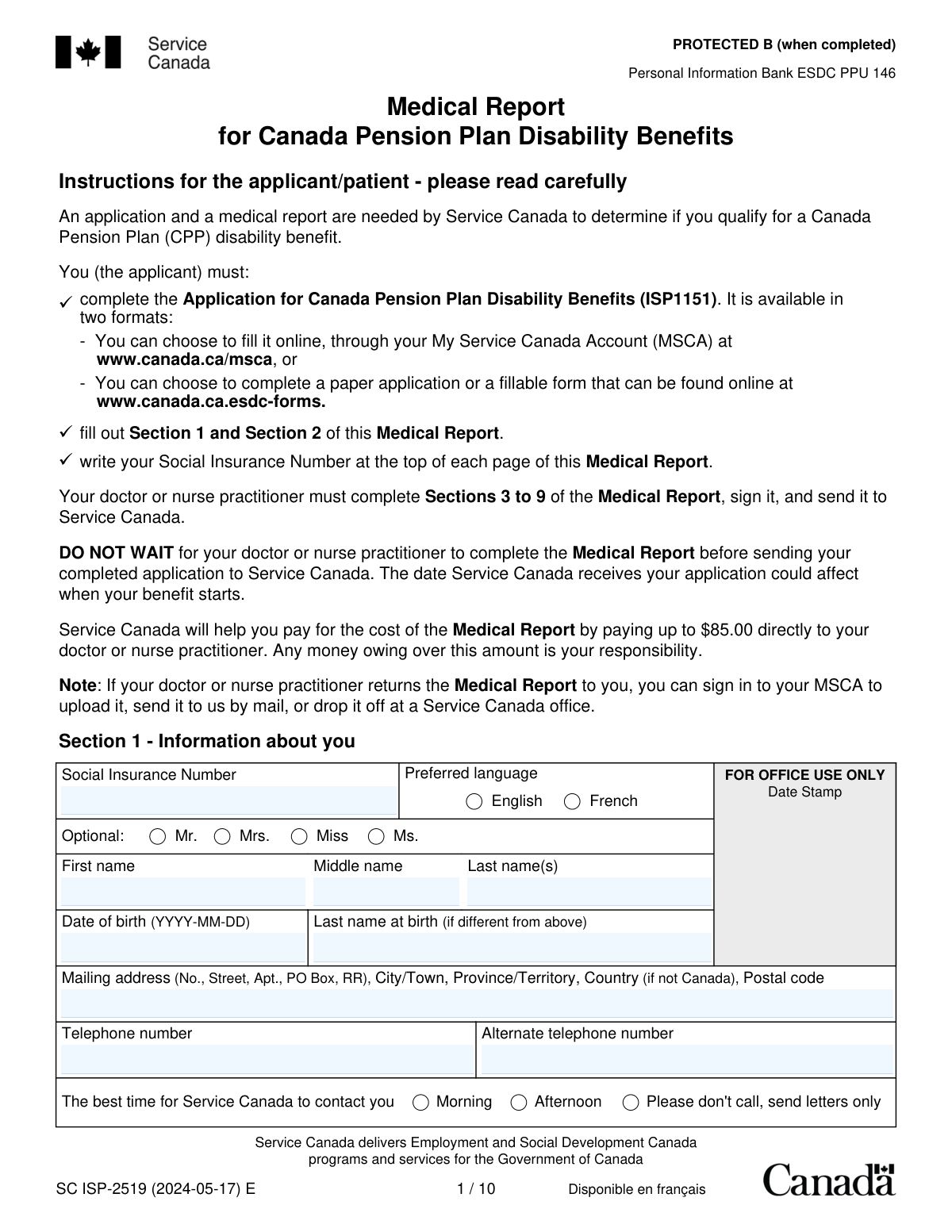
SC ISP-2519 is the official Service Canada medical report that supports an application for Canada Pension Plan (CPP) disability benefits by documenting diagnoses, impairments, functional limitations, treatment history, prognosis, and work capacity. The applicant completes personal details and consent (Sections 1â2), while a doctor or nurse practitioner completes the medical sections (Sections 3â9) and submits the report with any supporting documents. Service Canada uses this information to apply the CPP legal test of a disability being both âsevereâ and âprolonged,â including how the condition affects employability. Today, this form can be filled out quickly and accurately using AI-powered services like Instafill.ai, which can also convert non-fillable PDF versions into interactive fillable forms.
Our AI automatically handles information lookup, data retrieval, formatting, and form filling.
It takes less than a minute to fill out ISP-2519 using our AI form filling.
Securely upload your data. Information is encrypted in transit and deleted immediately after the form is filled out.
Form specifications
| Form name: | SC ISP-2519, Medical Report for Canada Pension Plan Disability Benefits |
| Number of pages: | 15 |
| Filled form examples: | Form ISP-2519 Examples |
| Language: | English |
| Categories: | disability forms |
Instafill Demo: filling out a legal form in seconds
How to Fill Out ISP-2519 Online for Free in 2026
Are you looking to fill out a ISP-2519 form online quickly and accurately? Instafill.ai offers the #1 AI-powered PDF filling software of 2026, allowing you to complete your ISP-2519 form in just 37 seconds or less.
Follow these steps to fill out your ISP-2519 form online using Instafill.ai:
- 1 Go to Instafill.ai and upload the SC ISP-2519 PDF (or search/select “ISP-2519 Medical Report for CPP Disability” from the form library).
- 2 Let the AI detect and map the form fields, then confirm the form version/date and that all pages/sections are included.
- 3 Complete Section 1 (applicant information) and ensure the Social Insurance Number is entered as required (including at the top of each page, if applicable).
- 4 Complete Section 2 (consent), choose the appropriate consent option, and add the applicant/representative signature and date (and witness details if signing with a mark).
- 5 Share the form securely with the doctor or nurse practitioner (or export a provider-ready link/PDF) so they can complete Sections 3–9, including medical conditions, functional limitations, treatment details, and employment capacity.
- 6 Upload or attach supporting documents (e.g., specialist reports, investigation results, hospital discharge summaries) and run Instafill.ai’s validation checks for missing dates, ICD-9-CM codes, signatures, and required selections.
- 7 Download the completed packet and submit it as instructed (e.g., upload via My Service Canada Account if returning to you, or mail/drop off to the appropriate Service Canada office), keeping copies for your records.
Our AI-powered system ensures each field is filled out correctly, reducing errors and saving you time.
Why Choose Instafill.ai for Your Fillable ISP-2519 Form?
Speed
Complete your ISP-2519 in as little as 37 seconds.
Up-to-Date
Always use the latest 2026 ISP-2519 form version.
Cost-effective
No need to hire expensive lawyers.
Accuracy
Our AI performs 10 compliance checks to ensure your form is error-free.
Security
Your personal information is protected with bank-level encryption.
Frequently Asked Questions About Form ISP-2519
This Medical Report is used by Service Canada to help determine whether you qualify for Canada Pension Plan (CPP) disability benefits. It provides medical details about your conditions, functional limitations, treatment, and prognosis.
Yes. Service Canada requires both the CPP Disability application (ISP1151) and this Medical Report (ISP-2519) to make a decision on eligibility.
You must complete Sections 1 and 2 and write your Social Insurance Number (SIN) at the top of each page. Your doctor or nurse practitioner must complete Sections 3 to 9, sign the declaration, and send the report to Service Canada.
No. The form instructs you to send your completed application (ISP1151) right away because the date Service Canada receives it can affect when your benefit starts.
Yes. The instructions say you must write your Social Insurance Number at the top of each page to help ensure the report is matched to your file.
You must select either âI give my consentâ or âI do not give my consent.â If you donât choose an option, it can delay processing or the calculation/determination of benefits.
Service Canada may decide based only on the information already in your file, may stop benefits if you are already receiving them, and can require you to provide the necessary information. Not giving consent can make it harder to gather complete medical evidence.
A witness is only required if the applicant signs with a mark (for example, an âXâ). If you sign normally, the witness section is not needed.
Service Canada will pay up to $85.00 directly to your doctor or nurse practitioner. Any amount charged above $85.00 is your responsibility.
They should submit the completed report and an invoice as soon as possible. The invoice must include the patientâs name, address, and identification number, plus a Business Number (BN) or GST/HST number or the clinicianâs SIN for tax purposes.
Expedited processing is for applicants with a terminal illness (expected to result in death within 6 months) or a âgraveâ condition listed in Annex A. Once Service Canada receives a complete application and Medical Report, the goal is 5 business days for terminal cases and 30 calendar days for grave conditions.
If available, include copies of relevant medical evidence such as longitudinal clinical notes, investigation reports, specialist reports, and hospital discharge summaries. The clinician should check the appropriate boxes in Section 8 and attach the documents.
Mail it to the Service Canada Disability office that serves the province/territory where you live (addresses are listed on the form). If you live outside Canada, send it to the office serving the province/territory where you last lived.
You can upload it through your My Service Canada Account (MSCA), mail it, or drop it off at a Service Canada office. Make sure all pages are included and your SIN is on each page.
YesâAI tools can help you enter information accurately and save time; services like Instafill.ai use AI to auto-fill form fields based on the details you provide. If your PDF is flat/non-fillable, Instafill.ai can convert it into an interactive fillable form and then help you complete fields like Sections 1â2 before you download, sign, and submit it as instructed.
Compliance ISP-2519
Validation Checks by Instafill.ai
1
Validates Social Insurance Number (SIN) format and checksum
Ensures the applicant SIN is present and is exactly 9 digits, with optional spaces/hyphens normalized, and passes the Luhn checksum used for Canadian SINs. This is critical because the SIN is the primary identifier used to match the medical report to the CPP disability application and to the correct client record. If the SIN is missing or invalid, the submission should be rejected or routed to manual review and the applicant prompted to correct it.
2
Ensures SIN is consistently provided on all required pages/sections
Checks that the SIN entered at the top of the report (and any repeated SIN fields captured during digitization) matches exactly across all occurrences. This prevents page-mismatch errors where pages from different applicants are combined or scanned together. If any SIN instance differs, the system should flag the submission as potentially corrupted/mixed and require reconciliation before processing.
3
Validates preferred language selection is exactly one option
Verifies that the applicant selects either English or French, but not both and not neither. Preferred language drives correspondence templates and service routing, so ambiguity can cause incorrect communications and delays. If validation fails, the form should be returned for correction or the applicant contacted to confirm the preference.
4
Validates applicant name completeness and character rules
Ensures First Name and Last Name(s) are provided and contain only acceptable characters (letters, spaces, hyphens, apostrophes, and common diacritics), and are not placeholder text. Names are required for identity matching, correspondence, and linking to the application (ISP1151). If missing or containing invalid characters, the submission should be flagged and the applicant asked to correct the fields.
5
Validates Date of Birth (DOB) format and plausibility
Checks DOB is in YYYY-MM-DD format, is a real calendar date, and is not in the future; optionally flags implausible ages (e.g., under 15 or over 120) for review. DOB is used for identity verification and eligibility calculations, and errors can lead to incorrect entitlement decisions. If invalid, the system should block submission or require correction before acceptance.
6
Validates mailing address completeness and Canadian postal code rules
Ensures the mailing address includes at minimum street/PO box, city/town, province/territory, and postal code; if country is not Canada, a country value must be present and postal code rules should be relaxed accordingly. For Canadian addresses, validates postal code format (A1A 1A1) and province/territory is one of the recognized Canadian values. If incomplete or invalid, the system should flag it because benefit correspondence and requests for additional information may not reach the applicant.
7
Validates telephone numbers format and contact preference logic
Checks telephone and alternate telephone numbers (if provided) conform to expected formats (e.g., 10-digit NANP with optional country code, or E.164), and are not obviously invalid (all zeros, too short). Also enforces that if 'Please don't call, send letters only' is selected, the system does not require a phone number and suppresses phone-contact workflows; if not selected, at least one reachable phone number should be present. If validation fails, the submission should be flagged because Service Canada may be unable to contact the applicant, causing processing delays.
8
Validates best time to contact selection is mutually consistent
Ensures the applicant selects at most one of Morning or Afternoon, and that selecting 'Please don't call, send letters only' is not combined with Morning/Afternoon. This prevents contradictory instructions that can lead to privacy issues (unwanted calls) or missed contact attempts. If inconsistent, the system should require the applicant to choose a single, clear contact preference.
9
Validates consent option selection is exactly one and signature is present
Confirms the applicant selects exactly one consent option (Give Consent or Do Not Give Consent) and provides an applicant/authorized representative signature and signature date. Consent governs what third-party information Service Canada can request; missing/ambiguous consent can delay adjudication and may limit evidence collection. If consent choice or signature/date is missing, the submission should be considered incomplete and returned for completion.
10
Validates witness fields are completed only when required (mark signature)
If the applicant signature is indicated as a mark (e.g., 'X') or the system captures a 'signed with a mark' indicator, then witness name, witness telephone, witness signature, and witness date must be present. If the applicant provides a normal signature, witness fields should be blank or ignored to avoid unnecessary personal data collection. If the witness requirement is triggered but incomplete, the consent section should be rejected as not properly executed.
11
Validates all date fields for correct format and cross-field chronology
Checks all YYYY-MM-DD and YYYY-MM fields (e.g., last office visit, start treating primary condition, stop working date, signature dates, medication/treatment start/end dates) are valid and not malformed. Enforces logical ordering such as: start treating date cannot be after last office visit; medication/treatment end date cannot be before start date; signature dates should not be in the future. If chronology fails, the system should flag for correction or clinical review because timelines are central to disability duration and severity assessment.
12
Validates Section 3 relationship duration selection and visit count
Ensures exactly one 'years in care' option is selected and the number of visits in the past 12 months is a non-negative integer within a reasonable range (e.g., 0â365). This information supports credibility and completeness of the medical history and helps interpret the level of ongoing care. If missing or out of range, the submission should be flagged for follow-up with the provider.
13
Validates expedited processing (terminal/grave) details completeness and rules
If 'Terminal: Yes' is selected, requires diagnosis, ICD-9-CM code, and symptom onset date (YYYY-MM), and enforces that the rest of Section 6 is skipped/blank as instructed. If 'Grave: Yes' is selected, requires that at least one condition is fully documented in Section 5 (since details are provided there). If these dependencies are not met, the system should not apply expedited handling and should request missing information to avoid incorrect prioritization.
14
Validates ICD-9-CM code format and presence when a condition is listed
For each medical condition entered in Section 4 or Section 5, checks that an ICD-9-CM code is provided in the expected pattern (typically 3 digits, optionally followed by a decimal and 1â2 digits, e.g., 296.3), and is not placeholder text like 'XXX.X'. ICD codes support standardized classification and downstream analytics and can reduce ambiguity in diagnosis. If missing/invalid, the system should flag the condition entry as incomplete and require correction or allow submission with mandatory manual review.
15
Validates Section 5 condition entry completeness and one-page-per-condition structure
For each condition page/entry, requires: medical condition name, symptom onset (YYYY-MM), impairment(s), functional limitation(s), prognosis selection, expected duration selection, and frequency selection. This ensures the report contains both objective/clinical context and functional impact, which is essential for the CPP 'severe and prolonged' test. If any required elements are missing, the system should mark the medical report as incomplete and request the provider to supply the missing details.
16
Validates 'Unknown' prognosis/frequency requires explanation in Section 7
If prognosis is marked 'unknown' and/or frequency is marked 'unknown' for any condition, checks that Section 7 contains a non-empty explanation (e.g., pending investigations, insufficient follow-up, awaiting specialist consult). This is important because unknowns without rationale reduce adjudicative value and can lead to delays or additional evidence requests. If no explanation is provided, the system should flag the submission and prompt the provider to complete Section 7.
17
Validates Section 6 employment questions branching and required follow-ups
Ensures Question 1 has exactly one response (Yes/No/Not discussed); if 'Yes' is selected, a stop-working date (YYYY-MM-DD) must be provided. For Question 2, if 'Yes' is selected, then Questions 3 and 4 must be answered; if 'No' or 'Unknown' is selected, Questions 3 and 4 should be blank. If branching rules are violated, the system should flag the report because inconsistent employment prognosis can mislead the employability assessment.
18
Validates Section 9 provider declaration completeness and professional type constraints
Requires the provider to select exactly one professional category (GP/CCFP, other physician specialist with specialty specified, nurse practitioner, or registered nurse in geographically isolated community), and to provide name, address/telephone, signature, and declaration date (YYYY-MM-DD). This is essential for authenticity, accountability, and determining whether the signer is an acceptable practitioner for CPP disability medical evidence. If missing or inconsistent (e.g., 'other specialist' selected but specialty blank), the submission should be rejected or held until corrected.
Common Mistakes in Completing ISP-2519
Applicants often enter their SIN once in Section 1 but miss the instruction to write it at the top of every page, especially when printing and assembling the package. Pages can become separated during handling, and missing SINs can slow matching the report to the correct file, causing processing delays. To avoid this, add the SIN to each page before giving the form to the clinician and again before mailing/uploading. AI-powered tools like Instafill.ai can help by auto-populating repeated identifiers consistently across all pages and validating that the SIN is present where required.
This form uses multiple date formats: full dates (YYYY-MM-DD) for signatures and visits, and month-only dates (YYYY-MM) for symptom onset and some treatment dates. People frequently enter DD/MM/YYYY, MM/DD/YYYY, or provide only a year, which can create ambiguity and trigger follow-ups. The consequence is avoidable back-and-forth with Service Canada or the clinician to clarify timelines. To prevent this, follow the exact format shown beside each field and use leading zeros (e.g., 2024-02-09). Instafill.ai can automatically format dates correctly and flag entries that donât match the required pattern.
Section 2 requires selecting exactly one option (consent or no consent), but applicants sometimes skip it, assume itâs optional, or accidentally mark both boxes. Service Canada explicitly notes that failing to choose an option can delay processing and may affect benefit decisions because information gathering is restricted. To avoid this, read the note in Section 2, select only one option, and ensure the selection matches your intent. Instafill.ai can enforce single-choice logic and warn if neither (or both) options are selected.
Applicants often forget to sign, forget the date, or sign but use a date format that doesnât match the form requirement. Unsigned or undated consent can invalidate Section 2, leading to delays or requests to resubmit. To avoid this, sign and date immediately after choosing the consent option and confirm the date is in YYYY-MM-DD format. Instafill.ai can prompt for required signatures/dates and validate that the date format is correct before submission.
The witness section is only required if the applicant signs with a mark (e.g., âXâ), but people sometimes fill it out unnecessarily or, conversely, forget it when a mark is used. Incorrect witness handling can cause Service Canada to question the validity of the consent and request clarification or a new consent page. To avoid this, leave witness fields blank unless the applicant signs with a mark; if a mark is used, the witness must print their name, provide a phone number, sign, and date. Instafill.ai can guide conditional sections so witness fields appear (or are required) only when applicable.
Applicants frequently omit apartment/unit numbers, PO Box/RR details, province/territory, or postal code, or they enter a physical address when their mail is delivered to a PO Box. Incomplete addresses can lead to missed correspondence, delayed requests for additional information, and slower decisions. To avoid this, enter the full mailing address exactly as Canada Post recognizes it, including unit number and postal code, and include country if outside Canada. Instafill.ai can standardize address formatting and flag missing components like postal code or province/territory.
Some applicants check âMorningâ or âAfternoonâ and also check âPlease donât call, send letters only,â creating contradictory instructions. This can cause Service Canada to default to slower communication methods or require clarification, delaying time-sensitive follow-ups. To avoid this, choose either a call window (morning/afternoon) or the âletters onlyâ option, not both, and ensure phone numbers are current if calls are allowed. Instafill.ai can detect conflicting selections and prompt the user to resolve them before submission.
Because the form is long and shared between applicant and clinician, applicants sometimes write into Sections 3â9, or clinicians assume the patient completed parts that are actually clinician-required (e.g., Section 3 relationship duration, Section 9 declaration). This can lead to credibility issues, missing professional attestations, and requests for a corrected report. To avoid this, the applicant should complete only Sections 1â2 and then provide the form to the doctor/nurse practitioner for Sections 3â9, ensuring Section 9 is signed and dated. Instafill.ai can help by clearly separating role-based sections and preventing edits in clinician-only areas when configured for applicant completion.
A very common issue is listing medical diagnoses and symptoms without clearly describing functional limitations (e.g., sitting/standing tolerance, concentration limits, interpersonal functioning) and how they prevent substantially gainful work. Service Canadaâs CPP disability test is based on severity/prolonged status and employability, so missing functional detail can weaken the medical evidence and lead to delays or denials. To avoid this, clinicians should describe objective findings, impairments, and specific functional restrictions using concrete examples (frequency, duration, thresholds) and align them with the patientâs ability to work at any job. Instafill.ai can help by prompting for structured functional limitation details and ensuring each condition entry includes the required elements.
Clinicians sometimes enter ICD-10 codes, nonstandard abbreviations, or leave the ICD-9-CM field blank, and applicants/clinicians may enter symptom onset as a full date when the field requires YYYY-MM. While Service Canada can still assess without perfect coding, missing/incorrect codes and inconsistent onset dates can trigger clarification requests and slow adjudication. To avoid this, use ICD-9-CM in the XXX.X format as requested and enter symptom onset as year-month (e.g., 2010-01). Instafill.ai can validate code formatting (XXX.X) and enforce the correct date granularity per field.
Applicants and clinicians often assume Service Canada will request records later, so they submit the report without relevant specialist reports, investigations, discharge summaries, or longitudinal notes, or they forget to check the boxes indicating whatâs attached. Missing documentation can lead to additional evidence requests and longer processing times, especially when objective findings are needed to support severity and prognosis. To avoid this, include copies of key reports referenced in Section 5 and clearly mark the types of documents included in Section 8 (and specify âotherâ when applicable). Instafill.ai can provide a checklist workflow to ensure attachments are accounted for and the corresponding Section 8 selections are completed.
Saved over 80 hours a year
âI was never sure if my IRS forms like W-9 were filled correctly. Now, I can complete the forms accurately without any external help.â
Kevin Martin Green
Your data stays secure with advanced protection from Instafill and our subprocessors
Robust compliance program
Transparent business model
Youâre not the product. You always know where your data is and what it is processed for.
ISO 27001, HIPAA, and GDPR
Our subprocesses adhere to multiple compliance standards, including but not limited to ISO 27001, HIPAA, and GDPR.
Security & privacy by design
We consider security and privacy from the initial design phase of any new service or functionality. Itâs not an afterthought, itâs built-in, including support for two-factor authentication (2FA) to further protect your account.
Fill out ISP-2519 with Instafill.ai
Worried about filling PDFs wrong? Instafill securely fills sc-isp-2519-medical-report-for-canada-pension-plan-disability-benefits forms, ensuring each field is accurate.




