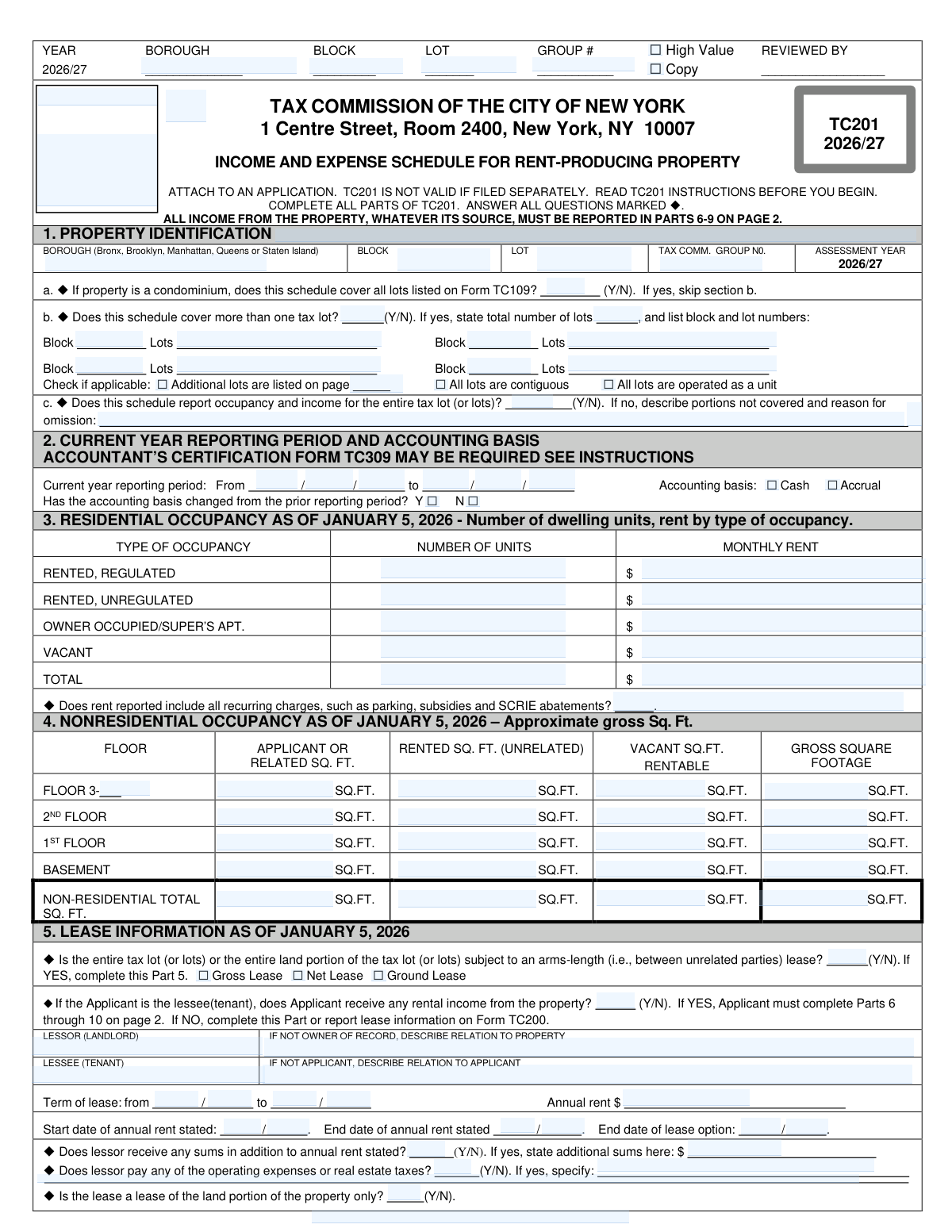
Yes! You can use AI to fill out TC201, Income and Expense Schedule for Rent-Producing Property
Form TC201 is an official New York City Tax Commission schedule that property owners must attach to their assessment appeal application to report detailed income and expense information for rent-producing properties, covering residential and nonresidential occupancy, lease details, and two years of financial data. It is required for the 2026/27 assessment year and is not valid if filed separately from the main application. Accurate completion of TC201 is critical because the Tax Commission uses the reported income and expense data to evaluate whether a property's assessed value is appropriate. Today, this form can be filled out quickly and accurately using AI-powered services like Instafill.ai, which can also convert non-fillable PDF versions into interactive fillable forms.
Our AI automatically handles information lookup, data retrieval, formatting, and form filling.
It takes less than a minute to fill out TC201 using our AI form filling.
Securely upload your data. Information is encrypted in transit and deleted immediately after the form is filled out.
Form specifications
| Form name: | TC201, Income and Expense Schedule for Rent-Producing Property |
| Number of pages: | 2 |
| Language: | English |
Instafill Demo: filling out a legal form in seconds
How to Fill Out TC201 Online for Free in 2026
Are you looking to fill out a TC201 form online quickly and accurately? Instafill.ai offers the #1 AI-powered PDF filling software of 2026, allowing you to complete your TC201 form in just 37 seconds or less.
Follow these steps to fill out your TC201 form online using Instafill.ai:
- 1 Navigate to Instafill.ai and search for or upload Form TC201 (Income and Expense Schedule for Rent-Producing Property) to begin filling it out online.
- 2 Enter the property identification details in Part 1, including borough, block, lot number, Tax Commission group number, and indicate whether the schedule covers a condominium, multiple tax lots, or the entire tax lot.
- 3 Complete Part 2 by specifying the current year reporting period (start and end dates), selecting the accounting basis (cash or accrual), and indicating whether the accounting basis has changed from the prior year.
- 4 Fill in Parts 3 and 4 with residential occupancy data (number of units and monthly rent by type) and nonresidential occupancy data (square footage by floor for applicant/related, rented, and vacant space) as of January 5, 2026.
- 5 If applicable, complete Part 5 with lease information, including lessor and lessee names, lease type (gross, net, or ground), term, annual rent, and answers to questions about additional sums and operating expense responsibilities.
- 6 Enter prior year and current year income figures in Part 6 (covering regulated and unregulated residential, commercial categories, and ancillary income) and expense figures in Part 7 (fuel, payroll, insurance, taxes, etc.), then calculate net profit or loss in Part 8.
- 7 Itemize any miscellaneous expenses in Part 9, answer the tenants' electricity questions in Part 10, review all entries for completeness and accuracy, then submit or print the completed form to attach to your Tax Commission appeal application.
Our AI-powered system ensures each field is filled out correctly, reducing errors and saving you time.
Why Choose Instafill.ai for Your Fillable TC201 Form?
Speed
Complete your TC201 in as little as 37 seconds.
Up-to-Date
Always use the latest 2026 TC201 form version.
Cost-effective
No need to hire expensive lawyers.
Accuracy
Our AI performs 10 compliance checks to ensure your form is error-free.
Security
Your personal information is protected with bank-level encryption.
Frequently Asked Questions About Form TC201
Form TC201 is the Income and Expense Schedule for Rent-Producing Property filed with the Tax Commission of the City of New York for the 2026/27 assessment year. It is used to report all income and expenses from a rent-producing property so the Tax Commission can evaluate the property's assessed value. Property owners or their representatives file this form as part of a tax assessment appeal.
No, TC201 is not valid if filed separately. It must be attached to an application (such as Form TC101 or TC105) submitted to the Tax Commission. Always read the TC201 Instructions before you begin completing the form.
Owners or applicants of rent-producing properties in New York City who are filing a tax assessment appeal with the Tax Commission must complete TC201. This includes properties with residential units (regulated or unregulated), commercial spaces, or mixed-use buildings that generate rental income.
You must report all income from the property, whatever its source, including regulated and unregulated residential rent, office, retail, loft, factory, warehouse, storage, and garage/parking income. You must also report ancillary income such as operating escalations, real estate tax escalations, utility sales, government rent subsidies, signage/billboard income, and cell tower/telecommunications income for both the prior year and current year.
Part 7 requires you to report operating expenses including fuel, light and power, cleaning contracts, wages and payroll, repairs and maintenance, management and administration, insurance, water and sewer, advertising, interior painting and decorating, and amortized leasing and tenant improvement costs. Real estate taxes (before any abatements) are listed separately, and miscellaneous expenses are itemized in Part 9. Note that mortgage payments and depreciation should NOT be included.
Occupancy information for both residential (Part 3) and nonresidential (Part 4) sections must reflect the status as of January 5, 2026. This includes the number of units, rent amounts, and square footage for all occupied, vacant, and owner-used spaces.
Yes, the form specifically asks whether the rent reported includes all recurring charges such as parking, subsidies, and SCRIE abatements. All such recurring charges must be included in the monthly rent figures reported for residential units in Part 3.
Form TC309 is an Accountant's Certification form that may be required along with TC201. The instructions indicate it may be needed depending on the nature of the property and the reporting period. You should review the TC201 Instructions to determine whether TC309 must be submitted with your filing.
If the entire tax lot or land portion is subject to an arms-length lease (between unrelated parties), answer 'Y' and complete all of Part 5, including the type of lease (Gross, Net, or Ground), lessor and lessee names, lease term, annual rent, start and end dates, and whether the lessor receives additional sums or pays any operating expenses. If the applicant is the lessee and receives rental income, Parts 6 through 10 on page 2 must also be completed.
In Part 1, section b, answer 'Y' and enter the total number of lots covered, then list all block and lot numbers in the spaces provided. You should also indicate whether the lots are contiguous, operated as a unit, or if additional lots are listed on another page. If the property is a condominium covering all lots on Form TC109, you may skip section b.
Yes, AI-powered services like Instafill.ai can help you accurately auto-fill Form TC201 by guiding you through each field and reducing errors. This can save significant time, especially given the detailed income, expense, occupancy, and lease information required across multiple sections of the form.
You can visit Instafill.ai, upload your TC201 PDF, and use the AI-assisted tool to fill in all required fields including property identification, income and expense figures, occupancy data, and lease information. The platform walks you through each section, ensuring nothing is missed before you download and submit the completed form.
If your TC201 PDF is a non-fillable or flat scanned form, Instafill.ai can convert it into an interactive fillable form so you can type directly into the fields. This eliminates the need to print and handwrite the form, making the process faster and more accurate.
You may report on either a Cash basis (income and expenses recognized when cash is received or paid) or an Accrual basis (income and expenses recognized when earned or incurred). If your accounting basis has changed from the prior reporting period, you must indicate 'Yes' on the form. Changing the accounting basis may affect comparability of prior and current year figures.
Part 10 asks two yes/no questions: whether tenants obtain electricity from the applicant or a related person, and whether there is a separate charge for electricity in addition to the rent. These answers help the Tax Commission understand how utility costs are structured and whether electricity income should be reflected elsewhere in the income schedule.
Compliance TC201
Validation Checks by Instafill.ai
1
Ensures Borough is a Valid New York City Borough Name
This check verifies that the Borough field contains one of the five valid NYC borough names: Bronx, Brooklyn, Manhattan, Queens, or Staten Island. The borough must match exactly between the header fields and Part 1 Property Identification section. If the borough is missing, misspelled, or contains an invalid value, the form cannot be properly associated with the correct tax jurisdiction, potentially invalidating the entire filing.
2
Validates Block and Lot Numbers Are Numeric and Non-Empty
This check confirms that both the Block and Lot fields contain only numeric characters and are not left blank. Block and lot numbers are the primary identifiers used by the NYC Tax Commission to locate and assess a specific parcel, and non-numeric or missing values would prevent the form from being matched to the correct property record. If either field is empty or contains letters or special characters, the submission must be rejected or flagged for correction.
3
Ensures Reporting Period Dates Are Valid and Span Exactly One Year
This check validates that the 'From' and 'To' dates in Part 2 are valid calendar dates (with months between 01–12 and days appropriate for the given month) and that the reporting period covers a full 12-month period. The reporting period must align with the 2026/27 assessment year context of the form. If the dates are invalid, incomplete, or do not span a full year, the income and expense data reported may be incomparable to prior-year figures and could trigger a review or rejection.
4
Ensures Exactly One Accounting Basis Checkbox Is Selected
This check confirms that one and only one of the two accounting basis checkboxes — Cash or Accrual — is selected in Part 2. Selecting both or neither would create ambiguity about how income and expenses were recognized, which is critical for the Tax Commission's assessment analysis. If neither or both boxes are checked, the form should be flagged as incomplete or contradictory.
5
Validates Residential Unit Totals Match Sum of Individual Occupancy Categories
This check verifies that the Total number of units in Part 3 equals the sum of Rented Regulated, Rented Unregulated, Owner Occupied/Super's Apt, and Vacant units. Similarly, the Total Monthly Rent should equal the sum of the monthly rents across all occupancy categories. A mismatch between the total row and the sum of its components indicates a data entry error that could distort the property's assessed value.
6
Ensures Nonresidential Square Footage Totals Are Internally Consistent
This check confirms that the Nonresidential Total row in Part 4 equals the sum of all individual floor rows (Floor 3+, 2nd Floor, 1st Floor, Basement) for each square footage column (Applicant/Related, Rented Unrelated, Vacant Rentable, and Gross). Additionally, for each floor row, the sum of Applicant/Related, Rented, and Vacant square footage should not exceed the Gross Square Footage for that floor. Inconsistencies in these totals suggest arithmetic errors or unreported space that could affect the assessment.
7
Validates Lease Section Is Completed When Arms-Length Lease Is Indicated
This check ensures that when the answer to 'Entire tax lot subject to arms-length lease' in Part 5 is 'Y', all required lease fields are populated, including Lessor name, Lessee name, lease term dates, annual rent, and at least one lease type checkbox (Gross, Net, or Ground Lease). Leaving these fields blank when a lease exists would result in an incomplete filing that fails to provide the Tax Commission with the information needed to properly evaluate the property's income potential.
8
Ensures Lease Term Dates Are Chronologically Valid
This check verifies that the lease start date precedes the lease end date in Part 5, and that the start and end dates of the annual rent stated fall within the overall lease term. Additionally, any lease option end dates must fall after the lease end date. Invalid or reversed date sequences would indicate data entry errors and could misrepresent the duration and terms of the lease to the Tax Commission.
9
Validates Total Gross Income Equals Sum of All Income Line Items
This check confirms that the Total Gross Income (Part 6, line l) for both the prior year and current year equals the sum of all income components: the residential subtotal, the nonresidential subtotal (lines b–h), owner-occupied/owner-related space (line i), all ancillary income items (line j, items 1–7), and other income (line k). An arithmetic discrepancy between the total and its components would undermine the reliability of the income data used for tax assessment purposes.
10
Validates Expenses Before Real Estate Taxes Equals Sum of Expense Lines a Through l
This check verifies that the 'Expenses Before Real Estate Taxes' subtotal (Part 7, line m) for both prior and current years equals the arithmetic sum of expense lines a through l (Fuel, Light and Power, Cleaning Contracts, Wages and Payroll, Repairs and Maintenance, Management and Administration, Insurance, Water and Sewer, Advertising, Interior Painting, Amortized Leasing Costs, and Miscellaneous Expenses). If the subtotal does not match the sum of its components, the Total Expenses and Net Profit calculations will also be incorrect, distorting the assessment.
11
Validates Total Expenses and Net Profit Calculations Are Arithmetically Correct
This check confirms that Total Expenses (Part 7, line o) equals Expenses Before Real Estate Taxes (line m) plus Real Estate Taxes (line n), and that Net Before Real Estate Taxes (Part 8, line a) equals Total Gross Income minus Expenses Before Real Estate Taxes, while Net After Real Estate Taxes (Part 8, line b) equals Total Gross Income minus Total Expenses. These cross-calculations must hold for both prior and current year columns. Errors in these derived fields would produce an inaccurate picture of the property's profitability.
12
Ensures Miscellaneous Expenses in Part 9 Match the Amount Carried into Part 7 Line l
This check verifies that the sum of all itemized miscellaneous expense amounts listed in Part 9 equals the value entered for Miscellaneous Expenses (Part 7, line l) for both the prior and current year. The form explicitly instructs that Part 9 is the source for line l, so any discrepancy between the itemized total and the carried-forward amount indicates either an omission in Part 9 or a transcription error in Part 7. Mortgage payments and depreciation must not appear in Part 9 per form instructions.
13
Ensures Condominium and Multi-Lot Logic Is Internally Consistent
This check validates the conditional logic in Part 1: if question 1a (condominium covers all lots) is 'Y', then question 1b (more than one tax lot) should be skipped; if 1a is 'N' and 1b is 'Y', then the total number of lots must be provided and at least one Block/Lot row must be populated. Additionally, the total number of lots stated must be consistent with the number of Block/Lot rows actually filled in. Inconsistencies in this section could result in the form covering the wrong set of parcels.
14
Validates That Recurring Charges Disclosure Is Answered for Residential Rent
This check ensures that the question in Part 3 — 'Does rent reported include all recurring charges, such as parking, subsidies and SCRIE abatements?' — is answered with either 'Y' or 'N' and is not left blank. This disclosure is required to ensure the Tax Commission can accurately interpret the reported monthly rent figures. If the field is blank, the completeness of the residential income data cannot be confirmed, which may require follow-up or cause the filing to be flagged.
15
Ensures Tenants' Electricity Questions Are Both Answered in Part 10
This check confirms that both questions in Part 10 — whether tenants obtain electricity from the applicant or a related person, and whether there is a separate charge for electricity in addition to rent — are each answered with 'Y' or 'N'. These questions are marked as required on the form and provide important context for evaluating utility income. If either question is left blank, the form is incomplete and may need to be returned for correction before processing.
16
Validates That Prior Year and Current Year Income/Expense Figures Are Both Provided
This check ensures that for each line in Parts 6 and 7, both the prior year and current year columns are populated with a numeric value (including zero where applicable) rather than being left entirely blank. The Tax Commission uses year-over-year comparisons to identify unusual changes in income or expenses that may warrant further review. Leaving an entire column blank for a line that has a corresponding value in the other year creates an incomplete record and may trigger a manual review or rejection.
Common Mistakes in Completing TC201
Many filers submit TC201 as a standalone document, not realizing the form explicitly states it is invalid if filed separately and must be attached to an application. This results in the entire filing being rejected or disqualified by the Tax Commission. Always ensure TC201 accompanies the required TC200 application form before submission. Tools like Instafill.ai can flag this dependency and help ensure all required companion documents are included.
A very common error is entering monthly rent figures in the income sections (Parts 6–9) rather than the full annual income amounts the form requires. This dramatically understates reported income and can trigger audits or assessments based on incorrect data. Always annualize all income figures before entering them in Parts 6–9, and double-check that the totals in line l (Total Gross Income) are consistent with a full year of operations.
Filers frequently report only base rent and overlook ancillary income streams such as government rent subsidies, SCRIE abatements, signage/billboard income, cell tower or telecommunications equipment revenue, and operating or real estate tax escalations. The form explicitly requires ALL income from the property, whatever its source, to be reported in Parts 6–9. Omitting these amounts can constitute an incomplete filing and may result in an inaccurate assessment. Review every line in Part 6 (items j1 through j7 and k) carefully before submitting.
Applicants sometimes transpose digits or copy block and lot numbers incorrectly from their tax bills or property records, causing the filing to be associated with the wrong parcel. This can lead to processing delays, rejection, or assessment errors that are difficult to correct after the deadline. Always verify block and lot numbers against the official NYC Department of Finance property tax records or the Notice of Property Value before entering them. AI-powered tools like Instafill.ai can cross-validate these identifiers automatically.
Parts 3 and 4 require occupancy information specifically as of January 5, 2026, but many filers use a different date—such as the filing date, year-end, or the start of the reporting period—resulting in inaccurate unit counts and square footage figures. Using the wrong date can misrepresent the property's occupancy status and affect the assessed value. Always use the exact date specified (January 5, 2026) when counting residential units, classifying occupancy types, and measuring nonresidential square footage.
Filers often confuse sections 1a and 1b, either skipping section 1b when they should complete it (because 1a does not apply) or failing to list all block and lot numbers when the schedule covers multiple tax lots. Incomplete lot identification can cause the Tax Commission to process the filing for only one lot, leaving others unaddressed. Read the conditional logic carefully: if the property is not a condominium, answer 1b and list every block and lot covered, and check the appropriate boxes for contiguity and unit operation.
Many filers enter a reporting period that does not match their actual fiscal year, or they switch between cash and accrual accounting without checking 'Yes' to indicate the change from the prior period. An inconsistent reporting period makes year-over-year comparisons unreliable and may require TC309 accountant certification that the filer has not obtained. Confirm the exact start and end dates of your reporting period, select the correct accounting basis, and if the basis has changed from the prior year, mark 'Yes' and obtain TC309 if required by the instructions.
Part 9 explicitly instructs filers not to include mortgage payments or depreciation in the itemization of miscellaneous expenses, yet these are among the most commonly entered items. Including them inflates reported expenses, distorts the net income calculation, and can raise red flags during review. Only include legitimate operating expenses in Part 9, and ensure the total carried to Part 7 line l matches the sum of all itemized miscellaneous expenses listed.
Part 7 line n specifically requires real estate taxes 'before any abatements,' but filers frequently enter the net amount they actually paid after applying J-51, 421-a, or other abatements. This understates the gross tax figure and distorts the net income calculations in Part 8. Always report the full assessed real estate tax amount before any abatements are applied, and report abatement income separately if applicable.
Filers with mixed-use or purely residential buildings often skip Part 4 entirely or enter figures for individual floors that do not sum to the nonresidential total row. Blank or inconsistent square footage data can cause the Tax Commission to question the completeness of the filing. For each floor (3rd and above, 2nd, 1st, and basement), enter the applicant/related, rented (unrelated), and vacant square footage, and verify that the totals row equals the sum of all floor entries.
The form asks whether reported rent includes all recurring charges such as parking, subsidies, and SCRIE abatements, and many filers answer 'Yes' without actually including those amounts in the monthly rent figures. This underreports total residential income and creates an inconsistency between Parts 3 and 6. Ensure that every recurring charge collected from tenants is reflected in the monthly rent figures in Part 3 and in the income totals in Part 6, or explain any exclusions clearly.
When the entire tax lot is subject to an arms-length lease, filers must complete all of Part 5, including lessor and lessee names, lease term dates, annual rent, start and end dates of the stated rent, option dates, and whether the lessor receives additional sums or pays operating expenses. Filers often leave several of these fields blank, particularly the option end dates and the specification of additional sums, which can result in an incomplete filing. If the applicant is the lessee and receives rental income, Parts 6–10 must also be completed in full.
Saved over 80 hours a year
“I was never sure if my IRS forms like W-9 were filled correctly. Now, I can complete the forms accurately without any external help.”
Kevin Martin Green
Your data stays secure with advanced protection from Instafill and our subprocessors

Robust compliance program
Transparent business model
You’re not the product. You always know where your data is and what it is processed for.
ISO 27001, HIPAA, and GDPR
Our subprocesses adhere to multiple compliance standards, including but not limited to ISO 27001, HIPAA, and GDPR.
Security & privacy by design
We consider security and privacy from the initial design phase of any new service or functionality. It’s not an afterthought, it’s built-in, including support for two-factor authentication (2FA) to further protect your account.
Fill out TC201 with Instafill.ai
Worried about filling PDFs wrong? Instafill securely fills tc201-income-and-expense-schedule-for-rent-producing-property forms, ensuring each field is accurate.