Yes! You can use AI to fill out Due Diligence Form (Australian Company) – The Perth Mint

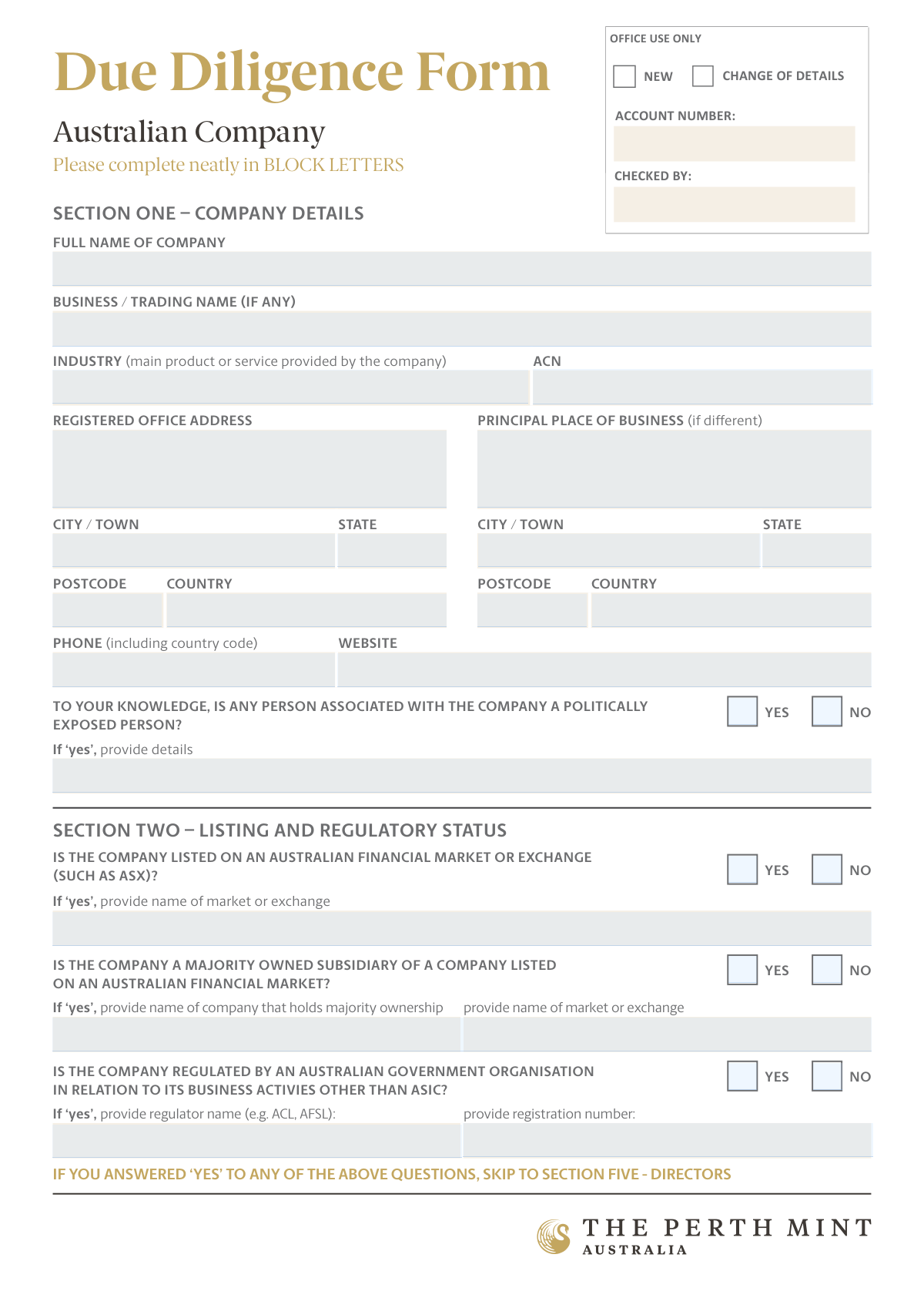
The Due Diligence Form (Australian Company) is a KYC/compliance document used by The Perth Mint to verify an Australian company’s identity, business details, regulatory status, and beneficial ownership/control (including shareholders, key decision makers, and directors). It also captures politically exposed person (PEP) declarations and requires supporting certified identification documents to validate an account for bullion transactions. Completing it accurately is important to satisfy anti-money laundering and other legal obligations and to avoid delays in account validation. Today, this form can be filled out quickly and accurately using AI-powered services like Instafill.ai, which can also convert non-fillable PDF versions into interactive fillable forms.
Our AI automatically handles information lookup, data retrieval, formatting, and form filling.
It takes less than a minute to fill out Perth Mint Due Diligence Form (Australian Company) using our AI form filling.
Securely upload your data. Information is encrypted in transit and deleted immediately after the form is filled out.

Form specifications

Form name: Due Diligence Form (Australian Company) – The Perth Mint
Number of pages: 4
Filled form examples: Form Perth Mint Due Diligence Form (Australian Company) Examples
Language: English
Categories: due diligence forms, compliance forms, Australian business forms
main-image

Instafill Demo: filling out a legal form in seconds

How to Fill Out Perth Mint Due Diligence Form (Australian Company) Online for Free in 2026

Are you looking to fill out a PERTH MINT DUE DILIGENCE FORM (AUSTRALIAN COMPANY) form online quickly and accurately? Instafill.ai offers the #1 AI-powered PDF filling software of 2026, allowing you to complete your PERTH MINT DUE DILIGENCE FORM (AUSTRALIAN COMPANY) form in just 37 seconds or less.
Follow these steps to fill out your PERTH MINT DUE DILIGENCE FORM (AUSTRALIAN COMPANY) form online using Instafill.ai:
  1. 1 Go to Instafill.ai and upload the Due Diligence Form (Australian Company) (or select it from the form library if available).
  2. 2 Let the AI detect and map the form fields, then connect/import your company profile details (legal name, ACN, addresses, phone, website) to auto-fill Section One.
  3. 3 Answer the compliance questions in Section Two (ASX listing, subsidiary status, other government regulation) and provide any required listing/regulator details; follow the form’s instruction to skip to Directors if any answers are “Yes.”
  4. 4 Enter beneficial ownership information: add shareholders who own 25% or more (or, if none, provide key decision makers who control the company), including names, DOBs, and residential addresses.
  5. 5 Complete Section Five by selecting company type (private/public) and listing directors and any additional key decision makers/directors on an extra page if needed.
  6. 6 Fill the declaration details for the authorised representative (name, position, DOB/contact details, address), apply an e-signature if permitted, and set the declaration date.
  7. 7 Upload the required certified supporting documents (ASIC company statement and certified IDs/address evidence for the authorised representative and each relevant shareholder/decision maker), then export and submit the completed form package to The Perth Mint.

Our AI-powered system ensures each field is filled out correctly, reducing errors and saving you time.

Why Choose Instafill.ai for Your Fillable Perth Mint Due Diligence Form (Australian Company) Form?

Speed

Complete your Perth Mint Due Diligence Form (Australian Company) in as little as 37 seconds.

Up-to-Date

Always use the latest 2026 Perth Mint Due Diligence Form (Australian Company) form version.

Cost-effective

No need to hire expensive lawyers.

Accuracy

Our AI performs 10 compliance checks to ensure your form is error-free.

Security

Your personal information is protected with bank-level encryption.

Frequently Asked Questions About Form Perth Mint Due Diligence Form (Australian Company)

This form collects company and key person details to meet The Perth Mint’s Know Your Customer (KYC) and legal due diligence requirements before an account can be validated for bullion transactions.

An authorised representative of an Australian company completing due diligence with The Perth Mint should fill it out, providing company details and information about relevant shareholders, controllers, and directors.

Yes—if completing by hand, the form asks you to write neatly in BLOCK LETTERS to reduce errors and delays. If completing digitally, ensure the typed text is clear and matches official documents.

You’ll need the company’s full legal name, any trading name, industry description, ACN, registered office address, principal place of business (if different), and contact details (phone and website).

Provide a short description of what the business does and its main product or service (e.g., “Wholesale metal trading” or “IT consulting services”). Keep it specific and consistent with your business activities.

A PEP is generally someone who holds (or has held) a prominent public position, or their close associate/family member. If you select “Yes,” include the person’s name, role/position, and relationship to the company in the PEP details field.

Not always—if you answer “Yes” to any question in Section Two (listed, majority-owned subsidiary of a listed company, or regulated by an Australian government organisation other than ASIC), the form instructs you to skip to Section Five (Directors).

List any individuals who own 25% or more of the company’s shares, directly or indirectly (including via another company shareholder). Provide their full name, date of birth, and current residential address (no PO Boxes).

If there are no shareholders at or above 25%, skip Section Three and complete Section Four (Key Decision Makers) with the people who control the company (e.g., those with voting control, veto power, or senior managing officials who can sign).

KYC rules typically require a person’s current residential street address to verify identity and reduce fraud risk. Use a physical address; postal addresses and PO Boxes are not accepted for individuals on this form.

First select whether the company is Private (e.g., contains “PTY/Proprietary”) or Public. If it’s a private company, list the full names of each director; if there are more directors or key decision makers than space allows, tick “Yes” and attach an extra copy of the page.

You must provide a certified copy of the ASIC company statement (or equivalent foreign registration document) and, for the authorised representative and each shareholder/decision maker, certified photo ID (driver’s licence, passport, or national ID) plus proof of address if the ID doesn’t show the current residential address.

In Australia, acceptable certifiers include legal practitioners, JPs, notaries, police officers, medical practitioners, pharmacists, certain accounting professionals, consular officials, and authorised reps of financial institutions. Overseas, certification is acceptable by a Commissioner for Oaths, Notary Public, or Justice of the Peace.

You must include an English translation prepared by an accredited translator. Submitting untranslated documents may delay verification.

Yes—AI tools can help reduce errors and save time by auto-filling fields from your company records and IDs; services like Instafill.ai can auto-fill form fields accurately. If the PDF is flat/non-fillable, Instafill.ai can convert it into an interactive fillable form and then guide you to complete and export it for signing and submission.

Compliance Perth Mint Due Diligence Form (Australian Company)
Validation Checks by Instafill.ai

1
Required Company Identity Fields Completed
Validates that the company’s Full Name, Industry, ACN, and Registered Office Address components (street, city/town, state, postcode, country) are all provided. These are core identifiers needed for KYC/AML due diligence and to match the entity to official registries. If any are missing, the submission should be rejected or routed to remediation because the company cannot be reliably identified.
2
ACN Format and Check-Digit Validation
Checks that the ACN is exactly 9 digits (allowing optional spaces) and passes the official ACN check-digit algorithm. This prevents typos and ensures the number is structurally valid before any registry lookup. If validation fails, the form should not proceed until a corrected ACN is provided.
3
Australian State/Territory Value Validation
Ensures State/Territory fields (registered office, principal place of business, and individual addresses where applicable) use valid Australian abbreviations (e.g., NSW, VIC, QLD, WA, SA, TAS, ACT, NT) when Country is Australia. This improves address standardization and downstream matching. If invalid, prompt the user to select/enter a valid state/territory or correct the country.
4
Postcode Format Consistent with Country
Validates that postcodes match expected formats based on the selected country (e.g., Australia must be 4 digits; other countries may have different patterns). This reduces undeliverable mail risk and improves address verification success. If the postcode format does not match the country, the submission should be flagged and require correction.
5
Principal Place of Business Conditional Completeness
If any Principal Place of Business field is entered (or a 'different from registered office' condition is implied), require all principal place address components (street, city/town, state, postcode, country). This prevents partial addresses that cannot be validated or used operationally. If incomplete, block submission or request the missing fields.
6
Phone Number Format (E.164 / Country Code Required)
Validates that the Company Phone Number and Authorised Representative Phone Number include a country code and contain only valid phone characters, with a minimum length consistent with international numbers (e.g., +61...). This is important for contactability and fraud controls (e.g., call-backs). If invalid, require correction before acceptance.
7
Website URL Format Validation
Checks that the Company Website is a well-formed URL (e.g., https://example.com) or a valid domain, and does not contain spaces or illegal characters. This supports automated enrichment and reduces data quality issues. If invalid, either reject the value and request correction or allow blank if the website is optional.
8
Mutually Exclusive Yes/No Selections Enforced
For each Yes/No pair (PEP, listed on exchange, majority-owned subsidiary, regulated by government org, more directors/decision makers, company type private/public), ensure exactly one option is selected. This prevents ambiguous regulatory status and workflow routing errors. If both or neither are selected, the form should fail validation and require a single clear choice.
9
PEP Details Required When PEP = Yes
If the PEP Declaration is 'Yes', require PEP Details to be populated with sufficient information (at minimum: person name and relationship/role). This is critical for enhanced due diligence and risk assessment. If missing or too short to be meaningful, the submission should be rejected or escalated for follow-up.
10
Listing/Subsidiary/Regulator Details Required When Answer = Yes
If the company is listed, require the market/exchange name; if it is a majority-owned subsidiary, require both the holding company name and the market/exchange where that holding company is listed; if regulated (other than ASIC), require regulator name and registration/licence number. These details support the form’s stated logic (skip to directors) and enable verification. If any required dependent detail is missing, validation fails and the user must complete the relevant fields.
11
Section Two Skip Logic vs Shareholder Capture Consistency
Enforces the rule: if any Section Two question is answered 'Yes', shareholder sections that are marked 'Fill only if all Section Two questions are No' should be empty (or ignored) and the workflow should route to directors. Conversely, if all Section Two answers are 'No', at least one shareholder/beneficial owner path must be completed (shareholders >=25% or key decision makers). If the provided data contradicts the skip logic, flag for correction to avoid incomplete or misrouted KYC.
12
Shareholder Percentage Numeric Range and Precision
Validates that each 'Total % of shares held' is numeric and within 0 to 100, allowing reasonable decimal precision (e.g., up to 2 decimal places). This prevents impossible ownership values and supports beneficial ownership determination. If out of range or non-numeric, reject the entry and require correction.
13
Beneficial Ownership Threshold Logic (>=25% Requires Full Details)
If any shareholder percentage is 25% or more, require that shareholder’s full name, date of birth, and full residential address fields are completed. This aligns with the form’s instruction to capture beneficial owners at or above the threshold. If a >=25% shareholder is missing required identity/address data, the submission should fail validation.
14
Key Decision Maker Required When No Shareholder >=25%
If all provided shareholder percentages are below 25% (or no qualifying beneficial owners are listed), require at least one Key Decision Maker record with role, full name, date of birth, and residential address. This ensures a controlling person/senior managing official is identified when beneficial owners are not. If none are provided, block submission as the controlling-person requirement is unmet.
15
Date of Birth and Declaration Date Validity (Format and Plausibility)
Validates that all dates (shareholders’ DOBs, decision makers’ DOBs, authorised representative DOB, and declaration date) are in an accepted format (e.g., DD/MM/YYYY) and represent real calendar dates. DOBs must be in the past and meet plausibility rules (e.g., not indicating a minor if policy requires adults; not older than a reasonable maximum age), and the declaration date should not be in the future. If invalid, the form should be rejected or flagged for manual review depending on severity.
16
Residential Address Must Not Be PO Box / Postal Address
Scans residential address fields for PO Box/postal indicators (e.g., 'PO Box', 'P.O. Box', 'Locked Bag', 'GPO Box', 'PMB') and rejects them where the form explicitly requires a street address. This is important for identity verification and meeting KYC address requirements. If a prohibited address type is detected, require a valid street address before acceptance.

Common Mistakes in Completing Perth Mint Due Diligence Form (Australian Company)

Using a trading name instead of the full registered company name

People often enter the business/trading name in the “Full Name of Company” field because that’s what they use day-to-day. This can cause mismatches against ASIC records and delay due diligence checks or trigger requests for clarification. Always use the exact legal name as shown on the ASIC company statement, and put any alternate name only in the “Business/Trading Name (if any)” field. AI-powered tools like Instafill.ai can pull the correct legal name from your source documents and keep names consistent across fields.

Entering an ABN or ARBN instead of the ACN (or using the wrong digit format)

A very common error is pasting an ABN (11 digits) into the ACN field (9 digits), or adding spaces/extra characters that make the number fail validation. This can prevent the company from being correctly identified and may lead to rejection or follow-up requests. Confirm you are entering the 9-digit ACN exactly as shown on the ASIC statement (typically formatted as 3-3-3 digits). Instafill.ai can validate number length and formatting automatically to prevent this mistake.

Providing a PO Box/postal address where a residential street address is required

The form repeatedly states “NO POSTAL ADDRESSES OR PO BOXES” for shareholders, decision makers, and the authorised representative, but applicants still use mailing addresses out of habit. This can cause KYC failure because identity/address verification requires a physical residential address. Use a current street address with unit/level details where applicable, and ensure it matches supporting documents (or provide an address document if the photo ID doesn’t show it). Instafill.ai can flag PO Box patterns and prompt for a compliant street address.

Mixing up Registered Office vs Principal Place of Business (or filling both when they’re the same)

Applicants often duplicate the same address in both sections or accidentally swap them, especially when the business operates from a different location than the registered office. This creates inconsistencies with ASIC records and can trigger manual review. Only complete “Principal Place of Business” if it is different from the registered office, and ensure each address is complete (street, city/town, state, postcode, country). Instafill.ai can detect duplicates and guide conditional completion so only the correct section is filled.

Leaving City/State/Postcode/Country blank or using inconsistent location formats

People frequently enter only a street address and forget the separate locality fields, or they use non-standard abbreviations (e.g., “WAus” or missing state/territory). Missing or inconsistent address components can prevent successful verification and slow onboarding. Always complete every address sub-field and use standard Australian state/territory abbreviations (e.g., WA, NSW, VIC) and correct postcodes. Instafill.ai can standardize and validate address components to reduce omissions.

Incorrect phone number formatting (missing country code/area code)

The form requires phone numbers “including country code” (and for the authorised representative, “including area code”), but many people enter local-only numbers. This can lead to failed contact attempts and delays in resolving KYC queries. Use international format (e.g., +61 
 for Australia) and include the appropriate area/mobile format. Instafill.ai can automatically format phone numbers into the correct international structure.

Not selecting YES/NO boxes clearly (or selecting both) for PEP and listing/regulatory questions

Checkbox questions are often left blank, ticked ambiguously, or both options are marked—especially on printed/scanned forms. This creates uncertainty and typically results in the form being returned for correction. Ensure exactly one option is selected for each YES/NO question and that the mark is clear and legible. Instafill.ai can enforce single-choice selection and reduce ambiguity when generating a clean, fillable output.

Answering “Yes” but not providing the required details (PEP, exchange, regulator, licence number)

Applicants sometimes tick “Yes” but leave the follow-up fields empty because they overlook the conditional requirement or assume it’s optional. This leads to incomplete due diligence and immediate follow-up requests. If you answer “Yes,” provide the requested specifics (e.g., PEP name/role/relationship; exchange name; regulator name and registration/licence number). Instafill.ai can prompt for required conditional fields and prevent submission until they’re completed.

Ignoring the instruction to skip sections based on Section Two answers

The form states: “IF YOU ANSWERED ‘YES’ TO ANY OF THE ABOVE QUESTIONS, SKIP TO SECTION FIVE - DIRECTORS,” but many people continue to fill shareholder/decision-maker sections anyway (or skip when they shouldn’t). This can create conflicting information and extra review work, delaying approval. Follow the branching logic exactly: if any Section Two item is “Yes,” go straight to Section Five; if all are “No,” complete the shareholder section as instructed. Instafill.ai can apply this logic automatically so only the relevant sections are completed.

Misreporting beneficial ownership (25% threshold) or listing only direct shareholders

A frequent misunderstanding is listing only immediate shareholders and missing indirect ownership (e.g., via a corporate shareholder), or failing to identify anyone at/above 25%. This can cause non-compliance with beneficial ownership requirements and lead to requests for ownership charts or additional documentation. Calculate ownership on a total, direct-or-indirect basis and include any person who ultimately owns 25% or more; if none meet the threshold, complete Section Four for controllers/senior managing officials. Instafill.ai can help structure ownership data and flag when the 25% rule likely requires additional entries.

Share percentages that don’t make sense (missing %, totals over/under 100, or leaving blank)

People often enter shareholdings without the percent sign, use rounded estimates, or provide totals that exceed 100% across listed shareholders. This raises red flags and can trigger reconciliation requests or rejection until corrected. Enter precise percentages for each listed shareholder and ensure the overall ownership picture is internally consistent (and aligns with company records). Instafill.ai can validate numeric ranges and highlight totals that appear inconsistent.

Missing declaration essentials (authorised representative details, signature/date, company stamp if applicable) and ID certification issues

Submissions are commonly delayed because the declaration is unsigned/undated, the authorised representative’s position is missing, or the company stamp is omitted when the organisation expects it. Separately, ID documents are often not properly certified, are expired, don’t show current address (without an additional address document), or are not translated by an accredited translator when not in English. Double-check the declaration fields (name, position, signature, date) and ensure all supporting documents are current, correctly certified by an acceptable certifier, and include address evidence where required. Instafill.ai can provide completeness checks and, if the form is a flat non-fillable PDF, can convert it into a fillable version to reduce missed fields and improve legibility.
Saved over 80 hours a year

“I was never sure if my IRS forms like W-9 were filled correctly. Now, I can complete the forms accurately without any external help.”

Kevin Martin Green

Your data stays secure with advanced protection from Instafill and our subprocessors

Robust compliance program

Transparent business model

You’re not the product. You always know where your data is and what it is processed for.

ISO 27001, HIPAA, and GDPR

Our subprocesses adhere to multiple compliance standards, including but not limited to ISO 27001, HIPAA, and GDPR.

Security & privacy by design

We consider security and privacy from the initial design phase of any new service or functionality. It’s not an afterthought, it’s built-in, including support for two-factor authentication (2FA) to further protect your account.

Fill out Perth Mint Due Diligence Form (Australian Company) with Instafill.ai

Worried about filling PDFs wrong? Instafill securely fills due-diligence-form-australian-company-the-perth-mint forms, ensuring each field is accurate.