Yes! You can use AI to fill out Principal Life Insurance Company Form PG4701, In-Plan Roth Conversion – No Spousal Consent Needed
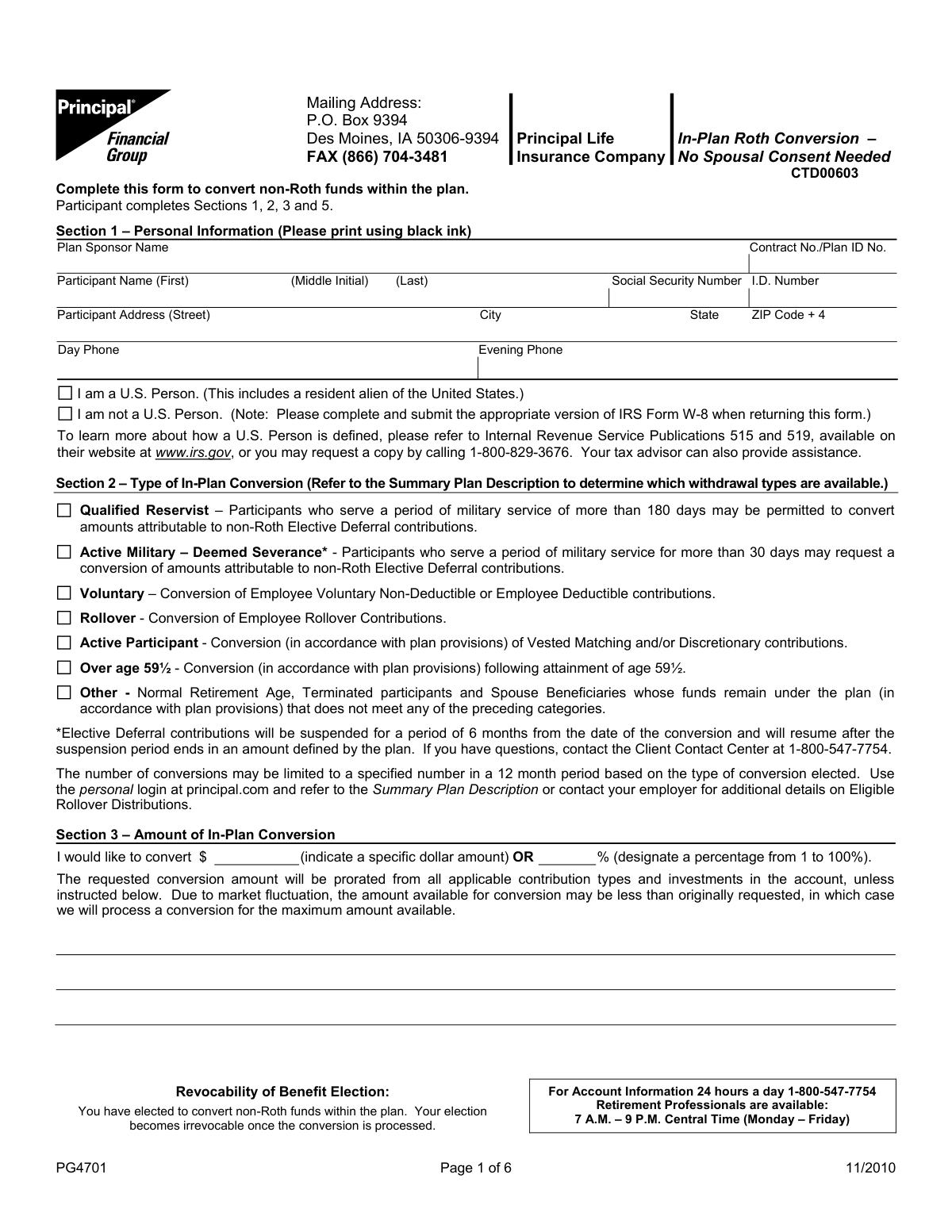
Form PG4701 is an In-Plan Roth Conversion request form provided by Principal Life Insurance Company. It allows a retirement plan participant to convert their existing non-Roth funds, such as pre-tax contributions and rollovers, into a Roth account within the same plan, which has significant tax implications. This conversion is important for individuals seeking to pay taxes now in exchange for tax-free qualified distributions in the future. Today, this form can be filled out quickly and accurately using AI-powered services like Instafill.ai, which can also convert non-fillable PDF versions into interactive fillable forms.
PG4701 is part of the
insurance forms, life insurance forms, Principal forms, company forms, Principal Life forms and Roth conversion forms categories on Instafill.
Rather not fill this in by hand? Instafill is an online form filler that completes PDF forms automatically — upload the blank form, answer a few questions, and the AI fills every field.
Form specifications
| Form name: | Principal Life Insurance Company Form PG4701, In-Plan Roth Conversion – No Spousal Consent Needed |
| Number of pages: | 1 |
| Language: | English |
Our AI automatically handles information lookup, data retrieval, formatting, and form filling.
It takes less than a minute to fill out PG4701 using our AI form filling.
Securely upload your data. Information is encrypted in transit and deleted immediately after the form is filled out.
Instafill Demo: How to fill out PDF forms in seconds with AI
How to Fill Out PG4701 Online for Free in 2026
Are you looking to fill out a PG4701 form online quickly and accurately? Instafill.ai offers the #1 AI-powered PDF filling software of 2026, allowing you to complete your PG4701 form in just 37 seconds or less.
Follow these steps to fill out your PG4701 form online using Instafill.ai:
- 1 Navigate to a service like Instafill.ai and upload or select the In-Plan Roth Conversion form (PG4701).
- 2 Use the AI assistant to accurately fill in your Personal Information in Section 1, including your name, address, Social Security Number, and plan details.
- 3 In Section 2, select the appropriate Type of In-Plan Conversion based on your eligibility, such as 'Over age 59½' or 'Rollover'.
- 4 Specify the Amount of In-Plan Conversion in Section 3 by indicating either a specific dollar amount or a percentage of your funds.
- 5 Review the important tax information in Section 4, acknowledging that while taxes are not withheld on the conversion, you will be liable for them.
- 6 Complete the State Taxation questions in Section 5, then digitally or physically sign and date the form to certify your election.
- 7 Review the entire completed form for accuracy before downloading, printing, or submitting it to your plan administrator as instructed.
Our AI-powered system ensures each field is filled out correctly, reducing errors and saving you time.
Why Choose Instafill.ai for Your Fillable PG4701 Form?
Speed
Complete your PG4701 in as little as 37 seconds.
Up-to-Date
Always use the latest 2026 PG4701 form version.
Cost-effective
No need to hire expensive lawyers.
Accuracy
Our AI performs 10 compliance checks to ensure your form is error-free.
Security
Your personal information is protected with bank-level encryption.
Frequently Asked Questions About PG4701
This form allows you to convert your existing non-Roth (pre-tax) funds within your retirement plan into Roth (post-tax) funds. This is a taxable event but allows for tax-free qualified distributions in the future.
Participants in a plan administered by Principal Life Insurance Company who wish to convert eligible non-Roth balances to Roth balances can use this form. Your eligibility for specific conversion types depends on your plan's rules and your personal status, such as age or military service.
You will need to provide your personal information, Plan Sponsor Name, Contract/Plan ID Number, and Social Security Number. You must also select the type of conversion and specify the amount you wish to convert.
Yes, in Section 1, you must check the box indicating you are not a U.S. Person. You are also required to complete and submit the appropriate IRS Form W-8 along with this form.
You can either write a specific dollar amount or designate a percentage (from 1 to 100%) of your eligible funds. If the market value is less than your requested dollar amount at the time of processing, the maximum available amount will be converted.
No, Principal Life Insurance Company will not withhold federal or state income taxes for an in-plan Roth conversion. You are responsible for paying any income taxes owed on the taxable portion of the conversion when you file your tax return.
Yes, converting pre-tax contributions and their earnings is a taxable event. You will owe income tax on the converted amount for the year the transaction occurs, so it is recommended to consult with a tax advisor.
No, your election to convert funds is irrevocable once the conversion has been processed. You cannot reverse the transaction.
To receive current year tax treatment, your completed form must be received with all necessary information on or before the market closes on the last business day of the calendar year. Forms received after this deadline will be processed in the following tax year.
You can mail the form to P.O. Box 9394, Des Moines, IA 50306-9394, or fax it to (866) 704-3481.
For questions about your account or the conversion process, you can call the Client Contact Center at 1-800-547-7754, Monday through Friday, from 7 A.M. to 9 P.M. Central Time.
Yes, services like Instafill.ai use AI to accurately auto-fill form fields, which can save you time and help reduce errors. This is especially useful for entering your personal and plan information.
Simply upload the PDF to the Instafill.ai platform. The AI will make the document interactive, allowing you to type your information directly into the fields before printing it for signature and submission.
You can use a service like Instafill.ai, which can convert flat, non-fillable PDFs into interactive, fillable forms. This allows you to easily type your information instead of filling it out by hand.
Compliance PG4701
Validation Checks by Instafill.ai
1
Social Security Number Format and Presence
This check ensures that the Social Security Number field in Section 1 is not empty and follows the standard 9-digit format, either as XXXXXXXXX or XXX-XX-XXXX. The SSN is a critical unique identifier for the participant and is required for tax reporting purposes. A failure in this validation would prevent the system from correctly identifying the participant's account and processing the conversion.
2
Participant Name Completeness
Validates that both the 'First' and 'Last' name fields for the participant in Section 1 are filled in. A full name is essential for legal and identification purposes to ensure the request is associated with the correct individual. If either field is missing, the form submission should be rejected until the required information is provided.
3
Exclusive Conversion Amount Selection
This validation ensures that in Section 3, the participant has entered either a specific dollar amount OR a percentage, but not both. The form provides two mutually exclusive options for determining the conversion amount. If both fields contain values, or if neither field does, the submission is ambiguous and must be corrected by the user.
4
Valid Conversion Percentage Range
If the participant chooses to convert a percentage of their funds in Section 3, this check verifies that the entered value is a number between 1 and 100, inclusive. A value outside this range is invalid and would lead to processing errors. This prevents illogical requests, such as converting 0% or more than 100% of available funds.
5
Conversion Type Selection Requirement
Ensures that the participant has selected exactly one 'Type of In-Plan Conversion' from the list in Section 2. This choice is mandatory as it defines the legal basis and rules under which the conversion is being requested. Failure to select a type would make it impossible to determine eligibility or apply the correct plan provisions.
6
Participant Signature and Date Presence
This check confirms that the participant has signed the form and provided a date in Section 5. The signature legally authorizes the transaction, and the date establishes when the authorization was given. An unsigned or undated form is legally incomplete and cannot be processed.
7
Date Format and Validity
Verifies that the date provided in Section 5 is a valid calendar date and is not a future date. The date of signature must be the current day or a day in the past to be considered valid. This prevents post-dating or invalid date entries that could cause legal or processing timeline issues.
8
U.S. Person Status Declaration
This validation requires that the participant must select either 'I am a U.S. Person' or 'I am not a U.S. Person' in Section 1. This declaration is critical for determining tax withholding requirements and whether an additional IRS Form W-8 is necessary. The submission cannot be completed without this mandatory choice.
9
Conditional State Tax Amount Logic
In Section 5, this check enforces the dependency of the state tax amount field. The field for entering the dollar amount of previously taxed deferrals should only be active and required if the participant answers 'Yes' to the first state tax question and 'No' to the second. This ensures data is collected only when relevant and prevents user confusion.
10
Participant and Plan ID Correlation
This is a logical check that cross-references the provided Participant SSN and the Contract No./Plan ID No. in Section 1 against the system's database. It verifies that the participant is an actual member of the specified plan. This prevents fraudulent requests or errors resulting from incorrect plan information.
11
Age Verification for 'Over age 59½' Conversion
If the participant selects 'Over age 59½' as the conversion type in Section 2, this validation checks the participant's date of birth in the system records to confirm they meet the age requirement. This is crucial because this eligibility status affects tax implications and withdrawal penalties. An ineligible selection would result in a compliance failure.
12
Phone Number Format Validation
This check ensures that the 'Day Phone' and 'Evening Phone' numbers in Section 1 adhere to a standard 10-digit format (e.g., XXX-XXX-XXXX or (XXX) XXX-XXXX). Valid contact information is important in case the processing agent needs to contact the participant about issues with their request. An improperly formatted number could hinder communication and delay processing.
13
Address Field Completeness
Verifies that the Street, City, State, and ZIP Code fields in Section 1 are all filled out. A complete mailing address is required for sending tax forms (like Form 1099-R) and other official correspondence related to the conversion. Missing address components would lead to returned mail and compliance issues.
14
ZIP Code Format
This validation ensures the ZIP Code in Section 1 is in a valid 5-digit (XXXXX) or 9-digit (XXXXX-XXXX) format. Correctly formatted ZIP codes are essential for accurate and timely mail delivery of important documents. An invalid format would cause the submission to fail until corrected.
15
Non-U.S. Person Documentation Flag
If a participant selects 'I am not a U.S. Person' in Section 1, this validation triggers a system flag or alert indicating that a completed IRS Form W-8 must accompany the submission. The form explicitly states this requirement, and this check ensures the rule is enforced before the conversion is processed to maintain tax compliance.
Common Mistakes in Completing PG4701
Participants often enter their personal account number instead of the plan's 'Contract No./Plan ID No.' or are unsure of the exact 'Plan Sponsor Name' in Section 1. This mistake happens because this information is not always top-of-mind. An error here can lead to significant processing delays or the inability to locate the correct plan, causing the entire request to be rejected. To avoid this, verify the information on a recent account statement or by logging into your online portal before filling out the form.
In Section 3, participants sometimes enter both a specific dollar amount and a percentage for the conversion, creating conflicting instructions. This ambiguity forces the processor to return the form for clarification, which delays the transaction. A delay could have market and tax implications, especially near year-end. You must choose only one option—either a precise dollar figure or a percentage—to ensure your request is processed correctly and on time.
Section 2 lists several eligibility reasons for a conversion, many of which are subject to specific plan rules. Participants may select a type, such as 'Over age 59½', without confirming their plan actually allows it for in-plan conversions. This results in a rejected application after the plan administrator verifies eligibility, wasting time. Always consult your Summary Plan Description (SPD) or contact your employer to confirm which conversion types are available to you before making a selection.
A missing signature or date in Section 5 is one of the most common and preventable reasons for a form to be immediately rejected. An unsigned form is legally invalid and cannot be processed, requiring it to be sent back to you. This simple oversight delays the entire transaction and could cause you to miss important deadlines, like the year-end cutoff for tax purposes. Always perform a final review to ensure all signature and date fields are completed.
In Section 1, participants who are not U.S. Persons may check the wrong box or, more commonly, fail to submit the required IRS Form W-8 along with this form. This is a critical error that leads to incorrect tax withholding and reporting, causing compliance issues with the IRS. If you are not a U.S. Person, you must check the appropriate box and attach a completed Form W-8 to avoid processing holds and tax complications.
Section 4 clearly states that while taxes will not be withheld from the conversion, the transaction is taxable. Participants often misinterpret 'no withholding' as 'no tax due,' leading to a significant and unexpected tax bill when they file their annual return, along with potential underpayment penalties. It is crucial to understand you are responsible for paying the income tax on the converted amount and should consult a tax advisor to plan for this liability.
The state tax questions in Section 5 are complex, asking for specific information about previously taxed contributions that most people don't know offhand. Guessing or leaving these fields blank can lead to incorrect state tax reporting by the plan administrator, potentially causing you to overpay or underpay state taxes. As the form suggests, you should contact your Plan Administrator to verify this information before completing this section.
The form specifies printing in black ink, but people often use other colors or have handwriting that is difficult to read. Illegible forms can be rejected by automated scanning systems or deemed invalid by the processing department, forcing a do-over and delaying the transaction. To prevent this, print clearly in black ink. Since this is a non-fillable PDF, AI-powered tools like Instafill.ai can convert it into a fillable version, ensuring all entries are typed and perfectly legible.
A simple typo or transposition in the Social Security Number field in Section 1 is a frequent error that will cause the form to fail validation. This happens due to haste or data entry error and will result in an immediate rejection of the form and can cause significant tax reporting problems. Carefully double-check this number against an official source, like your Social Security card, as AI form-filling tools like Instafill.ai can help validate the format but cannot verify the number's accuracy against your personal records.
Participants sometimes omit key parts of their address in Section 1, such as an apartment number, suite, or the full ZIP+4 code. An incomplete address can delay or prevent the delivery of important follow-up documents, such as transaction confirmations or year-end tax forms (e.g., Form 1099-R). Always provide your full, current mailing address to ensure you receive all necessary correspondence without delay. Using a tool like Instafill.ai can help by auto-completing and standardizing addresses to prevent such omissions.
Saved over 80 hours a year
“I was never sure if my IRS forms like W-9 were filled correctly. Now, I can complete the forms accurately without any external help.”
Kevin Martin Green
Your data stays secure with advanced protection from Instafill and our subprocessors




Robust compliance program
Transparent business model
You’re not the product. You always know where your data is and what it is processed for.
ISO 27001, HIPAA, and GDPR
Our subprocesses adhere to multiple compliance standards, including but not limited to ISO 27001, HIPAA, and GDPR.
Security & privacy by design
We consider security and privacy from the initial design phase of any new service or functionality. It’s not an afterthought, it’s built-in, including support for two-factor authentication (2FA) to further protect your account.
Fill out PG4701 with Instafill.ai
Worried about filling PDFs wrong? Instafill securely fills principal-life-insurance-company-form-pg4701-in-plan-roth-conversion-no-spousal-consent-needed forms, ensuring each field is accurate.
